owasp-dep-scan/dep-scan
GitHub: owasp-dep-scan/dep-scan
开源的下一代依赖安全与风险审计工具,支持漏洞扫描、可达性分析、许可证合规及 SBOM 生成。
Stars: 1248 | Forks: 131
# 简介
OWASP dep-scan 是一款基于项目依赖的已知漏洞、建议和许可证限制的下一代安全与风险审计工具。支持本地代码库和容器镜像作为输入,非常适合集成到 ASPM/VM 平台以及 CI 环境中。
 [](https://github.com/owasp-dep-scan/dep-scan/actions/workflows/pythonpublish.yml)
## 目录
- [功能特性](#features)
- [漏洞数据源](#vulnerability-data-sources)
- [Linux 发行版](#linux-distros)
- [快速开始](#quick-start)
- [本地扫描项目 (Python 版本)](#scanning-projects-locally-python-version)
- [本地扫描容器 (Python 版本)](#scanning-containers-locally-python-version)
- [本地扫描项目 (Docker 容器)](#scanning-projects-locally-docker-container)
- [服务器模式](#server-mode)
- [depscanGPT](https://chatgpt.com/g/g-674f260c887c819194e465d2c65f4061-owasp-dep-scan)
- [文档](https://depscan.readthedocs.io)
- [支持的语言和包格式](https://depscan.readthedocs.io/supported-languages)
- [可达性分析](https://depscan.readthedocs.io/reachability-analysis)
- [Java 项目分析示例](https://depscan.readthedocs.io/reachability-analysis#example-analysis-for-a-java-project)
- [JavaScript 项目分析示例](https://depscan.readthedocs.io/reachability-analysis#example-analysis-for-a-java-project)
- [通过环境变量进行自定义](https://depscan.readthedocs.io/env-var#customization-through-environment-variables)
- [GitHub Security Advisory](https://depscan.readthedocs.io/adv-usage#github-security-advisory)
- [建议模式](https://depscan.readthedocs.io/adv-usage#suggest-mode)
- [包风险审计](https://depscan.readthedocs.io/adv-usage#package-risk-audit)
- [自动调整](https://depscan.readthedocs.io/adv-usage#automatic-adjustment)
- [配置权重](https://depscan.readthedocs.io/adv-usage#configuring-weights)
- [实时 OS 扫描](https://depscan.readthedocs.io/adv-usage#live-os-scan)
- [许可证扫描](https://depscan.readthedocs.io/adv-usage#license-scan)
- [Kubernetes 与云应用](https://depscan.readthedocs.io/adv-usage#kubernetes-and-cloud-apps)
- [PDF 报告](https://depscan.readthedocs.io/adv-usage#pdf-reports)
- [自定义报告](https://depscan.readthedocs.io/adv-usage#custom-reports)
- [许可证](#license)
## 功能特性
- 扫描大多数应用程序代码——包括本地代码库、Linux 容器镜像、Kubernetes manifests 和操作系统——以识别已知 CVE,并进行优先级排序
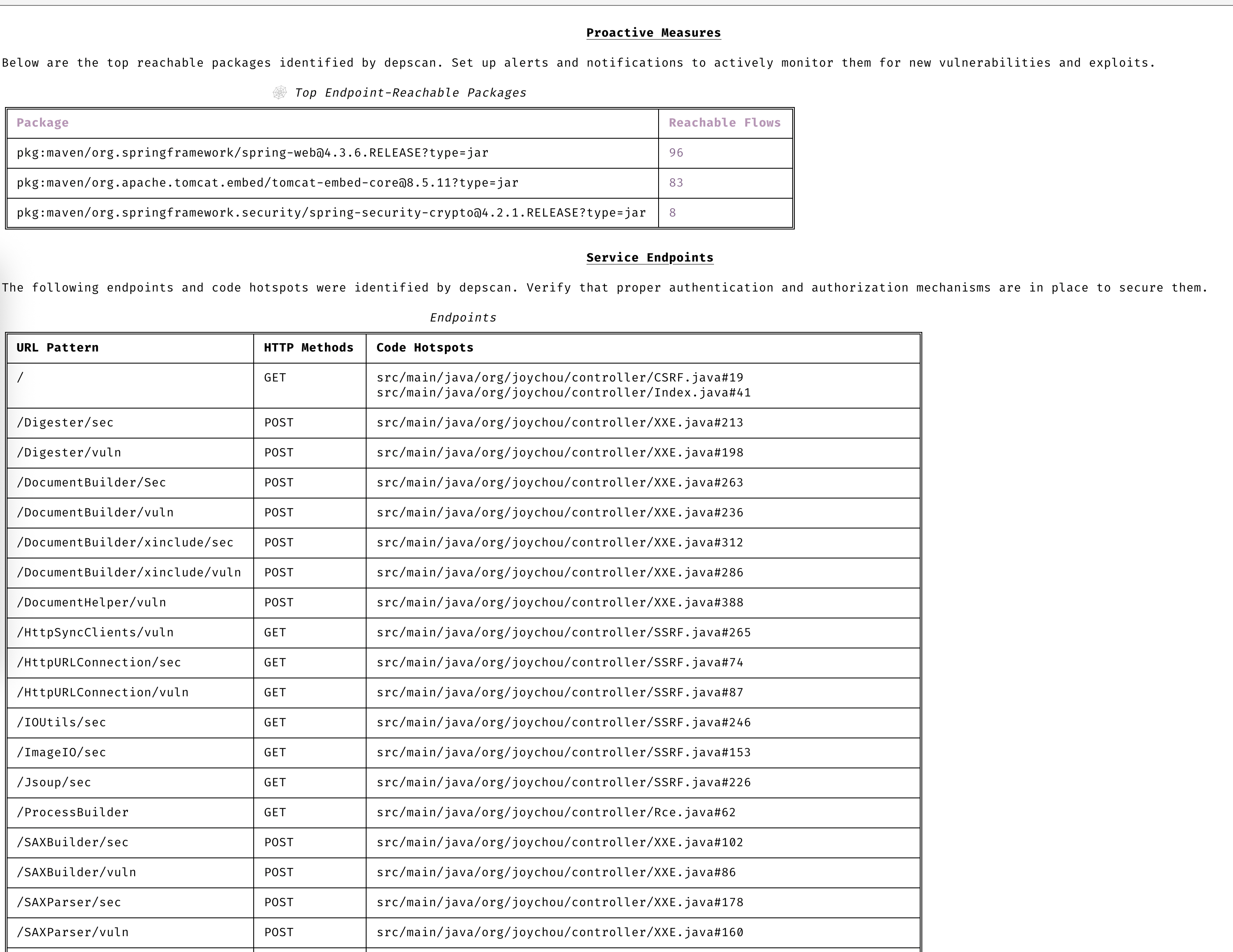
- 对多种语言执行高级可达性分析(参见可达性分析)
- 包漏洞扫描在本地执行,速度非常快。无需使用服务器!
- 生成包含漏洞披露报告 (VDR) 信息的软件物料清单 (SBOM)
- 生成通用安全建议框架 (CSAF) 2.0 VEX 文档(查看 [CSAF Readme](contrib/CSAF_README.md))
- 针对依赖混淆攻击和维护风险执行深度包风险审计(参见风险审计)
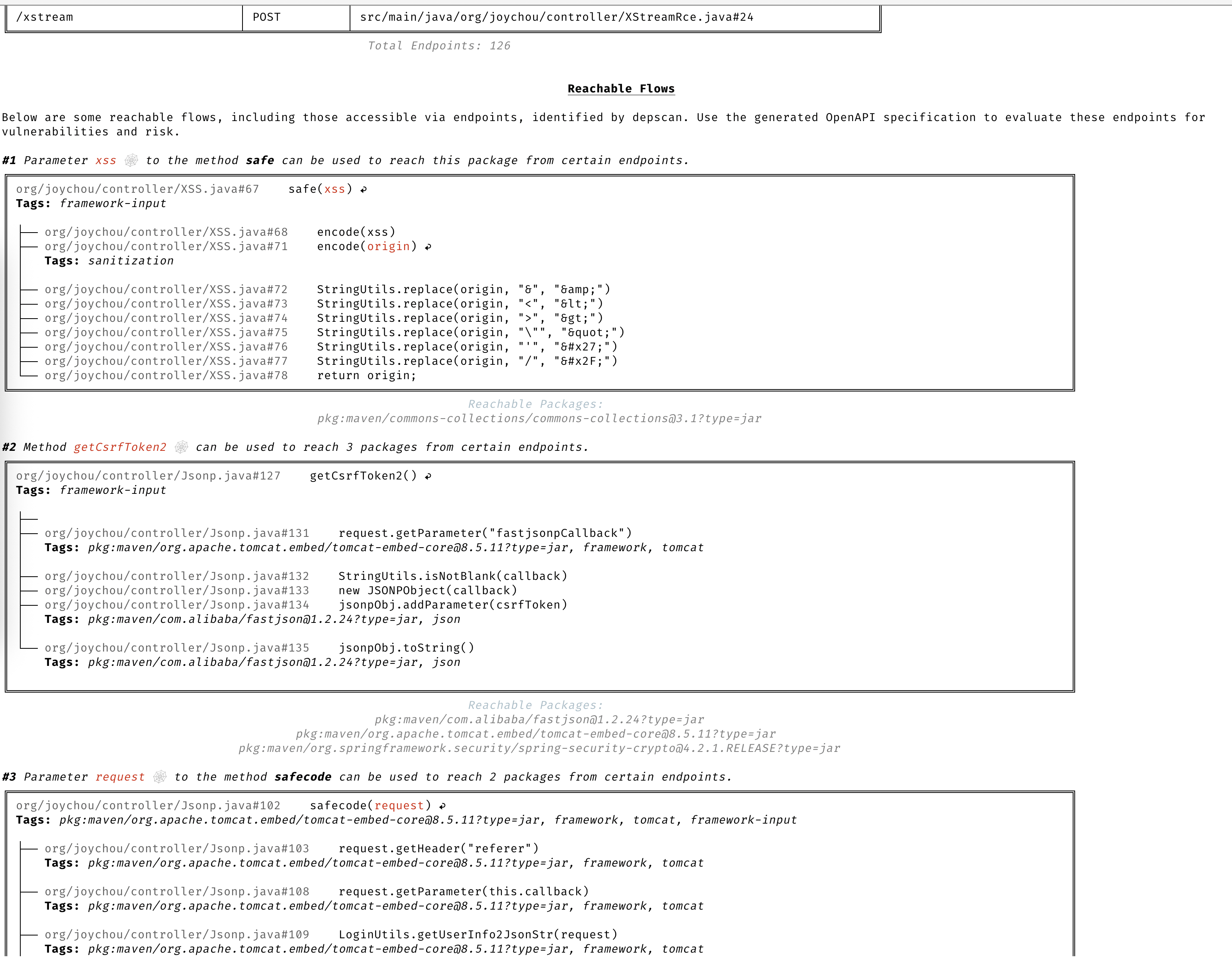
### 精确的可达数据流
基于完整上下文的详细数据流,用于识别应用程序中可达和不可达的路径。
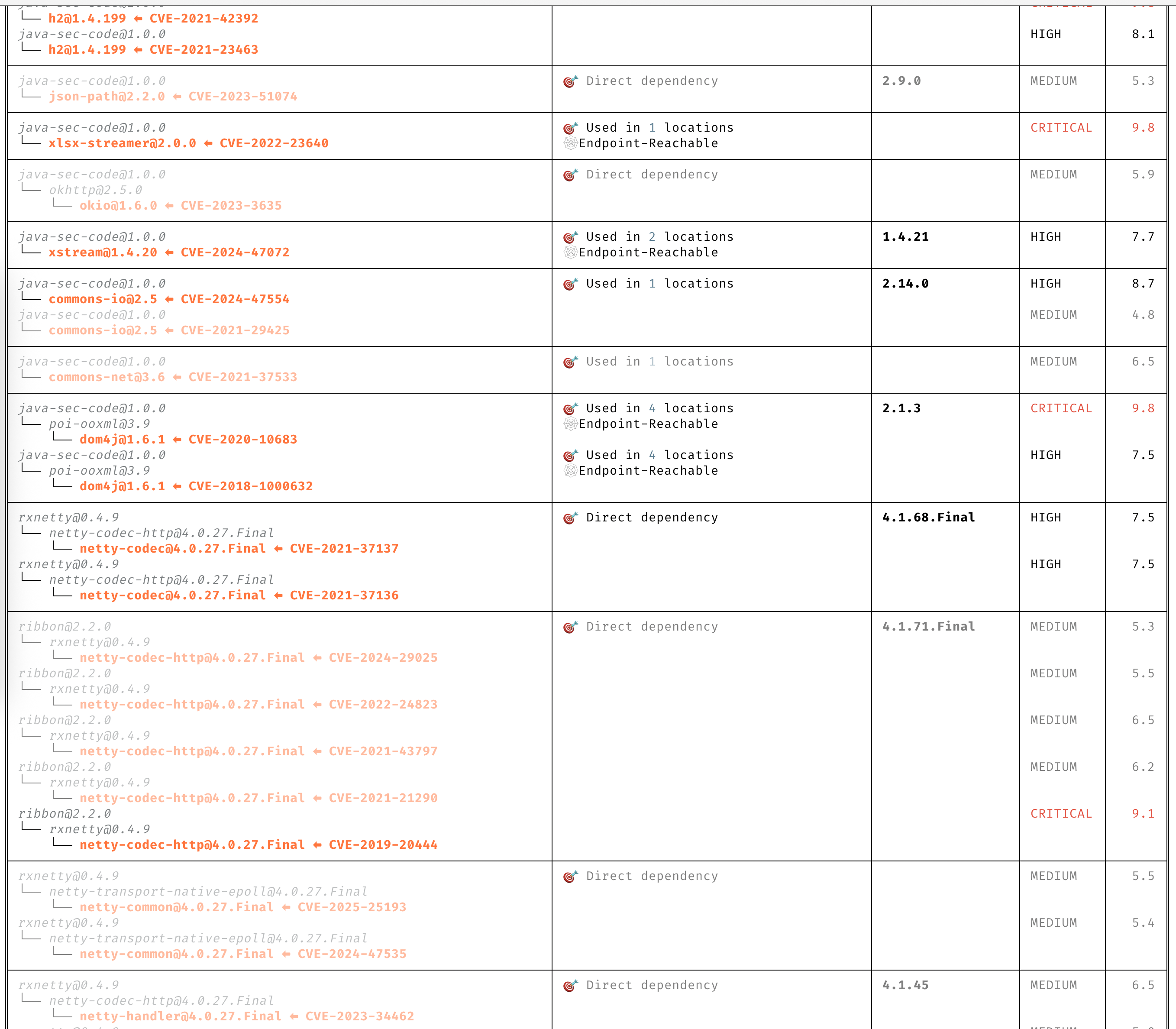
### 清晰的 CVE 洞察
无需阅读冗长的描述即可清晰理解 CVE。
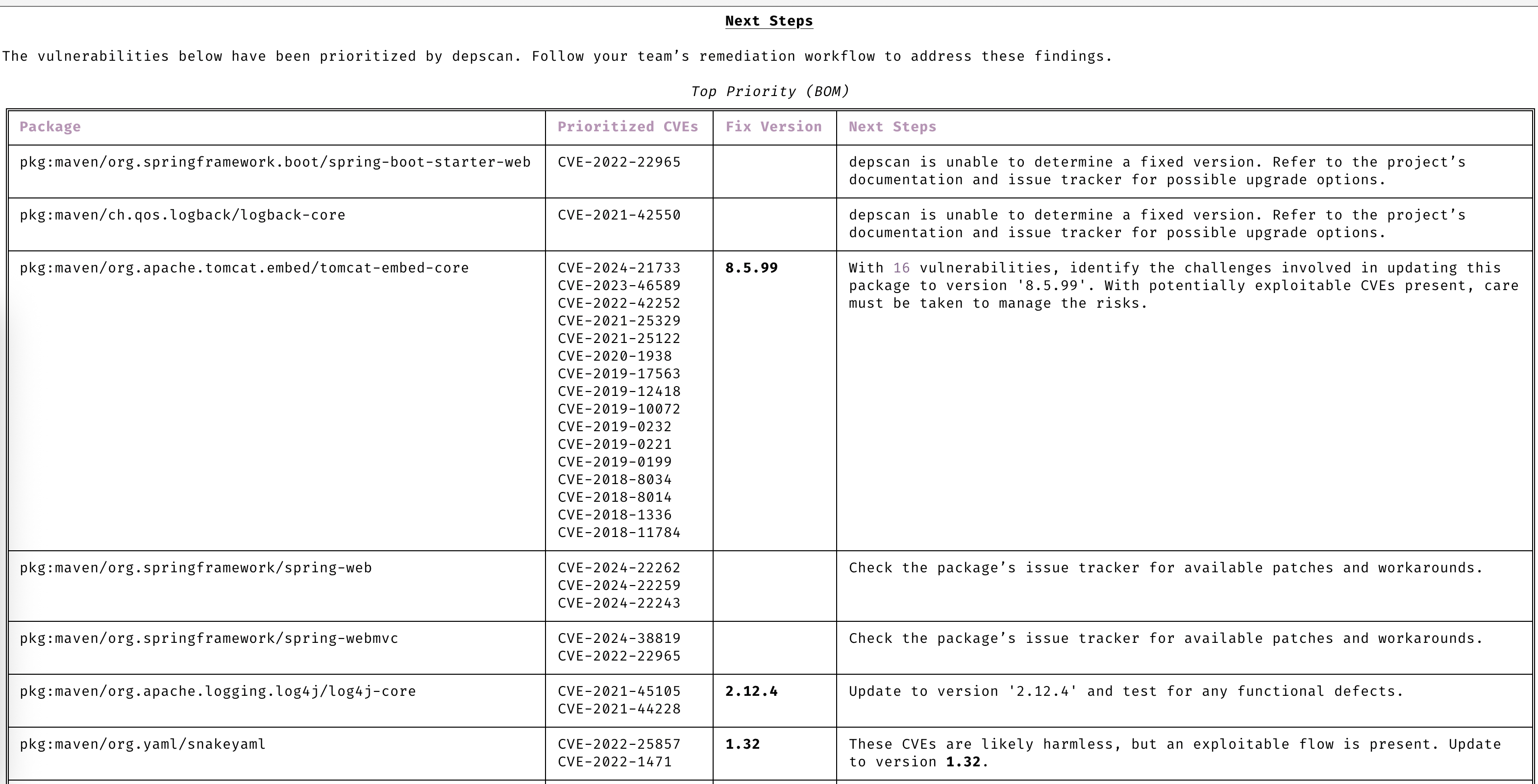
### 自动优先级排序
仅关注需要您注意的 CVE。
### 保持主动性
通过高级漏洞和利用预测始终保持领先一步。
### 漏洞数据源
- OSV
- NVD
- GitHub
- NPM
- Linux [vuln-list](https://github.com/appthreat/vuln-list)
### Linux 发行版
- AlmaLinux
- Debian
- Alpine
- Amazon Linux
- Arch Linux
- RHEL/CentOS
- Rocky Linux
- Ubuntu
- OpenSUSE/SLES
- Photon
- Chainguard
- Wolfi OS
## 快速开始
dep-scan 非常适合在持续集成 (CI) 中使用,也可作为本地开发工具。
### 本地扫描项目 (Python 版本)
```
sudo npm install -g @cyclonedx/cdxgen
# 推荐大多数用户使用 Normal 版本 (MIT)
pip install owasp-depscan
# 如需包含所有扩展和服务器模式的 Full 版本 (Multiple Licenses)
pip install owasp-depscan[all]
```
这将安装两个命令:`cdxgen` 和 `depscan`。
您可以使用各种选项直接调用扫描命令。
```
cd
[](https://github.com/owasp-dep-scan/dep-scan/actions/workflows/pythonpublish.yml)
## 目录
- [功能特性](#features)
- [漏洞数据源](#vulnerability-data-sources)
- [Linux 发行版](#linux-distros)
- [快速开始](#quick-start)
- [本地扫描项目 (Python 版本)](#scanning-projects-locally-python-version)
- [本地扫描容器 (Python 版本)](#scanning-containers-locally-python-version)
- [本地扫描项目 (Docker 容器)](#scanning-projects-locally-docker-container)
- [服务器模式](#server-mode)
- [depscanGPT](https://chatgpt.com/g/g-674f260c887c819194e465d2c65f4061-owasp-dep-scan)
- [文档](https://depscan.readthedocs.io)
- [支持的语言和包格式](https://depscan.readthedocs.io/supported-languages)
- [可达性分析](https://depscan.readthedocs.io/reachability-analysis)
- [Java 项目分析示例](https://depscan.readthedocs.io/reachability-analysis#example-analysis-for-a-java-project)
- [JavaScript 项目分析示例](https://depscan.readthedocs.io/reachability-analysis#example-analysis-for-a-java-project)
- [通过环境变量进行自定义](https://depscan.readthedocs.io/env-var#customization-through-environment-variables)
- [GitHub Security Advisory](https://depscan.readthedocs.io/adv-usage#github-security-advisory)
- [建议模式](https://depscan.readthedocs.io/adv-usage#suggest-mode)
- [包风险审计](https://depscan.readthedocs.io/adv-usage#package-risk-audit)
- [自动调整](https://depscan.readthedocs.io/adv-usage#automatic-adjustment)
- [配置权重](https://depscan.readthedocs.io/adv-usage#configuring-weights)
- [实时 OS 扫描](https://depscan.readthedocs.io/adv-usage#live-os-scan)
- [许可证扫描](https://depscan.readthedocs.io/adv-usage#license-scan)
- [Kubernetes 与云应用](https://depscan.readthedocs.io/adv-usage#kubernetes-and-cloud-apps)
- [PDF 报告](https://depscan.readthedocs.io/adv-usage#pdf-reports)
- [自定义报告](https://depscan.readthedocs.io/adv-usage#custom-reports)
- [许可证](#license)
## 功能特性
- 扫描大多数应用程序代码——包括本地代码库、Linux 容器镜像、Kubernetes manifests 和操作系统——以识别已知 CVE,并进行优先级排序
- 对多种语言执行高级可达性分析(参见可达性分析)
- 包漏洞扫描在本地执行,速度非常快。无需使用服务器!
- 生成包含漏洞披露报告 (VDR) 信息的软件物料清单 (SBOM)
- 生成通用安全建议框架 (CSAF) 2.0 VEX 文档(查看 [CSAF Readme](contrib/CSAF_README.md))
- 针对依赖混淆攻击和维护风险执行深度包风险审计(参见风险审计)
### 精确的可达数据流
基于完整上下文的详细数据流,用于识别应用程序中可达和不可达的路径。

### 清晰的 CVE 洞察
无需阅读冗长的描述即可清晰理解 CVE。

### 自动优先级排序
仅关注需要您注意的 CVE。

### 保持主动性
通过高级漏洞和利用预测始终保持领先一步。

### 漏洞数据源
- OSV
- NVD
- GitHub
- NPM
- Linux [vuln-list](https://github.com/appthreat/vuln-list)
### Linux 发行版
- AlmaLinux
- Debian
- Alpine
- Amazon Linux
- Arch Linux
- RHEL/CentOS
- Rocky Linux
- Ubuntu
- OpenSUSE/SLES
- Photon
- Chainguard
- Wolfi OS
## 快速开始
dep-scan 非常适合在持续集成 (CI) 中使用,也可作为本地开发工具。
### 本地扫描项目 (Python 版本)
```
sudo npm install -g @cyclonedx/cdxgen
# 推荐大多数用户使用 Normal 版本 (MIT)
pip install owasp-depscan
# 如需包含所有扩展和服务器模式的 Full 版本 (Multiple Licenses)
pip install owasp-depscan[all]
```
这将安装两个命令:`cdxgen` 和 `depscan`。
您可以使用各种选项直接调用扫描命令。
```
cd
depscan --src $PWD --reports-dir $PWD/reports
```
完整的选项列表如下:
```
usage: depscan [-h] [--config CONFIG] [--no-banner] [-i SRC_DIR_IMAGE] [-o REPORTS_DIR] [--csaf]
[--profile {appsec,research,operational,threat-modeling,license-compliance,generic,machine-learning,ml,deep-learning,ml-deep,ml-tiny}]
[--lifecycle {pre-build,build,post-build} [{pre-build,build,post-build} ...]]
[--technique {auto,source-code-analysis,binary-analysis,manifest-analysis,hash-comparison,instrumentation,filename} [{auto,source-code-analysis,binary-analysis,manifest-analysis,hash-comparison,instrumentation,filename} ...]]
[--bom-engine {auto,CdxgenGenerator,CdxgenServerGenerator,CdxgenImageBasedGenerator,BlintGenerator} |
--vulnerability-analyzer {auto,VDRAnalyzer,LifecycleAnalyzer}] [--reachability-analyzer {off,FrameworkReachability,SemanticReachability}] [--no-suggest]
[--risk-audit] [--cdxgen-args CDXGEN_ARGS] [--private-ns PRIVATE_NS] [-t PROJECT_TYPE [PROJECT_TYPE ...]] [--bom BOM | --bom-dir BOM_DIR | --purl SEARCH_PURL]
[--report-template REPORT_TEMPLATE] [--report-name REPORT_NAME] [--deep] [--fuzzy-search] [--search-order {purl,pcu,cpe,cpu,url}] [--no-universal]
[--no-vuln-table] [--server] [--server-host SERVER_HOST] [--server-port SERVER_PORT] [--cdxgen-server CDXGEN_SERVER] [--debug] [-q | --explain] [-v]
Fully open-source security and license audit for application dependencies and container images based on known vulnerabilities and advisories.
options:
-h, --help show this help message and exit
--config CONFIG Path to the configuration file. Default: $PWD/.config/depscan.toml
--no-banner Do not display the logo and donation banner. Please make a donation to OWASP before using this argument.
-i, --src SRC_DIR_IMAGE
Source directory or container image or binary file
-o, --reports-dir REPORTS_DIR
Reports directory
--csaf Generate a OASIS CSAF VEX document
--profile {appsec,research,operational,threat-modeling,license-compliance,generic,machine-learning,ml,deep-learning,ml-deep,ml-tiny}
Profile to use while generating the BOM. For granular control, use the arguments --bom-engine, --vulnerability-analyzer, or --reachability-analyzer.
--lifecycle {pre-build,build,post-build} [{pre-build,build,post-build} ...]
Product lifecycle for the generated BOM. Multiple values allowed.
--technique {auto,source-code-analysis,binary-analysis,manifest-analysis,hash-comparison,instrumentation,filename} [{auto,source-code-analysis,binary-analysis,manifest-analysis,hash-comparison,instrumentation,filename} ...]
Analysis technique to use for BOM generation. Multiple values allowed.
--bom-engine {auto,CdxgenGenerator,CdxgenServerGenerator,CdxgenImageBasedGenerator,BlintGenerator}
BOM generation engine to use. Defaults to automatic selection based on project type and lifecycle.
--vulnerability-analyzer {auto,VDRAnalyzer,LifecycleAnalyzer}
Vulnerability analyzer to use. Defaults to automatic selection based on bom_dir argument.
--reachability-analyzer {off,FrameworkReachability,SemanticReachability}
Reachability analyzer to use. Default FrameworkReachability.
--no-suggest Disable suggest mode
--risk-audit Perform package risk audit (slow operation). Npm only.
--cdxgen-args CDXGEN_ARGS
Additional arguments to pass to cdxgen
--private-ns PRIVATE_NS
Private namespace to use while performing oss risk audit. Private packages should not be available in public registries by default. Comma separated
values accepted.
-t, --type PROJECT_TYPE [PROJECT_TYPE ...]
Override project types if auto-detection is incorrect. Multiple values supported.
--bom BOM Examine using the given Software Bill-of-Materials (SBOM) file in CycloneDX format. Use cdxgen command to produce one.
--bom-dir BOM_DIR Examine all the Bill-of-Materials (BOM) files in the given directory.
--purl SEARCH_PURL Scan a single package url.
--custom-data CUSTOM_DATA
Path to directory containing custom vulnerability data (JSON/YAML/TOML) to override/augment results.
--report-template REPORT_TEMPLATE
Jinja template file used for rendering a custom report
--report-name REPORT_NAME
Filename of the custom report written to the --reports-dir
--deep Perform deep scan by passing this --deep argument to cdxgen. Useful while scanning docker images and OS packages.
--fuzzy-search Perform fuzzy search by creating variations of package names. Use this when the input SBOM lacks a PURL.
--search-order {purl,pcu,cpe,cpu,url}
Attributes to use while searching for vulnerabilities. Default: PURL, CPE, URL (pcu).
--no-universal Depscan would attempt to perform a single universal scan instead of individual scans per language type.
--no-vuln-table Do not print the table with the full list of vulnerabilities. This can help reduce console output.
--server Run depscan as a server
--server-host SERVER_HOST
depscan server host
--server-port SERVER_PORT
depscan server port
--server-allowed-hosts [SERVER_ALLOWED_HOSTS ...]
List of allowed hostnames or IPs that can access the server (e.g., 'localhost 192.168.1.10'). If unspecified, no host allowlist is
enforced.
--server-allowed-paths [SERVER_ALLOWED_PATHS ...]
List of allowed filesystem paths that can be scanned by the server. Restricts `path` parameter in /scan requests.
--cdxgen-server CDXGEN_SERVER
cdxgen server url. Eg: http://cdxgen:9090
--debug Run depscan in debug mode.
-q, --quiet Makes depscan quiet.
--explain Makes depscan to explain the various analysis. Useful for creating detailed reports.
--explanation-mode {Endpoints,EndpointsAndReachables,NonReachables,LLMPrompts}
Style of explanation needed. Defaults to Endpoints and Reachables.
--annotate Include the generated text VDR report as an annotation. Defaults to true when explain is enabled; false otherwise.
-v, --version Display the version
```
### 本地扫描容器 (Python 版本)
扫描一个 Java 项目。
```
depscan --src -o containertests -t java
```
扫描容器 `shiftleft/scan-slim` 的 `latest` 标签。
```
depscan --src shiftleft/scan-slim -o containertests -t docker
```
将 `license` 添加到类型中以执行许可证审计。
```
depscan --src shiftleft/scan-slim -o containertests -t docker license
```
您也可以使用 sha256 摘要指定镜像。
```
depscan --src redmine@sha256:a5c5f8a64a0d9a436a0a6941bc3fb156be0c89996add834fe33b66ebeed2439e -o containertests -t docker
```
您还可以使用 docker 或 podman save 命令保存容器镜像,并将归档文件传递给 depscan 进行扫描。
```
docker save -o /tmp/scanslim.tar shiftleft/scan-slim:latest
# podman save --format oci-archive -o /tmp/scanslim.tar shiftleft/scan-slim:latest
depscan --src /tmp/scanslim.tar -o reports -t docker
```
更多示例请参阅此仓库 GitHub action 工作流下的 docker 测试。
### 本地扫描项目 (Docker 容器)
可以使用 `ghcr.io/owasp-dep-scan/dep-scan` 容器镜像来执行扫描。
使用默认设置进行扫描
```
docker run --rm -v $PWD:/app ghcr.io/owasp-dep-scan/dep-scan depscan --src /app --reports-dir /app/reports
```
使用基于自定义环境变量的配置进行扫描
```
docker run --rm \
-e VDB_HOME=/db \
-e GITHUB_TOKEN= \
-v /tmp:/db \
-v $PWD:/app ghcr.io/owasp-dep-scan/dep-scan depscan --src /app --reports-dir /app/reports
```
在上面的示例中,`/tmp` 被挂载到容器中的 `/db`。然后该目录被指定为 `VDB_HOME`,用于缓存漏洞信息。这样可以缓存并重用数据库以提高性能。
### 服务器模式
dep-scan 和 cdxgen 可以在服务器模式下运行。使用包含的 docker-compose 文件开始使用。
```
git clone https://github.com/owasp-dep-scan/dep-scan
docker compose up
```
```
depscan --server --server-host 0.0.0.0 --server-port 7070
```
使用 `/scan` 端点执行扫描。
- 扫描本地目录。
扫描 SBOM 文件(本地存在)。
```
curl --json '{"path": "/tmp/vulnerable-aws-koa-app/sbom_file.json", "type": "js"}' http://0.0.0.0:7070/scan
```
- 扫描 GitHub 仓库。
```
curl --json '{"url": "https://github.com/HooliCorp/vulnerable-aws-koa-app", "type": "js"}' http://0.0.0.0:7070/scan -o app.vdr.json
```
- 上传 SBOM 文件并基于此生成结果。
```
curl -X POST -H 'Content-Type: multipart/form-data' -F 'file=@/tmp/app/sbom_file.json' http://0.0.0.0:7070/scan?type=js
```
## 本地开发
按照官方[文档](https://docs.astral.sh/uv/)设置 uv。
```
uv sync --all-extras --all-packages
uv run depscan --help
uv run pytest
```
### 本地 VDB 设置
```
vdb --clean
vdb --download-image
# 扫描 containers 和 OS 镜像
# vdb --download-full-image
```
### 扫描本地 depscan
```
uv run depscan --config .config/depscan-dev.toml
```
这将自动使用本地配置[文件](./.config/depscan.toml)中指定的配置。
## 许可证
MIT License
该项目于 2023 年 8 月由 AppThreat Ltd 捐赠给 OWASP 基金会。
## 资助
该项目通过 [NGI Zero Core](https://nlnet.nl/core) 获得资助,这是一个由 [NLnet](https://nlnet.nl) 设立的基金,并得到了欧盟委员会 [Next Generation Internet](https://ngi.eu) 计划的财政支持。了解更多信息,请访问 [NLnet 项目页面](https://nlnet.nl/project/OWASP-dep-scan)。
[ ](https://nlnet.nl)
[
](https://nlnet.nl)
[ ](https://nlnet.nl/core)
[](https://github.com/owasp-dep-scan/dep-scan/actions/workflows/pythonpublish.yml)
## 目录
- [功能特性](#features)
- [漏洞数据源](#vulnerability-data-sources)
- [Linux 发行版](#linux-distros)
- [快速开始](#quick-start)
- [本地扫描项目 (Python 版本)](#scanning-projects-locally-python-version)
- [本地扫描容器 (Python 版本)](#scanning-containers-locally-python-version)
- [本地扫描项目 (Docker 容器)](#scanning-projects-locally-docker-container)
- [服务器模式](#server-mode)
- [depscanGPT](https://chatgpt.com/g/g-674f260c887c819194e465d2c65f4061-owasp-dep-scan)
- [文档](https://depscan.readthedocs.io)
- [支持的语言和包格式](https://depscan.readthedocs.io/supported-languages)
- [可达性分析](https://depscan.readthedocs.io/reachability-analysis)
- [Java 项目分析示例](https://depscan.readthedocs.io/reachability-analysis#example-analysis-for-a-java-project)
- [JavaScript 项目分析示例](https://depscan.readthedocs.io/reachability-analysis#example-analysis-for-a-java-project)
- [通过环境变量进行自定义](https://depscan.readthedocs.io/env-var#customization-through-environment-variables)
- [GitHub Security Advisory](https://depscan.readthedocs.io/adv-usage#github-security-advisory)
- [建议模式](https://depscan.readthedocs.io/adv-usage#suggest-mode)
- [包风险审计](https://depscan.readthedocs.io/adv-usage#package-risk-audit)
- [自动调整](https://depscan.readthedocs.io/adv-usage#automatic-adjustment)
- [配置权重](https://depscan.readthedocs.io/adv-usage#configuring-weights)
- [实时 OS 扫描](https://depscan.readthedocs.io/adv-usage#live-os-scan)
- [许可证扫描](https://depscan.readthedocs.io/adv-usage#license-scan)
- [Kubernetes 与云应用](https://depscan.readthedocs.io/adv-usage#kubernetes-and-cloud-apps)
- [PDF 报告](https://depscan.readthedocs.io/adv-usage#pdf-reports)
- [自定义报告](https://depscan.readthedocs.io/adv-usage#custom-reports)
- [许可证](#license)
## 功能特性
- 扫描大多数应用程序代码——包括本地代码库、Linux 容器镜像、Kubernetes manifests 和操作系统——以识别已知 CVE,并进行优先级排序
- 对多种语言执行高级可达性分析(参见可达性分析)
- 包漏洞扫描在本地执行,速度非常快。无需使用服务器!
- 生成包含漏洞披露报告 (VDR) 信息的软件物料清单 (SBOM)
- 生成通用安全建议框架 (CSAF) 2.0 VEX 文档(查看 [CSAF Readme](contrib/CSAF_README.md))
- 针对依赖混淆攻击和维护风险执行深度包风险审计(参见风险审计)
### 精确的可达数据流
基于完整上下文的详细数据流,用于识别应用程序中可达和不可达的路径。

### 清晰的 CVE 洞察
无需阅读冗长的描述即可清晰理解 CVE。

### 自动优先级排序
仅关注需要您注意的 CVE。

### 保持主动性
通过高级漏洞和利用预测始终保持领先一步。

### 漏洞数据源
- OSV
- NVD
- GitHub
- NPM
- Linux [vuln-list](https://github.com/appthreat/vuln-list)
### Linux 发行版
- AlmaLinux
- Debian
- Alpine
- Amazon Linux
- Arch Linux
- RHEL/CentOS
- Rocky Linux
- Ubuntu
- OpenSUSE/SLES
- Photon
- Chainguard
- Wolfi OS
## 快速开始
dep-scan 非常适合在持续集成 (CI) 中使用,也可作为本地开发工具。
### 本地扫描项目 (Python 版本)
```
sudo npm install -g @cyclonedx/cdxgen
# 推荐大多数用户使用 Normal 版本 (MIT)
pip install owasp-depscan
# 如需包含所有扩展和服务器模式的 Full 版本 (Multiple Licenses)
pip install owasp-depscan[all]
```
这将安装两个命令:`cdxgen` 和 `depscan`。
您可以使用各种选项直接调用扫描命令。
```
cd ](https://nlnet.nl)
[](https://nlnet.nl/core)标签:AI应用开发, ASPM, DevSecOps, GPT, Python, Python库, SBOM, Web截图, 上游代理, 云安全监控, 依赖扫描, 可到达性分析, 容器安全, 文档安全, 无后门, 模型提供商, 活动识别, 漏洞管理, 硬件无关, 许可证合规, 请求拦截, 逆向工具, 镜像扫描, 静态分析, 风险分析