itm4n/PrivescCheck
GitHub: itm4n/PrivescCheck
一款 Windows 本地权限提升枚举脚本,用于快速识别系统中的提权漏洞、配置问题并收集后渗透所需信息。
Stars: 3876 | Forks: 505
# PrivescCheck
快速识别常见的 Windows **漏洞**和**配置问题**(这些通常不被公共安全标准所覆盖),并收集用于漏洞利用和后渗透(post-exploitation)任务的有用信息。
## :rocket: 快速开始
在此下载脚本:[PrivescCheck.ps1](https://github.com/itm4n/PrivescCheck/releases/latest/download/PrivescCheck.ps1)
### 使用场景 1(渗透测试):仅运行基础检查
是否存在明显的本地提权方式?
```
powershell -ep bypass -c ". .\PrivescCheck.ps1; Invoke-PrivescCheck"
```
### 使用场景 2(安全研究):运行扩展检查 + 编写人类可读报告
是否有额外的信息可用于后渗透或发现第三方软件中的漏洞?
```
powershell -ep bypass -c ". .\PrivescCheck.ps1; Invoke-PrivescCheck -Extended -Report PrivescCheck_$($env:COMPUTERNAME) -Format TXT,HTML"
```
### 使用场景 3(安全审计):运行所有检查 + 编写所有报告
是否存在常见安全标准未覆盖的配置问题?
```
powershell -ep bypass -c ". .\PrivescCheck.ps1; Invoke-PrivescCheck -Extended -Audit -Report PrivescCheck_$($env:COMPUTERNAME) -Format TXT,HTML,CSV,XML"
```
## :open_book: 详细用法
```
Invoke-PrivescCheck [-Extended] [-Audit] [-Experimental] [-Report ]
[-Format [,...]] [-Risky] [-Silent] [-Force]
-Extended
Include all "extended" checks in the scan (see README).
-Audit
Include all "audit" checks in the scan.
-Experimental
Include all "experimental" checks in the scan. Use only if you know
what you are doing.
-Report
Generate at least one report file. The output filename will be
"PREFIX.txt" by default. The extension is automatically appended
based on the report format (see "-Format [,...]").
-Format [,...]
Specify the format of the output report file(s). If not set, the
default value is "TXT". Supported formats are: "TXT", "HTML", "CSV",
and "XML".
-Risky
Include checks marked as "risky", i.e. checks that are likely to
trigger a blocking action by an endpoint protection solution. Use with
caution.
-Silent
Suppress terminal output. This can be useful if you want to run the
script as part of a batch file, in a scheduled task for instance.
-Force
Force execution and ignore warnings. Typically, the script stops if
it is executed with administrator privileges. Use this option to
execute it anyway.
```
### 报告格式 > TXT (`-Format TXT`)
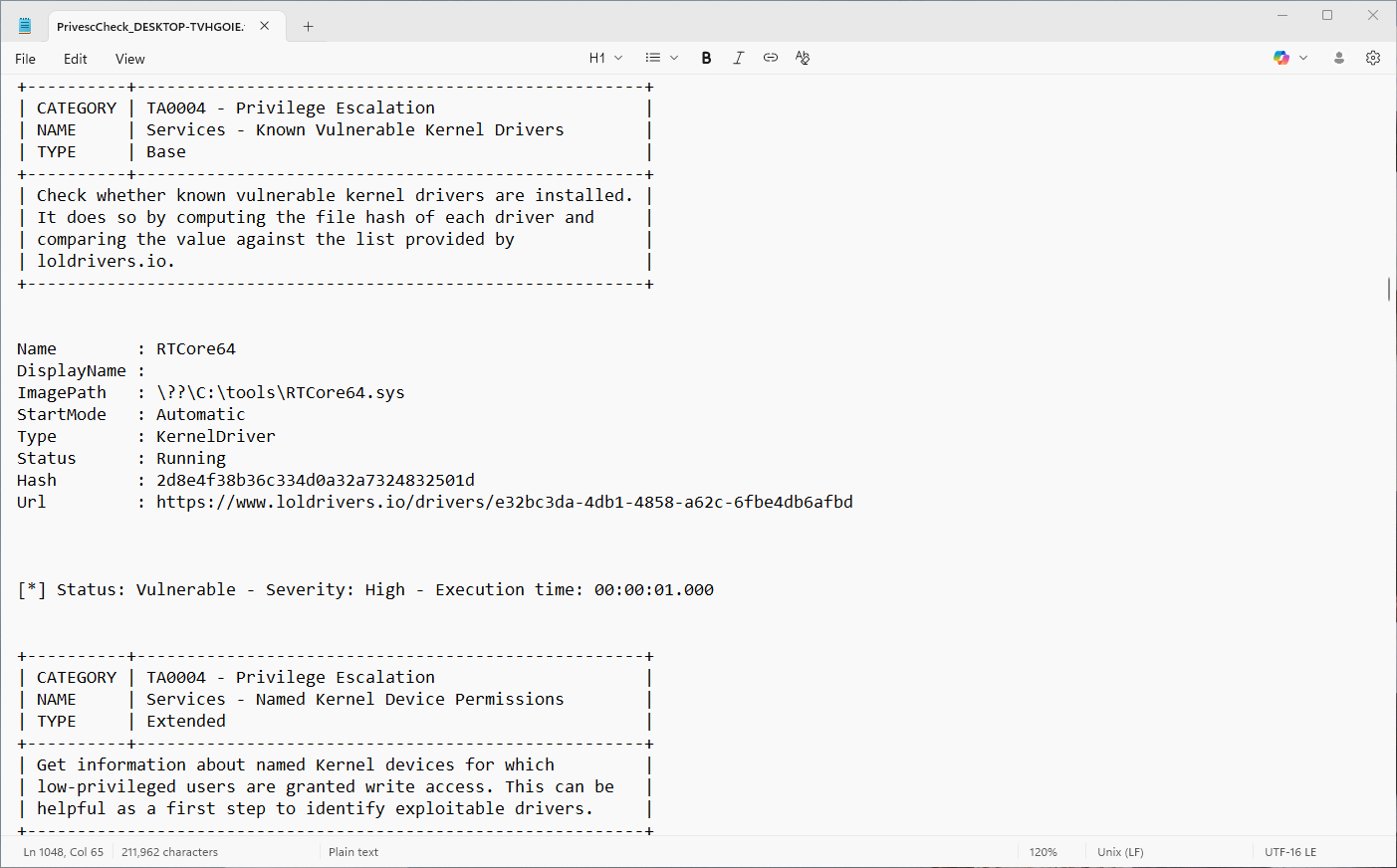
使用选项 `-Report `(配合 `-Format TXT`)指定要生成**纯文本报告**。输出内容与终端显示类似,但仅包含 ASCII 字符,以确保对所有文本编辑器具有更好的(复古)兼容性。
### 报告格式 > HTML (`-Format HTML`)
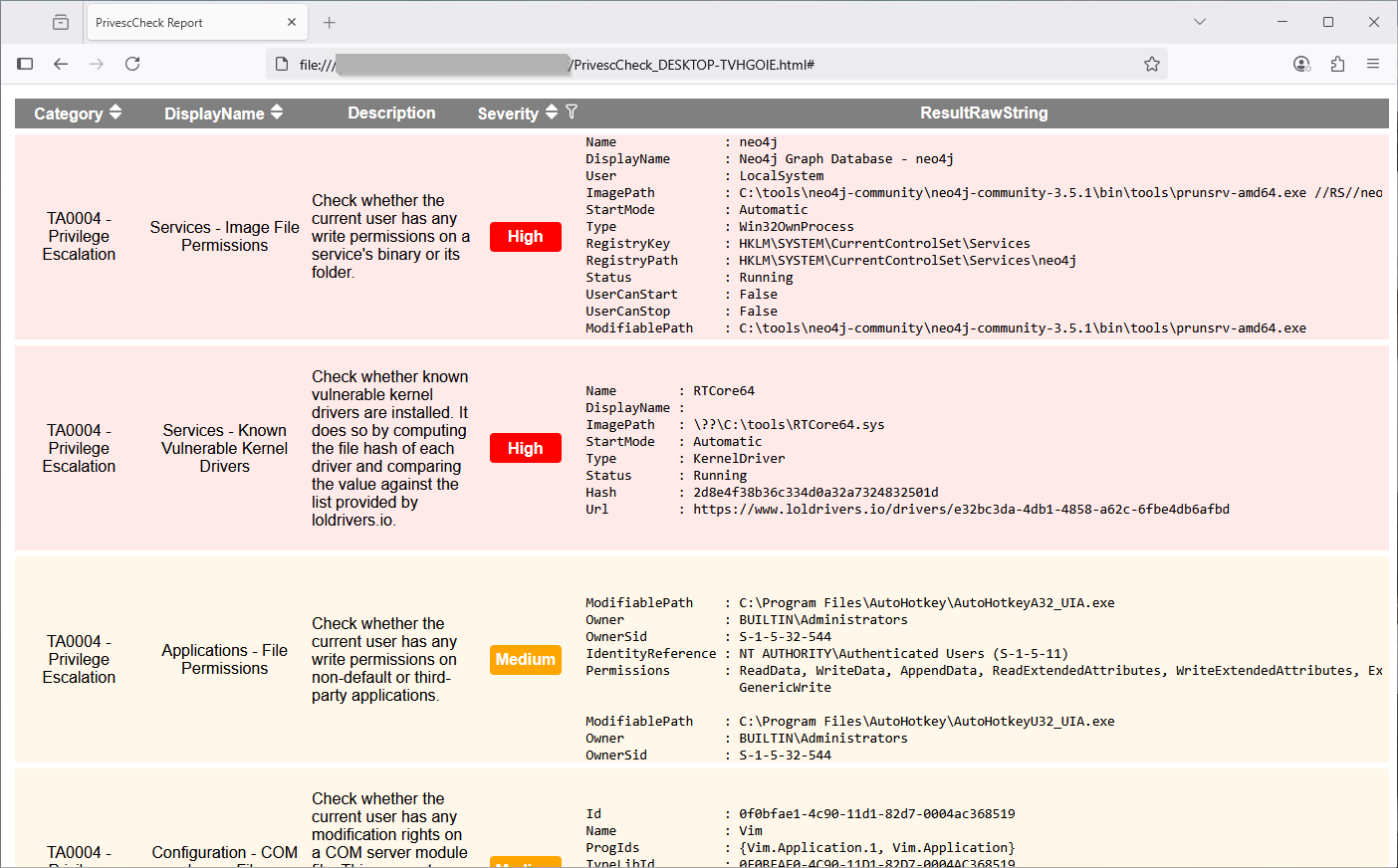
使用选项 `-Report ` 配合 `-Format HTML` 指定要生成 **HTML 报告**。输出文件可在 Web 浏览器中打开。相比于纯文本报告,它更便于可视化数据。此外,它还提供了**排序**和**过滤**功能!
### 报告格式 > CSV (`-Format CSV`) & XML (`-Format XML`)
使用选项 `-Report ` 配合 `-Format CSV` 或 `-Format XML` 指定要生成 **CSV 或 XML 报告**。输出文件旨在方便自动化报告工具解析结果。
### 检查类型 > 基础(Base)
`Base` 类型的检查将始终执行,除非脚本以管理员身份运行。它们主要用于识别权限提升漏洞或其他重要问题。
### 检查类型 > 扩展(`-Extended`)
`Extended` 类型的检查只有在命令行中指定了 `-Extended` 选项时才会执行。它们主要用于提供对漏洞利用开发或后渗透有用的附加信息。
### 检查类型 > 审计(`-Audit`)
`Audit` 类型的检查只有在命令行中指定了 `-Audit` 选项时才会执行。它们主要用于提供在配置审计场景中相关的信息。
## :bulb: 提示与技巧
### PowerShell 执行策略
默认情况下,当新的 `powershell.exe` 进程启动时,客户端上的 PowerShell [执行策略](https://learn.microsoft.com/en-us/powershell/module/microsoft.powershell.core/about/about_execution_policies)会被设置为 `Restricted`,而服务器上则为 `RemoteSigned`。这些策略会阻止(未签名的)脚本的执行,但可以在当前作用域内通过以下方式绕过。
```
Set-ExecutionPolicy Bypass -Scope Process -Force
. .\PrivescCheck.ps1
```
然而,如果执行策略是通过 GPO 强制执行的,这个技巧就不起作用了。这种情况下,在启动新的 PowerShell 会话后,你可以按如下方式加载脚本。
```
Get-Content .\PrivescCheck.ps1 | Out-String | Invoke-Expression
```
### PowerShell 版本 2
绕过[约束语言模式](https://devblogs.microsoft.com/powershell/powershell-constrained-language-mode/)的一种常见方法是使用 PSv2,因为它没有实现这种保护机制。因此,为了维持这种向后兼容性,我们投入了大量的开发精力。
### Metasploit 超时
如果你在 Meterpreter 会话中运行此脚本,很可能会遇到“超时”错误。这是因为 Metasploit 默认使用 15 秒的超时值,而这对于脚本完成典型执行过程来说是不够的。
```
meterpreter > load powershell
Loading extension powershell...Success.
meterpreter > powershell_import /local/path/to/PrivescCheck.ps1
[+] File successfully imported. No result was returned.
meterpreter > powershell_execute "Invoke-PrivescCheck"
[-] Error running command powershell_execute: Rex::TimeoutError Operation timed out.
```
通过 `sessions` 命令的 `-t` 选项可以设置不同的超时时间([文档](https://www.offensive-security.com/metasploit-unleashed/msfconsole-commands/))。在以下示例中,为 ID 为 `1` 的会话设置了 2 分钟的超时时间,但你可能需要设置一个更高的值。
```
msf6 exploit(multi/handler) > sessions -t 120 -i 1
[*] Starting interaction with 1...
meterpreter > powershell_execute "Invoke-PrivescCheck"
```
## :bookmark_tabs: 致谢
- 词表 - [CBHue/PyFuscation](https://github.com/CBHue/PyFuscation)
- 易受攻击的驱动列表 - [https://www.loldrivers.io/api/drivers.csv](https://www.loldrivers.io/api/drivers.csv)
标签:AI合规, IPv6, Libemu, PowerShell, Web报告查看器, 协议分析, 插件系统, 无线安全, 权限提升