charmbracelet/glamour
GitHub: charmbracelet/glamour
一个基于样式表的 Go 库,用于在 ANSI 兼容的终端中渲染带有颜色和排版的 Markdown 文档。
Stars: 3543 | Forks: 295
# Glamour
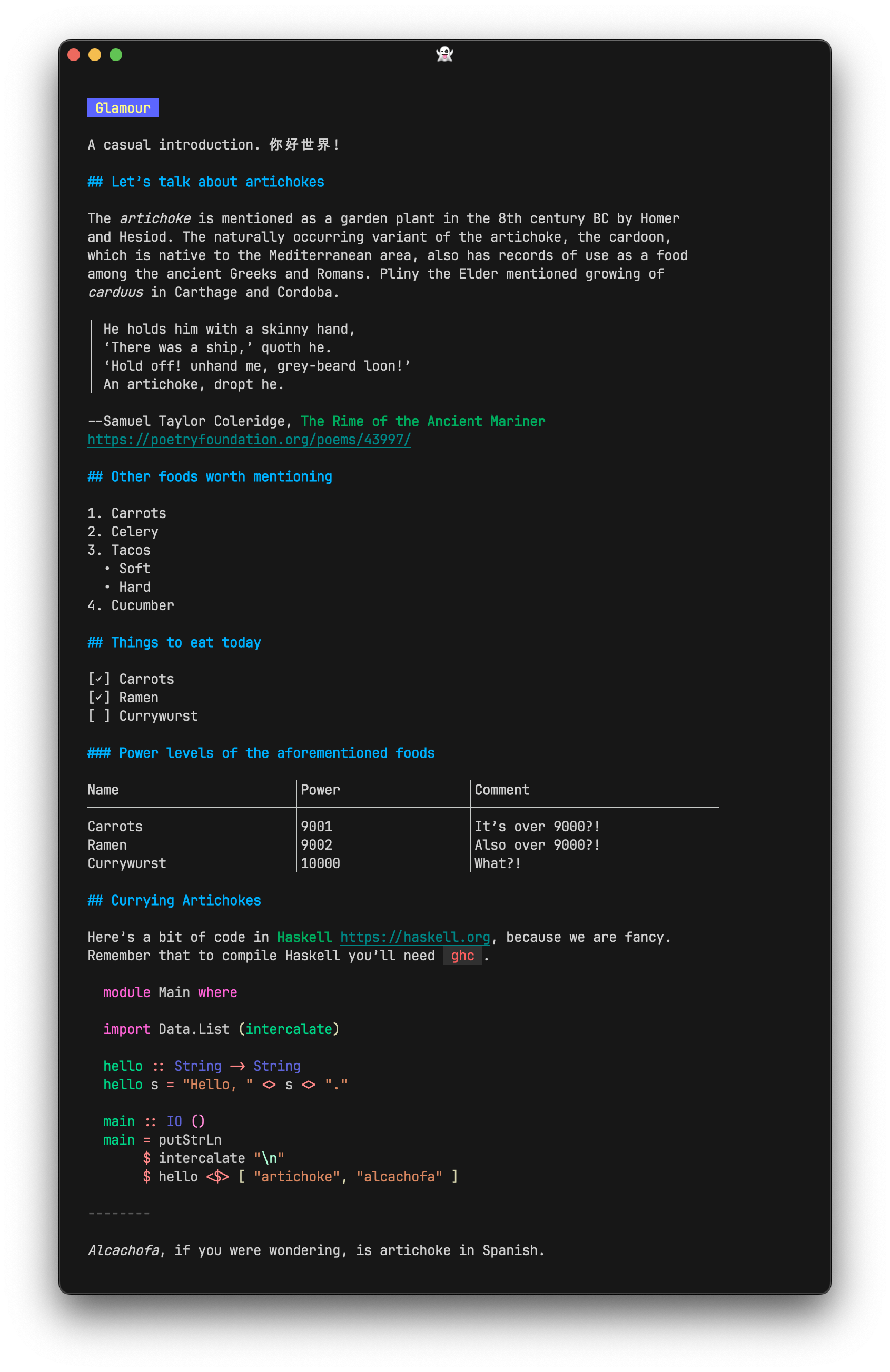 `glamour` 让你能够在兼容 [ANSI](https://en.wikipedia.org/wiki/ANSI_escape_code) 的终端上渲染 [markdown](https://en.wikipedia.org/wiki/Markdown) 文档和模板。你可以创建自己的样式表,或者直接使用那些漂亮的默认样式。
## 用法
```
import "charm.land/glamour/v2"
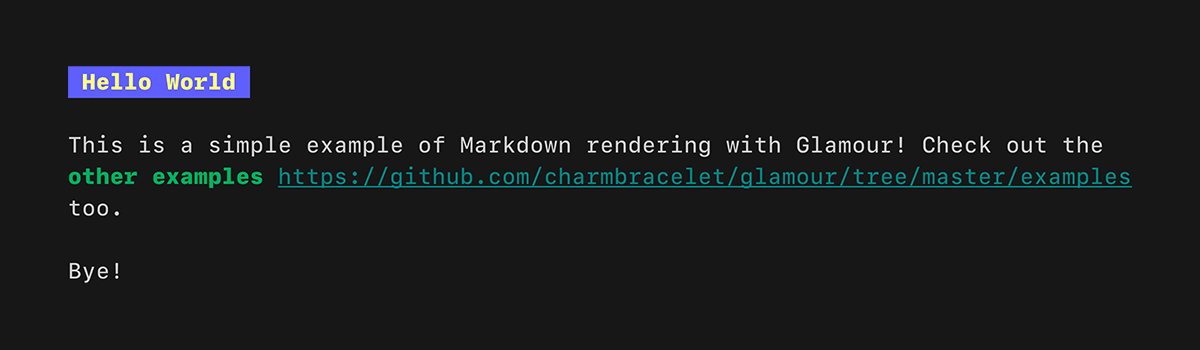
in := `# Hello World
This is a simple example of Markdown rendering with Glamour!
Check out the [other examples](https://github.com/charmbracelet/glamour/tree/main/examples) too.
Bye!
`
out, err := glamour.Render(in, "dark")
fmt.Print(out)
```
`glamour` 让你能够在兼容 [ANSI](https://en.wikipedia.org/wiki/ANSI_escape_code) 的终端上渲染 [markdown](https://en.wikipedia.org/wiki/Markdown) 文档和模板。你可以创建自己的样式表,或者直接使用那些漂亮的默认样式。
## 用法
```
import "charm.land/glamour/v2"
in := `# Hello World
This is a simple example of Markdown rendering with Glamour!
Check out the [other examples](https://github.com/charmbracelet/glamour/tree/main/examples) too.
Bye!
`
out, err := glamour.Render(in, "dark")
fmt.Print(out)
```
 ### 自定义渲染器
```
import "charm.land/glamour/v2"
r, _ := glamour.NewTermRenderer(
// wrap output at specific width (default is 80)
glamour.WithWordWrap(40),
)
out, err := r.Render(in)
fmt.Print(out)
```
### 颜色降采样
由于渲染器被设计为“纯粹”的,并且对于相同的输入总是产生相同的输出,它无法获取终端的功能。这意味着默认情况下不会执行颜色降采样。在这种情况下,请使用 [Lip Gloss][lipgloss] 在渲染之前执行降采样:
```
import (
"charm.land/glamour/v2"
"charm.land/lipgloss/v2"
)
r, _ := glamour.NewTermRenderer(
// wrap output at specific width (default is 80)
glamour.WithWordWrap(40),
)
out, err := r.Render(in)
if err != nil {
// handle error
}
// downsample colors based on terminal capabilities.
lipgloss.Print(out)
```
## 样式
你可以在我们的[图库](https://github.com/charmbracelet/glamour/tree/main/styles/gallery)中找到所有可用的默认样式。
想创建你自己的样式?[了解如何操作!](https://github.com/charmbracelet/glamour/tree/main/styles)
使用自定义样式有以下几个选项:
1. 调用 `glamour.Render(inputText, "desiredStyle")`
2. 将 `GLAMOUR_STYLE` 环境变量设置为你想要的默认样式,或样式文件的位置,然后调用 `glamour.RenderWithEnvironmentConfig(inputText)`
3. 设置 `GLAMOUR_STYLE` 环境变量,并将 `glamour.WithEnvironmentConfig()` 传递给你的自定义渲染器
## 极具魅力的项目
看看这些使用 `glamour` 的项目:
- [Glow](https://github.com/charmbracelet/glow),一个用于命令行的 markdown 渲染器。
- [GitHub CLI](https://github.com/cli/cli),GitHub 官方的命令行工具。
- [GitLab CLI](https://gitlab.com/gitlab-org/cli),GitLab 官方的命令行工具。
- [Gitea CLI](https://gitea.com/gitea/tea),Gitea 官方的命令行工具。
- [Meteor](https://github.com/odpf/meteor),一个易于使用、插件驱动的元数据收集框架。
## 反馈
我们很乐意听取你对这个项目的想法。欢迎随时给我们留言!
- [Twitter](https://twitter.com/charmcli)
- [The Fediverse](https://mastodon.social/@charmcli)
- [Discord](https://charm.sh/chat)
## 许可证
[MIT](https://github.com/charmbracelet/glamour/raw/master/LICENSE)
[Charm](https://charm.sh) 的一部分。
### 自定义渲染器
```
import "charm.land/glamour/v2"
r, _ := glamour.NewTermRenderer(
// wrap output at specific width (default is 80)
glamour.WithWordWrap(40),
)
out, err := r.Render(in)
fmt.Print(out)
```
### 颜色降采样
由于渲染器被设计为“纯粹”的,并且对于相同的输入总是产生相同的输出,它无法获取终端的功能。这意味着默认情况下不会执行颜色降采样。在这种情况下,请使用 [Lip Gloss][lipgloss] 在渲染之前执行降采样:
```
import (
"charm.land/glamour/v2"
"charm.land/lipgloss/v2"
)
r, _ := glamour.NewTermRenderer(
// wrap output at specific width (default is 80)
glamour.WithWordWrap(40),
)
out, err := r.Render(in)
if err != nil {
// handle error
}
// downsample colors based on terminal capabilities.
lipgloss.Print(out)
```
## 样式
你可以在我们的[图库](https://github.com/charmbracelet/glamour/tree/main/styles/gallery)中找到所有可用的默认样式。
想创建你自己的样式?[了解如何操作!](https://github.com/charmbracelet/glamour/tree/main/styles)
使用自定义样式有以下几个选项:
1. 调用 `glamour.Render(inputText, "desiredStyle")`
2. 将 `GLAMOUR_STYLE` 环境变量设置为你想要的默认样式,或样式文件的位置,然后调用 `glamour.RenderWithEnvironmentConfig(inputText)`
3. 设置 `GLAMOUR_STYLE` 环境变量,并将 `glamour.WithEnvironmentConfig()` 传递给你的自定义渲染器
## 极具魅力的项目
看看这些使用 `glamour` 的项目:
- [Glow](https://github.com/charmbracelet/glow),一个用于命令行的 markdown 渲染器。
- [GitHub CLI](https://github.com/cli/cli),GitHub 官方的命令行工具。
- [GitLab CLI](https://gitlab.com/gitlab-org/cli),GitLab 官方的命令行工具。
- [Gitea CLI](https://gitea.com/gitea/tea),Gitea 官方的命令行工具。
- [Meteor](https://github.com/odpf/meteor),一个易于使用、插件驱动的元数据收集框架。
## 反馈
我们很乐意听取你对这个项目的想法。欢迎随时给我们留言!
- [Twitter](https://twitter.com/charmcli)
- [The Fediverse](https://mastodon.social/@charmcli)
- [Discord](https://charm.sh/chat)
## 许可证
[MIT](https://github.com/charmbracelet/glamour/raw/master/LICENSE)
[Charm](https://charm.sh) 的一部分。
 Charm热爱开源 • Charm loves open source



`glamour` 让你能够在兼容 [ANSI](https://en.wikipedia.org/wiki/ANSI_escape_code) 的终端上渲染 [markdown](https://en.wikipedia.org/wiki/Markdown) 文档和模板。你可以创建自己的样式表,或者直接使用那些漂亮的默认样式。
## 用法
```
import "charm.land/glamour/v2"
in := `# Hello World
This is a simple example of Markdown rendering with Glamour!
Check out the [other examples](https://github.com/charmbracelet/glamour/tree/main/examples) too.
Bye!
`
out, err := glamour.Render(in, "dark")
fmt.Print(out)
```
### 自定义渲染器
```
import "charm.land/glamour/v2"
r, _ := glamour.NewTermRenderer(
// wrap output at specific width (default is 80)
glamour.WithWordWrap(40),
)
out, err := r.Render(in)
fmt.Print(out)
```
### 颜色降采样
由于渲染器被设计为“纯粹”的,并且对于相同的输入总是产生相同的输出,它无法获取终端的功能。这意味着默认情况下不会执行颜色降采样。在这种情况下,请使用 [Lip Gloss][lipgloss] 在渲染之前执行降采样:
```
import (
"charm.land/glamour/v2"
"charm.land/lipgloss/v2"
)
r, _ := glamour.NewTermRenderer(
// wrap output at specific width (default is 80)
glamour.WithWordWrap(40),
)
out, err := r.Render(in)
if err != nil {
// handle error
}
// downsample colors based on terminal capabilities.
lipgloss.Print(out)
```
## 样式
你可以在我们的[图库](https://github.com/charmbracelet/glamour/tree/main/styles/gallery)中找到所有可用的默认样式。
想创建你自己的样式?[了解如何操作!](https://github.com/charmbracelet/glamour/tree/main/styles)
使用自定义样式有以下几个选项:
1. 调用 `glamour.Render(inputText, "desiredStyle")`
2. 将 `GLAMOUR_STYLE` 环境变量设置为你想要的默认样式,或样式文件的位置,然后调用 `glamour.RenderWithEnvironmentConfig(inputText)`
3. 设置 `GLAMOUR_STYLE` 环境变量,并将 `glamour.WithEnvironmentConfig()` 传递给你的自定义渲染器
## 极具魅力的项目
看看这些使用 `glamour` 的项目:
- [Glow](https://github.com/charmbracelet/glow),一个用于命令行的 markdown 渲染器。
- [GitHub CLI](https://github.com/cli/cli),GitHub 官方的命令行工具。
- [GitLab CLI](https://gitlab.com/gitlab-org/cli),GitLab 官方的命令行工具。
- [Gitea CLI](https://gitea.com/gitea/tea),Gitea 官方的命令行工具。
- [Meteor](https://github.com/odpf/meteor),一个易于使用、插件驱动的元数据收集框架。
## 反馈
我们很乐意听取你对这个项目的想法。欢迎随时给我们留言!
- [Twitter](https://twitter.com/charmcli)
- [The Fediverse](https://mastodon.social/@charmcli)
- [Discord](https://charm.sh/chat)
## 许可证
[MIT](https://github.com/charmbracelet/glamour/raw/master/LICENSE)
[Charm](https://charm.sh) 的一部分。
Charm热爱开源 • Charm loves open source
标签:EVTX分析, Golang, Markdown渲染, TUI, UI组件库, 安全编程, 日志审计, 防御加固