dstotijn/hetty
GitHub: dstotijn/hetty
Hetty 是一个基于 Go 的开源 HTTP MITM 代理,提供日志、搜索、请求编辑与重放等功能,旨在替代商业的安全测试工具。
Stars: 11246 | Forks: 701

 [](https://github.com/dstotijn/hetty/releases/latest)
[](https://github.com/dstotijn/hetty/actions/workflows/build-test.yml)

[](https://github.com/dstotijn/hetty/blob/master/LICENSE)
[](https://hetty.xyz/)
**Hetty** 是一个用于安全研究的 HTTP 工具包。它旨在成为 Burp Suite Pro 等商业软件的开源替代方案,提供针对信息安全和赏金漏洞社区需求的强大功能。
[](https://github.com/dstotijn/hetty/releases/latest)
[](https://github.com/dstotijn/hetty/actions/workflows/build-test.yml)

[](https://github.com/dstotijn/hetty/blob/master/LICENSE)
[](https://hetty.xyz/)
**Hetty** 是一个用于安全研究的 HTTP 工具包。它旨在成为 Burp Suite Pro 等商业软件的开源替代方案,提供针对信息安全和赏金漏洞社区需求的强大功能。
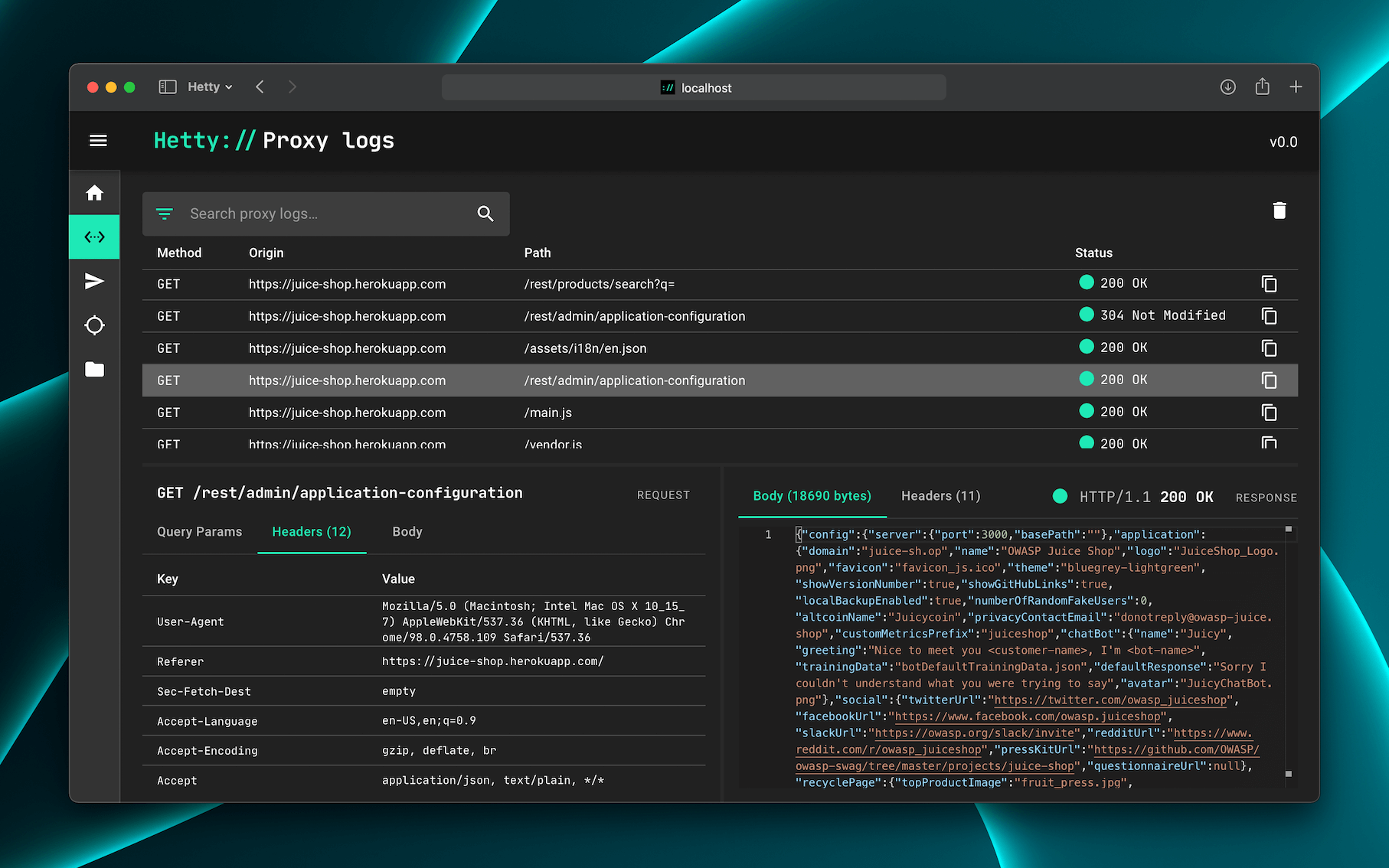 ## 功能
- 中间人 (MITM) HTTP 代理,带日志和高级搜索
- 用于手动创建/编辑请求以及重放代理请求的 HTTP 客户端
- 拦截请求和响应以进行手动审查(编辑、发送/接收、取消)
- 支持范围管理,帮助保持工作有序
- 易于使用的基于网页的管理界面
- 基于项目的数据库存储,帮助保持工作有序
👷♂️ Hetty 正在积极开发中。查看 待办列表 以了解当前状态。
📣 您是团队中的渗透测试专业人士吗?欢迎通过 [this 5 minute
survey](https://forms.gle/36jtgNc3TJ2imi5A8) 分享您对工具的想法。谢谢!
## 入门
💡 [Getting started](https://hetty.xyz/docs/getting-started) 文档提供更详细的安装和使用说明。
### 安装
通过包管理器安装和更新 Hetty 的最快方法是:
#### macOS
```
brew install hettysoft/tap/hetty
```
#### Linux
```
sudo snap install hetty
```
#### Windows
```
scoop bucket add hettysoft https://github.com/hettysoft/scoop-bucket.git
scoop install hettysoft/hetty
```
#### 其他
或者,您可以 [download the latest release from
GitHub](https://github.com/dstotijn/hetty/releases/latest) 为您的操作系统和架构下载二进制文件,并将其移动到 `$PATH` 中的目录。如果您的操作系统不支持任何包管理器或未在 GitHub 发布页面列出,您可以从源码编译 _(链接即将推出)_。
#### Docker
Docker 镜像通过 [GitHub's Container registry](https://github.com/dstotijn/hetty/pkgs/container/hetty) 和 [Docker Hub](https://hub.docker.com/r/dstotijn/hetty) 分发。要使用带有数据库和证书存储卷以及转发 8080 端口的 Hetty,请运行:
```
docker run -v $HOME/.hetty:/root/.hetty -p 8080:8080 \
ghcr.io/dstotijn/hetty:latest
```
### 使用
安装后,通过以下方式启动 Hetty:
```
hetty
```
💡 阅读 [Getting started](https://hetty.xyz/docs/getting-started) 文档获取更多细节。
列出所有可用选项,运行:`hetty --help`:
```
$ hetty --help
Usage:
hetty [flags] [subcommand] [flags]
Runs an HTTP server with (MITM) proxy, GraphQL service, and a web based admin interface.
Options:
--cert Path to root CA certificate. Creates file if it doesn't exist. (Default: "~/.hetty/hetty_cert.pem")
--key Path to root CA private key. Creates file if it doesn't exist. (Default: "~/.hetty/hetty_key.pem")
--db Database file path. Creates file if it doesn't exist. (Default: "~/.hetty/hetty.db")
--addr TCP address for HTTP server to listen on, in the form \"host:port\". (Default: ":8080")
--chrome Launch Chrome with proxy settings applied and certificate errors ignored. (Default: false)
--verbose Enable verbose logging.
--json Encode logs as JSON, instead of pretty/human readable output.
--version, -v Output version.
--help, -h Output this usage text.
Subcommands:
- cert Certificate management
Run `hetty
## 功能
- 中间人 (MITM) HTTP 代理,带日志和高级搜索
- 用于手动创建/编辑请求以及重放代理请求的 HTTP 客户端
- 拦截请求和响应以进行手动审查(编辑、发送/接收、取消)
- 支持范围管理,帮助保持工作有序
- 易于使用的基于网页的管理界面
- 基于项目的数据库存储,帮助保持工作有序
👷♂️ Hetty 正在积极开发中。查看 待办列表 以了解当前状态。
📣 您是团队中的渗透测试专业人士吗?欢迎通过 [this 5 minute
survey](https://forms.gle/36jtgNc3TJ2imi5A8) 分享您对工具的想法。谢谢!
## 入门
💡 [Getting started](https://hetty.xyz/docs/getting-started) 文档提供更详细的安装和使用说明。
### 安装
通过包管理器安装和更新 Hetty 的最快方法是:
#### macOS
```
brew install hettysoft/tap/hetty
```
#### Linux
```
sudo snap install hetty
```
#### Windows
```
scoop bucket add hettysoft https://github.com/hettysoft/scoop-bucket.git
scoop install hettysoft/hetty
```
#### 其他
或者,您可以 [download the latest release from
GitHub](https://github.com/dstotijn/hetty/releases/latest) 为您的操作系统和架构下载二进制文件,并将其移动到 `$PATH` 中的目录。如果您的操作系统不支持任何包管理器或未在 GitHub 发布页面列出,您可以从源码编译 _(链接即将推出)_。
#### Docker
Docker 镜像通过 [GitHub's Container registry](https://github.com/dstotijn/hetty/pkgs/container/hetty) 和 [Docker Hub](https://hub.docker.com/r/dstotijn/hetty) 分发。要使用带有数据库和证书存储卷以及转发 8080 端口的 Hetty,请运行:
```
docker run -v $HOME/.hetty:/root/.hetty -p 8080:8080 \
ghcr.io/dstotijn/hetty:latest
```
### 使用
安装后,通过以下方式启动 Hetty:
```
hetty
```
💡 阅读 [Getting started](https://hetty.xyz/docs/getting-started) 文档获取更多细节。
列出所有可用选项,运行:`hetty --help`:
```
$ hetty --help
Usage:
hetty [flags] [subcommand] [flags]
Runs an HTTP server with (MITM) proxy, GraphQL service, and a web based admin interface.
Options:
--cert Path to root CA certificate. Creates file if it doesn't exist. (Default: "~/.hetty/hetty_cert.pem")
--key Path to root CA private key. Creates file if it doesn't exist. (Default: "~/.hetty/hetty_key.pem")
--db Database file path. Creates file if it doesn't exist. (Default: "~/.hetty/hetty.db")
--addr TCP address for HTTP server to listen on, in the form \"host:port\". (Default: ":8080")
--chrome Launch Chrome with proxy settings applied and certificate errors ignored. (Default: false)
--verbose Enable verbose logging.
--json Encode logs as JSON, instead of pretty/human readable output.
--version, -v Output version.
--help, -h Output this usage text.
Subcommands:
- cert Certificate management
Run `hetty 标签:ETW劫持, EVTX分析, EVTX分析, Go语言, meg, Rootkit检测, SIEM, Web界面, XDR, 云安全, 代码生成, 信息安全, 安全平台, 安全研究, 日志分析, 日志审计, 日志记录, 渗透测试工具, 漏洞赏金, 程序破解, 网络安全, 请求拦截, 隐私保护