f-droid/fdroidclient
GitHub: f-droid/fdroidclient
F-Droid 客户端是一款 Android 应用,用于浏览和安装 F-Droid 自由软件仓库中的开源应用。
Stars: 2907 | Forks: 225
# F-Droid 客户端
[](https://gitlab.com/fdroid/fdroidclient/-/jobs)
[](https://hosted.weblate.org/engage/f-droid/)
适用于 Android 的 [F-Droid](https://f-droid.org)(自由软件仓库系统)客户端。
## 使用 Gradle 构建
```
./gradlew assembleRelease
```
## 直接下载
你可以直接从我们的网站[下载该应用](https://f-droid.org/F-Droid.apk),或者[在仓库中浏览](https://f-droid.org/app/org.fdroid.fdroid)。
## 代码风格
本项目使用 [ktfmt](https://github.com/facebook/ktfmt) 并通过 CI 进行强制执行。
你可以运行以下命令来自动格式化你的更改:
```
./gradlew ktfmtFormat
```
## 库
F-Droid 的核心功能被拆分为可复用的库,旨在让您在自己的项目中尽可能轻松地使用 F-Droid 技术。
[有关库的更多信息](libs/README.md)
## IRC
我们在 OFTC 上的 `#fdroid` 和 `#fdroid-dev` 频道。我们每周四 UTC 时间 11:30 在 `#fdroid-dev` 举行开发会议,通常会持续半小时。
## 常见问题
* 为什么 F-Droid 默认需要开启“未知来源”才能安装应用?
因为普通的 Android 应用无法单独充当包管理器。要做到这一点,它需要系统权限(见下文),类似于 Google Play 的做法。
* 我能否通过将 F-Droid 安装为特权系统应用来避免开启“未知来源”?
过去是这样的,但现在不行了。现在应该放入系统的是[特权扩展](https://gitlab.com/fdroid/privileged-extension)。它可以被打包进 ROM 中,或者通过 zip 包进行安装。
## 许可证
本程序是自由软件:你可以随意使用、学习、分享和改进它。具体而言,你可以根据自由软件基金会发布的 [GNU General Public License](https://www.gnu.org/licenses/gpl.html) 条款重新分发或修改它,适用许可证的第 3 版,或者(由你选择)任何更高的版本。
部分图标由 [Picol](http://www.flaticon.com/authors/picol)、[Icomoon](http://www.flaticon.com/authors/icomoon) 或 [Dave Gandy](http://www.flaticon.com/authors/dave-gandy) 从 [Flaticon](http://www.flaticon.com) 提供,或者由 Google 提供,并根据 [Creative Commons BY 3.0](https://creativecommons.org/licenses/by/3.0/) 获得许可。
其他图标来自 [Material Design Icon set](https://github.com/google/material-design-icons),根据 [Attribution 4.0 International license](https://creativecommons.org/licenses/by/4.0/) 发布。
## 翻译
所有内容均可翻译。有关更多信息,请参阅[翻译与本地化](https://f-droid.org/docs/Translation_and_Localization)。
[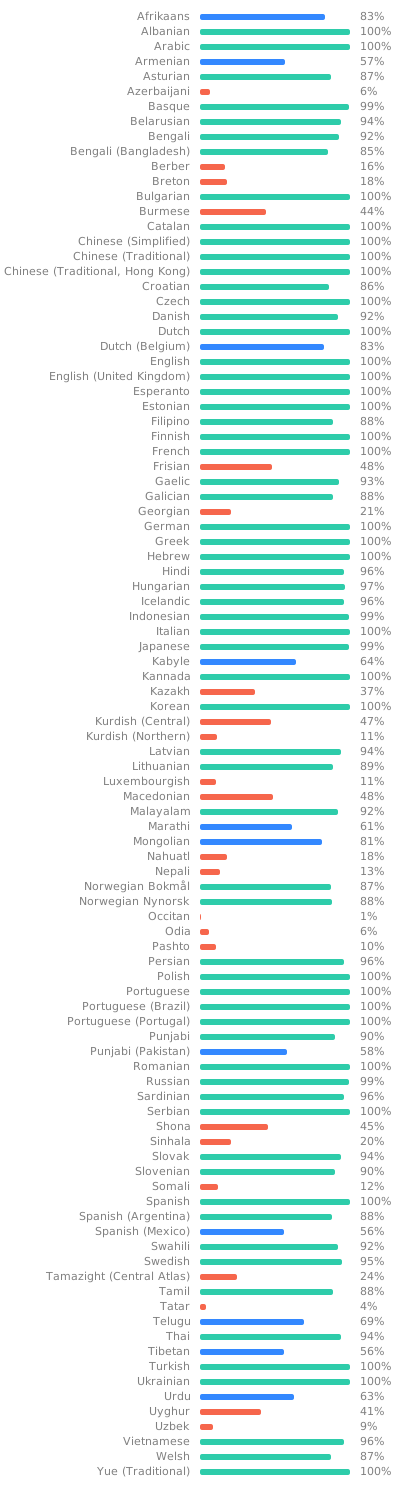](https://hosted.weblate.org/engage/f-droid/?utm_source=widget)
标签:Android, DSL, F-Droid, Kotlin, 后台面板检测, 应用商店, 软件包管理器