nfstream/nfstream
GitHub: nfstream/nfstream
NFStream 是一个跨平台 Python 网络流数据分析框架,提供灵活的数据结构来简化在线/离线网络流量的处理、特征提取与机器学习建模。
Stars: 1216 | Forks: 144

[**NFStream**][repo] 是一个多平台的 Python 框架,提供快速、灵活且富有表现力的数据结构,旨在使处理**在线**或**离线**网络数据变得简单直观。它的目标是成为 Python 用于实际**真实世界**网络流数据分析的基础高级构建块。此外,它还有一个更宏大的目标,即成为**面向研究人员的统一网络数据分析框架**,确保实验间的数据可复现性。
## 目录
- [目录](#table-of-contents)
- [主要功能](#main-features)
- [如何获取?](#how-to-get-it)
- [如何使用?](#how-to-use-it)
- [加密应用识别与元数据提取](#encrypted-application-identification-and-metadata-extraction)
- [系统可见性](#system-visibility)
- [事后统计流特征提取](#post-mortem-statistical-flow-features-extraction)
- [早期统计流特征提取](#early-statistical-flow-features-extraction)
- [Pandas 导出接口](#pandas-export-interface)
- [CSV 导出接口](#csv-export-interface)
- [扩展 NFStream](#extending-nfstream)
- [机器学习模型训练与部署](#machine-learning-models-training-and-deployment)
- [训练模型](#training-the-model)
- [在实时流量上使用 ML 驱动的 streamer](#ml-powered-streamer-on-live-traffic)
- [从源码构建 ](#building-from-sources---)
- [贡献](#contributing)
- [道德规范](#ethics)
- [致谢](#credits)
- [引用](#citation)
- [作者](#authors)
- [支持组织](#supporting-organizations)
- [使用 NFStream 的出版物](#publications-that-use-nfstream)
- [许可证](#license)
## 主要功能
* **性能:** NFStream 的设计目标就是快:在 Linux 上使用 [**AF_PACKET_V3/FANOUT**][packet],支持多进程、原生的基于 [**CFFI**][cffi] 的计算引擎,并全面支持 [**PyPy**][pypy]。
* **加密的第 7 层可见性:** NFStream 的深度包检测基于 [**nDPI**][ndpi]。
这使得 NFStream 能够执行 [**可靠**][reliable] 的加密应用识别和元数据指纹提取(例如 TLS、SSH、DHCP、HTTP)。
* **系统可见性:** NFStream 会探测被监控系统的内核,以获取有关打开的 Internet 套接字的信息,并在应用层收集有保证的真实数据(进程名、PID 等)。
* **统计特征提取:** NFStream 提供了最先进的基于流的统计特征提取。
它包括事后统计特征(例如,数据包大小和到达时间间隔的最小值、平均值、标准差和最大值)以及早期流特征(例如,前 n 个数据包的大小、到达时间间隔和方向的序列)。
* **灵活性:** NFStream 易于使用 [**NFPlugins**][nfplugin] 进行扩展。只需几行 Python 代码即可创建新的流特征。
* **面向机器学习:** NFStream 旨在使用于网络流量管理的机器学习方法具有可复现性和可部署性。通过使用 NFStream 作为通用框架,研究人员可以确保模型使用相同的特征计算逻辑进行训练,从而实现公平比较。此外,训练好的模型可以使用 [**NFPlugins**][nfplugin] 在实时网络中进行部署和评估。
## 如何获取?
最新发布版本的二进制安装程序可在 Pypi 上获取。
```
pip install nfstream
```
## 如何使用?
### 加密应用识别与元数据提取
在处理大型 pcap 文件并希望将其聚合为带有标签的网络流时?**NFStream** 只需几行代码就能让这个过程变得更容易:
```
from nfstream import NFStreamer
# 我们显示所有 streamer 参数及其默认值。
# 有关每个参数的详细信息,请参见文档。
# https://www.nfstream.org/docs/api#nfstreamer
my_streamer = NFStreamer(source="facebook.pcap", # or live network interface
decode_tunnels=True,
bpf_filter=None,
promiscuous_mode=True,
snapshot_length=1536,
idle_timeout=120,
active_timeout=1800,
accounting_mode=0,
udps=None,
n_dissections=20,
statistical_analysis=False,
splt_analysis=0,
n_meters=0,
max_nflows=0,
performance_report=0,
system_visibility_mode=0,
system_visibility_poll_ms=100)
for flow in my_streamer:
print(flow) # print it.
```
```
# 有关每个功能的详细描述,请参见文档。
# https://www.nfstream.org/docs/api#nflow
NFlow(id=0,
expiration_id=0,
src_ip='192.168.43.18',
src_mac='30:52:cb:6c:9c:1b',
src_oui='30:52:cb',
src_port=52066,
dst_ip='66.220.156.68',
dst_mac='98:0c:82:d3:3c:7c',
dst_oui='98:0c:82',
dst_port=443,
protocol=6,
ip_version=4,
vlan_id=0,
tunnel_id=0,
bidirectional_first_seen_ms=1472393122365,
bidirectional_last_seen_ms=1472393123665,
bidirectional_duration_ms=1300,
bidirectional_packets=19,
bidirectional_bytes=5745,
src2dst_first_seen_ms=1472393122365,
src2dst_last_seen_ms=1472393123408,
src2dst_duration_ms=1043,
src2dst_packets=9,
src2dst_bytes=1345,
dst2src_first_seen_ms=1472393122668,
dst2src_last_seen_ms=1472393123665,
dst2src_duration_ms=997,
dst2src_packets=10,
dst2src_bytes=4400,
application_name='TLS.Facebook',
application_category_name='SocialNetwork',
application_is_guessed=0,
application_confidence=4,
requested_server_name='facebook.com',
client_fingerprint='t12d1310h2_27a29bd8d6e6_85173d161f9a',
server_fingerprint='2d1eb5817ece335c24904f516ad5da12',
user_agent='',
content_type='')
```
### 系统可见性
NFStream 会探测被监控系统的内核,以获取有关打开的 Internet 套接字的信息,并在应用层收集有保证的真实数据(进程名、PID 等)。
```
from nfstream import NFStreamer
my_streamer = NFStreamer(source="Intel(R) Wi-Fi 6 AX200 160MHz", # Live capture mode.
# Disable L7 dissection for readability purpose only.
n_dissections=0,
system_visibility_poll_ms=100,
system_visibility_mode=1)
for flow in my_streamer:
print(flow) # print it.
```
```
# 有关每个功能的详细描述,请参见文档。
# https://www.nfstream.org/docs/api#nflow
NFlow(id=0,
expiration_id=0,
src_ip='192.168.43.18',
src_mac='30:52:cb:6c:9c:1b',
src_oui='30:52:cb',
src_port=59339,
dst_ip='184.73.244.37',
dst_mac='98:0c:82:d3:3c:7c',
dst_oui='98:0c:82',
dst_port=443,
protocol=6,
ip_version=4,
vlan_id=0,
tunnel_id=0,
bidirectional_first_seen_ms=1638966705265,
bidirectional_last_seen_ms=1638966706999,
bidirectional_duration_ms=1734,
bidirectional_packets=98,
bidirectional_bytes=424464,
src2dst_first_seen_ms=1638966705265,
src2dst_last_seen_ms=1638966706999,
src2dst_duration_ms=1734,
src2dst_packets=22,
src2dst_bytes=2478,
dst2src_first_seen_ms=1638966705345,
dst2src_last_seen_ms=1638966706999,
dst2src_duration_ms=1654,
dst2src_packets=76,
dst2src_bytes=421986,
# The process that generated this reported flow.
system_process_pid=14596,
system_process_name='FortniteClient-Win64-Shipping.exe')
```
### 事后统计流特征提取
NFStream 可执行 48 项事后流统计特征提取,其中包括详细的 TCP 标志分析,以及各个方向上数据包大小和到达时间间隔的最小值、平均值、最大值和标准差。
```
from nfstream import NFStreamer
my_streamer = NFStreamer(source="facebook.pcap",
# Disable L7 dissection for readability purpose.
n_dissections=0,
statistical_analysis=True)
for flow in my_streamer:
print(flow)
```
```
# 有关每个功能的详细描述,请参见文档。
# https://www.nfstream.org/docs/api#nflow
NFlow(id=0,
expiration_id=0,
src_ip='192.168.43.18',
src_mac='30:52:cb:6c:9c:1b',
src_oui='30:52:cb',
src_port=52066,
dst_ip='66.220.156.68',
dst_mac='98:0c:82:d3:3c:7c',
dst_oui='98:0c:82',
dst_port=443,
protocol=6,
ip_version=4,
vlan_id=0,
tunnel_id=0,
bidirectional_first_seen_ms=1472393122365,
bidirectional_last_seen_ms=1472393123665,
bidirectional_duration_ms=1300,
bidirectional_packets=19,
bidirectional_bytes=5745,
src2dst_first_seen_ms=1472393122365,
src2dst_last_seen_ms=1472393123408,
src2dst_duration_ms=1043,
src2dst_packets=9,
src2dst_bytes=1345,
dst2src_first_seen_ms=1472393122668,
dst2src_last_seen_ms=1472393123665,
dst2src_duration_ms=997,
dst2src_packets=10,
dst2src_bytes=4400,
bidirectional_min_ps=66,
bidirectional_mean_ps=302.36842105263156,
bidirectional_stddev_ps=425.53315715259754,
bidirectional_max_ps=1454,
src2dst_min_ps=66,
src2dst_mean_ps=149.44444444444446,
src2dst_stddev_ps=132.20354676701294,
src2dst_max_ps=449,
dst2src_min_ps=66,
dst2src_mean_ps=440.0,
dst2src_stddev_ps=549.7164925870628,
dst2src_max_ps=1454,
bidirectional_min_piat_ms=0,
bidirectional_mean_piat_ms=72.22222222222223,
bidirectional_stddev_piat_ms=137.34994188549086,
bidirectional_max_piat_ms=398,
src2dst_min_piat_ms=0,
src2dst_mean_piat_ms=130.375,
src2dst_stddev_piat_ms=179.72036811192467,
src2dst_max_piat_ms=415,
dst2src_min_piat_ms=0,
dst2src_mean_piat_ms=110.77777777777777,
dst2src_stddev_piat_ms=169.51458475436397,
dst2src_max_piat_ms=409,
bidirectional_syn_packets=2,
bidirectional_cwr_packets=0,
bidirectional_ece_packets=0,
bidirectional_urg_packets=0,
bidirectional_ack_packets=18,
bidirectional_psh_packets=9,
bidirectional_rst_packets=0,
bidirectional_fin_packets=0,
src2dst_syn_packets=1,
src2dst_cwr_packets=0,
src2dst_ece_packets=0,
src2dst_urg_packets=0,
src2dst_ack_packets=8,
src2dst_psh_packets=4,
src2dst_rst_packets=0,
src2dst_fin_packets=0,
dst2src_syn_packets=1,
dst2src_cwr_packets=0,
dst2src_ece_packets=0,
dst2src_urg_packets=0,
dst2src_ack_packets=10,
dst2src_psh_packets=5,
dst2src_rst_packets=0,
dst2src_fin_packets=0)
```
### 早期统计流特征提取
NFStream 可执行早期(最多 255 个数据包)流统计特征提取(在文献中称为 SPLT 分析)。它被概括为这些数据包的方向、大小和到达时间间隔的序列。
```
from nfstream import NFStreamer
my_streamer = NFStreamer(source="facebook.pcap",
# We disable l7 dissection for readability purpose.
n_dissections=0,
splt_analysis=10)
for flow in my_streamer:
print(flow)
```
```
# 有关每个功能的详细描述,请参见文档。
# https://www.nfstream.org/docs/api#nflow
NFlow(id=0,
expiration_id=0,
src_ip='192.168.43.18',
src_mac='30:52:cb:6c:9c:1b',
src_oui='30:52:cb',
src_port=52066,
dst_ip='66.220.156.68',
dst_mac='98:0c:82:d3:3c:7c',
dst_oui='98:0c:82',
dst_port=443,
protocol=6,
ip_version=4,
vlan_id=0,
tunnel_id=0,
bidirectional_first_seen_ms=1472393122365,
bidirectional_last_seen_ms=1472393123665,
bidirectional_duration_ms=1300,
bidirectional_packets=19,
bidirectional_bytes=5745,
src2dst_first_seen_ms=1472393122365,
src2dst_last_seen_ms=1472393123408,
src2dst_duration_ms=1043,
src2dst_packets=9,
src2dst_bytes=1345,
dst2src_first_seen_ms=1472393122668,
dst2src_last_seen_ms=1472393123665,
dst2src_duration_ms=997,
dst2src_packets=10,
dst2src_bytes=4400,
# The sequence of 10 first packet direction, size and inter arrival time.
splt_direction=[0, 1, 0, 0, 1, 1, 0, 1, 0, 1],
splt_ps=[74, 74, 66, 262, 66, 1454, 66, 1454, 66, 463],
splt_piat_ms=[0, 303, 0, 0, 313, 0, 0, 0, 0, 1])
```
### Pandas 导出接口
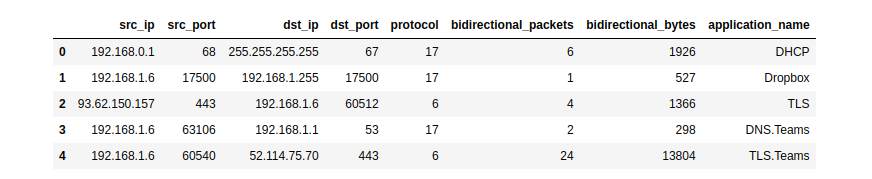
NFStream 原生支持将 Pandas 作为导出接口。
```
# 有关更多详细信息,请参见文档。
# https://www.nfstream.org/docs/api#pandas-dataframe-conversion
from nfstream import NFStreamer
my_dataframe = NFStreamer(source='teams.pcap').to_pandas()[["src_ip",
"src_port",
"dst_ip",
"dst_port",
"protocol",
"bidirectional_packets",
"bidirectional_bytes",
"application_name"]]
my_dataframe.head(5)
```
### CSV 导出接口
NFStream 原生支持将 CSV 文件格式作为导出接口。
```
# 有关更多详细信息,请参见文档。
# https://www.nfstream.org/docs/api#csv-file-conversion
flows_count = NFStreamer(source='facebook.pcap').to_csv(path=None,
columns_to_anonymize=(),
flows_per_file=0,
rotate_files=0)
```
### 扩展 NFStream
没有找到特定的流特征?只需几行代码即可向 **NFStream** 添加插件:
```
from nfstream import NFPlugin
class MyCustomPktSizeFeature(NFPlugin):
def on_init(self, packet, flow):
# flow creation with the first packet
if packet.raw_size == self.custom_size:
flow.udps.packet_with_custom_size = 1
else:
flow.udps.packet_with_custom_size = 0
def on_update(self, packet, flow):
# flow update with each packet belonging to the flow
if packet.raw_size == self.custom_size:
flow.udps.packet_with_custom_size += 1
extended_streamer = NFStreamer(source='facebook.pcap',
udps=MyCustomPktSizeFeature(custom_size=555))
for flow in extended_streamer:
# see your dynamically created metric in generated flows
print(flow.udps.packet_with_custom_size)
```
### 机器学习模型训练与部署
以下简单的示例演示了如何为流量流分类训练和部署一种机器学习方法。
我们希望基于 bidirectional_packets 和 bidirectional_bytes 作为输入特征,对社交网络类别的流进行分类。为了简便起见,我们决定仅在流过期阶段进行预测。
#### 训练模型
```
from nfstream import NFPlugin, NFStreamer
import numpy
from sklearn.ensemble import RandomForestClassifier
df = NFStreamer(source="training_traffic.pcap").to_pandas()
X = df[["bidirectional_packets", "bidirectional_bytes"]]
y = df["application_category_name"].apply(lambda x: 1 if 'SocialNetwork' in x else 0)
model = RandomForestClassifier()
model.fit(X, y)
```
#### 在实时流量上使用 ML 驱动的 streamer
```
class ModelPrediction(NFPlugin):
def on_init(self, packet, flow):
flow.udps.model_prediction = 0
def on_expire(self, flow):
# You can do the same in on_update entrypoint and force expiration with custom id.
to_predict = numpy.array([flow.bidirectional_packets,
flow.bidirectional_bytes]).reshape((1,-1))
flow.udps.model_prediction = self.my_model.predict(to_predict)
ml_streamer = NFStreamer(source="eth0", udps=ModelPrediction(my_model=model))
for flow in ml_streamer:
print(flow.udps.model_prediction)
```
官方[**文档**][documentation]中提供了更多的 NFPlugin 示例和详细信息。您还可以使用我们的[**实时演示 notebook**][demo] 在无需安装的情况下测试 NFStream。
## 从源码构建 ![l] ![m] ![w]
要从源码构建 **NFStream**,请阅读官方文档中提供的[**安装指南**][install]。
## 道德规范
**NFStream** 专为网络数据研究和取证而设计。研究人员和网络数据科学家可以使用此框架来构建可靠的数据集,并训练和评估网络应用的机器学习模型。
与任何数据包监控工具一样,**NFStream** 也可能被滥用。**请勿在您不拥有或管理的任何网络上运行它**。
### 引用
[**NFStream 论文**][doi] 发表在 [**Computer Networks (COMNET)**][comnet] 上。如果您在科学出版物中使用 NFStream,我们希望您能引用以下文章:
```
@article{AOUINI2022108719,
title = {NFStream: A flexible network data analysis framework},
author = {Aouini, Zied and Pekar, Adrian},
doi = {10.1016/j.comnet.2021.108719},
issn = {1389-1286},
journal = {Computer Networks},
pages = {108719},
year = {2022},
publisher = {Elsevier},
volume = {204},
url = {https://www.sciencedirect.com/science/article/pii/S1389128621005739}
}
```
### 支持组织
以下组织对 NFStream 提供了支持:
* [**SoftAtHome**](https://www.softathome.com/):NFStream 开发的支持者。
* [**Technical University of Košice**](https://www.tuke.sk/):为数据集生成和存储提供硬件和基础设施。
* [**ntop**](https://www.ntop.org/):为 [**nDPI**][ndpi] 集成提供技术支持。
* [**The Nmap Project**](https://nmap.org):为 [**Npcap**][npcap] 集成提供技术支持(Windows CI 上的 NPCAP OEM 安装程序)。
* [**Google OSS Fuzz**](https://google.github.io/oss-fuzz/):为 NFStream 项目提供持续模糊测试支持。
[![sah]](https://www.softathome.com/) [![tuke]](https://www.tuke.sk/) [![ntop]](https://www.ntop.org/) [![nmap]](https://nmap.org/) [![google]](https://google.github.io/oss-fuzz/)
## 使用 NFStream 的出版物
已有超过 [**100 篇研究论文**](https://scholar.google.com/scholar?hl=en&as_sdt=2005&sciodt=0,5&cites=14084093141225707606&scipsc=) 将 NFStream 作为其处理流水线的一部分。
## 许可证
本项目基于 LGPLv3 许可证授权 - 有关详细信息,请参阅 [**License**][license] 文件。
| Live Notebook |

|
| Project Website |

|
| Discussion Channel |

|
| Latest Release |

|
| Supported Versions |


|
| Project License |

|
| Continuous Integration |



|
| Code Quality |


)
|
标签:Python, 代码示例, 数据分析, 无后门, 网络框架, 网络流量分析, 逆向工具