
# CrossOver
**一个适用于任何屏幕上任何游戏的免费准星叠加层。**
530+ 款准星 · 21.7万 月活用户 · Microsoft Store 4.8星评分 · Windows · macOS · Linux
[](https://github.com/lacymarrow/crossover/releases/latest)
[](https://github.com/lacymarrow/crossover/releases/latest)
[](https://snapcraft.io/crossover)
[](https://snapcraft.io/crossover)
[](LICENSE)
[](https://github.com/lacymarrow/crossover/discussions)
[](https://github.com/lacymarrow/crossover/actions/workflows/crossover-ci.yml)
[](https://circleci.com/gh/lacymarrow/crossover/)
[](https://ci.appveyor.com/project/lacymarrow/crossover/)
[](https://github.com/lacymarrow/crossover/stargazers)
[](https://github.com/sponsors/lacymarrow)
### **[crossover.lacy.sh →](https://crossover.lacy.sh)**


[**Windows 版下载**](https://github.com/lacymorrow/crossover/releases/latest/download/CrossOver.exe) · [所有下载 (Mac, Linux, Windows)](https://github.com/lacymorrow/crossover/releases/latest)
## 它是什么
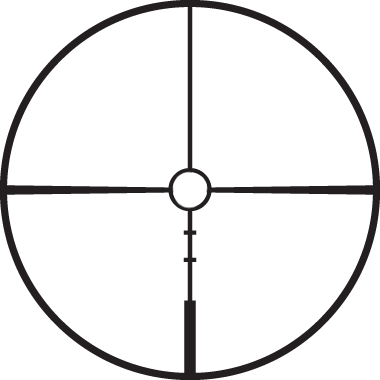
CrossOver 会将一个可自定义的准星固定在任何窗口的顶部,让你能确切看到瞄准的位置。内置 530+ 款准星 —— 真正的瞄准镜分划、圆点、V型标线、战术光学瞄准 —— 或者直接拖入任何图片来使用。调整大小、重新着色、调节透明度,并将其锁定到位。
它只是一个叠加层。没有注入。不触碰游戏文件。**不会导致封号。**第一天起就完全免费。
## 快速开始
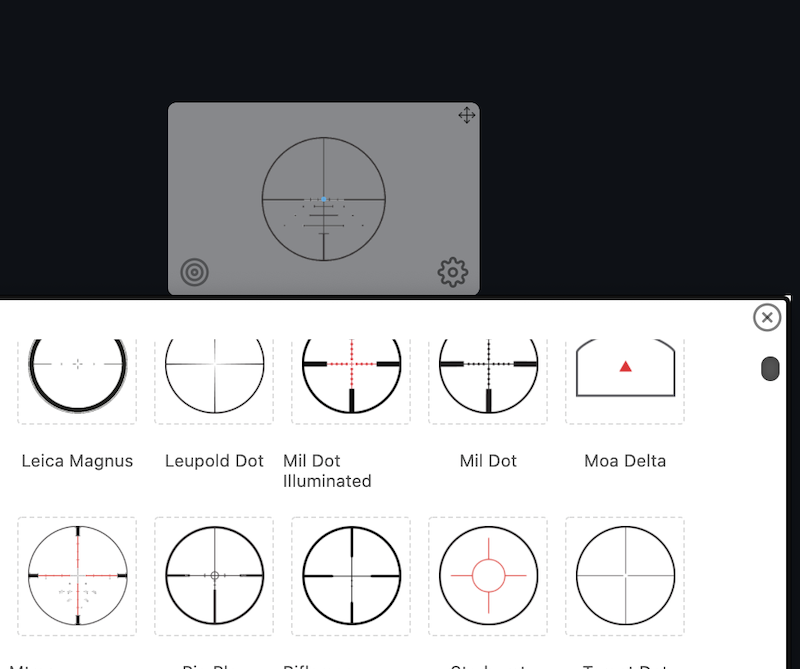
1. **选择准星** —— 点击靶心 ◎ 打开选择器,或拖入你自己的图片。
2. **移动位置** —— 点击并拖动准星到任何地方,双击靶心可使其居中。
3. **微调** —— 使用
Ctrl+
Alt+
Shift+
↑↓←→ 逐像素移动。
4. **锁定** —— 使用
Ctrl+
Alt+
Shift+
X。
5. **重置所有设置** —— 使用
Ctrl+
Alt+
Shift+
R。



## 功能
- **530+ 款内置准星** —— 真正的瞄准镜分划、圆点/十字变体、V型标线、MLG、Kenney、Diatoku 以及特别请求的款式。
- **自定义准星** —— 将任何图片(PNG/SVG/GIF)拖到窗口上即可使用。
- **跨平台** —— 在 Windows、macOS 和 Linux 上均提供一流的支持。
- **多显示器** —— 只需一个快捷键即可在连接的显示器之间移动准星。
- **克隆准星** —— 最多可固定 14 个影子准星,以标记多个位置。
- **完全自定义** —— 大小、颜色、透明度、SVG 填充、明亮/暗黑模式、应用强调色。
- **中心点/分划** —— 形状和颜色独立于准星本身。
- **开镜隐藏** —— 绑定鼠标按键;当你开镜瞄准时准星会自动隐藏。
- **持久化设置** —— 自动记住你的设置。
- **自动更新** —— 在后台自动保持最新版本(macOS, Windows)。
- **内置色盲支持** —— 完全控制颜色和对比度。
- **无遥测** —— 你的数据仅保存在你的设备上。CrossOver 仅会连接 GitHub 以获取更新。
## 安装
### Windows
[**下载 `CrossOver.exe`**](https://github.com/lacymorrow/crossover/releases/latest/download/CrossOver.exe)(或从 [发布页面](https://github.com/lacymorrow/crossover/releases/latest) 获取便携版)。
如果 Windows 提示*“Windows 已保护你的电脑”*:点击 **更多信息** → **仍要运行**。
或者从 [Microsoft Store](https://apps.microsoft.com/detail/9mtd5zln7nl1?hl=en-US&gl=US) 获取。
### macOS
从 [发布页面](https://github.com/lacymorrow/crossover/releases/latest) 下载适合你系统架构的 `.dmg` 文件(Intel `x64` 或 Apple Silicon `arm64`)。
如果 macOS 提示*“无法打开 CrossOver,因为无法验证开发者”*:找到该应用,按住 **Control 键单击** 它,然后选择 **打开**。
#### 疑难解答
### Linux
从 [发布页面](https://github.com/lacymorrow/crossover/releases/latest) 下载 `.AppImage`、`.apk`、`.deb`、`.freebsd`、`.pacman`、`.rpm` 或 `.snap`,或者从 Snap Store 安装:
```
$ sudo snap install crossover
```
下载后需要将 `AppImage` [设为可执行文件](http://discourse.appimage.org/t/how-to-make-an-appimage-executable/80)。某些轻量级桌面环境需要合成器才能使叠加层正常工作([#230](https://github.com/lacymorrow/crossover/issues/230))。
高级功能(锁定、隐藏、ADS 调整大小、鼠标跟随)依赖于 `libxkbcommon`:
```
$ sudo apt install libxkbcommon-x11-0 # Ubuntu / Pop!_OS
$ sudo dnf install libxkbcommon-x11 # Fedora
```
## 用法
**定位** —— 点击并将准星拖动到任何屏幕上的任何位置。双击靶心使其居中。
**选择** —— 点击靶心 ◎ 打开选择器。将任何图片拖到窗口上即可使用自定义准星。
**自定义** —— 使用齿轮图标。请参阅下方的[设置](#settings)。
**退出** —— 使用
Ctrl+
Alt+
Shift+
X 解锁,然后点击关闭图标(macOS 在左上角,Windows 上则右键单击 → 关闭)。
### 默认键盘快捷键
| 操作 | 快捷键 |
|---|---|
| 切换设置 / 锁定准星 |
Ctrl+
Alt+
Shift+
X |
| 逐像素移动 |
Ctrl+
Alt+
Shift+
↑↓←→ |
| 隐藏 / 显示 |
Ctrl+
Alt+
Shift+
H |
| 在当前显示器上居中 |
Ctrl+
Alt+
Shift+
C |
| 移至下一个显示器 |
Ctrl+
Alt+
Shift+
M |
| 在影子窗口中克隆 |
Ctrl+
Alt+
Shift+
D |
| 关于窗口 |
Ctrl+
Alt+
Shift+
A |
| 重置所有设置 |
Ctrl+
Alt+
Shift+
R |
在 macOS 上,
⌥ 替代了
Alt。所有按键绑定(重置除外)均可在设置中重新映射或清除 —— 点击输入框并按下你的新组合键,或者按
Backspace 键禁用。
## 设置
| 设置项 | 作用 |
|---|---|
| **Crosshair** | 从 530+ 内置选项中选择或拖入自定义图片。调整大小和透明度。 |
| **Reticle** | 中心的小圆点/十字。选择形状和颜色,或将其关闭。 |
| **Hide on ADS** | 绑定一个鼠标按键;按住该键时准星会隐藏。 |
| **Hardware acceleration** | 少数用户在某些游戏中会遇到掉帧问题([#70](https://github.com/lacymorrow/crossover/issues/70))。CrossOver 不应增加延迟 —— 如果确实增加了,请切换此选项并禁用 Hide on ADS。 |
| **Start on boot** | 在系统启动时自动运行 CrossOver。 |
| **Automatic updates** | 默认开启。禁用可阻止所有网络请求。CrossOver 仅会与 GitHub 通信。 |
### 克隆准星
克隆窗口共享主窗口的设置,并且不支持所有功能(不支持鼠标跟随)。它们的状态不会单独保存,并且在主窗口关闭时它们都会关闭。

## 游戏兼容性
| 运行状态 | 游戏 | 备注 |
| ----- | ----- | ----- |
| ✅ | Among Us | |
| ✅ | Apex Legends | 在 `Windowed`(窗口化)模式下运行 |
| ✅ | Call of Duty: Black Ops Cold War | `Windowed`(窗口化)、`Windowed Fullscreen`(窗口化全屏)、`Multi-Monitor`(多显示器) |
| ✅ | Call of Duty: Warzone | `Windowed`(窗口化) |
| ✅ | Counter-Strike (1.6) | `Windowed`(窗口化) |
| ✅ | CS:GO | `Windowed`(窗口化)。配合 AHK 脚本可能在其他模式下工作 |
| ✅ | CS2 | `Windowed`(窗口化)。在 `Fullscreen`(全屏)下无效(无论是否使用 AHK) |
| ❌ | Cyberpunk 2077 | Vulkan |
| ✅ | Dead by Daylight | `Windowed`(窗口化)和 `Fullscreen`(全屏) |
| ✅ | Deceit | `Windowed`(窗口化) |
| ✅ | Destiny 2 | `Windowed Fullscreen`(窗口化全屏);有部分报告称 `Fullscreen`(全屏)也可行 |
| ✅ | Empyrion: Galactic Survival | `Windowed`(窗口化) |
| ❌ | Escape from Tarkov | CrossOver 运行时游戏无法启动([#47](https://github.com/lacymorrow/crossover/issues/47#issuecomment-987762466)) |
| ✅ | FiveM | `Fullscreen`(全屏) |
| ✅ | Fortnite | `Windowed Fullscreen`(窗口化全屏) |
| ✅ | GTFO | `Fullscreen window`(全屏窗口)、`Maximized window`(最大化窗口)、`Windowed`(窗口化)(不支持 `Exclusive Fullscreen` 独占全屏) |
| ❌ | Hunt: Showdown | 仅在 `Windowed`(窗口化)下有效 |
| ✅ | Killing Floor | `Windowed`(窗口化) |
| ✅ | League of Legends | `Borderless`(无边框)和 `Windowed`(窗口化) |
| ✅ | Left 4 Dead 2 | `Borderless`(无边框)和 `Windowed`(窗口化) |
| ✅ | Halo: Master Chief Collection | `Borderless`(无边框)和 `Windowed`(窗口化) |
| ❌ | Metro Exodus Gold Edition | 在任何情况下均无效 |
| ✅ | Overwatch | `Windowed Fullscreen`(窗口化全屏) |
| ✅ | Phasmophobia | `Windowed`(窗口化)和 `Fullscreen`(全屏) |
| ✅ | Planetside 2 | `Windowed`(窗口化)和 `Windowed Fullscreen`(窗口化全屏) |
| ❌ | Rainbow 6: Siege | Vulkan |
| ❌ | RedM | 无效 |
| ✅ | Roblox | `Fullscreen`(全屏)(Windows)、`Windowed Fullscreen`(窗口化全屏)(macOS) |
| ✅ | Rocket League | `Windowed`(窗口化) |
| ✅ | Rust | `Windowed Fullscreen`(窗口化全屏) |
| ❌ | Sea of Thieves | **会导致封号 —— 切勿使用** |
| ✅ | Star Wars Battlefront 2 | `Borderless`(无边框) |
| ✅ | The Finals | `Borderless`(无边框)和 `Windowed`(窗口化) |
| ✅ | Tom Clancy's The Division 2 | `Windowed Fullscreen`(窗口化全屏) |
| ✅ | Tony Hawk's Pro Skater 1+2 | 只是个有趣的游戏 |
| ❌ | 基于 Vulkan 的游戏 | |
| ✅ | Valorant | `Borderless`(无边框)和 `Windowed`(窗口化) |### 操作系统
| 运行状态 | 操作系统 | 备注 |
| ----- | ----- | ----- |
| ✅ | macOS arm64 (M1/M2/M3/M4) | 首次启动可能需要应用 [隔离修复](#macos) |
| ✅ | macOS x64 (Intel) | 已在 Catalina 10.15.1 上测试 |
| ✅ | Windows 11 | |
| ✅ | Windows 10 (ia32 和 x64) | 自定义鼠标指针在 x64 系统的任务栏拖动区域中不渲染 |
| ✅ | Windows 8 | |
| ❓ | Windows 7 | 家庭版无效;专业版有效([#63](https://github.com/lacymorrow/crossover/issues/63)) |
| ❓ | Arch | 已在 v2021.01.01 版本测试 |
| ✅ | Elementary OS | v5.1+ |
| ✅ | Fedora | v33+(快捷键可能与桌面切换冲突) |
| ✅ | Linux Mint | v20.1+ |
| ✅ | Ubuntu | v20.04.1+ |
## Bug 与限制
### 被全屏应用隐藏
CrossOver 适用于窗口化和无边框应用程序。如果你的游戏支持,请使用 **窗口化全屏**。参见 [#1](https://github.com/lacymorrow/crossover/issues/1)。
#### 全屏模式的替代方案 (Windows)
如果你确实需要独占全屏,[AutoHotKey](https://www.autohotkey.com/) 有时可以将叠加层强制置于顶部 —— 由 [@girkovarpa](https://github.com/lacymorrow/crossover/issues/47#issuecomment-805017469) 提供。将以下内容保存为 `script.ahk` 并双击运行:
```
Home::Winset, Alwaysontop, , CrossOver
```
在游戏中按
Space 键(空格键)可将叠加层置前。注意:这可能会导致 FPS 问题,并且不适用于所有游戏([#47](https://github.com/lacymorrow/crossover/issues/47#issuecomment-895995990))。
### 开启 V-Sync / G-Sync 时卡顿
一些用户报告称在使用 V-Sync、G-Sync 或其他自适应同步技术(Adaptive Sync)时会出现卡顿([#330](https://github.com/lacymorrow/crossover/issues/330))。如果遇到此问题,请禁用自适应同步。
### Linux 合成器的边缘情况
CrossOver 在 KDE Plasma 的 KWin 上可能无法正常渲染 —— 尝试使用 GNOME (Mutter) 或其他不同的合成器。完全缺失合成器会导致异常行为([#230](https://github.com/lacymorrow/crossover/issues/230))。
在 Lutris 中,你可以针对单个游戏更换合成器:
```
# 启动前 script
#!/bin/bash
mutter --replace # or: gnome-shell --replace
```
```
# 启动后 script
#!/bin/bash
kwin_x11 --replace
plasmashell --replace
```
## 开发
有关完整的构建、测试、调试和发布指南,请参阅 [`docs/DEVELOPMENT.md`](docs/DEVELOPMENT.md)。快速开始:
```
$ nvm install && nvm use
$ npm install
$ npm start
```
欢迎提交 Bug 报告、功能请求和 PR —— 请提交一个 [issue](https://github.com/lacymorrow/crossover/issues/new/choose) 或加入 [Discussions](https://github.com/lacymorrow/crossover/discussions) 讨论。
## 许可证
[FSL-1.1-MIT](LICENSE) —— Functional Source License,包含 2 年后转换为 MIT 的未来授权。当前提供源码;两年后将转换为 MIT 许可证。