GACWR/OpenUBA
GitHub: GACWR/OpenUBA
一个开源的用户与实体行为分析(UEBA)框架,专注于提供透明、可审计的「白盒」安全模型管理与可视化规则编排能力。
Stars: 490 | Forks: 280
 # 开放式用户行为分析 (v0.0.2)
一个健壮、灵活且轻量级的开源用户与实体行为分析 (UEBA) 框架,用于安全分析。由网络安全行业的科学家和安全分析师用 luv 开发。
| 状态 | 徽章 | 状态 | 徽章 |
| --- | --- | --- | --- |
| `Build` | [](https://github.com/GACWR/OpenUBA/actions) | `License` | [](https://github.com/GACWR/OpenUBA/blob/master/LICENSE) |
| `Issues` | [](https://github.com/GACWR/OpenUBA/issues) | `Closed Issues` | [](https://github.com/GACWR/OpenUBA/issues?q=is%3Aissue+is%3Aclosed) |
| `Pull Requests` | [](https://github.com/GACWR/OpenUBA/pulls) | `Last Commit` | [](https://github.com/GACWR/OpenUBA/commits/master) |
| `Top Language` | [](https://github.com/GACWR/OpenUBA) | `Code Size` | [](https://github.com/GACWR/OpenUBA) |
| `Repo Size` | [](https://github.com/GACWR/OpenUBA) | `Contributors` | [](https://github.com/GACWR/OpenUBA/graphs/contributors) |
| `Stars` | [](https://github.com/GACWR/OpenUBA/stargazers) | `Forks` | [](https://github.com/GACWR/OpenUBA/network/members) |
| `Releases` | [](https://github.com/GACWR/OpenUBA/releases) | `Platform` |  |
| `Python` |  | `TypeScript` |  |
| `FastAPI` |  | `Next.js` |  |
| `PostgreSQL` |  | `Kubernetes` |  |
| `Docker` | [](https://hub.docker.com/u/openuba) | `Spark` |  |
| `Elasticsearch` |  | `PRs Welcome` | [](https://github.com/GACWR/OpenUBA/pulls) |
| `Chat` |  | | |
## 目录
- [问题](#problem)
- [解决方案](#solution)
- [架构](#architecture)
- [技术栈](#tech-stack)
- [功能特性](#features)
- [规则画布](#rule-canvas)
- [模型库](#model-library)
- [模型执行沙箱](#model-execution-sandbox)
- [工作区与 SDK](#workspaces--sdk)
- [身份验证与访问控制](#authentication-and-access-control)
- [LLM 助手](#llm-assistant)
- [快速入门](#getting-started)
- [开发](#development)
- [Makefile 参考](#makefile-reference)
- [测试](#testing)
- [白皮书](#white-paper)
- [社区](#community)
- [许可证](#license)
## 问题
许多 UBA 平台通常在数据科学实践中采用“黑盒”方法,这对于那些对生成异常、基线和案例的底层模型细节不感兴趣的安全分析师来说可能最合适。这些平台将其模型视为 IP。
## 解决方案
OpenUBA 采用“开放模型”的方法,专为那一小部分对模型行为及其底层原理抱有真正好奇心的安全分析师而设计。我们坚信科学计算社区及其多年来的贡献(库、工具包等)。在安全领域,规则/模型的透明度对于合规性、响应/调查和决策至关重要。
OpenUBA 还利用了社区驱动的模型市场,类似于插件商店,其中插件即安全模型。该市场是 OpenUBA 用户为其特定用例安装安全模型的地方。模型开发者也可以上传他们的模型,使其他用户能够复用它们,无论是免费还是付费——这完全由模型开发者决定。
# 开放式用户行为分析 (v0.0.2)
一个健壮、灵活且轻量级的开源用户与实体行为分析 (UEBA) 框架,用于安全分析。由网络安全行业的科学家和安全分析师用 luv 开发。
| 状态 | 徽章 | 状态 | 徽章 |
| --- | --- | --- | --- |
| `Build` | [](https://github.com/GACWR/OpenUBA/actions) | `License` | [](https://github.com/GACWR/OpenUBA/blob/master/LICENSE) |
| `Issues` | [](https://github.com/GACWR/OpenUBA/issues) | `Closed Issues` | [](https://github.com/GACWR/OpenUBA/issues?q=is%3Aissue+is%3Aclosed) |
| `Pull Requests` | [](https://github.com/GACWR/OpenUBA/pulls) | `Last Commit` | [](https://github.com/GACWR/OpenUBA/commits/master) |
| `Top Language` | [](https://github.com/GACWR/OpenUBA) | `Code Size` | [](https://github.com/GACWR/OpenUBA) |
| `Repo Size` | [](https://github.com/GACWR/OpenUBA) | `Contributors` | [](https://github.com/GACWR/OpenUBA/graphs/contributors) |
| `Stars` | [](https://github.com/GACWR/OpenUBA/stargazers) | `Forks` | [](https://github.com/GACWR/OpenUBA/network/members) |
| `Releases` | [](https://github.com/GACWR/OpenUBA/releases) | `Platform` |  |
| `Python` |  | `TypeScript` |  |
| `FastAPI` |  | `Next.js` |  |
| `PostgreSQL` |  | `Kubernetes` |  |
| `Docker` | [](https://hub.docker.com/u/openuba) | `Spark` |  |
| `Elasticsearch` |  | `PRs Welcome` | [](https://github.com/GACWR/OpenUBA/pulls) |
| `Chat` |  | | |
## 目录
- [问题](#problem)
- [解决方案](#solution)
- [架构](#architecture)
- [技术栈](#tech-stack)
- [功能特性](#features)
- [规则画布](#rule-canvas)
- [模型库](#model-library)
- [模型执行沙箱](#model-execution-sandbox)
- [工作区与 SDK](#workspaces--sdk)
- [身份验证与访问控制](#authentication-and-access-control)
- [LLM 助手](#llm-assistant)
- [快速入门](#getting-started)
- [开发](#development)
- [Makefile 参考](#makefile-reference)
- [测试](#testing)
- [白皮书](#white-paper)
- [社区](#community)
- [许可证](#license)
## 问题
许多 UBA 平台通常在数据科学实践中采用“黑盒”方法,这对于那些对生成异常、基线和案例的底层模型细节不感兴趣的安全分析师来说可能最合适。这些平台将其模型视为 IP。
## 解决方案
OpenUBA 采用“开放模型”的方法,专为那一小部分对模型行为及其底层原理抱有真正好奇心的安全分析师而设计。我们坚信科学计算社区及其多年来的贡献(库、工具包等)。在安全领域,规则/模型的透明度对于合规性、响应/调查和决策至关重要。
OpenUBA 还利用了社区驱动的模型市场,类似于插件商店,其中插件即安全模型。该市场是 OpenUBA 用户为其特定用例安装安全模型的地方。模型开发者也可以上传他们的模型,使其他用户能够复用它们,无论是免费还是付费——这完全由模型开发者决定。
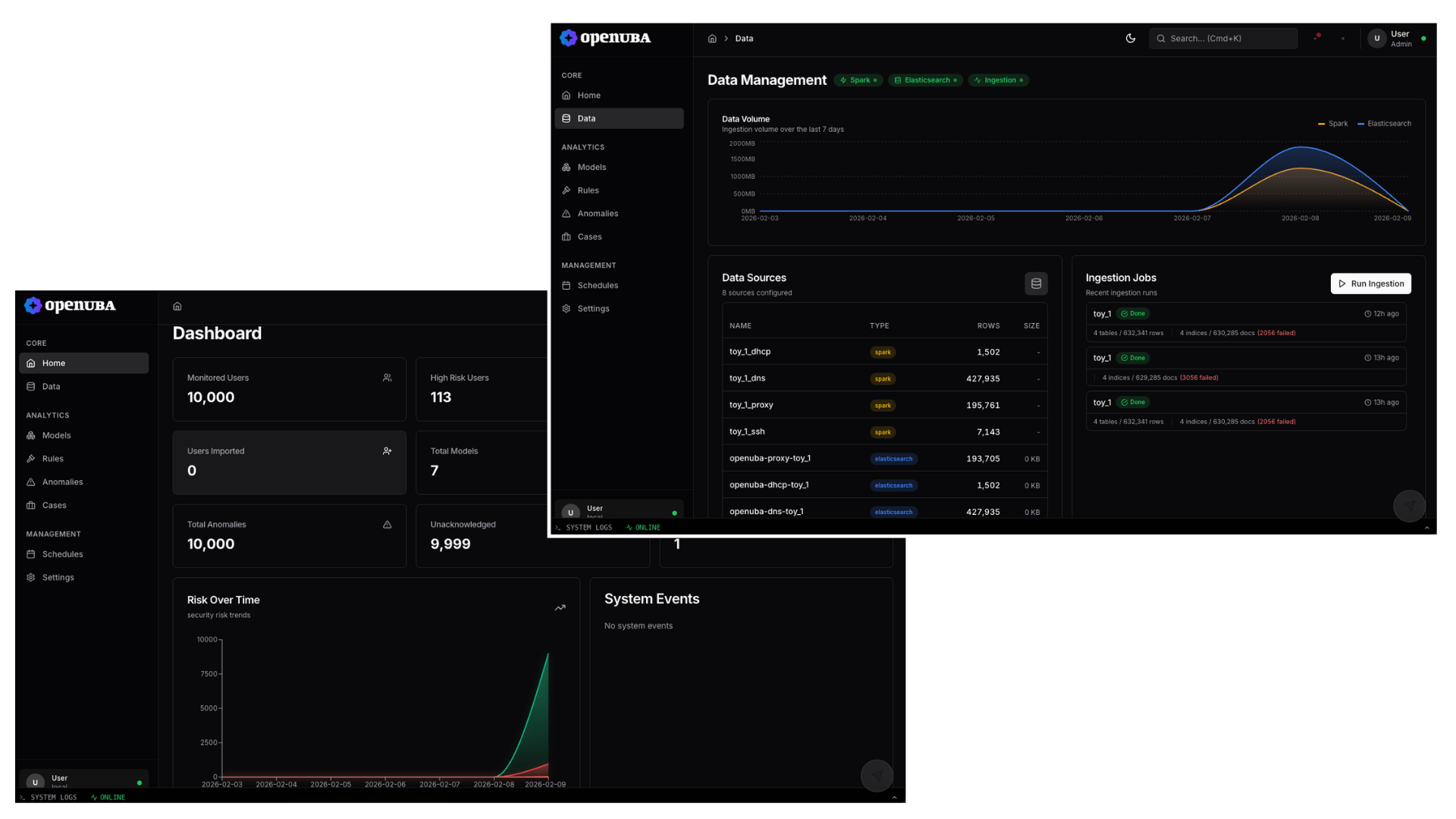

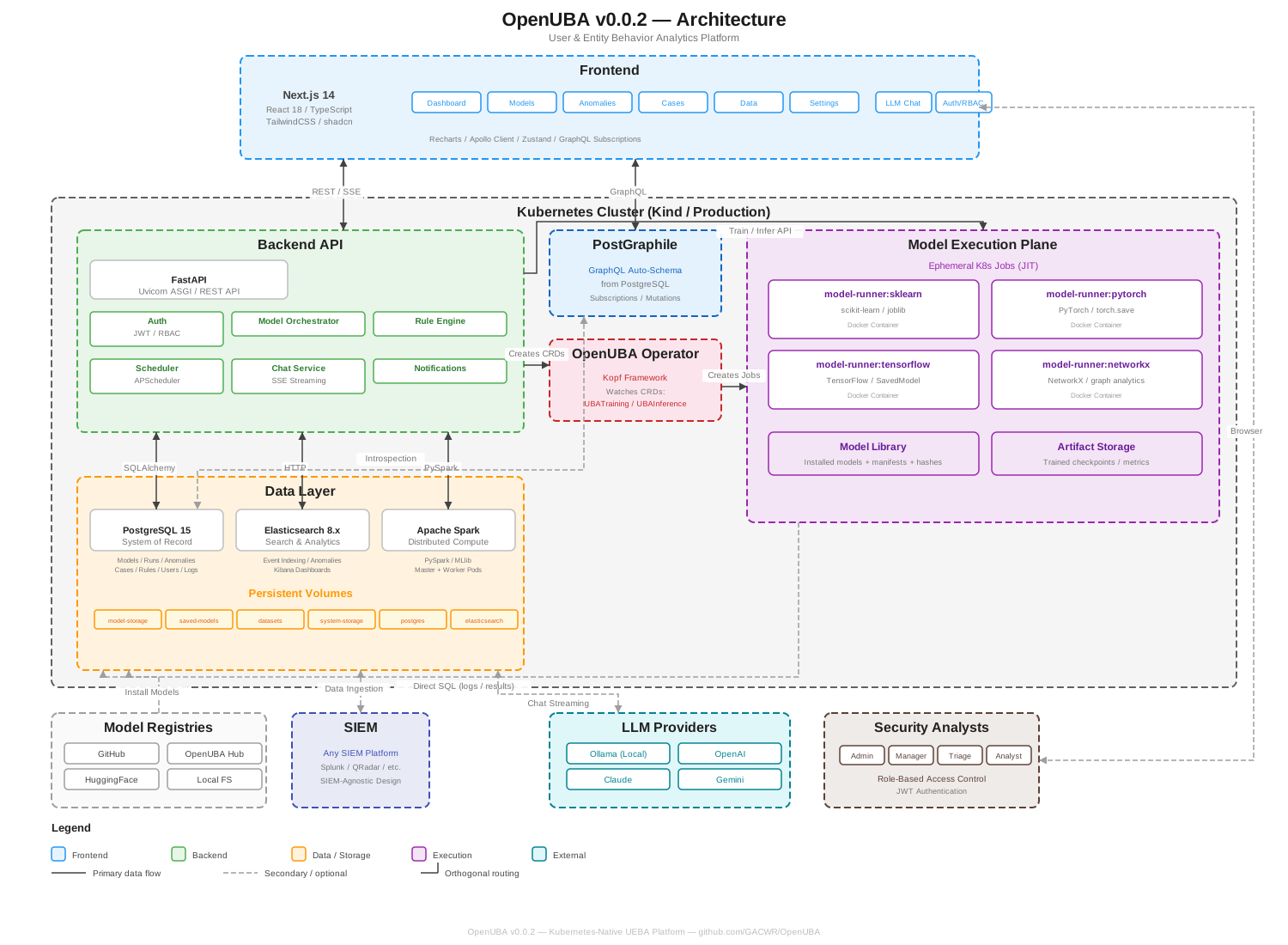 OpenUBA v0.0.2 是一个 Kubernetes 原生平台,采用模块化、云原生架构。所有组件均已容器化,可部署到 Kind 集群进行开发,或部署到生产环境的 Kubernetes 集群。该系统设计保持轻量级——没有始终运行的单模型服务,没有沉重的流水线编排器,只有大规模运行安全分析所需的最小基础设施。
| 层级 | 描述 |
| --- | --- |
| **Frontend** | Next.js 14 React 应用,包含 TailwindCSS、shadcn/ui 组件和实时 GraphQL 订阅 |
| **Backend API** | FastAPI 应用,提供 REST 端点、JWT 认证、模型编排、规则引擎和调度 |
| **GraphQL** | PostGraphile 从 PostgreSQL schema 自动生成完整的 GraphQL API,支持订阅和高效查询 |
| **Operator** | 自定义 Kubernetes operator (Kopf) 监视 UBATraining 和 UBAInference CRD 并创建临时 Job |
| **Data Layer** | PostgreSQL (记录系统), Elasticsearch (搜索/分析), Apache Spark (分布式计算), 由 Persistent Volumes 支持 |
| **Execution Plane** | 临时 K8s Job,使用特定框架的 Docker 镜像 (sklearn, pytorch, tensorflow, networkx) 进行 JIT 模型训练和推理 |
## 技术栈
### Frontend
| 组件 | 技术 |
| --- | --- |
| Framework | Next.js 14.0.4 (App Router) |
| Language | TypeScript 5.3 |
| UI System | TailwindCSS 3.4, Radix UI primitives, class-variance-authority |
| Data Layer | Apollo Client 3.8 (GraphQL), Axios 1.6 (REST) |
| Real-time | GraphQL subscriptions via graphql-ws 5.14 |
| Charts | Recharts 3.5 |
| Rule Canvas | @xyflow/react 12.10 (flow-based node editor) |
| State | Zustand 4.5 (UI state), Apollo cache (server state) |
| Markdown | react-markdown 10.1, react-syntax-highlighter 16.1 |
| Command Palette | cmdk 0.2 |
| Icons | lucide-react 0.309 |
### Backend
| 组件 | 技术 |
| --- | --- |
| Framework | FastAPI 0.104 (Uvicorn 0.24 ASGI) |
| Language | Python 3.9 (typed, Pydantic 2.5) |
| ORM | SQLAlchemy 2.0.23 |
| Auth | JWT (python-jose 3.3), bcrypt via passlib 1.7 |
| Scheduling | APScheduler 3.10 |
| GraphQL | PostGraphile (auto-schema from PostgreSQL) |
| Data Engines | PySpark 3.5, Elasticsearch client 8.11 |
| Container Clients | docker-py 6.1, kubernetes-client 28.1 |
### Infrastructure
| 组件 | 技术 |
| --- | --- |
| Database | PostgreSQL 15 (Alpine) |
| Search | Elasticsearch 8.11.0 |
| Compute | Apache Spark 3.5.0 (Master + Worker) |
| Orchestration | Kubernetes (Kind for dev, any cluster for prod) |
| Operator | Custom OpenUBA Operator (Kopf, Python) |
| Containers | Docker (framework-specific model runner images) |
| Node.js Runtime | Node 18 (Alpine, multi-stage frontend build) |
### Modeling Frameworks
| Framework | Runner Image | Serialization |
| --- | --- | --- |
| scikit-learn | `model-runner:sklearn` | joblib |
| PyTorch | `model-runner:pytorch` | torch.save |
| TensorFlow / Keras | `model-runner:tensorflow` | SavedModel |
| NetworkX | `model-runner:networkx` | pickle |
## 功能特性
### 建模
- 具备完整生命周期的模型管理(安装、训练、推理)
- 包含社区驱动和内部驱动模型的模型库
- 多 Registry 支持 (GitHub, OpenUBA Hub, HuggingFace, Kubeflow, 本地文件系统)
- 模型版本控制和 Artifact 跟踪
- 用于持续模型训练的反馈循环
- 用于模型和风险评分实验的“影子模式”
- 安装时和每次执行前的加密哈希验证
- 框架无关:支持 sklearn, PyTorch, TensorFlow, Keras, NetworkX, Spark MLlib 等
- “白盒”模型标准 —— 每个模型都是可检查和可审计的
### 规则引擎与告警
- 基于阈值和基于偏差的检测规则
- 流图规则逻辑,带有用于构建复杂规则电路的可视化画布
- 规则通过逻辑运算符组合模型输出,并确定性地序列化到数据库
- 规则触发的告警与异常和案例相关联
- 告警可以按规则启用或禁用
### 工作区与 SDK
- 从 UI 启动具有可配置硬件层级的托管 JupyterLab 环境
- Python SDK (`pip install openuba`),用于程序化模型注册、作业提交和可视化
- 直接从 notebook 注册 sklearn, PyTorch, TensorFlow 和 NetworkX 模型
- 通过实时 SSE 进度流提交训练和推理作业
- 多后端可视化渲染 (matplotlib, seaborn, plotly, bokeh, altair, plotnine, datashader, networkx, geopandas)
- K8s operator 通过 UBAWorkspace CRD 管理工作区生命周期
### 仪表板
- 现代 Next.js + shadcn/ui 界面,默认深色模式
- 通过 GraphQL 订阅进行实时更新
- 全局时间范围选择器、命令面板和键盘导航
- 具有响应式布局的模块化组件
- 页面:Home, Data, Models, Rules, Alerts, Entities, Anomalies, Cases, Workspaces, Visualizations, Dashboards, Experiments, Features, Pipelines, Jobs, Datasets
### 安全与访问控制
- JWT 认证与基于角色的访问控制 (admin, manager, triage, analyst)
- 管理员可配置的按页面细粒度权限 (读/写)
- 持久化通知系统
- 用于合规的审计日志
### 核心能力
- 案例管理,包含异常关联和时间线
- 异常检测结果浏览、过滤和确认
- 实体管理和风险跟踪
- 数据源管理与摄入状态监控
- SIEM 无关架构,支持灵活的数据集
- 集成 LLM 助手以进行上下文分析
- 告警和通知系统
- 基于 Cron 的调度,用于自动化模型执行
## 规则画布
OpenUBA 包含一个可视化的基于流的规则构建器,用于创建检测逻辑。规则在交互式画布上通过逻辑运算符组合模型输出,类似于 n8n 或 Node-RED 等工具,但专为安全分析而构建。分析师可以连接已注册的模型,定义阈值条件,并链接逻辑门来表达复杂的检测标准 —— 无需编写代码。
每个规则的流图作为结构化 JSON 对象确定性地序列化到数据库中,使规则完全可重现、可版本跟踪和可审计。当满足规则条件时,它会触发告警,告警可以链接到异常和案例。
OpenUBA v0.0.2 是一个 Kubernetes 原生平台,采用模块化、云原生架构。所有组件均已容器化,可部署到 Kind 集群进行开发,或部署到生产环境的 Kubernetes 集群。该系统设计保持轻量级——没有始终运行的单模型服务,没有沉重的流水线编排器,只有大规模运行安全分析所需的最小基础设施。
| 层级 | 描述 |
| --- | --- |
| **Frontend** | Next.js 14 React 应用,包含 TailwindCSS、shadcn/ui 组件和实时 GraphQL 订阅 |
| **Backend API** | FastAPI 应用,提供 REST 端点、JWT 认证、模型编排、规则引擎和调度 |
| **GraphQL** | PostGraphile 从 PostgreSQL schema 自动生成完整的 GraphQL API,支持订阅和高效查询 |
| **Operator** | 自定义 Kubernetes operator (Kopf) 监视 UBATraining 和 UBAInference CRD 并创建临时 Job |
| **Data Layer** | PostgreSQL (记录系统), Elasticsearch (搜索/分析), Apache Spark (分布式计算), 由 Persistent Volumes 支持 |
| **Execution Plane** | 临时 K8s Job,使用特定框架的 Docker 镜像 (sklearn, pytorch, tensorflow, networkx) 进行 JIT 模型训练和推理 |
## 技术栈
### Frontend
| 组件 | 技术 |
| --- | --- |
| Framework | Next.js 14.0.4 (App Router) |
| Language | TypeScript 5.3 |
| UI System | TailwindCSS 3.4, Radix UI primitives, class-variance-authority |
| Data Layer | Apollo Client 3.8 (GraphQL), Axios 1.6 (REST) |
| Real-time | GraphQL subscriptions via graphql-ws 5.14 |
| Charts | Recharts 3.5 |
| Rule Canvas | @xyflow/react 12.10 (flow-based node editor) |
| State | Zustand 4.5 (UI state), Apollo cache (server state) |
| Markdown | react-markdown 10.1, react-syntax-highlighter 16.1 |
| Command Palette | cmdk 0.2 |
| Icons | lucide-react 0.309 |
### Backend
| 组件 | 技术 |
| --- | --- |
| Framework | FastAPI 0.104 (Uvicorn 0.24 ASGI) |
| Language | Python 3.9 (typed, Pydantic 2.5) |
| ORM | SQLAlchemy 2.0.23 |
| Auth | JWT (python-jose 3.3), bcrypt via passlib 1.7 |
| Scheduling | APScheduler 3.10 |
| GraphQL | PostGraphile (auto-schema from PostgreSQL) |
| Data Engines | PySpark 3.5, Elasticsearch client 8.11 |
| Container Clients | docker-py 6.1, kubernetes-client 28.1 |
### Infrastructure
| 组件 | 技术 |
| --- | --- |
| Database | PostgreSQL 15 (Alpine) |
| Search | Elasticsearch 8.11.0 |
| Compute | Apache Spark 3.5.0 (Master + Worker) |
| Orchestration | Kubernetes (Kind for dev, any cluster for prod) |
| Operator | Custom OpenUBA Operator (Kopf, Python) |
| Containers | Docker (framework-specific model runner images) |
| Node.js Runtime | Node 18 (Alpine, multi-stage frontend build) |
### Modeling Frameworks
| Framework | Runner Image | Serialization |
| --- | --- | --- |
| scikit-learn | `model-runner:sklearn` | joblib |
| PyTorch | `model-runner:pytorch` | torch.save |
| TensorFlow / Keras | `model-runner:tensorflow` | SavedModel |
| NetworkX | `model-runner:networkx` | pickle |
## 功能特性
### 建模
- 具备完整生命周期的模型管理(安装、训练、推理)
- 包含社区驱动和内部驱动模型的模型库
- 多 Registry 支持 (GitHub, OpenUBA Hub, HuggingFace, Kubeflow, 本地文件系统)
- 模型版本控制和 Artifact 跟踪
- 用于持续模型训练的反馈循环
- 用于模型和风险评分实验的“影子模式”
- 安装时和每次执行前的加密哈希验证
- 框架无关:支持 sklearn, PyTorch, TensorFlow, Keras, NetworkX, Spark MLlib 等
- “白盒”模型标准 —— 每个模型都是可检查和可审计的
### 规则引擎与告警
- 基于阈值和基于偏差的检测规则
- 流图规则逻辑,带有用于构建复杂规则电路的可视化画布
- 规则通过逻辑运算符组合模型输出,并确定性地序列化到数据库
- 规则触发的告警与异常和案例相关联
- 告警可以按规则启用或禁用
### 工作区与 SDK
- 从 UI 启动具有可配置硬件层级的托管 JupyterLab 环境
- Python SDK (`pip install openuba`),用于程序化模型注册、作业提交和可视化
- 直接从 notebook 注册 sklearn, PyTorch, TensorFlow 和 NetworkX 模型
- 通过实时 SSE 进度流提交训练和推理作业
- 多后端可视化渲染 (matplotlib, seaborn, plotly, bokeh, altair, plotnine, datashader, networkx, geopandas)
- K8s operator 通过 UBAWorkspace CRD 管理工作区生命周期
### 仪表板
- 现代 Next.js + shadcn/ui 界面,默认深色模式
- 通过 GraphQL 订阅进行实时更新
- 全局时间范围选择器、命令面板和键盘导航
- 具有响应式布局的模块化组件
- 页面:Home, Data, Models, Rules, Alerts, Entities, Anomalies, Cases, Workspaces, Visualizations, Dashboards, Experiments, Features, Pipelines, Jobs, Datasets
### 安全与访问控制
- JWT 认证与基于角色的访问控制 (admin, manager, triage, analyst)
- 管理员可配置的按页面细粒度权限 (读/写)
- 持久化通知系统
- 用于合规的审计日志
### 核心能力
- 案例管理,包含异常关联和时间线
- 异常检测结果浏览、过滤和确认
- 实体管理和风险跟踪
- 数据源管理与摄入状态监控
- SIEM 无关架构,支持灵活的数据集
- 集成 LLM 助手以进行上下文分析
- 告警和通知系统
- 基于 Cron 的调度,用于自动化模型执行
## 规则画布
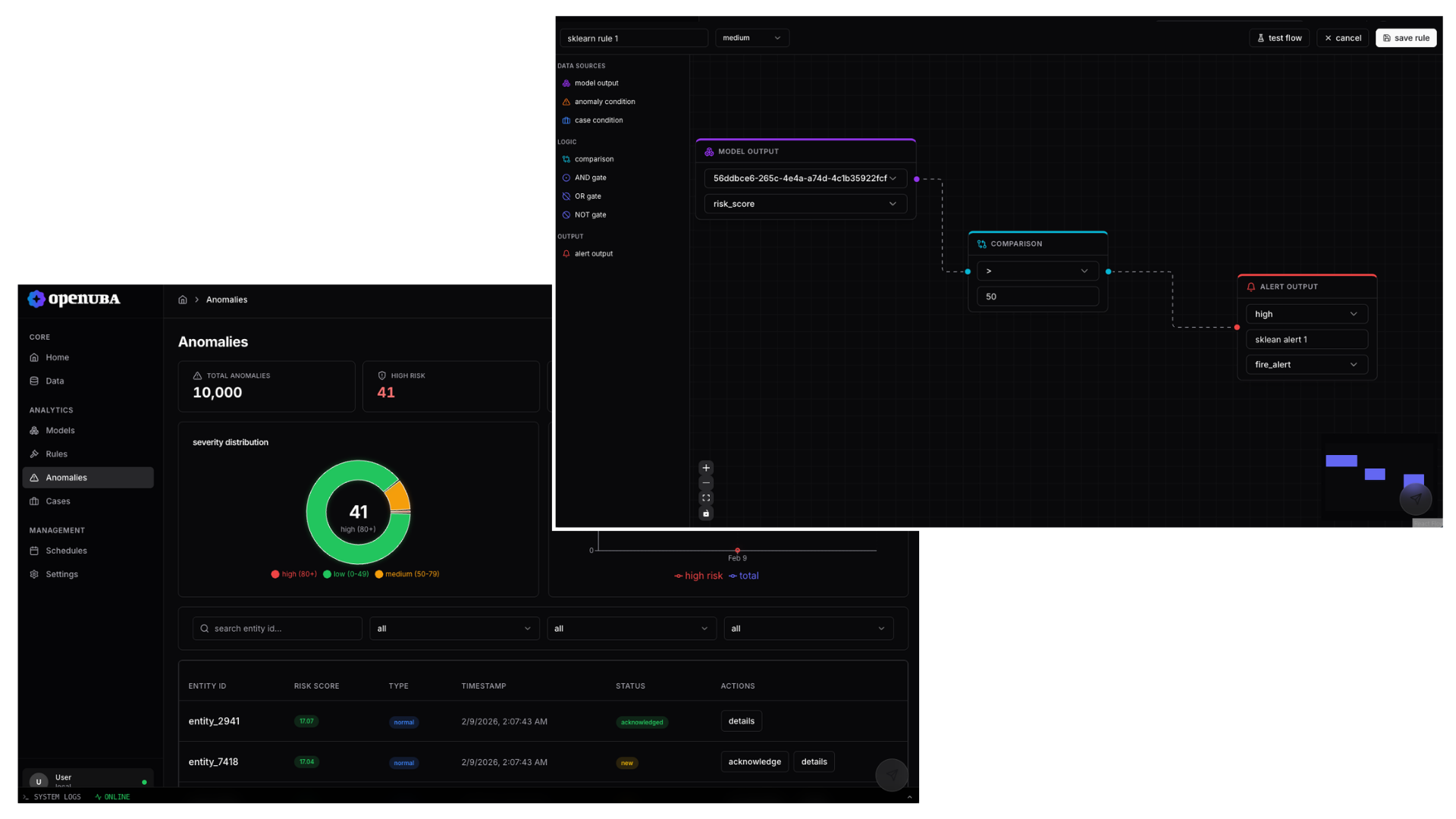
OpenUBA 包含一个可视化的基于流的规则构建器,用于创建检测逻辑。规则在交互式画布上通过逻辑运算符组合模型输出,类似于 n8n 或 Node-RED 等工具,但专为安全分析而构建。分析师可以连接已注册的模型,定义阈值条件,并链接逻辑门来表达复杂的检测标准 —— 无需编写代码。
每个规则的流图作为结构化 JSON 对象确定性地序列化到数据库中,使规则完全可重现、可版本跟踪和可审计。当满足规则条件时,它会触发告警,告警可以链接到异常和案例。
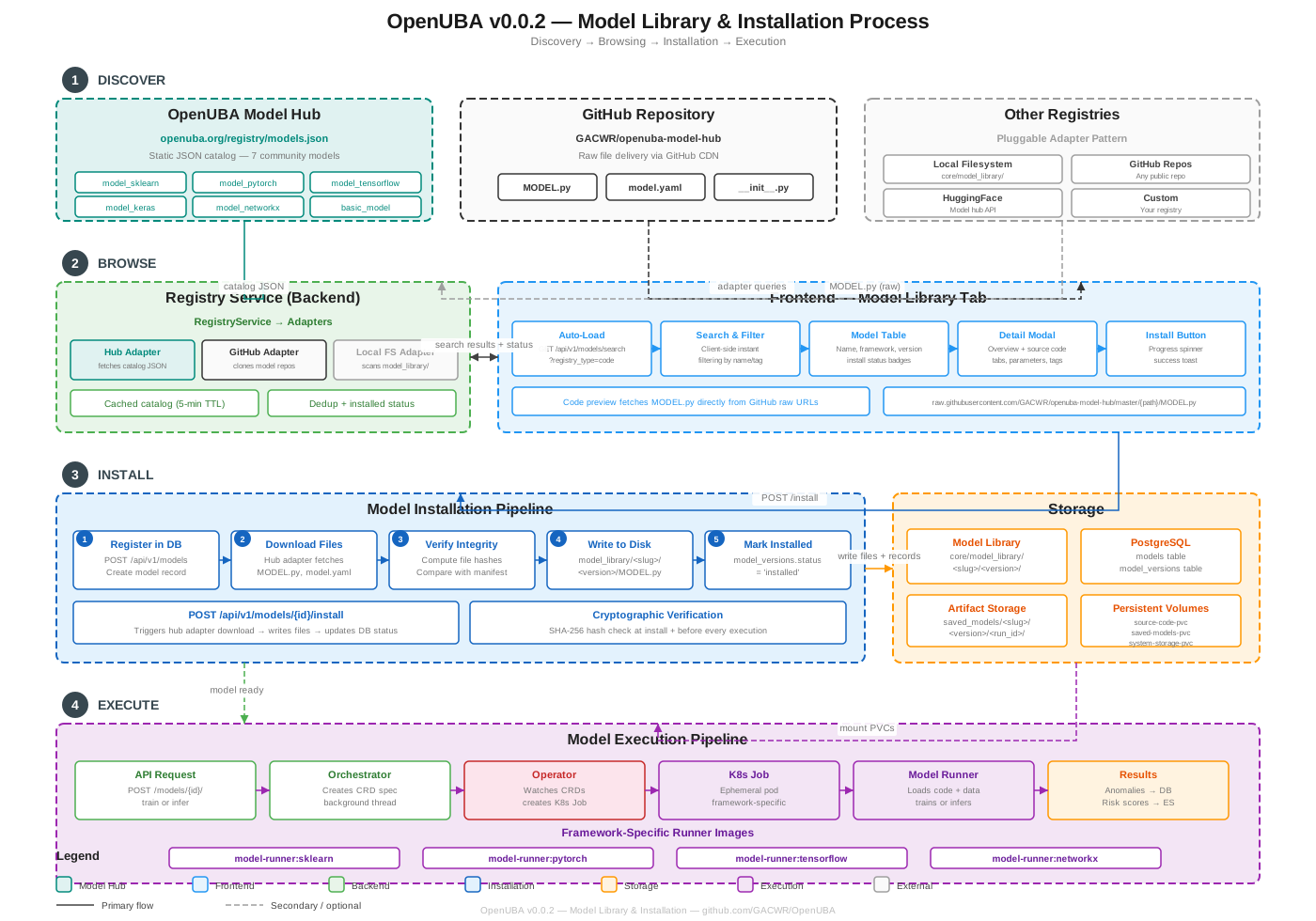 ### 可用模型
| Model | Framework | Description |
| --- | --- | --- |
| `basic_model` | Python | Baseline example model for getting started |
| `model_sklearn` | scikit-learn | Isolation Forest anomaly detection |
| `model_pytorch` | PyTorch | Neural network-based behavior analysis |
| `model_tensorflow` | TensorFlow | Deep learning behavior model |
| `model_keras` | Keras | High-level API behavior model |
| `model_networkx` | NetworkX | Graph-based entity relationship analysis |
| `model_1` | Python | General-purpose analytics model |
### 模型接口
模型遵循简单的 Python 接口。不需要繁重的 SDK 或复杂的流水线定义 —— 模型作者使用熟悉的库编写简单的 Python 逻辑:
```
class Model:
def train(self, ctx):
# Train model, return summary
...
def infer(self, ctx):
# Run inference, return risk scores as DataFrame
...
```
每个模型包是一个目录,包含一个 `MODEL.py`,一个可选的 `model.yaml` 清单,以及一个可选的 `requirements.txt`。Runner 处理所有 I/O、数据库访问和特定框架的序列化(sklearn 用 joblib,PyTorch 用 torch.save,TensorFlow 用 SavedModel)。
### Registry 适配器
模型 Registry 使用可插拔的适配器模式。每个适配器为其后端实现模型发现、列表和下载:
| Adapter | Source | Description |
| --- | --- | --- |
| OpenUBA Hub | `openuba.org` | Official model catalog with cached JSON registry (5-min TTL) |
| GitHub | Any repo | Clone and install models from GitHub repositories |
| Local Filesystem | `model_library/` | Scan locally installed models |
| HuggingFace | HF Hub | Model hub API integration (planned) |
### 数据加载器
模型可以通过内置数据加载器模块从多个源消费数据:
| Loader | Module | Description |
| --- | --- | --- |
| Local CSV | `local_pandas` | Reads CSV files via pandas |
| Elasticsearch | `es` | Queries Elasticsearch indices |
| Spark | `spark` | Distributed data via PySpark |
| Source Groups | `source_group` | Aggregated multi-source loading |
## 模型执行沙箱
每次模型执行都在独立的 Docker 容器或 Kubernetes Job 内运行,与主 API 分离。这提供了:
- **安全性** —— 不受信任的模型代码无法破坏核心系统
- **隔离性** —— 每个模型都有自己的环境,拥有正确的依赖项
- **可靠性** —— 行为异常的模型被包含在内;资源限制防止其耗尽系统资源
- **可扩展性** —— 多个模型可以作为独立的 K8s Job 并行运行
没有长期运行的单模型服务。每次训练和推理运行都是一个临时 Job,启动、执行、写入结果并退出。唯一长期存在的部分是 operator、backend 和数据库。
自定义 OpenUBA operator 监视 `UBATraining` 和 `UBAInference` 自定义资源,并使用适当的特定框架 Runner 镜像创建 Kubernetes Job。输入和输出数据通过共享的 Persistent Volumes 流动。
## 工作区与 SDK
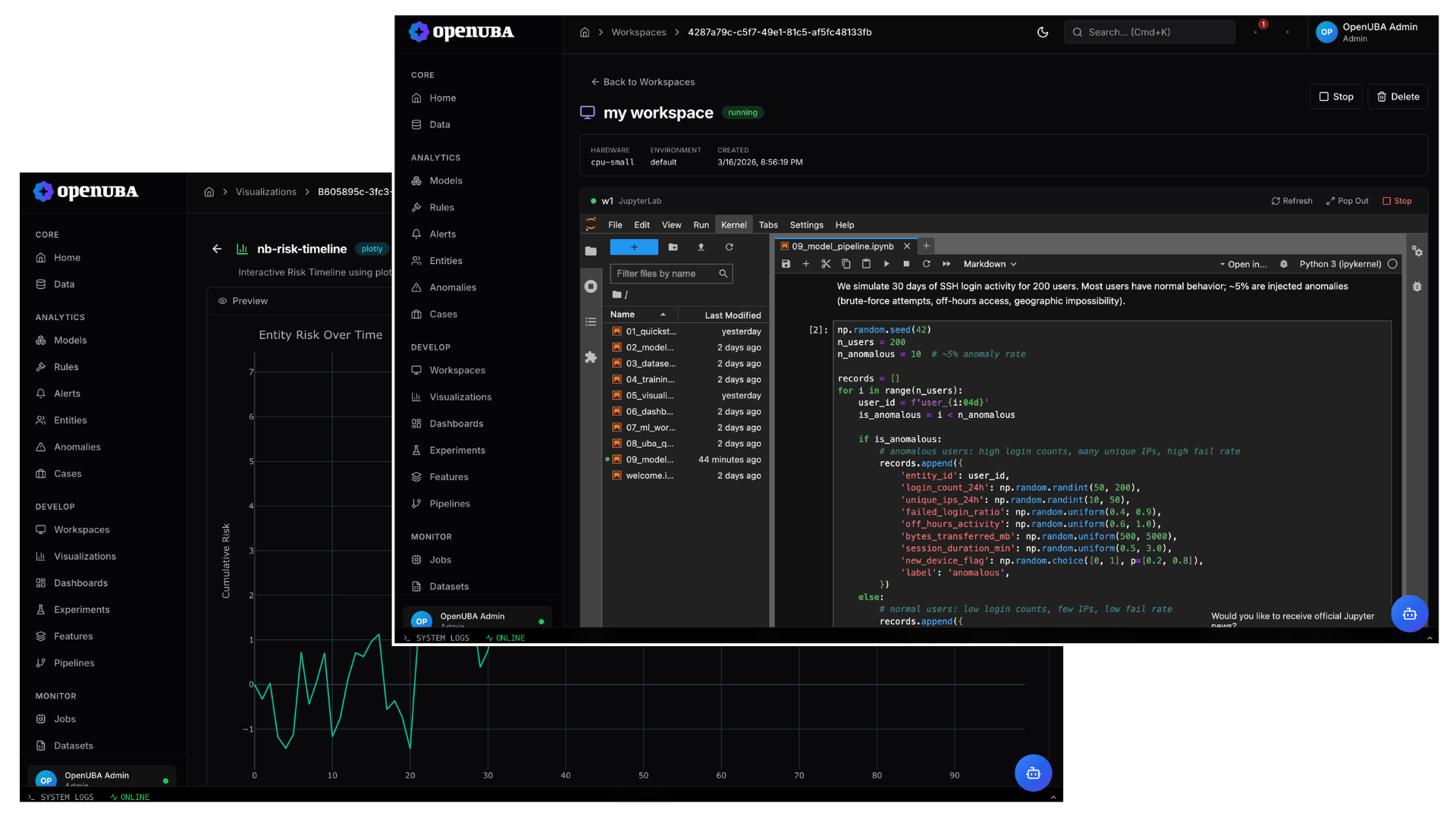
OpenUBA 包含作为 Kubernetes Pod 运行的托管 JupyterLab 工作区,为分析师和数据科学家提供一个直接连接到平台的完整 notebook 环境。在工作区中,您可以注册模型、提交训练和推理作业、查询结果并渲染可视化 —— 全部通过 Python SDK 完成。
```
pip install openuba
```
```
import openuba
# 从 notebook 注册训练好的 sklearn 模型
openuba.register_model("ssh-anomaly-detector", model, runtime="sklearn")
# 提交训练作业并轮询直到完成
openuba.start_training(model_id, dataset_id=dataset_id)
# 运行 inference -- 返回异常分数
openuba.start_inference(model_id, dataset_id=dataset_id)
# 渲染 plotly 可视化并推送到平台
openuba.render(fig, viz_id=viz_id)
```
SDK 开箱即支持 9 种可视化后端。任何 matplotlib, seaborn, plotly, bokeh, altair, plotnine, datashader, networkx, 或 geopandas 图形都可以被渲染并推送到平台,在 Visualizations 页面显示。
工作区由 K8s operator 通过 `UBAWorkspace` 自定义资源管理。硬件层级(`cpu-small`, `cpu-large`, `gpu-small`, `gpu-large`)控制资源分配。每个工作区都有自己的持久卷、预安装的 SDK 和用于认证访问平台的 API Token。
### 可用模型
| Model | Framework | Description |
| --- | --- | --- |
| `basic_model` | Python | Baseline example model for getting started |
| `model_sklearn` | scikit-learn | Isolation Forest anomaly detection |
| `model_pytorch` | PyTorch | Neural network-based behavior analysis |
| `model_tensorflow` | TensorFlow | Deep learning behavior model |
| `model_keras` | Keras | High-level API behavior model |
| `model_networkx` | NetworkX | Graph-based entity relationship analysis |
| `model_1` | Python | General-purpose analytics model |
### 模型接口
模型遵循简单的 Python 接口。不需要繁重的 SDK 或复杂的流水线定义 —— 模型作者使用熟悉的库编写简单的 Python 逻辑:
```
class Model:
def train(self, ctx):
# Train model, return summary
...
def infer(self, ctx):
# Run inference, return risk scores as DataFrame
...
```
每个模型包是一个目录,包含一个 `MODEL.py`,一个可选的 `model.yaml` 清单,以及一个可选的 `requirements.txt`。Runner 处理所有 I/O、数据库访问和特定框架的序列化(sklearn 用 joblib,PyTorch 用 torch.save,TensorFlow 用 SavedModel)。
### Registry 适配器
模型 Registry 使用可插拔的适配器模式。每个适配器为其后端实现模型发现、列表和下载:
| Adapter | Source | Description |
| --- | --- | --- |
| OpenUBA Hub | `openuba.org` | Official model catalog with cached JSON registry (5-min TTL) |
| GitHub | Any repo | Clone and install models from GitHub repositories |
| Local Filesystem | `model_library/` | Scan locally installed models |
| HuggingFace | HF Hub | Model hub API integration (planned) |
### 数据加载器
模型可以通过内置数据加载器模块从多个源消费数据:
| Loader | Module | Description |
| --- | --- | --- |
| Local CSV | `local_pandas` | Reads CSV files via pandas |
| Elasticsearch | `es` | Queries Elasticsearch indices |
| Spark | `spark` | Distributed data via PySpark |
| Source Groups | `source_group` | Aggregated multi-source loading |
## 模型执行沙箱
每次模型执行都在独立的 Docker 容器或 Kubernetes Job 内运行,与主 API 分离。这提供了:
- **安全性** —— 不受信任的模型代码无法破坏核心系统
- **隔离性** —— 每个模型都有自己的环境,拥有正确的依赖项
- **可靠性** —— 行为异常的模型被包含在内;资源限制防止其耗尽系统资源
- **可扩展性** —— 多个模型可以作为独立的 K8s Job 并行运行
没有长期运行的单模型服务。每次训练和推理运行都是一个临时 Job,启动、执行、写入结果并退出。唯一长期存在的部分是 operator、backend 和数据库。
自定义 OpenUBA operator 监视 `UBATraining` 和 `UBAInference` 自定义资源,并使用适当的特定框架 Runner 镜像创建 Kubernetes Job。输入和输出数据通过共享的 Persistent Volumes 流动。
## 工作区与 SDK
OpenUBA 包含作为 Kubernetes Pod 运行的托管 JupyterLab 工作区,为分析师和数据科学家提供一个直接连接到平台的完整 notebook 环境。在工作区中,您可以注册模型、提交训练和推理作业、查询结果并渲染可视化 —— 全部通过 Python SDK 完成。
```
pip install openuba
```
```
import openuba
# 从 notebook 注册训练好的 sklearn 模型
openuba.register_model("ssh-anomaly-detector", model, runtime="sklearn")
# 提交训练作业并轮询直到完成
openuba.start_training(model_id, dataset_id=dataset_id)
# 运行 inference -- 返回异常分数
openuba.start_inference(model_id, dataset_id=dataset_id)
# 渲染 plotly 可视化并推送到平台
openuba.render(fig, viz_id=viz_id)
```
SDK 开箱即支持 9 种可视化后端。任何 matplotlib, seaborn, plotly, bokeh, altair, plotnine, datashader, networkx, 或 geopandas 图形都可以被渲染并推送到平台,在 Visualizations 页面显示。
工作区由 K8s operator 通过 `UBAWorkspace` 自定义资源管理。硬件层级(`cpu-small`, `cpu-large`, `gpu-small`, `gpu-large`)控制资源分配。每个工作区都有自己的持久卷、预安装的 SDK 和用于认证访问平台的 API Token。
标签:AMSI绕过, Apex, Docker, Python, UEBA, 内部威胁, 凭据扫描, 威胁检测, 子域名突变, 安全分析框架, 安全防御评估, 开源, 异常检测, 数据科学, 无后门, 机器学习, 测试用例, 用户与实体行为分析, 网络安全, 请求拦截, 资源验证, 逆向工具, 隐私保护