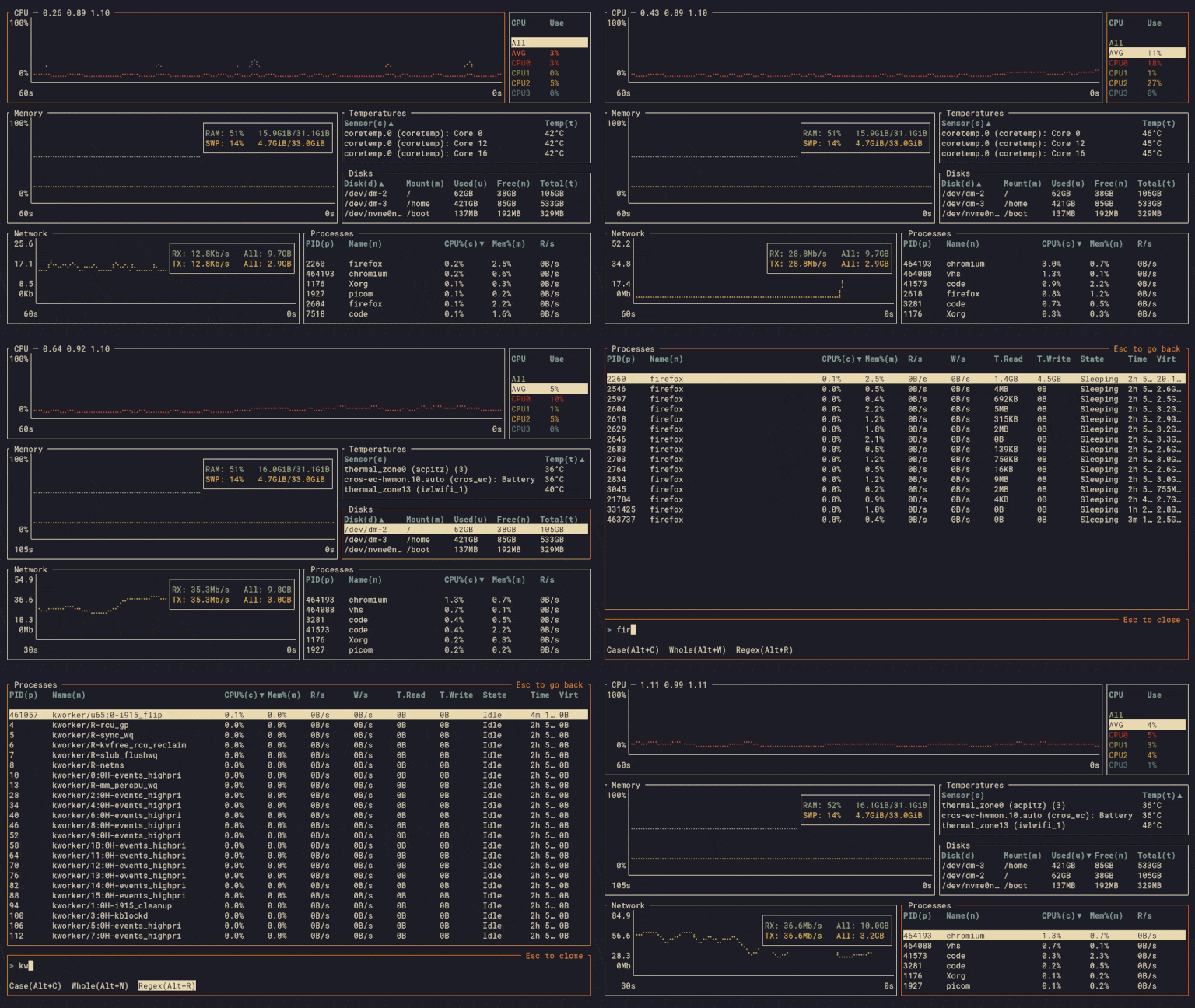
ClementTsang/bottom
GitHub: ClementTsang/bottom
一款跨平台终端图形化系统/进程监控工具,帮助用户在 Linux、macOS 和 Windows 上实时查看资源占用并管理进程。
Stars: 13821 | Forks: 366
bottom (btm)
一个可定制的跨平台终端图形化进程/系统监视器。
支持 Linux、macOS 和 Windows。灵感来源于 gtop、gotop 和 htop。
[

](https://github.com/ClementTsang/bottom/actions?query=branch%3Amain)
[

](https://crates.io/crates/bottom)
[

](https://bottom.pages.dev/stable)
[

](https://bottom.pages.dev/nightly)
[

](https://clementtsang.github.io/bottom/stable)
## 目录
- [功能](#features)
- [支持](#support)
- [官方支持](#official)
- [非官方支持](#unofficial)
- [安装说明](#installation)
- [Cargo](#cargo)
- [Alpine](#alpine)
- [Arch Linux](#arch-linux)
- [Debian / Ubuntu](#debian--ubuntu)
- [Exherbo Linux](#exherbo-linux)
- [Fedora / CentOS / AlmaLinux / Rocky Linux](#fedora--centos--almalinux--rocky-linux)
- [COPR](#copr)
- [Terra](#terra)
- [RPM](#rpm)
- [Gentoo](#gentoo)
- [Nix](#nix)
- [openSUSE](#opensuse)
- [Snap](#snap)
- [Solus](#solus)
- [Void](#void)
- [gah](#gah)
- [Homebrew](#homebrew)
- [MacPorts](#macports)
- [Chocolatey](#chocolatey)
- [Scoop](#scoop)
- [winget](#winget)
- [Windows 安装程序](#windows-installer)
- [Conda](#conda)
- [mise](#mise)
- [预编译二进制文件](#pre-built-binaries)
- [自动补全](#auto-completion)
- [用法](#usage)
- [配置](#configuration)
- [故障排除](#troubleshooting)
- [文档](#documentation)
- [贡献](#contribution)
- [贡献者](#contributors)
- [鸣谢](#thanks)
## 功能
作为(又一个)进程/系统可视化和管理应用程序,bottom 支持以下典型功能:
- 针对以下内容的图形化可视化小部件:
- 随时间变化的 [CPU 使用率](https://bottom.pages.dev/nightly/usage/widgets/cpu-graph/),包括平均使用率和每个核心的使用率
- 随时间变化的 [RAM 和 swap 使用情况](https://bottom.pages.dev/nightly/usage/widgets/memory-graph/)
- 随时间变化的 [网络 I/O 使用情况](https://bottom.pages.dev/nightly/usage/widgets/network-graph/)
- 随时间变化的 [温度](https://bottom.pages.dev/nightly/usage/widgets/temperature-graph/)
- 随时间变化的 [磁盘 I/O 使用情况](https://bottom.pages.dev/nightly/usage/widgets/disk-io-graph/)
并支持放大/缩小当前显示的时间间隔。
- 用于显示以下信息的小部件:
- [磁盘容量/使用情况](https://bottom.pages.dev/nightly/usage/widgets/disk/)
- [温度传感器](https://bottom.pages.dev/nightly/usage/widgets/temperature-table/)
- [电池使用情况](https://bottom.pages.dev/nightly/usage/widgets/battery/)
- [进程小部件](https://bottom.pages.dev/nightly/usage/widgets/process/) 用于显示、排序和搜索进程信息,并支持:
- [终止信号](https://bottom.pages.dev/nightly/usage/widgets/process/#process-termination)
- [树状模式](https://bottom.pages.dev/nightly/usage/widgets/process/#tree-mode)
- 对 Linux、macOS 和 Windows 的 [跨平台支持](https://github.com/ClementTsang/bottom#support),未来计划支持更多平台。
- [可定制的行为](https://bottom.pages.dev/nightly/configuration/command-line-options/),可通过命令行参数或配置文件控制,例如:
- 自定义和内置的颜色主题
- 自定义小部件行为
- 更改小部件的布局
- 过滤掉某些小部件中的条目
- 以及更多功能:
- [受 htop 启发的基础模式](https://bottom.pages.dev/nightly/usage/basic-mode/)
- [扩展以仅专注于一个小部件](https://bottom.pages.dev/nightly/usage/general-usage/#expansion)
您可以在[文档](https://bottom.pages.dev/nightly/usage/general-usage/)中找到更多详细信息。
### 官方支持
bottom *官方*支持以下操作系统及对应的架构:
- macOS (`x86_64`, `aarch64`)
- Linux (`x86_64`, `i686`, `aarch64`)
- Windows (`x86_64`, `i686`)
这些平台在大多数情况下都已通过测试,如果出现问题,我们会尽可能修复。
此外,二进制文件是使用当时最新的 Rust 稳定版构建和测试的。
有关受支持的平台和已知问题的更多详细信息,请查看[文档](https://bottom.pages.dev/nightly/support/official/)。
### 非官方支持
bottom 可能可以在许多未受到官方支持的平台上运行。请注意,不受支持的平台:
- 可能未在 CI 中进行构建或通过测试(有关已检查的平台,请参见[此处](./.github/workflows/ci.yml))。
- 维护者在稳定版本发布前可能未进行充分测试。
- 可能只能获得有限的支持,例如可能存在缺失功能或未修复的 bug。
请注意,某些不受支持的平台最终可能会得到官方支持(例如 FreeBSD)。
一些当前可通过非官方支持的平台(可能会编译/运行)的非详尽列表包括:
- FreeBSD (`x86_64`)
- Linux (`armv6`, `armv7`, `powerpc64le`, `riscv64gc`, `loongarch64`)
- Android (`arm64`)
- Windows (`arm64`)
- NetBSD (`x86_64`)
有关不受支持的平台和已知问题的更多详细信息,请查看[文档](https://bottom.pages.dev/nightly/support/unofficial/)。
## 安装说明
### Cargo
可以通过安装 [`bottom`](https://crates.io/crates/bottom) crate 来使用 `cargo` 进行安装:
```
# 您可能需要先更新 Rust 的 stable 版本。
# 其他版本可能也可以工作,但这无法保证。
rustup update stable
# 从 crates.io 安装二进制文件。
cargo install bottom --locked
# 如果您默认使用其他 channel,您可以像这样指定
# 要使用哪个 channel:
cargo +stable install bottom --locked
# 如果您不想使用 Cargo.lock 中锁定的
# crate 版本,可以省略 --locked。但是,
# 请注意这可能会导致依赖项问题。
cargo install bottom
```
或者,您也可以使用 `cargo install` 并将该仓库作为源进行安装。
```
# 您可能需要先更新 Rust 的 stable 版本。
# 其他版本可能也可以工作,但这无法保证。
rustup update stable
# 选项 1 - 从 releases 下载归档文件并安装
curl -LO https://github.com/ClementTsang/bottom/archive/0.14.3.tar.gz
tar -xzvf 0.14.3.tar.gz
cargo install --path . --locked
# 选项 2 - 手动 clone repo 并安装
git clone https://github.com/ClementTsang/bottom
cd bottom
cargo install --path . --locked
# 选项 3 - 使用 cargo 以 repo 为源进行安装
cargo install --git https://github.com/ClementTsang/bottom --locked
# 您还可以传入 target-cpu=native 标志来尝试
# 使用更好的 CPU 特定优化。例如:
RUSTFLAGS="-C target-cpu=native" cargo install --path . --locked
```
### Alpine
bottom 作为 [软件包](https://pkgs.alpinelinux.org/packages?name=bottom&branch=edge&repo=&arch=&origin=&flagged=&maintainer=) 可通过 `apk` 在 Alpine Linux 上使用:
```
apk add bottom
```
文档 ([`bottom-doc`](https://pkgs.alpinelinux.org/packages?name=bottom-doc&branch=edge&repo=&arch=&origin=&flagged=&maintainer=)) 以及 Bash ([`bottom-bash-completion`](https://pkgs.alpinelinux.org/packages?name=bottom-bash-completion&branch=edge&repo=&arch=&origin=&flagged=&maintainer=))、Fish ([`bottom-fish-completion`](https://pkgs.alpinelinux.org/packages?name=bottom-fish-completion&branch=edge&repo=&arch=&origin=&flagged=&maintainer=)) 和 Zsh ([`bottom-zsh-completion`](https://pkgs.alpinelinux.org/packages?name=bottom-zsh-completion&branch=edge&repo=&arch=&origin=&flagged=&maintainer=)) 的自动补全包也可用。
### Arch Linux
bottom 可作为 [官方软件包](https://archlinux.org/packages/extra/x86_64/bottom/) 使用 `pacman` 安装:
```
sudo pacman -S bottom
```
如果您想要尚未稳定的最新更改,也可以[从 AUR](https://aur.archlinux.org/packages/bottom-git) 安装 `bottom-git`:
```
# 使用 paru
paru -S bottom-git
# 使用 yay
yay -S bottom-git
```
### Debian / Ubuntu
每次 [稳定版发布](https://github.com/ClementTsang/bottom/releases/latest) 和
[nightly 构建](https://bottom.pages.dev/nightly/nightly-release) 都会提供适用于 x86、aarch64 和 armv7 的 `.deb` 文件。
以此方式安装的一些示例:
```
# x86-64
curl -LO https://github.com/ClementTsang/bottom/releases/download/0.14.3/bottom_0.14.3-1_amd64.deb
sudo dpkg -i bottom_0.14.3-1_amd64.deb
# ARM64
curl -LO https://github.com/ClementTsang/bottom/releases/download/0.14.3/bottom_0.14.3-1_arm64.deb
sudo dpkg -i bottom_0.14.3-1_arm64.deb
# ARM
curl -LO https://github.com/ClementTsang/bottom/releases/download/0.14.3/bottom_0.14.3-1_armhf.deb
sudo dpkg -i bottom_0.14.3-1_armhf.deb
# 基于 musl
curl -LO https://github.com/ClementTsang/bottom/releases/download/0.14.3/bottom-musl_0.14.3-1_amd64.deb
sudo dpkg -i bottom-musl_0.14.3-1_amd64.deb
```
### Exherbo Linux
bottom 可作为 [rust 软件包](https://gitlab.exherbo.org/exherbo/rust/-/tree/master/packages/sys-process/bottom) 使用 `cave` 安装:
```
cave resolve -x repository/rust
cave resolve -x bottom
```
### Fedora / CentOS / AlmaLinux / Rocky Linux
#### COPR
bottom 可在 [COPR](https://copr.fedorainfracloud.org/coprs/atim/bottom/) 上获取:
```
sudo dnf copr enable atim/bottom -y
sudo dnf install bottom
```
#### Terra
bottom 也可通过 [Terra](https://terra.fyralabs.com/) 获取:
```
sudo dnf install --repofrompath 'terra,https://repos.fyralabs.com/terra$releasever' --setopt='terra.gpgkey=https://repos.fyralabs.com/terra$releasever/key.asc' terra-release
sudo dnf install bottom
```
#### RPM
在 [releases](https://github.com/ClementTsang/bottom/releases) 页面也为 x86 生成了 `.rpm` 文件。
例如:
```
curl -LO https://github.com/ClementTsang/bottom/releases/download/0.14.3/bottom-0.14.3-1.x86_64.rpm
sudo dnf install ./bottom-0.14.3-1.x86_64.rpm
```
### Gentoo
可在 [官方 Gentoo 仓库](https://packages.gentoo.org/packages/sys-process/bottom) 中获取:
```
sudo emerge --ask sys-process/bottom
```
### Nix
作为 `bottom` [在 Nixpkgs 中](https://search.nixos.org/packages?channel=unstable&show=bottom&from=0&size=1&sort=relevance&type=packages) 可用:
```
nix profile install nixpkgs#bottom
```
```
{
programs.bottom.enable = true;
}
```
### openSUSE
在 openSUSE Tumbleweed 中可用:
```
zypper in bottom
```
### Snap
bottom 可作为 [snap](https://snapcraft.io/install/bottom/ubuntu) 使用:
```
sudo snap install bottom
# 以允许程序按预期运行
sudo snap connect bottom:mount-observe
sudo snap connect bottom:hardware-observe
sudo snap connect bottom:system-observe
sudo snap connect bottom:process-control
```
### Solus
[在 Solus 仓库中](https://dev.getsol.us/source/bottom/) 可用:
```
sudo eopkg it bottom
```
### Void
[在 void-packages 仓库中](https://github.com/void-linux/void-packages/tree/master/srcpkgs/bottom) 可用:
```
sudo xbps-install bottom
```
### gah
也可以使用 [gah](https://github.com/marverix/gah) 在 Linux 或 macOS 上安装 bottom:
```
gah install bottom
```
### Homebrew
formula 可在[此处](https://formulae.brew.sh/formula/bottom)获取:
```
brew install bottom
```
### MacPorts
可在[此处](https://ports.macports.org/port/bottom/)获取:
```
sudo port selfupdate
sudo port install bottom
```
### Chocolatey
Chocolatey 软件包位于[此处](https://chocolatey.org/packages/bottom):
```
choco install bottom
```
### Scoop
在 [Main bucket](https://github.com/ScoopInstaller/Main) 中可用:
```
scoop install bottom
```
### winget
winget 软件包可在[此处](https://github.com/microsoft/winget-pkgs/tree/master/manifests/c/Clement/bottom)找到:
```
winget install bottom
# 如果您需要更具体的 app id:
winget install Clement.bottom
```
您可以通过控制面板、选项或 `winget --uninstall bottom` 进行卸载。
### Windows 安装程序
您可以通过从[最新发布版本](https://github.com/ClementTsang/bottom/releases/latest)下载并使用 `.msi` 文件,手动将 bottom 安装为 Windows 程序。
### Conda
您可以使用 `conda` 和[此 conda-smithy 仓库](https://github.com/conda-forge/bottom-feedstock)安装 bottom:
```
# 添加 channel
conda config --add channels conda-forge
conda config --set channel_priority strict
# 安装
conda install bottom
```
### mise
bottom 可在 [mise](https://github.com/jdx/mise) 中获取。您可以像这样安装它:
```
mise use -g bottom@latest
```
### 预编译二进制文件
您也可以使用预编译的发布二进制文件:
- [最新稳定版](https://github.com/ClementTsang/bottom/releases/latest)
- [最新 nightly 版](https://bottom.pages.dev/nightly/nightly-release)
要使用它,请下载并解压与您的系统相匹配的二进制文件。然后您可以通过以下方式运行:
```
./btm
```
或者按照您的系统安装二进制文件的步骤将其安装到您的系统中。
#### 自动补全
[发布页面](https://github.com/ClementTsang/bottom/releases) 中的发布二进制文件打包了
适用于 Bash、Zsh、fish、Powershell、Elvish、Fig 和 Nushell 的 shell 自动补全文件。要安装它们:
- 对于 Bash,将 `btm.bash` 移动到 `$XDG_CONFIG_HOME/bash_completion` 或 `/etc/bash_completion.d/`。
- 对于 Zsh,将 `_btm` 移动到您 `$fpath` 目录中的一个。
- 对于 fish,将 `btm.fish` 移动到 `$HOME/.config/fish/completions/`。
- 对于 PowerShell,将 `_btm.ps1` 添加到您的 PowerShell [profile](
).
- 对于 Elvish,补全文件为 `btm.elv`。
- 对于 Fig,补全文件为 `btm.ts`。
- 对于 Nushell,使用 `btm.nu`。
如果需要,各个自动补全文件也作为 `completion.tar.gz` 包含在 stable/nightly 版本中。
## 用法
您可以使用 `btm` 运行 bottom。
- 如需有关参数的帮助,请使用 `btm -h` 获取快速概览,或使用 `btm --help` 获取更多详细信息。
- 有关键鼠绑定的信息,请在 bottom 内按 `?` 或参阅[文档页面](https://bottom.pages.dev/nightly/)。
您可以在[文档](https://bottom.pages.dev/nightly/)中找到有关用法的更多信息。
## 配置
bottom 接受许多命令行参数,以便根据需要更改应用程序的行为。
此外,bottom 会在首次启动时自动生成一个配置文件,您可以对其进行更改。
有关配置的更多详细信息可以在[文档](https://bottom.pages.dev/nightly/configuration/config-file/)中找到。
## 故障排除
如果某些功能无法正常工作,请查看[故障排除页面](https://bottom.pages.dev/nightly/troubleshooting)
。如果仍然无法正常工作,请考虑提问[一个问题](https://github.com/ClementTsang/bottom/discussions)
,或者如果您认为这是一个 bug,请提交[bug 报告](https://github.com/ClementTsang/bottom/issues/new/choose)。
## 文档
主要文档页面可以在 找到,使用 Cloudflare Pages。如果需要,也可以使用通过
Github Pages 托管的镜像,网址为 。
## 贡献
无论是报告 bug、提出功能建议、维护软件包,还是提交 PR,我们都随时欢迎贡献!请阅读
[CONTRIBUTING.md](./CONTRIBUTING.md) 了解有关如何为 bottom 做出贡献的详细信息。
## 鸣谢
- 本项目深受 [gotop](https://github.com/xxxserxxx/gotop)、
[gtop](https://github.com/aksakalli/gtop) 和 [htop](https://github.com/htop-dev/htop/) 的启发。
- 本应用程序的编写依赖于[许多](https://github.com/ClementTsang/bottom/blob/main/Cargo.toml)、
[_许多_ 库](https://github.com/ClementTsang/bottom/blob/main/Cargo.lock),以及许多服务和
程序,这些都是建立在众多才华横溢的开发者的工作之上的。如果没有这一切,bottom 就不会存在。
- 当然,再次感谢所有贡献者和软件包维护者!
- 我也非常感谢任何使用过 bottom 的人,以及那些
特意抽出时间报告 bug 或提出改进建议的人。我希望
它对其他人来说是一个有用的工具。
- 感谢那些通过捐赠为我的工作提供财务支持的人,非常感谢你们。
- 感谢 JetBrains 提供了我用来开发 bottom 的工具访问权限,
这也是他们[开源支持计划](https://jb.gg/OpenSourceSupport)的一部分。
 - 还要感谢 [SignPath.io](https://about.signpath.io/) 提供免费的代码签名服务,并感谢
[SignPath Foundation](https://signpath.org/) 提供证书。
- 还要感谢 [SignPath.io](https://about.signpath.io/) 提供免费的代码签名服务,并感谢
[SignPath Foundation](https://signpath.org/) 提供证书。标签:Rust, 命令行工具, 系统监控, 终端UI, 网络流量审计, 跨平台, 进程管理, 通知系统