RyanDFIR/hindsight
GitHub: RyanDFIR/hindsight
一款专注于 Chrome/Chromium 浏览器的互联网历史取证工具,用于提取并关联网页特征生成时间线。
Stars: 1473 | Forks: 182
#  Hindsight
Google Chrome/Chromium 的互联网历史取证工具
Hindsight 是一个用于分析网页特征(免费)的工具。它最初用于解析 Google Chrome 浏览器的浏览历史,现已扩展支持其他基于 Chromium 的应用程序(更多功能即将推出!)。Hindsight 可以解析多种类型的网页特征,包括网址、下载历史、缓存记录、书签、自动填充记录、保存的密码、偏好设置、浏览器扩展、HTTP Cookie 以及本地存储记录(HTML5 Cookie)。提取完每个文件的数据后,会将其与其他历史文件的数据关联,并生成时间线。
它拥有一个简单的 Web UI —— 运行 "hindsight_gui.py"(或在 Windows 上运行打包的 "hindsight_gui.exe")并访问 http://localhost:8080 即可使用:
Hindsight
Google Chrome/Chromium 的互联网历史取证工具
Hindsight 是一个用于分析网页特征(免费)的工具。它最初用于解析 Google Chrome 浏览器的浏览历史,现已扩展支持其他基于 Chromium 的应用程序(更多功能即将推出!)。Hindsight 可以解析多种类型的网页特征,包括网址、下载历史、缓存记录、书签、自动填充记录、保存的密码、偏好设置、浏览器扩展、HTTP Cookie 以及本地存储记录(HTML5 Cookie)。提取完每个文件的数据后,会将其与其他历史文件的数据关联,并生成时间线。
它拥有一个简单的 Web UI —— 运行 "hindsight_gui.py"(或在 Windows 上运行打包的 "hindsight_gui.exe")并访问 http://localhost:8080 即可使用:
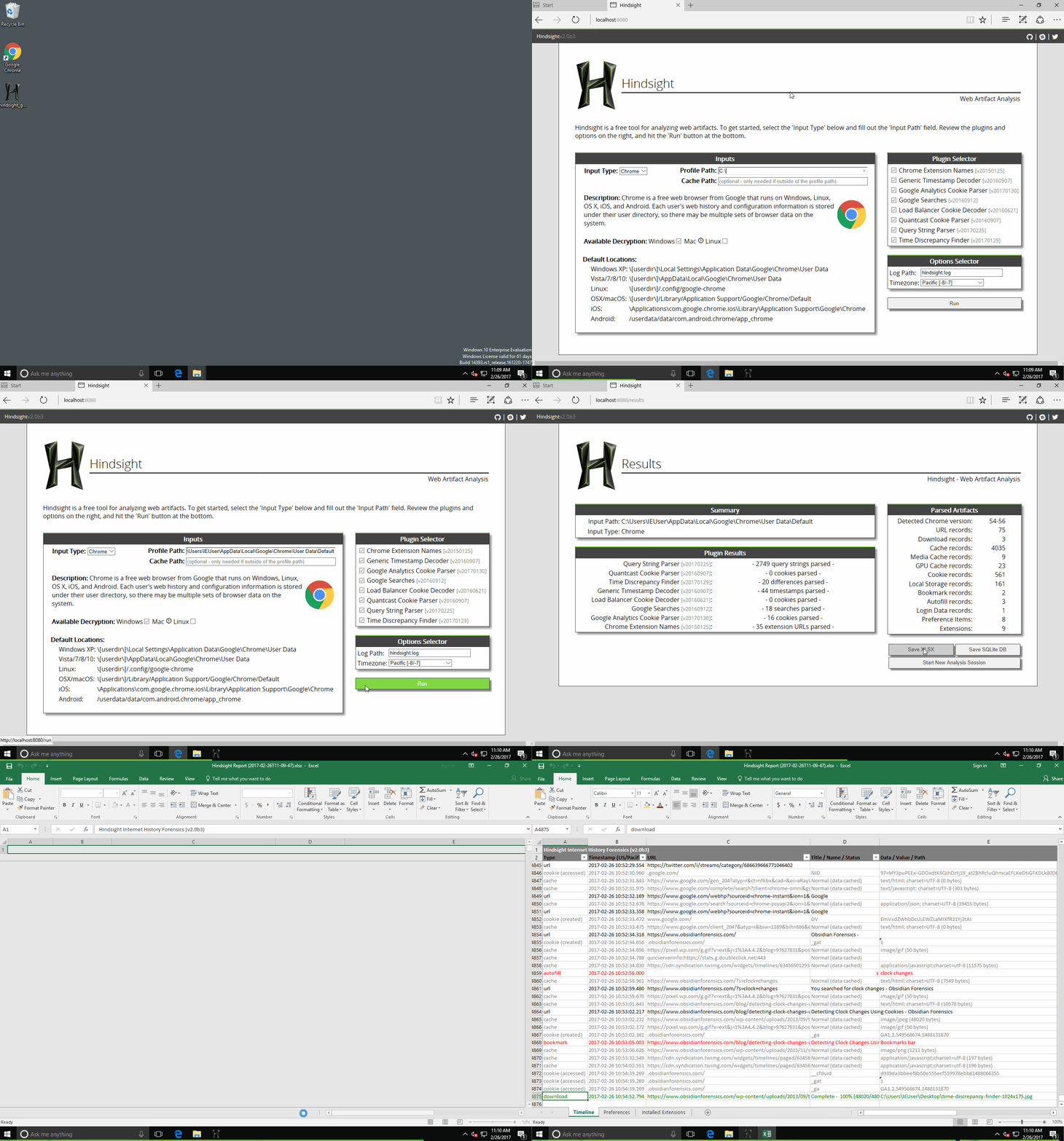 唯一需要填写的字段是“Profile Path”。这是你想要分析的 Chrome 配置文件路径(不同操作系统的默认配置文件路径请参见页面底部)。点击“Run”后,你将进入结果页面,可以在此将结果保存为电子表格(或其它格式)。
## 手动安装
要安装 Hindsight(包括命令行工具和 Web 界面),请执行以下操作:
```
pip install pyhindsight
pip install git+https://github.com/cclgroupltd/ccl_chromium_reader.git
```
如果你希望在 Hindsight Web 界面中使用“在浏览器中查看 SQLite 数据库”功能,则需要运行另一个安装命令:
```
curl -sSL https://raw.githubusercontent.com/obsidianforensics/hindsight/master/install-js.sh | sh
```
## 命令行
同时也有命令行版本的 Hindsight —— hindsight.py 或 hindsight.exe。文档文件夹中的用户指南涵盖了许多主题,但以下信息应能帮助你开始使用命令行版本:
示例用法: \> C:\\hindsight.py -i "C:\Users\Ryan\AppData\Local\Google\Chrome\User Data\Default" -o test_case
命令行选项:
| 选项 | 描述 |
| -------------- | ------------------------------------------------------- |
| -i 或 --input | Chrome(ium) “Default” 目录的路径 |
| -o 或 --output | 输出文件名(不含扩展名) |
| -f 或 --format | 输出格式(默认为 XLSX,其他选项为 SQLite 和 JSONL) |
| -c 或 --cache | 缓存目录的路径;仅当该目录位于指定的“输入”目录之外时需要。Mac 系统默认采用这种方式配置。 |
| -b 或 --browser_type | 输入文件所属的浏览器类型。支持 Chrome(默认)和 Brave。 |
| -l 或 --log | Hindsight 应记录到的日志位置(如果存在则追加记录) |
| -h 或 --help | 显示这些选项及默认的 Chrome 数据位置 |
| -t 或 --timezone | 在 XLSX 输出中显示时间戳的时区 |
## 默认配置文件路径
Chrome 默认配置文件夹的默认位置如下:
* WinXP: \[userdir\]\Local Settings\Application Data\Google\Chrome\User Data\Default
* Vista/7/8/10: \[userdir\]\AppData\Local\Google\Chrome\User Data\Default
* Linux: \[userdir\]/.config/google-chrome/Default
* OS X: \[userdir\]/Library/Application Support/Google/Chrome/Default
* iOS: \Applications\com.google.chrome.ios\Library\Application Support\Google\Chrome\Default
* Android: /userdata/data/com.android.chrome/app_chrome/Default
* CrOS: \home\user\\
唯一需要填写的字段是“Profile Path”。这是你想要分析的 Chrome 配置文件路径(不同操作系统的默认配置文件路径请参见页面底部)。点击“Run”后,你将进入结果页面,可以在此将结果保存为电子表格(或其它格式)。
## 手动安装
要安装 Hindsight(包括命令行工具和 Web 界面),请执行以下操作:
```
pip install pyhindsight
pip install git+https://github.com/cclgroupltd/ccl_chromium_reader.git
```
如果你希望在 Hindsight Web 界面中使用“在浏览器中查看 SQLite 数据库”功能,则需要运行另一个安装命令:
```
curl -sSL https://raw.githubusercontent.com/obsidianforensics/hindsight/master/install-js.sh | sh
```
## 命令行
同时也有命令行版本的 Hindsight —— hindsight.py 或 hindsight.exe。文档文件夹中的用户指南涵盖了许多主题,但以下信息应能帮助你开始使用命令行版本:
示例用法: \> C:\\hindsight.py -i "C:\Users\Ryan\AppData\Local\Google\Chrome\User Data\Default" -o test_case
命令行选项:
| 选项 | 描述 |
| -------------- | ------------------------------------------------------- |
| -i 或 --input | Chrome(ium) “Default” 目录的路径 |
| -o 或 --output | 输出文件名(不含扩展名) |
| -f 或 --format | 输出格式(默认为 XLSX,其他选项为 SQLite 和 JSONL) |
| -c 或 --cache | 缓存目录的路径;仅当该目录位于指定的“输入”目录之外时需要。Mac 系统默认采用这种方式配置。 |
| -b 或 --browser_type | 输入文件所属的浏览器类型。支持 Chrome(默认)和 Brave。 |
| -l 或 --log | Hindsight 应记录到的日志位置(如果存在则追加记录) |
| -h 或 --help | 显示这些选项及默认的 Chrome 数据位置 |
| -t 或 --timezone | 在 XLSX 输出中显示时间戳的时区 |
## 默认配置文件路径
Chrome 默认配置文件夹的默认位置如下:
* WinXP: \[userdir\]\Local Settings\Application Data\Google\Chrome\User Data\Default
* Vista/7/8/10: \[userdir\]\AppData\Local\Google\Chrome\User Data\Default
* Linux: \[userdir\]/.config/google-chrome/Default
* OS X: \[userdir\]/Library/Application Support/Google/Chrome/Default
* iOS: \Applications\com.google.chrome.ios\Library\Application Support\Google\Chrome\Default
* Android: /userdata/data/com.android.chrome/app_chrome/Default
* CrOS: \home\user\\
## 功能请求
如果你有新的功能想法(或者发现了问题),请[提交问题](https://github.com/obsidianforensics/hindsight/issues/new/choose)。
Hindsight
Google Chrome/Chromium 的互联网历史取证工具
Hindsight 是一个用于分析网页特征(免费)的工具。它最初用于解析 Google Chrome 浏览器的浏览历史,现已扩展支持其他基于 Chromium 的应用程序(更多功能即将推出!)。Hindsight 可以解析多种类型的网页特征,包括网址、下载历史、缓存记录、书签、自动填充记录、保存的密码、偏好设置、浏览器扩展、HTTP Cookie 以及本地存储记录(HTML5 Cookie)。提取完每个文件的数据后,会将其与其他历史文件的数据关联,并生成时间线。
它拥有一个简单的 Web UI —— 运行 "hindsight_gui.py"(或在 Windows 上运行打包的 "hindsight_gui.exe")并访问 http://localhost:8080 即可使用:
唯一需要填写的字段是“Profile Path”。这是你想要分析的 Chrome 配置文件路径(不同操作系统的默认配置文件路径请参见页面底部)。点击“Run”后,你将进入结果页面,可以在此将结果保存为电子表格(或其它格式)。
## 手动安装
要安装 Hindsight(包括命令行工具和 Web 界面),请执行以下操作:
```
pip install pyhindsight
pip install git+https://github.com/cclgroupltd/ccl_chromium_reader.git
```
如果你希望在 Hindsight Web 界面中使用“在浏览器中查看 SQLite 数据库”功能,则需要运行另一个安装命令:
```
curl -sSL https://raw.githubusercontent.com/obsidianforensics/hindsight/master/install-js.sh | sh
```
## 命令行
同时也有命令行版本的 Hindsight —— hindsight.py 或 hindsight.exe。文档文件夹中的用户指南涵盖了许多主题,但以下信息应能帮助你开始使用命令行版本:
示例用法: \> C:\\hindsight.py -i "C:\Users\Ryan\AppData\Local\Google\Chrome\User Data\Default" -o test_case
命令行选项:
| 选项 | 描述 |
| -------------- | ------------------------------------------------------- |
| -i 或 --input | Chrome(ium) “Default” 目录的路径 |
| -o 或 --output | 输出文件名(不含扩展名) |
| -f 或 --format | 输出格式(默认为 XLSX,其他选项为 SQLite 和 JSONL) |
| -c 或 --cache | 缓存目录的路径;仅当该目录位于指定的“输入”目录之外时需要。Mac 系统默认采用这种方式配置。 |
| -b 或 --browser_type | 输入文件所属的浏览器类型。支持 Chrome(默认)和 Brave。 |
| -l 或 --log | Hindsight 应记录到的日志位置(如果存在则追加记录) |
| -h 或 --help | 显示这些选项及默认的 Chrome 数据位置 |
| -t 或 --timezone | 在 XLSX 输出中显示时间戳的时区 |
## 默认配置文件路径
Chrome 默认配置文件夹的默认位置如下:
* WinXP: \[userdir\]\Local Settings\Application Data\Google\Chrome\User Data\Default
* Vista/7/8/10: \[userdir\]\AppData\Local\Google\Chrome\User Data\Default
* Linux: \[userdir\]/.config/google-chrome/Default
* OS X: \[userdir\]/Library/Application Support/Google/Chrome/Default
* iOS: \Applications\com.google.chrome.ios\Library\Application Support\Google\Chrome\Default
* Android: /userdata/data/com.android.chrome/app_chrome/Default
* CrOS: \home\user\\标签:Chrome取证, Chrome浏览器取证, Chromium取证, Chromium浏览器取证, GUI工具, Hindsight工具, HTML5 Cookie, HTTP Cookie, pip安装, Python取证工具, URL分析, Web UI工具, Web取证, 下载历史, 书签分析, 互联网取证, 保存密码, 取证分析工具, 开源取证, 数字取证, 数据关联, 数据可视化, 本地存储, 浏览器偏好设置, 浏览器取证, 浏览器取证工具, 浏览器扩展, 浏览器数据分析, 用户浏览行为分析, 缓存记录, 网络历史分析, 自动化脚本, 自动填充记录, 跨平台取证, 逆向工具, 黄金证书