screetsec/Sudomy
GitHub: screetsec/Sudomy
本项目是一款子域名枚举与分析工具,支持主动与被动模式,能够快速收集目标网站的子域信息并进行安全评估。
Stars: 2399 | Forks: 414
# 以下 are the requested translations in Simplified Chinese, preserving the original line count of 26 lines:
[](https://github.com/Screetsec/Sudomy/blob/master/LICENSE.md) [](https://github.com/Screetsec/Sudomy/actions) []() []() []() [](https://github.com/screetsec/sudomy/issues) [](https://www.paypal.me/screetsec)
### 子域名枚举与分析
 ***Sudomy*** 是一个子域名枚举工具,用于收集子域名并分析域名,执行高级自动化侦察(框架)。该工具也可用于 OSINT(开源情报)活动。
## 功能 !
##### 最近,***Sudomy*** 拥有这 20 项功能:
- 简单、轻量、快速且强大。几乎所有 Linux 发行版默认都提供 Bash 脚本(控制器)。通过使用 Bash 脚本的多进程特性,所有处理器将得到最优利用。
- 子域名枚举过程可以使用 **主动** 方法或 **被动** 方法实现
- **主动方法**
- *Sudomy* 使用 Gobuster 工具,因为它在执行 DNS 子域名暴力破解攻击(支持通配符)时速度极快。使用的词表来自组合的 SecList(Discover/DNS)列表,约 300 万条目
- **被动方法**
- 通过评估并 **选择** **优质** 第三方站点/资源,枚举过程可以 **优化**。可以在更短时间内获得更多结果。*Sudomy* 可以从以下 22 个精选第三方站点收集数据:
https://censys.io
https://developer.shodan.io
https://dns.bufferover.run
https://index.commoncrawl.org
https://riddler.io
https://api.certspotter.com
https://api.hackertarget.com
https://api.threatminer.org
https://community.riskiq.com
https://crt.sh
https://dnsdumpster.com
https://docs.binaryedge.io
https://securitytrails.com
https://graph.facebook.com
https://otx.alienvault.com
https://rapiddns.io
https://spyse.com
https://urlscan.io
https://www.dnsdb.info
https://www.virustotal.com
https://threatcrowd.org
https://web.archive.org
- 测试收集的子域名列表并探测可用的 http 或 https 服务器。此功能使用第三方工具 [httprobe](https://github.com/tomnomnom/httprobe "httprobe")。
- 基于 Ping Sweep 和/或获取 HTTP 状态码的子域名可用性测试。
- 检测虚拟主机(多个子域名解析到同一 IP 地址)。Sudomy 将把收集的子域名解析为 IP 地址,然后对解析到同一 IP 的多个子域名进行分类。此功能在后续透测试/漏洞赏金过程中非常有用。例如,在端口扫描时,同一 IP 地址不会被重复扫描。
- 对收集的子域名/虚拟主机 IP 地址进行端口扫描。
- 测试子域名接管攻击(CNAME 解析、DNS 查询、检测 NXDomain、检查漏洞)。
- 使用 gowitness 截取子域名截图,或选择其他截图工具,如 (-ss webscreeenshot)。
- 识别网站技术(类别、应用、版本)。
- 检测 URL、端口、标题、内容长度、状态码、响应体等。
- 默认从 https 自动回退到 http。
- 从第三方(默认:Shodan)收集/抓取开放端口数据。当前仅使用 Shodan,未来计划支持 Censys、Zoomeye。更高效地从目标 IP 列表中收集端口信息 [[ 子域名 > IP 解析 > 爬取 > ASN 与开放端口 ]]。
- 收集有价值的 URL 并提取 URL 参数(默认资源:WebArchive、CommonCrawl、UrlScanIO)。
- 收集有趣的路径(api|.git|admin|etc)、文档(doc|pdf)、JavaScript(js|node)和参数。
- 为输出文件定义路径(完成后指定输出文件)。
- 检查 IP 是否属于 Cloudflare。
- 基于收集的 URL 资源(wayback、urlscan、commoncrawl)生成并制作词表。为此,我们从域名侦察中提取所有参数和路径。
- 生成网络图可视化子域名和虚拟主机。
- 以 HTML 与 CSV 格式输出报告。
- 向 Slack 频道发送通知。
## Sudomy 工作原理
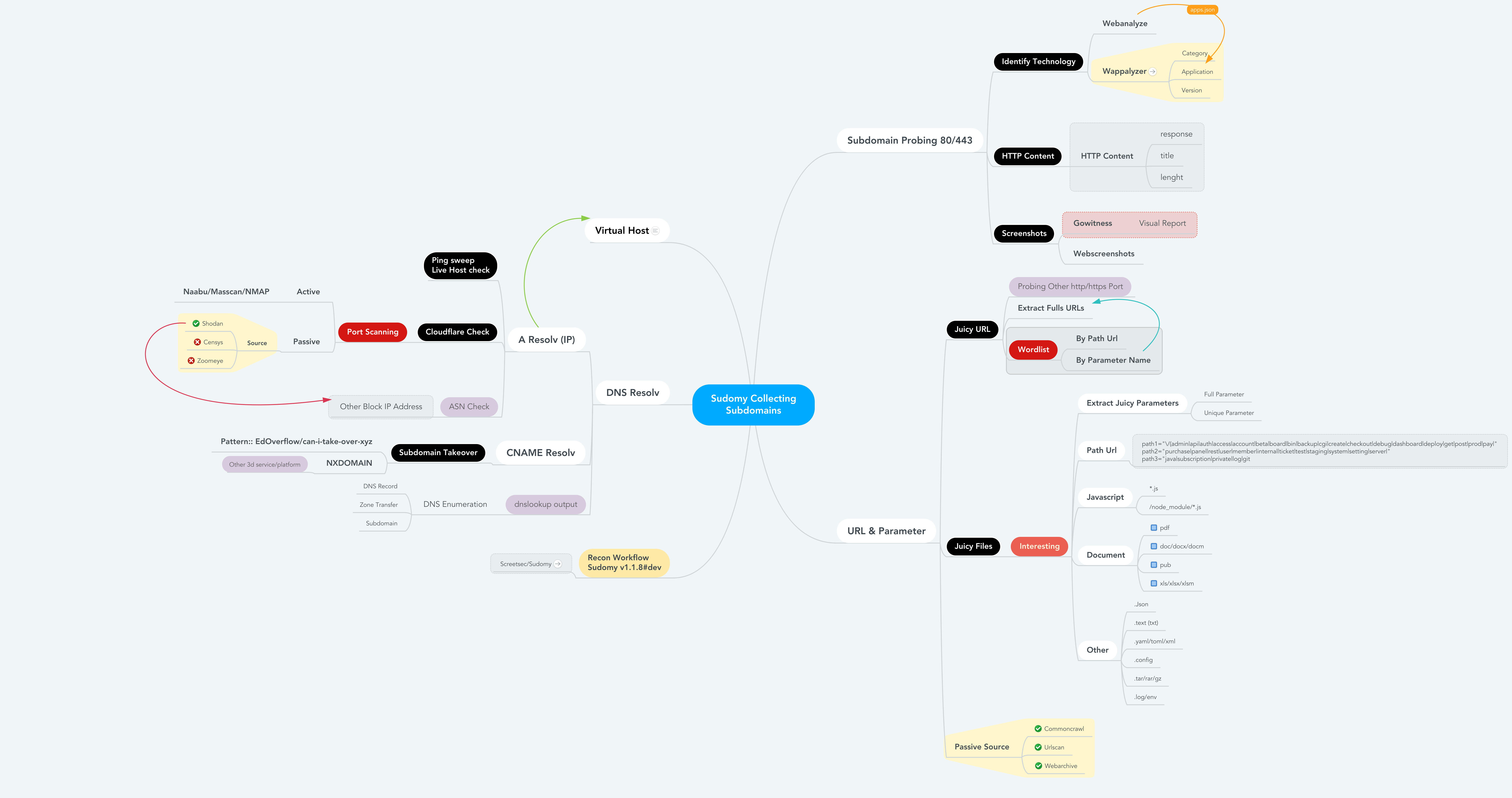
Sudomy 的工作方式或侦察流程,当你运行最佳参数以收集子域名并通过自动化侦察进行分析时。
```
root@maland: ./sudomy -d bugcrowd.com -dP -eP -rS -cF -pS -tO -gW --httpx --dnsprobe -aI webanalyze -sS
```
### 侦察工作流
此侦察工作流 Sudomy v1.1.8#dev
### 详细信息
详细信息文件 侦察与有价值数据
```
------------------------------------------------------------------------------------------------------
- subdomain.txt -- Subdomain list < $DOMAIN (Target)
- httprobe_subdomain.txt -- Validate Subdomain < subdomain.txt
- webanalyzes.txt -- Identify technology scan < httprobe_subdomain.txt
- httpx_status_title.txt -- title+statuscode+lenght < httprobe_subdomain.txt
- dnsprobe_subdomain.txt -- Subdomain resolv < subdomain.txt
- Subdomain_Resolver.txt -- Subdomain resolv (alt) < subdomain.txt
- cf-ipresolv.txt -- Cloudflare scan < ip_resolver.txt
- Live_hosts_pingsweep.txt -- Live Host check < ip_resolver.txt
- ip_resolver.txt -- IP resolv list < Subdomain_Resolver::dnsprobe
- ip_dbasn.txt -- ASN Number Check < ip_resolver.txt
- vHost_subdomain.txt -- Virtual Host (Group by ip) < Subdomain_Resolver.txt
- nmap_top_ports.txt -- Active port scanning < cf-ipresolv.txt
- ip_dbport.txt -- Passive port scanning < cf-ipresolv.txt
------------------------------------------------------------------------------------------------------
- Passive_Collect_URL_Full.txt -- Full All Url Crawl (WebArchive, CommonCrawl, UrlScanIO)
------------------------------------------------------------------------------------------------------
- ./screenshots/report-0.html -- Screenshoting report < httprobe_subdomain.txt
- ./screenshots/gowitness/gowitness.sqlite3 -- Database screenshot < httprobe_subdomain.txt
------------------------------------------------------------------------------------------------------
- ./interest/interesturi-allpath.out -- Interest path(/api,/git,etc) < Passive_Collect_URL_Full.txt
- ./interest/interesturi-doc.out -- Interest doc (doc,pdf,xls) < Passive_Collect_URL_Full.txt
- ./interest/interesturi-otherfile.out -- Other files (.json,.env,etc) < Passive_Collect_URL_Full.txt
- ./interest/interesturi-js.out -- All Javascript files(*.js) < Passive_Collect_URL_Full.txt
- ./interest/interesturi-nodemodule.out -- Files from /node_modules/ < Passive_Collect_URL_Full.txt
- ./interest/interesturi-param-full.out -- Full parameter list < Passive_Collect_URL_Full.txt
- ./interest/interesturi-paramsuniq.out -- Full Uniq parameter list < Passive_Collect_URL_Full.txt
- Notes : You can validate juicy/interest urls/param using urlprobe or httpx to avoid false positives
------------------------------------------------------------------------------------------------------
- ./takeover/CNAME-resolv.txt -- CNAME Resolver < subdomain.txt
- ./takeover/TakeOver-Lookup.txt -- DNSLookup < CNAME-resolv.txt
- ./takeover/TakeOver-nxdomain.txt -- Other 3d service platform < TakeOver-Lookup.txt
- ./takeover/TakeOver.txt -- Checking Vulnerabilty < CNAME-resolv.txt
------------------------------------------------------------------------------------------------------
- ./wordlist/wordlist-parameter.lst -- Generate params wordlist < Passive_Collect_URL_Full.txt
- ./wordlist/wordlist-pathurl.lst -- Generate List paths wordlis < Passive_Collect_URL_Full.txt
- Notes : This Wordlist based on domain & subdomain information (path,file,query strings & parameter)
------------------------------------------------------------------------------------------------------
```
## 发表
- [Sudomy: Information Gathering Tools for Subdomain Enumeration and Analysis](https://iopscience.iop.org/article/10.1088/1757-899X/771/1/012019/meta) - IOP Conference Series: Materials Science and Engineering, Volume 771, 2nd International Conference on Engineering and Applied Sciences (2nd InCEAS) 16 November 2019, Yogyakarta, Indonesia
## 对比
Sudomy 在使用资源(第三方站点)时更省资源。通过评估并选择优质的第三方站点/资源,使枚举过程得到优化。本次对比使用的域名为 ***tiket.com***。
以下是对 *Sublist3r v1.1.0、Subfinder v2.4.5* 与 *Sudomy v1.2.0* 进行被动枚举 DNS 测试的结果。
***Sudomy*** 是一个子域名枚举工具,用于收集子域名并分析域名,执行高级自动化侦察(框架)。该工具也可用于 OSINT(开源情报)活动。
## 功能 !
##### 最近,***Sudomy*** 拥有这 20 项功能:
- 简单、轻量、快速且强大。几乎所有 Linux 发行版默认都提供 Bash 脚本(控制器)。通过使用 Bash 脚本的多进程特性,所有处理器将得到最优利用。
- 子域名枚举过程可以使用 **主动** 方法或 **被动** 方法实现
- **主动方法**
- *Sudomy* 使用 Gobuster 工具,因为它在执行 DNS 子域名暴力破解攻击(支持通配符)时速度极快。使用的词表来自组合的 SecList(Discover/DNS)列表,约 300 万条目
- **被动方法**
- 通过评估并 **选择** **优质** 第三方站点/资源,枚举过程可以 **优化**。可以在更短时间内获得更多结果。*Sudomy* 可以从以下 22 个精选第三方站点收集数据:
https://censys.io
https://developer.shodan.io
https://dns.bufferover.run
https://index.commoncrawl.org
https://riddler.io
https://api.certspotter.com
https://api.hackertarget.com
https://api.threatminer.org
https://community.riskiq.com
https://crt.sh
https://dnsdumpster.com
https://docs.binaryedge.io
https://securitytrails.com
https://graph.facebook.com
https://otx.alienvault.com
https://rapiddns.io
https://spyse.com
https://urlscan.io
https://www.dnsdb.info
https://www.virustotal.com
https://threatcrowd.org
https://web.archive.org
- 测试收集的子域名列表并探测可用的 http 或 https 服务器。此功能使用第三方工具 [httprobe](https://github.com/tomnomnom/httprobe "httprobe")。
- 基于 Ping Sweep 和/或获取 HTTP 状态码的子域名可用性测试。
- 检测虚拟主机(多个子域名解析到同一 IP 地址)。Sudomy 将把收集的子域名解析为 IP 地址,然后对解析到同一 IP 的多个子域名进行分类。此功能在后续透测试/漏洞赏金过程中非常有用。例如,在端口扫描时,同一 IP 地址不会被重复扫描。
- 对收集的子域名/虚拟主机 IP 地址进行端口扫描。
- 测试子域名接管攻击(CNAME 解析、DNS 查询、检测 NXDomain、检查漏洞)。
- 使用 gowitness 截取子域名截图,或选择其他截图工具,如 (-ss webscreeenshot)。
- 识别网站技术(类别、应用、版本)。
- 检测 URL、端口、标题、内容长度、状态码、响应体等。
- 默认从 https 自动回退到 http。
- 从第三方(默认:Shodan)收集/抓取开放端口数据。当前仅使用 Shodan,未来计划支持 Censys、Zoomeye。更高效地从目标 IP 列表中收集端口信息 [[ 子域名 > IP 解析 > 爬取 > ASN 与开放端口 ]]。
- 收集有价值的 URL 并提取 URL 参数(默认资源:WebArchive、CommonCrawl、UrlScanIO)。
- 收集有趣的路径(api|.git|admin|etc)、文档(doc|pdf)、JavaScript(js|node)和参数。
- 为输出文件定义路径(完成后指定输出文件)。
- 检查 IP 是否属于 Cloudflare。
- 基于收集的 URL 资源(wayback、urlscan、commoncrawl)生成并制作词表。为此,我们从域名侦察中提取所有参数和路径。
- 生成网络图可视化子域名和虚拟主机。
- 以 HTML 与 CSV 格式输出报告。
- 向 Slack 频道发送通知。
## Sudomy 工作原理
Sudomy 的工作方式或侦察流程,当你运行最佳参数以收集子域名并通过自动化侦察进行分析时。
```
root@maland: ./sudomy -d bugcrowd.com -dP -eP -rS -cF -pS -tO -gW --httpx --dnsprobe -aI webanalyze -sS
```
### 侦察工作流
此侦察工作流 Sudomy v1.1.8#dev

### 详细信息
详细信息文件 侦察与有价值数据
```
------------------------------------------------------------------------------------------------------
- subdomain.txt -- Subdomain list < $DOMAIN (Target)
- httprobe_subdomain.txt -- Validate Subdomain < subdomain.txt
- webanalyzes.txt -- Identify technology scan < httprobe_subdomain.txt
- httpx_status_title.txt -- title+statuscode+lenght < httprobe_subdomain.txt
- dnsprobe_subdomain.txt -- Subdomain resolv < subdomain.txt
- Subdomain_Resolver.txt -- Subdomain resolv (alt) < subdomain.txt
- cf-ipresolv.txt -- Cloudflare scan < ip_resolver.txt
- Live_hosts_pingsweep.txt -- Live Host check < ip_resolver.txt
- ip_resolver.txt -- IP resolv list < Subdomain_Resolver::dnsprobe
- ip_dbasn.txt -- ASN Number Check < ip_resolver.txt
- vHost_subdomain.txt -- Virtual Host (Group by ip) < Subdomain_Resolver.txt
- nmap_top_ports.txt -- Active port scanning < cf-ipresolv.txt
- ip_dbport.txt -- Passive port scanning < cf-ipresolv.txt
------------------------------------------------------------------------------------------------------
- Passive_Collect_URL_Full.txt -- Full All Url Crawl (WebArchive, CommonCrawl, UrlScanIO)
------------------------------------------------------------------------------------------------------
- ./screenshots/report-0.html -- Screenshoting report < httprobe_subdomain.txt
- ./screenshots/gowitness/gowitness.sqlite3 -- Database screenshot < httprobe_subdomain.txt
------------------------------------------------------------------------------------------------------
- ./interest/interesturi-allpath.out -- Interest path(/api,/git,etc) < Passive_Collect_URL_Full.txt
- ./interest/interesturi-doc.out -- Interest doc (doc,pdf,xls) < Passive_Collect_URL_Full.txt
- ./interest/interesturi-otherfile.out -- Other files (.json,.env,etc) < Passive_Collect_URL_Full.txt
- ./interest/interesturi-js.out -- All Javascript files(*.js) < Passive_Collect_URL_Full.txt
- ./interest/interesturi-nodemodule.out -- Files from /node_modules/ < Passive_Collect_URL_Full.txt
- ./interest/interesturi-param-full.out -- Full parameter list < Passive_Collect_URL_Full.txt
- ./interest/interesturi-paramsuniq.out -- Full Uniq parameter list < Passive_Collect_URL_Full.txt
- Notes : You can validate juicy/interest urls/param using urlprobe or httpx to avoid false positives
------------------------------------------------------------------------------------------------------
- ./takeover/CNAME-resolv.txt -- CNAME Resolver < subdomain.txt
- ./takeover/TakeOver-Lookup.txt -- DNSLookup < CNAME-resolv.txt
- ./takeover/TakeOver-nxdomain.txt -- Other 3d service platform < TakeOver-Lookup.txt
- ./takeover/TakeOver.txt -- Checking Vulnerabilty < CNAME-resolv.txt
------------------------------------------------------------------------------------------------------
- ./wordlist/wordlist-parameter.lst -- Generate params wordlist < Passive_Collect_URL_Full.txt
- ./wordlist/wordlist-pathurl.lst -- Generate List paths wordlis < Passive_Collect_URL_Full.txt
- Notes : This Wordlist based on domain & subdomain information (path,file,query strings & parameter)
------------------------------------------------------------------------------------------------------
```
## 发表
- [Sudomy: Information Gathering Tools for Subdomain Enumeration and Analysis](https://iopscience.iop.org/article/10.1088/1757-899X/771/1/012019/meta) - IOP Conference Series: Materials Science and Engineering, Volume 771, 2nd International Conference on Engineering and Applied Sciences (2nd InCEAS) 16 November 2019, Yogyakarta, Indonesia
## 对比
Sudomy 在使用资源(第三方站点)时更省资源。通过评估并选择优质的第三方站点/资源,使枚举过程得到优化。本次对比使用的域名为 ***tiket.com***。
以下是对 *Sublist3r v1.1.0、Subfinder v2.4.5* 与 *Sudomy v1.2.0* 进行被动枚举 DNS 测试的结果。
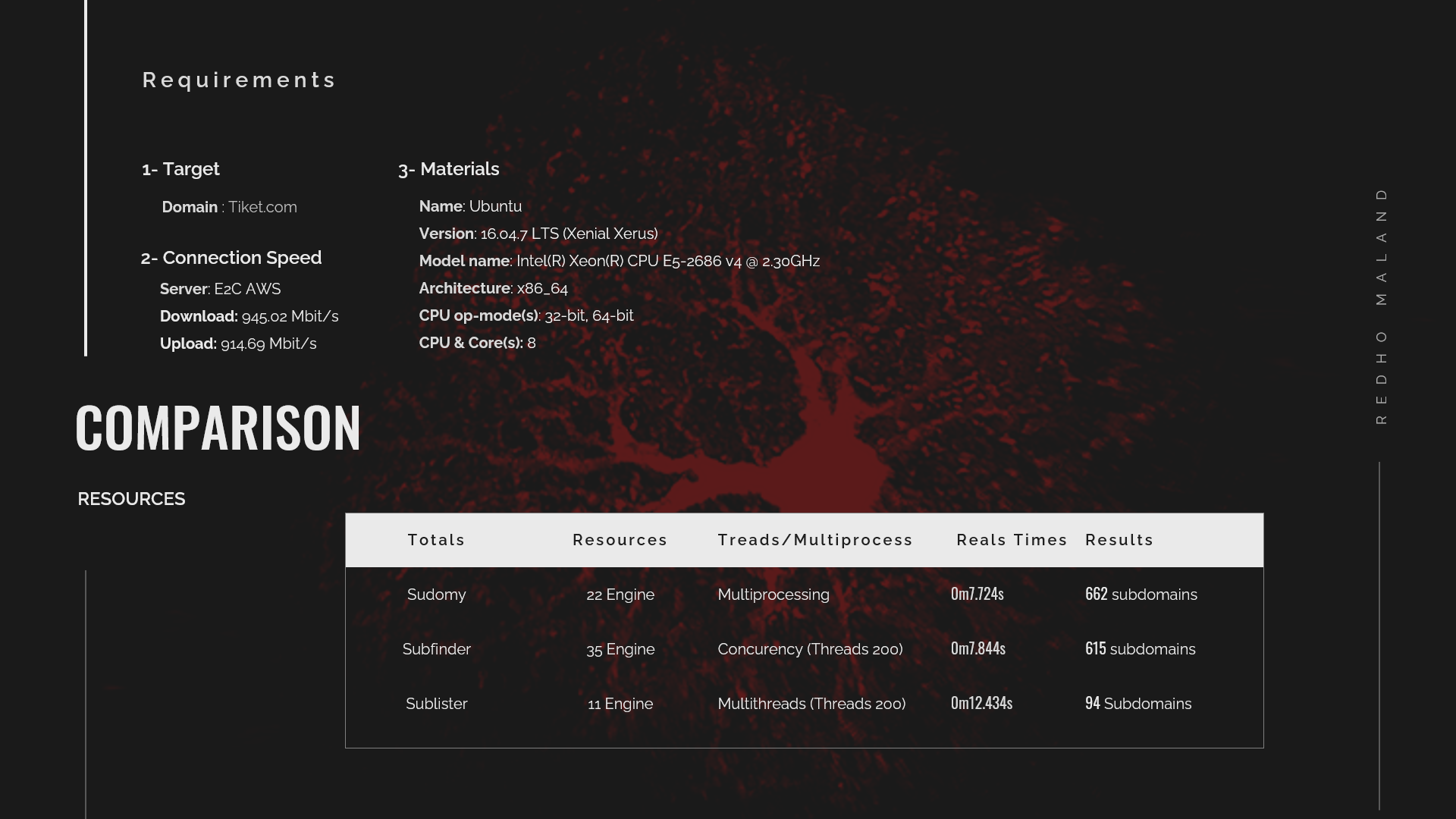 在这里,subfinder 仍然被归类为非常快速的子域名收集工具,但它会使用相当多的资源。尤其是当使用的资源已经被优化时(?)。
有关编译结果和视频,请查看:
### 但它很烂!你的实现太差!
- 是的,你可能是对的。随意“不要使用它”,并且有一个拉取按钮可以“让它更好”。
## 安装
*Sudomy* 目前已扩展以下工具。下面提供了安装和使用该应用的说明链接。
### 从 Github 下载 Sudomy
```
# 1. Sudomy → 疑难
git clone --recursive https://github.com/screetsec/Sudomy.git
```
### 依赖
```
$ python3 -m pip install -r requirements.txt
```
*Sudomy* 需要 [jq](https://stedolan.github.io/jq/download/) 和 [GNU grep](https://www.gnu.org/software/grep/) 来运行和解析。关于如何下载和安装 jq 的信息可在 [here](https://stedolan.github.io/jq/download/) 获得。
```
# 2. Clone this repository → 克隆此仓库
apt-get update
apt-get install jq nmap phantomjs npm chromium parallel
npm i -g wappalyzer wscat
# 3. Linux → Linux
brew cask install phantomjs
brew install jq nmap npm parallel grep
npm i -g wappalyzer wscat
# 4. Mac → Mac
All you would need is an installation of the latest Google Chrome or Chromium
Set the PATH in rc file for GNU grep changes
```
## 在 Docker 容器中运行
```
# 5. Note → 注意
docker pull screetsec/sudomy:v1.2.1-dev
# 6. Pull an image from DockerHub → 从 DockerHub 拉取镜像
mkdir output
# 7. Create output directory → 创建输出目录
docker run -v "${PWD}/output:/usr/lib/sudomy/output" -v "${PWD}/sudomy.api:/usr/lib/sudomy/sudomy.api" -t --rm screetsec/sudomy:v1.1.9-dev [argument]
# 8. Run an image, you can run the image on custom directory but you must copy/download config sudomy.api on current directory → 运行镜像,你可以在自定义目录运行镜像,但必须在当前目录复制/下载 config sudomy.api
docker run -v "${PWD}/output:/usr/lib/sudomy/output" -e "SHODAN_API=xxxx" -e "VIRUSTOTAL=xxxx" -t --rm screetsec/sudomy:v1.1.9-dev [argument]
```
### 安装后
在查询第三方站点(如 ```Shodan、Censys、SecurityTrails、Virustotal``` 和 ```BinaryEdge```)之前,需要 API 密钥。
- API 密钥设置可在 sudomy.api 文件中完成。
```
# 9. or define API variable when executed an image. → 或者在执行镜像时定义 API 变量
# 10. Shodan → Shodan
# 11. URL : http://developer.shodan.io → URL: http://developer.shodan.io
# 12. Example : → 示例:
SHODAN_API=""
# 13. - SHODAN_API="VGhpc1M0bXBsZWwKVGhmcGxlbAo" → - SHODAN_API="VGhpc1M0bXBsZWwKVGhmcGxlbAo"
# 14. Censys → Censys
CENSYS_API=""
CENSYS_SECRET=""
# 15. URL : https://search.censys.io/register → URL: https://search.censys.io/register
# 16. Virustotal → Virustotal
VIRUSTOTAL=""
# 17. URL : https://www.virustotal.com/gui/ → URL: https://www.virustotal.com/gui/
# 18. Binaryedge → Binaryedge
BINARYEDGE=""
# 19. URL : https://app.binaryedge.io/login → URL: https://app.binaryedge.io/login
# 20. SecurityTrails → SecurityTrails
SECURITY_TRAILS=""
```
在使用 Slack 通知前,需要 YOUR_WEBHOOK_URL
- URL 设置可在 slack.conf 文件中完成。
```
# 21. URL : https://securitytrails.com/ → URL: https://securitytrails.com/
# 22. Configuration Slack Alert → 配置 Slack 警报
# 23. For configuration/tutorial to get webhook url following to this site → 用于配置/教程获取此站点的 webhook URL
# 24. - https://api.slack.com/messaging/webhooks → - https://api.slack.com/messaging/webhooks
# 25. Example: → 示例:
YOUR_WEBHOOK_URL="https://hooks.slack.com/services/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"
```
## 用法
```
___ _ _ _
/ __|_ _ __| (_)(_)_ __ _ _
\__ \ || / _ / __ \ ' \ || |
|___/\_,_\__,_\____/_|_|_\_, |
|__/ v{1.2.1#dev} by @screetsec
Sud⍥my - Fast Subdmain Enumeration and Analyzer
http://github.com/screetsec/sudomy
Usage: sud⍥my.sh [-h [--help]] [-s[--source]][-d[--domain=]]
Example: sud⍥my.sh -d example.com
sud⍥my.sh -s Shodan,VirusTotal -d example.com
Best Argument:
sudomy -d domain.com -dP -eP -rS -cF -pS -tO -gW --httpx --dnsprobe -aI webanalyze --slack -sS
Optional Arguments:
-a, --all Running all Enumeration, no nmap & gobuster
-b, --bruteforce Bruteforce Subdomain Using Gobuster (Wordlist: ALL Top SecList DNS)
-d, --domain domain of the website to scan
-h, --help show this help message
-o, --outfile specify an output file when completed
-s, --source Use source for Enumerate Subdomain
-aI, --apps-identifier Identify technologies on website (ex: -aI webanalyze)
-dP, --db-port Collecting port from 3rd Party default=shodan
-eP, --extract-params Collecting URL Parameter from Engine
-tO, --takeover Subdomain TakeOver Vulnerabilty Scanner
-wS, --websocket WebSocket Connection Check
-cF, --cloudfare Check an IP is Owned by Cloudflare
-pS, --ping-sweep Check live host using methode Ping Sweep
-rS, --resolver Convert domain lists to resolved IP lists without duplicates
-sC, --status-code Get status codes, response from domain list
-nT, --nmap-top Port scanning with top-ports using nmap from domain list
-sS, --screenshot Screenshots a list of website (default: gowitness)
-nP, --no-passive Do not perform passive subdomain enumeration
-gW, --gwordlist Generate wordlist based on collecting url resources (Passive)
--httpx Perform httpx multiple probers using retryablehttp
--dnsprobe Perform multiple dns queries (dnsprobe)
--no-probe Do not perform httprobe
--html Make report output into HTML
--graph Network Graph Visualization
```
使用全部 22 个来源并探测可用的 http 或 https 服务器(验证):
```
$ sudomy -d hackerone.com
```
使用一个或多个来源:
```
$ sudomy -s shodan,dnsdumpster,webarchive -d hackerone.com
```
使用全部来源但不进行验证:
```
$ sudomy -d hackerone.com --no-probe
```
使用一个或多个插件:
```
$ sudomy -pS -sC -sS -d hackerone.com
```
使用全部插件:测试主机状态、http/https 状态码、子域名接管和截图。
不包括 Nmap、Gobuster、wappalyzer 和 wscat。
```
$ sudomy -d hackerone.com --all
```
生成 HTML 格式报告
```
$ sudomy -d hackerone.com --html --all
```
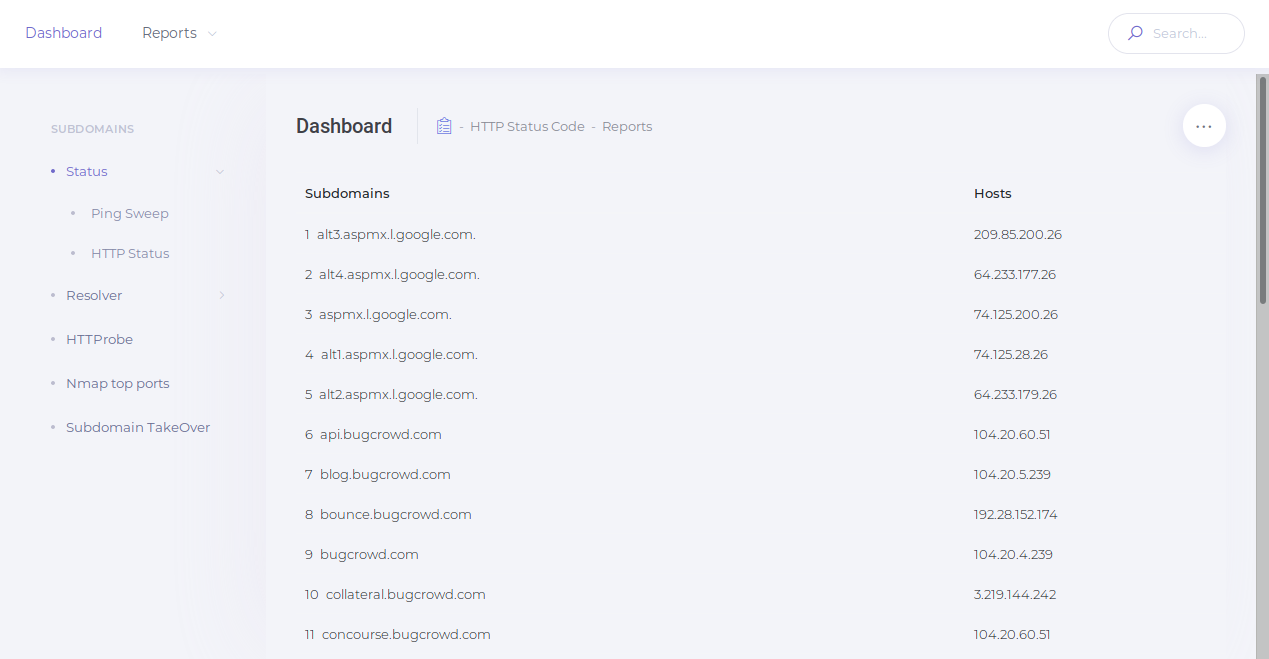
HTML 报告示例:
| Dashboard | Reports |
| ------------ | ------------ |
|||
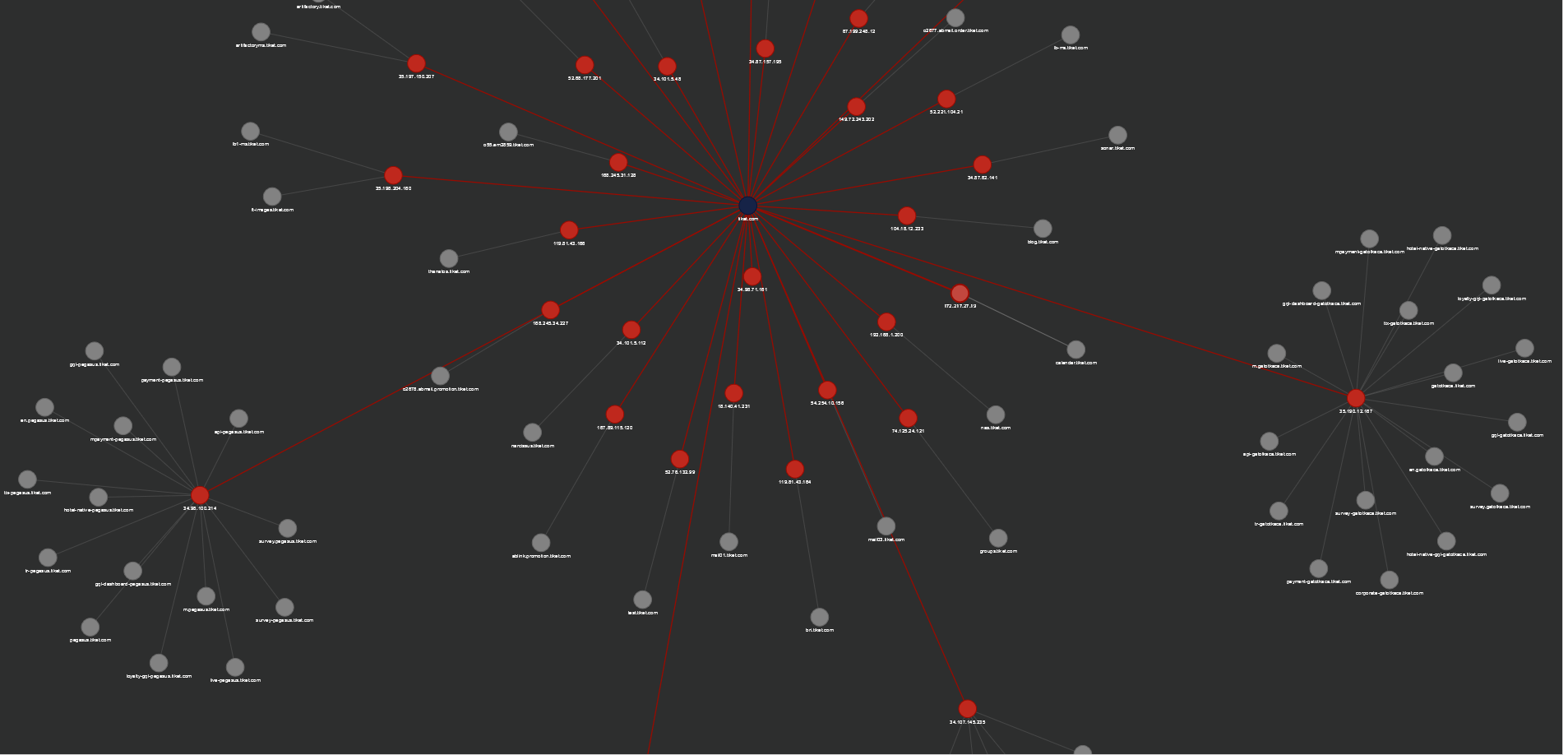
生成网络图可视化子域名与虚拟主机
```
$ sudomy -d hackerone.com -rS --graph
```
图形可视化 [Sample](https://screetsec.github.io/):
| nGraph |
| ------------ |
||
使用最佳参数收集子域名,进行自动化侦察并发送 Slack 通知
```
./sudomy -d ngesec.id -dP -eP -rS -cF -pS -tO -gW --httpx --dnsprobe --graph -aI webanalyze --slack -sS
```
## 工具概览
## 更新日志
本项目的所有重要更改将记录在此 [file](https://github.com/Screetsec/sudomy/blob/master/CHANGELOG.md) 中。
## 替代最佳工具 - 子域名枚举
- [Subfinder](https://github.com/projectdiscovery/subfinder) - Projectdiscovery
- [Sublist3r](https://github.com/aboul3la/Sublist3r) - aboul3la
- [Findomain](https://github.com/Edu4rdSHL/findomain) - Edu4rdSHL
- [Amass](https://github.com/OWASP/Amass) - OWASP
## 致谢
- [Tom Hudson](https://github.com/tomnomnom/) - Tomonomnom
- [OJ Reeves](https://github.com/OJ/) - Gobuster
- [ProjectDiscovery](https://github.com/projectdiscovery) - Security Through Intelligent Automation
- [Thomas D Maaaaz](https://github.com/maaaaz) - Webscreenshot
- [Dwi Siswanto](https://github.com/dwisiswant0) - cf-checker
- [Robin Verton](https://github.com/rverton/webanalyze) - webanalyze
- [christophetd](https://github.com/christophetd/censys-subdomain-finder) - Censys
- [Daniel Miessler](https://github.com/danielmiessler/) - SecList
- [EdOverflow](https://github.com/EdOverflow/) - can-i-take-over-xyz
- [jerukitumanis](https://github.com/myugan) - Docker Maintainer
- [NgeSEC](https://ngesec.id/) - Community
- [Zerobyte](http://zerobyte.id/) - Community
- [Gauli(dot)Net](https://gauli.net/) - Lab Hacking Indonesia
- [missme3f](https://github.com/missme3f/) - Raditya Rahma
- [Bugcrowd](https://www.bugcrowd.com/) & [Hackerone](https://www.hackerone.com/)
- [darknetdiaries](https://darknetdiaries.com/) - Awesome Art
在这里,subfinder 仍然被归类为非常快速的子域名收集工具,但它会使用相当多的资源。尤其是当使用的资源已经被优化时(?)。
有关编译结果和视频,请查看:
### 但它很烂!你的实现太差!
- 是的,你可能是对的。随意“不要使用它”,并且有一个拉取按钮可以“让它更好”。
## 安装
*Sudomy* 目前已扩展以下工具。下面提供了安装和使用该应用的说明链接。
### 从 Github 下载 Sudomy
```
# 1. Sudomy → 疑难
git clone --recursive https://github.com/screetsec/Sudomy.git
```
### 依赖
```
$ python3 -m pip install -r requirements.txt
```
*Sudomy* 需要 [jq](https://stedolan.github.io/jq/download/) 和 [GNU grep](https://www.gnu.org/software/grep/) 来运行和解析。关于如何下载和安装 jq 的信息可在 [here](https://stedolan.github.io/jq/download/) 获得。
```
# 2. Clone this repository → 克隆此仓库
apt-get update
apt-get install jq nmap phantomjs npm chromium parallel
npm i -g wappalyzer wscat
# 3. Linux → Linux
brew cask install phantomjs
brew install jq nmap npm parallel grep
npm i -g wappalyzer wscat
# 4. Mac → Mac
All you would need is an installation of the latest Google Chrome or Chromium
Set the PATH in rc file for GNU grep changes
```
## 在 Docker 容器中运行
```
# 5. Note → 注意
docker pull screetsec/sudomy:v1.2.1-dev
# 6. Pull an image from DockerHub → 从 DockerHub 拉取镜像
mkdir output
# 7. Create output directory → 创建输出目录
docker run -v "${PWD}/output:/usr/lib/sudomy/output" -v "${PWD}/sudomy.api:/usr/lib/sudomy/sudomy.api" -t --rm screetsec/sudomy:v1.1.9-dev [argument]
# 8. Run an image, you can run the image on custom directory but you must copy/download config sudomy.api on current directory → 运行镜像,你可以在自定义目录运行镜像,但必须在当前目录复制/下载 config sudomy.api
docker run -v "${PWD}/output:/usr/lib/sudomy/output" -e "SHODAN_API=xxxx" -e "VIRUSTOTAL=xxxx" -t --rm screetsec/sudomy:v1.1.9-dev [argument]
```
### 安装后
在查询第三方站点(如 ```Shodan、Censys、SecurityTrails、Virustotal``` 和 ```BinaryEdge```)之前,需要 API 密钥。
- API 密钥设置可在 sudomy.api 文件中完成。
```
# 9. or define API variable when executed an image. → 或者在执行镜像时定义 API 变量
# 10. Shodan → Shodan
# 11. URL : http://developer.shodan.io → URL: http://developer.shodan.io
# 12. Example : → 示例:
SHODAN_API=""
# 13. - SHODAN_API="VGhpc1M0bXBsZWwKVGhmcGxlbAo" → - SHODAN_API="VGhpc1M0bXBsZWwKVGhmcGxlbAo"
# 14. Censys → Censys
CENSYS_API=""
CENSYS_SECRET=""
# 15. URL : https://search.censys.io/register → URL: https://search.censys.io/register
# 16. Virustotal → Virustotal
VIRUSTOTAL=""
# 17. URL : https://www.virustotal.com/gui/ → URL: https://www.virustotal.com/gui/
# 18. Binaryedge → Binaryedge
BINARYEDGE=""
# 19. URL : https://app.binaryedge.io/login → URL: https://app.binaryedge.io/login
# 20. SecurityTrails → SecurityTrails
SECURITY_TRAILS=""
```
在使用 Slack 通知前,需要 YOUR_WEBHOOK_URL
- URL 设置可在 slack.conf 文件中完成。
```
# 21. URL : https://securitytrails.com/ → URL: https://securitytrails.com/
# 22. Configuration Slack Alert → 配置 Slack 警报
# 23. For configuration/tutorial to get webhook url following to this site → 用于配置/教程获取此站点的 webhook URL
# 24. - https://api.slack.com/messaging/webhooks → - https://api.slack.com/messaging/webhooks
# 25. Example: → 示例:
YOUR_WEBHOOK_URL="https://hooks.slack.com/services/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"
```
## 用法
```
___ _ _ _
/ __|_ _ __| (_)(_)_ __ _ _
\__ \ || / _ / __ \ ' \ || |
|___/\_,_\__,_\____/_|_|_\_, |
|__/ v{1.2.1#dev} by @screetsec
Sud⍥my - Fast Subdmain Enumeration and Analyzer
http://github.com/screetsec/sudomy
Usage: sud⍥my.sh [-h [--help]] [-s[--source]][-d[--domain=]]
Example: sud⍥my.sh -d example.com
sud⍥my.sh -s Shodan,VirusTotal -d example.com
Best Argument:
sudomy -d domain.com -dP -eP -rS -cF -pS -tO -gW --httpx --dnsprobe -aI webanalyze --slack -sS
Optional Arguments:
-a, --all Running all Enumeration, no nmap & gobuster
-b, --bruteforce Bruteforce Subdomain Using Gobuster (Wordlist: ALL Top SecList DNS)
-d, --domain domain of the website to scan
-h, --help show this help message
-o, --outfile specify an output file when completed
-s, --source Use source for Enumerate Subdomain
-aI, --apps-identifier Identify technologies on website (ex: -aI webanalyze)
-dP, --db-port Collecting port from 3rd Party default=shodan
-eP, --extract-params Collecting URL Parameter from Engine
-tO, --takeover Subdomain TakeOver Vulnerabilty Scanner
-wS, --websocket WebSocket Connection Check
-cF, --cloudfare Check an IP is Owned by Cloudflare
-pS, --ping-sweep Check live host using methode Ping Sweep
-rS, --resolver Convert domain lists to resolved IP lists without duplicates
-sC, --status-code Get status codes, response from domain list
-nT, --nmap-top Port scanning with top-ports using nmap from domain list
-sS, --screenshot Screenshots a list of website (default: gowitness)
-nP, --no-passive Do not perform passive subdomain enumeration
-gW, --gwordlist Generate wordlist based on collecting url resources (Passive)
--httpx Perform httpx multiple probers using retryablehttp
--dnsprobe Perform multiple dns queries (dnsprobe)
--no-probe Do not perform httprobe
--html Make report output into HTML
--graph Network Graph Visualization
```
使用全部 22 个来源并探测可用的 http 或 https 服务器(验证):
```
$ sudomy -d hackerone.com
```
使用一个或多个来源:
```
$ sudomy -s shodan,dnsdumpster,webarchive -d hackerone.com
```
使用全部来源但不进行验证:
```
$ sudomy -d hackerone.com --no-probe
```
使用一个或多个插件:
```
$ sudomy -pS -sC -sS -d hackerone.com
```
使用全部插件:测试主机状态、http/https 状态码、子域名接管和截图。
不包括 Nmap、Gobuster、wappalyzer 和 wscat。
```
$ sudomy -d hackerone.com --all
```
生成 HTML 格式报告
```
$ sudomy -d hackerone.com --html --all
```
HTML 报告示例:
| Dashboard | Reports |
| ------------ | ------------ |
|||
生成网络图可视化子域名与虚拟主机
```
$ sudomy -d hackerone.com -rS --graph
```
图形可视化 [Sample](https://screetsec.github.io/):
| nGraph |
| ------------ |
||
使用最佳参数收集子域名,进行自动化侦察并发送 Slack 通知
```
./sudomy -d ngesec.id -dP -eP -rS -cF -pS -tO -gW --httpx --dnsprobe --graph -aI webanalyze --slack -sS
```
## 工具概览
## 更新日志
本项目的所有重要更改将记录在此 [file](https://github.com/Screetsec/sudomy/blob/master/CHANGELOG.md) 中。
## 替代最佳工具 - 子域名枚举
- [Subfinder](https://github.com/projectdiscovery/subfinder) - Projectdiscovery
- [Sublist3r](https://github.com/aboul3la/Sublist3r) - aboul3la
- [Findomain](https://github.com/Edu4rdSHL/findomain) - Edu4rdSHL
- [Amass](https://github.com/OWASP/Amass) - OWASP
## 致谢
- [Tom Hudson](https://github.com/tomnomnom/) - Tomonomnom
- [OJ Reeves](https://github.com/OJ/) - Gobuster
- [ProjectDiscovery](https://github.com/projectdiscovery) - Security Through Intelligent Automation
- [Thomas D Maaaaz](https://github.com/maaaaz) - Webscreenshot
- [Dwi Siswanto](https://github.com/dwisiswant0) - cf-checker
- [Robin Verton](https://github.com/rverton/webanalyze) - webanalyze
- [christophetd](https://github.com/christophetd/censys-subdomain-finder) - Censys
- [Daniel Miessler](https://github.com/danielmiessler/) - SecList
- [EdOverflow](https://github.com/EdOverflow/) - can-i-take-over-xyz
- [jerukitumanis](https://github.com/myugan) - Docker Maintainer
- [NgeSEC](https://ngesec.id/) - Community
- [Zerobyte](http://zerobyte.id/) - Community
- [Gauli(dot)Net](https://gauli.net/) - Lab Hacking Indonesia
- [missme3f](https://github.com/missme3f/) - Raditya Rahma
- [Bugcrowd](https://www.bugcrowd.com/) & [Hackerone](https://www.hackerone.com/)
- [darknetdiaries](https://darknetdiaries.com/) - Awesome Art
***Sudomy*** 是一个子域名枚举工具,用于收集子域名并分析域名,执行高级自动化侦察(框架)。该工具也可用于 OSINT(开源情报)活动。
## 功能 !
##### 最近,***Sudomy*** 拥有这 20 项功能:
- 简单、轻量、快速且强大。几乎所有 Linux 发行版默认都提供 Bash 脚本(控制器)。通过使用 Bash 脚本的多进程特性,所有处理器将得到最优利用。
- 子域名枚举过程可以使用 **主动** 方法或 **被动** 方法实现
- **主动方法**
- *Sudomy* 使用 Gobuster 工具,因为它在执行 DNS 子域名暴力破解攻击(支持通配符)时速度极快。使用的词表来自组合的 SecList(Discover/DNS)列表,约 300 万条目
- **被动方法**
- 通过评估并 **选择** **优质** 第三方站点/资源,枚举过程可以 **优化**。可以在更短时间内获得更多结果。*Sudomy* 可以从以下 22 个精选第三方站点收集数据:
https://censys.io
https://developer.shodan.io
https://dns.bufferover.run
https://index.commoncrawl.org
https://riddler.io
https://api.certspotter.com
https://api.hackertarget.com
https://api.threatminer.org
https://community.riskiq.com
https://crt.sh
https://dnsdumpster.com
https://docs.binaryedge.io
https://securitytrails.com
https://graph.facebook.com
https://otx.alienvault.com
https://rapiddns.io
https://spyse.com
https://urlscan.io
https://www.dnsdb.info
https://www.virustotal.com
https://threatcrowd.org
https://web.archive.org
- 测试收集的子域名列表并探测可用的 http 或 https 服务器。此功能使用第三方工具 [httprobe](https://github.com/tomnomnom/httprobe "httprobe")。
- 基于 Ping Sweep 和/或获取 HTTP 状态码的子域名可用性测试。
- 检测虚拟主机(多个子域名解析到同一 IP 地址)。Sudomy 将把收集的子域名解析为 IP 地址,然后对解析到同一 IP 的多个子域名进行分类。此功能在后续透测试/漏洞赏金过程中非常有用。例如,在端口扫描时,同一 IP 地址不会被重复扫描。
- 对收集的子域名/虚拟主机 IP 地址进行端口扫描。
- 测试子域名接管攻击(CNAME 解析、DNS 查询、检测 NXDomain、检查漏洞)。
- 使用 gowitness 截取子域名截图,或选择其他截图工具,如 (-ss webscreeenshot)。
- 识别网站技术(类别、应用、版本)。
- 检测 URL、端口、标题、内容长度、状态码、响应体等。
- 默认从 https 自动回退到 http。
- 从第三方(默认:Shodan)收集/抓取开放端口数据。当前仅使用 Shodan,未来计划支持 Censys、Zoomeye。更高效地从目标 IP 列表中收集端口信息 [[ 子域名 > IP 解析 > 爬取 > ASN 与开放端口 ]]。
- 收集有价值的 URL 并提取 URL 参数(默认资源:WebArchive、CommonCrawl、UrlScanIO)。
- 收集有趣的路径(api|.git|admin|etc)、文档(doc|pdf)、JavaScript(js|node)和参数。
- 为输出文件定义路径(完成后指定输出文件)。
- 检查 IP 是否属于 Cloudflare。
- 基于收集的 URL 资源(wayback、urlscan、commoncrawl)生成并制作词表。为此,我们从域名侦察中提取所有参数和路径。
- 生成网络图可视化子域名和虚拟主机。
- 以 HTML 与 CSV 格式输出报告。
- 向 Slack 频道发送通知。
## Sudomy 工作原理
Sudomy 的工作方式或侦察流程,当你运行最佳参数以收集子域名并通过自动化侦察进行分析时。
```
root@maland: ./sudomy -d bugcrowd.com -dP -eP -rS -cF -pS -tO -gW --httpx --dnsprobe -aI webanalyze -sS
```
### 侦察工作流
此侦察工作流 Sudomy v1.1.8#dev

### 详细信息
详细信息文件 侦察与有价值数据
```
------------------------------------------------------------------------------------------------------
- subdomain.txt -- Subdomain list < $DOMAIN (Target)
- httprobe_subdomain.txt -- Validate Subdomain < subdomain.txt
- webanalyzes.txt -- Identify technology scan < httprobe_subdomain.txt
- httpx_status_title.txt -- title+statuscode+lenght < httprobe_subdomain.txt
- dnsprobe_subdomain.txt -- Subdomain resolv < subdomain.txt
- Subdomain_Resolver.txt -- Subdomain resolv (alt) < subdomain.txt
- cf-ipresolv.txt -- Cloudflare scan < ip_resolver.txt
- Live_hosts_pingsweep.txt -- Live Host check < ip_resolver.txt
- ip_resolver.txt -- IP resolv list < Subdomain_Resolver::dnsprobe
- ip_dbasn.txt -- ASN Number Check < ip_resolver.txt
- vHost_subdomain.txt -- Virtual Host (Group by ip) < Subdomain_Resolver.txt
- nmap_top_ports.txt -- Active port scanning < cf-ipresolv.txt
- ip_dbport.txt -- Passive port scanning < cf-ipresolv.txt
------------------------------------------------------------------------------------------------------
- Passive_Collect_URL_Full.txt -- Full All Url Crawl (WebArchive, CommonCrawl, UrlScanIO)
------------------------------------------------------------------------------------------------------
- ./screenshots/report-0.html -- Screenshoting report < httprobe_subdomain.txt
- ./screenshots/gowitness/gowitness.sqlite3 -- Database screenshot < httprobe_subdomain.txt
------------------------------------------------------------------------------------------------------
- ./interest/interesturi-allpath.out -- Interest path(/api,/git,etc) < Passive_Collect_URL_Full.txt
- ./interest/interesturi-doc.out -- Interest doc (doc,pdf,xls) < Passive_Collect_URL_Full.txt
- ./interest/interesturi-otherfile.out -- Other files (.json,.env,etc) < Passive_Collect_URL_Full.txt
- ./interest/interesturi-js.out -- All Javascript files(*.js) < Passive_Collect_URL_Full.txt
- ./interest/interesturi-nodemodule.out -- Files from /node_modules/ < Passive_Collect_URL_Full.txt
- ./interest/interesturi-param-full.out -- Full parameter list < Passive_Collect_URL_Full.txt
- ./interest/interesturi-paramsuniq.out -- Full Uniq parameter list < Passive_Collect_URL_Full.txt
- Notes : You can validate juicy/interest urls/param using urlprobe or httpx to avoid false positives
------------------------------------------------------------------------------------------------------
- ./takeover/CNAME-resolv.txt -- CNAME Resolver < subdomain.txt
- ./takeover/TakeOver-Lookup.txt -- DNSLookup < CNAME-resolv.txt
- ./takeover/TakeOver-nxdomain.txt -- Other 3d service platform < TakeOver-Lookup.txt
- ./takeover/TakeOver.txt -- Checking Vulnerabilty < CNAME-resolv.txt
------------------------------------------------------------------------------------------------------
- ./wordlist/wordlist-parameter.lst -- Generate params wordlist < Passive_Collect_URL_Full.txt
- ./wordlist/wordlist-pathurl.lst -- Generate List paths wordlis < Passive_Collect_URL_Full.txt
- Notes : This Wordlist based on domain & subdomain information (path,file,query strings & parameter)
------------------------------------------------------------------------------------------------------
```
## 发表
- [Sudomy: Information Gathering Tools for Subdomain Enumeration and Analysis](https://iopscience.iop.org/article/10.1088/1757-899X/771/1/012019/meta) - IOP Conference Series: Materials Science and Engineering, Volume 771, 2nd International Conference on Engineering and Applied Sciences (2nd InCEAS) 16 November 2019, Yogyakarta, Indonesia
## 对比
Sudomy 在使用资源(第三方站点)时更省资源。通过评估并选择优质的第三方站点/资源,使枚举过程得到优化。本次对比使用的域名为 ***tiket.com***。
以下是对 *Sublist3r v1.1.0、Subfinder v2.4.5* 与 *Sudomy v1.2.0* 进行被动枚举 DNS 测试的结果。
在这里,subfinder 仍然被归类为非常快速的子域名收集工具,但它会使用相当多的资源。尤其是当使用的资源已经被优化时(?)。
有关编译结果和视频,请查看:
### 但它很烂!你的实现太差!
- 是的,你可能是对的。随意“不要使用它”,并且有一个拉取按钮可以“让它更好”。
## 安装
*Sudomy* 目前已扩展以下工具。下面提供了安装和使用该应用的说明链接。
### 从 Github 下载 Sudomy
```
# 1. Sudomy → 疑难
git clone --recursive https://github.com/screetsec/Sudomy.git
```
### 依赖
```
$ python3 -m pip install -r requirements.txt
```
*Sudomy* 需要 [jq](https://stedolan.github.io/jq/download/) 和 [GNU grep](https://www.gnu.org/software/grep/) 来运行和解析。关于如何下载和安装 jq 的信息可在 [here](https://stedolan.github.io/jq/download/) 获得。
```
# 2. Clone this repository → 克隆此仓库
apt-get update
apt-get install jq nmap phantomjs npm chromium parallel
npm i -g wappalyzer wscat
# 3. Linux → Linux
brew cask install phantomjs
brew install jq nmap npm parallel grep
npm i -g wappalyzer wscat
# 4. Mac → Mac
All you would need is an installation of the latest Google Chrome or Chromium
Set the PATH in rc file for GNU grep changes
```
## 在 Docker 容器中运行
```
# 5. Note → 注意
docker pull screetsec/sudomy:v1.2.1-dev
# 6. Pull an image from DockerHub → 从 DockerHub 拉取镜像
mkdir output
# 7. Create output directory → 创建输出目录
docker run -v "${PWD}/output:/usr/lib/sudomy/output" -v "${PWD}/sudomy.api:/usr/lib/sudomy/sudomy.api" -t --rm screetsec/sudomy:v1.1.9-dev [argument]
# 8. Run an image, you can run the image on custom directory but you must copy/download config sudomy.api on current directory → 运行镜像,你可以在自定义目录运行镜像,但必须在当前目录复制/下载 config sudomy.api
docker run -v "${PWD}/output:/usr/lib/sudomy/output" -e "SHODAN_API=xxxx" -e "VIRUSTOTAL=xxxx" -t --rm screetsec/sudomy:v1.1.9-dev [argument]
```
### 安装后
在查询第三方站点(如 ```Shodan、Censys、SecurityTrails、Virustotal``` 和 ```BinaryEdge```)之前,需要 API 密钥。
- API 密钥设置可在 sudomy.api 文件中完成。
```
# 9. or define API variable when executed an image. → 或者在执行镜像时定义 API 变量
# 10. Shodan → Shodan
# 11. URL : http://developer.shodan.io → URL: http://developer.shodan.io
# 12. Example : → 示例:
SHODAN_API=""
# 13. - SHODAN_API="VGhpc1M0bXBsZWwKVGhmcGxlbAo" → - SHODAN_API="VGhpc1M0bXBsZWwKVGhmcGxlbAo"
# 14. Censys → Censys
CENSYS_API=""
CENSYS_SECRET=""
# 15. URL : https://search.censys.io/register → URL: https://search.censys.io/register
# 16. Virustotal → Virustotal
VIRUSTOTAL=""
# 17. URL : https://www.virustotal.com/gui/ → URL: https://www.virustotal.com/gui/
# 18. Binaryedge → Binaryedge
BINARYEDGE=""
# 19. URL : https://app.binaryedge.io/login → URL: https://app.binaryedge.io/login
# 20. SecurityTrails → SecurityTrails
SECURITY_TRAILS=""
```
在使用 Slack 通知前,需要 YOUR_WEBHOOK_URL
- URL 设置可在 slack.conf 文件中完成。
```
# 21. URL : https://securitytrails.com/ → URL: https://securitytrails.com/
# 22. Configuration Slack Alert → 配置 Slack 警报
# 23. For configuration/tutorial to get webhook url following to this site → 用于配置/教程获取此站点的 webhook URL
# 24. - https://api.slack.com/messaging/webhooks → - https://api.slack.com/messaging/webhooks
# 25. Example: → 示例:
YOUR_WEBHOOK_URL="https://hooks.slack.com/services/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"
```
## 用法
```
___ _ _ _
/ __|_ _ __| (_)(_)_ __ _ _
\__ \ || / _ / __ \ ' \ || |
|___/\_,_\__,_\____/_|_|_\_, |
|__/ v{1.2.1#dev} by @screetsec
Sud⍥my - Fast Subdmain Enumeration and Analyzer
http://github.com/screetsec/sudomy
Usage: sud⍥my.sh [-h [--help]] [-s[--source]][-d[--domain=]]
Example: sud⍥my.sh -d example.com
sud⍥my.sh -s Shodan,VirusTotal -d example.com
Best Argument:
sudomy -d domain.com -dP -eP -rS -cF -pS -tO -gW --httpx --dnsprobe -aI webanalyze --slack -sS
Optional Arguments:
-a, --all Running all Enumeration, no nmap & gobuster
-b, --bruteforce Bruteforce Subdomain Using Gobuster (Wordlist: ALL Top SecList DNS)
-d, --domain domain of the website to scan
-h, --help show this help message
-o, --outfile specify an output file when completed
-s, --source Use source for Enumerate Subdomain
-aI, --apps-identifier Identify technologies on website (ex: -aI webanalyze)
-dP, --db-port Collecting port from 3rd Party default=shodan
-eP, --extract-params Collecting URL Parameter from Engine
-tO, --takeover Subdomain TakeOver Vulnerabilty Scanner
-wS, --websocket WebSocket Connection Check
-cF, --cloudfare Check an IP is Owned by Cloudflare
-pS, --ping-sweep Check live host using methode Ping Sweep
-rS, --resolver Convert domain lists to resolved IP lists without duplicates
-sC, --status-code Get status codes, response from domain list
-nT, --nmap-top Port scanning with top-ports using nmap from domain list
-sS, --screenshot Screenshots a list of website (default: gowitness)
-nP, --no-passive Do not perform passive subdomain enumeration
-gW, --gwordlist Generate wordlist based on collecting url resources (Passive)
--httpx Perform httpx multiple probers using retryablehttp
--dnsprobe Perform multiple dns queries (dnsprobe)
--no-probe Do not perform httprobe
--html Make report output into HTML
--graph Network Graph Visualization
```
使用全部 22 个来源并探测可用的 http 或 https 服务器(验证):
```
$ sudomy -d hackerone.com
```
使用一个或多个来源:
```
$ sudomy -s shodan,dnsdumpster,webarchive -d hackerone.com
```
使用全部来源但不进行验证:
```
$ sudomy -d hackerone.com --no-probe
```
使用一个或多个插件:
```
$ sudomy -pS -sC -sS -d hackerone.com
```
使用全部插件:测试主机状态、http/https 状态码、子域名接管和截图。
不包括 Nmap、Gobuster、wappalyzer 和 wscat。
```
$ sudomy -d hackerone.com --all
```
生成 HTML 格式报告
```
$ sudomy -d hackerone.com --html --all
```
HTML 报告示例:
| Dashboard | Reports |
| ------------ | ------------ |
|||
生成网络图可视化子域名与虚拟主机
```
$ sudomy -d hackerone.com -rS --graph
```
图形可视化 [Sample](https://screetsec.github.io/):
| nGraph |
| ------------ |
||
使用最佳参数收集子域名,进行自动化侦察并发送 Slack 通知
```
./sudomy -d ngesec.id -dP -eP -rS -cF -pS -tO -gW --httpx --dnsprobe --graph -aI webanalyze --slack -sS
```
## 工具概览
## 更新日志
本项目的所有重要更改将记录在此 [file](https://github.com/Screetsec/sudomy/blob/master/CHANGELOG.md) 中。
## 替代最佳工具 - 子域名枚举
- [Subfinder](https://github.com/projectdiscovery/subfinder) - Projectdiscovery
- [Sublist3r](https://github.com/aboul3la/Sublist3r) - aboul3la
- [Findomain](https://github.com/Edu4rdSHL/findomain) - Edu4rdSHL
- [Amass](https://github.com/OWASP/Amass) - OWASP
## 致谢
- [Tom Hudson](https://github.com/tomnomnom/) - Tomonomnom
- [OJ Reeves](https://github.com/OJ/) - Gobuster
- [ProjectDiscovery](https://github.com/projectdiscovery) - Security Through Intelligent Automation
- [Thomas D Maaaaz](https://github.com/maaaaz) - Webscreenshot
- [Dwi Siswanto](https://github.com/dwisiswant0) - cf-checker
- [Robin Verton](https://github.com/rverton/webanalyze) - webanalyze
- [christophetd](https://github.com/christophetd/censys-subdomain-finder) - Censys
- [Daniel Miessler](https://github.com/danielmiessler/) - SecList
- [EdOverflow](https://github.com/EdOverflow/) - can-i-take-over-xyz
- [jerukitumanis](https://github.com/myugan) - Docker Maintainer
- [NgeSEC](https://ngesec.id/) - Community
- [Zerobyte](http://zerobyte.id/) - Community
- [Gauli(dot)Net](https://gauli.net/) - Lab Hacking Indonesia
- [missme3f](https://github.com/missme3f/) - Raditya Rahma
- [Bugcrowd](https://www.bugcrowd.com/) & [Hackerone](https://www.hackerone.com/)
- [darknetdiaries](https://darknetdiaries.com/) - Awesome Art标签:ESC4, OSINT, SecList, Snort++, Talos规则, VEH, Volatility, 主动扫描, 内存取证, 可视化界面, 子域名枚举, 字典攻击, 开源情报, 数字取证, 日志审计, 系统安全, 网络安全, 自动化脚本, 被动扫描, 请求拦截, 逆向工具, 隐私保护