protocolbuffers/txtpbfmt
GitHub: protocolbuffers/txtpbfmt
protobuf 官方的 text proto 文件格式化工具,在解析、编辑和格式化过程中完整保留注释。
Stars: 131 | Forks: 18
# Text Proto Formatter
`txtpbfmt` 能够解析、编辑和格式化 text proto 文件,同时保留注释。
这可以节省开发(阅读/编辑/审查)时间,并支持自动化编辑。
## 如何格式化现有的 text proto 文件?
安装:
```
$ go install github.com/protocolbuffers/txtpbfmt/cmd/txtpbfmt@latest
```
原地格式化文件:
```
$ ${GOPATH}/bin/txtpbfmt [FILES]
```
将格式化后的输入写入 stdout:
```
$ ${GOPATH}/bin/txtpbfmt < [FILE]
```
## 它有什么功能?
主要功能:
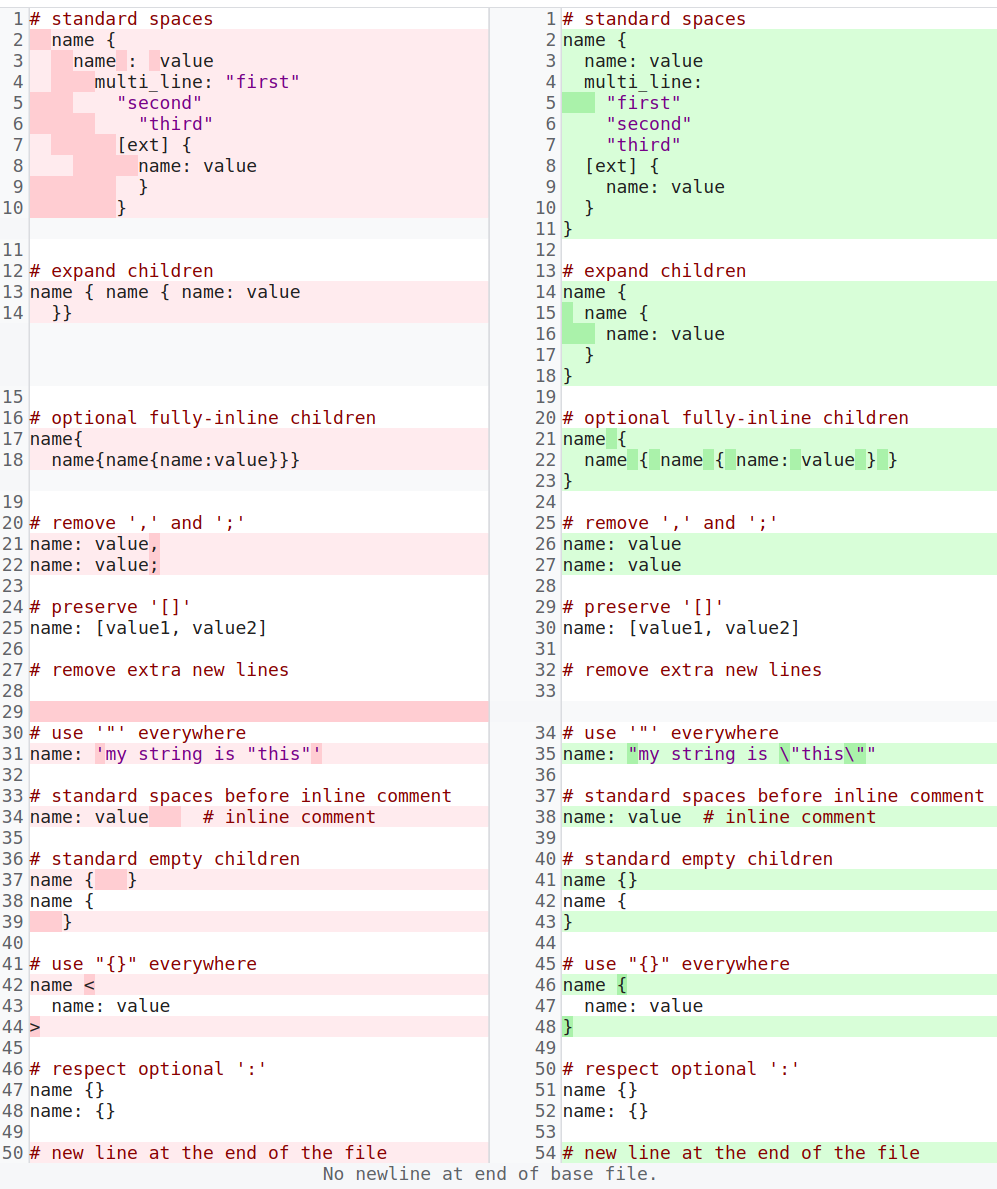
可配置的功能:
- 以下各项的字段
[`parser.Config`](https://github.com/search?q=repo%3Aprotocolbuffers%2Ftxtpbfmt+%22type+Config+struct%22&type=code)
- 以下各项对应的 `# txtpbfmt: feature` 名称
[`parser.addToConfig`](https://github.com/search?q=repo%3Aprotocolbuffers%2Ftxtpbfmt+%22func+addToConfig%28%22&type=code)
- [config.md](docs/config.md) 上的示例
## 是否有 API 可以在保留注释的同时编辑 text proto 文件?
有的,请参阅 [ast.go](ast/ast.go)。
## 如何禁用它?
你可以通过在文件顶部(第一个非空且非注释的行之前)添加带有 "# txtpbfmt: disable" 的注释来禁用整个文件的格式化,例如:
```
# File overview ...
# txtpbfmt: disable
content: { ... }
```
## 我的 text proto 文件应该使用哪种扩展名?
`.textproto` 是 Google 内部使用最广泛的扩展名(第二受欢迎的选择是 `.textpb`)。
## 另请参阅
* [文本格式语言规范](https://developers.google.com/protocol-buffers/docs/text-format-spec)
标签:EVTX分析, Go, Protocol Buffers, Ruby工具, SOC Prime, 代码格式化, 开发工具, 文本处理, 日志审计