angristan/wireguard-install
GitHub: angristan/wireguard-install
通过一个交互式 Bash 脚本在 Linux 服务器上快速安装并配置 WireGuard VPN,自动完成密钥生成、NAT 设置和客户端配置文件输出。
Stars: 11168 | Forks: 1664
# WireGuard 安装程序

[](https://saythanks.io/to/angristan)
**这个项目是一个 bash 脚本,旨在尽可能轻松地在 Linux 服务器上设置 [WireGuard](https://www.wireguard.com/) VPN!**
WireGuard 是一种点对点 VPN,可以以多种方式使用。在这里,我们将 VPN 定义为:客户端将通过加密隧道将其所有流量转发到服务器。
服务器将对客户端的流量应用 NAT,因此客户端就像是使用服务器的 IP 在浏览网页一样。
该脚本同时支持 IPv4 和 IPv6。请查看 [issues](https://github.com/angristan/wireguard-install/issues) 了解正在进行的开发、错误和计划中的功能!您也可以查看 [discussions](https://github.com/angristan/wireguard-install/discussions) 获取帮助。
WireGuard 不适合您的环境?看看 [openvpn-install](https://github.com/angristan/openvpn-install) 吧。
## 要求
支持的发行版:
- AlmaLinux >= 8
- Alpine Linux
- Arch Linux
- CentOS Stream >= 8
- Debian >= 10
- Fedora >= 32
- Oracle Linux
- Rocky Linux >= 8
- Ubuntu >= 18.04
## 使用方法
下载并执行脚本。回答脚本提出的问题,剩下的交由它来处理。
```
curl -O https://raw.githubusercontent.com/angristan/wireguard-install/master/wireguard-install.sh
chmod +x wireguard-install.sh
./wireguard-install.sh
```
它将在服务器上安装 WireGuard(内核模块和工具),对其进行配置,创建 systemd 服务和客户端配置文件。
再次运行该脚本以添加或移除客户端!
### 讨论更改
如果您想讨论某项更改,请在提交 PR 之前先开一个 issue,特别是对于较大的更改。
### 代码格式化
我们使用 [shellcheck](https://github.com/koalaman/shellcheck) 和 [shfmt](https://github.com/mvdan/sh) 来强制执行 bash 样式指南和最佳实践。它们会在每次提交 / PR 时通过 GitHub Actions 执行,因此您可以在此处[查看配置](https://github.com/angristan/wireguard-install/blob/master/.github/workflows/lint.yml)。
## 鸣谢与许可
本项目基于 [MIT 许可证](https://raw.githubusercontent.com/angristan/wireguard-install/master/LICENSE)
## Star 历史
[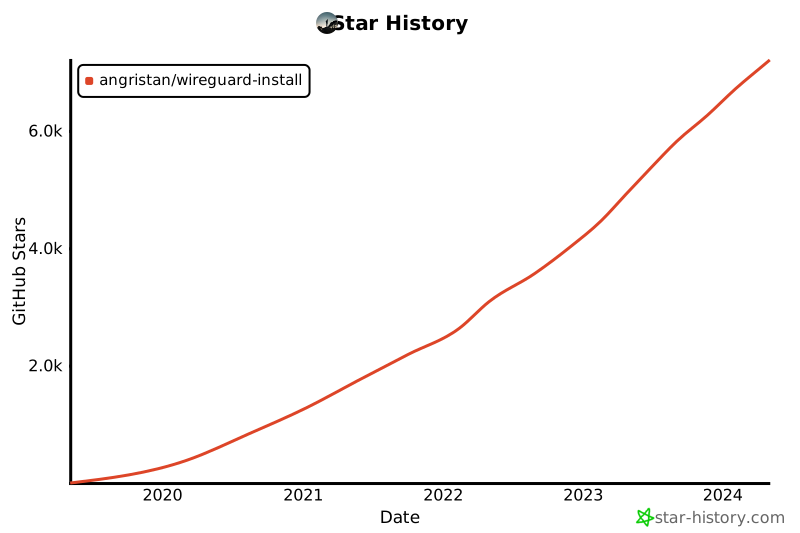](https://star-history.com/#angristan/wireguard-install&Date)
标签:AlmaLinux, Arch Linux, CentOS, Debian, Fedora, IPv4, IPv6, Linux服务器, NAT, openvpn替代, PE 加载器, PowerShell, Rocky Linux, Shell脚本, systemd, VPN, VPN安装, WireGuard, 一键脚本, 加密隧道, 安全合规, 应用安全, 开源, 服务器配置, 网络代理, 网络信息收集, 网络安全, 运维工具, 远程访问, 隐私保护