sipcapture/homer
GitHub: sipcapture/homer
一款开源的 SIP/VoIP/RTC 信令抓包与监控平台,基于 DuckDB 数据湖架构实现海量通话数据的高效采集、存储与检索。
Stars: 1978 | Forks: 264
 # homer eleven
`homer` 是为 Homer 11.x 数据湖提供支持的*多合一* HEP 捕获和 API 服务器单体应用
# homer eleven
`homer` 是为 Homer 11.x 数据湖提供支持的*多合一* HEP 捕获和 API 服务器单体应用
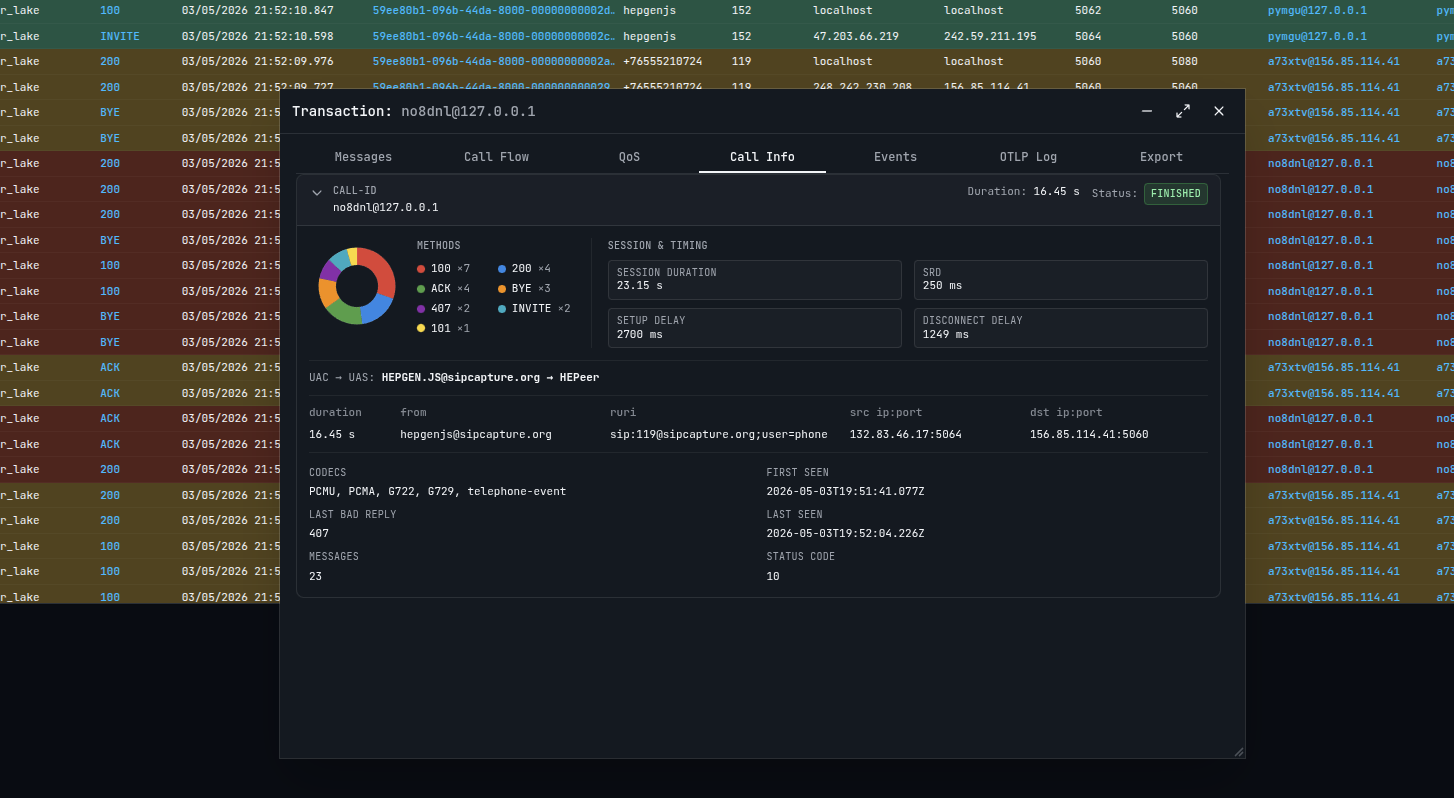 ## 特性
- 多合一应用 *(写入器、读取器、协调器、压缩器、API)*
- 适用于 Linux/MacOS 上 X64/ARM64 架构的现代化 Golang 代码库
- 由 DuckDB 1.5 和 Apache Arrow/IPC/Parquet 驱动
- 基于 DuckLake Catalog 和 本地/对象存储的数据湖设计
- 端到端列式 OTLP 设计,支持按需查询执行
- 线性扩展以查询共享的对象存储 catalog/池
- 灵活的 Schema 支持,应对不断增长的问题和协议
- 向后兼容所有 HEPv3 代理 (Agent)
- 易于维护、操作和扩展 *(可缩减至零!)*
- 面向 K8s 和标准部署的云原生设计
- 为人类打造的内置用户界面
- 支持 MCP 且对 LLM/Agent 友好的设计 *(抢走我们枯燥的工作)*
## 架构
Homer 采用模块化架构,具有四个主要组件:
```
┌─────────────────────────────────────────────────────────────────────────────┐
│ Homer Core │
│ │
│ ┌─────────────┐ ┌─────────────┐ ┌──────────┐ ┌─────────────────┐ │
│ │ Ingest │ │ Storage │ │ Node │ │ Coordinator │ │
│ │ (HEP recv) │──▶│ (DuckLake) │──▶│ gRPC/HTTP│──▶│ (REST API) │ │
│ └─────────────┘ └─────────────┘ └──────────┘ └─────────────────┘ │
│ UDP/TCP/HTTP Parquet+S3 Airport :50051 HTTP :8080 │
│ FlightSQL :50055 (opt. proxy :32010) │
└─────────────────────────────────────────────────────────────────────────────┘
```
### 模块
| 模块 | 描述 |
|--------|-------------|
| **Ingest** | 通过 UDP/TCP/TLS/HTTP/HTTPS 接收 HEP 数据包 |
| **Storage** | 将数据写入 DuckLake (Parquet + catalog) |
| **Node** | Airport gRPC + HTTP `/query`;可选的用于 Grafana 的 Arrow FlightSQL ([docs/FLIGHTSQL.md](docs/FLIGHTSQL.md)) |
| **Coordinator** | 用于 UI 和外部应用程序的 REST API 网关 |
## 快速入门
### 安装选项
- 下载 [release 版本](https://github.com/sipcapture/homer/releases)并在您的操作系统/架构上安装 `homer` 包
- 使用官方的 [docker 构建](ghcr.io/sipcapture/homer:latest)和 [compose 示例](examples/docker)
- 在本地构建您自己的发布版本 _(继续阅读)_
### 多合一部署
```
{
"ingest": {
"enable": true,
"udp": { "enable": true, "port": 9060 },
"tcp": { "enable": true, "port": 9061 },
"http": { "enable": true, "port": 9080 }
},
"storage": {
"enable": true,
"ducklake": {
"catalog_path": "/data/homer/homer_catalog.sqlite",
"data_path": "/data/homer/parquet"
}
},
"node": {
"enable": true,
"flight_server": { "port": 50051 }
},
"coordinator": {
"enable": true,
"http_server": { "port": 8080 }
}
}
```
### 构建与运行
```
# 构建
make
# 作为服务器运行(默认模式)
./homer --config-path /etc/homer/homer.json
# 带 debug 日志
./homer --config-path /etc/homer/homer.json --log-level debug
```
## 子命令
Homer 使用基于子命令的 CLI。不带参数运行 `homer` 将启动服务器。
```
homer Run the server (default)
homer search [flags] Search Homer data via coordinator API
homer cli [flags] Interactive DuckLake SQL shell
homer system [flags] System operations (compaction, extensions, reload)
homer wizard [flags] Interactive config generator wizard
homer mcp [flags] Start MCP stdio server
homer version Show version
homer help Show full help with all flags
```
### 服务器模式(默认)
```
homer --config-path /etc/homer/homer.json
homer --config-path /etc/homer/homer.json --log-level debug --syslog-disable
```
| 标志 | 描述 |
|------|-------------|
| `--config-path
## 特性
- 多合一应用 *(写入器、读取器、协调器、压缩器、API)*
- 适用于 Linux/MacOS 上 X64/ARM64 架构的现代化 Golang 代码库
- 由 DuckDB 1.5 和 Apache Arrow/IPC/Parquet 驱动
- 基于 DuckLake Catalog 和 本地/对象存储的数据湖设计
- 端到端列式 OTLP 设计,支持按需查询执行
- 线性扩展以查询共享的对象存储 catalog/池
- 灵活的 Schema 支持,应对不断增长的问题和协议
- 向后兼容所有 HEPv3 代理 (Agent)
- 易于维护、操作和扩展 *(可缩减至零!)*
- 面向 K8s 和标准部署的云原生设计
- 为人类打造的内置用户界面
- 支持 MCP 且对 LLM/Agent 友好的设计 *(抢走我们枯燥的工作)*
## 架构
Homer 采用模块化架构,具有四个主要组件:
```
┌─────────────────────────────────────────────────────────────────────────────┐
│ Homer Core │
│ │
│ ┌─────────────┐ ┌─────────────┐ ┌──────────┐ ┌─────────────────┐ │
│ │ Ingest │ │ Storage │ │ Node │ │ Coordinator │ │
│ │ (HEP recv) │──▶│ (DuckLake) │──▶│ gRPC/HTTP│──▶│ (REST API) │ │
│ └─────────────┘ └─────────────┘ └──────────┘ └─────────────────┘ │
│ UDP/TCP/HTTP Parquet+S3 Airport :50051 HTTP :8080 │
│ FlightSQL :50055 (opt. proxy :32010) │
└─────────────────────────────────────────────────────────────────────────────┘
```
### 模块
| 模块 | 描述 |
|--------|-------------|
| **Ingest** | 通过 UDP/TCP/TLS/HTTP/HTTPS 接收 HEP 数据包 |
| **Storage** | 将数据写入 DuckLake (Parquet + catalog) |
| **Node** | Airport gRPC + HTTP `/query`;可选的用于 Grafana 的 Arrow FlightSQL ([docs/FLIGHTSQL.md](docs/FLIGHTSQL.md)) |
| **Coordinator** | 用于 UI 和外部应用程序的 REST API 网关 |
## 快速入门
### 安装选项
- 下载 [release 版本](https://github.com/sipcapture/homer/releases)并在您的操作系统/架构上安装 `homer` 包
- 使用官方的 [docker 构建](ghcr.io/sipcapture/homer:latest)和 [compose 示例](examples/docker)
- 在本地构建您自己的发布版本 _(继续阅读)_
### 多合一部署
```
{
"ingest": {
"enable": true,
"udp": { "enable": true, "port": 9060 },
"tcp": { "enable": true, "port": 9061 },
"http": { "enable": true, "port": 9080 }
},
"storage": {
"enable": true,
"ducklake": {
"catalog_path": "/data/homer/homer_catalog.sqlite",
"data_path": "/data/homer/parquet"
}
},
"node": {
"enable": true,
"flight_server": { "port": 50051 }
},
"coordinator": {
"enable": true,
"http_server": { "port": 8080 }
}
}
```
### 构建与运行
```
# 构建
make
# 作为服务器运行(默认模式)
./homer --config-path /etc/homer/homer.json
# 带 debug 日志
./homer --config-path /etc/homer/homer.json --log-level debug
```
## 子命令
Homer 使用基于子命令的 CLI。不带参数运行 `homer` 将启动服务器。
```
homer Run the server (default)
homer search [flags] Search Homer data via coordinator API
homer cli [flags] Interactive DuckLake SQL shell
homer system [flags] System operations (compaction, extensions, reload)
homer wizard [flags] Interactive config generator wizard
homer mcp [flags] Start MCP stdio server
homer version Show version
homer help Show full help with all flags
```
### 服务器模式(默认)
```
homer --config-path /etc/homer/homer.json
homer --config-path /etc/homer/homer.json --log-level debug --syslog-disable
```
| 标志 | 描述 |
|------|-------------|
| `--config-path 标签:Apache Arrow, DEF CON 演示, DuckDB, EVTX分析, Google搜索, Go语言, Gradle集成, HEP协议, LLM, MCP支持, Python工具, RTC, SIP协议, Unmanaged PE, VoIP, 分布式架构, 列式存储, 子域名突变, 实时通信, 开源, 故障排查, 数据湖, 日志审计, 程序破解, 端到端监控, 网络性能监控, 网络流量捕获, 网络测绘, 请求拦截, 防御绕过