Plecost/plecost
GitHub: Plecost/plecost
一款专注于 WordPress 的异步安全扫描器,利用本地 CVE 数据库实现漏洞自动关联与去重。
Stars: 380 | Forks: 82

Plecost
Professional WordPress Security Scanner
Async-first, library-friendly, no external API required.
[](https://github.com/Plecost/plecost/actions)
[](https://pypi.org/project/plecost/)
[](https://python.org)
[](https://ghcr.io/plecost/plecost)
[](https://polyformproject.org/licenses/noncommercial/1.0.0/)
## 什么是 Plecost?
Plecost 检测 WordPress 安装(核心、插件和主题)中的漏洞,并将发现结果与每日更新的本地 CVE 数据库进行关联。它可以作为 CLI 工具、Python 库运行,或集成到 Celery 等任务队列中,输出格式一致且适合自动化处理。
**Plecost 与 WPScan 等替代方案的区别:**
- **无需 Ruby、无需 API 密钥、无需订阅。** 纯 Python 实现,自带每日通过 GitHub Actions 更新的 CVE 数据库。
- **以库为先的设计。** `from plecost import Scanner` 的使用方式与 CLI 相同,无需子进程封装。
- **完全异步。** 基于 `httpx` 和 `asyncio` 构建;模块在依赖图上并行运行以获得最高速度。
- **稳定的发现 ID。** 每个发现都有永久 ID(如 `PC-CVE-CVE-2023-28121`、`PC-MCFG-009`),可在工单系统和仪表板中安全跟踪。
- **SQLite 或 PostgreSQL。** 默认使用本地 SQLite;团队部署时可切换至 PostgreSQL。
## 快速开始
```
pip install plecost
# 仅首次下载 CVE 数据库(耗时数秒)
plecost update-db
# 扫描目标
plecost scan https://target.wordpress.com
```
仅此而已。没有账户、API 密钥或后台守护进程。
## 安装
**pip**
```
pip install plecost
pip install plecost[fast] # adds uvloop for higher throughput
pip install plecost[postgres] # adds asyncpg for PostgreSQL support
```
**Docker**
```
docker run --rm ghcr.io/plecost/plecost scan https://target.com
# 将 JSON 报告保存到本地目录
docker run --rm -v $(pwd):/data ghcr.io/plecost/plecost scan https://target.com \
--output /data/report.json
```
**从源码安装**
```
git clone https://github.com/Plecost/plecost.git
cd plecost
pip install -e ".[dev]"
```
## CVE 数据库
Plecost 附带一个 **本地 SQLite 数据库**,涵盖 WordPress 核心、插件和主题。它位于 `~/.plecost/db/plecost.db`,扫描期间不会发送到任何外部服务。
**数据库需要首次下载一次,之后保持更新。**
### 首次设置
```
plecost update-db
```
这将从 [plecost-db 发布页面](https://github.com/Plecost/plecost-db/releases) 下载预构建的快照(约 10–50 MB)。后续运行仅下载每日差异,通常小于 100 KB。
### 保持更新
定期运行 `update-db`(每周一次对大多数用例已足够):
```
plecost update-db
```
Plecost 在下载前会检查 SHA256 校验和。如果自上次运行以来没有变化,则不会传输任何数据。
### 更新机制如何工作
[plecost-db](https://github.com/Plecost/plecost-db) 仓库每天 02:00 UTC 运行一次 GitHub Actions 工作流。它查询 [NVD API v2.0](https://nvd.nist.gov/developers/vulnerabilities) 获取过去 24 小时内所有与 WordPress 相关的 CVE,利用 Jaro-Winkler 模糊匹配将 CVE 产品名称关联到约 50,000 个已知插件/主题标识符,并发布一个小的 JSON 补丁文件作为发布资源。
运行 `plecost update-db` 时,它会:
1. 从 `plecost-db` 发布页下载 `index.json`(64 字节)
2. 将其 SHA256 与本地副本比较
3. 仅下载缺失的补丁文件并按顺序应用
4. 首次运行时下载 `full.json`(完整历史记录)
| 运行 | 下载内容 | 典型大小 |
|------|----------|----------|
| 首次 | `full.json`(所有 CVE) | 10–50 MB |
| 每日更新 | 今天的补丁 | < 100 KB |
| 已更新 | 无(校验和匹配) | 64 字节 |
### 自定义数据库位置
```
# SQLite 使用自定义路径
export PLECOST_DB_URL=sqlite:////data/plecost.db
plecost update-db
plecost scan https://target.com
# PostgreSQL(团队共享设置)
pip install plecost[postgres]
export PLECOST_DB_URL=postgresql+asyncpg://user:pass@host/plecost
plecost update-db
plecost scan https://target.com
```
## 扫描
### 基本扫描
```
$ plecost scan https://target.com
Plecost v4.1 — WordPress Security Scanner
Target: https://target.com
WordPress 6.4.2 detected | WAF: Cloudflare
Plugins (3)
woocommerce 8.2.1 VULNERABLE
contact-form-7 5.8 OK
elementor 3.17.0 OK
Findings (7)
PC-CVE-CVE-2023-28121 WooCommerce SQLi CRITICAL
PC-SSL-001 HTTP does not redirect to HTTPS HIGH
PC-HDR-001 Missing Strict-Transport-Security MEDIUM
PC-USR-001 User enumeration via REST API MEDIUM
PC-XMLRPC-001 XML-RPC interface accessible MEDIUM
PC-REST-001 REST API user data exposed LOW
PC-MCFG-009 readme.html discloses WP version LOW
Summary: 1 Critical 1 High 3 Medium 2 Low | Duration: 4.2s
```
### 常用选项
```
# 认证扫描
plecost scan https://target.com --user admin --password secret
# 通过 Burp Suite 或 OWASP ZAP 路由流量
plecost scan https://target.com --proxy http://127.0.0.1:8080
# 仅运行特定检测模块
plecost scan https://target.com --modules fingerprint,plugins,cves
# 激进模式 — 50 个并行请求(仅适用于内部目标)
plecost scan https://target.com --aggressive
# 深度模式 — 完整词库(4750+ 插件,900+ 主题);默认扫描前 150/50
plecost scan https://target.com --deep
# 隐身模式 — 随机 UA,仅被动检测,速度较慢
plecost scan https://target.com --stealth
# 将结果保存为 JSON
plecost scan https://target.com --output report.json
# 仅显示 HIGH 和 CRITICAL 漏洞
plecost scan https://target.com --quiet
```
### 所有扫描标志
| 标志 | 描述 | 默认 |
|------|------|------|
| `--concurrency N` | 并行请求 | 10 |
| `--timeout N` | 请求超时(秒) | 10 |
| `--proxy URL` | HTTP 或 SOCKS5 代理 | — |
| `--user / -u` | WordPress 用户名 | — |
| `--password / -p` | WordPress 密码 | — |
| `--modules` | 要运行的模块(逗号分隔) | all |
| `--skip-modules` | 要跳过的模块 | — |
| `--stealth` | 被动模式,随机 User-Agent,减速 | 关闭 |
| `--aggressive` | 最大并发(50 个请求) | 关闭 |
| `--output / -o` | JSON 输出文件 | — |
| `--no-verify-ssl` | 跳过证书验证 | 关闭 |
| `--force` | 即使未检测到 WordPress 也进行扫描 | 关闭 |
| `--deep` | 全词表扫描(4750+ 插件,900+ 主题);默认为前 150/50 | 关闭 |
| `--verbose / -v` | 扫描期间实时显示模块进度和发现结果 | 关闭 |
| `--quiet` | 仅显示 HIGH 和 CRITICAL 发现 | 关闭 |
| `--module-option` | 模块特定选项:`MODULE:KEY=VALUE`(可重复) | — |
## 检测模块
Plecost 并行运行 **16 个异步模块**,通过明确的依赖图连接。无依赖关系的模块从开始起并发运行;`cves` 在关联结果前等待 `plugins` 和 `themes` 完成。
| 模块 | 检查内容 | 发现 ID |
|------|----------|----------|
| `fingerprint` | WordPress 版本(meta、readme、RSS、wp-login) | PC-FP-001/002 |
| `waf` | WAF/CDN 检测(Cloudflare、Sucuri、Wordfence、Imperva、AWS、Akamai、Fastly) | PC-WAF-001 |
| `plugins` | 插件枚举——被动 HTML 加对 `readme.txt` 的暴力破解 | PC-PLG-NNN |
| `themes` | 主题检测——被动扫描加对 `style.css` 的暴力破解 | PC-THM-001 |
| `users` | 用户枚举——通过 REST API 和作者归档页面 | PC-USR-001/002 |
| `xmlrpc` | XML-RPC 访问、`pingback.ping` DoS 向量、`system.listMethods` | PC-XMLRPC-001/002/003 |
| `rest_api` | REST API 链接泄露、oEmbed、CORS 配置错误 | PC-REST-001/002/003 |
| `misconfigs` | 12 项检查:`wp-config.php`、`.env`、`.git`、`debug.log`、目录遍历…… | PC-MCFG-001–012 |
| `directory_listing` | `wp-content/` 子目录中的开放目录列表 | PC-DIR-001–004 |
| `http_headers` | 缺失 HSTS、CSP、X-Frame-Options、X-Content-Type、Referrer-Policy 等 | PC-HDR-001–008 |
| `ssl_tls` | HTTP→HTTPS 重定向、证书有效性、HSTS 预加载 | PC-SSL-001/002/003 |
| `debug_exposure` | 活跃的 `WP_DEBUG`、通过响应头泄露的 PHP 版本 | PC-DBG-001/003 |
| `content_analysis` | 信用卡脚本、可疑 iframe、硬编码 API 密钥 | PC-CNT-001/002/003 |
| `auth` | 认证检查:登录验证、开放用户注册 | PC-AUTH-001/002 |
| `cves` | 针对本地数据库的核心、插件、主题 CVE 关联 | PC-CVE-{CVE-ID} |
|woocommerce` | WooCommerce 专用安全检查(详见下文) | PC-WC-000–021 |
| `wp_ecommerce` | WP eCommerce 专用安全检查(详见下文) | PC-WPEC-000–021 |
使用 `plecost explain
` 获取任意发现 ID 的完整技术细节和修复步骤。
## WooCommerce 安全
`woocommerce` 模块对 WooCommerce 安装及其官方扩展(Payments、Blocks、Stripe Gateway)执行专用安全检查。检测到 WooCommerce 时自动运行。
### 被动检查(始终开启)
- **指纹识别**——检测 WooCommerce 版本、活动扩展(Payments、Blocks、Stripe Gateway)和暴露的 API 命名空间
- **REST API 无认证访问**——检查 `/wp-json/wc/v3/customers`、`/orders`、`/coupons` 和 `/system-status` 是否无需凭据即可访问(严重/高危)
- **敏感文件暴露**——`/wp-content/uploads/wc-logs/` 的目录列表、访问 `/wp-content/uploads/woocommerce_uploads/`
### 半主动检查(需显式启用)
半主动检查会发送额外 HTTP 请求,可能在服务器日志中留下痕迹。需显式启用:
```
plecost scan https://target.com --module-option woocommerce:mode=semi-active
```
| 检查 | CVE | CVSS |
|------|-----|------|
| WooCommerce Payments 认证绕过 | CVE-2023-28121 | 9.8 严重 |
| WooCommerce Stripe Gateway IDOR(PII 泄露) | CVE-2023-34000 | 7.5 高 |
### 认证检查(可选)
提供 WooCommerce REST API 凭据以解锁额外检查(系统配置泄露、支付网关枚举):
```
plecost scan https://target.com \
--module-option woocommerce:wc_consumer_key=ck_xxx \
--module-option woocommerce:wc_consumer_secret=cs_xxx
```
### WooCommerce JSON 输出
检测到 WooCommerce 时,扫描结果包含独立的 `woocommerce` 部分:
```
{
"woocommerce": {
"detected": true,
"version": "8.5.2",
"active_plugins": ["core", "payments", "blocks", "stripe-gateway"],
"api_namespaces": ["wc/store/v1", "wc/v3"]
}
}
```
## WP eCommerce 安全
`wp_ecommerce` 模块对 **WP eCommerce**(wp-e-commerce)插件执行专用安全检查。检测到 WP eCommerce 时自动运行。
### 被动检查(始终开启)
- **指纹识别**——通过 `readme.txt` 检测版本,通过活动支付网关(ChronoPay)识别
- **目录暴露**——插件目录列表、`uploads/wpsc/`、`uploads/wpsc/digital/`(数字下载)
- **管理脚本**——直接访问 `wpsc-admin/db-backup.php` 和 `wpsc-admin/display-log.php`
- **ChronoPay 端点**——回调端点可访问性检查
### 半主动检查(需显式启用)
显式启用:
```
plecost scan https://target.com --module-option wpec:mode=semi-active
```
| 检查 | CVE | CVSS |
|------|-----|------|
| ChronoPay SQL 注入 | CVE-2024-1514 | 9.8 严重 |
| 通过 AJAX 的 PHP 对象注入 | CVE-2026-1235 | 8.1 高 |
检测为 **布尔型**(仅 SQL 错误字符串、反序列化模式),不进行基于时间的探测。
### WP eCommerce JSON 输出
检测到 WP eCommerce 时,扫描结果包含独立的 `wp_ecommerce` 部分:
```
{
"wp_ecommerce": {
"detected": true,
"version": "3.15.1",
"active_gateways": ["chronopay"],
"checks_run": ["readme", "directories", "sensitive_files", "chronopay_endpoint"]
}
}
```
## 输出格式
### 终端(默认)
带颜色编码严重等级的富格式表格。使用 `--quiet` 抑制 LOW/MEDIUM 发现。
### JSON
```
plecost scan https://target.com --output report.json
```
```
{
"url": "https://target.com",
"scanned_at": "2026-04-13T09:00:00Z",
"is_wordpress": true,
"wordpress_version": "6.4.2",
"waf_detected": "Cloudflare",
"plugins": [{ "slug": "woocommerce", "version": "8.2.1" }],
"themes": [{ "slug": "twentytwentyfour", "version": "1.2" }],
"users": ["admin", "editor"],
"findings": [
{
"id": "PC-CVE-CVE-2023-28121",
"remediation_id": "REM-CVE-CVE-2023-28121",
"title": "WooCommerce SQLi (CVE-2023-28121)",
"severity": "CRITICAL",
"cvss_score": 9.8,
"description": "...",
"remediation": "Update WooCommerce to version 7.8.0 or later.",
"references": ["https://nvd.nist.gov/vuln/detail/CVE-2023-28121"],
"evidence": { "plugin": "woocommerce", "version": "8.2.1" },
"module": "cves"
}
],
"summary": { "critical": 1, "high": 1, "medium": 3, "low": 2 },
"duration_seconds": 4.2,
"blocked": false,
"woocommerce": {
"detected": true,
"version": "8.2.1",
"active_plugins": ["core", "payments", "blocks"],
"api_namespaces": ["wc/store/v1", "wc/v3"]
},
"wp_ecommerce": null
}
```
## 库用法
Plecost 是一个一流的 Python 库。与 CLI 相同的逻辑可作为可导入的 API 使用——无需子进程,也无需解析 CLI 输出。
### 独立脚本
```
import asyncio
from plecost import Scanner, ScanOptions
async def main():
options = ScanOptions(
url="https://target.com",
concurrency=10,
timeout=10,
modules=["fingerprint", "plugins", "cves"], # None = all modules
)
result = await Scanner(options).run()
print(f"WordPress {result.wordpress_version} | WAF: {result.waf_detected}")
for finding in result.findings:
print(f"[{finding.severity.value}] {finding.id}: {finding.title}")
asyncio.run(main())
```
### Celery 工作器
```
from celery import Celery
from plecost import Scanner, ScanOptions
import asyncio
app = Celery("tasks")
@app.task
def scan_wordpress(url: str) -> dict:
opts = ScanOptions(url=url, modules=["fingerprint", "plugins", "cves"])
result = asyncio.run(Scanner(opts).run())
return {
"url": result.url,
"critical": result.summary.critical,
"findings": [f.id for f in result.findings],
}
```
## 环境变量
| 变量 | 描述 | 使用模块 |
|------|------|----------|
| `PLECOST_DB_URL` | 数据库 URL(SQLite 或 PostgreSQL) | `update-db`、`scan` |
| `PLECOST_TIMEOUT` | 请求超时(秒) | `scan` |
| `PLECOST_OUTPUT` | JSON 输出文件路径 | `scan` |
| `GITHUB_TOKEN` | GitHub 令牌以避免下载限流 | `update-db` |
## 架构
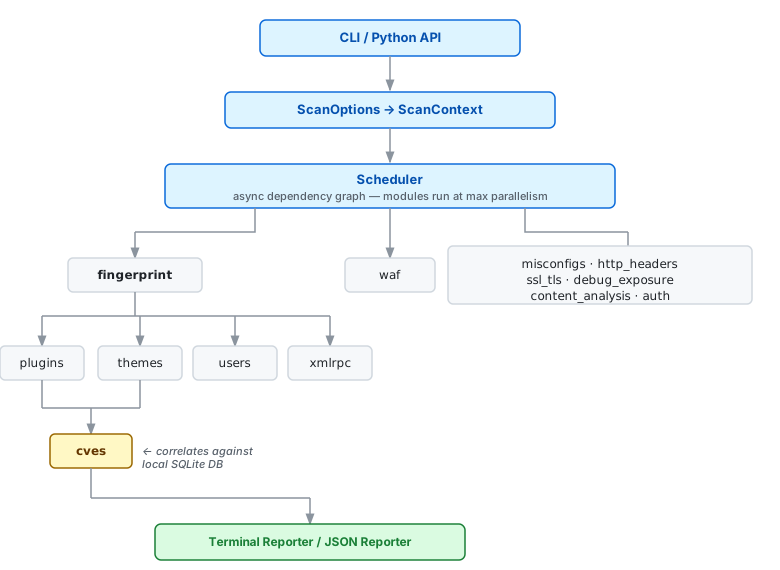 无依赖关系的模块从开始起并发运行。`cves` 等待 `plugins` 和 `themes` 完成,以便拥有完整的已安装软件列表来匹配 CVE 数据库。
## 故障排除
**"CVE 数据库未找到"**
本地数据库尚未下载:
```
plecost update-db
```
**目标返回 429(速率限制)**
```
# 降低并发
plecost scan https://target.com --concurrency 3
# 或使用隐身模式(包含自动调节速率)
plecost scan https://target.com --stealth
```
**SSL 证书错误**
```
plecost scan https://target.com --no-verify-ssl
```
**目标返回 403(扫描器被阻止)**
Plecost 会自动在预探测中检测到此情况,并干净地中止,出现发现 `PC-PRE-001`。请尝试更换 IP、使用代理或更改 User-Agent:
```
plecost scan https://target.com --proxy http://127.0.0.1:8080
plecost scan https://target.com --random-user-agent
```
**未检测到 WordPress**
```
plecost scan https://target.com --force
```
## 本地测试环境
一个自包含的 Docker Compose 环境——**Damn Vulnerable WordPress (DVWP)**——包含于 `tests/dvwp/` 中,用于本地测试和开发。它会启动一个配置完整的 WordPress 实例,并包含一组精心挑选的、故意存在漏洞的插件。
位于 [`tests/dvwp/`](tests/dvwp/)。
### 启动
```
cd tests/dvwp
docker compose up -d
docker compose logs wpcli -f # watch setup (~60s), wait for plugin table
```
`wpcli` 退出后,环境已就绪:
| URL | 凭据 |
|-----|-------|
| http://localhost:8765 | — |
| http://localhost:8765/wp-admin | `admin` / `admin` |
### 预安装的漏洞插件
| 插件 | 版本 | CVE |
|------|------|-----|
| wpDiscuz | 7.0.4 | CVE-2020-24186 — 未认证 RCE(文件上传),CVSS 9.8 |
| Contact Form 7 | 5.3.1 | CVE-2020-35489 — 无限制文件上传 |
| WooCommerce | 5.0.0 | CVE-2021-32790 — 多项 |
| WooCommerce Payments | 3.9.0 | CVE-2023-28121 — 未认证权限提升,CVSS 9.8 |
| WooCommerce Stripe Gateway | 4.3.0 | CVE-2019-15826 — 订单信息泄露 |
| Easy Digital Downloads | 2.11.5 | CVE-2021-39351 — 存储型 XSS |
| Give – Donation Plugin | 2.10.3 | CVE-2021-34634 — SQL 注入 |
| YITH WooCommerce Wishlist | 2.2.9 | CVE-2021-24987 — 存储型 XSS |
| Ninja Forms | 3.4.34.2 | CVE-2021-34648 — 未认证邮件注入 |
| Duplicator | 1.3.26 | CVE-2020-11738 — 路径遍历 |
| Loginizer | 1.6.3 | CVE-2020-27615 — SQL 注入 |
| Elementor | 3.1.2 | CVE-2022-1329 — 认证 RCE |
| WP Super Cache | 1.7.1 | CVE-2021-33203 — 认证 XSS |
| Wordfence | 7.5.0 | CVE-2021-24875 — 反射型 XSS |
### 对其运行 Plecost
```
plecost scan http://localhost:8765 -v
plecost scan http://localhost:8765 --deep -v
```
### 重置
```
docker compose down -v && docker compose up -d
```
详见 [`tests/dvwp/README.md`](tests/dvwp/README.md) 的完整说明。
## 对比
| | Plecost v4 | WPScan | Wordfence |
|------|-----------|--------|-----------|
| Python 库 API | 是 | 否 | 否 |
| 异步(httpx) | 是 | 否 | 否 |
| 无需 API 密钥 | 是 | 否(CVE 需 API) | 否 |
| WAF 检测(7 个提供者) | 是 | 是 | 否 |
| 插件暴力破解 | 是 | 是 | 否 |
| CVE 关联(每日更新) | 是 | 是 | 是 |
| 内容/嗅探器分析 | 是 | 否 | 是 |
| WooCommerce 专用检查 | 是 | 否 | 否 |
| 稳定的发现 ID | 是 | 否 | 否 |
| 原生 Docker | 是 | 是 | 否 |
| Celery / 库兼容 | 是 | 否 | 否 |
| PostgreSQL 支持 | 是 | 否 | 否 |
## 许可证
Plecost 在 [PolyForm Noncommercial License 1.0.0](https://polyformproject.org/licenses/noncommercial/1.0.0/) 许可下分发。
**免费用于:** 个人安全研究、内部企业审计、学术和教育用途、开源项目、慈善和政府组织。
**商业用途需获得许可:** 扫描即服务、包含于商业产品、或任何产生直接或间接收入的用途。
商业许可请联系:cr0hn@cr0hn.com(Dani) · ffranz@mrlooquer.com(Fran)
无依赖关系的模块从开始起并发运行。`cves` 等待 `plugins` 和 `themes` 完成,以便拥有完整的已安装软件列表来匹配 CVE 数据库。
## 故障排除
**"CVE 数据库未找到"**
本地数据库尚未下载:
```
plecost update-db
```
**目标返回 429(速率限制)**
```
# 降低并发
plecost scan https://target.com --concurrency 3
# 或使用隐身模式(包含自动调节速率)
plecost scan https://target.com --stealth
```
**SSL 证书错误**
```
plecost scan https://target.com --no-verify-ssl
```
**目标返回 403(扫描器被阻止)**
Plecost 会自动在预探测中检测到此情况,并干净地中止,出现发现 `PC-PRE-001`。请尝试更换 IP、使用代理或更改 User-Agent:
```
plecost scan https://target.com --proxy http://127.0.0.1:8080
plecost scan https://target.com --random-user-agent
```
**未检测到 WordPress**
```
plecost scan https://target.com --force
```
## 本地测试环境
一个自包含的 Docker Compose 环境——**Damn Vulnerable WordPress (DVWP)**——包含于 `tests/dvwp/` 中,用于本地测试和开发。它会启动一个配置完整的 WordPress 实例,并包含一组精心挑选的、故意存在漏洞的插件。
位于 [`tests/dvwp/`](tests/dvwp/)。
### 启动
```
cd tests/dvwp
docker compose up -d
docker compose logs wpcli -f # watch setup (~60s), wait for plugin table
```
`wpcli` 退出后,环境已就绪:
| URL | 凭据 |
|-----|-------|
| http://localhost:8765 | — |
| http://localhost:8765/wp-admin | `admin` / `admin` |
### 预安装的漏洞插件
| 插件 | 版本 | CVE |
|------|------|-----|
| wpDiscuz | 7.0.4 | CVE-2020-24186 — 未认证 RCE(文件上传),CVSS 9.8 |
| Contact Form 7 | 5.3.1 | CVE-2020-35489 — 无限制文件上传 |
| WooCommerce | 5.0.0 | CVE-2021-32790 — 多项 |
| WooCommerce Payments | 3.9.0 | CVE-2023-28121 — 未认证权限提升,CVSS 9.8 |
| WooCommerce Stripe Gateway | 4.3.0 | CVE-2019-15826 — 订单信息泄露 |
| Easy Digital Downloads | 2.11.5 | CVE-2021-39351 — 存储型 XSS |
| Give – Donation Plugin | 2.10.3 | CVE-2021-34634 — SQL 注入 |
| YITH WooCommerce Wishlist | 2.2.9 | CVE-2021-24987 — 存储型 XSS |
| Ninja Forms | 3.4.34.2 | CVE-2021-34648 — 未认证邮件注入 |
| Duplicator | 1.3.26 | CVE-2020-11738 — 路径遍历 |
| Loginizer | 1.6.3 | CVE-2020-27615 — SQL 注入 |
| Elementor | 3.1.2 | CVE-2022-1329 — 认证 RCE |
| WP Super Cache | 1.7.1 | CVE-2021-33203 — 认证 XSS |
| Wordfence | 7.5.0 | CVE-2021-24875 — 反射型 XSS |
### 对其运行 Plecost
```
plecost scan http://localhost:8765 -v
plecost scan http://localhost:8765 --deep -v
```
### 重置
```
docker compose down -v && docker compose up -d
```
详见 [`tests/dvwp/README.md`](tests/dvwp/README.md) 的完整说明。
## 对比
| | Plecost v4 | WPScan | Wordfence |
|------|-----------|--------|-----------|
| Python 库 API | 是 | 否 | 否 |
| 异步(httpx) | 是 | 否 | 否 |
| 无需 API 密钥 | 是 | 否(CVE 需 API) | 否 |
| WAF 检测(7 个提供者) | 是 | 是 | 否 |
| 插件暴力破解 | 是 | 是 | 否 |
| CVE 关联(每日更新) | 是 | 是 | 是 |
| 内容/嗅探器分析 | 是 | 否 | 是 |
| WooCommerce 专用检查 | 是 | 否 | 否 |
| 稳定的发现 ID | 是 | 否 | 否 |
| 原生 Docker | 是 | 是 | 否 |
| Celery / 库兼容 | 是 | 否 | 否 |
| PostgreSQL 支持 | 是 | 否 | 否 |
## 许可证
Plecost 在 [PolyForm Noncommercial License 1.0.0](https://polyformproject.org/licenses/noncommercial/1.0.0/) 许可下分发。
**免费用于:** 个人安全研究、内部企业审计、学术和教育用途、开源项目、慈善和政府组织。
**商业用途需获得许可:** 扫描即服务、包含于商业产品、或任何产生直接或间接收入的用途。
商业许可请联系:cr0hn@cr0hn.com(Dani) · ffranz@mrlooquer.com(Fran)标签:CI, CVE, Docker, GraphQL安全矩阵, PB级数据处理, PostgreSQL, PyPI, Semgrep, SQLite, TLS抓取, WordPress主题扫描, WordPress安全扫描, WordPress插件扫描, WordPress核心扫描, 安全扫描器, 安全运维, 安全防御评估, 开源安全工具, 异步, 异步IO, 数字签名, 本地数据库, 测试用例, 结构化查询, 网页安全, 自动化安全, 计算机取证, 请求拦截, 软件安全, 运行时操纵, 逆向工具, 逆向工程平台