AdamWhiteHat/Judge-Jury-and-Executable
GitHub: AdamWhiteHat/Judge-Jury-and-Executable
这是一款基于.NET的文件系统取证与威胁搜寻工具,能够绕过权限限制直接读取MFT并将海量文件属性存入SQL数据库,利用SQL语法实现深度数据分析。
Stars: 84 | Forks: 15
# 法官、陪审团与 Executable
## 一款威胁狩猎取证工具

## 功能:
- 立即扫描已挂载的文件系统以查找威胁
- 或者在安全事件发生前收集系统基准,以增强威胁狩猎能力
- 可在安全事件发生前、发生时或发生后使用
- 适用于单台或多台工作站
- 扫描 MFT,绕过文件权限、文件锁定或操作系统的文件保护/隐藏/影子复制
- 为每个文件收集多达 51 种不同的属性
- 扫描结果将存入 SQL 表中,以便日后搜索、汇总多次扫描和/或多台机器的结果,以及进行历史或回顾性分析
- 利用 SQL 的强大功能来搜索文件系统、查询文件属性、回答复杂或高层次的问题,并狩猎威胁或入侵指标
## 环境要求:
- .NET Framework v4.8
- Microsoft Visual C++ 2015 Redistributable
- 具有读/写/创建权限的本地或远程 SQL 数据库。
- Visual Studio(如果您希望编译 C# 代码)
- 互联网访问权限(否则您是怎么获取到这段代码的???此外还需要获取 nuget 包...)
- SQL 的基础知识
## 通过编写 SQL 查询,在一个(或多个)文件系统上狩猎病毒、恶意软件和 APT。
请允许我详细说明...
您一开始拥有一个可能被恶意软件、病毒、APT(高级持续性威胁)或类似东西弄“脏”的磁盘或磁盘镜像,然后使用此工具对它们进行扫描。(可选步骤,并且假设您有如此的智慧和远见,您可能希望先(或后——这无关紧要)使用此工具扫描一个已知良好的基准磁盘镜像。这当然不是必须的,但绝对会对您有所帮助。)此工具的取证级扫描部分会收集文件系统(或其镜像)中每个文件的_大量_属性,并将这些属性放入一个 SQL 关系数据库表中。秘诀在于能够通过使用 SQL 语言对创建的数据库进行查询,从而实现对数据的威胁狩猎、调查或提问。这里的一个关键特性是_不_发明专有的查询语言。如果您懂 SQL 并且知道如何点击按钮,那么您就已经知道如何像个专家一样使用这个工具了。即使您不会,这个概念也非常强大,预置的查询(见下文)将为您提供极大的便利。
## 取证级扫描。
首先,该工具会在数据库中为 MFT(主文件表——这是 NTFS 进行记录的方式)中发现的每条记录创建一个条目。这绕过了文件安全权限、文件隐藏、隐身或混淆技术、文件删除或篡改时间戳。这些技术都无法阻止文件被扫描和编目。文件的字节会直接从 MFT 中读取,并且在尝试使用更高级别的操作系统 API 调用访问任何数据点之前,会尽可能多地从 MFT 读取的文件字节中提取数据点。
## 丰富的高层数据分析。
在确保获取到 MFT 和取证级数据之后,系统会收集每个文件可用的操作系统级属性、数据和元数据,并以此扩充从 MFT 条目创建的每个条目。因此,即使由于文件权限 (ACL)、文件锁定(正在使用中)、磁盘损坏、零字节长度文件或其他各种原因导致无法通过操作系统 API 或 .NET Framework 访问文件或其属性,该文件的存在仍然会被记录、登记和追踪。只是该条目不会包含操作系统无法访问的关于该文件的信息。每个文件最多可收集 51 个不同的数据点。
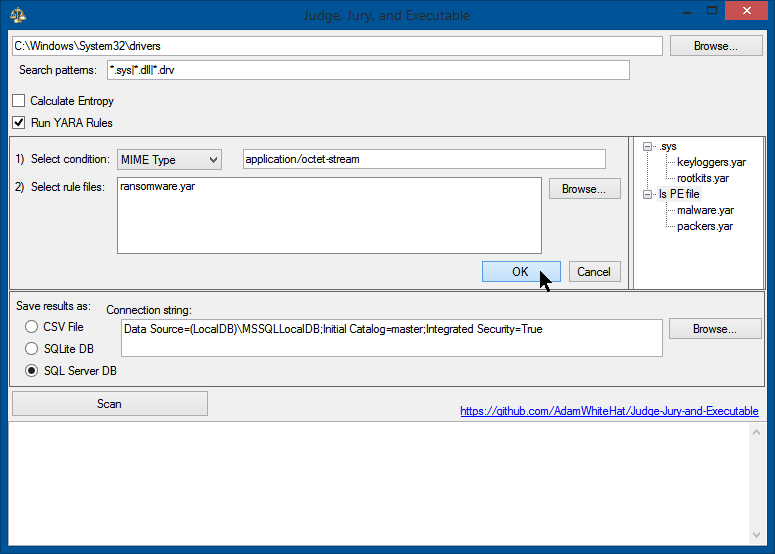
## 
## 对于每个文件,收集的信息包括:
- SHA256 哈希值
- MD5 哈希值
- 导入表哈希值 (ImpHash)(如果存在)
- MFT 编号和序列号
- MFT 记录的创建/修改/访问日期
- 操作系统报告的创建/修改/访问日期
- 所有“标准”的操作系统文件属性:位置、大小、日期戳、属性、元数据
- 是否为 PE、DLL 或驱动程序?
- 是否经过 Authenticode 签名?
- X.509 证书链是否通过验证?
- 自定义 YARA 规则(列出匹配的规则名称)
- 文件熵值
- 总共最多 51 个不同的数据点
## 示例数据行:
| MFTNumber | SequenceNumber | SHA256 | FullPath | Length | FileOwner | Attributes | IsExe | IsDll | IsDriver | BinaryType | IsSigned | IsSignatureValid | IsValidCertChain | IsTrusted | ImpHash | MD5 | SHA1 | CompileDate | MimeType | InternalName | ProductName | OriginalFileName | FileVersion | FileDescription | Copyright | Company | Language | Trademarks | Project | ApplicationName | Comment | Title | Link | ProviderItemID | ComputerName | DriveLetter | DirectoryLocation | Filename | Extension | CertSubject | CertIssuer | CertSerialNumber | CertThumbprint | CertNotBefore | CertNotAfter | PrevalenceCount | Entropy | YaraRulesMatched | DateSeen | MftTimeAccessed | MftTimeCreation | MftTimeModified | MftTimeMftModified | CreationTime | LastAccessTime | LastWriteTime |
|:-------------:|:-------------:|:-------------:|:-------------:|:-------------:|:-------------:|:-------------:|:-------------:|:-------------:|:-------------:|:-------------:|:-------------:|:-------------:|:-------------:|:-------------:|:-------------:|:-------------:|:-------------:|:-------------:|:-------------:|:-------------:|:-------------:|:-------------:|:-------------:|:-------------:|:-------------:|:-------------:|:-------------:|:-------------:|:-------------:|:-------------:|:-------------:|:-------------:|:-------------:|:-------------:|:-------------:|:-------------:|:-------------:|:-------------:|:-------------:|:-------------:|:-------------:|:-------------:|:-------------:|:-------------:|:-------------:|:-------------:|:-------------:|:-------------:|:-------------:|:-------------:|:-------------:|:-------------:|:-------------:|:-------------:|:-------------:|
| 18010 | 0 | C67BE7D3F54D44AC264A18E33909482F1F8CA7B7FBAAF5659EF71ED9F8092C34 | C:\Windows\WinSxS\amd64_windows-defender-service-cloudclean_31bf3856ad364e35_6.3.9600.18603_none_73d12e8145b3841b\SymSrv.dll | 149264 | TrustedInstaller | A | 1 | 1 | 0 | 16 | 1 | 1 | 0 | 1 | 5D54F5D721E301667338323AC07578E3 | 65FB3391EB26F5AC647FC40501D8E21D | 4B46DB2A99A47FF6A6EE376F4D79F5298BFF28A2 | 2010-02-01 20:15:48.0000000 | application/x-msdownload | symsrv.dll | Debugging Tools for Windows(R) | symsrv.dll | 6.12.2.633 | Symbol Server | © Microsoft Corporation. All rights reserved. | Microsoft Corporation | English (United States) | | | | | | | | L | C | C:\Windows\WinSxS\amd64_windows-defender-service-cloudclean_31bf3856ad364e35_6.3.9600.18603_none_73d12e8145b3841b | SymSrv.dll | .dll | CN=Microsoft Corporation, OU=MOPR, O=Microsoft Corporation, L=Redmond, S=Washington, C=US | CN=Microsoft Code Signing PCA, O=Microsoft Corporation, L=Redmond, S=Washington, C=US | 6105F71E000000000032 | D468FAEB5190BF9DECD9827AF470F799C41A769C | 7/13/2009 5:00:18 PM | 10/13/2010 5:10:18 PM | 1 | 0 | NULL | 2020-10-25 06:17:12.0133333 | 2013-06-18 14:43:52.6497911 | 2013-08-22 06:56:50.9086288 | 2013-08-22 06:56:50.9086288 | 2019-01-15 19:13:49.1704756 | 2013-08-22 06:56:50.9086288 | 2013-08-22 06:56:50.9086288 | 2013-06-18 14:43:52.6497911 |
# 预置查询:
```
/*
IDEA: All files in the directory C:\Windows\System32\ should be 'owned' by TrustedInstaller.
If a file in the System32 directory is owned by a different user, this indicates an anomaly,
and that user is likely the user that created that file.
Malware likes to masquerade around as valid Windows system files.
Executables that are placed in the System32 directory not only look more official, as it is a common path for
system files, but an explicit path to that executable does not need to be supplied to execute it from the
command line, windows 'Run' dialog box of the start menu, or the win32 API call ShellExecute.
*/
SELECT
TOP 1000 *
FROM [FileProperties]
WHERE
[FileOwner] <> 'TrustedInstaller'
AND [DirectoryLocation] = ':\Windows\System32'
AND IsSigned = 0
ORDER BY [PrevalenceCount] DESC
/*
IDEA: The MFT creation timestamp and the OS creation timestamp should match.
If the MFT creation timestamp occurs after the creation time reported by the OS meta-data,
this indicates an anomaly.
Timestomp is a tool that is part of the Metasploit Framework that allows a user to backdate a file
to an arbitrary time of their choosing. There really isn't a good legitimate reason for doing this
(let me know if you can think of one), and is considered an anti-forensics technique.
*/
SELECT
TOP 1000 *
FROM [FileProperties]
WHERE
([MftTimeAccessed] <> [LastAccessTime]) OR
([MftTimeCreation] <> [CreationTime]) OR
([MftTimeMftModified] <> [LastWriteTime])
ORDER BY [DateSeen] DESC
/*
IDEA: The 'CompileDate' property of any executable or dll should always come before the creation timestamp for that file.
Similar logic applies as for the MFT creation timestamp occuring after the creation timestamp. How could a program have been
compiled AFTER the file that holds it was created? This anomaly indicates backdating or timestomping has occurred.
*/
SELECT
TOP 1000 *
FROM [FileProperties]
WHERE
([MftTimeCreation] < [CompileDate]) OR
([CreationTime] < [CompileDate])
ORDER BY [DateSeen] DESC
```
标签:C#, MFT解析, .NET, 威胁狩猎, 安全工具, 数字取证, 文件系统, 自动化脚本