clj-kondo/clj-kondo
GitHub: clj-kondo/clj-kondo
为 Clojure 代码提供静态分析与语法检查的轻量级工具,在开发阶段提前发现错误并规范编码风格。
Stars: 1845 | Forks: 305
[](https://clojars.org/clj-kondo)
[](https://opencollective.com/clj-kondo)
[](https://circleci.com/gh/clj-kondo/clj-kondo/tree/master)
[](https://ci.appveyor.com/project/clj-kondo/clj-kondo/branch/master)
[](https://cljdoc.org/d/clj-kondo/clj-kondo/CURRENT)
[](https://clojurians.slack.com/messages/CHY97NXE2)
[](https://twitter.com/search?q=%23cljkondo&src=typed_query&f=live)
一个为 Clojure 代码提供静态分析和语法检查的工具,能带来愉悦体验。
## 原理
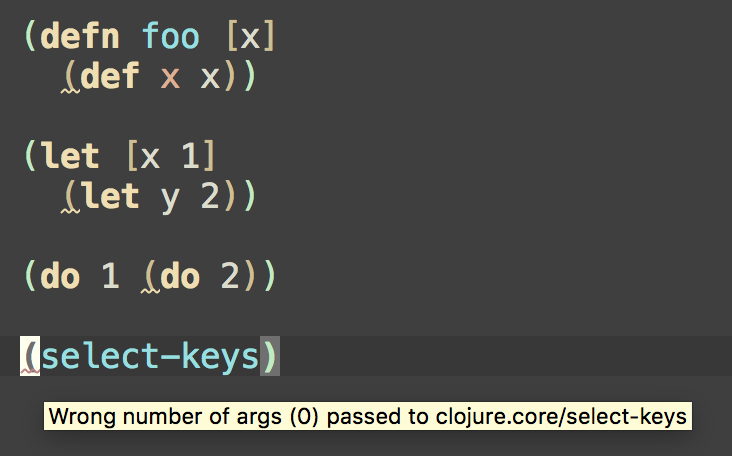
Clj-kondo 对 Clojure、ClojureScript 和 EDN 执行 [静态分析]()。
它在您输入时通知您潜在的错误(无需执行程序)。
## 功能
Clj-kondo 检测:
* 行内 `def` 表达式
* 冗余的 `do` 和 `let` 包装
* arity 错误:
- 在同一命名空间和跨命名空间之间
- 静态 Java 方法调用
- 本地 `let` 和 `letfn` 绑定调用
- 递归调用(包括 `recur`)
- 重载函数中的冲突 arity
* 未使用的私有变量
* 私有和已弃用变量的使用
* 需要但未使用的命名空间
* 未排序的必需命名空间
* 引用但未使用的变量
* 重复的 require
* 未使用的函数参数和 let 绑定
* 标记为未使用但已使用的参数和 let 绑定(可选)
* 未使用的导入
* 重定义的变量
* 未解析的符号、变量和命名空间
* 放置不当的文档字符串
* 重复的映射键和集合元素
* 常量测试中的重复项和引用
* 缺失的映射键
* 绑定向量中形式数量无效
* `clojure.test/deftest` 中缺少断言
* 别名一致性
* [类型检查](doc/types.md)
* Datalog 语法检查
* 格式字符串参数不匹配
* 遮蔽变量
* reduce 的两个参数用法(可选)
在表单进入 REPL 之前。
它建议遵循一些风格指南,例如:
* Stuart Sierra 的 [how to ns](https://stuartsierra.com/2016/clojure-how-to-ns.html) 中的规则
* 在 `cond` 中使用 `:else` 作为捕获所有测试表达式(参见 [Clojure 风格指南](https://github.com/bbatsov/clojure-style-guide#else-keyword-in-cond))
* 使用 `seq` 代替 `(not (empty? ,,,))`(参见 [Clojure 风格指南](https://github.com/bbatsov/clojure-style-guide#nil-punning))
* 不要让行过长(参见 [Clojure 风格指南](https://github.com/bbatsov/clojure-style-guide#80-character-limits))
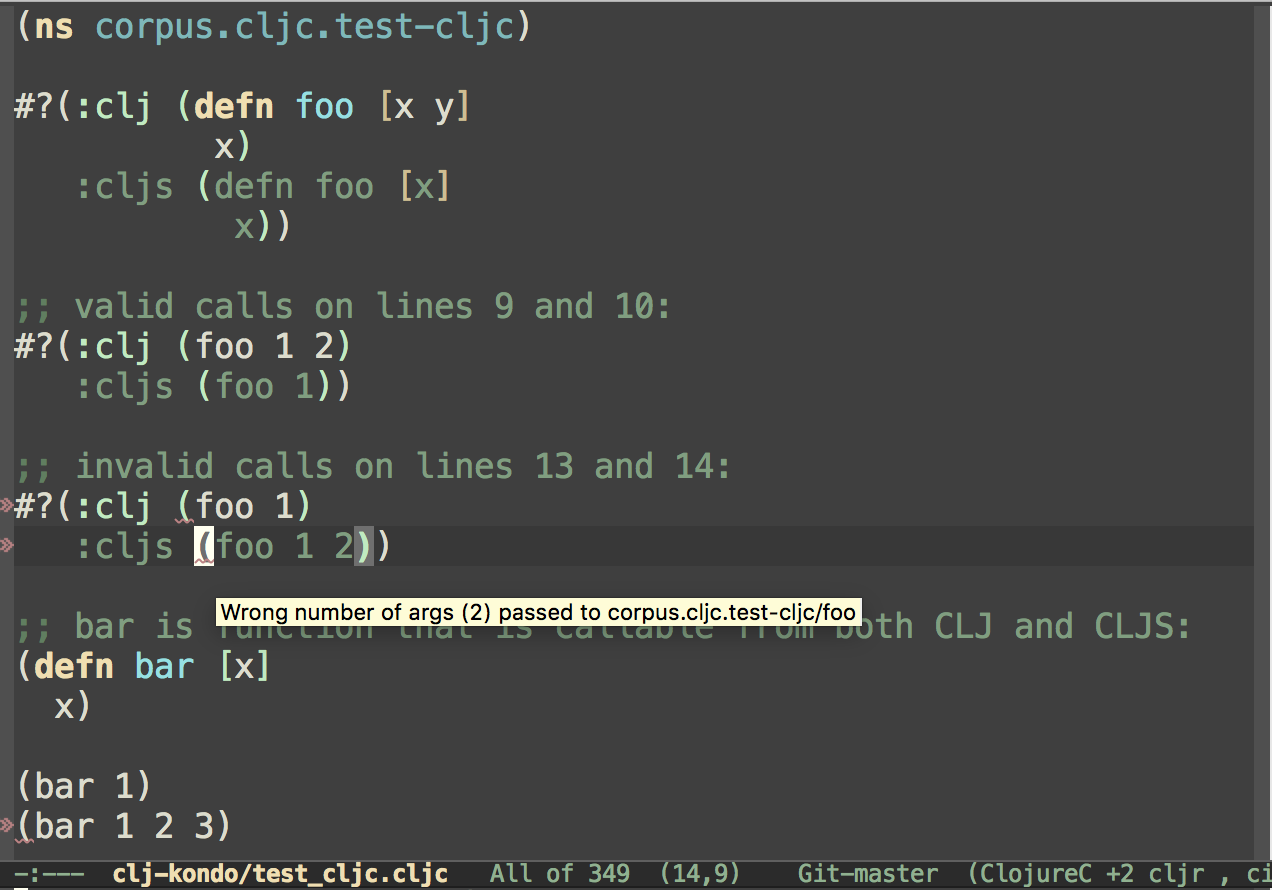
它支持常用宏的语法,例如
`clojure.core.async/alt!!`、`schema.core/defn` 和 `potemkin/import-vars`。
它能检测 `deps.edn` 和 `bb.edn` 中的常见错误。
它提供 [分析数据](analysis) 以便您构建自己的自定义语法检查器。
在此处查看所有可用的语法检查器 [here](doc/linters.md)。
该语法检查器具备以下特性:
* 兼容 `.clj`、`.cljs`、`.cljc` 和 `.edn` 文件
* 与构建工具和编辑器无关
* 静态代码分析器
* 使用 GraalVM 编译为本机代码
请在 [交互式游乐场](https://clj-kondo.michielborkent.nl) 尝试 clj-kondo。
观看讲座:
[](https://www.youtube.com/watch?v=MB3vVREkI7s)
## [安装](doc/install.md)
## [在 JVM 上运行](doc/jvm.md)
## [使用 Docker 运行](doc/docker.md)
## 用法
### 命令行
从标准输入进行语法检查:
```
$ echo '(def x (def x 1))' | clj-kondo --lint -
:1:8: warning: inline def
```
检查文件:
```
$ echo '(def x (def x 1))' > /tmp/foo.clj
$ clj-kondo --lint /tmp/foo.clj
/tmp/foo.clj:1:8: warning: inline def
```
检查目录:
```
$ clj-kondo --lint src
src/clj_kondo/test.cljs:7:1: warning: redundant do
src/clj_kondo/calls.clj:291:3: error: Wrong number of args (1) passed to clj-kondo.calls/analyze-calls
```
检查项目类路径:
```
$ clj-kondo --lint "$(lein classpath)"
```
帮助:
```
$ clj-kondo --help
clj-kondo v2024.11.14
Options:
--lint : a file can either be a normal file, directory or classpath. In the
case of a directory or classpath, only .clj, .cljs and .cljc will be
processed. Use - as filename for reading from stdin.
--lang : if lang cannot be derived from the file extension this option will be
used. Supported values: clj, cljs, cljc.
--filename : in case stdin is used for linting, use this to set the
reported filename.
--cache-dir: when this option is provided, the cache will be resolved to this
directory. If --cache is false, this option will be ignored.
--cache: if false, won't use cache. Otherwise, will try to resolve cache
using `--cache-dir`. If `--cache-dir` is not set, cache is resolved using the
nearest `.clj-kondo` directory in the current and parent directories.
--config : extra config that is merged. May be a file or an EDN expression. See https://github.com/clj-kondo/clj-kondo/blob/master/doc/config.md.
--config-dir : use this config directory instead of auto-detected
.clj-kondo dir.
--parallel: lint sources in parallel.
--dependencies: don't report any findings. Useful for populating cache while linting dependencies.
--copy-configs: copy configs from dependencies while linting.
--skip-lint: skip lint/analysis, still check for other tasks like copy-configs.
--fail-level : minimum severity for exit with error code. Supported values:
warning, error. The default level if unspecified is warning.
--report-level : minimum severity for which to report. Supported values:
info, warning, error. The default level if unspecified is info.
--debug: print debug information.
```
## 项目设置
为了检测项目中跨命名空间的语法错误,需要缓存。要
让 clj-kondo 知道在哪里创建缓存,请在项目的根目录下创建一个 `.clj-kondo` 目录,
该目录与 `project.clj`、`deps.edn` 或 `build.boot` 位于同一层级:
```
$ mkdir -p .clj-kondo
```
运行 `clj-kondo` 时会创建缓存。在在编辑器中进行语法检查之前,建议对整个类路径进行语法检查,以
告知 clj-kondo 所有正在使用的库,包括 Clojure 和/或 ClojureScript 本身。某些库带有配置。
要导入它们,请先运行:
```
$ clj-kondo --lint "" --dependencies --copy-configs --skip-lint
```
`--copy-configs` 标志会在语法检查期间搜索并复制依赖项中的配置到
`.clj-kondo` 目录中(参见
[config.md](doc/config.md#exporting-and-importing-configuration))。
配置就位后,我们现在可以正确分析依赖项:
```
$ clj-kondo --lint "" --dependencies --parallel
```
`--dependencies` 标志表示 clj-kondo 用于分析源代码以填充缓存。启用后,clj-kondo 将抑制警告并跳过
已经语法检查过的 `.jar` 文件以提升性能。
`--parallel` 选项将使用多线程来加快语法检查速度。
注意:在 `2024.05.24` 之后的版本中,复制配置和检查依赖项可以一步完成:
```
$ clj-kondo --lint "" --dependencies --parallel --copy-configs
```
构建工具特定的类路径获取方式:
- `lein classpath`
- `boot with-cp -w -f -`
- `clojure -Spath`
- `npx shadow-cljs classpath`
因此,对于 `lein`,完整命令如下:
```
$ clj-kondo --lint "$(lein classpath)" --dependencies --parallel --copy-configs
```
现在您可以使用 [编辑器
集成](doc/editor-integration.md) 检查单个文件。当
您在编辑器中编辑文件时,会发生以下模拟操作:
```
$ echo '(select-keys)' | clj-kondo --lang cljs --lint -
:1:1: error: Wrong number of args (0) passed to cljs.core/select-keys
```
由于 clj-kondo 现在通过缓存了解了您的 ClojureScript 版本,
它会检测到传递给 `select-keys` 的参数数量无效。每次编辑文件时,缓存都会增量更新,
因此 clj-kondo 会获悉您刚编写的新函数。
如果您想使用不同的目录来读写缓存,请使用
`--cache-dir` 选项。若要完全禁用缓存(即使存在 `.clj-kondo` 目录),请使用 `--cache false`。
对于项目的版本控制,我们建议您将 `./.clj-kondo/` 目录下的所有内容提交到版本控制,
但请忽略缓存目录。在 `.gitignore` 中添加 `.cache` 以忽略所有 `.cache` 目录,
包括 `./.clj-kondo` 下的目录。根据您使用的 `--cache-dir` 进行相应调整。
## [配置](doc/config.md)
## [编辑器集成](doc/editor-integration.md)
## 退出代码
退出代码可通过 `--fail-level ` 选项控制。默认失败级别为 `warning`,返回的退出代码如下:
- `0`:未发现错误或警告
- `2`:发现一个或多个警告
- `3`:一个或多个错误
如果提供 `--fail-level error`,警告不会导致非零退出代码:
- `0`:未发现错误
- `0`:发现一个或多个警告
- `3`:发现一个或多个错误
所有其他退出代码(除了 `0`、`2` 和 `3`)表示由于 clj-kondo 的 bug 或其他不可控错误导致的错误。
## [CI 集成](doc/ci-integration.md)
## [分析数据](analysis)
## 开发者文档
## [使用 clj-kondo 的公司](doc/companies.md)
## 宏
由于 clj-kondo 是一个静态分析器,不需要运行时(JVM、浏览器、Node.js 等)。它不会执行代码。
因此它可以作为不依赖运行时的语法检查器的更快替代方案,例如
[eastwood](https://github.com/jonase/eastwood)。这种方法有一个限制,即 clj-kondo 无法执行宏,因为宏可以使用运行时的任意特性。clj-kondo 支持 clojure 核心宏和一些社区流行库。
对于不受支持的宏,可以使用
[配置](https://github.com/clj-kondo/clj-kondo/blob/master/doc/config.md#unrecognized-macros) 来支持。配置宏的一种方法是编写
[hooks](https://github.com/clj-kondo/clj-kondo/blob/master/doc/hooks.md) 用于
它们(也请参见此
[博客文章](https://blog.michielborkent.nl/clj-kondo-hooks.html))。
对于许多库,已经有可用的配置,您可以
[导入](https://github.com/clj-kondo/clj-kondo/blob/master/doc/config.md#importing)。同时也可以查看 clj-kondo [configs](https://github.com/clj-kondo/configs),其中包含第三方库的配置。
## Babashka pod
clj-kondo 可以作为 [babashka
pod](https://github.com/babashka/babashka.pods) 调用。
```
#!/usr/bin/env bb
(ns script
(:require [babashka.pods :as pods]))
(pods/load-pod "clj-kondo")
(require '[pod.borkdude.clj-kondo :as clj-kondo])
(clj-kondo/merge-configs
'{:linters {:unresolved-symbol {:exclude [(foo1.bar)]}}}
'{:linters {:unresolved-symbol {:exclude [(foo2.bar)]}}})
;;=> {:linters {:unresolved-symbol {:exclude [(foo1.bar) (foo2.bar)]}}}
(-> (clj-kondo/run! {:lint ["src"]})
:summary)
;;=> {:error 0, :warning 0, :info 0, :type :summary, :duration 779}
```
## 播客
+ [defnpodcast](https://soundcloud.com/defn-771544745)
+ [ClojureScript Podcast](https://clojurescriptpodcast.com/)
## 文章
- [How to catch derived Vars with a clj-kondo hook](https://www.mikkokoski.com/blog/derived-vars/index.html) by Mikko Koski
- [Taking your linting to the next level](https://blog.tvaisanen.com/take-your-linting-game-to-the-next-level?showSharer=true#heading-benefits-of-types-in-the-editor) by Toni Vaisanen
- [Replacing clojure-lsp with clj-kondo and Refactor-nREPL](https://andreyor.st/posts/2025-09-21-replacing-clojure-lsp-with-clj-kondo-and-refactor-nrepl/)
## 许可证
版权所有 © 2019 - 2023 Michiel Borkent
根据 EPL 许可证分发,与 Clojure 相同。请参阅 LICENSE。
目录 `inlined` 包含来自 [`tools.reader`](https://github.com/clojure/tools.reader) 的源代码,其根据 EPL 许可证授权。
目录 `parser` 包含来自 [`rewrite-clj`](https://github.com/xsc/rewrite-clj) 的修改源代码,其根据 MIT 许可证授权。标签:clj-kondo, Clojure, ClojureScript, EDN, Linter, pptx, SOC Prime, WebSocket, 二进制发布, 云安全监控, 代码分析, 代码审查, 代码规范, 代码错误检测, 依赖分析, 凭证管理, 函数式编程, 函数调用分析, 变量未使用检测, 命名空间分析, 开发工具, 开源工具, 服务器监控, 编程工具, 语法检测, 远程代码执行, 错误基检测, 静态代码分析, 静态分析