Tencent/rapidjson
GitHub: Tencent/rapidjson
一个由腾讯开源的高性能 C++ JSON 解析与生成库,提供 SAX/DOM 双风格 API,兼具极速解析与极低内存开销。
Stars: 15111 | Forks: 3648


## 适用于 C++ 的快速 JSON 解析器/生成器,同时提供 SAX/DOM 风格的 API
腾讯很高兴通过开源 RapidJSON 来支持开源社区。
版权所有 (C) 2015 THL A29 Limited, 一家腾讯公司, 以及 Milo Yip。
* [RapidJSON GitHub](https://github.com/Tencent/rapidjson/)
* RapidJSON 文档
* [English](http://rapidjson.org/)
* [简体中文](http://rapidjson.org/zh-cn/)
* [GitBook](https://www.gitbook.com/book/miloyip/rapidjson/) 提供可下载的 PDF/EPUB/MOBI,但不包含 API 参考。
## 构建状态
| [Linux][lin-link] | [Windows][win-link] | [Coveralls][cov-link] |
| :---------------: | :-----------------: | :-------------------: |
| ![lin-badge] | ![win-badge] | ![cov-badge] |
## 简介
RapidJSON 是一个 C++ 的 JSON 解析器和生成器。它的灵感来源于 [RapidXml](http://rapidxml.sourceforge.net/)。
* RapidJSON **小**而**全**。它同时支持 SAX 和 DOM 风格的 API。SAX 解析器仅有半千行代码。
* RapidJSON **速度快**。其性能可与 `strlen()` 相媲美。它还可选择支持 SSE2/SSE4.2 进行加速。
* RapidJSON **独立**且**仅包含头文件**。它不依赖于诸如 BOOST 等外部库,甚至不依赖于 STL。
* RapidJSON **对内存友好**。对于大多数 32/64 位机器,每个 JSON 值恰好占用 16 字节(不包括文本字符串)。默认情况下,它使用快速的内存分配器,并且解析器在解析期间会紧凑地分配内存。
* RapidJSON **对 Unicode 友好**。它内部支持 UTF-8、UTF-16、UTF-32(LE 和 BE),以及它们的检测、验证和转码。例如,你可以读取一个 UTF-8 文件,并让 RapidJSON 将 DOM 中的 JSON 字符串转码为 UTF-16。它还支持代理项和 "\u0000"(空字符)。
更多功能可以在[这里](doc/features.md)阅读。
JSON(JavaScript 对象表示法) 是一种轻量级的数据交换格式。RapidJSON 应完全符合 RFC7159/ECMA-404,并可选支持宽松语法。有关 JSON 的更多信息,请访问
* [Introducing JSON](http://json.org/)
* [RFC7159: The JavaScript Object Notation (JSON) Data Interchange Format](https://tools.ietf.org/html/rfc7159)
* [Standard ECMA-404: The JSON Data Interchange Format](https://www.ecma-international.org/publications/standards/Ecma-404.htm)
## v1.1 亮点 (2016-8-25)
* 新增 [JSON Pointer](doc/pointer.md)
* 新增 [JSON Schema](doc/schema.md)
* 新增 [宽松 JSON 语法](doc/dom.md)(注释、尾随逗号、NaN/Infinity)
* 使用 [C++11 基于范围的 for 循环](doc/tutorial.md)迭代数组/对象
* 在 x86-64 架构下,将每个 `Value` 的内存开销从 24 字节减少到 16 字节。
有关其他更改,请参考[更新日志](CHANGELOG.md)。
## 兼容性
RapidJSON 是跨平台的。已经测试过的部分平台/编译器组合如下所示。
* Windows (32/64 位) 上的 Visual C++ 2008/2010/2013
* Cygwin 上的 GNU C++ 3.8.x
* Mac OS X (32/64 位) 和 iOS 上的 Clang 3.4
* Android NDK 上的 Clang 3.4
用户可以在他们的平台/编译器上构建并运行单元测试。
## 安装
RapidJSON 是一个仅含头文件的 C++ 库。只需将 `include/rapidjson` 文件夹复制到系统或项目的 include 路径中即可。
或者,如果你使用 [vcpkg](https://github.com/Microsoft/vcpkg/) 依赖管理器,你可以通过单个命令下载并安装 rapidjson 并集成 CMake:
* vcpkg install rapidjson
RapidJSON 使用以下软件作为其依赖项:
* [CMake](https://cmake.org/) 作为通用构建工具
* (可选)[Doxygen](http://www.doxygen.org) 用于构建文档
* (可选)[googletest](https://github.com/google/googletest) 用于单元和性能测试
要生成用户文档并运行测试,请按照以下步骤操作:
1. 执行 `git submodule update --init` 以获取第三方子模块(google test)的文件。
2. 在 rapidjson 源代码目录中创建一个名为 `build` 的目录。
3. 切换到 `build` 目录并运行 `cmake ..` 命令来配置你的构建。Windows 用户可以使用 cmake-gui 应用程序完成相同的操作。
4. 在 Windows 上,构建在 build 目录中找到的解决方案。在 Linux 上,从 build 目录运行 `make`。
构建成功后,你会在 `bin` 目录中找到编译好的测试和示例二进制文件。生成的文档将位于构建树的 `doc/html` 目录中。要在完成构建后运行测试,请从构建树中运行 `make test` 或 `ctest`。你可以使用 `ctest -V` 命令获取详细的输出。
可以通过在具有管理员权限的构建树中运行 `make install` 命令,将库安装到整个系统。这将根据系统偏好安装所有文件。一旦安装了 RapidJSON,就可以通过将 `find_package(RapidJSON)` 行添加到你的 CMakeLists.txt 中,在其他 CMake 项目中使用它。
## 一瞥用法
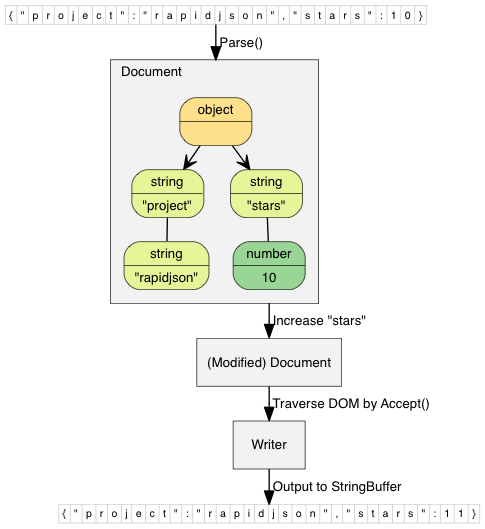
这个简单的例子将一个 JSON 字符串解析到文档(DOM)中,对 DOM 进行简单的修改,最后将 DOM 转换回 JSON 字符串。
```
// rapidjson/example/simpledom/simpledom.cpp`
#include "rapidjson/document.h"
#include "rapidjson/writer.h"
#include "rapidjson/stringbuffer.h"
#include
using namespace rapidjson;
int main() {
// 1. Parse a JSON string into DOM.
const char* json = "{\"project\":\"rapidjson\",\"stars\":10}";
Document d;
d.Parse(json);
// 2. Modify it by DOM.
Value& s = d["stars"];
s.SetInt(s.GetInt() + 1);
// 3. Stringify the DOM
StringBuffer buffer;
Writer writer(buffer);
d.Accept(writer);
// Output {"project":"rapidjson","stars":11}
std::cout << buffer.GetString() << std::endl;
return 0;
}
```
请注意,此示例未处理潜在的错误。
下图展示了该过程。
更多[示例](https://github.com/Tencent/rapidjson/tree/master/example)可用:
* DOM API
* [tutorial](https://github.com/Tencent/rapidjson/blob/master/example/tutorial/tutorial.cpp): DOM API 的基本用法。
* SAX API
* [simplereader](https://github.com/Tencent/rapidjson/blob/master/example/simplereader/simplereader.cpp): 在通过 `Reader` 解析 JSON 时转储所有 SAX 事件。
* [condense](https://github.com/Tencent/rapidjson/blob/master/example/condense/condense.cpp): 一个命令行工具,用于重写 JSON 并删除所有空白字符。
* [pretty](https://github.com/Tencent/rapidjson/blob/master/example/pretty/pretty.cpp): 一个命令行工具,通过 `PrettyWriter` 使用缩进和换行重写 JSON。
* [capitalize](https://github.com/Tencent/rapidjson/blob/master/example/capitalize/capitalize.cpp): 一个命令行工具,用于将 JSON 中的字符串大写。
* [messagereader](https://github.com/Tencent/rapidjson/blob/master/example/messagereader/messagereader.cpp): 使用 SAX API 解析 JSON 消息。
* [serialize](https://github.com/Tencent/rapidjson/blob/master/example/serialize/serialize.cpp): 使用 SAX API 将 C++ 对象序列化为 JSON。
* [jsonx](https://github.com/Tencent/rapidjson/blob/master/example/jsonx/jsonx.cpp): 实现了一个 `JsonxWriter`,它将 SAX 事件转换为 [JSONx](https://www-01.ibm.com/support/knowledgecenter/SS9H2Y_7.1.0/com.ibm.dp.doc/json_jsonx.html)(一种 XML)格式。该示例是一个命令行工具,用于将输入的 JSON 转换为 JSONx 格式。
* Schema
* [schemavalidator](https://github.com/Tencent/rapidjson/blob/master/example/schemavalidator/schemavalidator.cpp) : 一个命令行工具,用于使用 JSON schema 验证 JSON。
* 高级
* [prettyauto](https://github.com/Tencent/rapidjson/blob/master/example/prettyauto/prettyauto.cpp): [pretty](https://github.com/Tencent/rapidjson/blob/master/example/pretty/pretty.cpp) 的修改版本,可自动处理任何 UTF 编码的 JSON。
* [parsebyparts](https://github.com/Tencent/rapidjson/blob/master/example/parsebyparts/parsebyparts.cpp): 实现了一个 `AsyncDocumentParser`,它可以使用 C++11 线程分部分解析 JSON。
* [filterkey](https://github.com/Tencent/rapidjson/blob/master/example/filterkey/filterkey.cpp): 一个命令行工具,用于移除所有用户指定键的值。
* [filterkeydom](https://github.com/Tencent/rapidjson/blob/master/example/filterkeydom/filterkeydom.cpp): 与上述相同的工具,但它演示了如何使用生成器来填充 `Document`。
### 问题
欢迎提交问题和功能增强请求。
请通过提供**最小的可重现示例**来帮助我们,因为源代码更容易让其他人了解发生了什么。
对于某些平台上的崩溃问题,请附带堆栈转储内容以及操作系统、编译器等详细信息。
请先尝试断点调试,告诉我们你的发现,看看我们是否能在准备了更多信息的基础上开始探索。
### 工作流
通常,我们遵循“fork-and-pull”的 Git 工作流。
1. 在 GitHub 上**Fork**仓库
2. 将项目**克隆**到你自己的机器上
3. 在你的 fork 上**签出**一个新分支,开始在该分支上进行开发
4. 在提交前**测试**更改,确保更改通过所有测试,包括 `unittest` 和 `preftest`,如有需要,请为每个新功能或错误修复添加测试用例。
5. 将更改**提交**到你自己的分支
6. 将你的工作**推送**回你的 fork
7. 提交**Pull request**,以便我们可以审查你的更改
注意:在发起 pull request 之前,请务必合并“upstream”的最新代码!
### 版权和许可
你可以从下方复制并粘贴许可证摘要。
```
Tencent is pleased to support the open source community by making RapidJSON available.
Copyright (C) 2015 THL A29 Limited, a Tencent company, and Milo Yip.
Licensed under the MIT License (the "License"); you may not use this file except
in compliance with the License. You may obtain a copy of the License at
http://opensource.org/licenses/MIT
Unless required by applicable law or agreed to in writing, software distributed
under the License is distributed on an "AS IS" BASIS, WITHOUT WARRANTIES OR
CONDITIONS OF ANY KIND, either express or implied. See the License for the
specific language governing permissions and limitations under the License.
```
标签:API, Bash脚本, C++, DOM, Header-Only, JSON生成器, JSON解析器, LangChain, RapidJSON, RapidXml, SAX, SSE2, SSE4.2, Unicode, UTF-8, 内存友好, 反序列化, 序列化, 开发库, 开源库, 搜索引擎爬虫, 数据擦除, 数据解析, 腾讯, 轻量级