aquasecurity/tfsec
GitHub: aquasecurity/tfsec
Tfsec 是一款针对 Terraform 的静态安全扫描工具,现已并入 Trivy,提供规则驱动的配置合规检查。
Stars: 7023 | Forks: 555
[](https://goreportcard.com/report/github.com/aquasecurity/tfsec)
[](https://slack.aquasec.com/)
[](https://hub.docker.com/r/tfsec/tfsec)
[](https://formulae.brew.sh/formula/tfsec)
[](https://chocolatey.org/packages/tfsec)
[](https://aur.archlinux.org/packages/tfsec-bin)
[](https://marketplace.visualstudio.com/items?itemName=tfsec.tfsec)
## 📣 tfsec 迁移至 Trivy 指南
作为我们为所有人提供全面的开源安全解决方案目标的一部分,我们一直致力于将所有与扫描相关的工作集中到一个地方,那就是 [Trivy](https://github.com/aquasecurity/trivy)。
在过去的一年中,tfsec 为 Trivy 的 IaC 和错误配置扫描功能奠定了基础,包括 Terraform 扫描,该功能早已在 Trivy 中获得原生支持。
展望未来,我们希望鼓励 tfsec 社区过渡到 Trivy。迁移到 Trivy 可为您提供同样出色的 Terraform 扫描引擎,并带来一些额外的好处:
1. 在同一工具中访问更多语言和功能。
2. 通过 Trivy 周围丰富的生态系统,访问与工具和服务更多的集成。
3. 由 Aqua 以及充满热情的 Trivy 社区提供商业支持。
tfsec 目前将继续保持可用状态,尽管未来我们的工程重心将转向 Trivy。
## tfsec 迁移至 Trivy 指南
有关 Trivy 与 tfsec 的对比以及如何从 tfsec 迁移到 Trivy 的更多信息,请查看[迁移指南](https://github.com/aquasecurity/tfsec/blob/master/tfsec-to-trivy-migration-guide.md)。
## 概述
tfsec 通过对您的 terraform 代码进行静态分析,来发现潜在的错误配置。
### 功能
- :cloud: 检查所有主要(以及一些次要)云服务商的错误配置
- :no_entry: 数百个内置规则
- :nesting_dolls: 扫描模块(本地和远程)
- :heavy_plus_sign: 计算 HCL 表达式以及字面值
- :arrow_right_hook: 计算 Terraform 函数,例如 `concat()`
- :link: 计算 Terraform 资源之间的关系
- :toolbox: 兼容 Terraform CDK
- :no_good: 应用(并完善)用户定义的 Rego 策略
- :page_with_curl: 支持多种输出格式:lovely(默认)、JSON、SARIF、CSV、CheckStyle、JUnit、文本、Gif。
- :hammer_and_wrench: 可配置(通过 CLI 标志和/或配置文件)
- :zap: 非常快,能够快速扫描庞大的代码库
- :electric_plug: 提供适用于流行 IDE 的插件([JetBrains](https://plugins.jetbrains.com/plugin/18687-tfsec-findings-explorer)、[VSCode](https://marketplace.visualstudio.com/items?itemName=tfsec.tfsec) 和 [Vim](https://github.com/aquasecurity/vim-tfsec))
- :house_with_garden: 社区驱动 - 欢迎[在 Slack 上](https://slack.aquasec.com/)与我们交流!
## Thoughtworks 推荐
被 [Thoughtworks 技术雷达](https://www.thoughtworks.com/en-gb/radar/tools/tfsec) 评为 _采纳 (Adopt)_ 级别:
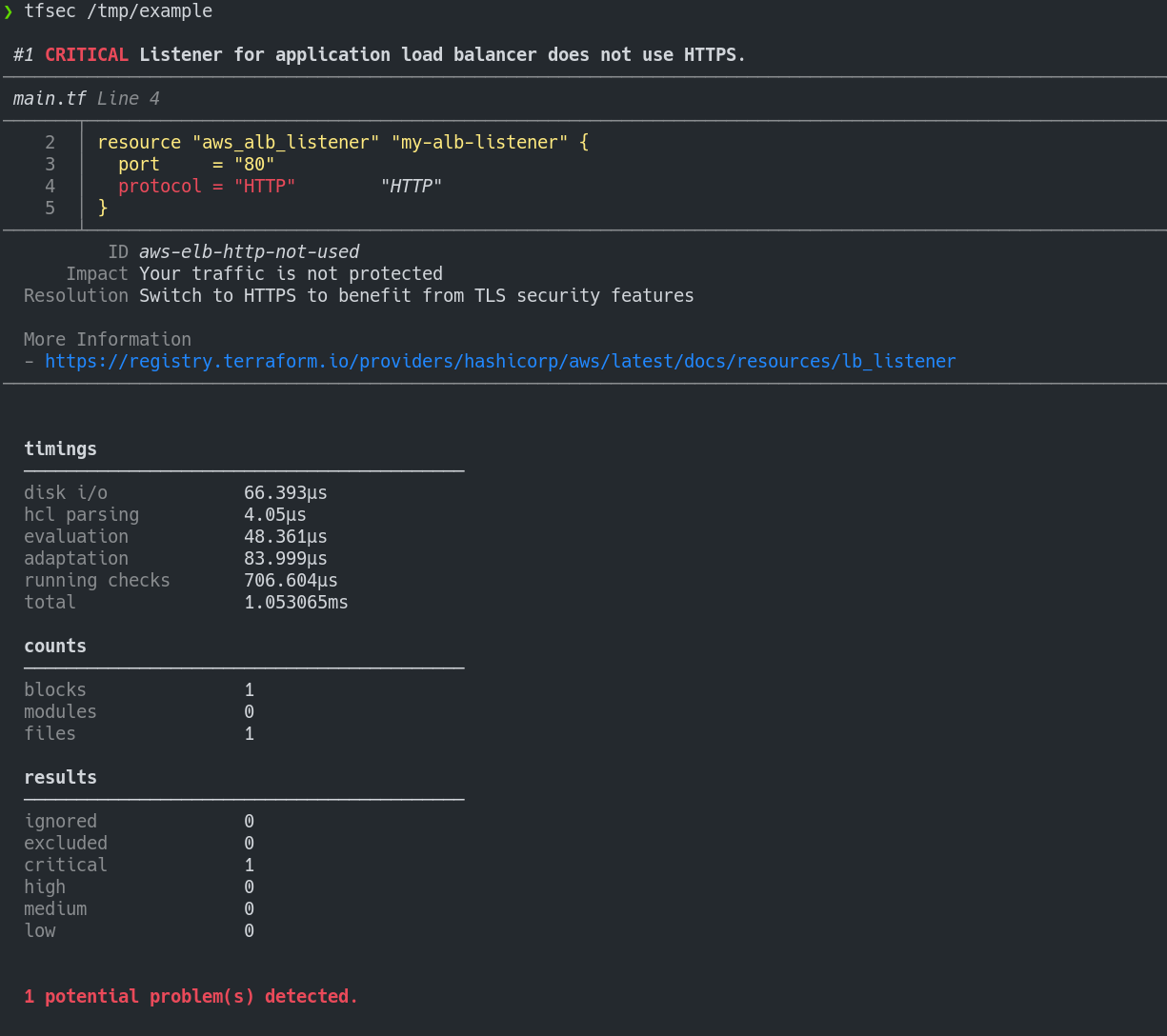
## 示例输出
## 安装说明
使用 [brew/linuxbrew](https://brew.sh) 安装
```
brew install tfsec
```
使用 [Chocolatey](https://chocolatey.org/) 安装
```
choco install tfsec
```
使用 [Scoop](https://scoop.sh/) 安装
```
scoop install tfsec
```
Bash 脚本:
```
curl -s https://raw.githubusercontent.com/aquasecurity/tfsec/master/scripts/install_linux.sh | bash
```
您也可以从 [发布页面](https://github.com/aquasecurity/tfsec/releases) 获取适合您系统的二进制文件。
或者,使用 Go 安装:
```
go install github.com/aquasecurity/tfsec/cmd/tfsec@latest
```
请注意,使用 `go install` 将直接从 `master` 分支进行安装,并且不会通过 `tfsec --version` 报告版本号。
### 签名
[发布页面](https://github.com/aquasecurity/tfsec/releases) 上的二进制文件使用 tfsec 签名密钥 `D66B222A3EA4C25D5D1A097FC34ACEFB46EC39CE` 进行签名。
有关更多信息,请查看[签名页面](SIGNING.md)以获取验证说明。
## 使用方法
tfsec 将扫描指定的目录。如果未指定目录,则将使用当前工作目录。
如果 tfsec 发现问题,退出状态将非零,否则退出状态为零。
```
tfsec .
```
## 配合 Docker 使用
作为在您的系统上安装和运行 tfsec 的替代方案,您可以在 Docker 容器中运行 tfsec。
有多种 Docker 选项可供选择
| 镜像名称 | 基础镜像 | 说明 |
|------------|------|---------|
|[aquasec/tfsec](https://hub.docker.com/r/aquasec/tfsec)|alpine|普通 tfsec 镜像|
|[aquasec/tfsec-alpine](https://hub.docker.com/r/aquasec/tfsec-alpine)|alpine|与 aquasec/tfsec 完全相同,但适用于喜欢明确指定的人|
|[aquasec/tfsec-ci](https://hub.docker.com/r/aquasec/tfsec-ci)|alpine|没有 entrypoint 的 tfsec - 适用于您想要覆盖命令的 CI 构建|
|[aquasec/tfsec-scratch](https://hub.docker.com/r/aquasec/tfsec-scratch)|scratch|基于 scratch 构建的镜像 - 没有多余的内容,仅运行 tfsec|
运行方式:
```
docker run --rm -it -v "$(pwd):/src" aquasec/tfsec /src
```
## 配合 Visual Studio Code 使用
目前正在开发一款 Visual Studio Code 扩展,以便与 tfsec 结果集成。更多信息可在 [tfsec Marketplace 页面](https://marketplace.visualstudio.com/items?itemName=tfsec.tfsec) 找到
## 作为 GitHub Action 使用
如果您想将 tfsec 作为 GitHub Action 在您的代码库上运行,可以使用 [https://github.com/aquasecurity/tfsec-pr-commenter-action](https://github.com/aquasecurity/tfsec-pr-commenter-action)。
## 作为 Azure DevOps Pipelines Task 使用
您现在可以安装 [官方 tfsec task](https://marketplace.visualstudio.com/items?itemName=AquaSecurityOfficial.tfsec-official)。请在 [task 代码库](https://github.com/aquasecurity/tfsec-azure-pipelines-task) 中提交任何问题或功能请求。
## 忽略警告
您可能希望忽略某些警告。如果您想这样做,可以
只需在模板中出错的行添加一个包含 `tfsec:ignore:
` 的注释。
或者,您可以将注释添加到包含该问题的代码块上方的一行,或者添加到 module 代码块以忽略 module 内所有出现的该问题。
例如,要忽略一个开放的安全组规则:
```
resource "aws_security_group_rule" "my-rule" {
type = "ingress"
cidr_blocks = ["0.0.0.0/0"] #tfsec:ignore:aws-vpc-no-public-ingress-sgr
}
```
...或者...
```
resource "aws_security_group_rule" "my-rule" {
type = "ingress"
#tfsec:ignore:aws-vpc-no-public-ingress-sgr
cidr_blocks = ["0.0.0.0/0"]
}
```
如果您不确定在哪一行添加注释,只需检查
tfsec 输出中发现的该问题的行号即可。
您可以通过在一行中拼接多个规则来忽略多个规则:
```
#tfsec:ignore:aws-s3-enable-bucket-encryption tfsec:ignore:aws-s3-enable-bucket-logging
resource "aws_s3_bucket" "my-bucket" {
bucket = "foobar"
acl = "private"
}
```
### 有效期
您可以为 `ignore` 设置 `yyyy-mm-dd` 格式的有效期。当您希望确保被忽略的问题不会被遗忘并应在将来重新审查时,这是一个非常有用的功能。
```
#tfsec:ignore:aws-s3-enable-bucket-encryption:exp:2025-01-02
```
像这样的忽略只会生效到 `2025-01-02`,在此日期之后它将被停用。
## 禁用检查
您可能希望排除某些检查的运行。如果您想这样做,可以
只需在您的 cmd 命令中添加新参数 `-e check1,check2,etc`
```
tfsec . -e general-secrets-sensitive-in-variable,google-compute-disk-encryption-customer-keys
```
## 包含来自 .tfvars 的值
您可以将 tfvars 文件中的值包含在扫描中,例如使用:`--tfvars-file terraform.tfvars`。
## 包含的检查
tfsec 支持许多流行的云和平台服务商
| 检查 |
|:----------------------------------------------------------------------------------------|
| [AWS 检查](https://aquasecurity.github.io/tfsec/latest/checks/aws/) |
| [Azure 检查](https://aquasecurity.github.io/tfsec/latest/checks/azure/) |
| [GCP 检查](https://aquasecurity.github.io/tfsec/latest/checks/google/) |
| [CloudStack 检查](https://aquasecurity.github.io/tfsec/latest/checks/cloudstack/) |
| [DigitalOcean 检查](https://aquasecurity.github.io/tfsec/latest/checks/digitalocean/) |
| [GitHub 检查](https://aquasecurity.github.io/tfsec/latest/checks/github/) |
| [Kubernetes 检查](https://aquasecurity.github.io/tfsec/latest/checks/kubernetes/) |
| [OpenStack 检查](https://aquasecurity.github.io/tfsec/latest/checks/openstack/) |
| [Oracle 检查](https://aquasecurity.github.io/tfsec/latest/checks/oracle/) |
## 在 CI 中运行
tfsec 专为在 CI 流水线中运行而设计。您可能希望在构建过程中运行 tfsec 而不带有彩色输出。您可以使用 `--no-colour`(或者对美国朋友来说使用 `--no-color`)来实现。
## 输出选项
您可以将 tfsec 的结果输出为 JSON、CSV、Checkstyle、Sarif、JUnit 或纯粹人类可读的格式。使用 `--format` 标志指定您所需的格式。
## GitHub 安全警报
如果您想与 GitHub 安全警报集成,并包含您的 tfsec 检查输出,您可以使用 [tfsec-sarif-action](https://github.com/marketplace/actions/run-tfsec-with-sarif-upload) GitHub Action 来运行静态分析,然后将结果上传到安全警报选项卡。
为 [tfsec-example-project](https://github.com/tfsec/tfsec-example-project) 生成的警报如下所示。
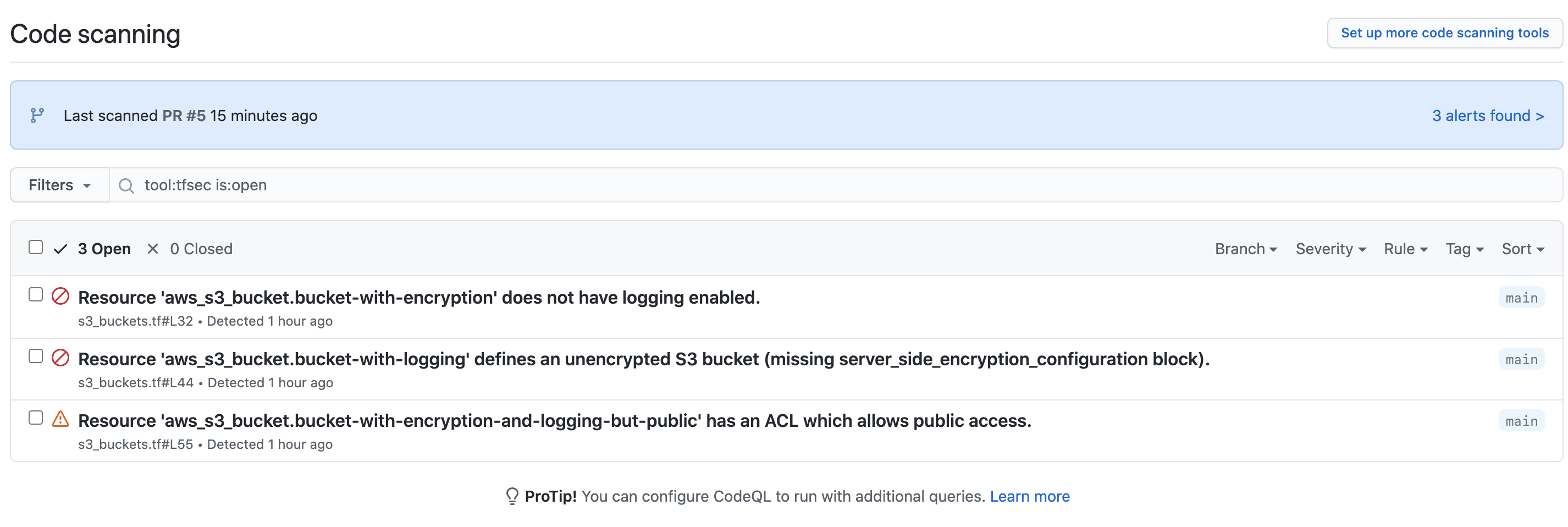
当您点击查看该分支的警报时,您会获得有关实际问题的更多信息。
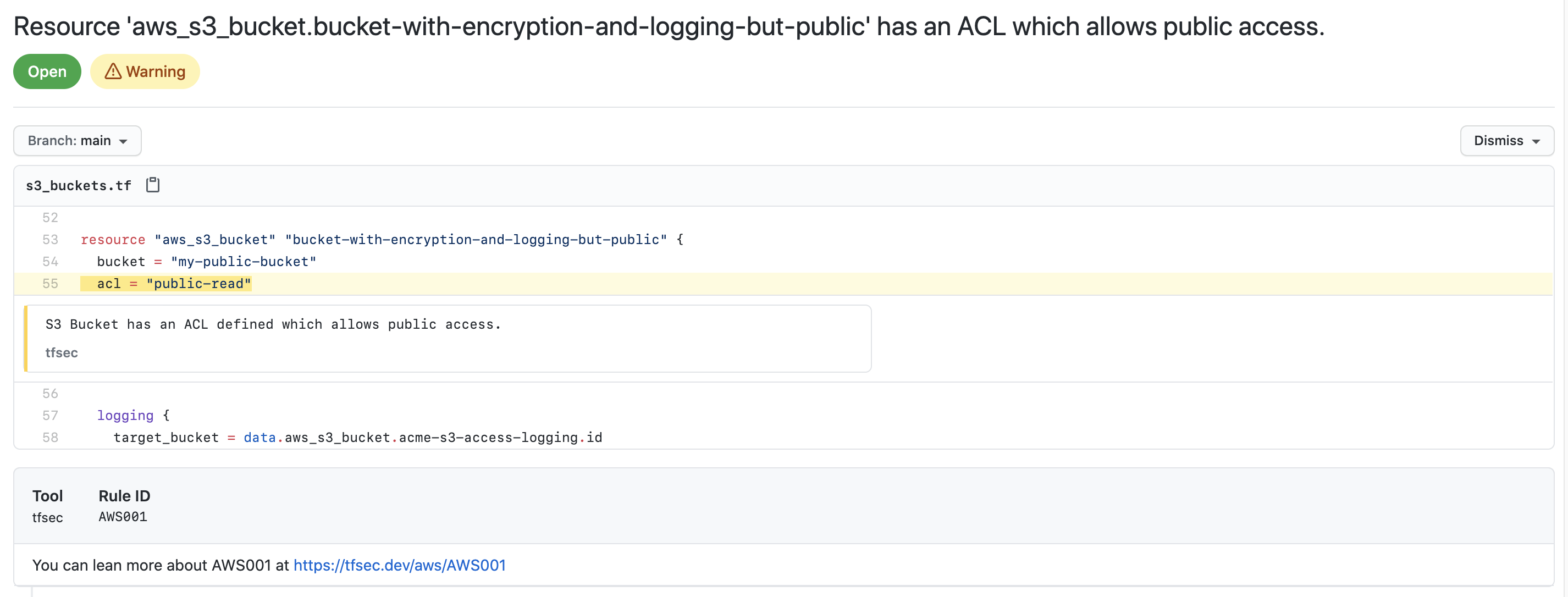
有关添加安全警报的更多信息,请查看 [GitHub 文档](https://docs.github.com/en/code-security/repository-security-advisories/about-github-security-advisories-for-repositories)
## 支持旧版 terraform
如果您需要支持使用 HCL v1 的 terraform 版本
(terraform <0.12),您可以使用 tfsec 的 `v0.1.3` 版本,尽管其支持非常有限且包含的检查较少。
### 部分贡献者
 由 [contributors-img](https://contrib.rocks) 制作。
`tfsec` 是一个 [Aqua Security](https://aquasec.com) 开源项目。
在[这里](https://www.aquasec.com/products/open-source-projects/)了解我们的开源工作和产品组合。
加入社区,并在 [GitHub Discussion](https://github.com/aquasecurity/tfsec/discussions) 或 [Slack](https://slack.aquasec.com) 上与我们讨论任何问题。
由 [contributors-img](https://contrib.rocks) 制作。
`tfsec` 是一个 [Aqua Security](https://aquasec.com) 开源项目。
在[这里](https://www.aquasec.com/products/open-source-projects/)了解我们的开源工作和产品组合。
加入社区,并在 [GitHub Discussion](https://github.com/aquasecurity/tfsec/discussions) 或 [Slack](https://slack.aquasec.com) 上与我们讨论任何问题。标签:DevSecOps, ECS, EVTX分析, Go, IaC扫描, Ruby工具, Terraform, Trivy, 上游代理, 云安全, 代码审计