nict-csl/exist
GitHub: nict-csl/exist
一款集成多源威胁情报的Web应用平台,支持自动采集、交叉检索和API查询,帮助安全运营人员高效调查事件。
Stars: 152 | Forks: 29
# EXIST (EXternal Information aggregation System against cyber Threat)
⚠️ 此仓库已不再维护/已归档。安全问题将不会修复。
EXIST 是一个用于聚合和分析 CTI(网络威胁情报)的 Web 应用程序。
EXIST 由以下软件编写。
- Python 3
- Django 1.11
## 概念
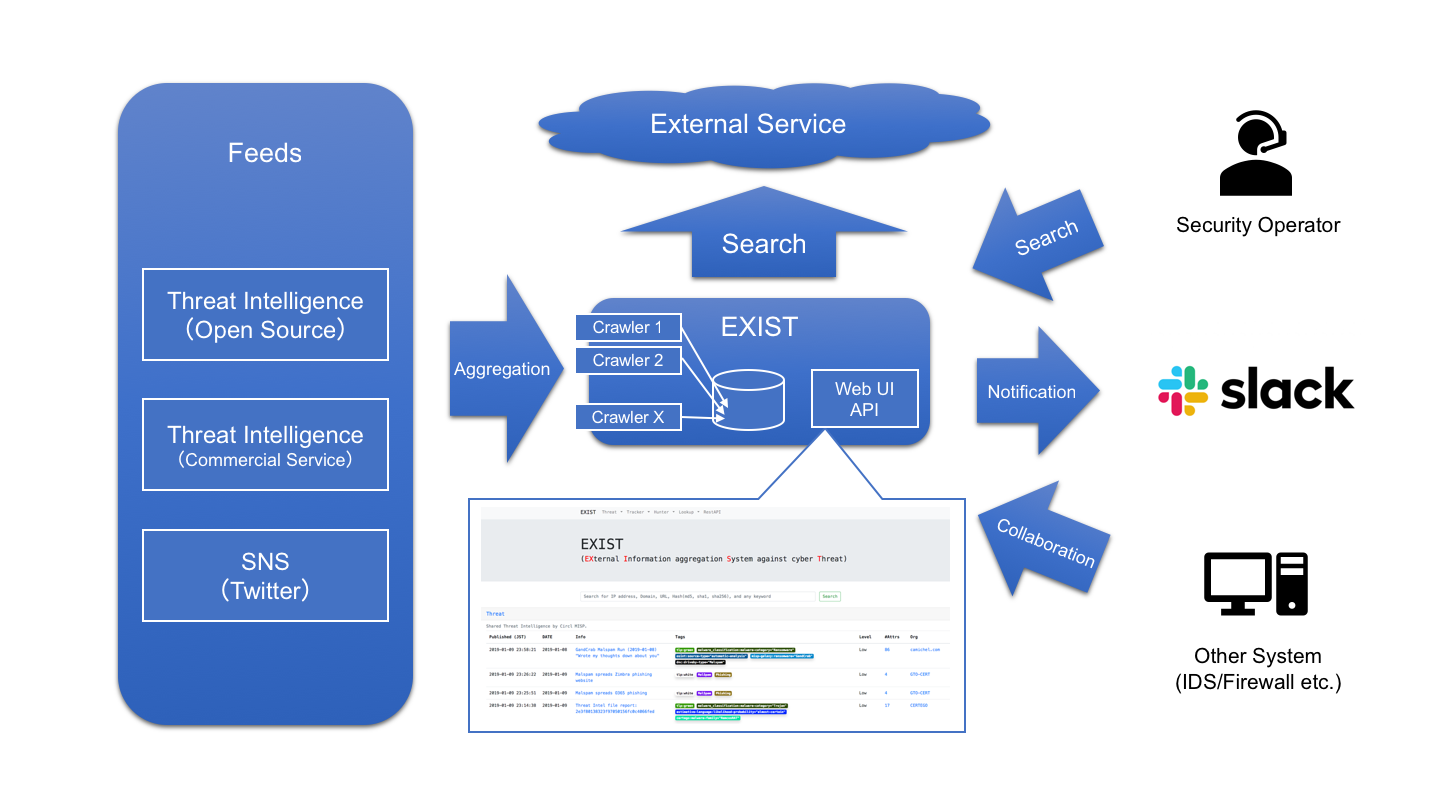
EXIST 是一个用于聚合 CTI 的 Web 应用程序,旨在帮助安全运营人员根据相关指标调查事件。
EXIST 通过 API 和 feeds 自动从多个 CTI 服务和 Twitter 获取数据。
你可以通过 Web 界面和 API 对指标进行交叉搜索。
如果你有记录客户端网络行为的服务器(例如 DNS 和 HTTP 代理服务器的日志等),你将能够通过将其与 EXIST 上的数据相关联来分析这些日志。
如果你使用 API 编写一些程序,你将实现自动化的 CTI 驱动的安全运营中心。
## 使用案例
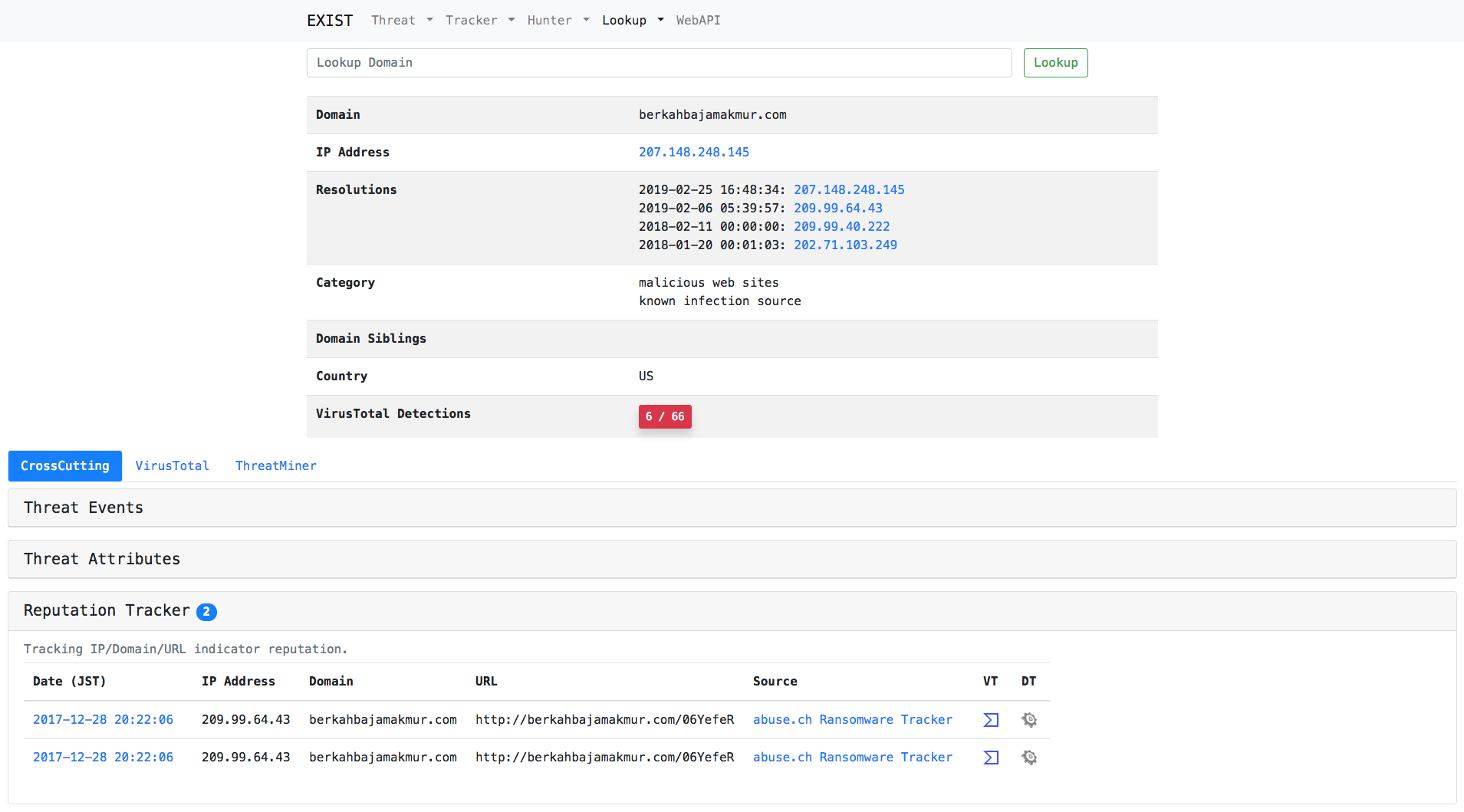
### 案例1:调查 IDS 检测到的域名
只需在搜索表单中输入域名。
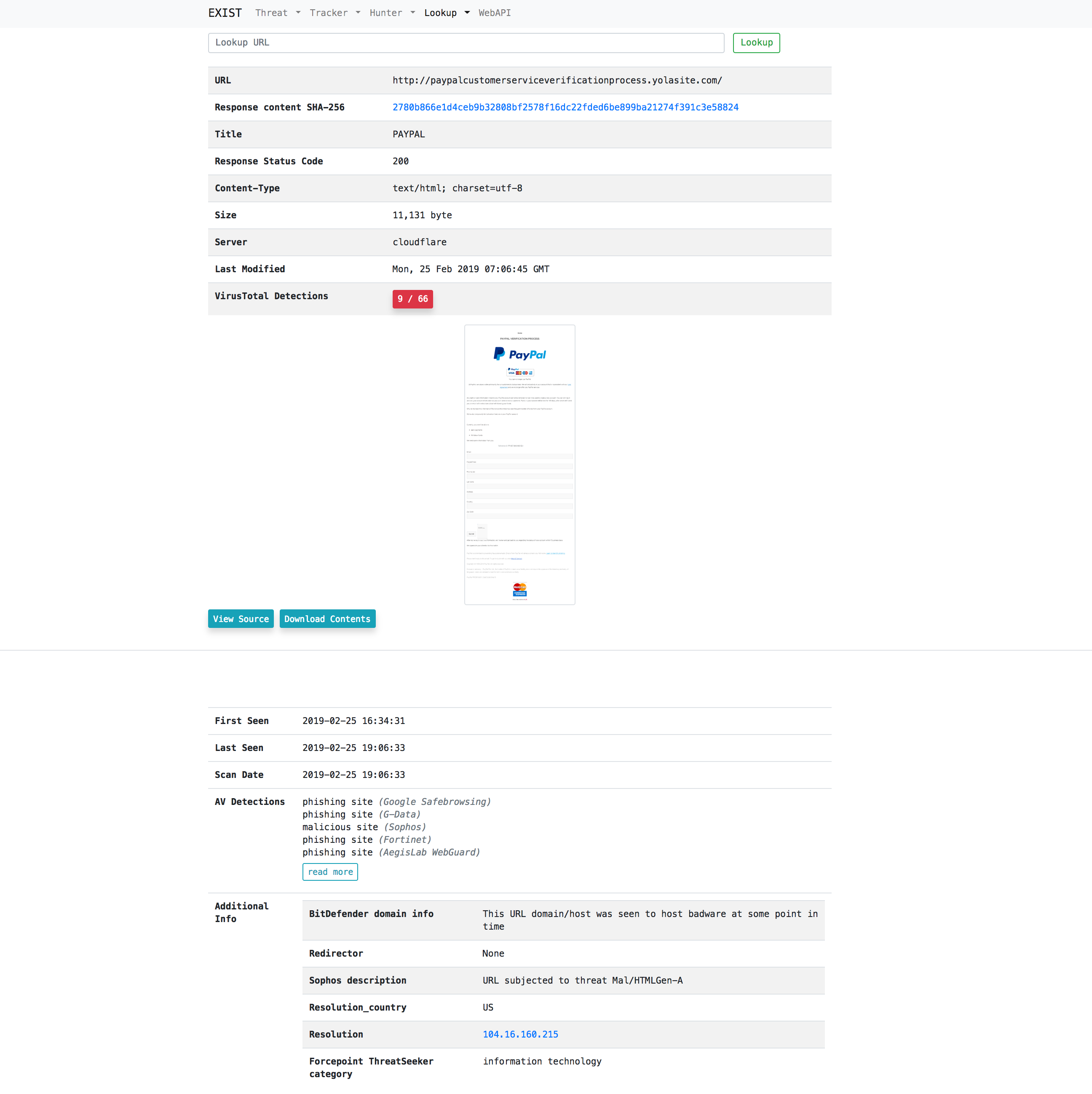
### 案例2:代表用户访问恶意 URL 并获取浏览器显示图像和要下载的内容
只需在搜索表单中输入 url。
### 案例3:监控网络威胁
只需在 Threat Hunter 或 Twitter Hunter 中添加关键词。

## 功能
### Tracker
Tracker 自动从多个 CTI 服务收集数据 feeds。
- Threat Tracker
- Reputation Tracker
- Twitter Tracker
- Exploit Tracker
- News Tracker
- Vuln Tracker
### Hunter
Hunter 使我们能够设置查询,以便从多个 CTI 服务和 Twitter 收集数据。
- Twitter Hunter
- Threat Hunter
- News Hunter
### Lookup
Lookup 从多个互联网服务(例如 whois)检索与特定信息(例如 IP 地址、域名)相关的信息。
- IP Address
- Domain
- URL
- File Hash
### Tools
用于标注来自 twitter tracker 的推文的工具。
- [Annotation Tool](#AnnotationTool)
### Web API
通过 Web API 提供存储在 EXIST 数据库中的数据。
- reputation
- twitter
- exploit
- threatEvent
- threatAttribute
- news
- vuln
## 入门指南
接下来我假设环境为 CentOS 7 或 Ubuntu 18.04 LTS。部署到其他环境时请自行处理。
### 安装 Python 模块
```
$ sudo pip install -r requirements.txt
```
### 安装 MariaDB
- CentOS 7
```
$ curl -sS https://downloads.mariadb.com/MariaDB/mariadb_repo_setup | sudo bash
$ sudo yum install MariaDB-server MariaDB-client
```
- Ubuntu 18.04 LTS
```
$ sudo apt install mariadb-server mariadb-client
```
### 运行数据库
```
$ sudo systemctl start mariadb
$ sudo systemctl enable mariadb
```
### 数据库设置
- 创建数据库和用户。
- 参照 [.env.example](.env.example) 创建 `.env`。并根据你的数据库设置进行编辑。
### 为 Django 生成 secret key
Django 的 secret key 必须写在 `.env` 文件中。
首先,运行密钥生成器:
```
$ python keygen.py
(example)> 70mm6h)()h3r&*b9xq$e52=-7($p=5983gfoyz%$d-j-gd7u5@
```
并将 secret key 写入 `.env` 文件:
```
...
# EXIST 应用设置
EXIST_SECRET_KEY="70mm6h)()h3r&*b9xq$e52=-7($p=5983gfoyz%$d-j-gd7u5@"
...
```
### 迁移数据库
```
$ python manage.py makemigrations exploit reputation threat threat_hunter twitter twitter_hunter news news_hunter vuln
$ python manage.py migrate
```
### 安装 Redis server
Reputation tracker 使用 redis 作为 Celery 缓存服务器后端。
- CentOS 7
```
$ sudo yum install redis
$ sudo systemctl start redis
$ sudo systemctl enable redis
```
- Ubuntu 18.04 LTS
```
$ sudo apt install redis-server
$ sudo systemctl start redis-server
$ sudo systemctl enable redis-server
```
### 设置 Celery
Reputation tracker 使用 Celery 作为异步任务作业队列。
- 创建一个 celery 配置。我建议将配置设置在以下路径:
+ CentOS 7: /etc/sysconfig/celery
+ Ubuntu 18.04 LTS: /etc/celery.conf
```
# Name of nodes to start
# here we have a single node
CELERYD_NODES="w1"
# or we could have three nodes:
#CELERYD_NODES="w1 w2 w3"
# Absolute or relative path to the 'celery' command:
CELERY_BIN="/path/to/your/celery"
# App instance to use
# comment out this line if you don't use an app
CELERY_APP="intelligence"
# or fully qualified:
#CELERY_APP="proj.tasks:app"
# How to call manage.py
CELERYD_MULTI="multi"
# Extra command-line arguments to the worker
CELERYD_OPTS="--time-limit=300 --concurrency=8"
# - %n will be replaced with the first part of the nodename.
# - %I will be replaced with the current child process index
# and is important when using the prefork pool to avoid race conditions.
CELERYD_PID_FILE="/var/run/celery/%n.pid"
CELERYD_LOG_FILE="/var/log/celery/%n%I.log"
CELERYD_LOG_LEVEL="INFO"
```
- 在 `/etc/systemd/system/celery.service` 创建一个 celery 服务管理脚本。另外,你必须将你的 celery 配置路径设置到 `EnvironmentFile`。
```
[Unit]
Description=Celery Service
After=network.target
[Service]
Type=forking
User=YOUR_USER
Group=YOUR_GROUP
EnvironmentFile=/etc/sysconfig/celery
WorkingDirectory=/path/to/your/exist
ExecStart=/bin/sh -c '${CELERY_BIN} multi start ${CELERYD_NODES} \
-A ${CELERY_APP} --pidfile=${CELERYD_PID_FILE} \
--logfile=${CELERYD_LOG_FILE} --loglevel=${CELERYD_LOG_LEVEL} ${CELERYD_OPTS}'
ExecStop=/bin/sh -c '${CELERY_BIN} multi stopwait ${CELERYD_NODES} \
--pidfile=${CELERYD_PID_FILE}'
ExecReload=/bin/sh -c '${CELERY_BIN} multi restart ${CELERYD_NODES} \
-A ${CELERY_APP} --pidfile=${CELERYD_PID_FILE} \
--logfile=${CELERYD_LOG_FILE} --loglevel=${CELERYD_LOG_LEVEL} ${CELERYD_OPTS}'
[Install]
WantedBy=multi-user.target
```
- 创建 Celery 日志和运行目录。
```
$ sudo mkdir /var/log/celery; sudo chown YOUR_USER:YOUR_GROUP /var/log/celery
$ sudo mkdir /var/run/celery; sudo chown YOUR_USER:YOUR_GROUP /var/run/celery
```
- 在 /etc/tmpfiles.d/exist.conf 创建配置文件
```
#Type Path Mode UID GID Age Argument
d /var/run/celery 0755 YOUR_USER YOUR_GROUP -
```
- 运行 Celery
```
$ sudo systemctl start celery.service
$ sudo systemctl enable celery.service
```
### 运行 Web 服务器
```
$ python manage.py runserver 0.0.0.0:8000
```
- 使用浏览器访问 http://[YourWebServer]:8000。
- WebAPI: http://[YourWebServer]:8000/api/
## 收集 feed
用于将 feed 插入数据库的脚本是 [scripts/insert2db](scripts/insert2db)/\*/insert2db.py。
### 配置 insert2db
- 配置文件是 [scripts/insert2db/conf](scripts/insert2db/conf)/insert2db.conf。参照 insert2db.conf.template 创建它。
- 如果你使用 [MISP](https://www.misp-project.org/),请将 MISP URL 和 API key 写入 insert2db.conf。
- 如果你使用 [Malshare](https://malshare.com/),请将你的 API key 写入 insert2db.conf。
- 在 https://developer.twitter.com/ 创建你的 Twitter API 账户以便使用 EXIST 进行跟踪。
- 为 EXIST 创建一个 App。
- 获取 Consumer API key (CA)、Consumer API secret key (CS)、Access token (AT)、access token secret (AS)。
- 将 CA、CS、AT、AS 写入 insert2db.conf。
### 运行脚本
```
$ python scripts/insert2db/reputation/insert2db.py
$ python scripts/insert2db/twitter/insert2db.py
$ python scripts/insert2db/exploit/insert2db.py
$ python scripts/insert2db/threat/insert2db.py
$ python scripts/insert2db/news/insert2db.py
$ python scripts/insert2db/vuln/insert2db.py
```
## 设置 hunter
### Twitter Hunter
Twitter Hunter 可以检测包含特定关键词和用户 ID 的推文。并且可以在必要时通知 Slack。
- 配置文件是 [scripts/hunter/conf](scripts/hunter/conf)/hunter.conf。参照 hunter.conf.template 创建它。
- 如果你使用 Slack,请将你的 Slack token 写入 hunter.conf。
- 在 https://developer.twitter.com/ 创建你的 Twitter API 账户。
- 为 EXIST 创建 18 个 App。
- 获取 18 组 Consumer API key (CA)、Consumer API secret key (CS)、Access token (AT)、access token secret (AS)。
- 将 CA、CS、AT、AS 写入 auth-hunter[00-18] 到 hunter.conf。
- 使用 cron 让 [scripts/hunter/twitter](scripts/hunter/twitter)/tw_watchhunter.py 每分钟运行一次,以使 Twitter Hunter 持续运行。
### Threat Hunter
Threat Hunter 可以检测包含特定关键词的威胁事件。并且可以在必要时通知 Slack。
- 配置文件是 [scripts/hunter/conf](scripts/hunter/conf)/hunter.conf。参照 hunter.conf.template 创建它。
- 如果你使用 Slack,请将你的 Slack token 写入 hunter.conf。
- 使用 cron 让 [scripts/hunter/threat](scripts/hunter/threat)/th_watchhunter.py 每分钟运行一次,以使 Threat Hunter 持续运行。
## 其他所需工具和设置
### VirusTotal API
EXIST 使用 [VirusTotal API](https://www.virustotal.com/ja/documentation/public-api/)。
- 创建你的 VirusTotal 账户。
- 将你的 API-key 写入 conf/vt.conf。
### GeoIP DB
Lookup IP / Domain 使用 [GeoLite2 Database](https://dev.maxmind.com/geoip/geoip2/geolite2/)。
- 从 http://geolite.maxmind.com/download/geoip/database/GeoLite2-City.mmdb.gz 下载 GeoIP DB。
- 在你的 conf/geoip.conf 中写入 GeoLite2-City.mmdb 的路径。
### wkhtmltopdf 和 Xvfb
Lookup URL 使用 [wkhtmltopdf](https://wkhtmltopdf.org/) 和 Xvfb。
- 从 https://wkhtmltopdf.org/downloads.html 下载并安装 wkhtmltopdf。
- 安装 Xvfb。
```
$ sudo yum install xorg-x11-server-Xvfb
```
如果你在 Ubuntu 18.04 LTS 上部署 EXIST,你可以使用 apt 安装这些软件包。
```
$ sudo apt install wkhtmltopdf xvfb
```
### 清除旧数据
- 配置文件是 [scripts/url](scripts/url)/url.conf。参照 url.conf.template 创建它。
- 使用 cron 让 [scripts/url](scripts/url)/delete_webdata.sh 每天运行一次,以清除旧的 Lookup URL 数据。
- 使用 cron 让 [scripts/url](scripts/url)/delete_oldtaskresult.sh 每天运行一次,以清除旧的 Celery 数据。
## AnnotationTool
用于为推文创建训练数据的标注工具。该工具面向机器学习研究人员。
### 如何使用
1. 勾选标注目标。

2. 点击 Annotation 按钮。
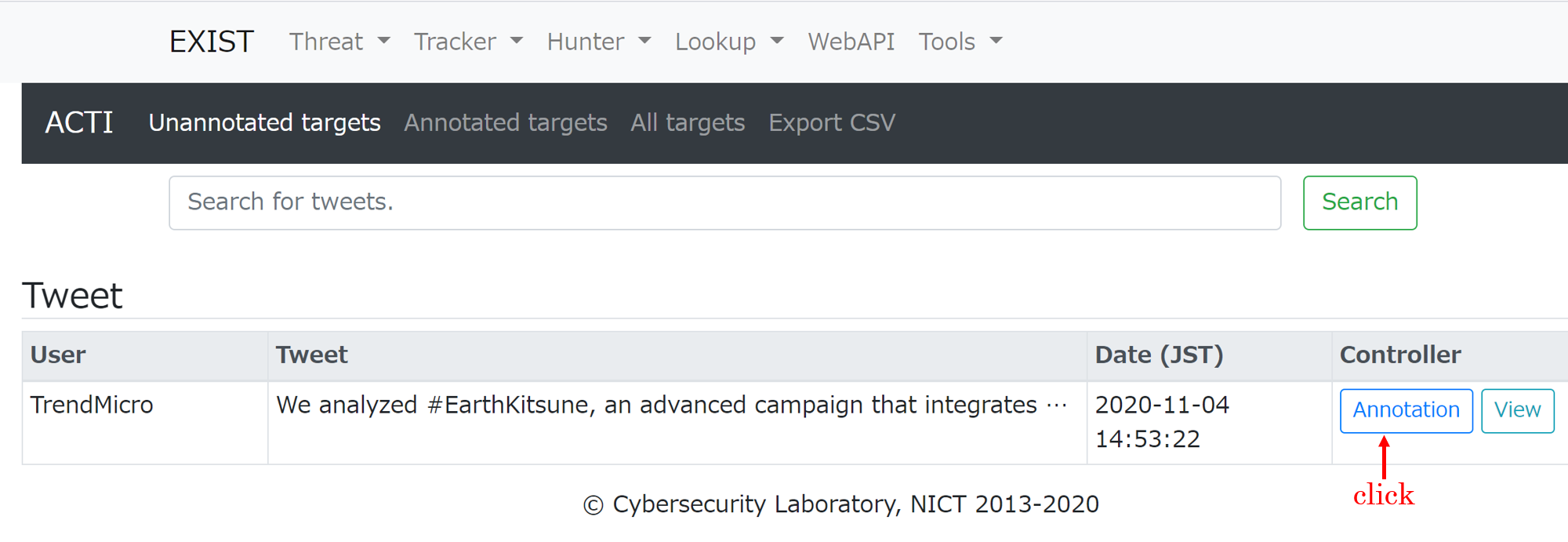
3. 选择要标记的词
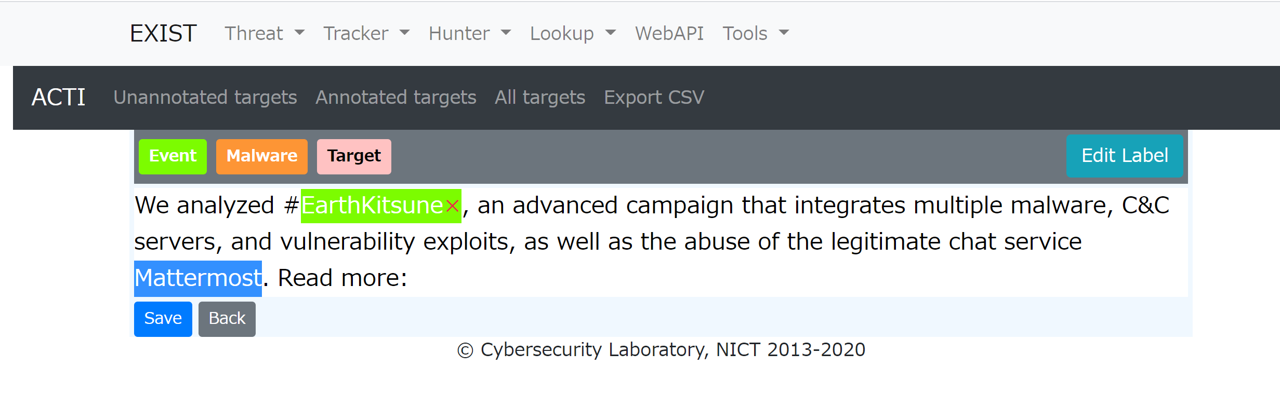
4. 点击标签按钮。
5. 保存
## 报告漏洞
如果你发现任何漏洞,请[给我们发送电子邮件](mailto:exist@ml.nict.go.jp)。
[漏洞报告模板](VULN_REPORT_TEMPLATE.md)
## 致谢
本产品包含由 MaxMind 创建的 GeoLite2 数据,可从 [https://www.maxmind.com](https://www.maxmind.com) 获取。
## 许可证
[MIT License](LICENSE) © Cybersecurity Laboratory, NICT
标签:DAST, Django, DNS日志分析, ESC4, HTTP代理分析, masscan, NICT, nuclei, OSINT, Python, TIP, Twitter监控, URL扫描, 域名信誉, 威胁情报, 威胁情报平台, 威胁追踪, 安全可视化, 安全运营, 开发者工具, 恶意软件分析, 情报共享, 扫描框架, 搜索引擎查询, 数据聚合, 无后门, 漏洞分析, 网络安全, 自动化收集, 路径探测, 隐私保护