sdnewhop/grinder
GitHub: sdnewhop/grinder
Grinder 是一个基于 Python 的互联网资产发现与枚举框架,通过整合 Shodan、Censys 等搜索引擎以及 Nmap、Vulners 等工具,实现对互联网连接设备的自动化发现、指纹识别和漏洞分析。
Stars: 298 | Forks: 37
# Grinder Framework
[](https://en.wikipedia.org/wiki/Linux)
[](https://www.python.org/downloads/)
[](/LICENSE)
[](https://github.com/psf/black)
[](https://github.com/sdnewhop/grinder)
:mag_right: 互联网连接设备普查 Python Framework
## 截图
 ## 目录
1. [描述](#description)
2. [幻灯片](#slides)
3. [Grinder 工作流](#grinder-workflow)
4. [Grinder 地图](#grinder-map)
- [截图](#screenshots)
- [描述](#description)
5. [需求](#requirements)
- [图例](#legend)
- :pushpin: [基础](#basic)
- :pushpin: [账户](#accounts)
- [附加扫描](#additional-scanning)
- [TLS 配置](#tls-configuration)
6. [当前功能](#current-features)
- [已实现](#already-implemented)
- :fire: [附加模块](#additional-modules)
- [开发和未来更新](#development-and-future-updates)
7. :pushpin: [Grinder 安装](#grinder-installing)
- [设置和配置环境](#setup-and-configure-environment)
- [本地运行 Grinder 地图服务器](#running-grinder-map-server-locally)
8. [在 Docker 中构建和运行](#building-and-running-in-docker)
- [描述](#description)
- [服务和镜像](#services-and-images)
- [提供的脚本和准备工作](#provided-scripts-and-preparations)
- [环境](#environment)
- :pushpin: [构建](#building)
- :pushpin: [运行](#running)
9. [测试](#tests)
10. [CLI 界面](#cli-interface)
- [命令行参数帮助](#help-on-command-line-arguments)
11. [Wiki](#wiki)
12. :pushpin: [使用示例](#usage-examples)
- [显示帮助](#show-help)
- [基础枚举](#basic-enumeration)
- [带有限结果的枚举](#enumeration-with-limited-results)
- [带 Nmap 扫描的枚举](#enumeration-with-nmap-scanning)
- [带附加分析、地图和图表的枚举](#enumeration-with-additional-analytics-map-and-plots)
- [带 Vulners 分析的枚举](#enumeration-with-analytics-from-vulners)
- [带 TLS 配置和攻击扫描的枚举](#enumeration-with-tls-configuration-and-attacks-scanning)
- [带附加过滤的枚举](#enumeration-with-additional-filtering)
- [带附加自定义脚本的枚举](#enumeration-with-additional-custom-scripts)
- [带附加调试信息的枚举](#enumeration-with-additional-debug-information)
13. :pushpin: [添加你自己的查询](#add-your-own-queries)
- [描述](#description)
- [查询模板](#queries-template)
- [查询示例](#queries-example)
## 描述
Grinder Framework 的创建旨在利用各种后端系统自动枚举和指纹识别互联网上的不同主机:使用搜索引擎(如 Shodan 或 Censys)发现主机,并使用 NMAP 引擎进行指纹识别和特定检查。此外,Grinder 支持 Vulners API 以获取有关可用公开漏洞和 exploits 的信息、与发现的漏洞相关的文档以及其他功能。
Grinder Framework 可用于许多不同的研究领域,可作为项目中的 Python 模块连接,也可作为开箱即用的独立工具使用。
## 幻灯片
1. 统领一切的框架:互联网连接设备普查框架。PHDays 2019。([演讲页面](http://2019.phdays.com/en/program/reports/one-framework-to-rule-them-all-a-framework-for-internet-connected-device-census/),[幻灯片](/docs/slides/phdays-9-one-framework-to-rule-them-all-a-framework-for-internet-connected-device-census.pdf))
2. 统领一切的框架:互联网连接设备普查框架。OFFZONE 2019。([演讲页面](https://2019.offzone.moscow/report/one-framework-to-rule-them-all-a-framework-for-internet-connected-device-census/),[幻灯片](/docs/slides/offzone-grinder-2019.pdf))
## Grinder 工作流

## Grinder 地图
### 截图
## 目录
1. [描述](#description)
2. [幻灯片](#slides)
3. [Grinder 工作流](#grinder-workflow)
4. [Grinder 地图](#grinder-map)
- [截图](#screenshots)
- [描述](#description)
5. [需求](#requirements)
- [图例](#legend)
- :pushpin: [基础](#basic)
- :pushpin: [账户](#accounts)
- [附加扫描](#additional-scanning)
- [TLS 配置](#tls-configuration)
6. [当前功能](#current-features)
- [已实现](#already-implemented)
- :fire: [附加模块](#additional-modules)
- [开发和未来更新](#development-and-future-updates)
7. :pushpin: [Grinder 安装](#grinder-installing)
- [设置和配置环境](#setup-and-configure-environment)
- [本地运行 Grinder 地图服务器](#running-grinder-map-server-locally)
8. [在 Docker 中构建和运行](#building-and-running-in-docker)
- [描述](#description)
- [服务和镜像](#services-and-images)
- [提供的脚本和准备工作](#provided-scripts-and-preparations)
- [环境](#environment)
- :pushpin: [构建](#building)
- :pushpin: [运行](#running)
9. [测试](#tests)
10. [CLI 界面](#cli-interface)
- [命令行参数帮助](#help-on-command-line-arguments)
11. [Wiki](#wiki)
12. :pushpin: [使用示例](#usage-examples)
- [显示帮助](#show-help)
- [基础枚举](#basic-enumeration)
- [带有限结果的枚举](#enumeration-with-limited-results)
- [带 Nmap 扫描的枚举](#enumeration-with-nmap-scanning)
- [带附加分析、地图和图表的枚举](#enumeration-with-additional-analytics-map-and-plots)
- [带 Vulners 分析的枚举](#enumeration-with-analytics-from-vulners)
- [带 TLS 配置和攻击扫描的枚举](#enumeration-with-tls-configuration-and-attacks-scanning)
- [带附加过滤的枚举](#enumeration-with-additional-filtering)
- [带附加自定义脚本的枚举](#enumeration-with-additional-custom-scripts)
- [带附加调试信息的枚举](#enumeration-with-additional-debug-information)
13. :pushpin: [添加你自己的查询](#add-your-own-queries)
- [描述](#description)
- [查询模板](#queries-template)
- [查询示例](#queries-example)
## 描述
Grinder Framework 的创建旨在利用各种后端系统自动枚举和指纹识别互联网上的不同主机:使用搜索引擎(如 Shodan 或 Censys)发现主机,并使用 NMAP 引擎进行指纹识别和特定检查。此外,Grinder 支持 Vulners API 以获取有关可用公开漏洞和 exploits 的信息、与发现的漏洞相关的文档以及其他功能。
Grinder Framework 可用于许多不同的研究领域,可作为项目中的 Python 模块连接,也可作为开箱即用的独立工具使用。
## 幻灯片
1. 统领一切的框架:互联网连接设备普查框架。PHDays 2019。([演讲页面](http://2019.phdays.com/en/program/reports/one-framework-to-rule-them-all-a-framework-for-internet-connected-device-census/),[幻灯片](/docs/slides/phdays-9-one-framework-to-rule-them-all-a-framework-for-internet-connected-device-census.pdf))
2. 统领一切的框架:互联网连接设备普查框架。OFFZONE 2019。([演讲页面](https://2019.offzone.moscow/report/one-framework-to-rule-them-all-a-framework-for-internet-connected-device-census/),[幻灯片](/docs/slides/offzone-grinder-2019.pdf))
## Grinder 工作流

## Grinder 地图
### 截图
 ### 描述
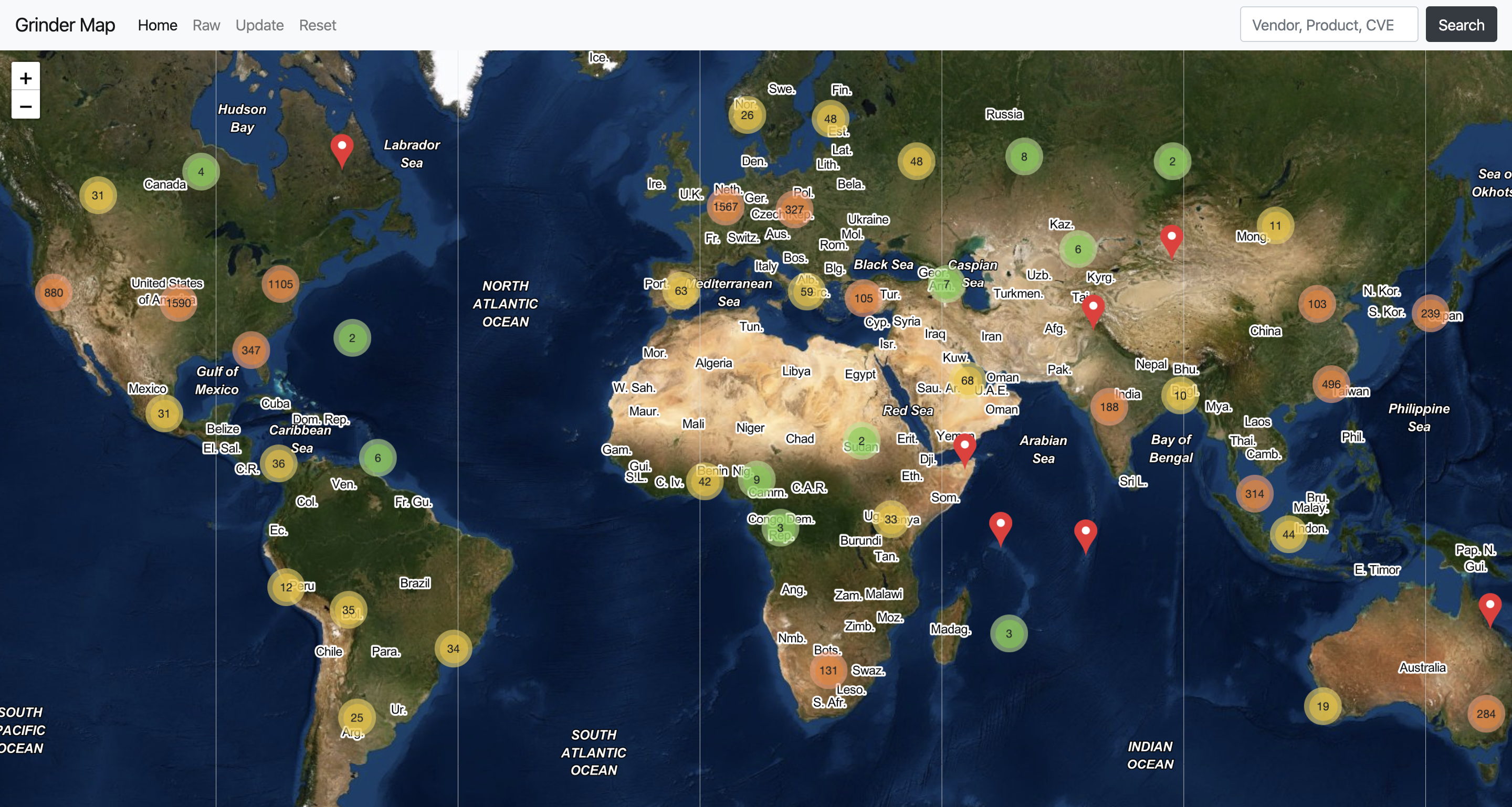
为了可视化获取的数据,Grinder Framework 提供了一个包含所有结果的交互式世界地图。使用 Flask 编写的 Grinder 地图后端支持额外的 REST API 方法,以从地图中获取有关所有扫描主机或某些特定主机的更多信息,还可以从地图中交互式地显示有关主机的某些附加信息。
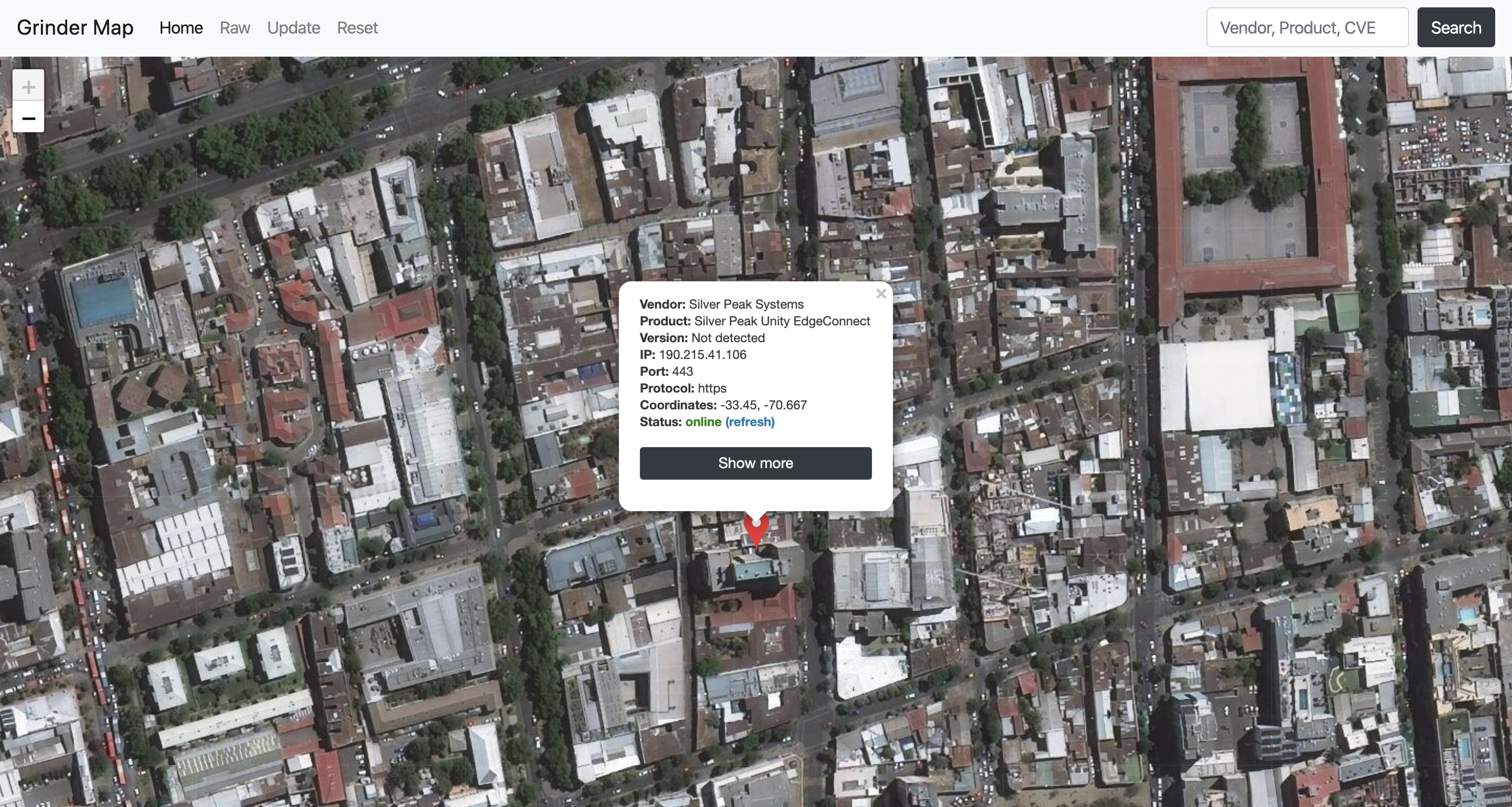
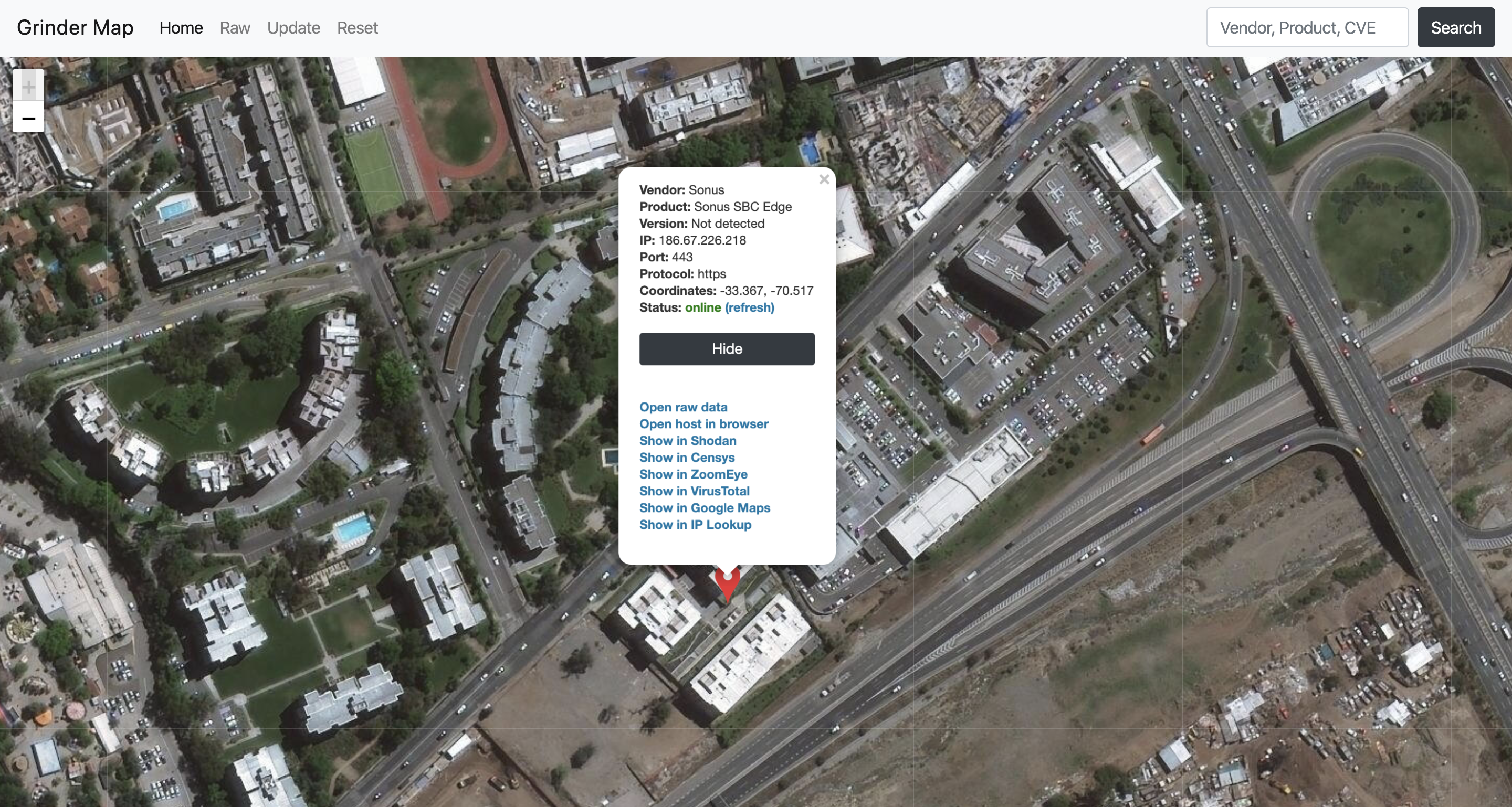
例如,后端将使用 ping 自动检查主机的可用性,并且对于每个主机,还有许多附加功能可用:当前主机可以直接在 Shodan、Censys 和 ZoomEye Web 界面中打开,可以在 Google Maps 上显示该主机及其所有可用的地理位置信息。此外,还可以通过提供的 API 方法在浏览器中或从您的应用程序中直接进行 IP 查找或打开 JSON 格式的原始信息。
## 需求
### 图例
:heavy_exclamation_mark: 必需
:heavy_plus_sign: 运行非必需(或仅附加模块需要)
### 基础
- :heavy_exclamation_mark: [Python 3.6+](https://www.python.org/downloads/)
- :heavy_exclamation_mark: [python3-tk](https://docs.python.org/3/library/tkinter.html) 库
- :heavy_exclamation_mark: [FreeType](https://www.freetype.org/) 库 (Python 3.8+)
### 账户
- :heavy_exclamation_mark: [Shodan](https://account.shodan.io/register) 和 [Censys](https://censys.io/register) 账户
收集主机所必需,免费账户和完整账户均可。此外,也可以只使用一个账户(Censys 或 Shodan,首选 Shodan)。
- :heavy_plus_sign: [Vulners](https://vulners.com/) 账户
用于生成有关漏洞和 exploits 的附加报告所必需。如果您不需要此功能,可以在没有 Vulners 账户的情况下使用 Grinder。
### 附加扫描
- :heavy_plus_sign: [Nmap Security Scanner 7.60+](https://nmap.org/download.html)
7.60 及更新版本已使用 Grinder 脚本(ssl-cert.nse、vulners.nse 等)进行了测试。
### TLS 配置
- :heavy_plus_sign: [Java 8](https://openjdk.java.net/install/)
构建 TLS-Attacker 和 TLS-Scanner 所需。
- :heavy_plus_sign: [TLS-Attacker 3.0](https://github.com/RUB-NDS/TLS-Attacker/releases/tag/3.0)
仅 TLS 扫描需要。
- :heavy_plus_sign: [TLS-Scanner 2.9](https://github.com/RUB-NDS/TLS-Scanner/releases/tag/2.9)
仅 TLS 扫描需要。
## 当前功能
### 已实现
- :mag: 使用 Shodan 和 Censys 搜索引擎收集主机和附加信息
- :rocket: 使用增强的多进程 Nmap Scanner 包装器扫描端口和服务
- :syringe: 使用 Vulners 数据库和 Shodan CVE 数据库扫描漏洞及其附加信息
- :memo: 检索有关 SSL 证书的信息
- :key: 扫描 SSL/TLS 配置和支持的密码套件
- :key: 扫描 SSL/TLS 错误、漏洞和攻击
- :earth_asia: 构建包含所发现主机信息的交互式地图
- :bar_chart: 根据收集的结果创建图表和表格
- :wrench: 自定义扫描脚本支持(LUA 或 Python3)
- :chart_with_downwards_trend: 置信度过滤系统支持
- :chart_with_upwards_trend: 特定供应商扫描和过滤支持
- :bulb: 基于 Grinder 检测到的漏洞和软件搜索文档、安全公告、公开 exploits 以及更多内容
### 附加模块
:rocket: **注意 #1:** 您可以在多个主机上同时运行多个 Python 脚本,因此您可以构建自己的脚本和检查链,以从主机获取最多的信息。随时通过 PR 添加您的模块,或者通过功能问题向我们提供想法。
:construction: **注意 #2:** 多个 NSE 脚本运行任务仍处于 WIP(进行中)状态。因此,NSE 脚本将按顺序依次运行。Grinder 的新 NSE 脚本引擎即将推出,敬请期待。
#### DICOM 患者信息获取器
**位置:** `py_scripts/dicom_getter/dicom_getter.py`
**描述:** 此模块允许您从医疗服务器获取不同的患者信息(包括文件)
#### HTTP 原始响应获取器
**位置:** `py_scripts/http_response_grabber/http_response_grabber.py`
**描述:** 此模块允许您以解码的原始字节格式获取 HTTP 响应(headers + body)
#### HTTP 状态
**位置:** `py_scripts/http_status/http_status.py`
**描述:** 此模块允许您检查资源的 HTTP 状态
#### SCP (SSH) 获取器
**位置:** `py_scripts/scp_grabber/scp_grabber.py`
**描述:** 此模块允许您从不同的 SSH 服务器获取和下载文件(您需要在模块中定义登录名/密码)
#### Sleep
**位置:** `py_scripts/sleep/sleep.py`
**描述:** 这只是一个用于测试的 sleep 模块
#### SNMP Walker (easysnmp 实现)
**位置:** `py_scripts/snmp_walker_easysnmp/snmp_walker_easysnmp.py`
**描述:** 此模块允许您从 SNMP 服务器收集信息
#### SNMP Walker (系统调用实现)
**位置:** `py_scripts/snmp_walker_os/snmp_walker_os.py`
**描述:** 与上一个相同,但实现方式不同
#### Tensor 服务服务器检查器
**位置:** `py_scripts/tensor_serving_checker/tensor_serving_checker.py`
**描述:** 此模块允许您检查资源是否为 TensorFlow Serving Server
#### 测试
**位置:** `py_scripts/test/test.py`
**描述:** 只是一个用于检查功能的空测试脚本
### 开发和未来更新
- [Grinder 开发项目](https://github.com/sdnewhop/grinder/projects/2?fullscreen=true)
:construction: **注意:** Grinder Framework 仍在开发中,功能有待改进,因此所有任务和其他功能将始终在此项目中描述。如果您有一些很棒的想法或任何其他关于 Grinder 的有趣事情,您可以随时在此存储库中打开 pull request 或提交 issues。
## Grinder 安装
:bulb: **注意 #1:** 如果您熟悉 pipenv 包管理器,所有与 virtualenv 相关的步骤都可以用 `pipenv sync` 命令代替。
:bulb: **注意 #2:** 如果您熟悉 Docker 和 docker-compose,可以使用 Docker 构建框架,请参阅 [在 Docker 中构建和运行](#building-and-running-in-docker)
:bulb: **注意 #3:** 仅适用于 macOS 10.13 及更高版本、Python 3.7.* 及更低版本:要使用包含其他网络库的附加脚本,您必须在启动前在 shell 配置文件(`~/.bashrc`、`~/.zshrc`)中或启动框架前额外设置环境变量:
```
export OBJC_DISABLE_INITIALIZE_FORK_SAFETY=YES
./grinder.py -h
```
### 设置和配置环境
1. 如果尚未安装,请安装 [Nmap Security Scanner](https://nmap.org/download.html)。
2. 如果尚未安装,请安装 [python3-tk](https://docs.python.org/3/library/tkinter.html) 包(仅限 Linux)
```
sudo apt-get install python3-tk
```
3. 安装 [FreeType](https://www.freetype.org/) 库(Python 3.8+)
```
sudo apt-get install build-essential libfreetype6-dev python-dev
```
4. 如果尚未安装 virtualenv,请安装
```
sudo pip3 install virtualenv
```
或
```
pip3 install --upgrade virtualenv
```
5. 克隆存储库
```
git clone https://github.com/sdnewhop/grinder
```
6. 克隆并安装 [TLS-Attacker 3.0](https://github.com/RUB-NDS/TLS-Attacker/releases/tag/3.0)(如果您想在 Grinder 中使用 TLS 扫描功能)。
7. 在 Grinder 目录中克隆 [TLS-Scanner 2.9](https://github.com/RUB-NDS/TLS-Scanner/releases/tag/2.9) 并安装它(如果您想在 Grinder 中使用 TLS 扫描功能)。
8. 创建虚拟环境
```
cd grinder
python3 -m venv grindervenv
source grindervenv/bin/activate
```
9. 检查虚拟环境是否成功加载
```
which python3
which pip3
```
10. 在虚拟环境中安装项目依赖
```
pip3 install -r requirements.txt
```
11. _(MacOS 版本 10.13 及更高,Python 版本 3.7.* 及更低)_
导出额外的环境变量以运行不同的 Python3 脚本
```
export OBJC_DISABLE_INITIALIZE_FORK_SAFETY=YES
```
12. 运行框架
```
./grinder.py -h
```
13. 在每次运行时通过命令行参数设置您的 Shodan、Censys 和 Vulners 密钥
```
./grinder.py -sk YOUR_SHODAN_KEY -ci YOUR_CENSYS_ID -cs YOUR_CENSYS_SECRET -vk YOUR_VULNERS_KEY
```
或通过环境变量永久设置
```
export SHODAN_API_KEY=YOUR_SHODAN_API_KEY_HERE
export CENSYS_API_ID=YOUR_CENSYS_API_ID_HERE
export CENSYS_API_SECRET=YOUR_CENSYS_API_SECRET_HERE
export VULNERS_API_KEY=YOUR_VULNERS_API_KEY_HERE
```
14. 使用后停用虚拟环境并恢复默认的 python 解释器
```
deactivate
```
### 本地运行 Grinder 地图服务器
1. 首先,完成上述 [设置和配置环境/Grinder 安装](#setup-and-configure-environment) 部分的所有步骤。
2. 扫描完成后,进入 "map" 文件夹
```
cd map/
```
3. 运行 Flask(使用 `--help` 键获取更多信息)
```
flask run
```
4. 在浏览器中打开
```
http://localhost:5000/
```
此外,Grinder 地图服务器提供了简单的 API 方法,例如 `/api/viewall/`、`/api/viewraw/
### 描述
为了可视化获取的数据,Grinder Framework 提供了一个包含所有结果的交互式世界地图。使用 Flask 编写的 Grinder 地图后端支持额外的 REST API 方法,以从地图中获取有关所有扫描主机或某些特定主机的更多信息,还可以从地图中交互式地显示有关主机的某些附加信息。
例如,后端将使用 ping 自动检查主机的可用性,并且对于每个主机,还有许多附加功能可用:当前主机可以直接在 Shodan、Censys 和 ZoomEye Web 界面中打开,可以在 Google Maps 上显示该主机及其所有可用的地理位置信息。此外,还可以通过提供的 API 方法在浏览器中或从您的应用程序中直接进行 IP 查找或打开 JSON 格式的原始信息。
## 需求
### 图例
:heavy_exclamation_mark: 必需
:heavy_plus_sign: 运行非必需(或仅附加模块需要)
### 基础
- :heavy_exclamation_mark: [Python 3.6+](https://www.python.org/downloads/)
- :heavy_exclamation_mark: [python3-tk](https://docs.python.org/3/library/tkinter.html) 库
- :heavy_exclamation_mark: [FreeType](https://www.freetype.org/) 库 (Python 3.8+)
### 账户
- :heavy_exclamation_mark: [Shodan](https://account.shodan.io/register) 和 [Censys](https://censys.io/register) 账户
收集主机所必需,免费账户和完整账户均可。此外,也可以只使用一个账户(Censys 或 Shodan,首选 Shodan)。
- :heavy_plus_sign: [Vulners](https://vulners.com/) 账户
用于生成有关漏洞和 exploits 的附加报告所必需。如果您不需要此功能,可以在没有 Vulners 账户的情况下使用 Grinder。
### 附加扫描
- :heavy_plus_sign: [Nmap Security Scanner 7.60+](https://nmap.org/download.html)
7.60 及更新版本已使用 Grinder 脚本(ssl-cert.nse、vulners.nse 等)进行了测试。
### TLS 配置
- :heavy_plus_sign: [Java 8](https://openjdk.java.net/install/)
构建 TLS-Attacker 和 TLS-Scanner 所需。
- :heavy_plus_sign: [TLS-Attacker 3.0](https://github.com/RUB-NDS/TLS-Attacker/releases/tag/3.0)
仅 TLS 扫描需要。
- :heavy_plus_sign: [TLS-Scanner 2.9](https://github.com/RUB-NDS/TLS-Scanner/releases/tag/2.9)
仅 TLS 扫描需要。
## 当前功能
### 已实现
- :mag: 使用 Shodan 和 Censys 搜索引擎收集主机和附加信息
- :rocket: 使用增强的多进程 Nmap Scanner 包装器扫描端口和服务
- :syringe: 使用 Vulners 数据库和 Shodan CVE 数据库扫描漏洞及其附加信息
- :memo: 检索有关 SSL 证书的信息
- :key: 扫描 SSL/TLS 配置和支持的密码套件
- :key: 扫描 SSL/TLS 错误、漏洞和攻击
- :earth_asia: 构建包含所发现主机信息的交互式地图
- :bar_chart: 根据收集的结果创建图表和表格
- :wrench: 自定义扫描脚本支持(LUA 或 Python3)
- :chart_with_downwards_trend: 置信度过滤系统支持
- :chart_with_upwards_trend: 特定供应商扫描和过滤支持
- :bulb: 基于 Grinder 检测到的漏洞和软件搜索文档、安全公告、公开 exploits 以及更多内容
### 附加模块
:rocket: **注意 #1:** 您可以在多个主机上同时运行多个 Python 脚本,因此您可以构建自己的脚本和检查链,以从主机获取最多的信息。随时通过 PR 添加您的模块,或者通过功能问题向我们提供想法。
:construction: **注意 #2:** 多个 NSE 脚本运行任务仍处于 WIP(进行中)状态。因此,NSE 脚本将按顺序依次运行。Grinder 的新 NSE 脚本引擎即将推出,敬请期待。
#### DICOM 患者信息获取器
**位置:** `py_scripts/dicom_getter/dicom_getter.py`
**描述:** 此模块允许您从医疗服务器获取不同的患者信息(包括文件)
#### HTTP 原始响应获取器
**位置:** `py_scripts/http_response_grabber/http_response_grabber.py`
**描述:** 此模块允许您以解码的原始字节格式获取 HTTP 响应(headers + body)
#### HTTP 状态
**位置:** `py_scripts/http_status/http_status.py`
**描述:** 此模块允许您检查资源的 HTTP 状态
#### SCP (SSH) 获取器
**位置:** `py_scripts/scp_grabber/scp_grabber.py`
**描述:** 此模块允许您从不同的 SSH 服务器获取和下载文件(您需要在模块中定义登录名/密码)
#### Sleep
**位置:** `py_scripts/sleep/sleep.py`
**描述:** 这只是一个用于测试的 sleep 模块
#### SNMP Walker (easysnmp 实现)
**位置:** `py_scripts/snmp_walker_easysnmp/snmp_walker_easysnmp.py`
**描述:** 此模块允许您从 SNMP 服务器收集信息
#### SNMP Walker (系统调用实现)
**位置:** `py_scripts/snmp_walker_os/snmp_walker_os.py`
**描述:** 与上一个相同,但实现方式不同
#### Tensor 服务服务器检查器
**位置:** `py_scripts/tensor_serving_checker/tensor_serving_checker.py`
**描述:** 此模块允许您检查资源是否为 TensorFlow Serving Server
#### 测试
**位置:** `py_scripts/test/test.py`
**描述:** 只是一个用于检查功能的空测试脚本
### 开发和未来更新
- [Grinder 开发项目](https://github.com/sdnewhop/grinder/projects/2?fullscreen=true)
:construction: **注意:** Grinder Framework 仍在开发中,功能有待改进,因此所有任务和其他功能将始终在此项目中描述。如果您有一些很棒的想法或任何其他关于 Grinder 的有趣事情,您可以随时在此存储库中打开 pull request 或提交 issues。
## Grinder 安装
:bulb: **注意 #1:** 如果您熟悉 pipenv 包管理器,所有与 virtualenv 相关的步骤都可以用 `pipenv sync` 命令代替。
:bulb: **注意 #2:** 如果您熟悉 Docker 和 docker-compose,可以使用 Docker 构建框架,请参阅 [在 Docker 中构建和运行](#building-and-running-in-docker)
:bulb: **注意 #3:** 仅适用于 macOS 10.13 及更高版本、Python 3.7.* 及更低版本:要使用包含其他网络库的附加脚本,您必须在启动前在 shell 配置文件(`~/.bashrc`、`~/.zshrc`)中或启动框架前额外设置环境变量:
```
export OBJC_DISABLE_INITIALIZE_FORK_SAFETY=YES
./grinder.py -h
```
### 设置和配置环境
1. 如果尚未安装,请安装 [Nmap Security Scanner](https://nmap.org/download.html)。
2. 如果尚未安装,请安装 [python3-tk](https://docs.python.org/3/library/tkinter.html) 包(仅限 Linux)
```
sudo apt-get install python3-tk
```
3. 安装 [FreeType](https://www.freetype.org/) 库(Python 3.8+)
```
sudo apt-get install build-essential libfreetype6-dev python-dev
```
4. 如果尚未安装 virtualenv,请安装
```
sudo pip3 install virtualenv
```
或
```
pip3 install --upgrade virtualenv
```
5. 克隆存储库
```
git clone https://github.com/sdnewhop/grinder
```
6. 克隆并安装 [TLS-Attacker 3.0](https://github.com/RUB-NDS/TLS-Attacker/releases/tag/3.0)(如果您想在 Grinder 中使用 TLS 扫描功能)。
7. 在 Grinder 目录中克隆 [TLS-Scanner 2.9](https://github.com/RUB-NDS/TLS-Scanner/releases/tag/2.9) 并安装它(如果您想在 Grinder 中使用 TLS 扫描功能)。
8. 创建虚拟环境
```
cd grinder
python3 -m venv grindervenv
source grindervenv/bin/activate
```
9. 检查虚拟环境是否成功加载
```
which python3
which pip3
```
10. 在虚拟环境中安装项目依赖
```
pip3 install -r requirements.txt
```
11. _(MacOS 版本 10.13 及更高,Python 版本 3.7.* 及更低)_
导出额外的环境变量以运行不同的 Python3 脚本
```
export OBJC_DISABLE_INITIALIZE_FORK_SAFETY=YES
```
12. 运行框架
```
./grinder.py -h
```
13. 在每次运行时通过命令行参数设置您的 Shodan、Censys 和 Vulners 密钥
```
./grinder.py -sk YOUR_SHODAN_KEY -ci YOUR_CENSYS_ID -cs YOUR_CENSYS_SECRET -vk YOUR_VULNERS_KEY
```
或通过环境变量永久设置
```
export SHODAN_API_KEY=YOUR_SHODAN_API_KEY_HERE
export CENSYS_API_ID=YOUR_CENSYS_API_ID_HERE
export CENSYS_API_SECRET=YOUR_CENSYS_API_SECRET_HERE
export VULNERS_API_KEY=YOUR_VULNERS_API_KEY_HERE
```
14. 使用后停用虚拟环境并恢复默认的 python 解释器
```
deactivate
```
### 本地运行 Grinder 地图服务器
1. 首先,完成上述 [设置和配置环境/Grinder 安装](#setup-and-configure-environment) 部分的所有步骤。
2. 扫描完成后,进入 "map" 文件夹
```
cd map/
```
3. 运行 Flask(使用 `--help` 键获取更多信息)
```
flask run
```
4. 在浏览器中打开
```
http://localhost:5000/
```
此外,Grinder 地图服务器提供了简单的 API 方法,例如 `/api/viewall/`、`/api/viewraw/`,您可以从应用路由列表中了解更多信息
```
flask routes
```
## 在 Docker 中构建和运行
### 描述
Grinder Framework 还支持作为一组 Docker 镜像构建:一个用于框架本身,一个用于地图,最后一个用于 TLS-Scanner 的临时镜像。您可以单独使用它们,也可以同时使用所有镜像——所有这些服务都通过 docker-compose.yml 文件链接。
### 服务和镜像
- `tls-scanner` 作为 `grinder/tls-scanner:2.9` 镜像
- `grinder` 作为 `grinder/grinder-framework:1.0` 镜像
- `map` 作为 `grinder/grinder-map:1.0` 镜像
### 提供的脚本和准备工作
为了使构建过程简单方便,存储库中提供了一组脚本来简化常规操作。
- `docker_build.sh` 脚本仅运行 `docker-compose build`,因此您可以自己完成。
- `docker_run.sh` 准备所有必需的文件和目录,以将您的主机文件与容器中的文件链接起来。
### 环境
首先,您需要通过 `.env` 或 `docker-compose` 文件本身提供所有必需的环境变量。
必需的变量(`docker-compose`):
```
SHODAN_API_KEY: ${SHODAN_API_KEY:-YOUR_SHODAN_API_KEY_HERE}
CENSYS_API_ID: ${CENSYS_API_ID:-YOUR_CENSYS_API_ID_HERE}
CENSYS_API_SECRET: ${CENSYS_API_SECRET:-YOUR_CENSYS_API_SECRET_HERE}
VULNERS_API_KEY: ${VULNERS_API_KEY:-YOUR_VULNERS_API_KEY_HERE}
```
或者在 `.env` 文件中以相同方式:
```
SHODAN_API_KEY=...
CENSYS_API_ID=...
CENSYS_API_SECRET=...
VULNERS_API_KEY=...
```
### 构建
要将 Grinder Framework 构建为基于 Alpine 的 Docker 镜像集,您可以使用脚本 `docker_build.sh`:
```
chmod +x docker_build.sh
./docker_build.sh
```
### 运行
要运行包含所有服务(Map、Framework 和 TLS-Scanner)的 Grinder Framework,您可以使用脚本 `docker_run.sh`:
```
chmod +x docker_run.sh
./docker_run.sh
```
之后,您可以在 `http://localhost:5000/` 打开地图,Grinder Framework 的 shell 将在容器内自动打开。所有数据将通过 Docker 卷和映射直接保存在您的主机上。
## 测试
要运行针对不同扫描和分析模块的基本测试,您需要将目录更改为 `tests/`:
```
cd tests/
```
并使用以下命令运行基本测试——请注意,您需要为某些模块(如 Shodan、Censys)提供 API 密钥,因为测试旨在检查这些搜索引擎在 Grinder 模块和包装器中的所有实际功能特性:
```
pytest --shodan_key SHODAN_API_KEY --censys_id CENSYS_ID_KEY --censys_secret CENSYS_SECRET_KEY
```
:construction: **注意:** 测试仍处于 WIP 状态,因此如果您遇到任何问题,请随时创建 issues。目前为一些基本模块和功能(Censys、Shodan、Filemanager、Database)提供了测试。
## CLI 界面
### 命令行参数帮助
```
-h, --help show this help message and exit
-r, --run Run scanning
-u, --update-markers Update map markers
-q QUERIES_FILE, --queries-file QUERIES_FILE
JSON File with Shodan queries
-sk SHODAN_KEY, --shodan-key SHODAN_KEY
Shodan API key
-vk VULNERS_KEY, --vulners-key VULNERS_KEY
Vulners API key
-cu, --count-unique Count unique entities
-cp, --create-plots Create graphic plots
-ci CENSYS_ID, --censys-id CENSYS_ID
Censys API ID key
-cs CENSYS_SECRET, --censys-secret CENSYS_SECRET
Censys API SECRET key
-cm CENSYS_MAX, --censys-max CENSYS_MAX
Censys default maximum results quantity
-sm SHODAN_MAX, --shodan-max SHODAN_MAX
Shodan default maximum results quantity.
-nm, --nmap-scan Initiate Nmap scanning
-nw NMAP_WORKERS, --nmap-workers NMAP_WORKERS
Number of Nmap workers to scan
-vs, --vulners-scan Initiate Vulners API scanning
-vw VULNERS_WORKERS, --vulners-workers VULNERS_WORKERS
Number of Vulners workers to scan
-ht HOST_TIMEOUT, --host-timeout HOST_TIMEOUT
Default host timeout in seconds for scanning with
Vulners and Nmap core
-tp TOP_PORTS, --top-ports TOP_PORTS
Quantity of popular top-ports in addition to Shodan
ports
-sc, --script-check Initiate custom scripts additional checks
-scw SCRIPT_WORKERS, --script-workers SCRIPT_WORKERS
Number of script checking workers
-scm, --script-mute Suppress scripts output (stdout, stderr)
-vc VENDOR_CONFIDENCE, --vendor-confidence VENDOR_CONFIDENCE
Set confidence level for vendors
-qc QUERY_CONFIDENCE, --query-confidence QUERY_CONFIDENCE
Set confidence level for queries
-v [VENDORS [VENDORS ...]], --vendors [VENDORS [VENDORS ...]]
Set list of vendors to search from queries file
-ml MAX_LIMIT, --max-limit MAX_LIMIT
Maximum number of unique entities in plots and results
-d, --debug Show more information
-ts, --tls-scan Check for possible TLS attacks and bugs (require TLS-
Scanner)
-tsp TLS_SCAN_PATH, --tls-scan-path TLS_SCAN_PATH
Path to TLS-Scanner.jar (if TLS-Scanner directory not
in Grinder root, else not required)
-vr, --vulners-report
Make additional vulners reports
-ni, --not-incremental
Turn off incrememental scan - make clean scan (without
previous results)
```
## Wiki
框架的更多扩展文档可在 [repository wiki](https://github.com/sdnewhop/grinder/wiki) 上找到,包括有关标志、框架内部结构、查询等的附加信息。
## 使用示例
### 显示帮助
#### 描述
显示 Grinder Framework 的所有可用 CLI 键
#### 示例
```
./grinder.py -h
```
### 基础枚举
#### 描述
使用 Shodan 和 Censys 引擎运行最基础的枚举,不更新地图标记和图表(结果将保存在数据库和输出 JSON 中)
#### 模板
```
./grinder.py -sk YOUR_SHODAN_API_KEY_HERE -ci YOUR_CENSYS_ID -cs YOUR_CENSYS_SECRET -q FILE_WITH_QUERIES.json -r
```
#### 示例
```
./grinder.py -sk YOUR_SHODAN_API_KEY_HERE -ci YOUR_CENSYS_ID -cs YOUR_CENSYS_SECRET -q queries/servers.json -r
```
### 带有限结果的枚举
#### 描述
运行枚举,其中每个查询的最大 Censys 结果为 555 个主机,最大 Shodan 结果为 1337 个主机
#### 模板
```
./grinder.py -sk YOUR_SHODAN_API_KEY_HERE -ci YOUR_CENSYS_ID -cs YOUR_CENSYS_SECRET -q FILE_WITH_QUERIES.json -cm CENSYS_RESULTS_LIMIT -sm SHODAN_RESULTS_LIMIT -r
```
#### 示例
```
./grinder.py -sk YOUR_SHODAN_API_KEY_HERE -ci YOUR_CENSYS_ID -cs YOUR_CENSYS_SECRET -q queries/servers.json -cm 555 -sm 1337 -r
```
### 带 Nmap 扫描的枚举
#### 描述
使用 10 个 Nmap Network Scanner 扫描 worker 运行枚举
#### 模板
```
./grinder.py -sk YOUR_SHODAN_API_KEY_HERE -ci YOUR_CENSYS_ID -cs YOUR_CENSYS_SECRET -q FILE_WITH_QUERIES.json -nm -nw NUMBER_OF_NMAP_WORKERS -r
```
#### 示例
```
./grinder.py -sk YOUR_SHODAN_API_KEY_HERE -ci YOUR_CENSYS_ID -cs YOUR_CENSYS_SECRET -q queries/servers.json -nm -nw 10 -r
```
### 带附加分析、地图和图表的枚举
#### 描述
运行枚举,统计唯一实体,创建图表并更新 Grinder 地图标记数据
#### 模板
```
./grinder.py -sk YOUR_SHODAN_API_KEY_HERE -ci YOUR_CENSYS_ID -cs YOUR_CENSYS_SECRET -q FILE_WITH_QUERIES.json -cu -cp -u -r
```
#### 示例
```
./grinder.py -sk YOUR_SHODAN_API_KEY_HERE -ci YOUR_CENSYS_ID -cs YOUR_CENSYS_SECRET -q queries/servers.json -cu -cp -u -r
```
### 带 Vulners 分析的枚举
#### 描述
运行带有 Vulners 扫描和 Vulners 附加报告的枚举,Vulners worker 数量为 10
#### 模板
```
./grinder.py -sk YOUR_SHODAN_API_KEY_HERE -ci YOUR_CENSYS_ID -cs YOUR_CENSYS_SECRET -q FILE_WITH_QUERIES.json -vs -vw NUMBER_OF_VULNERS_WORKERS -vr -vk YOUR_VULNERS_API_KEY_HERE -r
```
#### 示例
```
./grinder.py -sk YOUR_SHODAN_API_KEY_HERE -ci YOUR_CENSYS_ID -cs YOUR_CENSYS_SECRET -q queries/servers.json -vs -vw 10 -vr -vk YOUR_VULNERS_API_KEY_HERE -r
```
### 带 TLS 配置和攻击扫描的枚举
#### 描述
运行带有 TLS 扫描功能的枚举
#### 模板
```
./grinder.py -sk YOUR_SHODAN_API_KEY_HERE -ci YOUR_CENSYS_ID -cs YOUR_CENSYS_SECRET -q FILE_WITH_QUERIES.json -ts -r
```
#### 示例
```
./grinder.py -sk YOUR_SHODAN_API_KEY_HERE -ci YOUR_CENSYS_ID -cs YOUR_CENSYS_SECRET -q queries/servers.json -ts -r
```
### 带附加过滤的枚举
#### 描述
运行枚举,按供应商(例如仅 Nginx 和 Apache)和查询及供应商的置信度级别(例如仅 "Certain" 级别)进行过滤
#### 模板
```
./grinder.py -sk YOUR_SHODAN_API_KEY_HERE -ci YOUR_CENSYS_ID -cs YOUR_CENSYS_SECRET -u -q FILE_WITH_QUERIES.json -v VENDOR_TO_INCLUDE_IN_1 VENDOR_TO_INCLUDE_IN_2 -qc QUERY_CONFIDENCE -vc VENDOR_CONFIDENCE -r
```
#### 示例
```
./grinder.py -sk YOUR_SHODAN_API_KEY_HERE -ci YOUR_CENSYS_ID -cs YOUR_CENSYS_SECRET -u -q queries/servers.json -v nginx apache -qc certain -vc certain -r
```
### 带附加自定义脚本的枚举
#### 描述
运行枚举,使用 JSON 文件中描述的自定义脚本,该文件包含 10 个 worker 的查询
#### 模板
```
./grinder.py -sc -sk YOUR_SHODAN_API_KEY_HERE -ci YOUR_CENSYS_ID -cs YOUR_CENSYS_SECRET -q FILE_WITH_QUERIES.json -sc -scw NUMBER_OF_SCRIPT_WORKERS -r
```
#### 示例
```
./grinder.py -sc -sk YOUR_SHODAN_API_KEY_HERE -ci YOUR_CENSYS_ID -cs YOUR_CENSYS_SECRET -q queries/servers.json -sc -scw 10 -r
```
### 带附加调试信息的枚举
#### 描述
运行 Grinder 并显示有关扫描的调试信息
#### 模板
```
./grinder.py -d -sk YOUR_SHODAN_API_KEY_HERE -ci YOUR_CENSYS_ID -cs YOUR_CENSYS_SECRET -q FILE_WITH_QUERIES.json -r
```
#### 示例
```
./grinder.py -d -sk YOUR_SHODAN_API_KEY_HERE -ci YOUR_CENSYS_ID -cs YOUR_CENSYS_SECRET -q queries/servers.json -r
```
## 添加你自己的查询
### 描述
要添加您自己的带有查询的供应商和产品,您只需在包含查询的目录中创建一个新的 JSON 文件,并在运行 Grinder 的 "run" 扫描模式时选择它。
### 查询模板
```
[
{
"vendor":"Your vendor name here ('Apache', for example; any string is allowed and required)",
"product":"Your product name here ('HTTP Server', for example; any string is allowed and required)",
"shodan_queries":[
{
"query":"Shodan query here ('Apache', 'Server: Apache', for example; any string is allowed and required)",
"query_confidence":"Query confidence level ('tentative', 'firm' or 'certain' - you can sort and modify your search with these keywords, use query confidence flag for this purpose)"
}
],
"censys_queries":[
{
"query":"Censys query here ('Apache', 'Server: Apache', for example; any string is allowed and required)",
"query_confidence":"Query confidence level ('tentative', 'firm' or 'certain' - you can sort and modify your search with these keywords, use query confidence flag for this purpose)"
}
],
"scripts":{
"py_script":"3 types of definitions are allowed: you can use a simple string here, for example, 'test/test.py'; you can use a list here, for example, ['test1/test1.py', 'test2/test2.py']; you can use a dictionary here, for example, {'test': 'test/test.py'}",
"nse_script":"Currently, you can run only 1 NSE script per time, this is WIP. Define the script with string, for example, 'test/test.nse'"
},
"vendor_confidence":"Vendor confidence level ('tentative', 'firm' or 'certain' - you can sort and modify your search with these keywords, use vendor and product confidence flags for this purpose)"
}
]
```
### 查询示例
:construction: **注意:** 由于开发阶段不同,`queries/` 目录中的查询可能有所不同,但大多数仍然受支持并经过测试。下面提供了最新的查询模板和示例,因此如果您需要或想尝试您的查询,可以使用此示例以获取最新的功能。
```
[
{
"vendor":"Apache Software Foundation",
"product":"Apache HTTP Server",
"shodan_queries":[
{
"query":"Apache",
"query_confidence":"certain"
}
],
"censys_queries":[
{
"query":"Apache",
"query_confidence":"certain"
}
],
"scripts":{
"py_script":"http_status/http_status.py",
"nse_script":""
},
"vendor_confidence":"certain"
},
{
"vendor":"Nginx",
"product":"Nginx",
"shodan_queries":[
{
"query":"Nginx",
"query_confidence":"certain"
}
],
"censys_queries":[
{
"query":"Nginx",
"query_confidence":"certain"
}
],
"scripts":{
"py_script":[
"http_response_grabber/http_response_grabber.py",
"http_status/http_status.py",
"test/test.py"
],
"nse_script":""
},
"vendor_confidence":"certain"
},
{
"vendor":"Flask",
"product":"Flask",
"shodan_queries":[
{
"query":"Flask",
"query_confidence":"certain"
}
],
"censys_queries":[
{
"query":"Flask",
"query_confidence":"certain"
}
],
"scripts":{
"py_script":{
"grabber":"http_response_grabber/http_response_grabber.py",
"status":"http_status/http_status.py",
"test":"test/test.py"
},
"nse_script":""
},
"vendor_confidence":"certain"
}
]
```
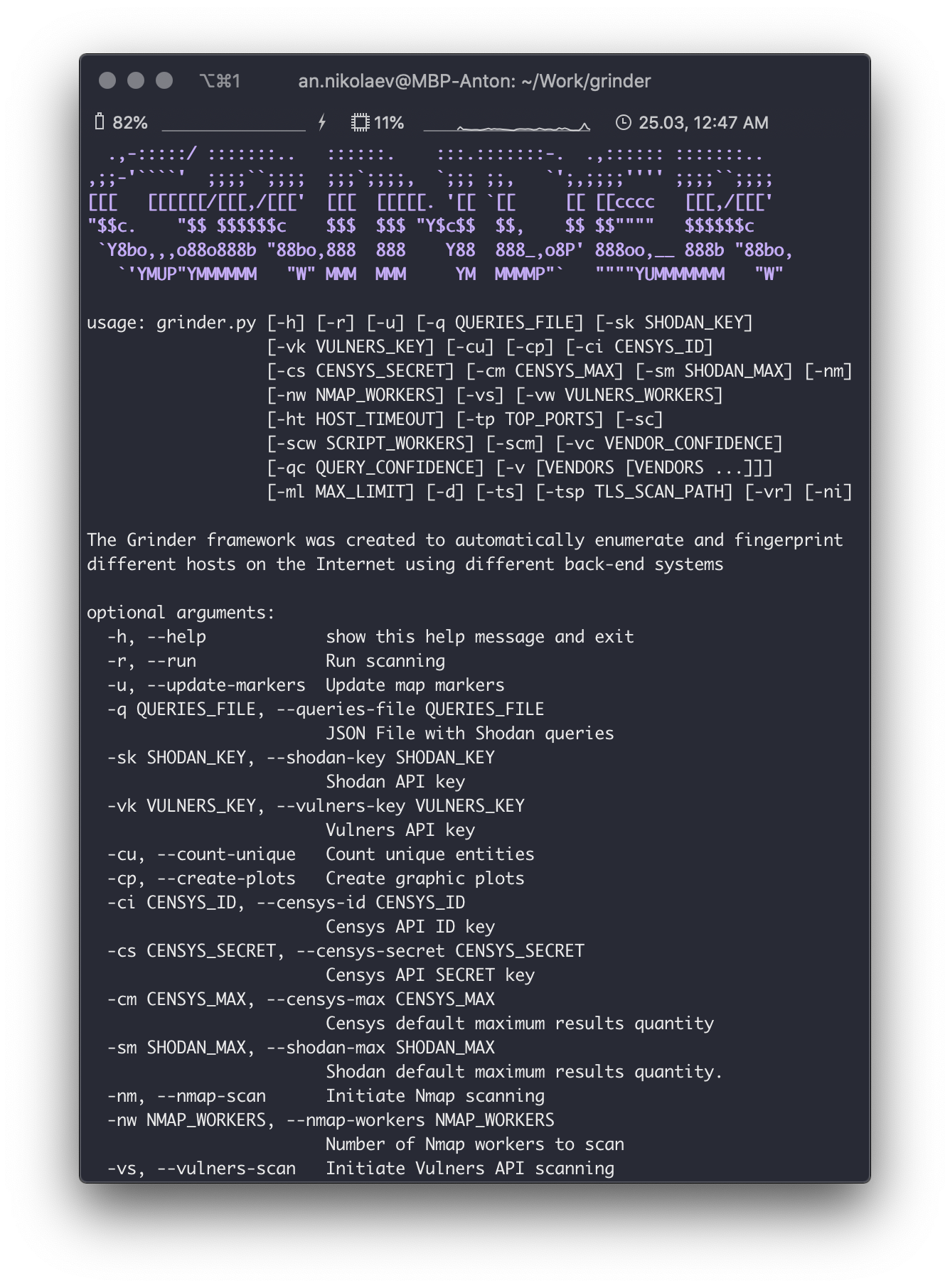
The basic CLI interface of the Grinder Framework
The Grinder Framework can easily build an interactive map with found hosts in your browser
Also, the Grinder Framework can show you some basic information
...And some additional information
标签:API 集成, CLI 工具, CTI, Docker, ESC4, OSINT, Python, 安全防御评估, 密码管理, 插件系统, 数据展示, 数据统计, 无后门, 空间测绘, 端口扫描, 红队, 网络安全, 网络普查, 网络调试, 自动化, 请求拦截, 资产枚举, 资产测绘, 逆向工具, 隐私保护