JoshuaMart/AutoRecon
GitHub: JoshuaMart/AutoRecon
一款基于Bash的自动化域名侦察脚本,整合多个开源安全工具实现子域名枚举、信息收集和漏洞扫描的编排流程。
Stars: 304 | Forks: 68
# AutoRecon
  
## 请查看 [RENGINE](https://github.com/yogeshojha/rengine/),这是一个更有趣且积极维护的项目
## 功能特性
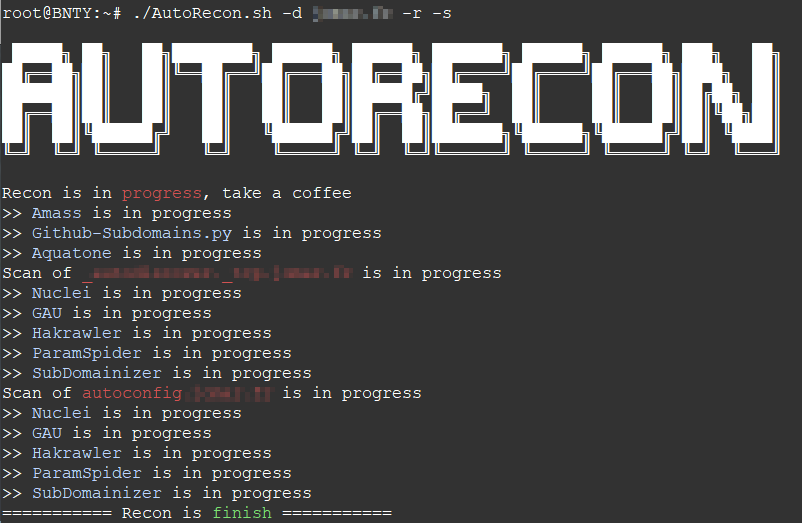
- 使用 [Amass](https://github.com/OWASP/Amass/) 枚举子域名、生成排列组合并移除泛解析
- 使用 [Github-Subdomains](https://github.com/gwen001/github-search/blob/master/github-subdomains.py) 在 GitHub 上搜索子域名
- 使用 [Aquatone](https://github.com/michenriksen/aquatone) 发现 Web 服务并进行截图
- [Nuclei](https://github.com/projectdiscovery/nuclei):基于模板的可配置定向扫描
- [Gau](https://github.com/lc/gau):从 AlienVault's Open Threat Exchange、Wayback Machine 和 Common Crawl 获取指定域名的已知 URL。
- [Hakrawler](https://github.com/hakluke/hakrawler):简单、快速的 Web 爬虫
- [ParamSpider](https://github.com/devanshbatham/ParamSpider):从 Web Archives 的暗角中挖掘参数
- [Gf](https://github.com/tomnomnom/gf):grep 的封装工具,帮助你搜索内容
- 包含来自 [Gf-Patterns](https://github.com/1ndianl33t/Gf-Patterns) 和 [ParamSpider](https://github.com/devanshbatham/ParamSpider/tree/master/gf_profiles) 的一些 GF 配置文件
- [SubDomainizer](https://github.com/nsonaniya2010/SubDomainizer):旨在发现网页、Github 和给定 URL 中的外部 JavaScript 里隐藏的子域名和敏感信息。

## 安装说明
- 安装与侦察测试均在 Ubuntu 20.04 上进行
运行安装程序:
```
./install.sh
```
如果需要(推荐),通过创建 [config.ini](https://github.com/OWASP/Amass/blob/master/examples/config.ini) 文件,使用所需的 API 密钥配置 [Amass](https://github.com/OWASP/Amass/)。
在 `/root/Tools/Github-Subdomains/` 目录下创建包含一个或多个 GitHub token 的 `.tokens` 文件。
## 使用方法
```
./recon.sh -d domain.tld -r -s -c /root/Tools/Amass/config.ini
```
选项:
```
-d | --domain (required) : Domain in domain.tld format
-r | --recon (optional) : Search subdomains for the specified domain
-s | --scan (optional) : Scan the specified domain
-c | --amassconfig (optional) : Provide Amass configuration files for better results
-rp | --resultspath (optional) : Defines the output folder
```
## 域名监控
使用带有 "-dir" 选项的 amass 的优势在于,它还允许通过 Bash 脚本进行监控。
例如,你可以创建一个定时任务,定期执行以下内容:
```
#!/bin/bash
DOMAIN=your-domain.tld
/root/AutoRecon.sh -d $DOMAIN -c /root/Tools/Amass/config.ini
MSG=$(amass track -d $DOMAIN -dir /root/Recon/$DOMAIN/Amass/ | grep 'Found:')
PAYLOAD="payload={\"text\": \"$MSG\"}"
HOOK=https://hooks.slack.com/services/XXXX/XXXX/XXXX
if [ ! -z "$var" ]
then
curl -X POST --data-urlencode "$PAYLOAD" "$HOOK"
fi
```

标签:Aquatone, C2日志可视化, Github-Dork, Google, Kali工具, LLM应用, Nuclei, 加密文件系统, 参数挖掘, 域名识别, 子域名枚举, 实时处理, 密码管理, 应用安全, 指纹识别, 日志审计, 系统安全, 自动化侦察, 路径爬虫, 逆向工具