dbrennand/virustotal-python
GitHub: dbrennand/virustotal-python
一个轻量级 Python 库,用于便捷地调用 VirusTotal v3/v2 API 进行文件、URL 和域名的威胁分析查询。
Stars: 75 | Forks: 17
# virustotal-python 🐍


[](https://github.com/dbrennand/virustotal-python/actions/workflows/ci.yml)
[](https://github.com/dbrennand/virustotal-python/actions/workflows/publish.yml)
一个用于与公开的 VirusTotal v3 和 v2 API 交互的 Python 库。
## 安装 🛠
```
# PyPi
pip install virustotal-python
# 手动
pip install .
# uv
uv sync --no-dev
```
## 获取 VirusTotal API Key 🔑
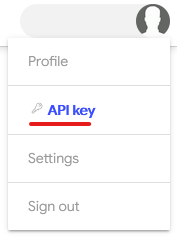
[注册](https://www.virustotal.com/gui/join-us)一个 VirusTotal 账户。然后,查看你的 VirusTotal API key。
## 入门指南
```
import virustotal_python
with virustotal_python.Virustotal("") as vtotal:
# Your code here...
# 使用(旧版)VirusTotal 版本 2 API
with virustotal_python.Virustotal(
API_KEY="", API_VERSION=2
) as vtotal:
# Your code here...
# 您还可以为该库发出的请求设置 proxies 和 timeouts
# 注意:要使用 proxies,您必须安装 PySocks extra
with virustotal_python.Virustotal(
API_KEY="",
PROXIES={"http": "http://10.10.1.10:3128", "https": "https://10.10.1.10:1080"},
TIMEOUT=5.0,
) as vtotal:
# Your code here...
# 您也可以省略 API_KEY 参数并通过
# 环境变量 VIRUSTOTAL_API_KEY 提供 API key
# Bash: export VIRUSTOTAL_API_KEY=""
# PowerShell: $Env:VIRUSTOTAL_API_KEY = ""
# 然后...
with virustotal_python.Virustotal() as vtotal:
# Your code here...
```
## 代码片段
### 提交文件以进行分析 🔎
```
import virustotal_python
import os.path
from pprint import pprint
FILE_PATH = "/path/to/file/to/scan.txt"
# 创建包含要发送以进行 multipart encoding 上传的文件的字典
files = {"file": (os.path.basename(FILE_PATH), open(os.path.abspath(FILE_PATH), "rb"))}
with virustotal_python.Virustotal("") as vtotal:
resp = vtotal.request("files", files=files, method="POST")
pprint(resp.json())
```
### 获取有关文件的信息 📁
```
import virustotal_python
from pprint import pprint
# 标识文件的 ID(SHA-256、SHA-1 或 MD5 hash)
FILE_ID = "9f101483662fc071b7c10f81c64bb34491ca4a877191d464ff46fd94c7247115"
with virustotal_python.Virustotal("") as vtotal:
resp = vtotal.request(f"files/{FILE_ID}")
pprint(resp.data)
```
### 提交 URL 🔗 进行分析并获取报告 📄
```
import virustotal_python
from pprint import pprint
from base64 import urlsafe_b64encode
url = "ihaveaproblem.info"
with virustotal_python.Virustotal("") as vtotal:
try:
resp = vtotal.request("urls", data={"url": url}, method="POST")
# Safe encode URL in base64 format
# https://developers.virustotal.com/reference/url
url_id = urlsafe_b64encode(url.encode()).decode().strip("=")
report = vtotal.request(f"urls/{url_id}")
pprint(report.object_type)
pprint(report.data)
except virustotal_python.VirustotalError as err:
print(f"Failed to send URL: {url} for analysis and get the report: {err}")
```
### 获取有关域名的信息:
```
import virustotal_python
from pprint import pprint
domain = "virustotal.com"
with virustotal_python.Virustotal("") as vtotal:
resp = vtotal.request(f"domains/{domain}")
pprint(resp.data)
```
## 开发说明
[Black](https://github.com/psf/black) 用于代码格式化。
### 单元测试
要运行单元测试,请在项目根目录下运行 `pytest`:
```
uv sync --dev
uv run pytest --cov=virustotal_python
```
### 发布新版本
```
# 从 master 分支运行
export VERSION=x.x.x
git commit --allow-empty -m "Publish $VERSION"
git tag -a $VERSION -m "Version $VERSION"
git push --tags
```
## 更新日志
详情请参阅 [更新日志](CHANGELOG.md)。
## 许可证
本项目基于 MIT 许可证授权 - 详情请参阅 [许可证](LICENSE)。
标签:API库, Python, 威胁情报, 安全规则引擎, 开发者工具, 无后门, 逆向工具