number571/hidden-lake

GitHub: number571/hidden-lake

一个基于后量子加密和F2F网络的匿名通信系统,用于实现抗量子破解的安全隐蔽数据交换。

Stars: 249 | Forks: 12

hl_logo.png

Theoretically Provable Anonymous Network

Go Release License Build Coverage GoDoc Go-Peer

GoReportCard Activity Commits Code Lines CodeSize Downloads

Awesome-Decentralized Alternative-Internet Awesome-Anonymity VKontakte Telegram

About project

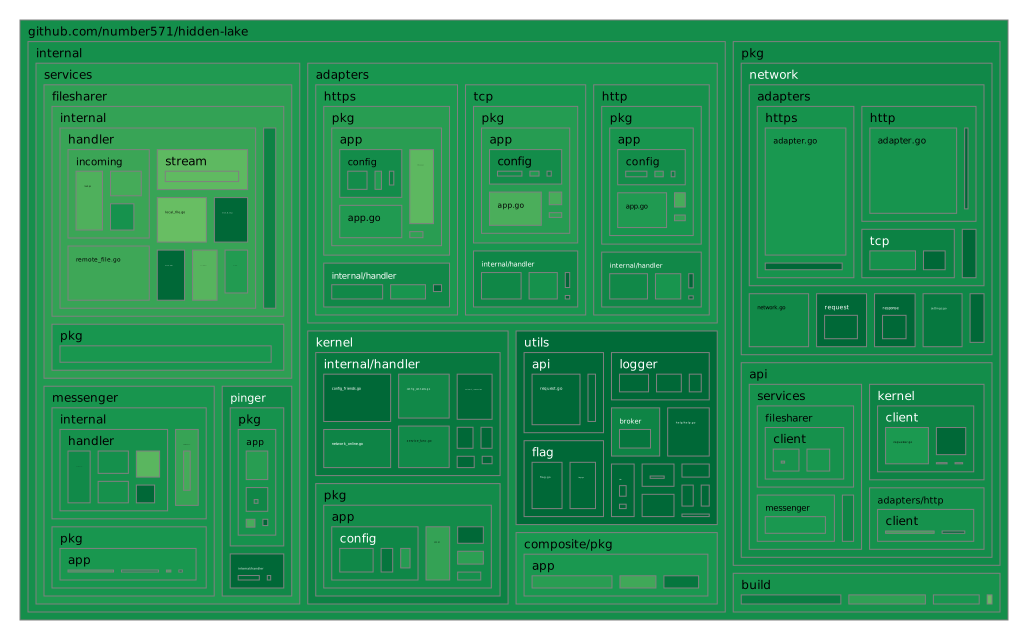
`Hidden Lake` 是一个基于 `micro-service` 架构构建的匿名网络。HL 的核心是 `HLK`(服务),它生成匿名化(基于队列)流量,并结合了许多其他服务(`HLS=filesharer`、`HLS=messenger`、`HLS=pinger` 等)。因此,Hidden Lake 不是一个完整且单一的解决方案,而是多个组合服务的组合。HL 是一个 `friend-to-friend`(F2F)网络,这意味着构建可信通信。由于这种方法,HL 网络的成员可以避免接收 `spam`,以及如果代码中发现漏洞时可能的 `possible attacks`。 ## 覆盖范围图

coverage_treemap.svg

## 发布版本 所有 cmd 程序都为 {`amd64`, `arm64`} 架构和 {`windows`, `linux`, `darwin`} 操作系统编译,格式为 `appname_arch_os`。总共有六个版本的应用程序。完整的发布版本列表可以在此处找到:[github.com/number571/hidden-lake/releases](https://github.com/number571/hidden-lake/releases "releases")。 ## 依赖项 1. Go 库 [github.com/number571/go-peer](https://github.com/number571/go-peer "go-peer")(由 `cmd/hlk` 使用) ### Makefile 有一些依赖项代表独立的应用程序,用于提供有关代码质量的额外信息。这些应用程序未包含在项目中,但通过 `make install-deps` 命令加载。应用程序列表如下: 1. golangci-lint [github.com/golangci/golangci-lint@v2.1.2](https://github.com/golangci/golangci-lint/tree/v2.1.2) 2. go-cover-treemap [github.com/nikolaydubina/go-cover-treemap@v1.4.2](https://github.com/nikolaydubina/go-cover-treemap/tree/v1.4.2) ## 工作原理 Hidden Lake 将匿名化任务分配给 `QB-problem`(基于队列)。
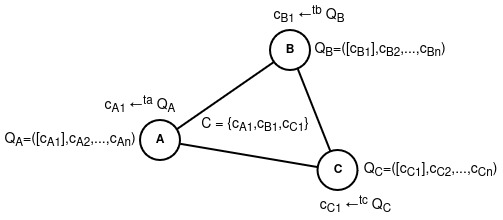
Actions within the QB-problem Figure QB-network with three nodes
  1. Each message m is encrypted with the recipient's key k: c = Ek(m)
  2. Message c is sent during period = T to all network participants
  3. The period T of one participant is independent of the periods T1, T2, ..., Tn of other participants
  4. If there is no message for the period T, then a false message v is sent to the network without a recipient (with a random key r): c = Er(v)
  5. Each participant tries to decrypt the message they received from the network: m = Dk(c)

----------------------------------------------------------------
hl_qbp.png

----------------------------------------------------------------

## 应用程序列表 1. 基础: * [HLK](cmd/hlk) - 使用 QB-problem 匿名化流量 * [HLC](cmd/hlc) - 将多个 HL 应用程序作为一个应用程序运行 2. 适配器: * [HLA=tcp](cmd/hla/hla-tcp) - 通过 TCP 协议适配 HL 流量 * [HLA=http](cmd/hla/hla-http) - 通过 HTTP 协议适配 HL 流量 * [HLA=https](cmd/hla/hla-https) - 通过 HTTPS 协议适配 HL 流量 3. 服务: * [HLS=messenger](cmd/hls/hls-messenger) - 发送和接收文本消息 * [HLS=filesharer](cmd/hls/hls-filesharer) - 查看存储和下载文件 * [HLS=pinger](cmd/hls/hls-pinger) - ping 节点以检查在线状态 ### 外部应用程序 1. [HL-Client](https://github.com/number571/hl-client) - 使用 Go 和 Fyne 编写的 «Hidden Lake» 网络客户端 2. [HL-Chat](https://github.com/number571/hl-chat) - 基于 «Hidden Lake» 网络的控制台群聊 ## 构建和运行 启动匿名网络主要是启动匿名化 `HLK` 和 `HLA=tcp` 服务。这些服务可以同时使用 `HLC` 应用程序启动。您可以使用 `hlc.yml` 文件编辑运行服务的列表。运行 HLC 有两种方式:通过 `源代码` 和通过 `发布版本`。 ### 1. 从源代码运行 ``` $ go install github.com/number571/hidden-lake/cmd/hlc@latest $ hlc ``` ### 2. 从发布版本运行 ``` $ wget https://github.com/number571/hidden-lake/releases/latest/download/hlc_amd64_linux $ chmod +x hlc_amd64_linux $ ./hlc_amd64_linux ``` ## 生产环境 HLK 节点可以通过 HLA=tcp 轻松连接到生产环境。为此,您只需在启动时指定 `network`。您可以在 [networks.yml](build/networks.yml) 文件中找到它们。 ``` $ hlc --network oi4r9NW9Le7fKF9d ``` 您还可以通过将 networks.yml 文件的内容复制到执行目录并重命名为 `hl-networks.yml` 来创建自己的网络。进一步,此文件的内容可以覆盖或补充。

hlk_logger.gif

## 通信 要与其他网络节点通信,您必须首先获取您的公钥,该公钥在首次启动 HLK 时生成。为此,您需要访问 `hlk.yml` 中提供的 `内部` 地址(默认为 `localhost:9572`)的 [HLK API](cmd/hlk/README.md#hlk-api)。 ``` $ curl -X GET 'http://localhost:9572/api/profile/pubkey' ``` 收到公钥后,必须将其传递给未来的对话者,并从他那里接收他的公钥。这样,将发生 `F2F 握手`,其中每方将明确建立对话者的公钥。要安装对话者的密钥,您也可以使用 `HLK API` 或仅编辑 `hlk.yml` 文件并重启 HLK 应用程序。 ``` $ curl -X POST 'http://localhost:9572/api/config/friends' --data '{"alias_name":"friend", "public_key":"PubKey{...}"}' ``` __成功__。现在您可以开始通信了!您可以在 `HLK/HLS API` 上编写自己的应用服务,或仅使用简单的 `CLI` 应用程序,例如 [hlk-cli](cmd/hlk/client/hlk-cli/)、[hls-messenger-cli](cmd/hls/hls-messenger/client/hls-messenger-cli/)、[hls-filesharer-cli](cmd/hls/hls-filesharer/client/hls-filesharer-cli/)、[hls-pinger-cli](cmd/hls/hls-pinger/client/hls-pinger-cli/)。 ## Star 历史 [![Star History 图表](https://api.star-history.com/svg?repos=number571/hidden-lake&type=Date)](https://star-history.com/#number571/hidden-lake&Date) ## 许可证 根据 MIT 许可证授权。有关完整许可证文本,请参阅 [LICENSE](LICENSE)。 **[⬆ 返回顶部](#releases)**
标签:EVTX分析, F2F网络, Go语言, GP/12协议, ML-DSA, ML-KEM, QB问题, 加密算法, 加密通信, 匿名网络, 协议栈, 后量子加密, 开源, 抗量子计算, 日志审计, 程序破解, 网络安全, 网络安全, 隐私保护, 隐私保护