fatih/color
GitHub: fatih/color
Go 语言的终端彩色输出库,让开发者在命令行应用中轻松实现跨平台的彩色文本输出与样式控制。
Stars: 7980 | Forks: 642
# color [](https://github.com/fatih/color/actions) [](https://pkg.go.dev/github.com/fatih/color)
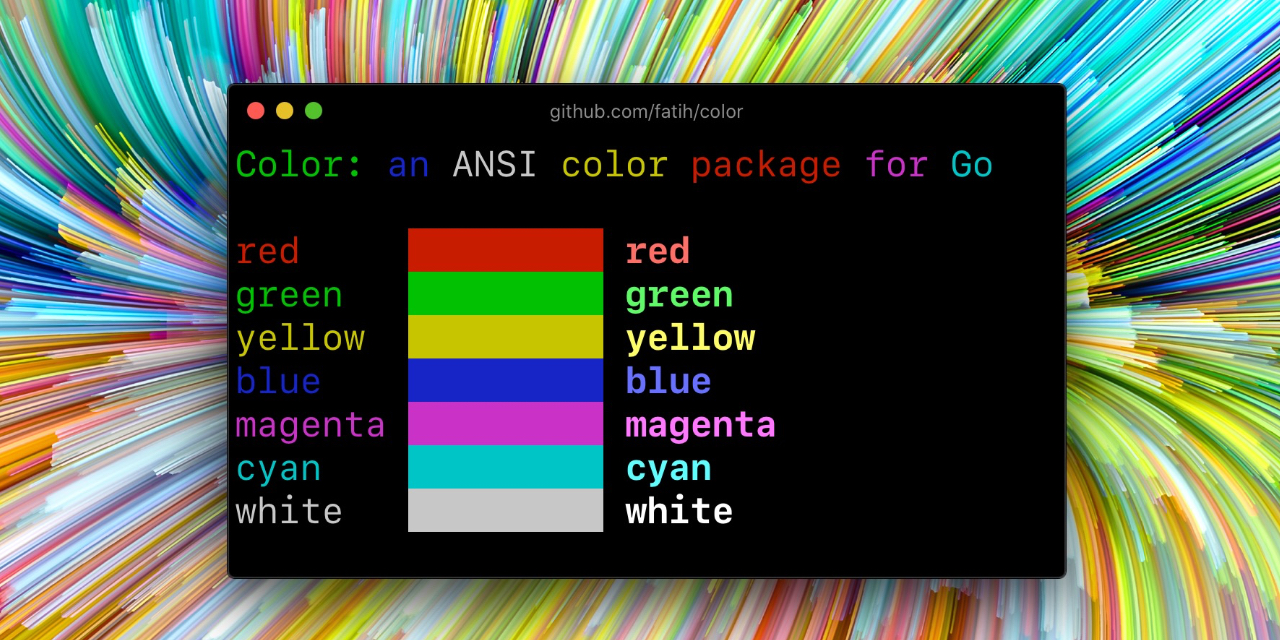
Color 让你在 Go (Golang) 中使用基于 [ANSI 转义码](http://en.wikipedia.org/wiki/ANSI_escape_code#Colors) 的彩色输出。它同样支持 Windows!该 API 可以通过多种方式使用,请选择适合你的一种。
## 安装
```
go get github.com/fatih/color
```
## 示例
### 标准颜色
```
// Print with default helper functions
color.Cyan("Prints text in cyan.")
// A newline will be appended automatically
color.Blue("Prints %s in blue.", "text")
// These are using the default foreground colors
color.Red("We have red")
color.Magenta("And many others ..")
```
### RGB 颜色
如果你的终端支持 24 位颜色,你可以使用 RGB 颜色代码。
```
color.RGB(255, 128, 0).Println("foreground orange")
color.RGB(230, 42, 42).Println("foreground red")
color.BgRGB(255, 128, 0).Println("background orange")
color.BgRGB(230, 42, 42).Println("background red")
```
### 混合并复用颜色
```
// Create a new color object
c := color.New(color.FgCyan).Add(color.Underline)
c.Println("Prints cyan text with an underline.")
// Or just add them to New()
d := color.New(color.FgCyan, color.Bold)
d.Printf("This prints bold cyan %s\n", "too!.")
// Mix up foreground and background colors, create new mixes!
red := color.New(color.FgRed)
boldRed := red.Add(color.Bold)
boldRed.Println("This will print text in bold red.")
whiteBackground := red.Add(color.BgWhite)
whiteBackground.Println("Red text with white background.")
// Mix with RGB color codes
color.RGB(255, 128, 0).AddBgRGB(0, 0, 0).Println("orange with black background")
color.BgRGB(255, 128, 0).AddRGB(255, 255, 255).Println("orange background with white foreground")
```
### 使用自定义输出 (io.Writer)
```
// Use your own io.Writer output
color.New(color.FgBlue).Fprintln(myWriter, "blue color!")
blue := color.New(color.FgBlue)
blue.Fprint(writer, "This will print text in blue.")
```
### 自定义 print 函数 (PrintFunc)
```
// Create a custom print function for convenience
red := color.New(color.FgRed).PrintfFunc()
red("Warning")
red("Error: %s", err)
// Mix up multiple attributes
notice := color.New(color.Bold, color.FgGreen).PrintlnFunc()
notice("Don't forget this...")
```
### 自定义 fprint 函数 (FprintFunc)
```
blue := color.New(color.FgBlue).FprintfFunc()
blue(myWriter, "important notice: %s", stars)
// Mix up with multiple attributes
success := color.New(color.Bold, color.FgGreen).FprintlnFunc()
success(myWriter, "Don't forget this...")
```
### 插入到无颜色字符串中 (SprintFunc)
```
// Create SprintXxx functions to mix strings with other non-colorized strings:
yellow := color.New(color.FgYellow).SprintFunc()
red := color.New(color.FgRed).SprintFunc()
fmt.Printf("This is a %s and this is %s.\n", yellow("warning"), red("error"))
info := color.New(color.FgWhite, color.BgGreen).SprintFunc()
fmt.Printf("This %s rocks!\n", info("package"))
// Use helper functions
fmt.Println("This", color.RedString("warning"), "should be not neglected.")
fmt.Printf("%v %v\n", color.GreenString("Info:"), "an important message.")
// Windows supported too! Just don't forget to change the output to color.Output
fmt.Fprintf(color.Output, "Windows support: %s", color.GreenString("PASS"))
```
### 嵌入现有代码
```
// Use handy standard colors
color.Set(color.FgYellow)
fmt.Println("Existing text will now be in yellow")
fmt.Printf("This one %s\n", "too")
color.Unset() // Don't forget to unset
// You can mix up parameters
color.Set(color.FgMagenta, color.Bold)
defer color.Unset() // Use it in your function
fmt.Println("All text will now be bold magenta.")
```
### 禁用/启用颜色
在某些情况下,你可能需要显式地禁用/启用彩色输出。对于非 TTY 输出流(例如,如果输出直接通过管道传递给 `less`),`go-isatty` 包会自动禁用彩色输出。
如果设置了 [`NO_COLOR`](https://no-color.org) 环境变量且其值为非空字符串,`color` 包也会禁用彩色输出。
`Color` 支持以编程方式全局禁用/启用颜色,也支持对单个颜色定义进行禁用/启用。例如,假设你有一个 CLI 应用,以及一个 `-no-color` 布尔标志。你可以通过以下方式轻松禁用彩色输出:
```
var flagNoColor = flag.Bool("no-color", false, "Disable color output")
if *flagNoColor {
color.NoColor = true // disables colorized output
}
```
它也支持针对单个颜色定义(局部)。你可以随时动态禁用/启用彩色输出:
```
c := color.New(color.FgCyan)
c.Println("Prints cyan text")
c.DisableColor()
c.Println("This is printed without any color")
c.EnableColor()
c.Println("This prints again cyan...")
```
## GitHub Actions
要在 GitHub Actions(或其他支持 ANSI 颜色的 CI 系统中)输出颜色,请确保设置 `color.NoColor = false`,以便其跳过对非 TTY 输出流的检查。
## 鸣谢
* [Fatih Arslan](https://github.com/fatih)
* Windows 支持由 @mattn 提供:[colorable](https://github.com/mattn/go-colorable)
## 许可证
The MIT License (MIT) - 详见 [`LICENSE.md`](https://github.com/fatih/color/blob/master/LICENSE.md)
标签:ANSI颜色, EVTX分析, Go, Ruby工具, 日志审计, 第三方库, 终端UI