neutrinolabs/xrdp
GitHub: neutrinolabs/xrdp
xrdp 是一个开源的 Linux RDP 服务端,让用户可以通过标准 RDP 协议从任意平台的远程桌面客户端连接到 Linux 图形化桌面环境。
Stars: 6650 | Forks: 1755
[](https://github.com/neutrinolabs/xrdp/actions)
[](https://gitter.im/neutrinolabs/xrdp-questions)

[](https://github.com/neutrinolabs/xrdp/releases)
# xrdp - 一个开源的 RDP 服务器
## 概述
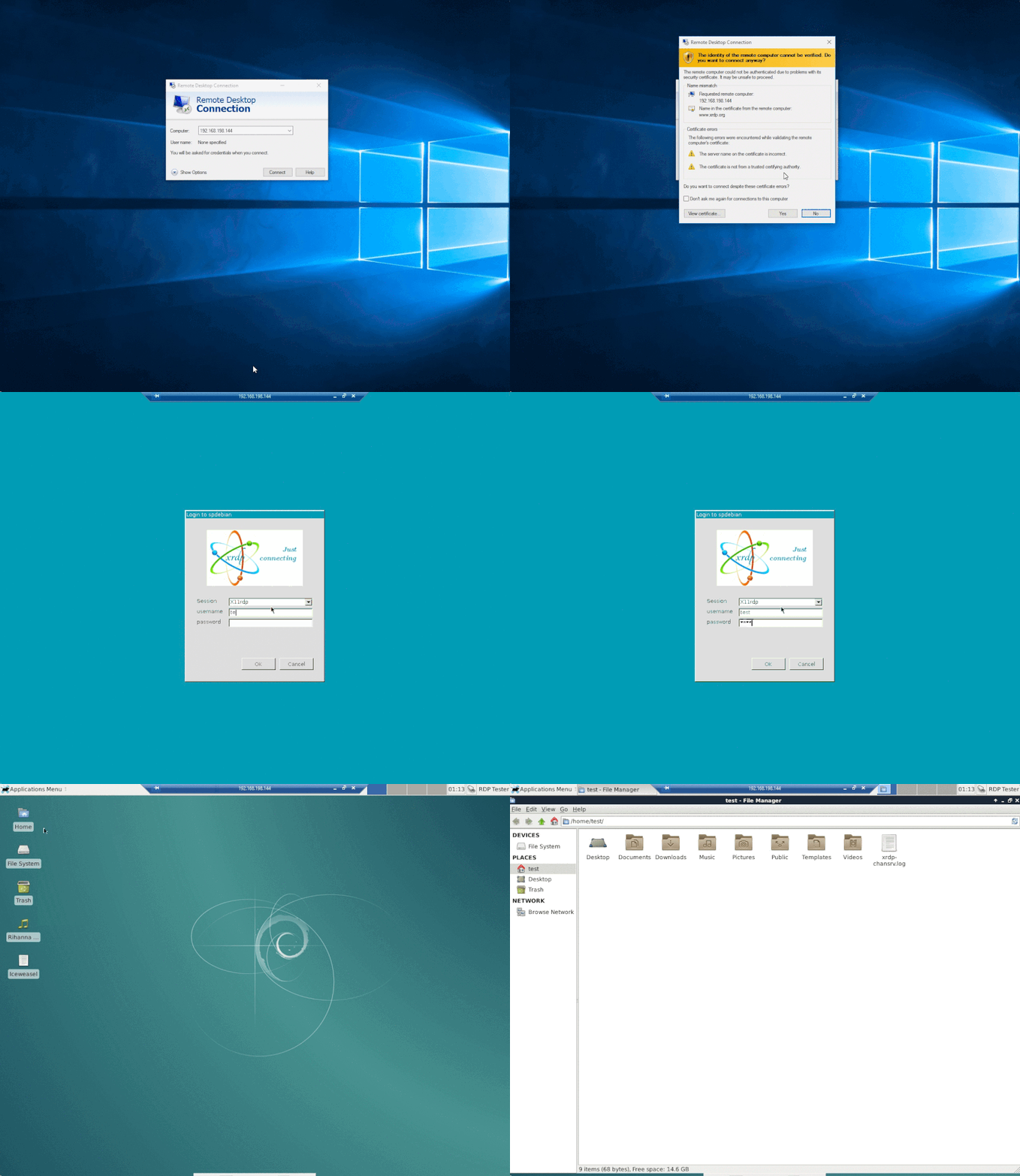
**xrdp** 使用 Microsoft 远程桌面协议 (RDP) 提供对远程机器的图形化登录。xrdp 接受来自多种 RDP 客户端的连接:
* FreeRDP
* rdesktop
* KRDC
* NeutrinoRDP
* Windows MSTSC (Microsoft Terminal Services Client,即 `mstsc.exe`)
* Microsoft Remote Desktop (可在 Microsoft Store 找到,与 MSTSC 不同)
其中许多客户端可以在 Windows、Mac OS、iOS 和/或 Android 的部分或全部平台上运行。
RDP 传输默认使用 TLS 进行加密。
## 功能
### 远程桌面访问
* 使用 RDP 从任何地方连接到 Linux 桌面(需要 [xorgxrdp](https://github.com/neutrinolabs/xorgxrdp) Xorg 模块)
* 重新连接到现有会话
* 会话大小调整(包括连接时调整和动态调整)
* RDP/VNC 代理(通过 xrdp 连接到另一个 RDP/VNC 服务器)
### 访问远程资源
* 双向剪贴板传输(文本、位图、文件)
* 音频重定向([需要编译额外的模块](https://github.com/neutrinolabs/xrdp/wiki/How-to-set-up-audio-redirection))
* 麦克风重定向([需要编译额外的模块](https://github.com/neutrinolabs/xrdp/wiki/How-to-set-up-audio-redirection))
* 驱动器重定向(在远程机器上挂载本地客户端驱动器)
## 支持的平台
**xrdp** 主要针对 GNU/Linux 操作系统。x86(包括 x86-64)和 ARM 处理器是运行 xrdp 最成熟的架构。
另请参阅[平台支持层级](https://github.com/neutrinolabs/xrdp/wiki/Platform-Support-Tier)。
xorgxrdp 和 RemoteFX 编解码器等某些组件使用 SIMD 指令对 x86 进行了特殊优化。因此,在 x86 处理器上运行 xrdp 将获得完全加速的体验。
## 快速开始
大多数 Linux 发行版应该在其软件库中提供 xrdp 的最新版本。为了获得最佳体验,您需要 xrdp 和 xorgxrdp 软件包。建议 xrdp 依赖于 xorgxrdp,因此安装 xrdp 通常就足够了。如果未提供 xorgxrdp,请使用 Xvnc 服务器。
xrdp 监听 3389/tcp 端口。请确保您的防火墙允许从您希望访问的位置连接到 3389/tcp。
### Ubuntu / Debian
```
apt install xrdp
```
### Fedora, RHEL 及其衍生版本
如果您运行的不是 Fedora,请务必先启用 EPEL 软件包。
```
dnf install epel-release
```
(所有系统)使用以下命令安装 xrdp:
```
dnf install xrdp
```
## 编译
另请参阅 https://github.com/neutrinolabs/xrdp/wiki#building-from-sources
### 前置条件
要从打包的源代码编译 xrdp,您需要基本的构建工具——编译器(**gcc** 或 **clang**)以及 **make** 程序。此外,您还需要 **openssl-devel**、**pam-devel**、**libX11-devel**、**libXfixes-devel**、**libXrandr-devel**。根据您的配置,可能还需要更多的附加软件。
要从检出的 Git 仓库编译 xrdp,您还需要额外安装 **autoconf**、**automake**、**libtool** 和 **pkg-config**。
### 获取源代码并编译
如果从打包的源代码进行编译,请解压 tar 包并进入生成的目录。
如果从检出的仓库进行编译,请确保您也克隆了子模块(使用 `git clone --recursive https://github.com/neutrinolabs/xrdp`)
然后运行以下命令来编译并安装 xrdp:
```
./bootstrap
./configure
make
sudo make install
```
如果您想使用音频重定向功能,需要编译并安装额外的 pulseaudio 模块。构建说明可以在 Wiki 中找到。
* [如何设置音频重定向](https://github.com/neutrinolabs/xrdp/wiki/How-to-set-up-audio-redirection)
## 目录结构
```
xrdp
├── common ······ common code
├── docs ········ documentation
├── fontutils ··· font handling utilities
├── genkeymap ··· keymap generator
├── instfiles ··· installable data file
├── keygen ······ xrdp RSA key pair generator
├── libpainter ·· painter library
├── librfxcodec · RFX codec library
├── libxrdp ····· core RDP protocol implementation
├── m4 ·········· Autoconf macros
├── mc ·········· media center module
├── neutrinordp · RDP client module for proxying RDP connections using NeutrinoRDP
├── pkgconfig ··· pkg-config configuration
├── scripts ····· build scripts
├┬─ sesman ······ session manager for xrdp
|├── chansrv ···· channel server for xrdp
|├── libsesman ·· Code common to sesman and its related executables
|└── tools ······ session management tools for sys admins
├── tests ······· tests for the code
├┬─ tools ······· tools
|└┬─ devel ······ development tools
| ├── gtcp_proxy GTK app that forwards TCP connections to a remote host
| └── tcp_proxy · CLI app that forwards TCP connections to a remote host
├── vnc ········· VNC client module for xrdp
├── vrplayer ···· QT player redirecting video/audio to clients over xrdpvr channel
├── xrdp ········ main server code
├── xrdpapi ····· virtual channel API
├── xrdpvr ······ API for playing media over RDP
└── xup ········· xorgxrdp client module
```
标签:Awesome, DNS解析, IT运维, RDP, Socks5代理, TLS加密, VNC代理, X11, Xorg, xrdp, 内核驱动, 图形界面, 安全测试工具, 客户端加密, 底层编程, 开源RDP服务器, 开源项目, 服务器, 桌面环境, 系统工具, 系统管理, 网络协议, 远程协助, 远程控制, 远程桌面, 远程访问