ossf/cve-bin-tool
GitHub: ossf/cve-bin-tool
一款开源的二进制与 SBOM 漏洞扫描工具,帮助团队自动检测软件中包含的已知 vulnerable 组件。
Stars: 1739 | Forks: 646
# CVE Binary Tool 快速入门 / README
[](https://github.com/ossf/cve-bin-tool/actions)
[](https://codecov.io/gh/ossf/cve-bin-tool)
[](https://gitter.im/cve-bin-tool/community?utm_source=badge&utm_medium=badge&utm_campaign=pr-badge)
[](https://cve-bin-tool.readthedocs.io/en/latest/)
[](https://pypi.org/project/cve-bin-tool/)
[](https://github.com/python/black)
[](https://pycqa.github.io/isort/)
[](https://bestpractices.coreinfrastructure.org/projects/5380)
[](https://securityscorecards.dev/viewer/?uri=github.com/ossf/cve-bin-tool)
CVE Binary Tool 是一款免费、开源的工具,旨在帮助您查找软件中已知的漏洞。它使用来自[国家漏洞数据库](https://nvd.nist.gov/) (NVD) 的[通用漏洞披露]() (CVE) 列表中的数据,以及来自 [Redhat](https://access.redhat.com/hydra/rest/securitydata)、[开源漏洞数据库 (OSV)](https://osv.dev/)、[Gitlab Advisory Database (GAD)](https://advisories.gitlab.com/) 和 [Curl](https://curl.se/docs/vuln.json) 的已知漏洞数据。
CVE Binary Tool 使用 NVD API,但未获得 NVD 的认可或认证。
该工具有两种主要操作模式:
1. 二进制扫描器,帮助您确定哪些包可能已被包含在某软件中。目前共有 447 个检查器。我们最初的重点是常见且易受攻击的开源组件,例如 openssl、libpng、libxml2 和 expat。
2. 用于扫描各种格式的已知组件列表的工具,包括 .csv、多种 Linux 发行版包列表、特定语言的包扫描器以及多种软件物料清单 (SBOM) 格式。
它旨在作为持续集成系统的一部分,以实现定期的漏洞扫描,并对供应链中的已知问题提供预警。它也可用于自动检测组件并生成 SBOM。
CVE Binary Tool 运行时的操作流程:
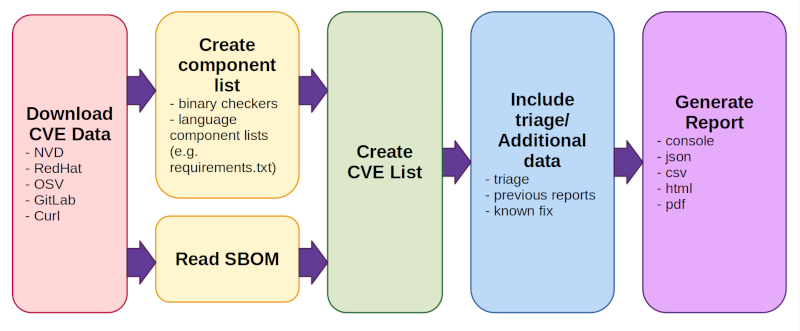
1. 下载 CVE 数据(来自 NVD、Redhat、OSV、Gitlab 和 Curl)。
- 默认情况下每天执行一次,而不是每次运行扫描时都执行。
- 首次运行时,下载所有数据可能需要一些时间。
2. 创建/读取组件列表。有两种操作模式:
1. 使用二进制检查器和语言组件列表(如 Python 的 requirements.txt)的组合创建组件列表(包括版本)。
2. 读取 SBOM(使用标准化的软件物料清单格式的现有组件列表。)
3. 创建 CVE 列表
- 查找发现或从现有物料清单中读取的所有组件,并报告与其相关的任何已知问题
4. 包含评估/附加数据
- 有多个选项可用于添加评估/注释、来自以前报告的信息以跟踪漏洞随时间的变化,或已知的修复数据
5. 以一种或多种格式(console、json、csv、html、pdf)生成报告
有关更多详细信息,请参阅我们的[文档](https://cve-bin-tool.readthedocs.io/en/latest/) 或此[快速入门指南](https://cve-bin-tool.readthedocs.io/en/latest/README.html)
- [CVE Binary Tool 快速入门 / README](#cve-binary-tool-quick-start--readme)
- [安装 CVE Binary Tool](#installing-cve-binary-tool)
- [最常用的使用选项](#most-popular-usage-options)
- [使用二进制扫描器查找已知漏洞](#finding-known-vulnerabilities-using-the-binary-scanner)
- [扫描 SBOM 文件以查找已知漏洞](#scanning-an-sbom-file-for-known-vulnerabilities)
- [生成 SBOM](#generating-an-sbom)
- [生成 VEX](#generating-a-vex)
- [漏洞评估](#triaging-vulnerabilities)
- [离线使用该工具](#using-the-tool-offline)
- [在 GitHub Actions 中使用 CVE Binary Tool](#using-cve-binary-tool-in-github-actions)
- [输出选项](#output-options)
- [配置](#configuration)
- [自动检测组件](#auto-detection-of-components)
- [二进制检查器列表](#binary-checker-list)
- [特定语言的检查器](#language-specific-checkers)
- [支持的归档格式](#supported-archive-formats)
- [附加要求](#additional-requirements)
- [局限性](#limitations)
- [反馈与贡献](#feedback--contributions)
- [安全问题](#security-issues)
- [完整选项列表](#full-option-list)
## 安装 CVE Binary Tool
可以使用 pip 安装 CVE Binary Tool:
```
pip install cve-bin-tool
```
如果你想尝试来自
[cve-bin-tool github](https://github.com/ossf/cve-bin-tool) 的最新代码或进行开发,你也可以使用 `pip install --user -e .` 从目录安装本地副本。[贡献者文档](CONTRIBUTING.md) 更详细地介绍了如何进行本地开发的设置。
Pip 会为你安装 python 依赖项,但对于某些类型的解压操作,我们会用到系统库。如果你在解压文件时遇到困难,可以查看我们针对 Linux 和 Windows 的[附加要求列表](#additional-requirements)。
首次使用时(以及默认情况下每天一次),该工具将从[一组已知的漏洞数据源](MANUAL.md#data-sources) 下载漏洞数据。由于 NVD 的可靠性问题,从 3.3 版本开始,我们将默认使用我们自己的 NVD 镜像 [https://cveb.in/](https://cveb.in/),而不是直接连接 NVD。如果你希望直接从 NVD 服务器获取数据,你必须[提供你自己的 NVD_API_KEY](MANUAL.md#--nvd-api-key-nvd_api_key) 来使用他们的 API。
如果你使用的是 3.3 之前且未使用我们镜像的版本,请按照上述说明使用 NVD_API_KEY。
## 最常用的使用选项
### 使用二进制扫描器查找已知漏洞
要对目录或文件运行二进制扫描器:
```
cve-bin-tool
```
默认情况下,该工具假设你试图扫描整个目录,但如果你向它提供一个列出依赖项的单个 .csv 或 .json 文件,它会将其视为物料清单。你也可以使用 [`--input-file` 选项](MANUAL.md#-i-input_file---input-file-input_file) 直接指定物料清单文件,或者按照下面的说明扫描 SBOM。
### 扫描 SBOM 文件以查找已知漏洞
要扫描软件物料清单文件 (SBOM):
```
cve-bin-tool --sbom --sbom-file
```
有效的 SBOM 类型包括 [SPDX](https://spdx.dev/specifications/)、
[CycloneDX](https://cyclonedx.org/specification/overview/) 和 [SWID](https://csrc.nist.gov/projects/software-identification-swid/guidelines)。
在 SBOM 文件中扫描产品名称时不区分大小写。
[SBOM 扫描操作指南](how_to_guides/sbom.md) 提供了更多 SBOM 扫描示例。
### 生成 SBOM
除了扫描 SBOM 之外,CVE Binary Tool 还可以用于从扫描结果中生成 SBOM,如下所示:
```
cve-bin-tool --sbom-type --sbom-format --sbom-output
```
有效的 SBOM 类型包括 [SPDX](https://spdx.dev/specifications/) 和 [CycloneDX](https://cyclonedx.org/specification/overview/)。
生成的 SBOM 将包含产品名称、版本、供应商(如果有)以及证据位置(适用于 CycloneDX)。不提供许可证信息。
[SBOM 生成操作指南](how_to_guides/sbom_generation.md) 提供了更多 SBOM 生成示例。
### 生成 VEX
除了扫描 VEX 之外,CVE Binary Tool 还可以用于从扫描结果中生成 VEX,如下所示:
```
cve-bin-tool --vex-type --vex-output
```
有效的 VEX 类型包括 [CSAF](https://oasis-open.github.io/csaf-documentation/)、[CycloneDX](https://cyclonedx.org/capabilities/vex/) 和 [OpenVEX](https://edu.chainguard.dev/open-source/sbom/what-is-openvex/)。
[VEX 生成操作指南](how_to_guides/vex_generation.md) 提供了更多 VEX 生成示例。
### 漏洞评估
`--vex-file` 选项可用于在扫描目录时添加额外的评估数据(如备注、注释等),这样输出将反映这些评估数据,并且你可以节省重新评估的时间(用法:`cve-bin-tool --vex-file test.json /path/to/scan`)。
支持的格式包括可以使用 `--vex-output` 选项生成的 [CycloneDX](https://cyclonedx.org/capabilities/vex/)、[CSAF](https://oasis-open.github.io/csaf-documentation/) 和 [OpenVEX](https://edu.chainguard.dev/open-source/sbom/what-is-openvex/) VEX 格式。
典型用法:
1. 使用 `cve-bin-tool /path/to/scan --vex-output triage.json` 生成评估文件
2. 使用你喜欢的文本编辑器编辑 triage.json,为列出的漏洞提供评估信息。
3. 将此评估文件用于以后的扫描,如下所示:`cve-bin-tool /path/to/scan --vex-file triage.json`
有关更详细的使用指南,请参阅此[链接](https://cve-bin-tool.readthedocs.io/en/latest/triaging_process.html)。
应该可以在 cve-bin-tool 的不同运行之间,或与其他支持 CycloneDX VEX、OpenVEX 和 CSAF 格式的工具共享评估数据。这对于扫描相关产品或容器的团队、出于合规原因需要使用多种工具的团队、拥有负责提供漏洞评估指导的中央安全策略团队的公司等来说,尤为有用。
### 离线使用该工具
在运行扫描时指定 `--offline` 选项,可确保 cve-bin-tool 不会尝试下载最新的数据库文件或检查是否有更新版本的工具。
请注意,在工具以离线模式运行之前,你需要获取一份漏洞数据副本。[离线操作指南包含了有关如何设置数据库的更多信息。](how_to_guides/offline.md)
### 在 GitHub Actions 中使用 CVE Binary Tool
如果你想将 cve-bin-tool 集成为 GitHub Action 流水线的一部分,可以使用 cve-bin-tool 的官方 GitHub Action。在[这里](https://github.com/ossf/cve-bin-tool-action/#cve-binary-tool-github-action) 了解更多详情。GitHub Action 会在安全选项卡中提供报告,开源项目以及付费使用该功能的 GitHub 客户均可使用此功能。
如果你想直接使用该工具,我们还提供了一个 [GitHub action](https://github.com/ossf/cve-bin-tool/blob/main/doc/how_to_guides/cve_scanner_gh_action.yml) 示例。对于希望将报告存储在证据库中,或者无法访问 GitHub Security 选项卡的团队来说,这可能是一个不错的选择。
## 输出选项
CVE Binary Tool 默认提供基于控制台的输出。如果你想提供其他格式,可以在命令行中使用 `--format` 进行指定并附带文件名。有效格式包括 CSV、JSON、JSON2、console、HTML 和 PDF。可以使用 `--output-file` 标志指定输出文件名。
你还可以使用逗号 (',') 作为分隔符来指定多种输出格式:
```
cve-bin-tool file -f csv,json,json2,html -o report
```
注意:在逗号 (',') 和输出格式之间不得使用空格。
报告的漏洞还可以通过使用 `--vex-output` 并结合 `--vex-type` 命令行选项定义类型,
以漏洞利用交换 (VEX) 格式进行报告。
然后,生成的 VEX 文件可以用作 `--vex-file` 以支持
评估流程。
如果你想使用 PDF 支持,将需要单独安装 `reportlab`
库。
如果你打算在安装 cve-bin-tool 时使用 PDF 支持,你可以指定它,reportlab 将作为 cve-bin-tool 安装的一部分进行安装:
```
pip install cve-bin-tool[PDF]
```
如果你已经安装了 cve-bin-tool,你可以之后使用 pip
添加 reportlab:
```
pip install --upgrade reportlab
```
请注意,reportlab 被移出了 cve-bin-tool 的默认安装,
因为它有一个与之相关的已知 CVE
([CVE-2020-28463](https://nvd.nist.gov/vuln/detail/CVE-2020-28463))。
cve-bin-tool 代码使用了建议的缓解措施来限制哪些资源
被添加到 PDF 中,以及额外的输入验证。这是一个
有点特殊的 CVE,因为它描述了 PDF 的核心功能:
外部项目,例如图像,可以嵌入其中,因此任何
查看 PDF 的人都可能
加载外部图像(类似于查看网页如何触发外部
加载)。对此没有内在的“修复”方法,只有在生成时使用该
库的用户必须确保仅将预期的项添加到 PDF 中
的缓解措施。
由于用户可能不希望安装带有一个开放的、无法修复的 CVE 的软件,
我们选择仅向自己安装了该库的用户提供 PDF 支持。
一旦安装了该库,PDF
报告选项即可使用。
## 配置
你可以使用 `--config` 选项为该工具提供配置文件。你仍然可以使用命令行参数覆盖配置文件中指定的选项。请查看我们在
[test/config](https://github.com/ossf/cve-bin-tool/blob/main/test/config/)
中的示例配置文件
## 自动检测组件
CVE Binary tool 尝试使用二进制检查器、支持的语言组件列表和文件提取方法来自动检测组件。用于自动检测的支持工具如下所列。
### 二进制检查器列表
以下检查器可用于在二进制文件中查找组件:
| | | | 可用检查 | | | |
|--------------- |------------ |---------------- |------------------ |-------------- |------------ |------------- |
| accountsservice |acpid |aomedia |apache_http_server |apcupsd |apparmor |apr |
| apr_util |asn1c |assimp |asterisk |atftp |augeas |avahi |
| axel |bash |bind |binutils |bird |bison |bluez |
| boa |boinc |botan |bro |bubblewrap |busybox |bwm_ng |
| bzip2 |c_ares |cairo |capnproto |captive_portal |catdoc |ceph |
| cflow |chess |chrony |cifs_utils |civetweb |clamav |clang |
| cockpit |collectd |commons_compress |connman |coreutils |corosync |cpio |
| cpp_httplib |cronie |cryptsetup |cups |cups_filters |curl |cvs |
| darkhttpd |dav1d |davfs2 |dbus |dcmtk |debianutils |dhclient |
| dhcpcd |dhcpd |djvulibre |dlt_daemon |dmidecode |dnsmasq |docker |
| domoticz |dosfstools |dotnet |dovecot |doxygen |dpkg |dropbear |
| e2fsprogs |ed |elfutils |emacs |enscript |erlang_otp |exfatprogs |
| exiftags |exim |exiv2 |f2fs_tools |faad2 |fastd |fastnetmon |
| fetchmail |ffmpeg |file |firefox |firejail |fish |flac |
| fluidsynth |freeradius |freerdp |fribidi |frr |fuse |gawk |
| gcc |gdal |gdb |gdk_pixbuf |gettext |ghostscript |gimp |
| git |glib |glibc |gmp |gnomeshell |gnupg |gnutls |
| go |gpgme |gpsd |graphicsmagick |grep |grub2 |gsasl |
| gsl |gstreamer |guile |gupnp |gvfs |gzip |haproxy |
| harfbuzz |haserl |hdf5 |heimdal |hostapd |hunspell |hwloc |
| i2pd |icecast |icu |igmpproxy |imagemagick |indent |inetutils |
| iperf3 |ipmitool |ipsec_tools |iptables |iputils |irssi |iucode_tool |
| iwd |jack2 |jacksondatabind |jansson |janus |jasper |jbig |
| jhead |jq |json_c |kbd |keepalived |kerberos |kexectools |
| kodi |kubernetes |ldns |lftp |libarchive |libass |libbpg |
| libbson |libcap |libcoap |libconfuse |libcurl |libdb |libde265 |
| libebml |libevent |libexpat |libgcrypt |libgd |libgit2 |libheif |
| libhtp |libical |libidn |libidn2 |libinput |libjpeg |libjpeg_turbo |
| libksba |liblas |liblouis |libmatroska |libmaxminddb |libmemcached |libmicrohttpd |
| libmodbus |libnss |libopenmpt |libpcap |libraw |libreoffice |libreswan |
| librsvg |librsync |libsamplerate |libseccomp |libsixel |libsndfile |libsolv |
| libsoup |libsrtp |libssh |libssh2 |libtasn1 |libtiff |libtomcrypt |
| libupnp |libuv |libvips |libvirt |libvncserver |libvorbis |libvpx |
| libxslt |libyaml |libyang |lighttpd |linux_kernel |linuxptp |lldpd |
| llvm |logrotate |lrzip |lua |luajit |lxc |lynx |
| lz4 |lzo2 |mailx |mariadb |mbedtls |mdadm |memcached |
| micropython |minetest |mini_httpd |minicom |minidlna |miniupnpc |miniupnpd |
| moby |modsecurity |monit |mosquitto |motion |mp4v2 |mpd |
| mpg123 |mpv |msmtp |mtr |mupdf |musl |mutt |
| mysql |nano |nasm |nbd |ncurses |neon |nessus |
| net_snmp |netatalk |netdata |netkit_ftp |netpbm |nettle |nghttp2 |
| nginx |ngircd |nmap |node |ntfs_3g |ntp |ntpsec |
| oath_toolkit |ofono |open_babel |open_iscsi |open_vm_tools |openafs |openblas |
| opencv |opendkim |openfortivpn |openimageio |openjpeg |openldap |openocd |
| openpmix |opensc |openssh |openssl |openswan |openvpn |openvswitch |
| orc |p7zip |pango |patch |pcre |pcre2 |pcsc_lite |
| perl |php |picocom |pigz |pixman |pjsip |png |
| poco |podman |polarssl |poppler |postgresql |ppp |privoxy |
| procps_ng |proftpd |protobuf_c |pspp |pure_ftpd |putty |python |
| qemu |qpdf |qt |quagga |radare2 |radvd |raptor |
| rauc |rdesktop |readline |redis |rpm |rsync |rsyslog |
| rtl_433 |rtmpdump |ruby |runc |rust |samba |sane_backends |
| sasl |sdl |seahorse |shadowsocks_libev |snapcast |snapd |sngrep |
| snort |socat |sofia_sip |speex |spice |sqlite |squashfs |
| squid |sslh |sssd |stellarium |strongswan |stunnel |subversion |
| sudo |suricata |sylpheed |syslogng |sysstat |systemd |tar |
| tbb |tcpdump |tcpreplay |terminology |tesseract |thrift |thttpd |
| thunderbird |timescaledb |tinyproxy |tor |toybox |tpm2_tss |traceroute |
| traffic_server |transmission |trousers |ttyd |twonky_server |u_boot |udisks |
| unbound |unixodbc |upx |util_linux |uwsgi |varnish |vim |
| vlc |vorbis_tools |vsftpd |wabt |wavpack |webkitgtk |wget |
| wireshark |wolfssl |wpa_supplicant |xerces |xml2 |xpdf |xrdp |
| xscreensaver |xwayland |xz |yasm |zabbix |zbar |zchunk |
| zeek |zlib |znc |zsh |zstandard |zziplib | |
所有检查器都可以在 checkers 目录中找到,此外还有
[关于如何添加新检查器的说明](checkers/README.md)。
可以通过
[GitHub issues](https://github.com/ossf/cve-bin-tool/issues) 请求对新检查器的支持。
### 特定语言的检查器
许多检查器可用于在特定语言包中查找易受攻击的组件。
| 语言 | 支持的文件 |
| ------------ | --------------------------------------------------------------- |
| Dart | `pubspec.lock` |
| Go | `Go.mod` |
| Java | `pom.xml`; JAR, WAR 和 EAR 归档文件 |
| JavaScript | `package-lock.json`, `yarn.lock` |
| OpenWrt opkg | `.control` 文件 |
| Perl | `cpanfile` |
| Python | `requirements.txt`, `PKG-INFO`, `METADATA`; .whl 和 .egg 文件 |
| Rust | `Cargo.lock` |
| Ruby | `Gemfile.lock` |
| R | `renv.lock` |
| Swift | `Package.resolved` |
| Windows PE | `.pyd` 文件 |
有关[特定语言的检查器](MANUAL.md#language-specific-checkers) 的更多信息,可以在 [CVE Binary Tool 手册](https://cve-bin-tool.readthedocs.io/en/latest/MANUAL.html) 中找到。
### 支持的归档格式
自动提取器目前支持以下归档格式:
| 归档格式 | 文件扩展名 |
| -------------- | ---------------------------------------------- |
| zip | .zip, .exe, .jar, .msi, .egg, .whl, .war, .ear |
| | .aar |
| tar | .tar, .tgz, .tar.gz, .tar.xz, .tar.bz2 |
| deb | .deb, .ipk |
| rpm | .rpm |
| cab | .cab |
| apk | .apk |
| zst | .zst |
| pkg | .pkg |
## 附加要求
要使用自动提取器,你可能需要根据你需要提取的[支持归档格式](#supported-archive-formats) 的类型使用以下实用程序。
在 Linux 上运行完整的测试套件需要以下实用程序:
- `file`
- `strings`
- `tar`
- `unzip`
- `rpm2cpio`
- `cpio`
- `ar`
- `cabextract`
其中大多数在许多 Linux 系统上默认安装,但 `cabextract` 和
`rpm2cpio` 尤其可能需要安装。
在 Windows 系统上,你可能需要:
- `ar`
- `7z`
- `Expand`
- `pdftotext`
Windows 默认已安装 `Expand`,但可能需要安装 `ar` 和 `7z`。
如果你想运行我们的测试套件或扫描 zstd 压缩文件,我们建议安装这个 7zip 的分支 [7-zip-zstd](https://github.com/mcmilk/7-Zip-zstd)
。我们目前使用 `7z` 来提取 `jar`、`apk`、`aar`、`msi`、`exe` 和 `rpm` 文件。
要安装 `ar`,你可以从[这里](https://www.mingw-w64.org/downloads/#msys2) 安装 MinGW(其中包含 binutils)并运行下载的 .exe 文件。
如果你在尝试从 pip 安装时收到有关构建库的错误,
你可能需要安装 Windows 构建工具。Windows 构建工具可以
从以下网址免费获取:
选项: -h, --help 显示此帮助信息并退出 -e EXCLUDE, --exclude EXCLUDE 逗号分隔的排除目录路径 -V, --version 显示程序版本号并退出 --disable-version-check 跳过检查新版本 --disable-validation-check 跳过针对 schema 验证 xml 文件 --offline 以离线模式操作 --detailed 在 csv 或 json 报告中添加 CVE 描述(对 console、html 或 pdf 无效) CVE 数据下载: 与数据源和缓存配置相关的参数 -n {api,api2,json,json-mirror,json-nvd}, --nvd {api,api2,json,json-mirror,json-nvd} 选择从 NVD 获取 CVE 列表的方法 -u {now,daily,never,latest}, --update {now,daily,never,latest} 数据源和 exploits 数据库的更新计划 (默认: daily) --nvd-api-key NVD_API_KEY 指定 NVD API key(用于提高 NVD 速率限制)。 设置为 `no` 可忽略环境中的任何密钥。 -d DISABLE_DATA_SOURCE, --disable-data-source DISABLE_DATA_SOURCE 逗号分隔的要禁用的数据源列表 (CURL, EPSS, GAD, NVD, OSV, PURL2CPE, REDHAT, RSD) (默认: NONE) --use-mirror USE_MIRROR 使用镜像更新数据库 输入: directory 要扫描的目录 -i INPUT_FILE, --input-file INPUT_FILE 提供输入文件名 -C CONFIG, --config CONFIG 提供配置文件 -L PACKAGE_LIST, --package-list PACKAGE_LIST 提供包列表 --sbom {spdx,cyclonedx,swid} 指定软件物料清单 (sbom) 的类型 (默认: spdx) --sbom-file SBOM_FILE 提供 sbom 文件名 --vex-file VEX_FILE 提供用于评估处理的漏洞利用交换 (vex) 文件名 输出: -q, --quiet 抑制输出 -l {debug,info,warning,error,critical}, --log {debug,info,warning,error,critical} 日志级别 (默认: info) -o OUTPUT_FILE, --output-file OUTPUT_FILE 提供输出文件名 (默认: 输出到 stdout) --html-theme HTML_THEME 为 HTML 报告提供自定义主题目录 -f {csv,json,json2,console,html,pdf}, --format {csv,json,json2,console,html,pdf} 更新输出格式 (默认: console) 通过使用逗号 (',') 作为分隔符指定多种输出格式 注意:在逗号 (',') 和输出格式之间不要使用空格。 --generate-config {yaml,toml,yaml,toml,toml,yaml} 为 cve bin tool 生成 toml 和 yaml 格式的配置文件。 -c CVSS, --cvss CVSS 报告的最小 CVSS 分数 (范围在 0 到 10 之间的整数) (默认: 0) -S {low,medium,high,critical}, --severity {low,medium,high,critical} 报告的最小 CVE 严重性 (默认: low) --metrics 检查所发现的 cve 的指标 (例如 EPSS) --epss-percentile EPSS_PERCENTILE 报告的 CVE 最小 epss 百分位范围在 0 到 100 之间。自动启用 `--metrics` --epss-probability EPSS_PROBABILITY 报告的 CVE 最小 epss 概率范围在 0 到 100 之间。自动启用 `--metrics` --no-0-cve-report 仅在发现 CVE 时生成报告 -A [- 列出来自 Linux 发行版的包的可用修复 -b [], --available-fix [ - ] - 列出来自 Linux 发行版的可用反向移植修复 --affected-versions 列出受给定 CVE 影响的产品版本(以便于升级) --sbom-output SBOM_FILE 提供要生成的软件物料清单 (sbom) 文件名 --sbom-type {spdx,cyclonedx} 指定要生成的软件物料清单 (sbom) 类型 (默认: spdx) --sbom-format {tag,json,yaml} 指定要生成的软件物料清单 (sbom) 格式 (默认: tag) --strip-scan-dir 从 sbom 证据位置路径和 CVE 路径中剥离扫描目录(对于固件转储很有用) Vex 输出: 与 Vex 输出文档相关的参数。 --vex-output VEX_FILE 提供要生成的漏洞利用交换 (vex) 文件名 --vex-type {cyclonedx, csaf, openvex} 指定要生成的漏洞利用交换 (vex) 的类型 (默认: cyclonedx) --product PRODUCT 产品名称 --release RELEASE 发布版本 --vendor VENDOR 产品的供应商/提供商 -rr REVISION_REASON, --revision-reason REVISION_REASON 应使用双引号指定 vex 文档更新的原因 --filter-triage 根据 Vex 文件中的评估数据过滤 cves 合并报告: 与中间报告和合并报告相关的参数 -a [APPEND], --append [APPEND] 以 json 格式将输出保存为中间报告 -t TAG, --tag TAG 添加一个唯一的标签以区分多个中间报告 -m MERGE, --merge MERGE 用于合并的逗号分隔中间报告路径 -F FILTER, --filter FILTER 用于过滤中间报告的逗号分隔标签字符串 检查器: -s SKIPS, --skips SKIPS 要禁用的检查器的逗号分隔列表 -r RUNS, --runs RUNS 要启用的检查器的逗号分隔列表 数据库管理: --import-json IMPORT_JSON 从按年份拆分的 json 文件导入数据库 --ignore-sig 导入 json 数据时不验证 PGP 签名 --log-signature-error 当签名不匹配时仅记录错误而不是停止 (不安全) --verify PGP_PUBKEY_PATH 导入 json 文件时验证 PGP 签名 --export-json EXPORT_JSON 将数据库导出为按年份拆分的 json 文件 --pgp-sign PGP_PRIVATE_KEY_PATH 使用 PGP 签名导出的 json 文件 --passphrase PASSPHRASE 使用 PGP 签名所需的密码 --export EXPORT 导出数据库文件名 --import IMPORT 导入数据库文件名 Exploits: --exploits 检查所发现的 cve 的 exploits 已弃用: --triage-input-file TRIAGE_INPUT_FILE 被 --vex-file 替代 -x, --extract 自动提取压缩文件 --report 即使相应的输出格式没有 CVE 也会生成报告 有关所有这些选项的更多信息,请参阅 [CVE Binary Tool 用户手册](https://cve-bin-tool.readthedocs.io/en/latest/MANUAL.html)。], --backport-fix [ - ]
标签:Claude, CVE检测, SBOM, 硬件无关, 聊天机器人, 逆向工具