GDRETools/gdsdecomp
GitHub: GDRETools/gdsdecomp
一款功能全面的 Godot 游戏引擎逆向工程工具,支持跨版本脚本反编译、资源提取和完整项目恢复。
Stars: 3753 | Forks: 276
# Godot RE Tools
## 简介
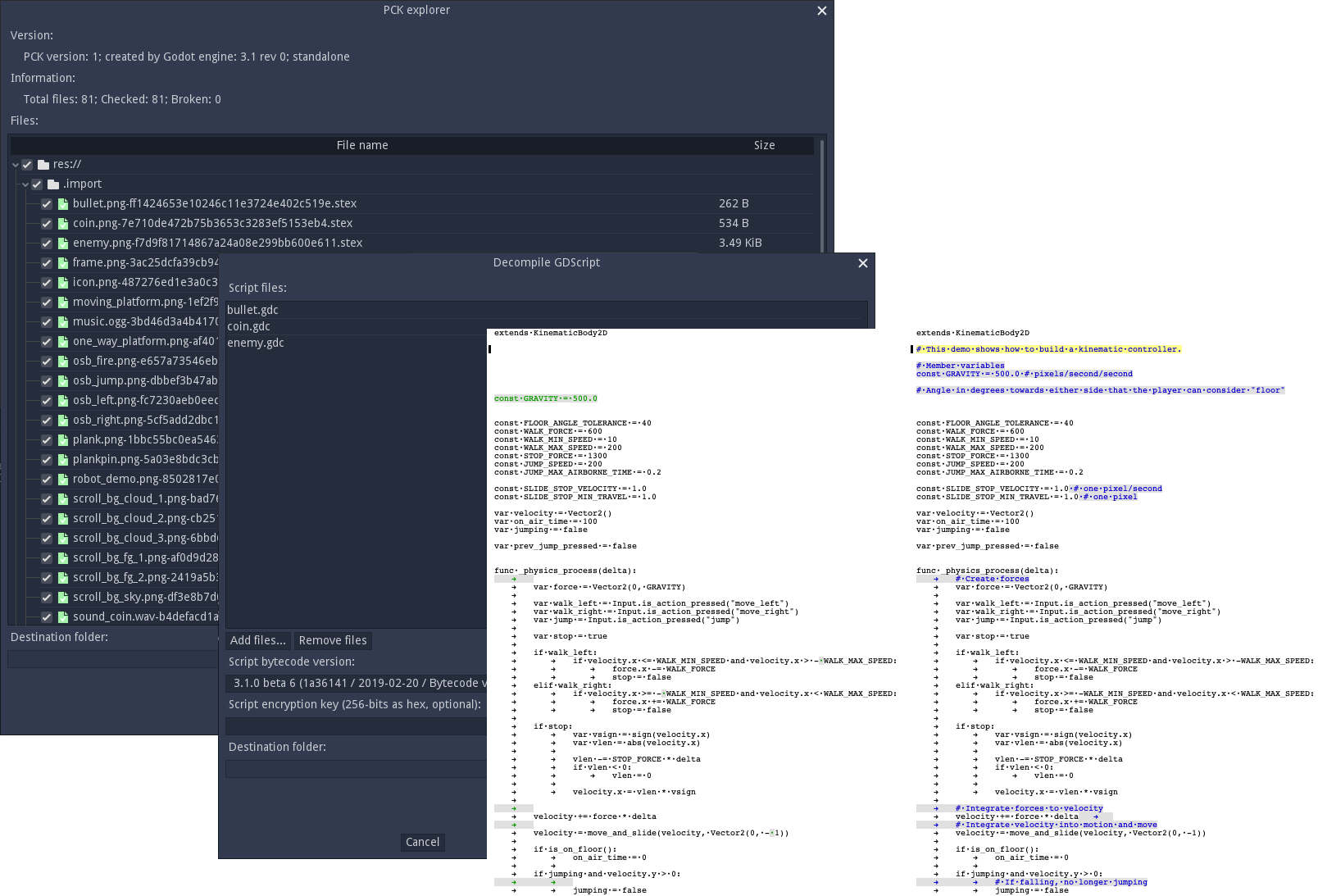
该模块包含以下功能:
- 完整项目恢复
- PCK 归档提取器 / 创建器。
- GDScript 批量反编译器。
- 资源文本 <-> 二进制批量转换器。
完整项目恢复执行以下操作:
- 从 APK、PCK 或嵌入式 EXE 文件加载项目资源
- 反编译所有 GDScript 脚本
- 恢复原始项目文件
- 将所有导入的资源转换回其原始导入格式
- 将任何自动转换的二进制资源转换回其原始文本格式
- 重建任何插件配置文件
该模块支持反编译 Godot 4.x、3.x 和 2.x 项目。
## 安装
从此处获取最新版本:https://github.com/GDRETools/gdsdecomp/releases
在 Windows 上,你也可以通过 [Scoop](https://scoop.sh) 安装:
```
scoop bucket add games
scoop install gdsdecomp
```
## 用法
### GUI
- 若要通过 GUI 执行完整项目恢复,请从“RE Tools”菜单中选择“Recover project...”:
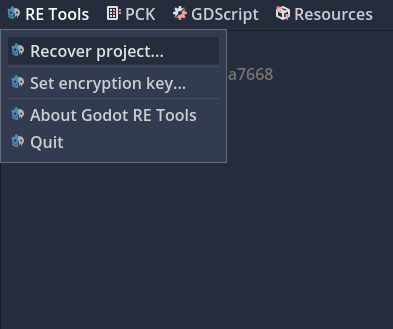
- 或者,直接将 PCK/EXE 拖放到应用程序窗口。
### Command Line
#### 用法:
```
gdre_tools --headless [options]
```
```
Main commands:
--recover= Perform full project recovery on the specified PCK, APK, EXE, or extracted project directory.
--extract= Extract the specified PCK, APK, or EXE.
--list-files= List all files in the specified PCK, APK, or EXE and exit (can be repeated)
--compile= Compile GDScript files to bytecode (can be repeated and use globs, requires --bytecode)
--decompile= Decompile GDC files to text (can be repeated and use globs)
--pck-create= Create a PCK file from the specified directory (requires --pck-version and --pck-engine-version)
--pck-patch= Patch a PCK file with the specified files
--list-bytecode-versions List all available bytecode versions
--dump-bytecode-versions= Dump all available bytecode definitions to the specified directory in JSON format
--txt-to-bin= Convert text-based scene or resource files to binary format (can be repeated)
--bin-to-txt= Convert binary scene or resource files to text-based format (can be repeated)
--patch-translations== Patch translations with the specified CSV file and source path
(e.g. "/path/to/translation.csv=res://translations/translation.csv") (can be repeated)
--gdre-help Print the help message and exit
--gdre-version Print the version of GDRE tools and exit
Recover/Extract Options:
--key= The Key to use if project is encrypted as a 64-character hex string,
e.g.: '000102030405060708090A0B0C0D0E0F101112131415161718191A1B1C1D1E1F'
--output= Output directory, defaults to , or the project directory if one of specified
--scripts-only Only extract/recover scripts
--include= Include files matching the glob pattern (can be repeated, see notes below)
--exclude= Exclude files matching the glob pattern (can be repeated, see notes below)
--ignore-checksum-errors Ignore MD5 checksum errors when extracting/recovering
--skip-checksum-check Skip MD5 checksum check when extracting/recovering
--csharp-assembly= Optional path to the C# assembly for C# projects; auto-detected from PCK path if not specified
--force-bytecode-version= Force the bytecode version to be the specified value. Can be either a commit hash (e.g. 'f3f05dc') or version string (e.g. '4.3.0')
--load-custom-bytecode= Load a custom bytecode definition file from the specified JSON file and use it for the recovery session
--translation-hint= Load a translation key hint file (.csv, .txt, .po, .mo) and use it during translation recovery
--skip-loading-resource-strings Skip loading resource strings from all resources during translation recovery
Decompile/Compile Options:
--bytecode= Either the commit hash of the bytecode revision (e.g. 'f3f05dc'), or the version of the engine (e.g. '4.3.0')
--load-custom-bytecode= Load a custom bytecode definition file from the specified JSON file and use it for the session
--output= Directory where compiled files will be output to.
- If not specified, compiled files will be output to the same location
(e.g. '/main.gd' -> '/main.gdc')
Create PCK Options:
--output= The output PCK file to create
--pck-version= The format version of the PCK file to create (0, 1, 2)
--pck-engine-version= The version of the engine to create the PCK for (x.y.z)
--embed= The executable to embed the PCK into
--key= 64-character hex string to encrypt the PCK with
Patch PCK Options:
--output= The output PCK file to create
--patch-file== The file to patch the PCK with (e.g. "/path/to/file.gd=res://file.gd") (can be repeated)
--include= Only include files from original PCK matching the glob pattern (can be repeated)
--exclude= Exclude files from original PCK matching the glob pattern (can be repeated)
--embed= The executable to embed the patched PCK into
--key= 64-character hex string to decrypt/encrypt the PCK with
Patch Translations Options:
(Note: This can be used in combination with --pck-patch and its options)
--pck= The PCK file with the source translations (if used in combination with --pck-patch, this can be omitted)
--output= The output directory to save the patched translations to (optional if used in combination with --pck-patch)
--locales= The locales to patch (comma-separated list, defaults to only newly-added locales)
```
#### 关于 Include/Exclude glob 模式的说明:
- 递归模式可以用 `**` 指定
- 示例:`res://**/*.gdc` 匹配 `res://main.gdc`、`res://scripts/script.gdc` 等。
- glob 应根植于 `res://` 或 `user://`
- 示例:`res://*.gdc` 将匹配项目根目录下的所有 .gdc 文件,但不包括任何子目录。
- 如果没有根植,glob 将根植于 `res://`
- 示例:`addons/plugin/main.gdc` 等同于 `res://addons/plugin/main.gdc`
- 作为一种特殊情况,如果 glob 包含通配符且不包含目录,则假定其为递归模式。
- 示例:`*.gdc` 将等同于 `res://**/*.gdc`
- Include/Exclude glob 仅匹配实际存在于项目 PCK/目录中的文件,而不是任何不存在的资源源文件。
- 示例:
- 一个项目包含文件 `res://main.gdc`。`res://main.gd` 是 `res://main.gdc` 的源文件,但未包含在项目 PCK 中。
- 使用 include glob `res://main.gd` 执行项目恢复将无法恢复 `res://main.gd`。
- 使用 include glob `res://main.gdc` 执行项目恢复将能够恢复 `res://main.gd`
使用编译原始游戏的相同 Godot 工具版本来编辑项目;恢复日志将说明检测到的版本。
## 限制
尚未实现对以下资源转换的支持:
- 2.x 模型(`dae`、`fbx`、`glb` 等)
- GDNative 或 GDExtension 脚本
## 从源代码编译
将此仓库克隆到 Godot 的 `modules` 子文件夹中,命名为 `gdsdecomp`。
按照 https://docs.godotengine.org/en/latest/development/compiling/index.html 中的描述重建 Godot 引擎。
你还需要 [rustup](https://rustup.rs) 和 [dotnet 9 sdk](https://dotnet.microsoft.com/en-us/download/dotnet/9.0)。
为了便于引导开发,我们在 .vscode 目录中包含了适用于 vscode 的启动、构建和设置模板。阅读上述编译 Godot 的说明并设置好构建环境后:将它们放入 Godot 目录(而不是 gdsdecomp)的 .vscode 文件夹中,删除每个文件的“.template”后缀,然后从 Godot 目录启动 vscode。
注意:请务必先构建 editor 版本,并启动编辑器以编辑 `standalone` 目录中的项目至少一次,以便在运行前导入资源。
### 要求
[Our fork of godot](https://github.com/nikitalita/godot) @ 分支 `gdre-wb-c53c5a1f49`
- 已放弃对 3.x 构建的支持,不再推送新功能
- 但 Godot RE Tools 仍然保留反编译 3.x 和 2.x 项目的能力。
### Standalone
假设你使用 `scons platform=linuxbsd target=template_debug` 进行编译,
```
$ bin/godot.linuxbsd.template_debug.x86_64.llvm --headless --path=modules/gdsdecomp/standalone --recover=
```
## 许可证
该模块的源代码在 MIT 许可证下授权。
标签:APK解包, DNS 反向解析, EXE解包, GDScript, Godot 3, Godot 4, Godot引擎, PCK提取, URL提取, 二进制分析, 云安全监控, 云安全运维, 云资产清单, 反编译, 可视化界面, 多人体追踪, 游戏安全, 游戏开发, 源码恢复, 资源解密, 逆向工程, 静态分析