ROCm/MIVisionX

GitHub: ROCm/MIVisionX

Stars: 212 | Forks: 88

[![MIT licensed](https://img.shields.io/badge/license-MIT-blue.svg)](https://opensource.org/licenses/MIT) [![doc](https://img.shields.io/badge/doc-readthedocs-blueviolet)](https://rocm.docs.amd.com/projects/MIVisionX/en/latest/)

#### Latest release [![GitHub tag (latest SemVer)](https://img.shields.io/github/v/tag/ROCm/MIVisionX?style=for-the-badge)](https://github.com/ROCm/MIVisionX/releases) ## AMD OpenVX™

[AMD OpenVX™](amd_openvx/README.md) is a highly optimized conformant open source implementation of the Khronos OpenVX™ 1.3 computer vision specification. It allows for rapid prototyping as well as fast execution on a wide range of computer hardware, including small embedded x86 CPUs and large workstation discrete GPUs. Khronos OpenVX™ 1.0.1 conformant implementation is available in [MIVisionX Lite](https://github.com/ROCm/MIVisionX/tree/openvx-1.0.1) ## AMD OpenVX™ Extensions The OpenVX framework provides a mechanism for vendors to add new vision functionality. This project includes the following OpenVX [modules](amd_openvx_extensions/README.md) that extend [amd_openvx](amd_openvx/README.md), the AMD OpenVX™ Core Engine.

* [amd_custom](amd_openvx_extensions/amd_custom/README.md): User-defined custom nodes for OpenVX graphs * [amd_loomsl](amd_openvx_extensions/amd_loomsl/README.md): Loom stitching library for live 360-degree video applications * [amd_media](amd_openvx_extensions/amd_media/README.md): Video and image encode/decode extension * [amd_migraphx](amd_openvx_extensions/amd_migraphx/README.md): AMD MIGraphX integration for end-to-end inference * [amd_nn](amd_openvx_extensions/amd_nn/README.md): Neural network extension module * [amd_opencv](amd_openvx_extensions/amd_opencv/README.md): OpenCV interop providing OpenCV functions as OpenVX kernels * [amd_rpp](amd_openvx_extensions/amd_rpp/README.md): Interface to [ROCm Performance Primitives](https://github.com/ROCm/rpp) (RPP) for image augmentation via [rocAL](https://github.com/ROCm/rocAL) * [amd_winml](amd_openvx_extensions/amd_winml/README.md): WinML extension to import ONNX models with pre & post processing for inference on Windows ## Applications MIVisionX includes several [applications](apps/README.md#applications) built on top of OpenVX modules, serving as prototypes and samples for developers.

## Neural network model compiler and optimizer

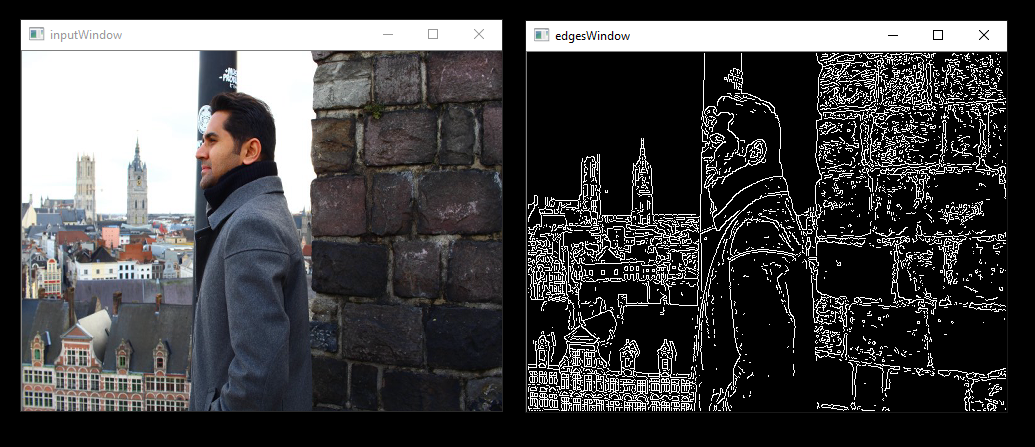
[Neural net model compiler and optimizer](model_compiler/README.md#neural-net-model-compiler--optimizer) converts pre-trained neural net models to MIVisionX runtime code for optimized inference. ## Toolkit [MIVisionX Toolkit](toolkit/README.md) is a comprehensive set of helpful tools for neural net creation, development, training, and deployment. The Toolkit provides tools to design, develop, quantize, prune, retrain, and infer your neural network work in any framework, and deploy on any AMD or 3rd party hardware. ## Utilities * [loom_shell](utilities/loom_shell/README.md#radeon-loomsh): Interpreter for prototyping 360-degree video stitching applications * [mv_deploy](utilities/mv_deploy/README.md): Model compiler and runtime files for neural net inference deployment * [RunCL](utilities/runcl/README.md#amd-runcl): Command-line utility to build, execute, and debug OpenCL programs * [RunVX](utilities/runvx/README.md#amd-runvx): Command-line utility to execute OpenVX graphs described in GDF text files ## Prerequisites ### Hardware * **CPU**: [AMD64](https://rocm.docs.amd.com/projects/install-on-linux/en/latest/reference/system-requirements.html) * **GPU**: [AMD Radeon™ Graphics](https://rocm.docs.amd.com/projects/install-on-linux/en/latest/reference/system-requirements.html) / [AMD Instinct™ Accelerators](https://rocm.docs.amd.com/projects/install-on-linux/en/latest/reference/system-requirements.html) [optional] * **APU**: [AMD Radeon™ `Mobile`/`Embedded`](https://rocm.docs.amd.com/projects/install-on-linux/en/latest/reference/system-requirements.html) [optional] ### Operating Systems #### Linux * Ubuntu - `22.04` / `24.04` * RedHat - `8` / `9` * SLES - `15-SP7` #### Windows * Windows `10` / `11` #### macOS * macOS - Ventura `13` / Sonoma `14` / Sequoia `15` ### Compiler * AMD Clang++ Version `18.0.0` or later - installed with ROCm ### Libraries | Package | Minimum Version | |---------|----------------| | CMake | `3.10` | | HIP | - | | OpenMP | - | | Half | `1.12.0` | | MIOpen | - | | MIGraphX | - | | RPP | `3.1.0` | | OpenCV | `3.X` / `4.X` | | FFmpeg | `4.4.2` | | pkg-config | - | sudo apt install cmake hip-dev openmp-extras-dev half miopen-hip-dev migraphx-dev rpp-dev libopencv-dev pkg-config libavcodec-dev libavformat-dev libavutil-dev libswscale-dev ## Installation instructions ### Linux Verify you have [ROCm-supported hardware](https://rocm.docs.amd.com/projects/install-on-linux/en/latest/reference/system-requirements.html), then install ROCm `7.0.0` or later with [amdgpu-install](https://rocm.docs.amd.com/projects/install-on-linux/en/latest/how-to/amdgpu-install.html) using `--usecase=rocm`. #### Package install Install MIVisionX runtime, development, and test packages. * Runtime package - `mivisionx` only provides the dynamic libraries and executables * Development package - `mivisionx-dev`/`mivisionx-devel` provides the libraries, executables, header files, and samples * Test package - `mivisionx-test` provides ctest to verify installation ##### Ubuntu sudo apt-get install mivisionx mivisionx-dev mivisionx-test ##### RedHat sudo yum install mivisionx mivisionx-devel mivisionx-test ##### SLES sudo zypper install mivisionx mivisionx-devel mivisionx-test #### Source install Use the `MIVisionX-setup.py` script to install all required dependencies, then build from source. git clone https://github.com/ROCm/MIVisionX.git cd MIVisionX python MIVisionX-setup.py mkdir build-hip && cd build-hip cmake ../ make -j8 sudo make install make test Run `python MIVisionX-setup.py --help` for all setup options including `--backend`, `--opencv`, and `--rocm_path`. * [Test option instructions](https://github.com/ROCm/MIVisionX/wiki/CTest) * Instructions for building MIVisionX with [**OPENCL** GPU backend](https://github.com/ROCm/MIVisionX/wiki/OpenCL-Backend) ### Windows * Windows SDK * Visual Studio 2019 or later * Install the latest AMD [drivers](https://www.amd.com/en/support) * Install [OpenCL SDK](https://github.com/GPUOpen-LibrariesAndSDKs/OCL-SDK/releases/tag/1.0) * Install [OpenCV 3.4.0](https://github.com/opencv/opencv/releases/tag/3.4.0) + Set `OpenCV_DIR` environment variable to `OpenCV/build` folder + Add `%OpenCV_DIR%\x64\vc14\bin` or `%OpenCV_DIR%\x64\vc15\bin` to your `PATH` #### Using Visual Studio * Use `MIVisionX.sln` to build for x64 platform ### macOS macOS [build instructions](https://github.com/ROCm/MIVisionX/wiki/macOS#macos-build-instructions) ## Verify installation ### Linux / macOS * The installer will copy + Executables into `/opt/rocm/bin` + Libraries into `/opt/rocm/lib` + Header files into `/opt/rocm/include/mivisionx` + Apps, & Samples folder into `/opt/rocm/share/mivisionx` + Documents folder into `/opt/rocm/share/doc/mivisionx` + Model Compiler, and Toolkit folder into `/opt/rocm/libexec/mivisionx` #### Verify with sample application **Canny Edge Detection**

export PATH=$PATH:/opt/rocm/bin export LD_LIBRARY_PATH=$LD_LIBRARY_PATH:/opt/rocm/lib runvx /opt/rocm/share/mivisionx/samples/gdf/canny.gdf #### Verify with mivisionx-test package Test package provides a ctest module to verify MIVisionX installation. mkdir mivisionx-test && cd mivisionx-test cmake /opt/rocm/share/mivisionx/test/ ctest -VV ### Windows * `MIVisionX.sln` builds the libraries & executables in the folder `MIVisionX/x64` * Use `RunVX` to test the build ./runvx.exe ADD_PATH_TO/MIVisionX/samples/gdf/skintonedetect.gdf ## Docker MIVisionX provides [Docker images](docker/README.md#mivisionx-docker) for Ubuntu `22.04` to quickly prototype and build applications. * [Ubuntu 22.04](https://hub.docker.com/repository/docker/mivisionx/ubuntu-22.04) ## Documentation * [Published documentation](https://rocm.docs.amd.com/projects/MIVisionX/en/latest/) * Build locally: `cd docs && pip3 install -r sphinx/requirements.txt && python3 -m sphinx -T -E -b html -d _build/doctrees -D language=en . _build/html` * Doxygen: `doxygen .Doxyfile` ## Release notes [![GitHub tag (latest SemVer)](https://img.shields.io/github/v/tag/ROCm/MIVisionX?style=for-the-badge)](https://github.com/ROCm/MIVisionX/releases) Review all notable [changes](CHANGELOG.md#changelog) with the latest release. ### Tested configurations * Windows `10` / `11` * Linux distribution + Ubuntu - `22.04` / `24.04` + RedHat - `8` / `9` + SLES - `15-SP7` * ROCm: `7.2.1` * RPP - `3.1.0` * miopen-hip - `3.4.0` * migraphx - `2.13.0` * OpenCV - `4.5.4`/`4.6` * FFMPEG - `4.4.2` * MIVisionX Setup Script - `V4.0.0` ### Known issues * Package install on `RedHat`/`SLES` requires manual `OpenCV` and `FFMPEG` development packages installed