jeemok/better-npm-audit
GitHub: jeemok/better-npm-audit
在原生 npm audit 基础上提供例外管理、多版本兼容和灵活过滤等增强功能的依赖安全审计工具。
Stars: 140 | Forks: 30
# 更好的 NPM Audit
本项目的目标是在现有的 npm audit 选项之上提供额外的功能。我们希望鼓励更多的人对其项目进行安全审计。
[](https://npmjs.org/package/better-npm-audit)
       
## 寻找合作者
你好!👋
我目前正在寻找合作者来帮助维护和开发这个项目。由于时间限制,我一直没能给它应有的关注,但我相信在充满热情的贡献者的帮助下,它有很大的成长潜力。
成为合作者
如果你有兴趣定期做出贡献,我非常希望你能加入我们,成为合作者。无论你是有兴趣修复 bug、添加新功能,还是改进文档,你的贡献都将受到高度重视。
作为合作者,你将拥有该仓库的推送权限,并在塑造项目的未来中发挥关键作用。如果你对此感兴趣,请与我联系!你可以创建一个标题为“Interested in Collaborating”的 issue,或者直接通过电子邮件联系我。
让我们共同努力,使这个项目变得更好!
## NPM 版本 6、7 和 8
NPM 在 2020 年底升级到了版本 7,并在 `npm audit` 中引入了破坏性更改。npm audit 的输出在易读格式和 `--json` 输出样式中都发生了显著变化。更遗憾的是,当 NPM 在 npm v7 中更改 JSON 输出时,他们移除了许多其他有用的标识符(`cves`、`cwe`、`github_advisory_id`),唯一保留下来的是 URL。我们正在尽最大努力处理每个版本,并为它们提供一致的功能。有关 v6 和 v7 更改的相关文档:
| 文档 | 链接 |
| -------------------------- | ------------------------------------------------------------------------------------------ |
| NPM v6 & v7 更改 | https://github.blog/2020-10-13-presenting-v7-0-0-of-the-npm-cli/ |
| NPM v7 博客文章 | https://blog.npmjs.org/post/626173315965468672/npm-v7-series-beta-release-and-semver-major |
| NPM v6 官方 audit 文档 | https://docs.npmjs.com/cli/v6/commands/npm-audit |
| NPM v7 官方 audit 文档 | https://docs.npmjs.com/cli/v7/commands/npm-audit |
| 处理新的 npm audit | https://uko.codes/dealing-with-npm-v7-audit-changes |
你可以在我们的代码库中找到每个 NPM 版本的 JSON 输出示例:[v6](https://github.com/jeemok/better-npm-audit/blob/master/test/__mocks__/v6-json-buffer.json)、[v7](https://github.com/jeemok/better-npm-audit/blob/master/test/__mocks__/v7-json-buffer.json) & [v8](https://github.com/jeemok/better-npm-audit/blob/master/test/__mocks__/v8-json-buffer.json)。
## 安装 ``` $ npm install --save better-npm-audit ``` 或 ``` $ npm install -g better-npm-audit ```
## 用法 ### 全局运行 ``` better-npm-audit audit ``` ### 带例外运行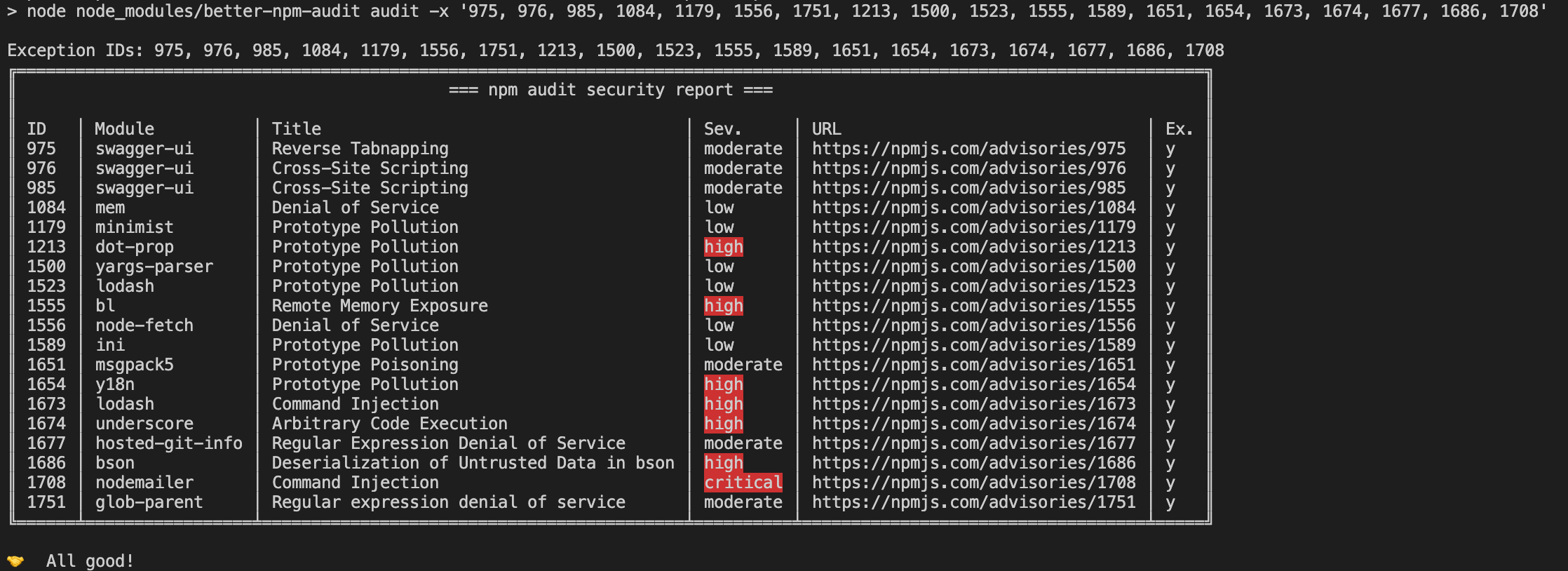 未处理或新报告的漏洞将被高亮显示:
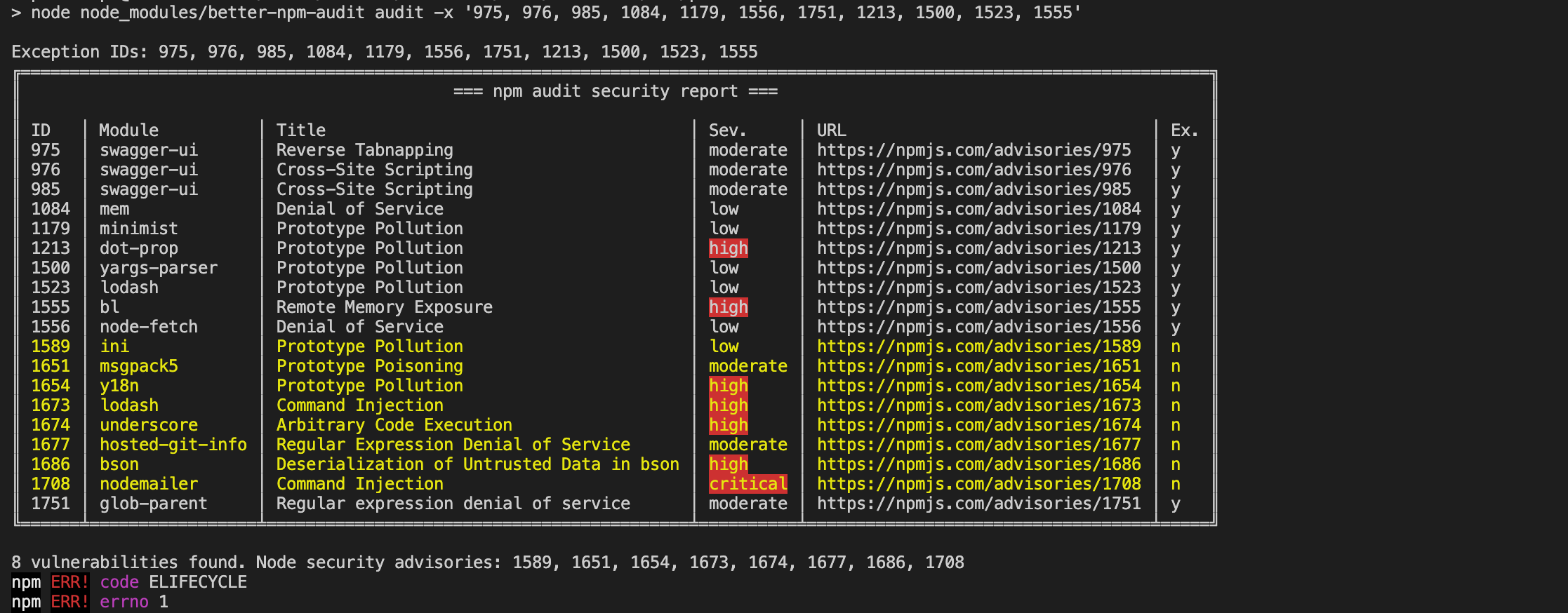 未使用的例外将被通知:
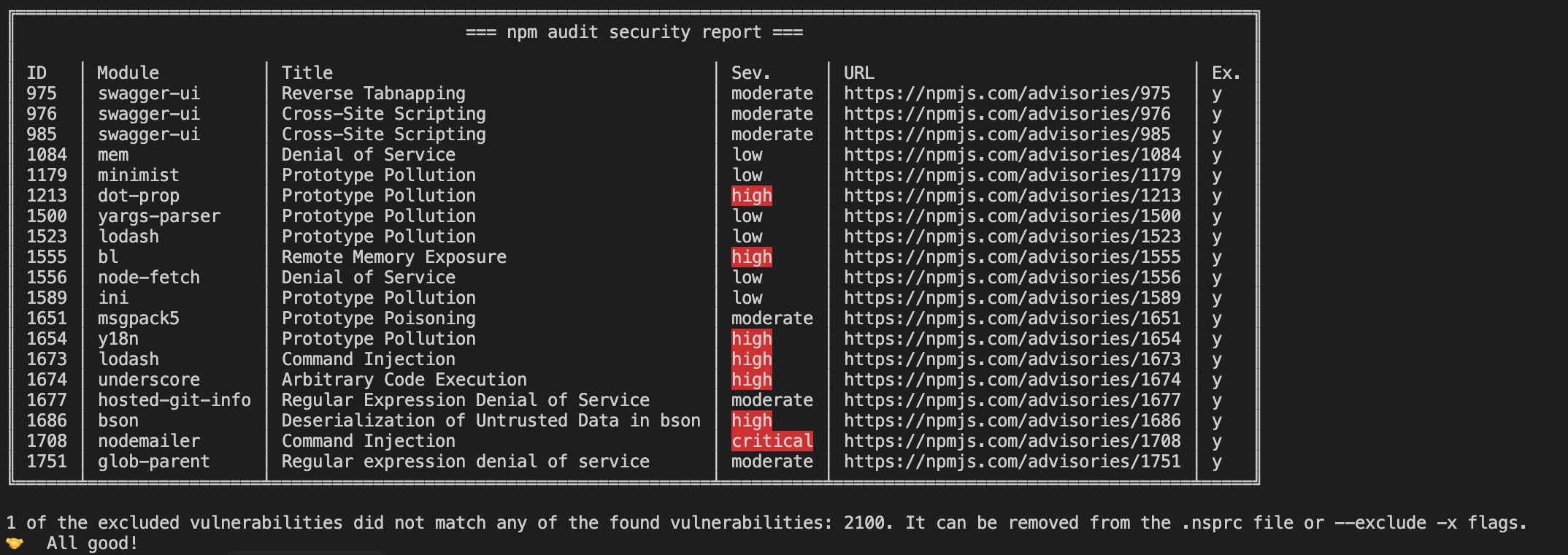 ### 添加到 package 脚本
```
{
"scripts": {
"prepush": "npm run test && npm run audit",
"audit": "better-npm-audit audit"
}
}
```
现在你可以在本地或你的 CI pipeline 中运行:
```
npm run audit
```
### 过滤漏洞表
你可以使用 `--filter-table` 标志过滤漏洞表,使其仅显示达到或超过指定严重级别的漏洞。这对于减少输出中的干扰同时保持用于退出代码的原始 audit 行为非常有用。
```
# 过滤表格以仅显示高和严重漏洞
better-npm-audit audit --filter-table high
# 过滤表格以匹配审计级别
better-npm-audit audit --level moderate --filter-table
# 为退出行为与表格显示设置不同级别
better-npm-audit audit --level high --filter-table moderate
```
**注意:** `--filter-table` 标志仅影响表中显示的漏洞。audit 级别(`--level`)仍然控制退出行为和漏洞计数。
### 添加到 package 脚本
```
{
"scripts": {
"prepush": "npm run test && npm run audit",
"audit": "better-npm-audit audit"
}
}
```
现在你可以在本地或你的 CI pipeline 中运行:
```
npm run audit
```
### 过滤漏洞表
你可以使用 `--filter-table` 标志过滤漏洞表,使其仅显示达到或超过指定严重级别的漏洞。这对于减少输出中的干扰同时保持用于退出代码的原始 audit 行为非常有用。
```
# 过滤表格以仅显示高和严重漏洞
better-npm-audit audit --filter-table high
# 过滤表格以匹配审计级别
better-npm-audit audit --level moderate --filter-table
# 为退出行为与表格显示设置不同级别
better-npm-audit audit --level high --filter-table moderate
```
**注意:** `--filter-table` 标志仅影响表中显示的漏洞。audit 级别(`--level`)仍然控制退出行为和漏洞计数。
## 选项 | 标志 | 简写 | 描述 | | ------------------- | ----- | ----------------------------------------------------------------------------------------------------- | | `--exclude` | `-x` | 要排除的例外或漏洞 ID;该 ID 可以是数字 ID、CVE、CWE 或 GHSA ID | | `--module-ignore` | `-m` | 要排除的模块名称 | | `--level` | `-l` | 验证的最低 audit 级别;与原始的 `--audit-level` 标志相同 | | `--filter-table` | `-f` | 过滤漏洞表,仅显示达到或超过指定级别的漏洞。接受一个级别(`info`、`low`、`moderate`、`high`、`critical`),或可作为布尔标志使用以根据 audit 级别进行过滤 | | `--production` | `-p` | 跳过 `devDependencies` | | `--registry` | `-r` | 要使用的 npm registry url | | `--include-columns` | `-i` | 报告中要包含的列 |
## 环境变量 | 变量 | 描述 | | ------------------------ | -------------------------------------------------------------------------------------------------------------------------- | | `NO_COLOR` | 支持 [no-color 标准](https://no-color.org/),允许用户在没有彩色输出的情况下使用该工具。 | | `NPM_CONFIG_AUDIT_LEVEL` | 用于设置 audit 级别。
_注意:如果命令中传递了 audit 级别标志,此设置将被忽略。_ |
## 使用 `.nsprc` 文件管理例外 你可以在项目根目录下添加一个 `.nsprc` 文件来管理例外。例如: ``` { "1337": { "active": true, "notes": "Ignored since we don't use xxx method", "expiry": 1615462134681 }, "4501": { "active": false, "notes": "Ignored since we don't use xxx method" }, "CWE-471": "CWE ID is acceptable", "GHSA-ww39-953v-wcq6": "GHSA ID is acceptable", "https://npmjs.com/advisories/1213": "Full or partial URL is acceptable too" } ``` ### 字段 | 属性 | 类型 | 描述 | 默认值 | 示例 | | --------- | ---------------- | --------------------------------------------------------- | ------- | ---------------------------------------------------------------------------------------------------------------------------------------------------------------------------------------------------------------------------------------------------------------------------------------------------------------------------- | | `active` | Boolean | 工具是否应将其用于例外 | `true` | `true` | | `expiry` | String \| Number | 易读的日期,或自 UNIX Epoch 以来的毫秒数 | | - `'2020-01-31'`
- `'2020/01/31'`
- `'01/31/2021, 11:03:58'`
- `'1 March 2016 15:00'`
- `'1 March 2016 3:00 pm'`
- `'2012-01-26T13:51:50.417-07:00'`
- `'Sun, 11 Jul 2021 03:03:13 GMT'`
- `'Thu Jan 26 2017 11:00:00 GMT+1100 (Australian Eastern Daylight Time)'`
- `327611110417` | | `notes` | String | 与漏洞相关的备注。 | |
当使用 `.nsprc` 文件时,在它开始运行时会显示一个报告: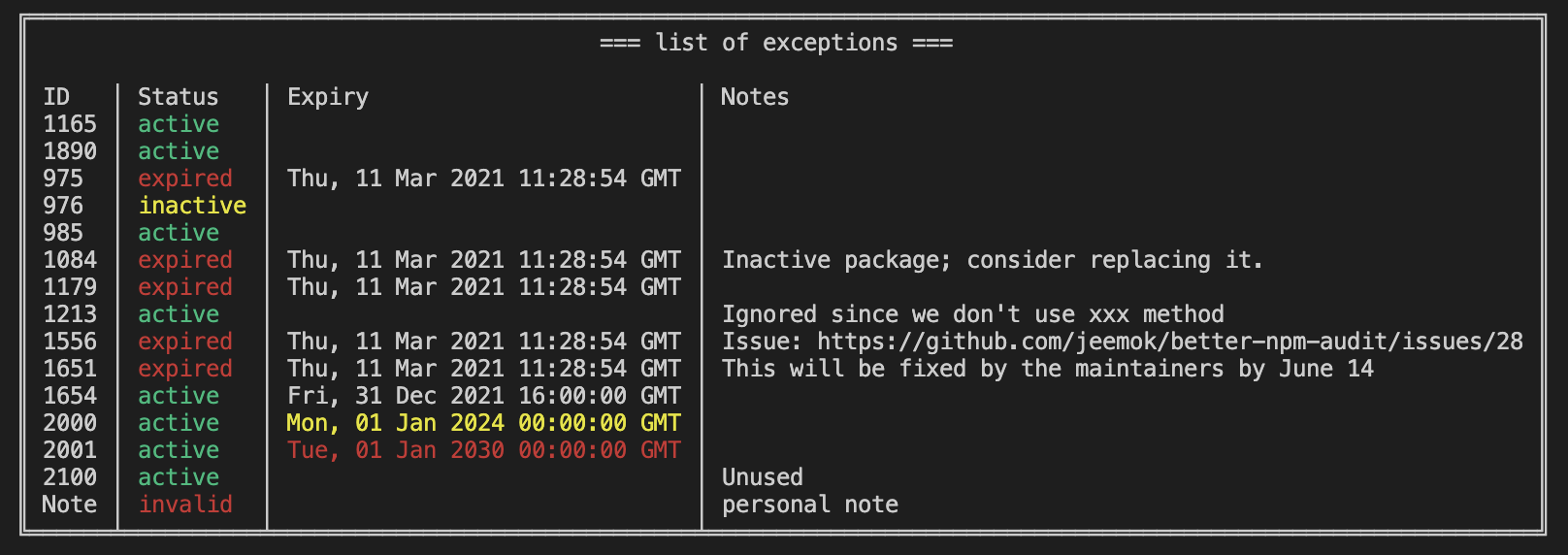
## 更新日志 你可以在[这里](https://github.com/jeemok/better-npm-audit/blob/master/CHANGELOG.md)找到更新日志。
## 安装 ``` $ npm install --save better-npm-audit ``` 或 ``` $ npm install -g better-npm-audit ```
## 用法 ### 全局运行 ``` better-npm-audit audit ``` ### 带例外运行
未处理或新报告的漏洞将被高亮显示:
未使用的例外将被通知:
### 添加到 package 脚本
```
{
"scripts": {
"prepush": "npm run test && npm run audit",
"audit": "better-npm-audit audit"
}
}
```
现在你可以在本地或你的 CI pipeline 中运行:
```
npm run audit
```
### 过滤漏洞表
你可以使用 `--filter-table` 标志过滤漏洞表,使其仅显示达到或超过指定严重级别的漏洞。这对于减少输出中的干扰同时保持用于退出代码的原始 audit 行为非常有用。
```
# 过滤表格以仅显示高和严重漏洞
better-npm-audit audit --filter-table high
# 过滤表格以匹配审计级别
better-npm-audit audit --level moderate --filter-table
# 为退出行为与表格显示设置不同级别
better-npm-audit audit --level high --filter-table moderate
```
**注意:** `--filter-table` 标志仅影响表中显示的漏洞。audit 级别(`--level`)仍然控制退出行为和漏洞计数。
## 选项 | 标志 | 简写 | 描述 | | ------------------- | ----- | ----------------------------------------------------------------------------------------------------- | | `--exclude` | `-x` | 要排除的例外或漏洞 ID;该 ID 可以是数字 ID、CVE、CWE 或 GHSA ID | | `--module-ignore` | `-m` | 要排除的模块名称 | | `--level` | `-l` | 验证的最低 audit 级别;与原始的 `--audit-level` 标志相同 | | `--filter-table` | `-f` | 过滤漏洞表,仅显示达到或超过指定级别的漏洞。接受一个级别(`info`、`low`、`moderate`、`high`、`critical`),或可作为布尔标志使用以根据 audit 级别进行过滤 | | `--production` | `-p` | 跳过 `devDependencies` | | `--registry` | `-r` | 要使用的 npm registry url | | `--include-columns` | `-i` | 报告中要包含的列 |
## 环境变量 | 变量 | 描述 | | ------------------------ | -------------------------------------------------------------------------------------------------------------------------- | | `NO_COLOR` | 支持 [no-color 标准](https://no-color.org/),允许用户在没有彩色输出的情况下使用该工具。 | | `NPM_CONFIG_AUDIT_LEVEL` | 用于设置 audit 级别。
_注意:如果命令中传递了 audit 级别标志,此设置将被忽略。_ |
## 使用 `.nsprc` 文件管理例外 你可以在项目根目录下添加一个 `.nsprc` 文件来管理例外。例如: ``` { "1337": { "active": true, "notes": "Ignored since we don't use xxx method", "expiry": 1615462134681 }, "4501": { "active": false, "notes": "Ignored since we don't use xxx method" }, "CWE-471": "CWE ID is acceptable", "GHSA-ww39-953v-wcq6": "GHSA ID is acceptable", "https://npmjs.com/advisories/1213": "Full or partial URL is acceptable too" } ``` ### 字段 | 属性 | 类型 | 描述 | 默认值 | 示例 | | --------- | ---------------- | --------------------------------------------------------- | ------- | ---------------------------------------------------------------------------------------------------------------------------------------------------------------------------------------------------------------------------------------------------------------------------------------------------------------------------- | | `active` | Boolean | 工具是否应将其用于例外 | `true` | `true` | | `expiry` | String \| Number | 易读的日期,或自 UNIX Epoch 以来的毫秒数 | | - `'2020-01-31'`
- `'2020/01/31'`
- `'01/31/2021, 11:03:58'`
- `'1 March 2016 15:00'`
- `'1 March 2016 3:00 pm'`
- `'2012-01-26T13:51:50.417-07:00'`
- `'Sun, 11 Jul 2021 03:03:13 GMT'`
- `'Thu Jan 26 2017 11:00:00 GMT+1100 (Australian Eastern Daylight Time)'`
- `327611110417` | | `notes` | String | 与漏洞相关的备注。 | |
当使用 `.nsprc` 文件时,在它开始运行时会显示一个报告:
## 更新日志 你可以在[这里](https://github.com/jeemok/better-npm-audit/blob/master/CHANGELOG.md)找到更新日志。
标签:Cilium, GNU通用公共许可证, MITM代理, Node.js, NPM, SOC Prime, 依赖管理, 开发工具, 数据可视化, 暗色界面, 漏洞审计, 自动化攻击