CadQuery/cadquery
GitHub: CadQuery/cadquery
CadQuery 是一个基于 Python 和 OCCT 的参数化 3D CAD 建模框架,用于快速创建与定制复杂几何模型。
Stars: 4939 | Forks: 445

# CadQuery
[](https://ci.appveyor.com/project/jmwright/cadquery-o18bh/branch/master)
[](https://dev.azure.com/cadquery/conda-packages/_build/latest?definitionId=2&branchName=master)

[](https://codecov.io/gh/CadQuery/cadquery)

[](https://cadquery.readthedocs.io/en/latest/?badge=latest)
[](https://doi.org/10.5281/zenodo.3955118)
### 快速链接
[***Documentation***](https://cadquery.readthedocs.io/en/latest/) | [***Cheatsheet***](https://cadquery.readthedocs.io/en/latest/_static/cadquery_cheatsheet.html) | [***GitHub Discussions***](https://github.com/CadQuery/cadquery/discussions) | [***Google Group***](https://groups.google.com/g/cadquery) | [***GUI Editor***](https://github.com/CadQuery/CQ-editor)
## 什么是 CadQuery
CadQuery is an intuitive, easy-to-use Python module for building parametric 3D CAD models. Using CadQuery, you can write short, simple scripts that produce high quality CAD models. It is easy to make many different objects using a single script that can be customized.
CadQuery is often compared to [OpenSCAD](http://www.openscad.org/). Like OpenSCAD, CadQuery is an open-source, script based, parametric model generator. However, CadQuery stands out in many ways and has several key advantages:
1. The scripts use a standard programming language, Python, and thus can benefit from the associated infrastructure. This includes many standard libraries and IDEs.
2. CadQuery's CAD kernel Open CASCADE Technology ([OCCT](https://en.wikipedia.org/wiki/Open_Cascade_Technology)) is much more powerful than the [CGAL](https://en.wikipedia.org/wiki/CGAL) used by OpenSCAD. Features supported natively by OCCT include NURBS, splines, surface sewing, STL repair, STEP import/export, and other complex operations, in addition to the standard CSG operations supported by CGAL
3. Ability to import/export [STEP](https://en.wikipedia.org/wiki/ISO_10303) and the ability to begin with a STEP model, created in a CAD package, and then add parametric features. This is possible in OpenSCAD using STL, but STL is a lossy format.
4. CadQuery scripts require less code to create most objects, because it is possible to locate features based on the position of other features, workplanes, vertices, etc.
5. CadQuery scripts can build STL, STEP, AMF and 3MF faster than OpenSCAD.
CadQuery was built to be used as a Python library without any GUI. This makes it great for use cases such as integration into servers, or creating scientific and engineering scripts. Options for visualization are also available including CQ-Editor and JupyterLab.
For those who are interested, the [OCP repository](https://github.com/CadQuery/OCP) contains the current OCCT wrapper used by CQ.
### 关键特性
* Build 3D models with scripts that are as close as possible to how you would describe the object to a human.
* Create parametric models that can be very easily customized by end users.
* Output high quality (loss-less) CAD formats like STEP and DXF in addition to STL, VRML, AMF and 3MF.
* Provide a non-proprietary, plain text model format that can be edited and executed with only a web browser.
* Offer advanced modeling capabilities such as fillets, curvilinear extrudes, parametric curves and lofts.
* Build nested assemblies out of individual parts and other assemblies.
### 为何此分支
The original version of CadQuery was built on the FreeCAD API. This was great because it allowed for fast development and easy cross-platform capability. However, we eventually started reaching the limits of the API for some advanced operations and selectors. This 2.0 version of CadQuery is based directly on a Python wrapper of the OCCT kernel. This gives us a great deal more control and flexibility, at the expense of some simplicity and having to handle the cross-platform aspects of deployment ourselves. We believe this is a worthwhile trade-off to allow CadQuery to continue to grow and expand in the future.
## 入门指南
To learn more about designing with CadQuery, visit the [documentation](https://cadquery.readthedocs.io/en/latest/intro.html), [examples](https://cadquery.readthedocs.io/en/latest/examples.html), and [cheatsheet](https://cadquery.readthedocs.io/en/latest/_static/cadquery_cheatsheet.html).
To get started playing around with CadQuery and see its capabilities, take a look at the [CQ-editor GUI](https://github.com/CadQuery/CQ-editor). This easy-to-use IDE is a great way to get started desiging with CadQuery. The CQ-editor installer bundles both CQ-editor and CadQuery (recommended). See the [CQ-editor installation instructions](https://cadquery.readthedocs.io/en/latest/installation.html#adding-a-nicer-gui-via-cq-editor).
The CadQuery library (with or without CQ-editor) and its dependencies may be installed using conda, or pip. Note that conda (or the CQ-editor installer) is the better supported option.
See the documentation for detailed CadQuery [installation instructions](https://cadquery.readthedocs.io/en/latest/installation.html).
### 通过 Conda 安装 CadQuery
To first install the Conda package manager see [Install the Conda Package Manager](https://cadquery.readthedocs.io/en/latest/installation.html#install-the-conda-package-manager), and [Miniforge](https://github.com/conda-forge/miniforge) for a minimal installer.
``mamba install`` is recommended over ``conda install`` for faster and less memory intensive cadquery installation.
```
# 设置新环境
conda create -n cadquery
# 激活新环境
conda activate cadquery
# 安装最新稳定版本
mamba install -c conda-forge cadquery
# 或安装开发版本以获取最新更改
mamba install -c conda-forge -c cadquery cadquery=master
```
### 通过 Pip 安装 CadQuery
CadQuery has a complex set of dependencies including OCP, which is our set of bindings to the OpenCASCADE CAD kernel. OCP is distributed as binary wheels for Linux, MacOS and Windows. However, there are some limitations. Only Python 3.9 through 3.12 are currently supported, and some older Linux distributions such as Ubuntu 18.04 are not supported. If the pip installation method does not work for your system, you can try the conda installation method.
It is highly recommended that a virtual environment is used when installing CadQuery, although it is not strictly required. Installing CadQuery via pip requires a up-to-date version of pip, which can be obtained with the following command line (or a slight variation thereof).
```
python3 -m pip install --upgrade pip
```
Once a current version of pip is installed, CadQuery can be installed using the following command line.
```
pip install cadquery
```
It is also possible to install the very latest changes directly from CadQuery's GitHub repository, with the understanding that sometimes breaking changes can occur. To install from the git repository, run the following command line.
```
pip install git+https://github.com/CadQuery/cadquery.git
```
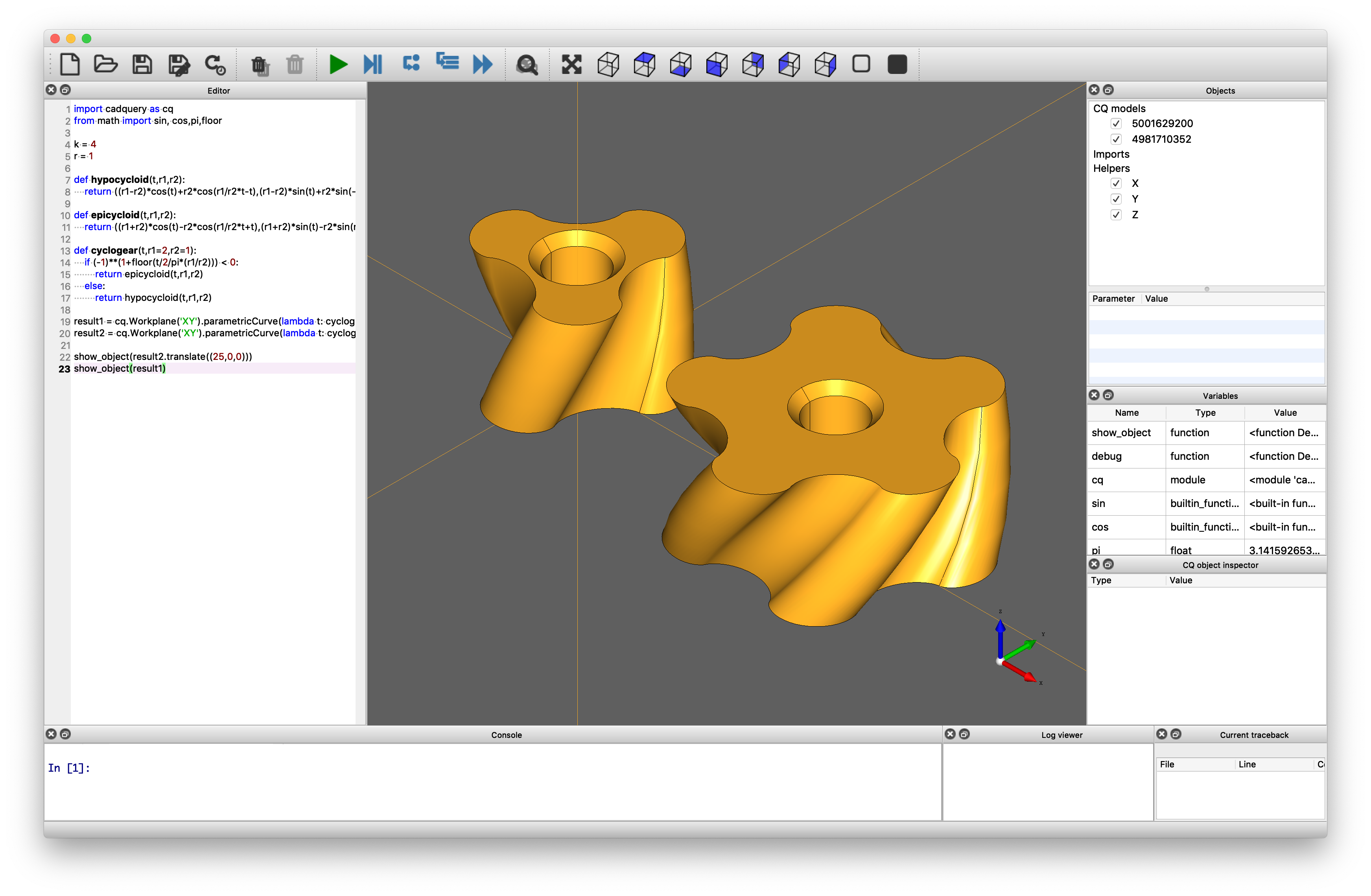
### CQ-editor 图形界面
CQ-editor is an IDE that allows users to edit CadQuery model scripts in a GUI environment. It includes features such as:
* A graphical debugger that allows you to step through your scripts.
* A CadQuery stack inspector.
* Export to various formats, including STEP and STL, directly from the menu.
More on CQ-editor:
* [CQ-editor README](https://github.com/CadQuery/CQ-editor/blob/master/README.md)
* [Installation](https://cadquery.readthedocs.io/en/latest/installation.html#adding-a-nicer-gui-via-cq-editor)
### Jupyter
CadQuery supports Jupyter out-of-the-box. Run your CadQuery code in the notebook and visualize the model by calling ```display()```.
* [JupyterLab installation](https://cadquery.readthedocs.io/en/latest/installation.html#jupyter).
## 获取帮助
You can find the full CadQuery documentation at [cadquery.readthedocs.io](https://cadquery.readthedocs.io/).
We also have a [Google Group](https://groups.google.com/forum/#!forum/cadquery) to make it easy to get help from other CadQuery users. We want you to feel welcome and encourage you to join the group and introduce yourself. We would also love to hear what you are doing with CadQuery.
[GitHub Discussions](https://github.com/CadQuery/cadquery/discussions) is a good place to ask general questions that are not tied to a bug report or feature request.
There is also a [Discord](https://discord.com/invite/Bj9AQPsCfx) server, but the other methods of getting help are much better for newcomers.
## 使用 CadQuery 的项目
Here are just a few examples of how CadQuery is being used.
FxBricks Lego Train System
[FxBricks](https://fxbricks.com/) uses CadQuery in the product development pipeline for their Lego train system. FxBricks has also given back to the community by creating [documentation for their CAD pipeline](https://github.com/fx-bricks/fx-cad-notes). They have also assembled [cq-kit](https://github.com/michaelgale/cq-kit), a library containing utility classes and functions to extend the capabilities of CadQuery. Thanks to @michaelgale and @fx-bricks for this example.

### Hexidor 棋盘游戏开发
Hexidor is an expanded take on the Quoridor board game, and the development process has been chronicled [here](https://bruceisonfire.net/2020/04/23/my-adventure-with-flosscad-the-birth-of-hexidor/). CadQuery was used to generate the game board. Thanks to Bruce for this example.
### 转轴装配
Thanks to @marcus7070 for this example from [here](https://github.com/marcus7070/spindle-assy-example).
### 3D 打印树脂模具
Thanks to @eddieliberato for sharing [this example](https://jungletools.blogspot.com/2017/06/an-anti-kink-device-for-novel-high-tech.html) of an anti-kink resin mold for a cable.
## 许可
CadQuery is licensed under the terms of the [Apache Public License, version 2.0](http://www.apache.org/licenses/LICENSE-2.0).
### 如何报告错误
When filing a bug report [issue](https://github.com/CadQuery/cadquery/issues), please be sure to answer these questions:
1. What version of the software are you running?
2. What operating system are you running the software on?
3. What are the steps to reproduce the bug?
### 如何建议功能或改进
If you find yourself wishing for a feature that does not exist, you are probably not alone. There are bound to be others out there with similar needs. Open an [issue](https://github.com/CadQuery/cadquery/issues) which describes the feature you would like to see, why you need it, and how it should work.
## 引用
Please use our Zenodo DOI if you use CadQuery for scientific research: https://doi.org/10.5281/zenodo.3955118.
### Jupyter
CadQuery supports Jupyter out-of-the-box. Run your CadQuery code in the notebook and visualize the model by calling ```display(
### 转轴装配
Thanks to @marcus7070 for this example from [here](https://github.com/marcus7070/spindle-assy-example).
### 3D 打印树脂模具
Thanks to @eddieliberato for sharing [this example](https://jungletools.blogspot.com/2017/06/an-anti-kink-device-for-novel-high-tech.html) of an anti-kink resin mold for a cable.
## 许可
CadQuery is licensed under the terms of the [Apache Public License, version 2.0](http://www.apache.org/licenses/LICENSE-2.0).
### 如何报告错误
When filing a bug report [issue](https://github.com/CadQuery/cadquery/issues), please be sure to answer these questions:
1. What version of the software are you running?
2. What operating system are you running the software on?
3. What are the steps to reproduce the bug?
### 如何建议功能或改进
If you find yourself wishing for a feature that does not exist, you are probably not alone. There are bound to be others out there with similar needs. Open an [issue](https://github.com/CadQuery/cadquery/issues) which describes the feature you would like to see, why you need it, and how it should work.
## 引用
Please use our Zenodo DOI if you use CadQuery for scientific research: https://doi.org/10.5281/zenodo.3955118.标签:3D建模, 3D设计, CadQuery, CAD内核, CAD可视化, CAD建模, NURBS, OCCT, Open CASCADE Technology, parametric modeling, Python module, 几何建模, 参数化CAD, 威胁情报, 工业设计, 工程设计, 建模库, 开发者工具, 开源CAD, 数值参数化, 脚本化CAD, 脚本化设计, 逆向工具