Neo23x0/yarGen
GitHub: Neo23x0/yarGen
yarGen 是一款YARA规则生成器,通过从恶意软件提取特征并过滤良性字符串,帮助安全人员快速创建检测规则。
Stars: 1796 | Forks: 305
[](https://gist.github.com/cheerfulstoic/d107229326a01ff0f333a1d3476e068d)
我创建了一个名为 [yarGen-Go](https://github.com/Neo23x0/yarGen-Go) 的新 YARA 规则生成器(Golang)。
# yarGen
```
_____
__ _____ _____/ ___/__ ___
/ // / _ `/ __/ (_ / -_) _ \
\_, /\_,_/_/ \___/\__/_//_/
/___/ Yara Rule Generator
Florian Roth, July 2020, Version 0.23.2
Note: Rules have to be post-processed
See this post for details: https://medium.com/@cyb3rops/121d29322282
```
### yarGen 是做什么的?
yarGen 是一个 [YARA](https://github.com/plusvic/yara/) 规则生成器。
其主要原理是从恶意软件文件中发现的字符串创建 YARA 规则,同时剔除所有也出现在良性软件文件中的字符串。因此,yarGen 包含一个大型良性软件字符串和操作码数据库,作为 ZIP 压缩包存储,必须在首次使用前解压。
在 0.24.0 版本中,yarGen 引入了一个输出选项(`--ai`)。此功能生成一个包含扩展字符串集的 YARA 规则,并附带专为 AI 设计的说明。我建议使用模型 4 的 ChatGPT Plus 来优化这些规则。激活 `--ai` 标志会将说明文本附加到 `yargen_rules.yar` 输出文件中,随后可将其输入给你的 AI 进行处理。
自 0.23.0 版本起,yarGen 已移植到 Python3。如果你想使用 Python 2 版本,请尝试以前的版本。(请注意,预建数据库的下载位置已更改,因为数据库格式已从过时的 `pickle` 更改为 `json`。旧数据库仍然可用,但仅位于旧版 yarGen <0.23 使用的旧网络服务器位置)
自 0.12.0 版本起,yarGen 不会从分析过程中完全移除良性软件字符串,而是根据其在良性软件样本中出现的次数,以极低的分数包含它们。如果找不到更好的字符串,将包含这些规则并标记为注释 /* Goodware rule */。
使用 --excludegood 强制 yarGen 移除所有良性软件字符串。同样自 0.12.0 版本起,yarGen 允许将 [PEstudio](https://winitor.com/) 的 "strings.xml" 放置在程序目录中,以便在字符串分析过程中应用黑名单定义。你会得到更好的结果。
自 0.14.0 版本起,它使用 Mustafa Atik 和 Nejdet Yucesoy 编写的朴素贝叶斯分类器对字符串进行分类,并检测有用的词汇而非压缩/加密垃圾数据。
自 0.15.0 版本起,yarGen 支持从 PE 文件的 `.text` 节中提取的操作码元素。在创建数据库期间,它使用正则表达式 [\x00]{3,} 分割 `.text` 节,并取每个部分的前 16 个字节
从良性软件 PE 文件构建操作码数据库。在对样本文件创建规则期间,它会将良性软件操作码与从恶意软件样本中提取的操作码进行比较,并剔除所有也出现在良性软件
数据库中的操作码。(目前还没有更多的魔法——没有 XOR 循环检测等)。激活操作码集成的选项是 '--opcodes'。
自 0.17.0 版本起,yarGen 允许为操作码和字符串创建多个数据库。你现在可以通过使用 "-c" 和标识符 "-i identifier"(例如 "office")轻松创建新数据库。然后它会创建两个新的
名为 "good-strings-office.db" 和 "good-opcodes-office.db" 的数据库文件,这些文件将在启动时使用内置数据库进行初始化。
自 0.18.0 版本起,yarGen 支持使用 `pe` 模块的额外条件。这包括 [imphash](https://www.fireeye.com/blog/threat-research/2014/01/tracking-malware-import-hashing.html) 值和 PE 文件的导出。我们提供预生成的 imphash 和导出数据库。
自 0.19.0 版本起,yarGen 支持 'dropzone' 模式,在该模式下,它仅初始化一次所有字符串/操作码/imphash/导出,并查询给定文件夹以查找新样本。如果发现新样本被投递到该文件夹,它会为这些样本创建规则,将 YARA 规则写入定义的输出文件(默认:yargen_rules.yar)并移除被投递的样本。你可以指定一个文本文件(`-b`)从中读取标识符。引用参数(`-r`)也已扩展,可以是磁盘上的文本文件,从中读取引用。例如,将名为 'identifier.txt' 和 'reference.txt' 的两个文件连同样本一起投递到文件夹,并使用参数 `-b ./dropzone/identifier.txt` 和 `-r ./dropzone/reference.txt` 在每次分析开始时从文件中读取相应的字符串。
自 0.20.0 版本起,yarGen 支持提取和使用通常出现在武器化 RTF 文件中的十六进制编码字符串。
规则生成过程还试图识别被分析文件之间的相似性,然后将字符串组合成所谓的**超级规则**。超级规则生成不会移除已组合在单个超级规则中的文件的简单规则。这意味着创建超级规则时会存在一些冗余。你可以使用 --nosimple 来抑制已被超级规则覆盖的文件的简单规则。
### 安装说明
1. 确保你计划使用 yarGen 的机器上至少有 4GB 内存(如果规则生成中包含操作码则需要 8GB,使用 --opcodes)
2. 使用 `pip install -r requirements.txt`(或 `pip3 install -r requirements.txt`)安装所有依赖项
3. 运行 `python yarGen.py --update` 自动下载内置数据库。它们被保存到 './dbs' 子文件夹中。(下载大小:913 MB)
4. 使用 `python yarGen.py --help` 查看帮助,获取有关命令行参数的更多信息
### 内存要求
警告:yarGen 将整个 `goodstring` 数据库拉入内存,并在几秒钟内至少使用 3 GB 内存——如果激活了操作码评估(--opcodes),则为 6 GB。
我已经尝试将数据库迁移到 sqlite,但大量的字符串比较和查找使得分析极其缓慢。
# 后处理视频教程
[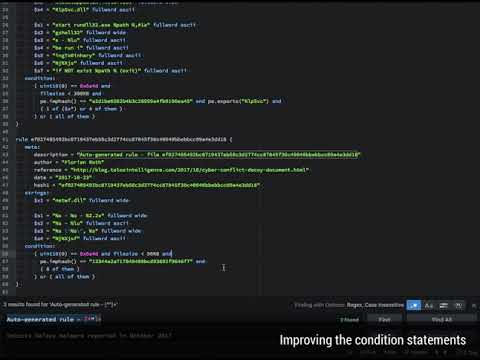](https://medium.com/@cyb3rops/how-to-post-process-yara-rules-generated-by-yargen-121d29322282)
# 多数据库支持
yarGen 允许为操作码或字符串创建多个数据库。你可以通过使用 "-c" 创建新数据库并使用 "-i identifier" 为新数据库指定唯一标识符(例如 "office")来轻松创建新数据库。它将创建两个新的数据库文件,名为 "good-strings-office.db" 和 "good-opcodes-office.db",从那时起,它们将在启动期间使用内置数据库进行初始化。
### 数据库创建 / 更新示例
从 Office 2013 程序目录创建新的字符串和操作码数据库:
```
yarGen.py -c --opcodes -i office -g /opt/packs/office2013
```
分析和字符串提取过程将在 "./dbs" 子文件夹中创建以下新数据库。
```
good-strings-office.db
good-opcodes-office.db
```
这些新数据库中的值将在规则创建过程中自动应用,因为启动期间会初始化 "./dbs" 子文件夹中的所有 *.db 文件。
你可以使用 "-u" 参数更新曾经创建的数据库
```
yarGen.py -u --opcodes -i office -g /opt/packs/office365
```
这将使用从给定目录中的文件提取的新字符串更新 "office" 数据库。
## 命令行参数
```
usage: yarGen.py [-h] [-m M] [-y min-size] [-z min-score] [-x high-scoring]
[-w superrule-overlap] [-s max-size] [-rc maxstrings]
[--excludegood] [-o output_rule_file] [-e output_dir_strings]
[-a author] [-r ref] [-l lic] [-p prefix] [-b identifier]
[--score] [--strings] [--nosimple] [--nomagic] [--nofilesize]
[-fm FM] [--globalrule] [--nosuper] [--update] [-g G] [-u]
[-c] [-i I] [--dropzone] [--nr] [--oe] [-fs size-in-MB]
[--noextras] [--debug] [--trace] [--opcodes] [-n opcode-num]
yarGen
optional arguments:
-h, --help show this help message and exit
Rule Creation:
-m M Path to scan for malware
-y min-size Minimum string length to consider (default=8)
-z min-score Minimum score to consider (default=0)
-x high-scoring Score required to set string as 'highly specific
string' (default: 30)
-w superrule-overlap Minimum number of strings that overlap to create a
super rule (default: 5)
-s max-size Maximum length to consider (default=128)
-rc maxstrings Maximum number of strings per rule (default=20,
intelligent filtering will be applied)
--excludegood Force the exclude all goodware strings
Rule Output:
-o output_rule_file Output rule file
-e output_dir_strings
Output directory for string exports
-a author Author Name
-r ref Reference (can be string or text file)
-l lic License
-p prefix Prefix for the rule description
-b identifier Text file from which the identifier is read (default:
last folder name in the full path, e.g. "myRAT" if -m
points to /mnt/mal/myRAT)
--score Show the string scores as comments in the rules
--strings Show the string scores as comments in the rules
--nosimple Skip simple rule creation for files included in super
rules
--nomagic Don't include the magic header condition statement
--nofilesize Don't include the filesize condition statement
-fm FM Multiplier for the maximum 'filesize' condition value
(default: 3)
--globalrule Create global rules (improved rule set speed)
--nosuper Don't try to create super rules that match against
various files
Database Operations:
--update Update the local strings and opcodes dbs from the
online repository
-g G Path to scan for goodware (dont use the database
shipped with yaraGen)
-u Update local standard goodware database with a new
analysis result (used with -g)
-c Create new local goodware database (use with -g and
optionally -i "identifier")
-i I Specify an identifier for the newly created databases
(good-strings-identifier.db, good-opcodes-
identifier.db)
General Options:
--dropzone Dropzone mode - monitors a directory [-m] for new
samples to processWARNING: Processed files will be
deleted!
--nr Do not recursively scan directories
--oe Only scan executable extensions EXE, DLL, ASP, JSP,
PHP, BIN, INFECTED
-fs size-in-MB Max file size in MB to analyze (default=10)
--noextras Don't use extras like Imphash or PE header specifics
--debug Debug output
--trace Trace output
Other Features:
--opcodes Do use the OpCode feature (use this if not enough high
scoring strings can be found)
-n opcode-num Number of opcodes to add if not enough high scoring
string could be found (default=3)
```
## 最佳实践
有关如何使用 yarGen 创建 YARA 规则的更详细说明,请参阅以下博客文章:
[如何编写简单但可靠的 Yara 规则 - 第 1 部分](https://www.bsk-consulting.de/2015/02/16/write-simple-sound-yara-rules/)
[如何编写简单但可靠的 Yara 规则 - 第 2 部分](https://www.bsk-consulting.de/2015/10/17/how-to-write-simple-but-sound-yara-rules-part-2/)
[如何编写简单但可靠的 Yara 规则 - 第 3 部分](https://www.bsk-consulting.de/2016/04/15/how-to-write-simple-but-sound-yara-rules-part-3/)
## 截图
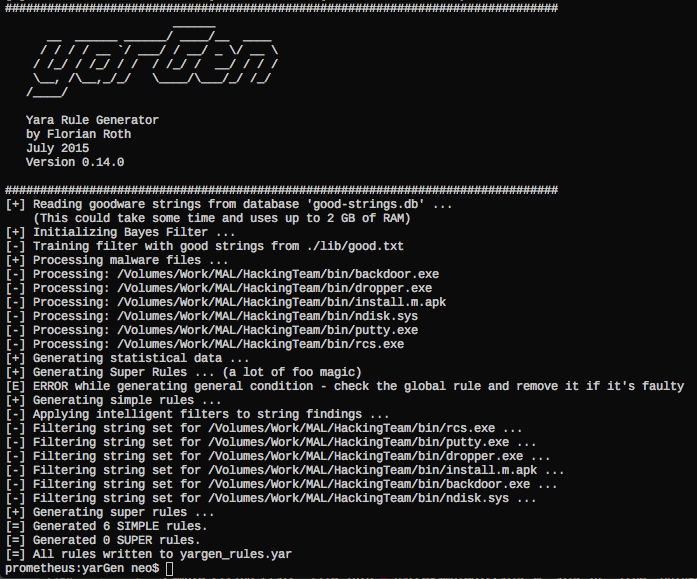
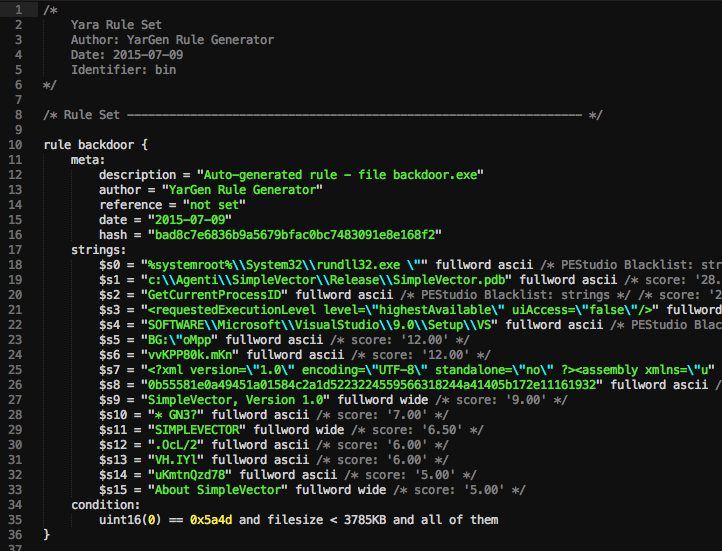
正如你在上面的屏幕截图中看到的,你会得到一个包含字符串的规则,这些字符串未在良性软件字符串数据库中找到。
你应该随后清理规则。在上面的例子中,移除看起来像随机代码的字符串 $s14, $s17, $s19, $s20,以获得更简洁的规则,该规则更有可能匹配同一系列的其他样本。
要获得更通用的规则,请移除字符串 $s5,它对于此编译的可执行文件非常具体。
## 示例
### Dropzone 模式(推荐)
监视给定的文件夹(-m)以查找新样本,处理样本,将 YARA 规则写入设置的输出文件(默认:yargen_rules.yar)并随后删除文件夹内容。
```python yarGen.py -a "yarGen Dropzone" --dropzone -m /opt/mal/dropzone```
警告:所有被投递到设置的 dropzone 的文件都将被移除!
在以下示例中,读取名为 `identifier.txt` 和 `reference.txt` 的两个文件,并用于 YARA 规则集中的 `reference` 和标识符。文件在每次迭代时读取,而不仅仅是在初始化期间。这样你可以将特定的字符串传递给每个 dropzone 规则生成。
```python yarGen.py --dropzone -m /opt/mal/dropzone -b /opt/mal/dropzone/identifier.txt -r /opt/mal/dropzone/reference.txt```
### 使用附带的数据库(快速)创建一些规则
```python yarGen.py -m X:\MAL\Case1401```
使用附带的良性软件字符串数据库并递归扫描恶意软件目录
"X:\MAL"。为此目录及其子目录中包含的所有文件
创建规则。将在当前目录中生成一个名为 'yargen_rules.yar' 的文件。
### 在注释中显示字符串的分数
yarGen 默认使用基于分数排名前 20 的字符串。要查看规则中某个
特定字符串的分数,请使用 "--score" 参数。
```python yarGen.py --score -m X:\MAL\Case1401```
### 仅使用具有特定最低分数的字符串
为了仅使用符合特定最低分数的字符串作为规则,请使用 "-z" 参数。一个好的做法是首先使用 "--score" 创建规则,然后通过 "-z" 为你的样本集设置最低分数进行第二次运行。
```python yarGen.py --score -z 5 -m X:\MAL\Case1401```
### 预设作者和引用
```python yarGen.py -a "Florian Roth" -r "http://goo.gl/c2qgFx" -m /opt/mal/case_441 -o case441.yar```
### 向规则添加操作码
```python yarGen.py --opcodes -a "Florian Roth" -r "http://goo.gl/c2qgFx" -m /opt/mal/case33 -o rules33.yar```
### 显示调试输出
```python yarGen.py --debug -m /opt/mal/case_441```
### 创建新的良性软件字符串数据库
```python yarGen.py -c --opcodes -g /home/user/Downloads/office2013 -i office```
这将生成两个名为以下名称的新字符串和操作码数据库:
- good-strings-office.db
- good-opcodes-office.db
新数据库将在启动期间自动初始化,并从那时起用于规则生成。
### 更新良性软件字符串数据库(将新的字符串、操作码、imphash、导出追加到旧的数据库中)
```python yarGen.py -u -g /home/user/Downloads/office365 -i office```
### 我常用的命令行
```python yarGen.py -a "Florian Roth" -r "Internal Research" -m /opt/mal/apt_case_32```
# db-lookup.py
一个名为 `db-lookup.py` 的工具(随 0.18.0 版本引入)允许你在简单的命令行界面中查询本地数据库。该界面接受一个输入值,可以是 `string`、`export` 或 `imphash` 值,检测查询类型,然后在加载的数据库中执行查找。这允许你使用 `string`、`export` 和 `imphash` 值查询 yarGen 数据库,以检查该值是否出现在已处理生成数据库的良性软件中。
这是一个不错的功能,可以帮助你回答以下问题:
* 这个字符串是否出现在我数据库的良性软件样本中?
* 这个导出名是否出现在我数据库的良性软件样本中?
* 我良性软件数据库中的样本是否具有此 imphash?
然而,有几个缺点:
* 它仅匹配完整的字符串(不包含 contains、startswith、endswith)
* 尚不支持操作码查找(目前)
我计划发布一个名为 `Valknut` 的新项目,该项目从样本中提取重叠的字节序列并创建可搜索的数据库。这个项目将成为 yarGen 的新的后端 API,允许进行各种查询、操作码和字符串值,支持 ascii 和 wide 格式。
标签:AMSI绕过, EDR, Goodware数据库, Homebrew安装, Python, YARA, 云资产可视化, 云资产清单, 人工智能辅助, 威胁检测, 恶意代码分析, 无后门, 特征提取, 网络安全, 网络调试, 脆弱性评估, 自动化, 规则生成器, 逆向工具, 逆向工程, 配置文件, 隐私保护