target/strelka
GitHub: target/strelka
企业级实时文件扫描系统,通过容器化架构和模块化扫描器实现大规模文件提取与元数据分析,助力威胁狩猎与事件响应。
Stars: 988 | Forks: 142

[版本发布][release] | [文档][wiki] | [Pull Requests][pr] | [Issues][issues]
[![GitHub release][img-version-badge]][repo] [![Build Status][img-actions-badge]][actions-ci] [![Pull Requests][img-pr-badge]][pr] [![Slack][img-slack-badge]][slack] [![License][img-license-badge]][license]
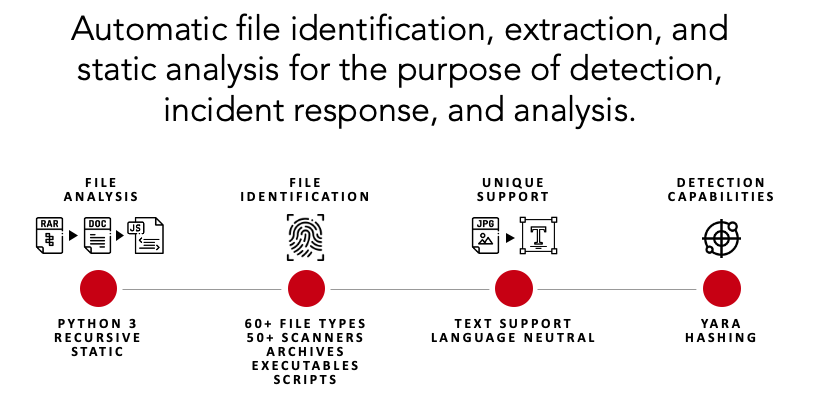
Strelka 是一个实时的、基于容器的文件扫描系统,用于威胁狩猎、威胁检测和事件响应。该项目最初基于洛克希德·马丁公司的 [Laika BOSS](https://github.com/lmco/laikaboss) 建立的设计以及类似项目(参见:[相关项目](#related-projects)),Strelka 的目的是在企业规模上执行文件提取和元数据收集。
Strelka 与其兄弟项目在几个重要方面有所不同:
* 核心代码库使用 Go 和 Python3.10+
* 服务器组件在容器中运行,以实现部署的简便性和灵活性
* 针对 Windows、Mac 和 Linux 的原生客户端应用程序
* 使用允许跨平台、跨语言支持的[库和格式](#architecture)构建
## 功能特性
Strelka 是一个模块化的数据扫描平台,允许用户或系统提交文件,以分析、提取和报告文件内容及元数据。结合 [SIEM](https://en.wikipedia.org/wiki/Security_information_and_event_management),Strelka 能够聚合、告警,并为分析师提供更好地了解其环境的能力,而无需执行直接的数据收集或耗时的文件分析。
## 快速入门
通过 Strelka 运行文件非常简单。在本节中,将演示 Strelka 的提取和分析功能,用于一次性分析。
*请查阅[文档](https://target.github.io/strelka/)以获取有关如何在企业环境中正确构建和部署 Strelka 的详细信息。*
#### 步骤 1:安装前置条件
```
# Ubuntu 23.04
sudo apt install -y wget git docker docker-compose golang jq && \
sudo usermod -aG docker $USER && \
newgrp docker
```
#### 步骤 2:下载 Strelka
```
git clone https://github.com/target/strelka.git && \
cd strelka
```
#### 步骤 3:下载并安装首选 yara 规则(可选)
```
rm configs/python/backend/yara/rules.yara && \
git clone https://github.com/Yara-Rules/rules.git configs/python/backend/yara/rules/ && \
echo 'include "./rules/index.yar"' > configs/python/backend/yara/rules.yara
```
#### 步骤 4a:拉取预编译镜像并启动 Strelka
**注意**:您可以跳过 `go build` 过程,并使用位于 `http://0.0.0.0:9980` 的 `Strelka UI` 来分析文件。
```
docker compose -f build/docker-compose-no-build.yaml up -d && \
go build github.com/target/strelka/src/go/cmd/strelka-oneshot
```
#### 步骤 4b:构建并启动 Strelka
**注意**:您可以跳过 `go build` 过程,并使用位于 `http://0.0.0.0:9980` 的 `Strelka UI` 来分析文件。
```
docker compose -f build/docker-compose.yaml build && \
docker compose -f build/docker-compose.yaml up -d && \
go build github.com/target/strelka/src/go/cmd/strelka-oneshot
```
#### 步骤 5:准备要分析的文件
使用任何恶意软件样本,或您希望 Strelka 分析的其他文件。
```
wget https://github.com/ytisf/theZoo/raw/master/malware/Binaries/Win32.Emotet/Win32.Emotet.zip -P samples/
```
#### 步骤 6:使用 dockerized oneshot 通过 Strelka 分析文件
```
./strelka-oneshot -f samples/Win32.Emotet.zip -l - | jq
```
#### 这里发生了什么?
1. Strelka 确定提交的文件是一个加密的 ZIP(参见:[taste.yara](configs/python/backend/taste/taste.yara) [backend.yaml](configs/python/backend/backend.yaml))
2. [ScanEncryptedZip](src/python/strelka/scanners/scan_encrypted_zip.py) 使用字典破解了 ZIP 文件密码,并提取了压缩文件
3. 提取的文件被扫描器发送回 Strelka pipeline,Strelka 确定提取的文件是一个 EXE
4. [ScanPe](src/python/strelka/scanners/scan_pe.py) 解析了 EXE 文件并向输出添加了有用的元数据
5. [ScanYara](src/python/strelka/scanners/scan_yara.py) 使用提供的规则分析了 EXE 文件,并向输出添加了多个匹配项,其中一些表明该文件可能是恶意的
*以下输出已为简洁起见进行了编辑。*
```
{
"file": {
"depth": 0,
"flavors": {
"mime": ["application/zip"],
"yara": ["encrypted_zip", "zip_file"]
},
"scanners": [
"ScanEncryptedZip",
"ScanEntropy",
"ScanFooter",
"ScanHash",
"ScanHeader",
"ScanYara",
"ScanZip"
]
},
"scan": {
"encrypted_zip": {
"cracked_password": "infected",
"elapsed": 0.114269,
"total": {"extracted": 1, "files": 1}
}
}
}
```
```
{
"file": {
"depth": 1,
"flavors": {
"mime": ["application/x-dosexec"],
"yara": ["mz_file"]
},
"name": "29D6161522C7F7F21B35401907C702BDDB05ED47.bin",
"scanners": [
"ScanEntropy",
"ScanFooter",
"ScanHash",
"ScanHeader",
"ScanPe",
"ScanYara"
]
},
"scan": {
"pe": {
"address_of_entry_point": 5168,
"base_of_code": 4096,
"base_of_data": 32768,
"checksum": 47465,
"compile_time": "2015-03-31T08:53:51",
"elapsed": 0.013076,
"file_alignment": 4096,
"file_info": {
"company_name": "In CSS3",
"file_description": "Note: In CSS3, the text-decoration property is a shorthand property for text-decoration-line, text-decoration-color, and text-decoration-style, but this is currently.",
"file_version": "1.00.0065",
"fixed": {"operating_systems": ["WINDOWS32"]},
"internal_name": "Callstb",
"original_filename": "NOFAstb.exe",
"product_name": "Goodreads",
"product_version": "1.00.0065",
"var": {"character_set": "Unicode", "language": "U.S. English"}
}
},
"yara": {
"elapsed": 0.068918,
"matches": [
"SEH__vba",
"SEH_Init",
"Big_Numbers1",
"IsPE32",
"IsWindowsGUI",
"HasOverlay",
"HasRichSignature",
"Microsoft_Visual_Basic_v50v60",
"Microsoft_Visual_Basic_v50",
"Microsoft_Visual_Basic_v50_v60",
"Microsoft_Visual_Basic_v50_additional",
"Microsoft_Visual_Basic_v50v60_additional"
],
"tags": [
"AntiDebug",
"SEH",
"Tactic_DefensiveEvasion",
"Technique_AntiDebugging",
"SubTechnique_SEH",
"PECheck",
"PEiD"
]
}
}
}
```
#### 接下来做什么?
如果 Strelka 已在您的环境中部署并摄取文件,您可能会在 SIEM 中收集这些事件。通过此分析,您可以编写一条规则来查找与可疑 yara 标签匹配的事件,从而提醒您注意潜在的恶意文件。
```
scan.yara.tags:("Technique_AntiDebugging" && "SubTechnique_SEH")
```
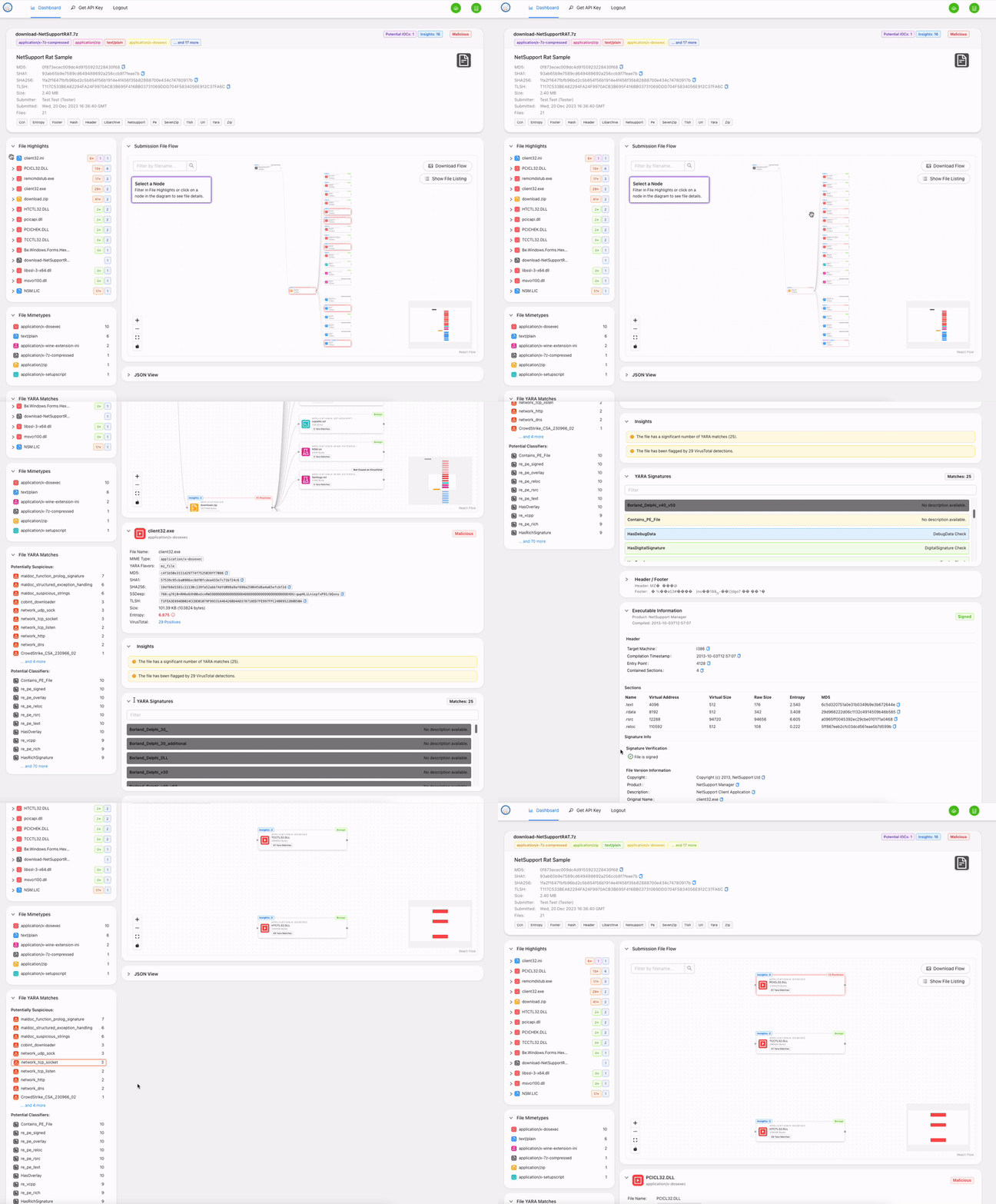
## Fileshot UI
当您构建提供的容器时,可以使用 [Strelka 的 UI](https://github.com/target/strelka-ui)。此 Web 界面允许您将文件上传到 Strelka 并捕获本地存储的事件。
访问 http://localhost:9980/ 并使用 strelka/strelka 登录。
## 潜在用途
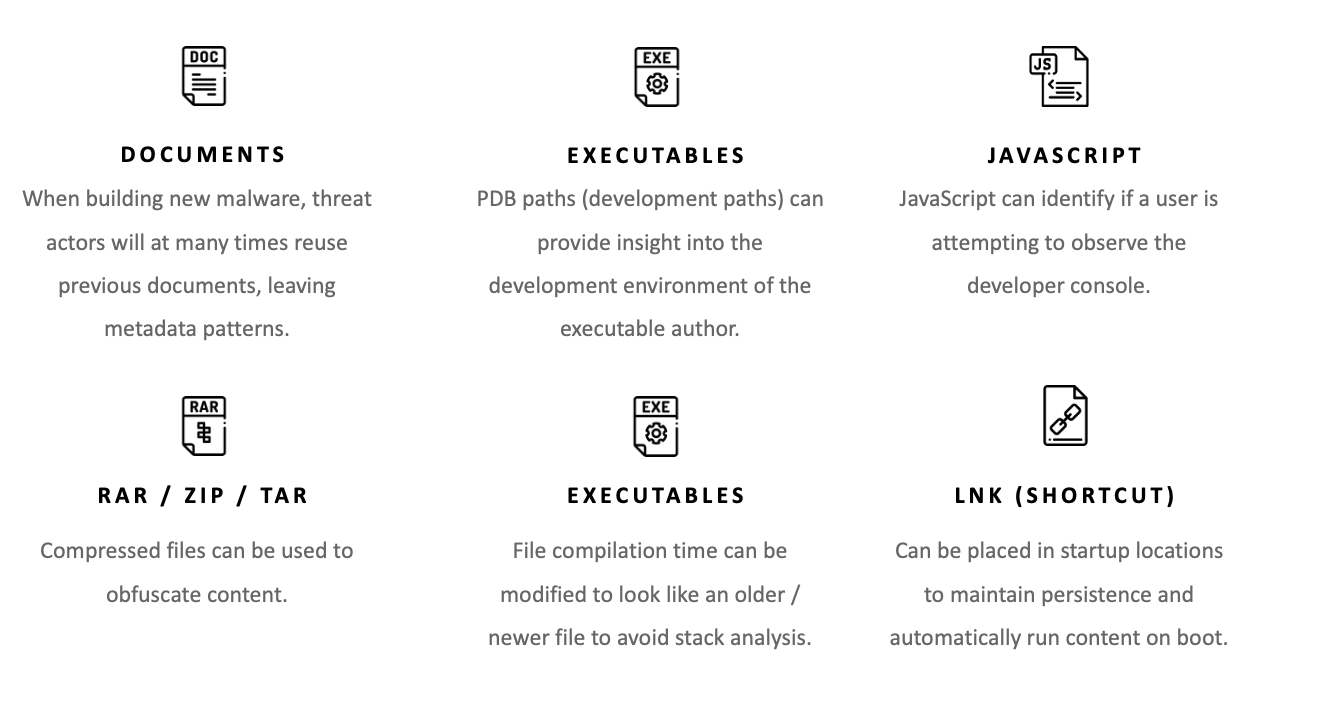
Strelka 拥有针对最常见文件类型(例如 exe、docx、js、zip)的 50 多个文件扫描器,为用户提供了深入了解其主机、网络或企业上文件的能力。虽然 Strelka 本身*不是*检测引擎(尽管它确实使用 [YARA](https://virustotal.github.io/yara/)),但它可以提供足够的元数据来识别可疑或恶意文件。Strelka 的一些潜在用途包括:
## 更多文档
关于 Strelka 的更多文档可以在 [README](https://target.github.io/strelka/) 中找到,包括:
- [安装](https://target.github.io/strelka/#/?id=installation)
- [部署](https://target.github.io/strelka/#/?id=deployment)
- [设计](https://target.github.io/strelka/#/?id=design)
- [架构](https://target.github.io/strelka/#/?id=architecture)
- [常见问题](https://target.github.io/strelka/#/?id=frequently-asked-questions)
## 贡献
贡献指南可以在[这里](https://github.com/target/strelka/blob/master/CONTRIBUTING.md)找到。
## 已知问题
### 加载 YARA 规则的问题
建议用户预编译其 YARA 规则以获得最佳性能,并避免运行时的潜在问题。
使用预编译的 YARA 文件有助于减少加载时间和资源使用,尤其是在具有大量规则集的环境中。确保使用 [Strelka 配置中的 compiled 选项](https://github.com/target/strelka/blob/master/configs/python/backend/backend.yaml)
指向预编译的规则文件。
### 其他问题
有关任何其他问题,请参阅跟踪器中[标记为 `bug` 的 issues](https://github.com/target/strelka/issues?q=is%3Aissue+is%3Aopen+label%3Abug)。
## 相关项目
* [Laika BOSS](https://github.com/lmco/laikaboss)
* [File Scanning Framework](https://github.com/EmersonElectricCo/fsf)
* [Assemblyline](https://cybercentrecanada.github.io/assemblyline4_docs/)
## 许可证
Strelka 及其相关代码根据 [Apache 2.0 License](https://github.com/target/strelka/blob/master/LICENSE) 的条款发布。
