smallstep/cli
GitHub: smallstep/cli
smallstep/cli 是一个用于零信任环境下自动化公钥基础设施和加密操作的命令行工具。
Stars: 4271 | Forks: 306
# h is to keep "Step CLI" as is, since it's likely a technical term or tool name. But to make it a translation in Chinese, I could output "Step CLI" in the context of Chinese text, but that might not be correct.
[](https://github.com/smallstep/cli/releases)
[](https://goreportcard.com/report/github.com/smallstep/cli)
[](https://github.com/smallstep/cli)
[](https://opensource.org/licenses/Apache-2.0)
[](https://cla-assistant.io/smallstep/cli)
`step` 是一个易于使用的 CLI 工具,用于构建、操作和自动化公钥基础设施(PKI)系统及工作流程。
它也是 [`step-ca` 在线证书颁发机构(CA)](https://github.com/smallstep/certificates) 服务器的客户端。
您可以将其用于许多常见的加密和 X.509 操作——既可以独立使用,也可以与在线 CA 配合使用。
[网站](https://smallstep.com) |
[文档](https://smallstep.com/docs/step-cli) |
[安装说明](https://smallstep.com/docs/step-cli/installation) |
[基本加密操作](https://smallstep.com/docs/step-cli/basic-crypto-operations) |
[贡献者指南](./docs/CONTRIBUTING.md)
## 功能
Step CLI 的命令组展示了其广泛用途:
- [`step certificate`](https://smallstep.com/docs/step-cli/reference/certificate/):处理 X.509(TLS/HTTPS)证书。
- 创建、吊销、验证、检查和捆绑 X.509 证书。
- 将 X.509 证书安装(及移除)到系统(及浏览器)的信任存储中。
- 验证证书部署和续期状态以实现自动化
- 创建密钥对(RSA, ECDSA, EdDSA)和证书签名请求(CSR)
- [签署 CSR](https://smallstep.com/docs/step-cli/reference/certificate/sign/)
- 创建符合 [RFC5280](https://tools.ietf.org/html/rfc5280) 和 [CA/Browser Forum](https://cabforum.org/baseline-requirements-documents/) 标准的证书,可用于 TLS 和 HTTPS
- [创建](https://smallstep.com/docs/step-cli/reference/certificate/create/) CA 证书(根证书和中间签名证书)
- 创建自签名证书和 CA 签名的证书
- [检查](https://smallstep.com/docs/step-cli/reference/certificate/inspect/)和 [校验](https://smallstep.com/docs/step-cli/reference/certificate/lint/) 磁盘上或远程服务器正在使用的证书
- [安装根证书](https://smallstep.com/docs/step-cli/reference/certificate/install/),使您的 CA 默认受信任(颁发开发证书 **[可在浏览器中使用](https://smallstep.com/blog/step-v0-8-6-valid-HTTPS-certificates-for-dev-pre-prod.html)**)
- [`step ca`](https://smallstep.com/docs/step-cli/reference/ca/):管理并使用 [`step-ca`](https://github.com/smallstep/certificates) 服务器,或任何符合 ACMEv2 ([RFC8555](https://tools.ietf.org/html/rfc8555)) 标准的 CA 服务器。ACME 是 Let's Encrypt 用于自动化 HTTPS 证书颁发的协议。
- 使用一条命令初始化 X.509 和/或 SSH CA
- 使用 [`step-ca`](https://github.com/smallstep/certificates) 支持的任何注册机制[进行认证并获取证书](https://smallstep.com/docs/step-cli/reference/ca/certificate/)
- 安全地[分发根证书](https://smallstep.com/docs/step-cli/reference/ca/root/)并[引导](https://smallstep.com/docs/step-cli/reference/ca/bootstrap/) PKI 依赖方
- [续期](https://smallstep.com/docs/step-cli/reference/ca/renew/)和[吊销](https://smallstep.com/docs/step-cli/reference/ca/revoke/)由 [`step-ca`](https://github.com/smallstep/certificates) 颁发的证书
- [提交 CSR](https://smallstep.com/docs/step-cli/reference/ca/sign/) 以供 [`step-ca`](https://github.com/smallstep/certificates) 签署
- 与 ACME CA 配合使用时,`step` 支持 `http-01` 挑战类型
- [`step crypto`](https://smallstep.com/docs/step-cli/reference/crypto/):通用加密工具包
- 处理 [JWT](https://jwt.io) ([RFC7519](https://tools.ietf.org/html/rfc7519)) 和[其他 JOSE 结构](https://datatracker.ietf.org/wg/jose/documents/)
- [签署](https://smallstep.com/docs/step-cli/reference/crypto/jwt/sign)、[验证](https://smallstep.com/docs/step-cli/reference/crypto/jwt/verify)和[检查](https://smallstep.com/docs/step-cli/reference/crypto/jwt/inspect) JSON Web Token(JWT)
- 使用 JSON Web Signature (JWS) [签署](https://smallstep.com/docs/step-cli/reference/crypto/jws/sign)、[验证](https://smallstep.com/docs/step-cli/reference/crypto/jws/verify)和[检查](https://smallstep.com/docs/step-cli/reference/crypto/jws/inspect/)任意数据
- 使用 JSON Web Encryption (JWE) [加密](https://smallstep.com/docs/step-cli/reference/crypto/jwe/encrypt/)和[解密](https://smallstep.com/docs/step-cli/reference/crypto/jwe/decrypt/)数据以及封装私钥
- [创建 JWK](https://smallstep.com/docs/step-cli/reference/crypto/jwk/create/) 和[管理密钥集](https://smallstep.com/docs/step-cli/reference/crypto/jwk/keyset) 以用于 JWT、JWE 和 JWS
- [生成和验证](https://smallstep.com/docs/step-cli/reference/crypto/otp/) TOTP 令牌,用于多因素认证(MFA)
- 使用 [NaCl](https://nacl.cr.yp.to/) 的高速工具进行加密和签名
- [应用密钥派生函数](https://smallstep.com/docs/step-cli/reference/crypto/kdf/)(KDF)并使用 `scrypt`、`bcrypt` 和 `argon2` [验证密码](https://smallstep.com/docs/step-cli/reference/crypto/kdf/compare/)
- 生成和检查[文件哈希](https://smallstep.com/docs/step-cli/reference/crypto/hash/)
- [`step oauth`](https://smallstep.com/docs/step-cli/reference/oauth/):为任何 CLI 应用程序添加 OAuth 2.0 单点登录流程。
- 支持 OAuth 授权码、带外(OOB)、JWT 持有者和刷新令牌流程
- 在命令行从任何提供商获取 OAuth 访问令牌和 OIDC 身份令牌
- 验证 OIDC 身份令牌 (`step crypto jwt verify`)
- [`step ssh`](https://smallstep.com/docs/step-cli/reference/ssh/):创建和管理 SSH 证书(需要在线或离线的 [`step-ca`](https://github.com/smallstep/certificates) 实例)
- 生成 SSH 用户和主机密钥对以及短期证书
- 向 SSH 代理添加和移除证书
- 检查 SSH 证书
- 登录并使用[单点登录 SSH](https://smallstep.com/blog/diy-single-sign-on-for-ssh/)
## 安装说明
请参阅我们的安装文档[此处](https://smallstep.com/docs/step-cli/installation)。
## 示例
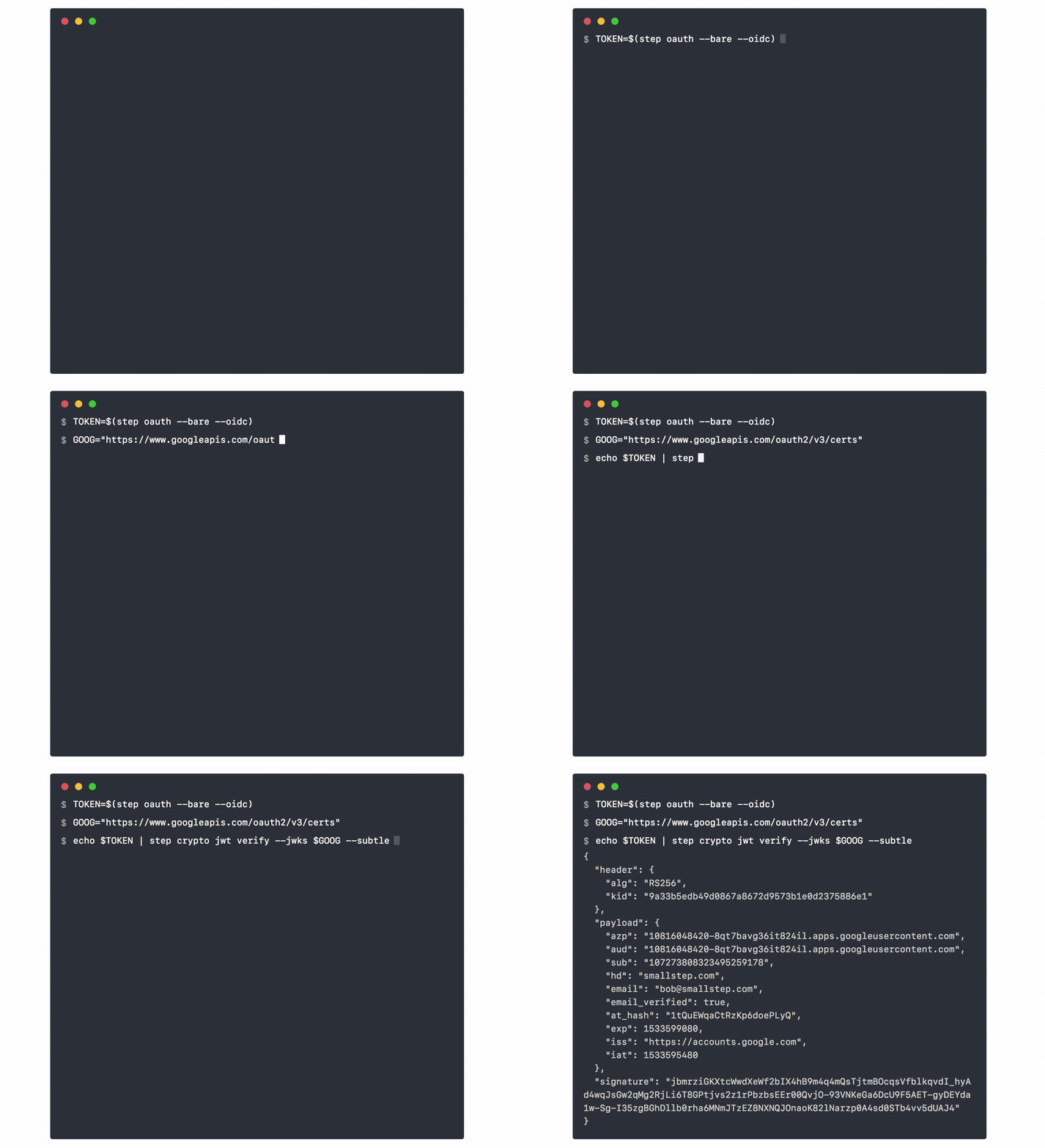
这是一个快速示例,结合 `step oauth` 和 `step crypto` 来获取并验证 Google OAuth OIDC 令牌的签名:
## 插件
插件是一个可执行文件,其命名格式为 `step--plugin`。
插件必须位于您的 `$PATH` 中或 `$STEPPATH/plugins` 目录中(默认为 `$HOME/.step/plugins`)。
当您运行 `step ` 时,如果找到,CLI 将自动执行相应的插件。
一些已知的插件包括:
- [**step-kms-plugin**](https://github.com/smallstep/step-kms-plugin):管理存储在 KMS 中的密钥和证书,包括 HSM、TPM、YubiKey、macOS 钥匙串和云 KMS。
- [**step-kmsproxy-plugin**](https://github.com/orbit-online/step-kmsproxy-plugin):
提供基于 HSM/KMS 认证的 mTLS 服务代理。感谢 [@andsens](https://github.com/andsens) 创建和维护此插件!
`step-kms-plugin` 也直接集成到 `step` 中,用于使用基于 KMS 的密钥创建证书、生成 CSR、签署令牌等。
## 社区
* 在 [GitHub Discussions](https://github.com/smallstep/certificates/discussions) 或 [Discord](https://u.step.sm/discord) 上与 `step` 用户交流
* [提交问题](https://github.com/smallstep/cli/issues/new/choose) 并告诉我们您希望看到哪些功能
* [贡献](./docs/CONTRIBUTING.md) `step` 代码库
* [在 Twitter 上关注 Smallstep](https://twitter.com/smallsteplabs)
## 延伸阅读
* [`step` 完整文档](https://smallstep.com/docs/step-cli)
* 我们在 [Smallstep 博客](https://smallstep.com/blog) 上有更多 `step` 和 `step-ca` 的实际应用示例。
* 如果您是 PKI 和 X.509 证书的新手,或者想回顾核心概念,可能会喜欢 [Everything PKI](https://smallstep.com/blog/everything-pki/)。
标签:EVTX分析, Go语言, HTTPS, JSONLines, JWT, OAuth, OTP, PB级数据处理, PKI自动化, Step CLI, TLS, X509证书, 公钥基础设施, 加密操作, 安全协议, 安全运维, 密码学, 密钥生成, 手动系统调用, 日志审计, 程序破解, 网络安全, 网络调试, 自动化, 证书生命周期, 证书管理, 证书颁发机构, 证书验证, 防御工具, 隐私保护, 零信任, 零信任安全