thewhiteh4t/seeker
GitHub: thewhiteh4t/seeker
Seeker 通过托管请求位置权限的虚假网页,利用社会工程学手段精确获取智能手机的 GPS 定位与设备指纹信息,是一款安全教育用途的概念验证工具。
Stars: 9608 | Forks: 2221




Available in




Seeker 背后的概念很简单,就像我们托管钓鱼网页来获取凭证一样,为什么不能托管一个像许多流行的基于位置的网站那样请求获取你的位置的虚假页面呢。请在
thewhiteh4t's 博客 阅读更多内容。Seeker 托管了一个请求位置权限的虚假网站,如果目标允许了该权限,我们就可以获取到:
* 经度
* 纬度
* 精度
* 海拔 - 并不总是可用
* 方向 - 仅在用户移动时可用
* 速度 - 仅在用户移动时可用
除了位置信息外,我们还可以在无需任何权限的情况下获取**设备信息**:
* 使用 Canvas Fingerprinting 获取的唯一 ID
* 设备型号 - 并不总是可用
* 操作系统
* 平台
* CPU 核心数 - 近似结果
* RAM 容量 - 近似结果
* 屏幕分辨率
* GPU 信息
* 浏览器名称和版本
* 公网 IP 地址
* 本地 IP 地址
* 本地端口
在接收到上述信息后,将执行**自动 IP 地址侦察**。
**本工具仅为概念验证且仅供教育目的使用,Seeker 展示了恶意网站可以收集关于您和您设备的哪些数据,以及为什么您不应该点击随机链接并授予诸如位置等关键权限。**
## 这与 IP 地理定位有何不同
* 其他工具和服务提供的 IP 地理定位根本不准确,它们并没有给出目标的实际位置,而是 ISP 的大致位置。
* Seeker 使用 HTML API 并获取位置权限,然后使用设备内置的 GPS 硬件获取经度和纬度,因此 Seeker 在智能手机上效果最好。如果设备(例如笔记本电脑)没有 GPS 硬件,Seeker 会回退到 IP 地理定位,或者去查找缓存的坐标。
* 通常,如果用户接受了位置权限,所获取信息的精度**大约在 30 米以内**。
* 精度取决于您可能无法控制的多种因素,例如:
* 设备 - 无法在 GPS 损坏的笔记本电脑或手机上运行
* 浏览器 - 某些浏览器会阻止 JavaScripts
* GPS 校准 - 如果 GPS 未校准,您可能会得到不准确的结果,而且这非常常见
## 模板
可用模板:
* NearYou
* Google Drive (由 @Akaal_no_one 建议)
* WhatsApp (由 @Dazmed707 建议)
* Telegram
* Zoom (由 @a7maadf 制作)
* Google reCAPTCHA (由 @MrEgyptian 制作)
创建您自己的模板!
有关让您创建模板的步骤已在[操作指南](./createTemplate.md)中说明
一旦您的模板准备就绪,**请不要忘记通过 PR (pull request) 将其分享给社区**
## 测试环境:
* Kali Linux
* BlackArch Linux
* Ubuntu
* Fedora
* Kali Nethunter
* Termux
* Parrot OS
* OSX - Monterey v.12.0.1
## 安装
### Kali Linux / Arch Linux / Ubuntu / Fedora / Parrot OS / Termux
```
git clone https://github.com/thewhiteh4t/seeker.git
cd seeker/
chmod +x install.sh
./install.sh
```
### BlackArch Linux
```
sudo pacman -S seeker
```
### Docker
```
docker pull thewhiteh4t/seeker
```
### OSX
```
git clone https://github.com/thewhiteh4t/seeker.git
cd seeker/
python3 seeker.py
```
为了在隧道模式下运行,请在终端中运行以下命令来安装 ngrok:
```
brew install ngrok/ngrok/ngrok
ngrok http 8080
```
## 用法
```
python3 seeker.py -h
usage: seeker.py [-h] [-k KML] [-p PORT] [-u] [-v] [-t TEMPLATE] [-d] [--telegram token:chatId] [--webhook WEBHOOK]
options:
-h, --help show this help message and exit
-k KML, --kml KML KML filename
-p PORT, --port PORT Web server port [ Default : 8080 ]
-u, --update Check for updates
-v, --version Prints version
-t TEMPLATE, --template TEMPLATE Auto choose the template with the given index
-d, --debugHTTP Disable auto http --> https redirection for testing purposes
(only works for the templates having index_temp.html file)
--telegram Send info to a telegram bot, provide telegram token and chat to use
format = token:chatId separated by a colon
--webhook Send events to a webhook endpoint to be processed
Note : endpoint must be unauthenticated and accept POST request
#########################
# 环境变量 #
#########################
Some of the options above can also be enabled via environment variables, to ease deployment.
Other parameters can be provided via environment variables to avoid interactive mode.
Variables:
DEBUG_HTTP Same as -d, --debugHTTP
PORT Same as -p, --port
TEMPLATE Same as -t, --template
TITLE Provide the group title or the page title
REDIRECT Provide the URL to redirect the user to, after the job is done
IMAGE Provide the image to use, can either be remote (http or https) or local
Note : Remote image will be downloaded locally during the startup
DESC Provide the description of the item (group or webpage depending on the template)
SITENAME Provide the name of the website
DISPLAY_URL Provide the URL to display on the page
MEM_NUM Provide the number of group membres (Telegram so far)
ONLINE_NUM Provide the number of the group online members (Telegram so far)
TELEGRAM Provide telegram token and chat to use to send info to a telegram bot
format = token:chatId separated by a colon
WEBHOOK Provide the webhook url to forward the events to
Note : endpoint should be unauthenticated and accept POST method
##################
# 使用示例 #
##################
# Step 1 : 在第一个终端
$ python3 seeker.py
# Step 2 : 在第二个终端启动一个隧道服务,例如 ngrok
$ ./ngrok http 8080
###########
# 选项 #
###########
# 输出用于 Google Earth 的 KML 文件
$ python3 seeker.py -k
# 使用自定义端口
$ python3 seeker.py -p 1337
$ ./ngrok http 1337
# 预选特定模板
$ python3 seeker.py -t 1
################
# Docker 使用 #
################
# Step 1
$ docker network create ngroknet
# Step 2
$ docker run --rm -it --net ngroknet --name seeker thewhiteh4t/seeker
# Step 3
$ docker run --rm -it --net ngroknet --name ngrok wernight/ngrok ngrok http seeker:8080
```
## 本地隧道
使用
```
ssh -R 80:localhost:8080 nokey@localhost.run
```
作为 ngrok 的替代方案
## 演示
**YouTube**
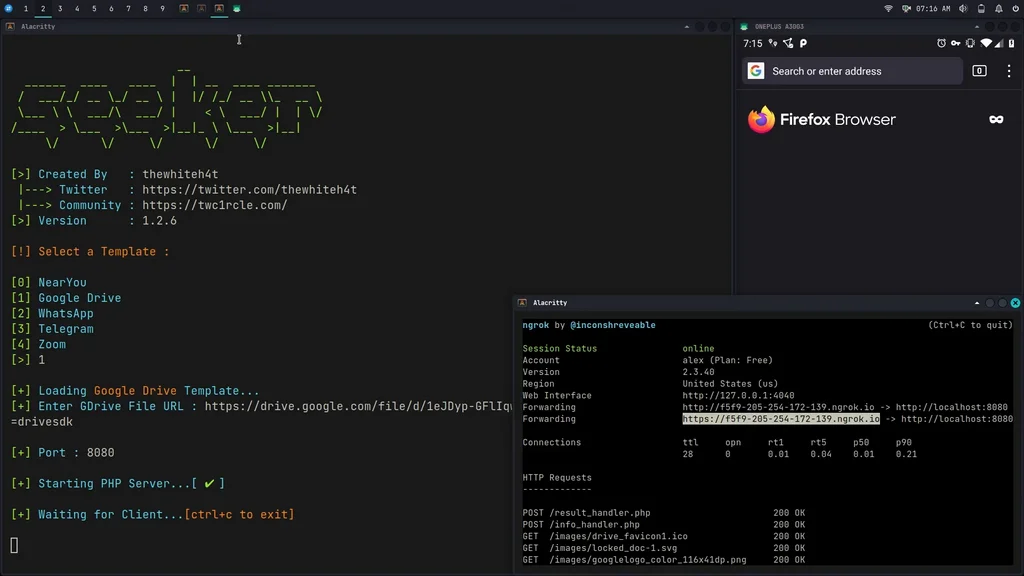
标签:ESC8, Python, 位置追踪, 多模态安全, 数据可视化, 无后门, 社会工程学, 请求拦截, 逆向工具