abishekvashok/cmatrix

GitHub: abishekvashok/cmatrix

基于 C 和 ncurses 的终端动画程序,在命令行中重现《黑客帝国》经典的绿色字符雨特效。

Stars: 5109 | Forks: 525

CMatrix

在你的终端中实现《黑客帝国》般的特效

![-----------------------------------------------------](https://static.pigsec.cn/wp-content/uploads/repos/2026/05/9c0ae60e26021337.png) ## 目录 - [概述](#overview) - [构建依赖](#build-dependencies) - [构建与安装](#building-and-installing-cmatrix) - [使用 configure (推荐)](#using-configure-(recommended-for-most-linux%2Fmingw-users)) - [使用 CMake](#using-cmake) - [用法](#usage) - [截图与录屏](#captures) - [截图](#screenshots) - [录屏](#screencasts) - [维护者](#maintainers) - [贡献者](#our-contributors) - [贡献指南](#contribution-guide) - [许可证](#license) ![-----------------------------------------------------](https://static.pigsec.cn/wp-content/uploads/repos/2026/05/9c0ae60e26021337.png) ## :cloud: 概述 CMatrix 基于《黑客帝国》网站的屏幕保护程序。它在终端中显示文字飞入飞出的效果,就像在电影《黑客帝国》中看到的那样。它可以以相同的速率或异步地滚动行,并以用户定义的速度运行。 CMatrix 的灵感来源于电影《黑客帝国》。如果你还没看过这部电影,并且你是计算机或科幻片的粉丝,快去看这部电影吧!!! ![-----------------------------------------------------](https://static.pigsec.cn/wp-content/uploads/repos/2026/05/9c0ae60e26021337.png) ## :open_file_folder: 构建依赖 你可能需要一个合适的 ncurses 库才能使其正常工作。在 Windows 上,推荐使用 mingw-w64-ncurses(PDCurses 也可以,但不支持颜色或粗体文本)。
##### :small_blue_diamond: 对于 Linux
运行此命令以检查 ncurses 的版本。 ``` ldconfig -p | grep ncurses ``` 如果没有输出,那么你需要安装 ncurses。点击下方链接在 Linux 中安装 ncurses。 - [ncurses](https://www.cyberciti.biz/faq/linux-install-ncurses-library-headers-on-debian-ubuntu-centos-fedora/) ![-----------------------------------------------------](https://static.pigsec.cn/wp-content/uploads/repos/2026/05/9c0ae60e26021337.png) ## :floppy_disk: 构建与安装 cmatrix 要安装 cmatrix,请将此仓库克隆到你的本地系统,并在 cmatrix 目录中使用以下任一方法。 #### :small_blue_diamond: 使用 `configure`(推荐大多数 Linux/mingw 用户使用) ``` autoreconf -i # skip if using released tarball ./configure make make install ``` #### :small_blue_diamond: 使用 CMake 这里我们还在子目录 "build" 中演示了外部构建。 (目前暂不支持在 Windows 上使用)。 ``` mkdir -p build cd build # 安装到 "/usr/local" cmake .. # OR # 安装到 "/usr" #cmake -DCMAKE_INSTALL_PREFIX=/usr .. make make install ``` ![-----------------------------------------------------](https://static.pigsec.cn/wp-content/uploads/repos/2026/05/9c0ae60e26021337.png) ## :bookmark_tabs: 用法 安装好 **cmatrix** 之后,只需输入命令 `cmatrix` 即可运行它 :) ``` cmatrix ``` 附带不同的参数运行可获得不同的效果。 ``` cmatrix [-abBflohnsmVx] [-u update] [-C color] ``` 示例: ``` cmatrix -ba -u 2 -C red ``` 获取更多选项和**帮助**请运行 `cmatrix -h`


或者
运行命令 `man cmatrix` 阅读手册页 _要让程序看起来最像电影,请使用 `cmatrix -lba`_ _要让程序看起来最像 Win/Mac 的屏幕保护程序,请使用 `cmatrix -ol`_ ![-----------------------------------------------------](https://static.pigsec.cn/wp-content/uploads/repos/2026/05/9c0ae60e26021337.png) ## :camera: 截图与录屏 #### :small_blue_diamond: 截图

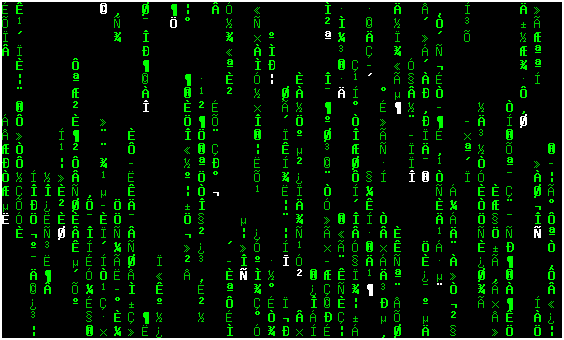
cmatrix screenshot

#### :small_blue_diamond: 录屏

cmatrix screencast

![-----------------------------------------------------](https://static.pigsec.cn/wp-content/uploads/repos/2026/05/9c0ae60e26021337.png) ## :zap: 维护者 - ➤ **Abishek V Ashok** [Core] -

## :page_facing_up: 许可证 本软件基于 GNU GPL v3 协议提供。[查看许可证](./COPYING)
标签:Bash脚本, CLI, CMake, CMatrix, WiFi技术, 休闲娱乐, 动画, 字符界面, 客户端加密, 屏保, 开源, 控制台, 特效, 科幻, 终端, 终端模拟器, 视觉效果, 黑客帝国