ltguillaume/music-folder-player
GitHub: ltguillaume/music-folder-player
一款无需数据库的轻量级 PHP 网页音乐播放器,支持大型曲库的文件夹式管理和丰富的播放列表功能,适用于派对和私人音乐收藏。
Stars: 130 | Forks: 34
[概述](#overview) • [快捷键](#list-of-hotkeys) • [安装](#installation) • [鸣谢](#credits)
# Music 文件夹播放器

一款优雅的 HTML5 网页文件夹音乐播放器,适用于派对和/或私人音乐收藏,配备了所有播放器本该具备的播放列表系统。它不需要使用数据库(因此数据始终是最新的),并且能够轻松处理包含 25,000 首甚至更多歌曲的文件夹。除了 PHP 之外,它不依赖任何其他组件,安装过程不到 2 分钟即可完成。在兼容 CSS3 的浏览器上,其设计可以完美实现响应式布局。
## 概述
#### 播放器
- 点击封面图像可放大(显示为 300x300px,再次点击可查看原图)
- 点击当前歌曲或文件夹名称,可在媒体库中定位该歌曲或文件夹
- 右键点击音量可静音
- 右键点击“下一首”可跳过当前演唱者/艺术家
#### 选项
- 加入队列:在媒体库中点击歌曲时,会将其添加到播放列表末尾,而不是直接插队播放(下一首)。右键点击会随机推荐一首歌曲加入队列。
- 随机播放:从即将播放的歌曲中随机抽取下一首(使用“插队播放(下一首)”添加的歌曲具有优先权)
- 右键点击“随机播放”可打乱即将播放的歌曲顺序(使用“插队播放(下一首)”添加的歌曲将保持原位)
- 淡入淡出(Crossfade):在当前歌曲结束前 10 秒开始播放下一首,并使当前歌曲逐渐淡出
- 使用密码锁定播放列表及其控制功能(仅允许使用“加入队列”、“播放/暂停”和“分享”功能)
- 提示:可使用 [OpenKiosk](http://openkiosk.mozdevgroup.com) 并禁用 _Set Inactive Terminal_
- 不将已播放过的歌曲重新加入播放列表(可选)
#### 播放列表
 - 点击歌曲可直接播放
- 拖放可更改顺序,拖至回收站可移除
- 右键点击歌曲可在媒体库中定位
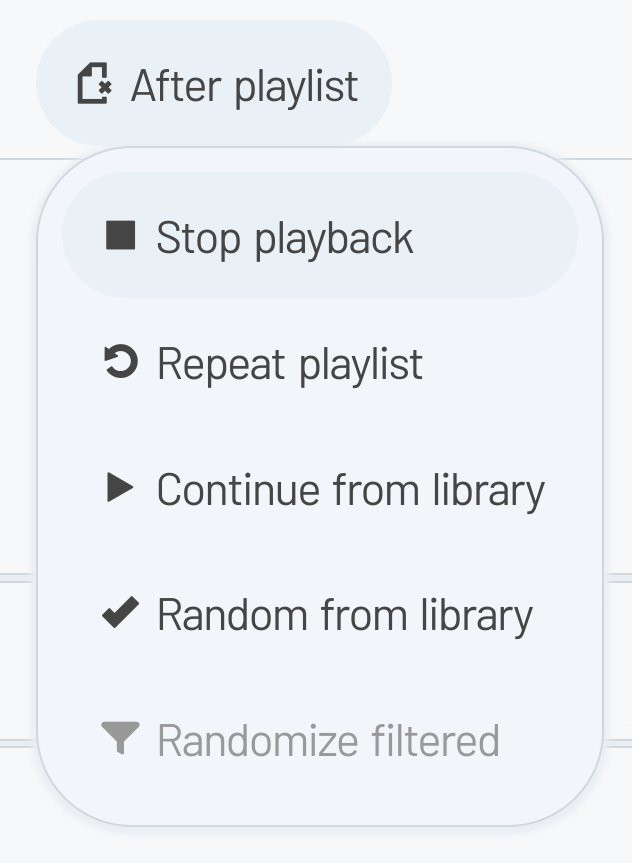
- 选择播放列表播放完毕后的后续操作:
- 停止播放
- 重复播放列表
- 从最后播放的歌曲在媒体库中的位置继续
- 从(已过滤的)媒体库中随机选取未播放的歌曲
- 如果条件允许,播放列表及配置信息将保存在浏览器的 Local Storage 中
- 加载/保存在线播放列表(可禁用)
- 从本地文件导入或将播放列表导出为本地文件
#### 媒体库
- 重新构建指定文件夹的树状结构,仅显示受支持扩展名的文件
- 使用方向键浏览媒体库树状结构,按回车键播放/加入队列,或按 Shift-Enter 插队播放(下一首)/添加文件夹
- 点击歌曲进行播放(或在启用“加入队列”模式时加入队列)
- 点击歌曲永远不会清空当前播放列表(说的就是你,老版本的 Winamp)
- 插队播放(下一首):右键点击(或长按)歌曲,使其作为下一首播放(“插队播放(下一首)”的歌曲将按“先进先出 (FIFO)”顺序播放)
- 右键点击文件夹可将其包含的所有歌曲添加到播放列表
- 如果歌曲已在播放队列中,则阻止重复添加(除非使用“插队播放(下一首)”功能)
- 配备媒体库(即时)过滤器,可快速查找歌曲
#### 分享
- 点击歌曲可直接播放
- 拖放可更改顺序,拖至回收站可移除
- 右键点击歌曲可在媒体库中定位
- 选择播放列表播放完毕后的后续操作:
- 停止播放
- 重复播放列表
- 从最后播放的歌曲在媒体库中的位置继续
- 从(已过滤的)媒体库中随机选取未播放的歌曲
- 如果条件允许,播放列表及配置信息将保存在浏览器的 Local Storage 中
- 加载/保存在线播放列表(可禁用)
- 从本地文件导入或将播放列表导出为本地文件
#### 媒体库
- 重新构建指定文件夹的树状结构,仅显示受支持扩展名的文件
- 使用方向键浏览媒体库树状结构,按回车键播放/加入队列,或按 Shift-Enter 插队播放(下一首)/添加文件夹
- 点击歌曲进行播放(或在启用“加入队列”模式时加入队列)
- 点击歌曲永远不会清空当前播放列表(说的就是你,老版本的 Winamp)
- 插队播放(下一首):右键点击(或长按)歌曲,使其作为下一首播放(“插队播放(下一首)”的歌曲将按“先进先出 (FIFO)”顺序播放)
- 右键点击文件夹可将其包含的所有歌曲添加到播放列表
- 如果歌曲已在播放队列中,则阻止重复添加(除非使用“插队播放(下一首)”功能)
- 配备媒体库(即时)过滤器,可快速查找歌曲
#### 分享
 - 下载单曲或整个文件夹的压缩包
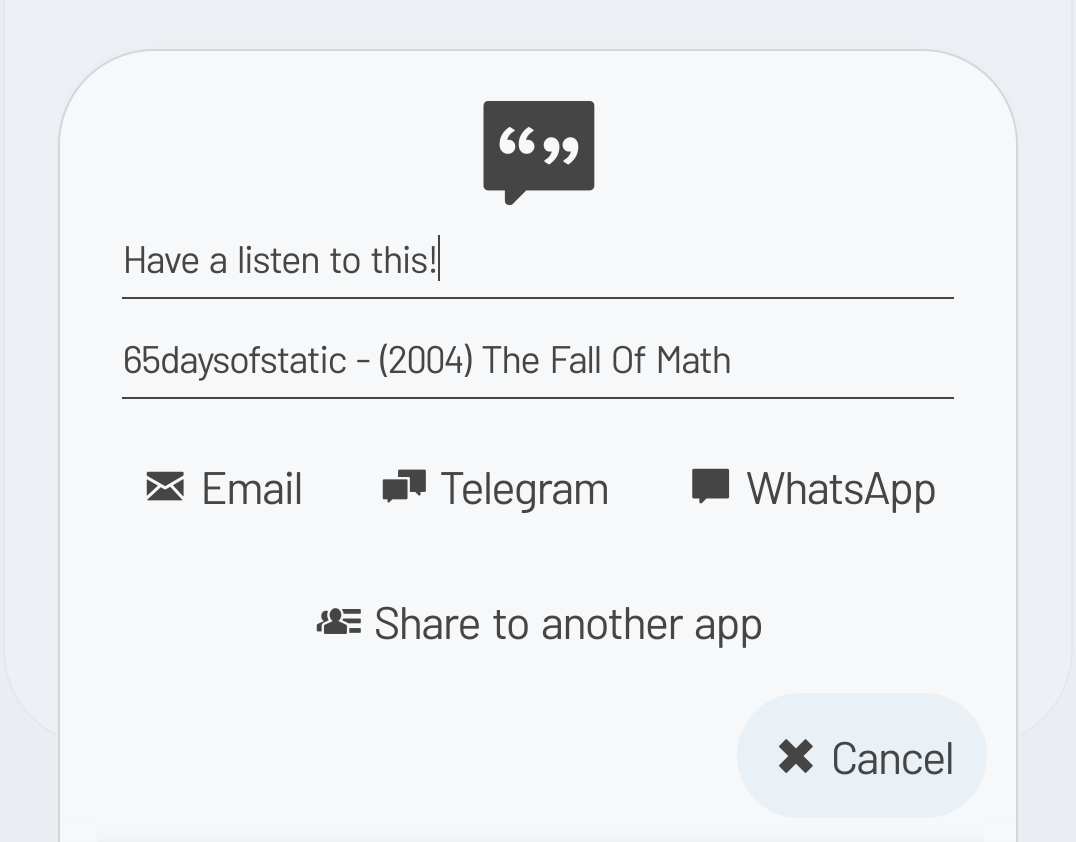
- 分享单曲、文件夹或播放列表链接(在此分享模式下,媒体库相关功能和选项将被禁用)
- 直接通过电子邮件、社交媒体分享链接,或使用您设备的原生分享功能(可选)
#### 主题
- 在 `music.ini` 中自定义可用主题及变体的子集
- 黑色 、 蓝色 、 绿色 、 灰色 和 浅色 主题
- 可与不同变体组合使用(参见 `music.theme.css`):
- 类 Material 的圆角 UI 和紧凑的复古 UI
- 为 悬停的按钮 着色
- 蓝色、绿色、橙色 和 粉色 聚焦颜色
- 使用彩色边框代替勾选标记来表示已启用的选项
- 主要元素的顶部装饰边框以及悬停按钮的底部装饰边框
#### 翻译
- 目前内置了中文、英语、荷兰语、葡萄牙语和西班牙语
- 有关创建新翻译的说明,请查阅 [Wiki](https://codeberg.org/ltguillaume/music-folder-player/wiki/Translations)
## 快捷键列表
关于所有快捷键的完整列表,请查阅 [Wiki](https://codeberg.org/ltguillaume/music-folder-player/wiki/List-of-hotkeys)。
## 安装
您可以在 2 分钟内完成并运行测试环境。有关所有详细信息,请查阅 [Wiki](https://codeberg.org/ltguillaume/music-folder-player/wiki)。
## 鸣谢
- 本项目的一些设计理念基于 [GM-Script-Writer-62850](https://github.com/GM-Script-Writer-62850) 开发的优秀项目 [HTML5 Music Player](https://github.com/GM-Script-Writer-62850/HTML5-Music-Player)
- 文本显示使用了 [Barlow font](https://github.com/jpt/barlow)(Regular 和 Semi Condensed Regular 字重)
- 所有图标均使用了 [Foundation icon font](https://zurb.com/playground/foundation-icon-fonts-3)
- 专辑封面占位图基于 [CmdRobot 的设计](http://fav.me/d7kpm65)
在此向他们致以诚挚的感谢与全部功劳!
- 下载单曲或整个文件夹的压缩包
- 分享单曲、文件夹或播放列表链接(在此分享模式下,媒体库相关功能和选项将被禁用)
- 直接通过电子邮件、社交媒体分享链接,或使用您设备的原生分享功能(可选)
#### 主题
- 在 `music.ini` 中自定义可用主题及变体的子集
- 黑色 、 蓝色 、 绿色 、 灰色 和 浅色 主题
- 可与不同变体组合使用(参见 `music.theme.css`):
- 类 Material 的圆角 UI 和紧凑的复古 UI
- 为 悬停的按钮 着色
- 蓝色、绿色、橙色 和 粉色 聚焦颜色
- 使用彩色边框代替勾选标记来表示已启用的选项
- 主要元素的顶部装饰边框以及悬停按钮的底部装饰边框
#### 翻译
- 目前内置了中文、英语、荷兰语、葡萄牙语和西班牙语
- 有关创建新翻译的说明,请查阅 [Wiki](https://codeberg.org/ltguillaume/music-folder-player/wiki/Translations)
## 快捷键列表
关于所有快捷键的完整列表,请查阅 [Wiki](https://codeberg.org/ltguillaume/music-folder-player/wiki/List-of-hotkeys)。
## 安装
您可以在 2 分钟内完成并运行测试环境。有关所有详细信息,请查阅 [Wiki](https://codeberg.org/ltguillaume/music-folder-player/wiki)。
## 鸣谢
- 本项目的一些设计理念基于 [GM-Script-Writer-62850](https://github.com/GM-Script-Writer-62850) 开发的优秀项目 [HTML5 Music Player](https://github.com/GM-Script-Writer-62850/HTML5-Music-Player)
- 文本显示使用了 [Barlow font](https://github.com/jpt/barlow)(Regular 和 Semi Condensed Regular 字重)
- 所有图标均使用了 [Foundation icon font](https://zurb.com/playground/foundation-icon-fonts-3)
- 专辑封面占位图基于 [CmdRobot 的设计](http://fav.me/d7kpm65)
在此向他们致以诚挚的感谢与全部功劳!
- 点击歌曲可直接播放
- 拖放可更改顺序,拖至回收站可移除
- 右键点击歌曲可在媒体库中定位
- 选择播放列表播放完毕后的后续操作:
- 停止播放
- 重复播放列表
- 从最后播放的歌曲在媒体库中的位置继续
- 从(已过滤的)媒体库中随机选取未播放的歌曲
- 如果条件允许,播放列表及配置信息将保存在浏览器的 Local Storage 中
- 加载/保存在线播放列表(可禁用)
- 从本地文件导入或将播放列表导出为本地文件
#### 媒体库
- 重新构建指定文件夹的树状结构,仅显示受支持扩展名的文件
- 使用方向键浏览媒体库树状结构,按回车键播放/加入队列,或按 Shift-Enter 插队播放(下一首)/添加文件夹
- 点击歌曲进行播放(或在启用“加入队列”模式时加入队列)
- 点击歌曲永远不会清空当前播放列表(说的就是你,老版本的 Winamp)
- 插队播放(下一首):右键点击(或长按)歌曲,使其作为下一首播放(“插队播放(下一首)”的歌曲将按“先进先出 (FIFO)”顺序播放)
- 右键点击文件夹可将其包含的所有歌曲添加到播放列表
- 如果歌曲已在播放队列中,则阻止重复添加(除非使用“插队播放(下一首)”功能)
- 配备媒体库(即时)过滤器,可快速查找歌曲
#### 分享
- 下载单曲或整个文件夹的压缩包
- 分享单曲、文件夹或播放列表链接(在此分享模式下,媒体库相关功能和选项将被禁用)
- 直接通过电子邮件、社交媒体分享链接,或使用您设备的原生分享功能(可选)
#### 主题
- 在 `music.ini` 中自定义可用主题及变体的子集
- 黑色 、 蓝色 、 绿色 、 灰色 和 浅色 主题
- 可与不同变体组合使用(参见 `music.theme.css`):
- 类 Material 的圆角 UI 和紧凑的复古 UI
- 为 悬停的按钮 着色
- 蓝色、绿色、橙色 和 粉色 聚焦颜色
- 使用彩色边框代替勾选标记来表示已启用的选项
- 主要元素的顶部装饰边框以及悬停按钮的底部装饰边框
#### 翻译
- 目前内置了中文、英语、荷兰语、葡萄牙语和西班牙语
- 有关创建新翻译的说明,请查阅 [Wiki](https://codeberg.org/ltguillaume/music-folder-player/wiki/Translations)
## 快捷键列表
关于所有快捷键的完整列表,请查阅 [Wiki](https://codeberg.org/ltguillaume/music-folder-player/wiki/List-of-hotkeys)。
## 安装
您可以在 2 分钟内完成并运行测试环境。有关所有详细信息,请查阅 [Wiki](https://codeberg.org/ltguillaume/music-folder-player/wiki)。
## 鸣谢
- 本项目的一些设计理念基于 [GM-Script-Writer-62850](https://github.com/GM-Script-Writer-62850) 开发的优秀项目 [HTML5 Music Player](https://github.com/GM-Script-Writer-62850/HTML5-Music-Player)
- 文本显示使用了 [Barlow font](https://github.com/jpt/barlow)(Regular 和 Semi Condensed Regular 字重)
- 所有图标均使用了 [Foundation icon font](https://zurb.com/playground/foundation-icon-fonts-3)
- 专辑封面占位图基于 [CmdRobot 的设计](http://fav.me/d7kpm65)
在此向他们致以诚挚的感谢与全部功劳!标签:HTML5, OpenVAS, PHP, 数据可视化, 自定义脚本, 跨平台, 音乐播放器