jesseduffield/lazygit
GitHub: jesseduffield/lazygit
一个用 Go 编写的 Git 终端 UI 工具,通过可视化界面和快捷键简化复杂的 Git 操作。
Stars: 79312 | Forks: 2865
Special thanks to:
 Warp, the intelligent terminal
Available for MacOS and Linux
 Tuple, the premier screen sharing app for developers on macOS and Windows.
 I (Jesse) co-founded Subble to save your company time and money by finding unused and over-provisioned SaaS licences. Check it out!
Available for MacOS and Linux
Visit warp.dev to learn more.

一个用于 git 命令的简单终端 UI
[](https://github.com/jesseduffield/lazygit/releases) [](https://goreportcard.com/report/github.com/jesseduffield/lazygit) [](https://app.codacy.com/gh/jesseduffield/lazygit/dashboard?utm_source=gh&utm_medium=referral&utm_content=&utm_campaign=Badge_grade) [](https://app.codacy.com/gh/jesseduffield/lazygit/dashboard?utm_source=gh&utm_medium=referral&utm_content=&utm_campaign=Badge_coverage) [](https://golangci-lint.run/) [](https://github.com/jesseduffield/lazygit/releases/latest) [](https://formulae.brew.sh/formula/lazygit) 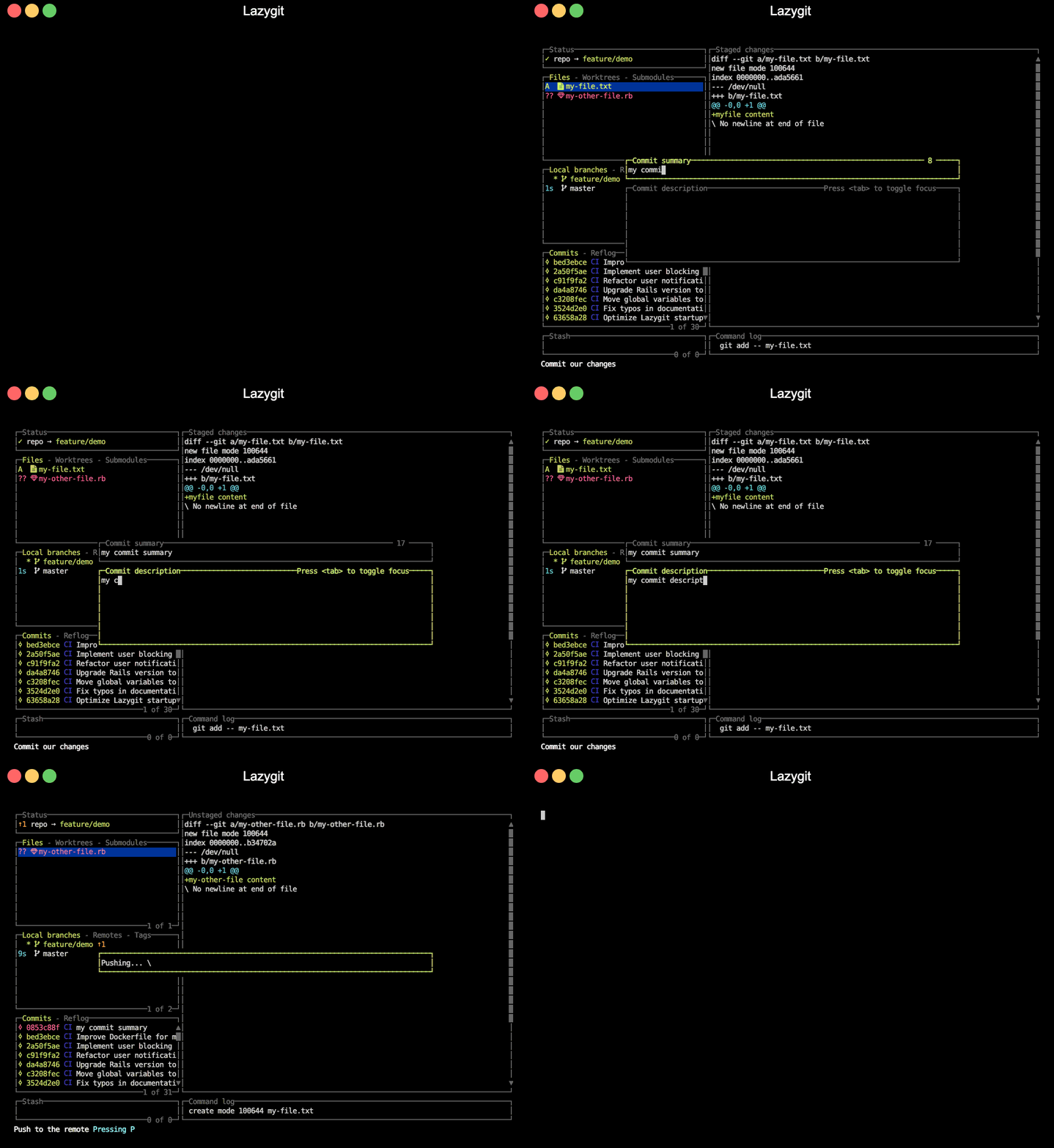
## 电梯演讲
吐槽时间:你可能听过这种说法,git 很_强大_,但如果所有操作都难得要死,这强大又有何用?交互式变基竟然要你在编辑器里编辑一个该死的 TODO 文件?_你在开玩笑吗?_ 想要暂存文件的一部分,你需要用命令行程序逐个检查每个 hunk,如果一个 hunk 无法再拆分但包含你不想暂存的代码,你必须_手动_编辑一个晦涩的补丁文件?_你在逗我吗?!_ 有时切换分支会被要求暂存更改,结果切换并恢复暂存后发现根本没冲突,直接 checkout 那个分支也完全没问题?_这简直不可理喻!_
如果你像我一样只是个普通凡人,听腻了 git 有多强大,但在日常使用中却觉得它是个大麻烦,那么 lazygit 可能适合你。
## 目录
## 功能
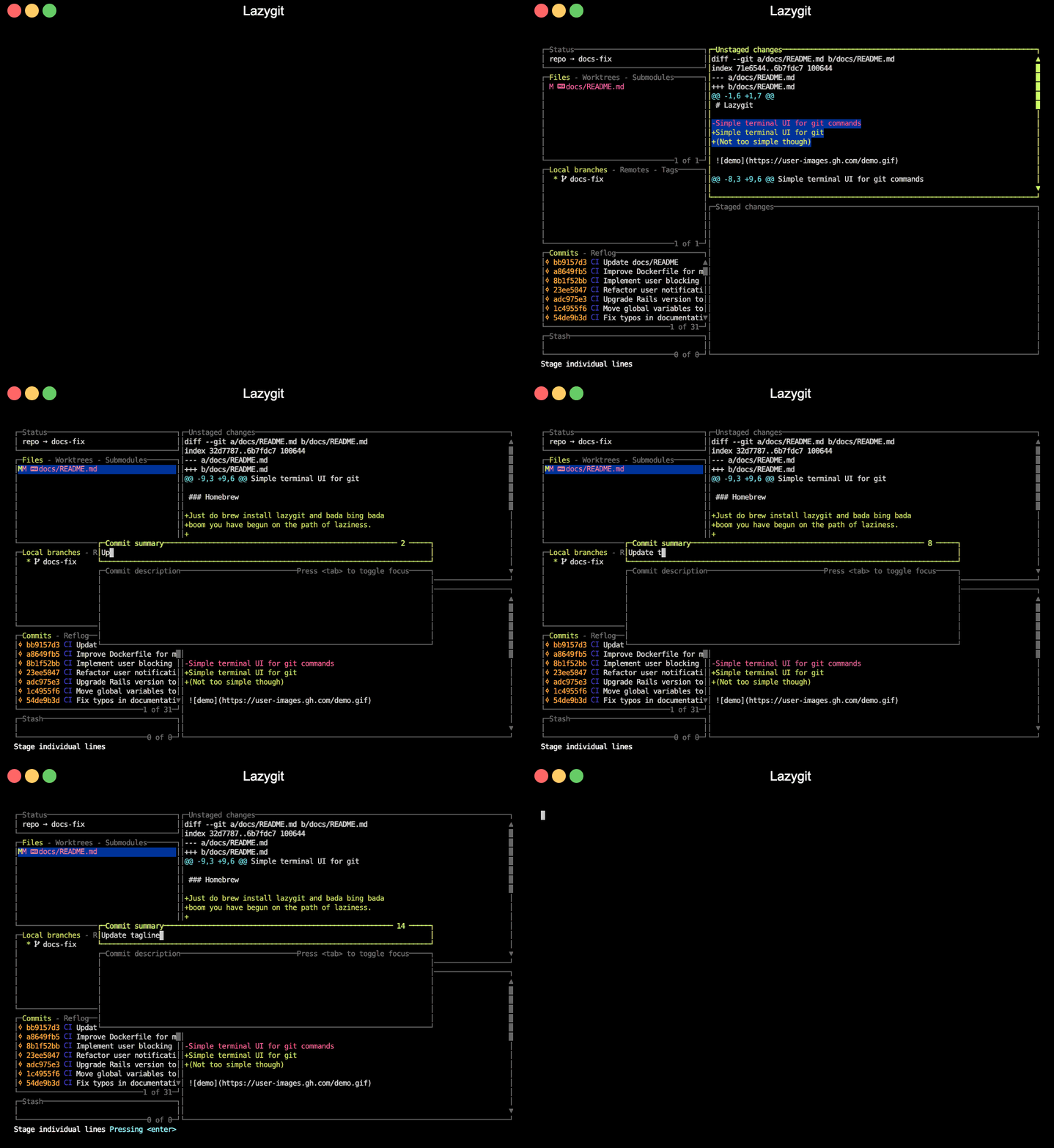
### 暂存单行
在选中的行上按空格键以暂存它,或按 `v` 开始选择多行范围。你也可以按 `a` 来选择当前 hunk 的全部内容。
### 交互式变基
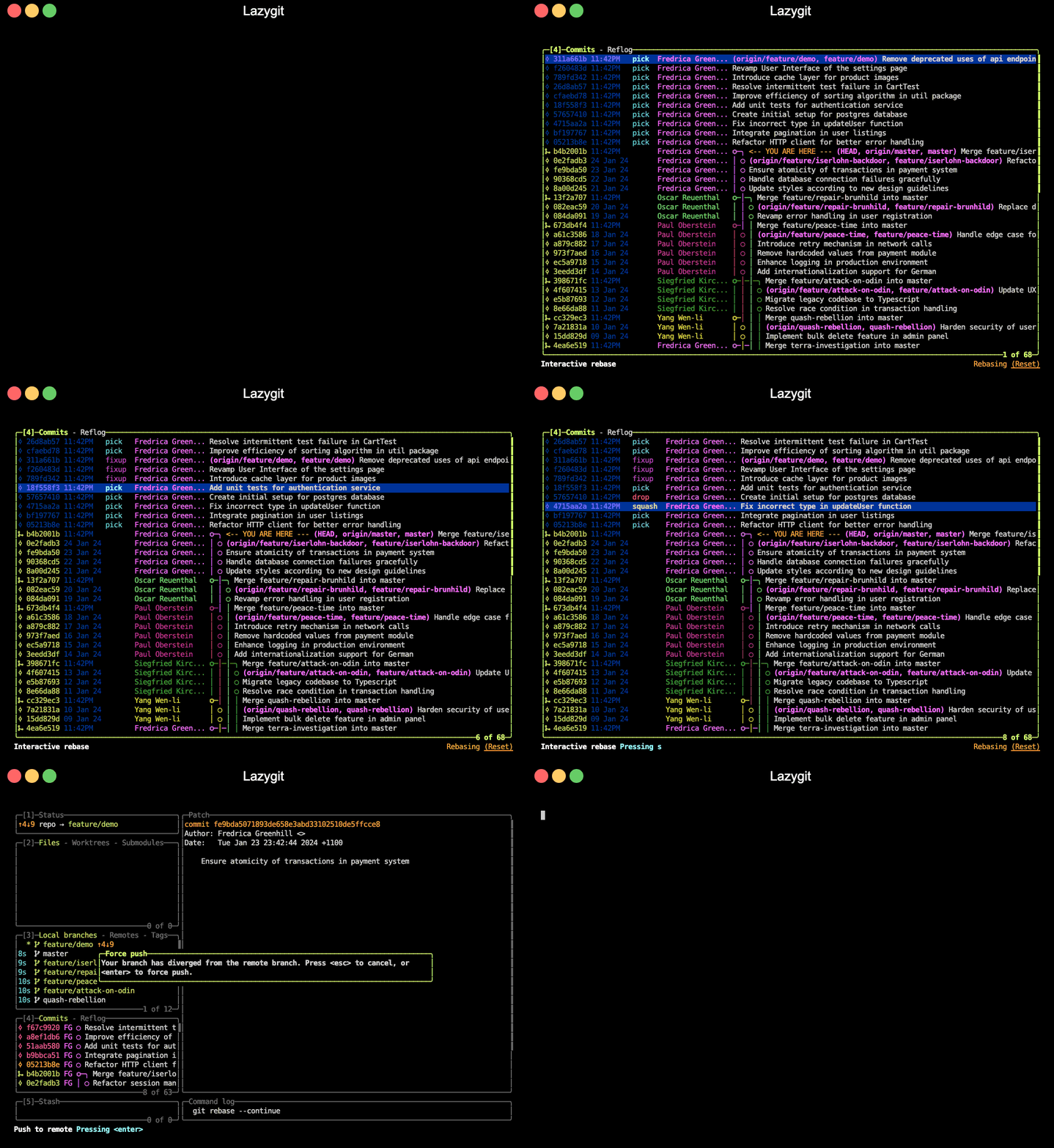
按 `i` 启动交互式变基。然后可以对 TODO commits 进行 squash (`s`)、fixup (`f`)、drop (`d`)、edit (`e`)、上移 (`ctrl+k`) 或下移 (`ctrl+j`),之后通过 `m` 调出变基选项菜单并选择 `continue` 以继续变基。
你也可以一次性执行这些操作(例如在某个 commit 上按 `s` 进行 squash),而无需显式启动变基。
此演示还使用了 shift+down 来选择一组 commit 进行移动和 fixup。
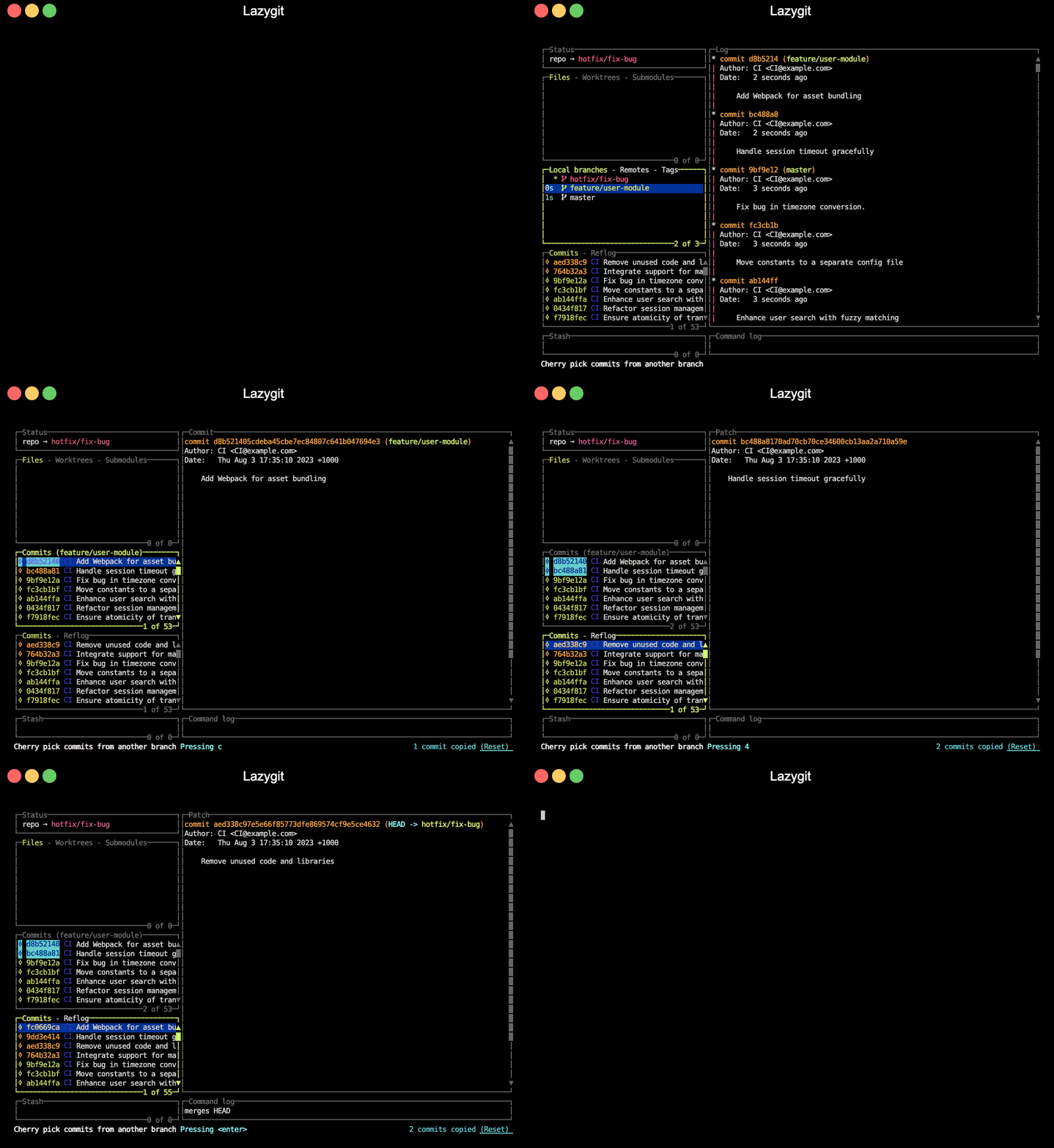
### Cherry-pick
在某个 commit 上按 `shift+c` 复制它,然后按 `shift+v` 粘贴(cherry-pick)它。
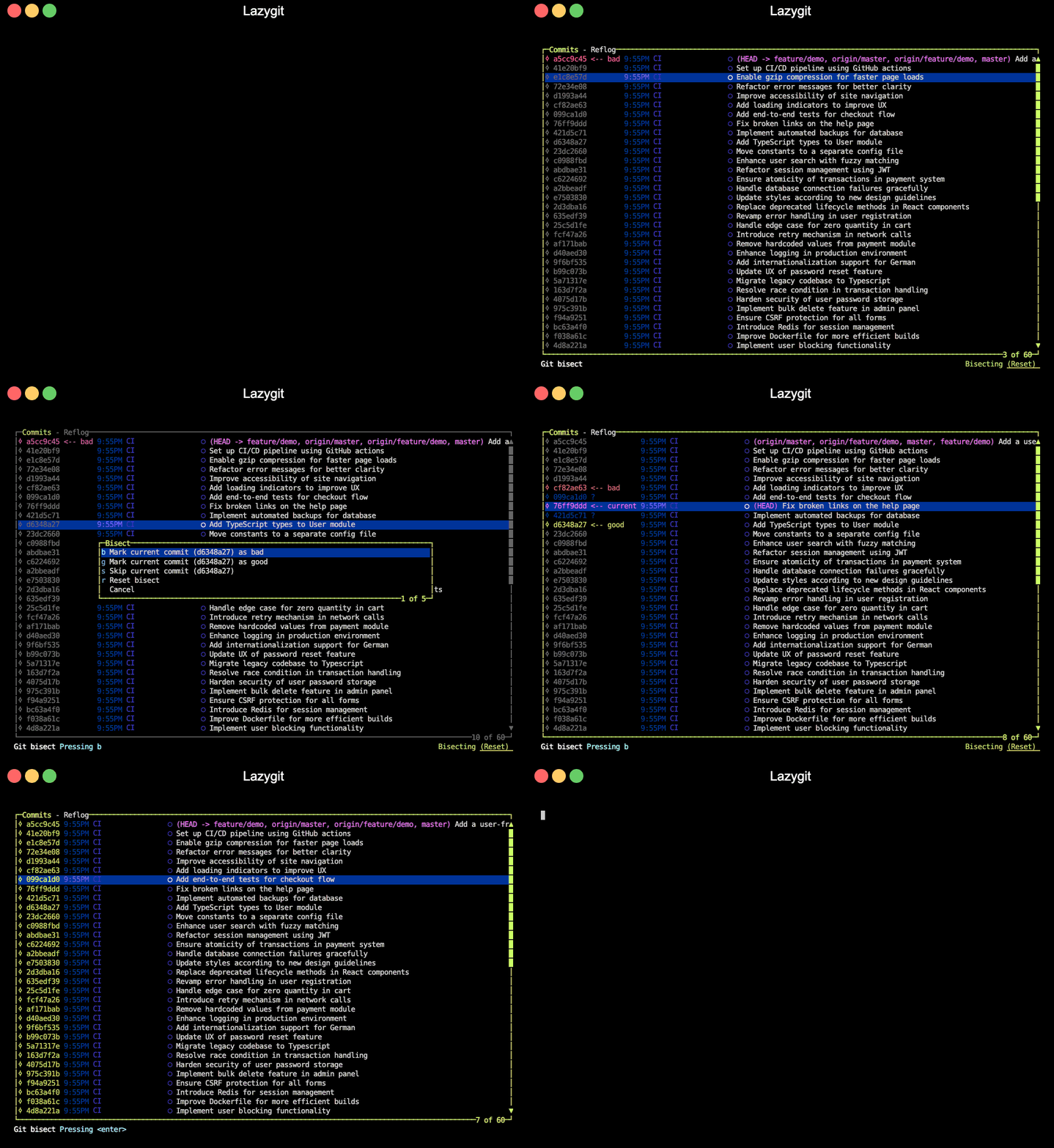
### Bisect
在 commits 视图中按 `b` 将 commit 标记为 good/bad 以开始 git bisect。
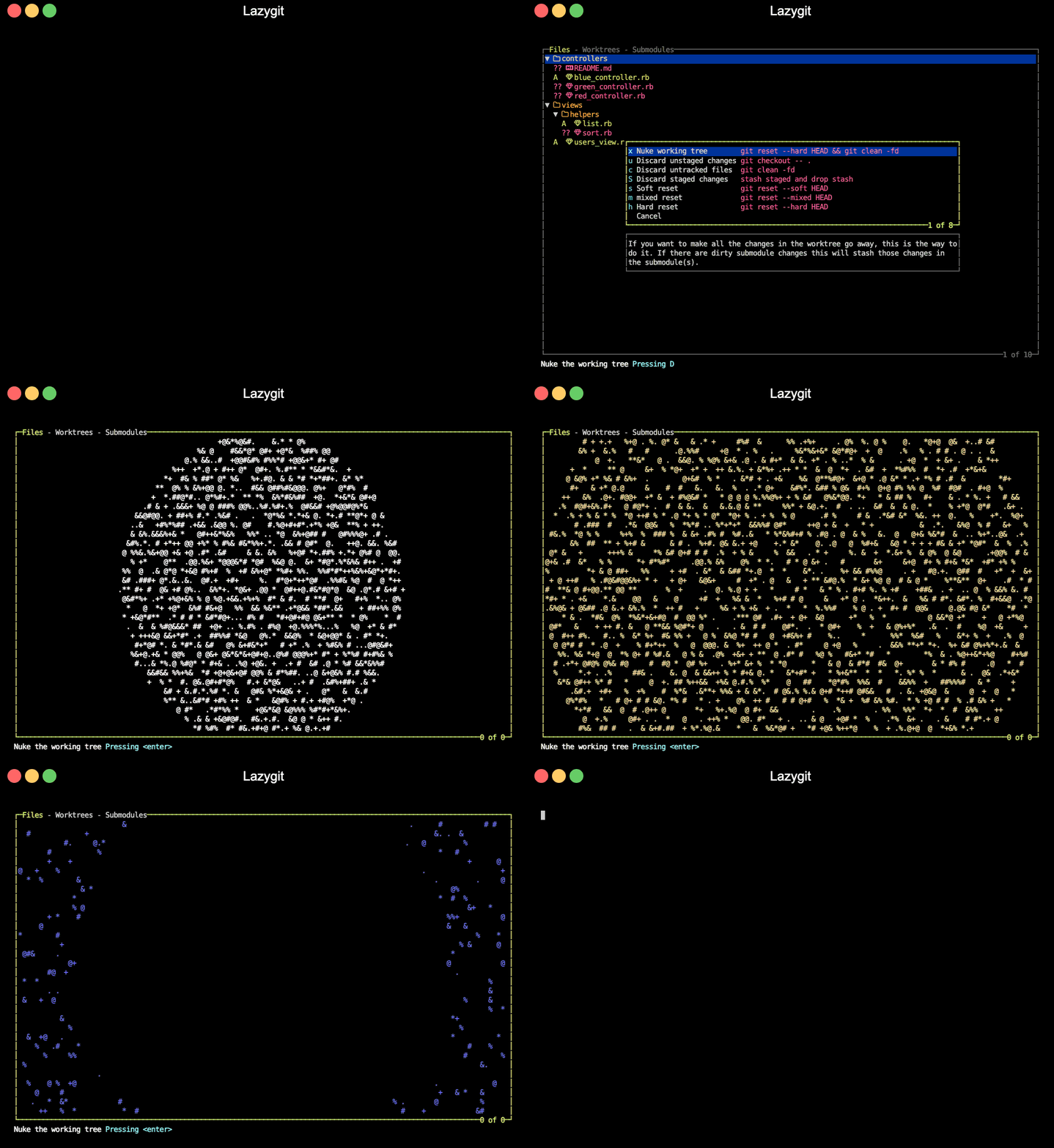
### 清空工作区
当你真的想清除运行 `git status` 时显示的所有内容(是的,包括脏的 submodules)时,就像 [kidpix 风格](https://www.youtube.com/watch?v=N4E2B_k2Bss)那样,按 `shift+d` 调出重置选项菜单,然后选择 'nuke' 选项。
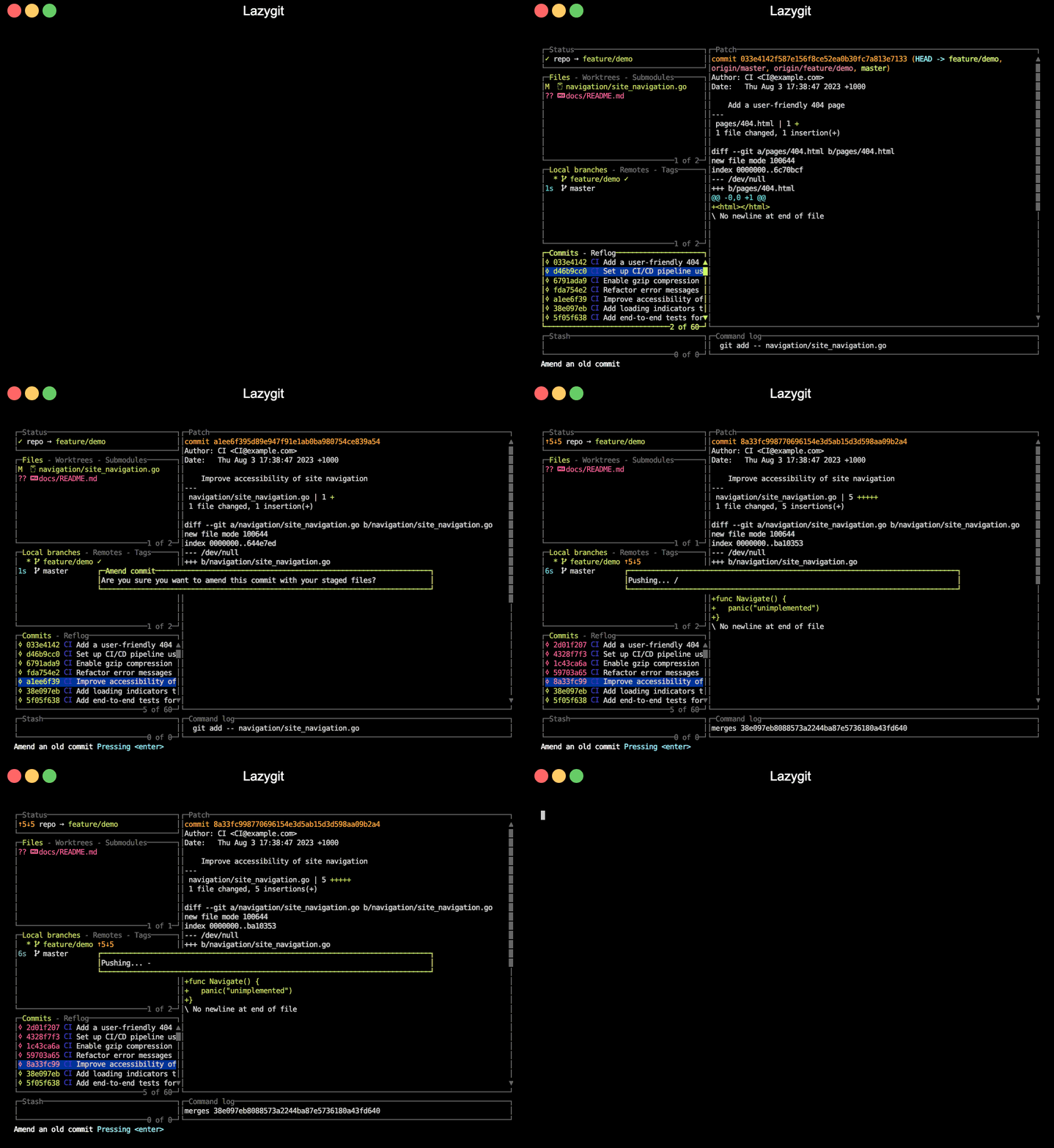
### 修改旧的 commit
在任意 commit 上按 `shift+a` 将使用当前已暂存的更改修改该 commit(在后台运行交互式变基)。
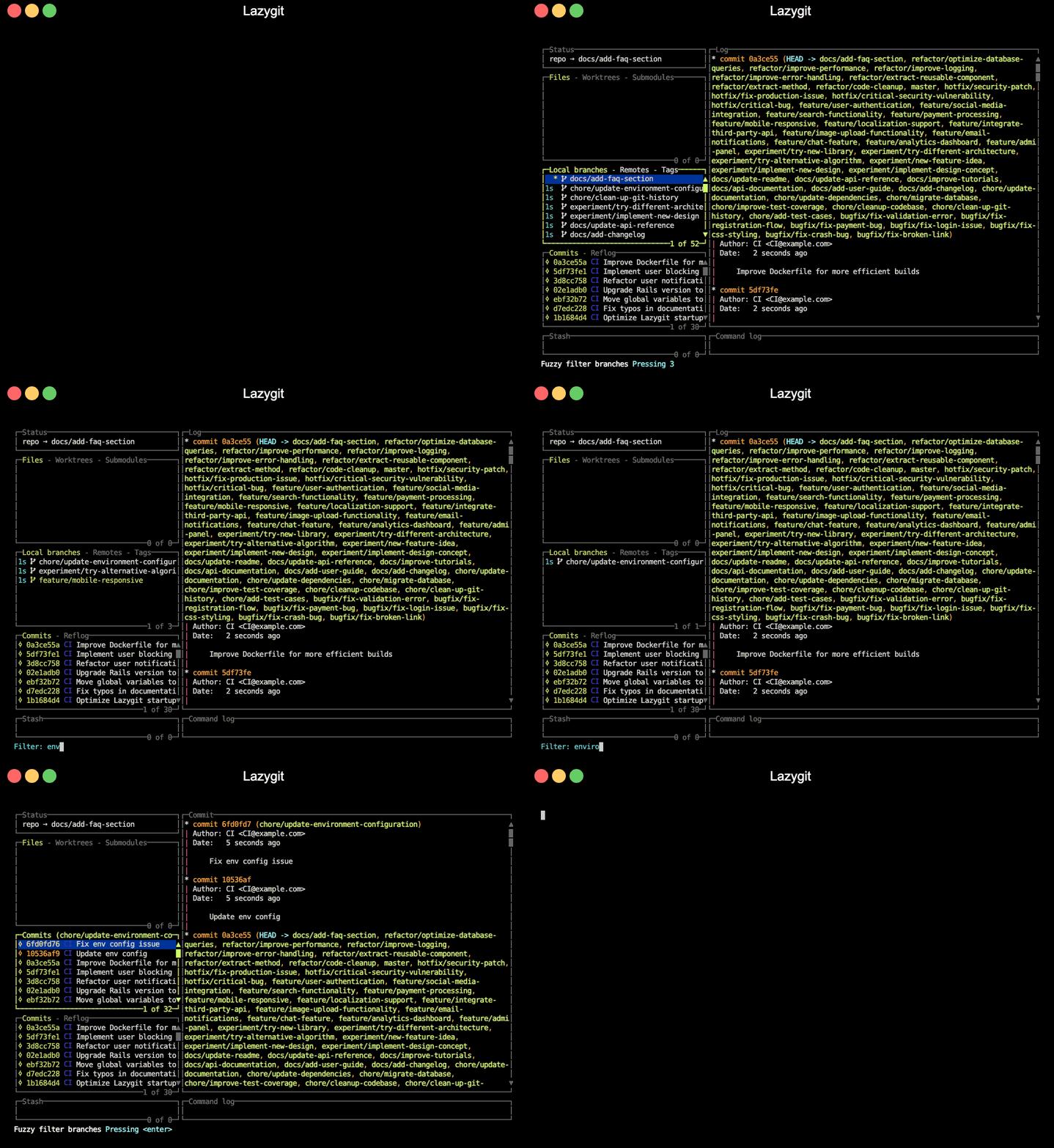
### 过滤
你可以使用 `/` 过滤视图。在这里我们过滤分支视图,然后按 `enter` 查看其 commits。
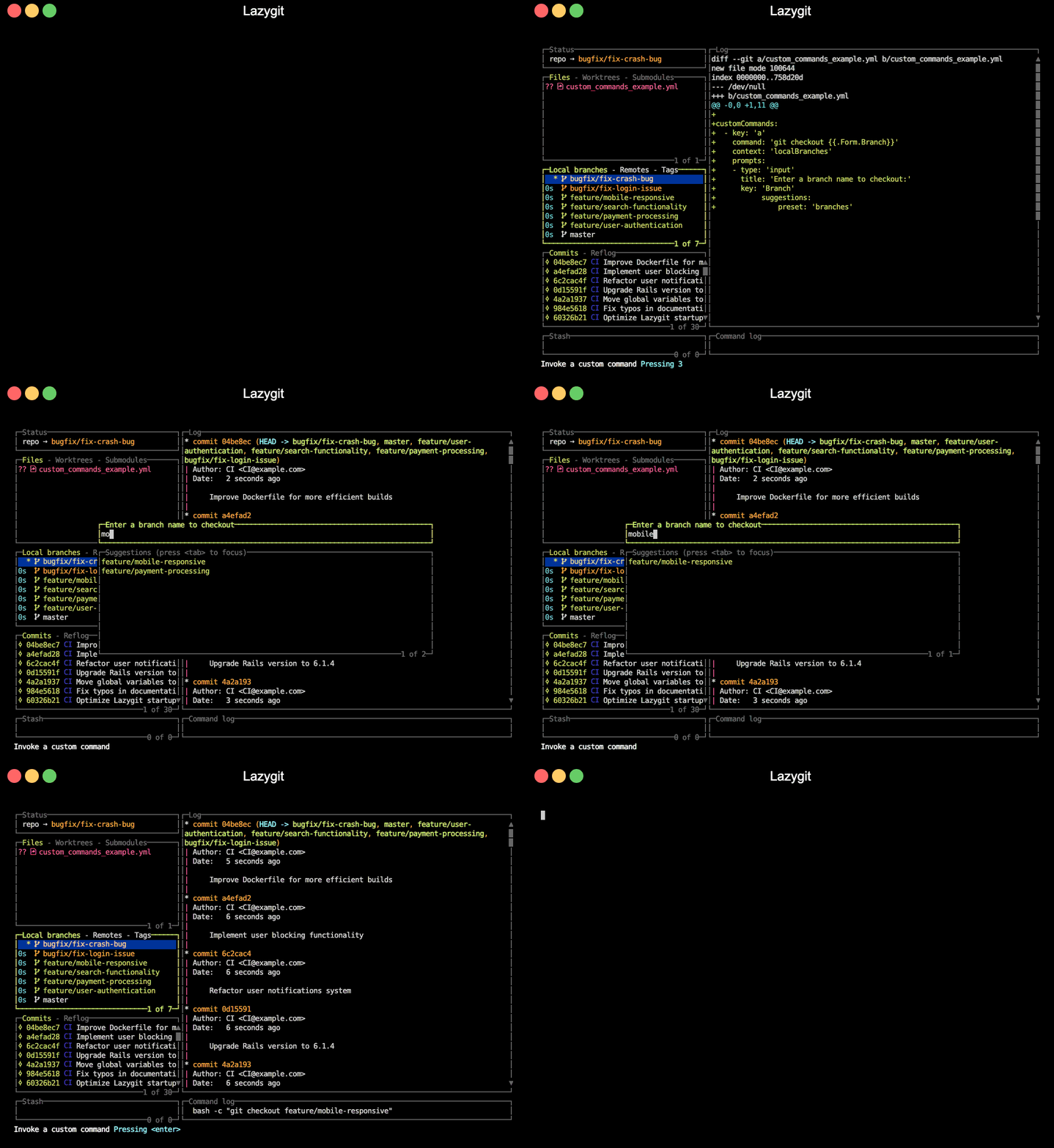
### 调用自定义命令
Lazygit 拥有一个非常灵活的 [自定义命令系统](docs/Custom_Command_Keybindings.md)。在这个例子中,定义了一个模拟内置分支 checkout 操作的自定义命令。
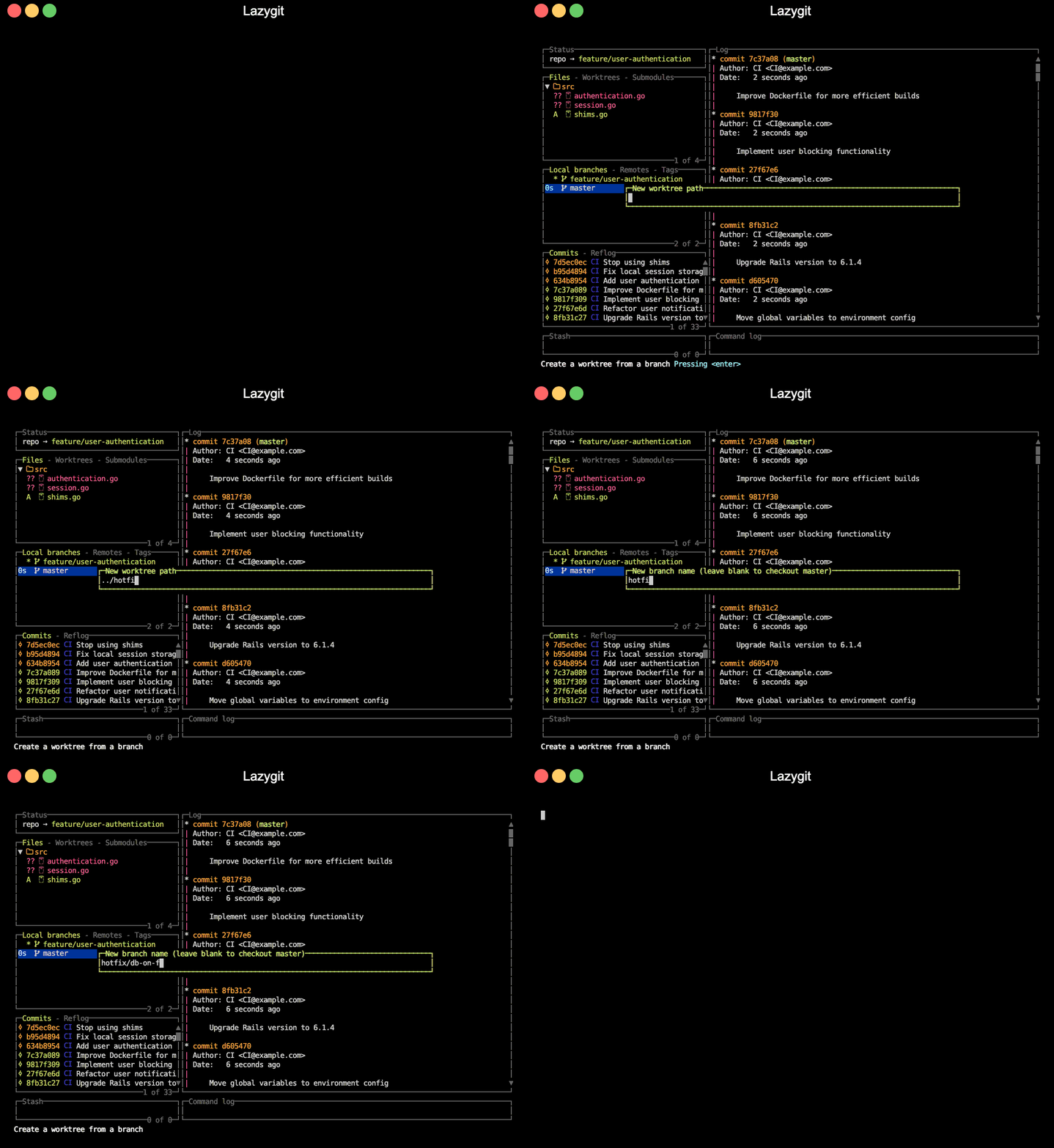
### Worktrees
你可以创建 worktrees 以同时处理多个分支,无需在切换时 stash 或创建 WIP commits。在 branches 视图中按 `w` 从选中的分支创建一个 worktree 并切换到它。
### 变基魔法(自定义补丁)
你可以从旧的 commit 构建自定义补丁,然后从 commit 中移除该补丁、拆分出新的 commit、将补丁反向应用到 index 等等。
在这个例子中,我们有一个冗余的注释想要从旧的 commit 中移除。我们在 commit 上按 `[](https://github.com/jesseduffield/lazygit/releases) [](https://goreportcard.com/report/github.com/jesseduffield/lazygit) [](https://app.codacy.com/gh/jesseduffield/lazygit/dashboard?utm_source=gh&utm_medium=referral&utm_content=&utm_campaign=Badge_grade) [](https://app.codacy.com/gh/jesseduffield/lazygit/dashboard?utm_source=gh&utm_medium=referral&utm_content=&utm_campaign=Badge_coverage) [](https://golangci-lint.run/) [](https://github.com/jesseduffield/lazygit/releases/latest) [](https://formulae.brew.sh/formula/lazygit) 
 ](https://youtu.be/CPLdltN7wgE)
- [15 分钟掌握 15 个 Lazygit 功能](https://youtu.be/CPLdltN7wgE)
- [基础教程](https://youtu.be/VDXvbHZYeKY)
- [变基魔法教程](https://youtu.be/4XaToVut_hs)
## 安装
[](https://repology.org/project/lazygit/versions)
_上述大部分包由第三方维护,因此请务必自行审查,确认维护者看起来是个值得信赖的人,比如参加当地体育比赛并通过烧烤筹款回馈社区等_
### 二进制发布版
对于 Windows、Mac OS(10.12+) 或 Linux,你可以在这里下载二进制发布版[这里](../../releases)。
### Dev container 功能
如果你想在例如你的 GitHub Codespaces 中使用 lazygit,有一个基于上述二进制发布版的第三方 [dev container 功能](https://github.com/GeorgOfenbeck/features/tree/main/src/lazygit-linuxbinary)。
### Homebrew
它也适用于 Linux。
```
brew install lazygit
```
### MacPorts
从 github releases 构建的最新版本。
Tap:
```
sudo port install lazygit
```
### Void Linux
Void Linux 的包可在 distro repo 中找到
它们跟随上游最新版本
```
sudo xbps-install -S lazygit
```
### Scoop (Windows)
你可以使用 [scoop](https://scoop.sh/) 安装 `lazygit`。它在 `extras` bucket 中:
```
# 添加 extras bucket
scoop bucket add extras
# 安装 lazygit
scoop install lazygit
```
### gah (Linux 和 Mac OS)
你可以使用 [gah](https://github.com/marverix/gah/) 安装 `lazygit`:
```
gah install lazygit
```
### Arch Linux
Arch Linux 的包可通过 pacman 和 AUR (Arch User Repository) 获得。
有两个包。稳定版使用最新 release 构建
git 版本使用最近的 commit 构建。
- Stable: `sudo pacman -S lazygit`
- Development:
](https://youtu.be/CPLdltN7wgE)
- [15 分钟掌握 15 个 Lazygit 功能](https://youtu.be/CPLdltN7wgE)
- [基础教程](https://youtu.be/VDXvbHZYeKY)
- [变基魔法教程](https://youtu.be/4XaToVut_hs)
## 安装
[](https://repology.org/project/lazygit/versions)
_上述大部分包由第三方维护,因此请务必自行审查,确认维护者看起来是个值得信赖的人,比如参加当地体育比赛并通过烧烤筹款回馈社区等_
### 二进制发布版
对于 Windows、Mac OS(10.12+) 或 Linux,你可以在这里下载二进制发布版[这里](../../releases)。
### Dev container 功能
如果你想在例如你的 GitHub Codespaces 中使用 lazygit,有一个基于上述二进制发布版的第三方 [dev container 功能](https://github.com/GeorgOfenbeck/features/tree/main/src/lazygit-linuxbinary)。
### Homebrew
它也适用于 Linux。
```
brew install lazygit
```
### MacPorts
从 github releases 构建的最新版本。
Tap:
```
sudo port install lazygit
```
### Void Linux
Void Linux 的包可在 distro repo 中找到
它们跟随上游最新版本
```
sudo xbps-install -S lazygit
```
### Scoop (Windows)
你可以使用 [scoop](https://scoop.sh/) 安装 `lazygit`。它在 `extras` bucket 中:
```
# 添加 extras bucket
scoop bucket add extras
# 安装 lazygit
scoop install lazygit
```
### gah (Linux 和 Mac OS)
你可以使用 [gah](https://github.com/marverix/gah/) 安装 `lazygit`:
```
gah install lazygit
```
### Arch Linux
Arch Linux 的包可通过 pacman 和 AUR (Arch User Repository) 获得。
有两个包。稳定版使用最新 release 构建
git 版本使用最近的 commit 构建。
- Stable: `sudo pacman -S lazygit`
- Development:  如果你想了解从哪里开始,请查看这个[视频](https://www.youtube.com/watch?v=kNavnhzZHtk),它演示了如何在 lazygit 中创建一个小功能。
### 本地调试
在一个终端标签页运行 `lazygit --debug`,在另一个终端运行 `lazygit --logs` 以并排查看程序及其日志输出
## 捐赠
如果你想支持 lazygit 的开发,请考虑[赞助我](https://github.com/sponsors/jesseduffield)(github 正在进行所有捐款 12 个月内一比一配对)
## 常见问题
### commit 颜色代表什么?
- 绿色:该 commit 包含在 master 分支中
- 黄色:该 commit 不包含在 master 分支中
- 红色:该 commit 尚未推送到上游分支
## 自我推销
如果你想看我 在开发方面在做什么,请在
[twitter](https://twitter.com/DuffieldJesse) 上关注我或查看我的[博客](https://jesseduffield.com/)
## 替代品
如果你发现 lazygit 不能完全满足你的要求,这些可能更适合:
- [GitUI](https://github.com/Extrawurst/gitui)
- [tig](https://github.com/jonas/tig)
- [GitArbor TUI](https://github.com/cadamsdev/gitarbor-tui)
如果你想了解从哪里开始,请查看这个[视频](https://www.youtube.com/watch?v=kNavnhzZHtk),它演示了如何在 lazygit 中创建一个小功能。
### 本地调试
在一个终端标签页运行 `lazygit --debug`,在另一个终端运行 `lazygit --logs` 以并排查看程序及其日志输出
## 捐赠
如果你想支持 lazygit 的开发,请考虑[赞助我](https://github.com/sponsors/jesseduffield)(github 正在进行所有捐款 12 个月内一比一配对)
## 常见问题
### commit 颜色代表什么?
- 绿色:该 commit 包含在 master 分支中
- 黄色:该 commit 不包含在 master 分支中
- 红色:该 commit 尚未推送到上游分支
## 自我推销
如果你想看我 在开发方面在做什么,请在
[twitter](https://twitter.com/DuffieldJesse) 上关注我或查看我的[博客](https://jesseduffield.com/)
## 替代品
如果你发现 lazygit 不能完全满足你的要求,这些可能更适合:
- [GitUI](https://github.com/Extrawurst/gitui)
- [tig](https://github.com/jonas/tig)
- [GitArbor TUI](https://github.com/cadamsdev/gitarbor-tui)标签:EVTX分析, EVTX分析, Git, Go, GUI, MacOS, Ruby工具, TUI, 威胁情报, 安全可观测性, 开发者工具, 开源, 效率工具, 日志审计, 源代码管理, 版本控制, 终端用户界面