DiCR77/Entra-Intune-Enterprise-Architecture
GitHub: DiCR77/Entra-Intune-Enterprise-Architecture
基于零信任架构的 Microsoft 365 / Entra ID / Intune 企业端点管理完整部署实验室,覆盖 Windows 11 设备生命周期的自动化、安全与合规管理。
Stars: 0 | Forks: 0
# 🌐 M365-Modern-Workplace-Deployment-Lab
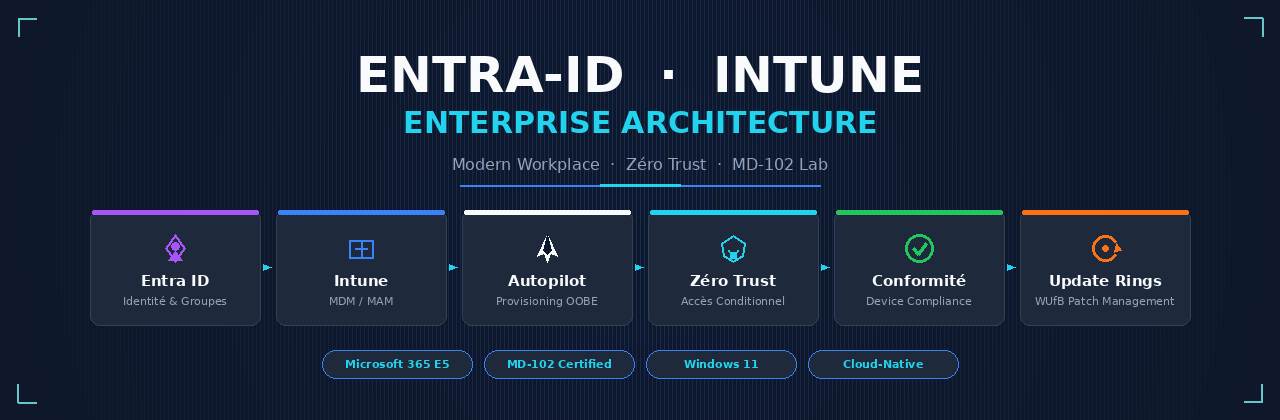
### **完整的 Microsoft 365 / Entra ID / Intune 架构,用于在零信任模式下管理、保护和自动化 Windows 11 设备的生命周期。**
## 📋 目录
- [📌 概述](#-pr%C3%A9sentation)
- [🏗️ 架构与管理流程](#%EF%B8%8F-architecture--flux-de-gestion)
- [🛠️ 实施步骤](#%EF%B8%8F-%C3%A9tapes-de-mise-en-%C5%93uvre)
- 云基础设施与身份
- 自动化配置与注册
- 零信任架构
- 工作站安全
- 应用管理与部署
- 补丁管理与生命周期
- [🧪 验证与 PoC](#-validation--poc)
- [📸 截图](#-screenshots)
- [🛡️ 合规性矩阵](#%EF%B8%8F-matrice-de-conformit%C3%A9)
- [🔧 脚本与资源](#-scripts--ressources)
- [📚 参考](#-r%C3%A9f%C3%A9rences)
- [👤 作者](#-auteur)
## 📌 概述
本项目记录了现代企业 Microsoft 365 / Entra ID / Intune 架构的**设计与完整部署**。目标是根据**零信任**安全要求和**Microsoft MD-102**(Endpoint Administrator)考试标准,管理、保护和自动化 **Windows 11 工作站的完整生命周期**。
### 🎯 目标
| 目标 | 描述 | 状态 |
|----------|-------------|--------|
| 🔐 **零信任安全** | 默认无访问权限,持续验证 | ✅ |
| 🤖 **自动化** | 无需 IT 干预的部署 | ✅ |
| 📱 **现代管理** | 云原生的端点管理 | ✅ |
| 🛡️ **合规性** | 遵循 MD-102 标准与企业安全 | ✅ |
| ⚡ **用户体验** | 流畅且快速的入职引导 | ✅ |
### 🏢 背景
- **环境**:Microsoft 365 E5
- **目标**:Windows 11 Pro/Enterprise 工作站
- **方法论**:云原生,User-Driven
- **框架**:Microsoft 零信任架构
## 🏗️ 架构与管理流程
```
┌─────────────────────────────────────────────────────────────────────────────┐
│ 🌐 TENANT MICROSOFT 365 │
└─────────────────────────────────────────────────────────────────────────────┘
│
┌─────────────────────────────┼─────────────────────────────┐
▼ ▼ ▼
┌───────────────┐ ┌─────────────────┐ ┌─────────────────┐
│ 🔷 Entra ID │ │ 📦 Intune MDM │ │ 🔄 Autopilot │
│ Identités │◄─────────►│ Gestion │◄─────────►│ Provisioning │
│ & Groupes │ │ Appareils │ │ OOBE │
└───────────────┘ └─────────────────┘ └─────────────────┘
│ │ │
▼ ▼ ▼
┌───────────────┐ ┌─────────────────┐ ┌─────────────────┐
│ 👥 Groupes │ │ 📋 Stratégies │ │ 🖥️ ESP │
│ Dynamiques │ │ Conformité │ │ (Enrollment │
│ (Départements)│ │ & Configuration │ │ Status Page) │
└───────────────┘ └─────────────────┘ └─────────────────┘
│ │ │
└─────────────────────────────┼─────────────────────────────┘
▼
┌─────────────────────────────────┐
│ 🛡️ ACCÈS CONDITIONNEL │
│ Zéro Trust - Appareil Conforme │
└─────────────────────────────────┘
│
┌─────────────────────────────┼─────────────────────────────┐
▼ ▼ ▼
┌───────────────┐ ┌─────────────────┐ ┌─────────────────┐
│ 📱 Applications│ │ 🔒 Sécurité │ │ 🔄 Maintenance │
│ M365 + Win32 │ │ BitLocker │ │ WUfB Rings │
│ │ │ Defender │ │ Feature/QoL │
└───────────────┘ └─────────────────┘ └─────────────────┘
```
### 🔀 数据流
```
graph TD
A[👤 Utilisateur] -->|Authentification| B[🔷 Entra ID]
B -->|Token JWT| C[🛡️ Accès Conditionnel]
C -->|Vérification conformité| D[📦 Intune]
D -->|État appareil| C
C -->|Autorisation| E[☁️ Microsoft 365]
F[🖥️ Windows 11 OOBE] -->|Autopilot| G[🔄 ESP]
G -->|Profils| H[📋 Configuration]
G -->|Apps| I[📱 Applications]
G -->|Sécurité| J[🔒 BitLocker/Defender]
K[⏰ Windows Update] -->|Anneaux| L[🔄 WUfB]
L -->|Patchs| F
```
## 🛠️ 实施步骤
### 1. 云基础设施与身份 (Microsoft Entra ID)
#### 🏢 创建 M365 租户
- 云租户的初始配置
- 分配 **Microsoft 365 E5** 许可证
- 配置自定义域
- 设置身份联合(可选)
#### 👥 身份管理
| 元素 | 配置 | 目标 |
|---------|--------------|----------|
| **用户** | 创建测试账号 + 管理员 | 测试与管理 |
| **动态组** | `Diae_Groupe` | 自动化目标定位 |
| **成员规则** | 部门,职位,位置 | 自动分配 |
**动态组规则示例:**
```
(user.department -eq "IT") -and (user.jobTitle -contains "Technicien")
```
### 2. 自动化配置与注册 (Windows Autopilot)
#### 📋 ESP (Enrollment Status Page) 配置
| 参数 | 值 | 理由 |
|-----------|--------|---------------|
| **桌面阻塞** | ✅ 已启用 | 安全:在所有内容安装完成前无访问权限 |
| **故障排除选项** | ✅ 已启用 | 用户自主性 |
| **重置** | ✅ 已启用 | 恢复能力 |
| **超时** | 60 分钟 | 避免无限阻塞 |
#### 🚀 Autopilot 部署配置文件 (`AP_WIN11_UserDriven`)
```
Profil: AP_WIN11_UserDriven
Mode: User-Driven
Jonction: Microsoft Entra ID Join (Native)
OOBE:
- Masquage EULA: true
- Masquage Privacy Settings: true
- Masquage Account Setup: true
- Langue: Français (France)
Compte local: Standard User (Principe moindre privilège)
White Glove: Non activé
Device Name Template: "W11-%SERIAL%"
```
### 3. 零信任架构:合规性与条件访问
#### 🔒 Windows 11 合规策略 (`COMP_WIN11_ExigenceSecurite`)
| 类别 | 要求 | 级别 |
|-----------|----------|--------|
| **加密** | BitLocker 已启用(需要 TPM 2.0) | 🔴 关键 |
| **防火墙** | Windows Firewall 已启用 | 🔴 关键 |
| **防病毒** | Microsoft Defender Antivirus 处于活动状态 | 🔴 关键 |
| **安全启动** | Secure Boot 已启用 | 🔴 关键 |
| **代码完整性** | Code Integrity (HVCI) | 🟡 推荐 |
| **OS 版本** | 最低 Windows 11 22H2 | 🟡 推荐 |
#### 🛡️ Entra ID 条件访问 (`CA_WIN11_ExigerAppareilConforme`)
```
{
"nom": "CA_WIN11_ExigerAppareilConforme",
"état": "Activé",
"cibles": {
"utilisateurs": "Tous les utilisateurs",
"applications": "Microsoft 365 cloud apps"
},
"conditions": {
"plateformes": ["Windows"],
"applications_client": "Toutes"
},
"contrôles": {
"appareil_conforme": "Requis",
"action_non_conforme": "Bloquer l'accès",
"message": "Votre appareil doit être conforme pour accéder aux ressources d'entreprise."
}
}
```
### 4. 工作站安全 (Settings Catalog)
#### ⚙️ Administrative 配置文件
| 参数 | 路径 | 值 |
|-----------|--------|--------|
| **USB 限制** | `DeviceInstallation/RestrictDeviceInstallation` | 阻止 |
| **个人 OneDrive** | `OneDrive/DisablePersonalSync` | 已启用(已阻止) |
| **企业 Cortana** | `Experience/AllowCortana` | 已禁用 |
| **Windows Store** | `ApplicationManagement/RequirePrivateStoreOnly` | 已启用 |
| **遥测** | `System/AllowTelemetry` | 安全(级别 0) |
| **密码** | `DeviceLock/MinPasswordLength` | 12 个字符 |
| **锁屏** | `DeviceLock/EnforceLockScreen` | 5 分钟 |
### 5. 应用管理与部署 (MAM / MDM)
#### 📦 Microsoft 365 Apps for Enterprise
| 应用 | 通道 | 版本 | 架构 |
|-------------|-------|---------|--------------|
| Word | Current Channel | 最新 | x64 |
| Excel | Current Channel | 最新 | x64 |
| PowerPoint | Current Channel | 最新 | x64 |
| Outlook | Current Channel | 最新 | x64 |
| Teams | Current Channel | 最新 | x64 |
| OneDrive 企业版 | Current Channel | 最新 | x64 |
**XML 配置(示例):**
```
### ⭐ 如果这个项目对您有帮助,请不吝赐予星标!
**[⬆ 返回顶部](#-M365-Modern-Workplace-Deployment-Lab)**
标签:AI合规, Awesome, JSONLines, Libemu, MD-102, Microsoft Intune, Windows 11, 微软企业服务, 系统管理, 终端管理, 运维部署, 零信任