harryless17/marshall-acton3-linux
GitHub: harryless17/marshall-acton3-linux
通过逆向工程获取的 BLE 协议,在 Linux 上通过 GNOME 托盘小程序和命令行控制 Marshall Acton III 音箱的音量与均衡器。
Stars: 0 | Forks: 0
# marshall-acton3-linux
[](LICENSE)
[](https://www.python.org/)
[]()
[]()
在 Linux 上控制你的 **Marshall Acton III** 音箱 —— 音量、低音和高音
—— 无需触碰实体旋钮,也无需使用 Marshall 移动应用
(该应用没有 Linux 版本)。
从 Linux 调节 **Marshall Acton III** 音箱的**音量、低音和高音**,无需触碰物理旋钮,也无需通过 Marshall 移动应用(该应用在 Linux 上不存在)。
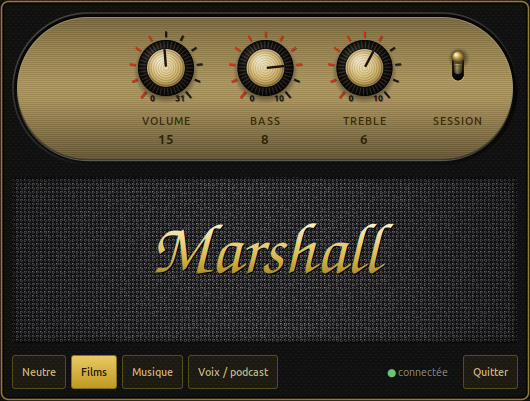
- 一个**系统栏中的图标**:左键点击显示滑块,右键点击显示菜单和预设;
- 一个 **CLI**,`marshall-ctl`;
- 在音箱旋钮上所做的更改会实时反映到界面中。
个人项目,与 Marshall 和 Zound Industries 无关。该协议是通过 reverse engineering 获得的,起点是
[`anpct/marshall-acton3-ble`](https://github.com/anpct/marshall-acton3-ble)。
## 实际前提条件
已在 **Ubuntu 24.04, GNOME on X11** 上测试。
| 依赖项 | Debian/Ubuntu 软件包 | 用途 |
|---|---|---|
| Python ≥ 3.9 | `python3` | |
| PyGObject | `python3-gi` | 一切都通过 Gio/GLib 传递 |
| Typelib GTK 3 | `gir1.2-gtk-3.0` | **不**会随 `python3-gi` 一起安装 |
| BlueZ | `bluez` | 系统总线上的 `org.bluez`,以及用于初始配对的 `bluetoothctl` |
| notification icon host | `gnome-shell-extension-appindicator` | **否则小程序会运行但保持不可见** |
```
sudo apt install python3-gi gir1.2-gtk-3.0 bluez gnome-shell-extension-appindicator
```
无 PyPI 依赖,无虚拟环境。
有两个环境限制需要了解:
- **仅限 X11。** 小程序使用 `Gtk.StatusIcon`,这在 Wayland 下没有等效
替代。而 CLI 可以在任何地方运行。
- 图标扩展必须**处于激活状态**(`gnome-extensions list --enabled`)。
如果没有,小程序会启动、连接,但不显示任何内容。
## 安装
```
git clone ~/Bureau/marshall-applet
cd ~/Bureau/marshall-applet
./install.sh
```
`install.sh` 会创建指向代码仓库的**符号链接**,因此只需修改
源代码即可 —— 无需重新安装。但另一方面:
它安装的内容:
| 路径 | 角色 |
|---|---|
| `~/bin/marshall-applet`, `~/bin/marshall-ctl` | 指向仓库的链接 |
| `~/.local/share/marshall/marshall_ble.py` | 指向模块的链接 |
| `~/.local/share/applications/marshall-applet.desktop` | 启动器入口 |
| `~/.config/autostart/marshall-applet.desktop` | 会话打开时启动 |
`~/bin` 不一定在你的 `PATH` 中。要在不输入完整路径的情况下运行 `marshall-ctl`:
```
echo 'export PATH="$HOME/bin:$PATH"' >> ~/.zshrc && exec zsh
```
## 配对 BLE 身份 —— 只需做一次
音箱暴露了**两个独立的 Bluetooth 身份**:
- `ACTON III` —— 音频(A2DP)。可能已经配对。**绝不要去动它**:
移除它会破坏声音。
- `ACTON III [LE]` —— 控制通道。需要单独配对它,
**并且必须使用一个 authentication agent** —— 否则 BlueZ 会拒绝。
```
# 1. 定位 BLE 地址(其显示为 "ACTON III [LE]")
bluetoothctl --timeout 12 scan le | grep -i acton
# 2. 配对,同时保持活跃的扫描以使地址保持有效
# (BLE 地址是私有且轮换的)
{ echo "agent on"; sleep 1; echo "default-agent"; sleep 1; \
echo "scan on"; sleep 8; echo "pair XX:XX:XX:XX:XX:XX"; sleep 25; \
echo "quit"; } | bluetoothctl
# 等待 "Pairing successful"
# 3. 验证
~/bin/marshall-ctl
```
无需对音箱进行任何物理操作。
此过程也可以通过 `marshall-ctl --setup` 离线使用。
## 用法
```
marshall-ctl # état courant
marshall-ctl bass 6 # 0..10
marshall-ctl treble 8 # 0..10
marshall-ctl volume 20 # 0..31
marshall-ctl bass 6 treble 8 # plusieurs réglages d'un coup
marshall-ctl preset Musique # applique un preset
marshall-ctl presets # liste les presets
```
预设(低音 / 高音 —— 它们**从不**影响音量):
| 预设 | 低音 | 高音 |
|---|---|---|
| 中性 | 5 | 5 |
| 电影 | 8 | 6 |
| 音乐 | 10 | 7 |
| 语音 / 播客 | 3 | 8 |
查找小程序:按 **Super** 键,然后输入 `marshall` —— 或者 `acton`、`音箱`、`低音`、
`高音`、`均衡器`……
## 测试
```
python3 -m unittest discover -s tests -t . -v
```
集成测试(`tests/test_speaker.py`)需要音箱已开机并配对;否则它们会被**自动跳过**。纯测试和小程序测试无需硬件即可运行。
`tests/manual_notify_probe.py` 是一个手动探测工具:它验证
音箱是否能正确报告其物理旋钮上所做的更改。
## 诊断
小程序会记录日志到 **`~/.local/state/marshall/applet.log`**(循环覆盖)。由 autostart 启动时,
它没有任何可见输出:如果图标未出现或界面似乎卡死,这是首选排查位置。
| 症状 | 线索 |
|---|---|
| 没有图标,但进程在运行 | 图标扩展被禁用,或者处于 Wayland 会话 |
| 图标上一直有叉号 | 音箱已关机、超出范围,或 BLE 身份未配对 |
| CLI 显示“找不到音箱” | 同上,或小程序占用了通道 |
| 移动文件夹后图标消失 | 重新运行 `./install.sh` |
| 界面卡住几秒钟 | 预期行为:BLE 调用是同步的 |
音箱在闲置约 10 分钟后会休眠;小程序会自动唤醒它(每 30 秒轮询一次,失败时会有 backoff)。
## 卸载
```
rm -f ~/bin/marshall-applet ~/bin/marshall-ctl
rm -f ~/.local/share/applications/marshall-applet.desktop
rm -f ~/.config/autostart/marshall-applet.desktop
rm -rf ~/.local/share/marshall ~/.local/state/marshall
```
要同时移除 BLE 配对 —— **仅限 `[LE]` 地址**:
```
bluetoothctl remove
```
## 协议简介
控制服务 `0000fccd-0000-1000-8000-00805f9b34fb`,characteristics 为
`0000000N-1337-1dea-feed-c0ffee70c0de`:
| 寄存器 | 角色 | 格式 |
|---|---|---|
| `0x07` | 音量 | 1 byte,0–31 |
| `0x08` | 最大音量 | 只读(=31) |
| `0x0f` | EQ | 5 bytes `[bass, 0xff, 0xff, 0xff, treble]`,0–10 |
Acton III 仅暴露了 5 段 EQ 的两个极端频段;中间的三个
必须保持为 `0xff`(“未触碰”)。
固件的陷阱,以及代码为何如此编写,都已记录在
[`docs/superpowers/specs/`](docs/superpowers/specs/2026-07-30-marshall-applet-design.md) 中。
随附的实施计划是一份**过期的历史文档**。
## 免责声明
本项目与 Marshall 和 Zound Industries 无关。该协议是通过观察 BLE 流量获得的,
制造商既未提供文档也不作保证:固件更新可能会在不另行通知的情况下更改它。代码仅写入
音量和 EQ 寄存器,但按“原样”提供,**不提供任何保证**
—— 详见许可证。
绝不要移除音箱的**音频**身份配对:只有
`[LE]` 身份与本工具有关。
## 作者
**Aghiles Manseur** — [@harryless17](https://github.com/harryless17)
该协议是通过观察音箱的 BLE 流量建立的,起点是
[`anpct/marshall-acton3-ble`](https://github.com/anpct/marshall-acton3-ble) 的工作,
随后进行了修正和补充:多个 Bluetooth 身份、BlueZ GATT 缓存、
通过 `Value` 属性读取 EQ,以及带 authentication agent 的 LE bonding。这些发现都记录在
[`docs/`](docs/superpowers/specs/2026-07-30-marshall-applet-design.md) 中,以便任何想要将协议移植到其他型号的人不必重蹈覆辙。
## 许可证
[MIT](LICENSE) —— 你可以随意使用,只需保留版权声明。
Copyright © 2026 Aghiles Manseur.

English — 快速开始
一个 GNOME 托盘小程序加上一个 CLI,通过 D-Bus 上的 BlueZ 与音箱专有的 BLE 控制 服务通信。无需 PyPI 依赖,无需 virtualenv。 ``` sudo apt install python3-gi gir1.2-gtk-3.0 bluez gnome-shell-extension-appindicator git clone https://github.com/harryless17/marshall-acton3-linux cd marshall-acton3-linux && ./install.sh ``` 音箱暴露了**两个 Bluetooth 身份**:一个是音频身份(A2DP,不要去动它),另一个是用于控制的独立 BLE 身份。你必须配对一次 BLE 身份, **并使用一个 authentication agent** —— 否则 BlueZ 会拒绝: ``` bluetoothctl --timeout 12 scan le | grep -i acton # find "ACTON III [LE]" { echo "agent on"; sleep 1; echo "default-agent"; sleep 1; \ echo "scan on"; sleep 8; echo "pair XX:XX:XX:XX:XX:XX"; sleep 25; \ echo "quit"; } | bluetoothctl ``` 然后: ``` marshall-ctl # show current state marshall-ctl bass 6 treble 8 # 0..10 each marshall-ctl volume 20 # 0..31 marshall-ctl preset Musique # Neutre | Films | Musique | Voix / podcast ``` 托盘图标提供滑块(左键点击)和预设(右键点击),并实时反映音箱的物理旋钮状态。 **需要 X11** —— 该小程序使用 `Gtk.StatusIcon`,这在 Wayland 中没有 等效替代。CLI 可以在任何地方运行。必须启用托盘扩展,否则 小程序会运行但保持不可见状态。 协议说明、固件特性以及代码背后的设计原因在 [`docs/`](docs/superpowers/specs/2026-07-30-marshall-applet-design.md) 中。下面的注释 和文档是法语。标签:Python, 无后门, 桌面小组件, 物联网, 物联网控制, 蓝牙, 逆向工具