crystal-actions/activity-weather
GitHub: crystal-actions/activity-weather
将 GitHub 仓库近期活动渲染为天气预报风格的动态 SVG,嵌入 README 直观展示项目活跃度。
Stars: 1 | Forks: 0
# Activity Weather
将你仓库的近期活动渲染为**天气预报 SVG** —— commit 源源不断时阳光明媚,issue 激增时雷雨交加,沉寂无声时大雾弥漫,发布刚结束时彩虹高挂。把它放进你的 README,让天空来讲述故事。
![]() ` 中即可生效,支持 `prefers-reduced-motion`,并可通过 `animated: false` 关闭
- **主题自适应** — `auto` 模式遵循浏览者的浅色/深色配色方案;每个仓库都有基于种子生成的专属风景
- **零配置** — 在运行 workflow 的仓库上即可开箱即用
- **独立运行** — 预构建镜像中的静态 Crystal 二进制文件;无 runtime 依赖,SVG 不会发起外部请求
## 快速开始
```
# .github/workflows/activity-weather.yml
name: Activity Weather
on:
schedule:
- cron: "17 0 * * *"
workflow_dispatch:
# contents to push the SVG; issues + pull-requests because the activity
# fetch reads the issues listing (a `permissions:` block drops everything
# it does not name).
permissions:
contents: write
issues: read
pull-requests: read
concurrency:
group: activity-weather
jobs:
weather:
runs-on: ubuntu-latest
steps:
- uses: actions/checkout@v5
- uses: crystal-actions/activity-weather@v0
```
就这么简单 —— 该 action 会获取过去 7 天的活动,读取天气状况,写入 `ACTIVITY_WEATHER.svg` 并提交。然后嵌入它:
```

```
## 样式
下方的每张图片均由 [`examples/`](examples/) 中提交的配置生成 —— 显示的 YAML 就是生成该图片的配置。
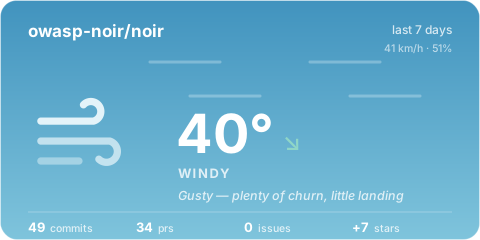
### `card` *(默认)*
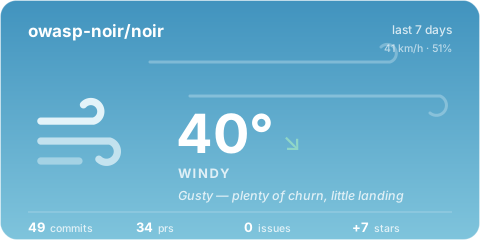
天气应用风格:巨大的动态图标、温度、天气状况以及一行指标。
```
# .github/activity-weather.yml
style: card
output: ACTIVITY_WEATHER.svg
```
` 中即可生效,支持 `prefers-reduced-motion`,并可通过 `animated: false` 关闭
- **主题自适应** — `auto` 模式遵循浏览者的浅色/深色配色方案;每个仓库都有基于种子生成的专属风景
- **零配置** — 在运行 workflow 的仓库上即可开箱即用
- **独立运行** — 预构建镜像中的静态 Crystal 二进制文件;无 runtime 依赖,SVG 不会发起外部请求
## 快速开始
```
# .github/workflows/activity-weather.yml
name: Activity Weather
on:
schedule:
- cron: "17 0 * * *"
workflow_dispatch:
# contents to push the SVG; issues + pull-requests because the activity
# fetch reads the issues listing (a `permissions:` block drops everything
# it does not name).
permissions:
contents: write
issues: read
pull-requests: read
concurrency:
group: activity-weather
jobs:
weather:
runs-on: ubuntu-latest
steps:
- uses: actions/checkout@v5
- uses: crystal-actions/activity-weather@v0
```
就这么简单 —— 该 action 会获取过去 7 天的活动,读取天气状况,写入 `ACTIVITY_WEATHER.svg` 并提交。然后嵌入它:
```

```
## 样式
下方的每张图片均由 [`examples/`](examples/) 中提交的配置生成 —— 显示的 YAML 就是生成该图片的配置。
### `card` *(默认)*
天气应用风格:巨大的动态图标、温度、天气状况以及一行指标。
```
# .github/activity-weather.yml
style: card
output: ACTIVITY_WEATHER.svg
```
 ### `forecast`
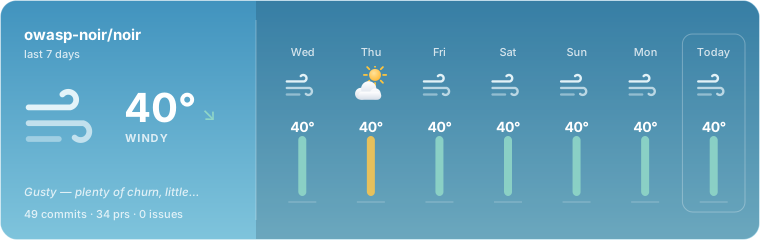
精简的“今日”面板,加上过往日期的逐列展示 —— 迷你图标、温度以及当日颜色的活动条。
```
style: forecast
forecast:
days: 7
```
### `forecast`
精简的“今日”面板,加上过往日期的逐列展示 —— 迷你图标、温度以及当日颜色的活动条。
```
style: forecast
forecast:
days: 7
```
 ### `banner`
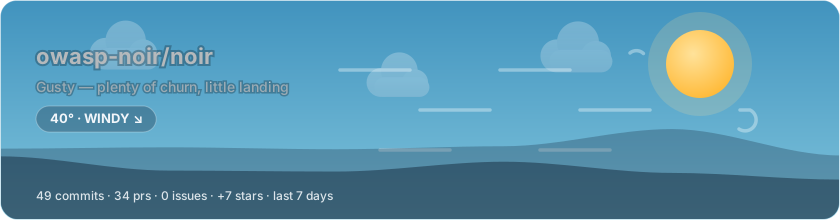
README 专属头图:多层天空、漂移的云朵、基于天气的降水,以及根据你的仓库名生成种子的山丘剪影 —— 每个仓库都有独一无二的地平线。
```
style: banner
```
### `banner`
README 专属头图:多层天空、漂移的云朵、基于天气的降水,以及根据你的仓库名生成种子的山丘剪影 —— 每个仓库都有独一无二的地平线。
```
style: banner
```
 ### `terminal`
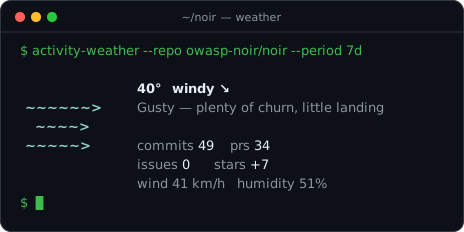
秉承 `wttr.in` 的精神:每种天气状况的 ASCII 艺术图、荧光色调的等宽字体读数、闪烁的光标提示。如同真实终端一样始终保持暗色。
```
style: terminal
```
### `terminal`
秉承 `wttr.in` 的精神:每种天气状况的 ASCII 艺术图、荧光色调的等宽字体读数、闪烁的光标提示。如同真实终端一样始终保持暗色。
```
style: terminal
```
 ### `minimal`
用于行内展示的 28px 胶囊样式 —— 紧挨着标题,或放在徽标行中。
```
style: minimal
```
### `minimal`
用于行内展示的 28px 胶囊样式 —— 紧挨着标题,或放在徽标行中。
```
style: minimal
```
 ## 变体
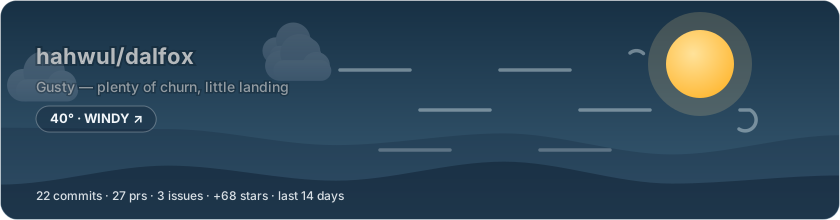
### 锁定暗黑模式 —— [`dark.yml`](examples/variants/dark.yml)
适用于在 README 中通过 `#gh-light-mode-only` / `#gh-dark-mode-only` 链接来搭配展示浅色/深色图片。
```
style: banner
theme:
mode: dark
```
## 变体
### 锁定暗黑模式 —— [`dark.yml`](examples/variants/dark.yml)
适用于在 README 中通过 `#gh-light-mode-only` / `#gh-dark-mode-only` 链接来搭配展示浅色/深色图片。
```
style: banner
theme:
mode: dark
```
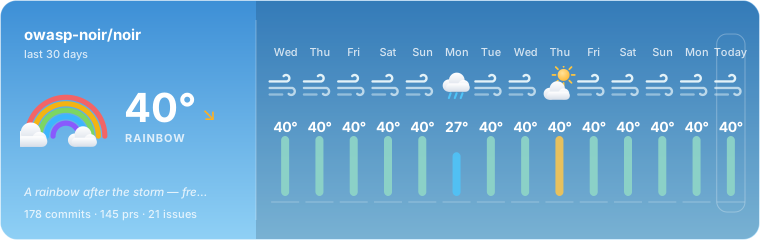
 ### 月度时间窗口 —— [`month.yml`](examples/variants/month.yml)
```
period: 1m
style: forecast
forecast:
days: 14
```
### 月度时间窗口 —— [`month.yml`](examples/variants/month.yml)
```
period: 1m
style: forecast
forecast:
days: 14
```
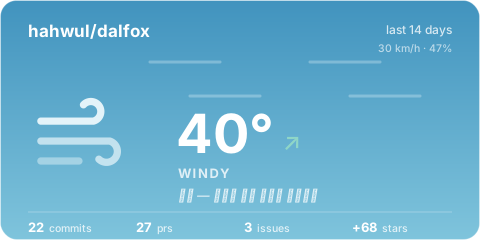
 ### 本地化短语 —— [`korean.yml`](examples/variants/korean.yml)
每种天气状况对应一条消息,支持 `{repo}` / `{commits}` / `{authors}` / `{issues}` / `{prs}` / `{stars}` 占位符。
```
messages:
windy: "강풍 — 논의는 많고 머지는 적습니다"
sunny: "쾌청 — 커밋 {commits}건이 쏟아집니다"
```
### 本地化短语 —— [`korean.yml`](examples/variants/korean.yml)
每种天气状况对应一条消息,支持 `{repo}` / `{commits}` / `{authors}` / `{issues}` / `{prs}` / `{stars}` 占位符。
```
messages:
windy: "강풍 — 논의는 많고 머지는 적습니다"
sunny: "쾌청 — 커밋 {commits}건이 쏟아집니다"
```
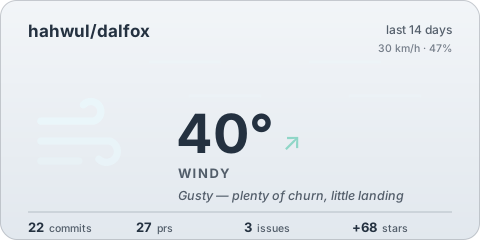
 ### 单色主题 —— [`mono.yml`](examples/variants/mono.yml)
天空褪去色彩;只有图标的点缀色保留。
```
theme:
preset: mono
```
### 单色主题 —— [`mono.yml`](examples/variants/mono.yml)
天空褪去色彩;只有图标的点缀色保留。
```
theme:
preset: mono
```
 ### 静态模式 —— [`static.yml`](examples/variants/static.yml)
无动画效果:光线不再旋转,雨滴不再落下。
```
animated: false
```
### 静态模式 —— [`static.yml`](examples/variants/static.yml)
无动画效果:光线不再旋转,雨滴不再落下。
```
animated: false
```
 ### 沉寂的仓库 —— [`quiet.yml`](examples/variants/quiet.yml)
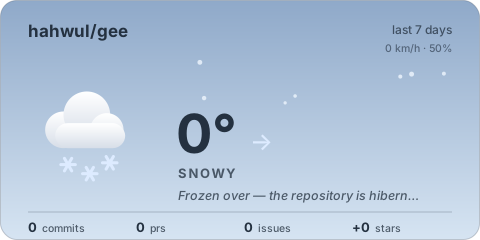
寂静也是一种天气:没有任何代码合入的仓库读取为雪,微弱的活动痕迹读取为雾。
```
period: 7d # nothing else — quiet is detected, not configured
```
### 沉寂的仓库 —— [`quiet.yml`](examples/variants/quiet.yml)
寂静也是一种天气:没有任何代码合入的仓库读取为雪,微弱的活动痕迹读取为雾。
```
period: 7d # nothing else — quiet is detected, not configured
```
 ## 天气是如何决定的
窗口期内的活动会被转换为分数(commits、PRs、issues、releases、stars、活跃作者 —— 各项均带有权重),然后进行对数缩放,映射为 0–40° 的**温度**,这样稳定推进的业余项目会显示为温暖的天气,而 monorepo 的活动量达到饱和时也不会让温度计爆表。**风力(Wind)**代表变动频率,**湿度(humidity)**代表积压压力(开启与关闭的比例),而**气压趋势(pressure trend)**则将当前窗口与前一个窗口进行比较。
天气状况(首个匹配的条件生效):
| 状况 | 触发条件 |
|---|---|
| 🌌 `aurora` | Star 激增(≥ 10/天) |
| 🌈 `rainbow` | 在繁忙的一周中发布了 release |
| ⛈ `stormy` | Issue 涌入速度超过了关闭速度 |
| ❄️ `snowy` | 毫无动静,几乎没有任何波澜(或仓库已归档) |
| 🌫 `foggy` | 微弱的活动迹象 |
| 🌧 `rainy` | 积压任务膨胀 —— 大量开启,少量关闭 |
| 💨 `windy` | 讨论多过代码 |
| ☀️ `sunny` | 炎热干燥 —— 大量代码合入,积压任务可控 |
| ⛅ `partly_cloudy` | 活跃度适中 |
| ☁️ `cloudy` | 平平无奇的中庸状态 |
每个阈值均可调整 —— 请参阅下方的 `thresholds`。
## 输入项
| 输入项 | 默认值 | 描述 |
|---|---|---|
| `config` | `.github/activity-weather.yml` | 配置文件路径(可选 —— 支持零配置运行) |
| `token` | `${{ github.token }}` | GitHub API token |
| `repo` | 当前仓库 | 用于报告的 `owner/name` |
| `period` | `7d` | 时间窗口:`1d`–`90d`,也支持 `2w`、`1m` |
| `no_commit` | `false` | 仅生成但不提交/推送 |
| `commit_message` | `chore: update activity weather` | 提交信息 |
## 输出项
| 输出项 | 示例 | 描述 |
|---|---|---|
| `condition` | `sunny` | 天气状况 |
| `temperature` | `23.5` | 活动温度,0–40 |
| `phrase` | `Clear skies — commits are pouring in` | 一行式报告 |
| `paths` | `ACTIVITY_WEATHER.svg` | 逗号分隔的已写入文件 |
| `width`, `height` | `480`, `240` | 第一个文件的像素尺寸 |
| `changed` | `true` | 是否已推送提交 |
## 配置
所有键均为可选。完整结构如下:
```
# .github/activity-weather.yml
repo: owner/name # default: the repository running the workflow
period: 7d # 1d..90d; also Nw / Nm
style: card # card | forecast | banner | terminal | minimal
output: ACTIVITY_WEATHER.svg
# Multiple files per run — mix styles and pinned theme modes:
outputs:
- path: docs/weather.svg
style: banner
- path: docs/weather-dark.svg
style: banner
mode: dark # auto | light | dark
- path: docs/badge.svg
style: minimal
animated: true # false = fully static SVG
title: "Weather in {repo}" # optional heading override
forecast:
days: 7 # 0..14 trailing days in forecast-style renders
metrics:
stars: true # false skips the stargazer fetch
releases: true # false skips the release fetch (and rainbows)
# Note: the default workflow token cannot read stargazers (the starring
# API is closed to GitHub App tokens), so stars report as 0 with a
# warning. Pass a personal access token via the `token` input to enable
# star metrics and the aurora condition.
thresholds: # the decision tree's dials (defaults shown)
sunny_temp: 25.0
storm_issues_per_day: 3.0
fog_points_per_day: 1.0
rain_humidity: 70
windy_wind: 25
aurora_stars_per_day: 10.0
rainbow_min_temp: 15.0
messages: # per-condition phrase overrides; placeholders:
sunny: "쾌청 — 커밋 {commits}건" # {repo} {commits} {authors} {issues} {prs} {stars}
theme:
preset: github # github | midnight | paper | mono
mode: auto # auto follows the viewer's color scheme
# background: "#0d1117" # page background behind the rounded card
# text_color: "#ffffff" # force the ink; default picks per condition
# dark: { background: "...", text_color: "..." }
# font_family: "Inter, sans-serif"
```
天气状况决定了天空的模样 —— 每种状况都有专属的日间/黄昏渐变色对 —— 而主题则决定了周边 UI 框架的样式。`mono` 预设会将天空替换为中性色阶。
## 本地运行
```
$ crystal build src/main.cr -o bin/activity-weather --release
$ GITHUB_TOKEN=$(gh auth token) bin/activity-weather -c examples/showcase.yml
activity-weather v0.1.0
```
除非传入 `--commit` 参数,否则在本地运行时不会进行任何提交。`just render` 会像 action 一样运行已发布的容器。
## 版本控制
请将 action 固定到某个 release 标签;日志的第一行会标明构建版本:
```
activity-weather v0.1.0
```
| 引用 | 含义 |
|---|---|
| `@v0` | 最新的 v0 版本(随着发布不断更新) |
| `@v0.1.0` | 精确锁定此版本,解析为其自身不可变的镜像 |
| `@main` | 最新代码,镜像浮动更新 |
## 开发
```
$ just build # shards install + build
$ just test # crystal spec
$ just check # format check + ameba + version check
$ just golden # re-record renderer golden files
```
渲染器的输出是确定的 —— 基于每个仓库的种子生成 —— 因此 SVG 会通过 golden file 进行逐字节的测试。
## 许可证
MIT —— 详见 [LICENSE](LICENSE)。
## 天气是如何决定的
窗口期内的活动会被转换为分数(commits、PRs、issues、releases、stars、活跃作者 —— 各项均带有权重),然后进行对数缩放,映射为 0–40° 的**温度**,这样稳定推进的业余项目会显示为温暖的天气,而 monorepo 的活动量达到饱和时也不会让温度计爆表。**风力(Wind)**代表变动频率,**湿度(humidity)**代表积压压力(开启与关闭的比例),而**气压趋势(pressure trend)**则将当前窗口与前一个窗口进行比较。
天气状况(首个匹配的条件生效):
| 状况 | 触发条件 |
|---|---|
| 🌌 `aurora` | Star 激增(≥ 10/天) |
| 🌈 `rainbow` | 在繁忙的一周中发布了 release |
| ⛈ `stormy` | Issue 涌入速度超过了关闭速度 |
| ❄️ `snowy` | 毫无动静,几乎没有任何波澜(或仓库已归档) |
| 🌫 `foggy` | 微弱的活动迹象 |
| 🌧 `rainy` | 积压任务膨胀 —— 大量开启,少量关闭 |
| 💨 `windy` | 讨论多过代码 |
| ☀️ `sunny` | 炎热干燥 —— 大量代码合入,积压任务可控 |
| ⛅ `partly_cloudy` | 活跃度适中 |
| ☁️ `cloudy` | 平平无奇的中庸状态 |
每个阈值均可调整 —— 请参阅下方的 `thresholds`。
## 输入项
| 输入项 | 默认值 | 描述 |
|---|---|---|
| `config` | `.github/activity-weather.yml` | 配置文件路径(可选 —— 支持零配置运行) |
| `token` | `${{ github.token }}` | GitHub API token |
| `repo` | 当前仓库 | 用于报告的 `owner/name` |
| `period` | `7d` | 时间窗口:`1d`–`90d`,也支持 `2w`、`1m` |
| `no_commit` | `false` | 仅生成但不提交/推送 |
| `commit_message` | `chore: update activity weather` | 提交信息 |
## 输出项
| 输出项 | 示例 | 描述 |
|---|---|---|
| `condition` | `sunny` | 天气状况 |
| `temperature` | `23.5` | 活动温度,0–40 |
| `phrase` | `Clear skies — commits are pouring in` | 一行式报告 |
| `paths` | `ACTIVITY_WEATHER.svg` | 逗号分隔的已写入文件 |
| `width`, `height` | `480`, `240` | 第一个文件的像素尺寸 |
| `changed` | `true` | 是否已推送提交 |
## 配置
所有键均为可选。完整结构如下:
```
# .github/activity-weather.yml
repo: owner/name # default: the repository running the workflow
period: 7d # 1d..90d; also Nw / Nm
style: card # card | forecast | banner | terminal | minimal
output: ACTIVITY_WEATHER.svg
# Multiple files per run — mix styles and pinned theme modes:
outputs:
- path: docs/weather.svg
style: banner
- path: docs/weather-dark.svg
style: banner
mode: dark # auto | light | dark
- path: docs/badge.svg
style: minimal
animated: true # false = fully static SVG
title: "Weather in {repo}" # optional heading override
forecast:
days: 7 # 0..14 trailing days in forecast-style renders
metrics:
stars: true # false skips the stargazer fetch
releases: true # false skips the release fetch (and rainbows)
# Note: the default workflow token cannot read stargazers (the starring
# API is closed to GitHub App tokens), so stars report as 0 with a
# warning. Pass a personal access token via the `token` input to enable
# star metrics and the aurora condition.
thresholds: # the decision tree's dials (defaults shown)
sunny_temp: 25.0
storm_issues_per_day: 3.0
fog_points_per_day: 1.0
rain_humidity: 70
windy_wind: 25
aurora_stars_per_day: 10.0
rainbow_min_temp: 15.0
messages: # per-condition phrase overrides; placeholders:
sunny: "쾌청 — 커밋 {commits}건" # {repo} {commits} {authors} {issues} {prs} {stars}
theme:
preset: github # github | midnight | paper | mono
mode: auto # auto follows the viewer's color scheme
# background: "#0d1117" # page background behind the rounded card
# text_color: "#ffffff" # force the ink; default picks per condition
# dark: { background: "...", text_color: "..." }
# font_family: "Inter, sans-serif"
```
天气状况决定了天空的模样 —— 每种状况都有专属的日间/黄昏渐变色对 —— 而主题则决定了周边 UI 框架的样式。`mono` 预设会将天空替换为中性色阶。
## 本地运行
```
$ crystal build src/main.cr -o bin/activity-weather --release
$ GITHUB_TOKEN=$(gh auth token) bin/activity-weather -c examples/showcase.yml
activity-weather v0.1.0
```
除非传入 `--commit` 参数,否则在本地运行时不会进行任何提交。`just render` 会像 action 一样运行已发布的容器。
## 版本控制
请将 action 固定到某个 release 标签;日志的第一行会标明构建版本:
```
activity-weather v0.1.0
```
| 引用 | 含义 |
|---|---|
| `@v0` | 最新的 v0 版本(随着发布不断更新) |
| `@v0.1.0` | 精确锁定此版本,解析为其自身不可变的镜像 |
| `@main` | 最新代码,镜像浮动更新 |
## 开发
```
$ just build # shards install + build
$ just test # crystal spec
$ just check # format check + ameba + version check
$ just golden # re-record renderer golden files
```
渲染器的输出是确定的 —— 基于每个仓库的种子生成 —— 因此 SVG 会通过 golden file 进行逐字节的测试。
## 许可证
MIT —— 详见 [LICENSE](LICENSE)。
### `forecast`
精简的“今日”面板,加上过往日期的逐列展示 —— 迷你图标、温度以及当日颜色的活动条。
```
style: forecast
forecast:
days: 7
```
### `banner`
README 专属头图:多层天空、漂移的云朵、基于天气的降水,以及根据你的仓库名生成种子的山丘剪影 —— 每个仓库都有独一无二的地平线。
```
style: banner
```
### `terminal`
秉承 `wttr.in` 的精神:每种天气状况的 ASCII 艺术图、荧光色调的等宽字体读数、闪烁的光标提示。如同真实终端一样始终保持暗色。
```
style: terminal
```
### `minimal`
用于行内展示的 28px 胶囊样式 —— 紧挨着标题,或放在徽标行中。
```
style: minimal
```
## 变体
### 锁定暗黑模式 —— [`dark.yml`](examples/variants/dark.yml)
适用于在 README 中通过 `#gh-light-mode-only` / `#gh-dark-mode-only` 链接来搭配展示浅色/深色图片。
```
style: banner
theme:
mode: dark
```
### 月度时间窗口 —— [`month.yml`](examples/variants/month.yml)
```
period: 1m
style: forecast
forecast:
days: 14
```
### 本地化短语 —— [`korean.yml`](examples/variants/korean.yml)
每种天气状况对应一条消息,支持 `{repo}` / `{commits}` / `{authors}` / `{issues}` / `{prs}` / `{stars}` 占位符。
```
messages:
windy: "강풍 — 논의는 많고 머지는 적습니다"
sunny: "쾌청 — 커밋 {commits}건이 쏟아집니다"
```
### 单色主题 —— [`mono.yml`](examples/variants/mono.yml)
天空褪去色彩;只有图标的点缀色保留。
```
theme:
preset: mono
```
### 静态模式 —— [`static.yml`](examples/variants/static.yml)
无动画效果:光线不再旋转,雨滴不再落下。
```
animated: false
```
### 沉寂的仓库 —— [`quiet.yml`](examples/variants/quiet.yml)
寂静也是一种天气:没有任何代码合入的仓库读取为雪,微弱的活动痕迹读取为雾。
```
period: 7d # nothing else — quiet is detected, not configured
```
## 天气是如何决定的
窗口期内的活动会被转换为分数(commits、PRs、issues、releases、stars、活跃作者 —— 各项均带有权重),然后进行对数缩放,映射为 0–40° 的**温度**,这样稳定推进的业余项目会显示为温暖的天气,而 monorepo 的活动量达到饱和时也不会让温度计爆表。**风力(Wind)**代表变动频率,**湿度(humidity)**代表积压压力(开启与关闭的比例),而**气压趋势(pressure trend)**则将当前窗口与前一个窗口进行比较。
天气状况(首个匹配的条件生效):
| 状况 | 触发条件 |
|---|---|
| 🌌 `aurora` | Star 激增(≥ 10/天) |
| 🌈 `rainbow` | 在繁忙的一周中发布了 release |
| ⛈ `stormy` | Issue 涌入速度超过了关闭速度 |
| ❄️ `snowy` | 毫无动静,几乎没有任何波澜(或仓库已归档) |
| 🌫 `foggy` | 微弱的活动迹象 |
| 🌧 `rainy` | 积压任务膨胀 —— 大量开启,少量关闭 |
| 💨 `windy` | 讨论多过代码 |
| ☀️ `sunny` | 炎热干燥 —— 大量代码合入,积压任务可控 |
| ⛅ `partly_cloudy` | 活跃度适中 |
| ☁️ `cloudy` | 平平无奇的中庸状态 |
每个阈值均可调整 —— 请参阅下方的 `thresholds`。
## 输入项
| 输入项 | 默认值 | 描述 |
|---|---|---|
| `config` | `.github/activity-weather.yml` | 配置文件路径(可选 —— 支持零配置运行) |
| `token` | `${{ github.token }}` | GitHub API token |
| `repo` | 当前仓库 | 用于报告的 `owner/name` |
| `period` | `7d` | 时间窗口:`1d`–`90d`,也支持 `2w`、`1m` |
| `no_commit` | `false` | 仅生成但不提交/推送 |
| `commit_message` | `chore: update activity weather` | 提交信息 |
## 输出项
| 输出项 | 示例 | 描述 |
|---|---|---|
| `condition` | `sunny` | 天气状况 |
| `temperature` | `23.5` | 活动温度,0–40 |
| `phrase` | `Clear skies — commits are pouring in` | 一行式报告 |
| `paths` | `ACTIVITY_WEATHER.svg` | 逗号分隔的已写入文件 |
| `width`, `height` | `480`, `240` | 第一个文件的像素尺寸 |
| `changed` | `true` | 是否已推送提交 |
## 配置
所有键均为可选。完整结构如下:
```
# .github/activity-weather.yml
repo: owner/name # default: the repository running the workflow
period: 7d # 1d..90d; also Nw / Nm
style: card # card | forecast | banner | terminal | minimal
output: ACTIVITY_WEATHER.svg
# Multiple files per run — mix styles and pinned theme modes:
outputs:
- path: docs/weather.svg
style: banner
- path: docs/weather-dark.svg
style: banner
mode: dark # auto | light | dark
- path: docs/badge.svg
style: minimal
animated: true # false = fully static SVG
title: "Weather in {repo}" # optional heading override
forecast:
days: 7 # 0..14 trailing days in forecast-style renders
metrics:
stars: true # false skips the stargazer fetch
releases: true # false skips the release fetch (and rainbows)
# Note: the default workflow token cannot read stargazers (the starring
# API is closed to GitHub App tokens), so stars report as 0 with a
# warning. Pass a personal access token via the `token` input to enable
# star metrics and the aurora condition.
thresholds: # the decision tree's dials (defaults shown)
sunny_temp: 25.0
storm_issues_per_day: 3.0
fog_points_per_day: 1.0
rain_humidity: 70
windy_wind: 25
aurora_stars_per_day: 10.0
rainbow_min_temp: 15.0
messages: # per-condition phrase overrides; placeholders:
sunny: "쾌청 — 커밋 {commits}건" # {repo} {commits} {authors} {issues} {prs} {stars}
theme:
preset: github # github | midnight | paper | mono
mode: auto # auto follows the viewer's color scheme
# background: "#0d1117" # page background behind the rounded card
# text_color: "#ffffff" # force the ink; default picks per condition
# dark: { background: "...", text_color: "..." }
# font_family: "Inter, sans-serif"
```
天气状况决定了天空的模样 —— 每种状况都有专属的日间/黄昏渐变色对 —— 而主题则决定了周边 UI 框架的样式。`mono` 预设会将天空替换为中性色阶。
## 本地运行
```
$ crystal build src/main.cr -o bin/activity-weather --release
$ GITHUB_TOKEN=$(gh auth token) bin/activity-weather -c examples/showcase.yml
activity-weather v0.1.0
```
除非传入 `--commit` 参数,否则在本地运行时不会进行任何提交。`just render` 会像 action 一样运行已发布的容器。
## 版本控制
请将 action 固定到某个 release 标签;日志的第一行会标明构建版本:
```
activity-weather v0.1.0
```
| 引用 | 含义 |
|---|---|
| `@v0` | 最新的 v0 版本(随着发布不断更新) |
| `@v0.1.0` | 精确锁定此版本,解析为其自身不可变的镜像 |
| `@main` | 最新代码,镜像浮动更新 |
## 开发
```
$ just build # shards install + build
$ just test # crystal spec
$ just check # format check + ameba + version check
$ just golden # re-record renderer golden files
```
渲染器的输出是确定的 —— 基于每个仓库的种子生成 —— 因此 SVG 会通过 golden file 进行逐字节的测试。
## 许可证
MIT —— 详见 [LICENSE](LICENSE)。标签:Crystal, GitHub Actions, README徽章, SVG生成, 开源项目可视化, 自动笔记, 请求拦截