moussa12345678/SecurAgentX
GitHub: moussa12345678/SecurAgentX
SecurAgentX 是一款具备自主推理能力的 AI 驱动渗透测试框架,通过智能化工具选择和动态技能生成来自动化完成安全评估与漏洞挖掘。
Stars: 1 | Forks: 0
# SecurAgentX

 ### 🐍 毒液主题 AI 渗透测试框架
*一个拥有真实 **3D 毒液化身**的自主 AI agent,能说话、倾听和黑客攻击。47 个工具。501 项技能。SAST 扫描器。硬核测试。*
### 🌐 在线演示: **[moussa12345678.github.io/SecurAgentX](https://moussa12345678.github.io/SecurAgentX)**
[](https://moussa12345678.github.io/SecurAgentX)
[](https://python.org)
[](LICENSE)
[](https://github.com/moussa12345678/SecurAgentX/actions)
[](https://github.com/moussa12345678/SecurAgentX/stargazers)
[](https://github.com/moussa12345678/SecurAgentX/forks)
[](https://github.com/moussa12345678/SecurAgentX/issues)
[](CONTRIBUTING.md)
[](https://modelcontextprotocol.io)
[](https://github.com/met4citizen/TalkingHead)
[](https://github.com/Tonejs/Tone.js)
### 🐍 毒液主题 AI 渗透测试框架
*一个拥有真实 **3D 毒液化身**的自主 AI agent,能说话、倾听和黑客攻击。47 个工具。501 项技能。SAST 扫描器。硬核测试。*
### 🌐 在线演示: **[moussa12345678.github.io/SecurAgentX](https://moussa12345678.github.io/SecurAgentX)**
[](https://moussa12345678.github.io/SecurAgentX)
[](https://python.org)
[](LICENSE)
[](https://github.com/moussa12345678/SecurAgentX/actions)
[](https://github.com/moussa12345678/SecurAgentX/stargazers)
[](https://github.com/moussa12345678/SecurAgentX/forks)
[](https://github.com/moussa12345678/SecurAgentX/issues)
[](CONTRIBUTING.md)
[](https://modelcontextprotocol.io)
[](https://github.com/met4citizen/TalkingHead)
[](https://github.com/Tonejs/Tone.js)
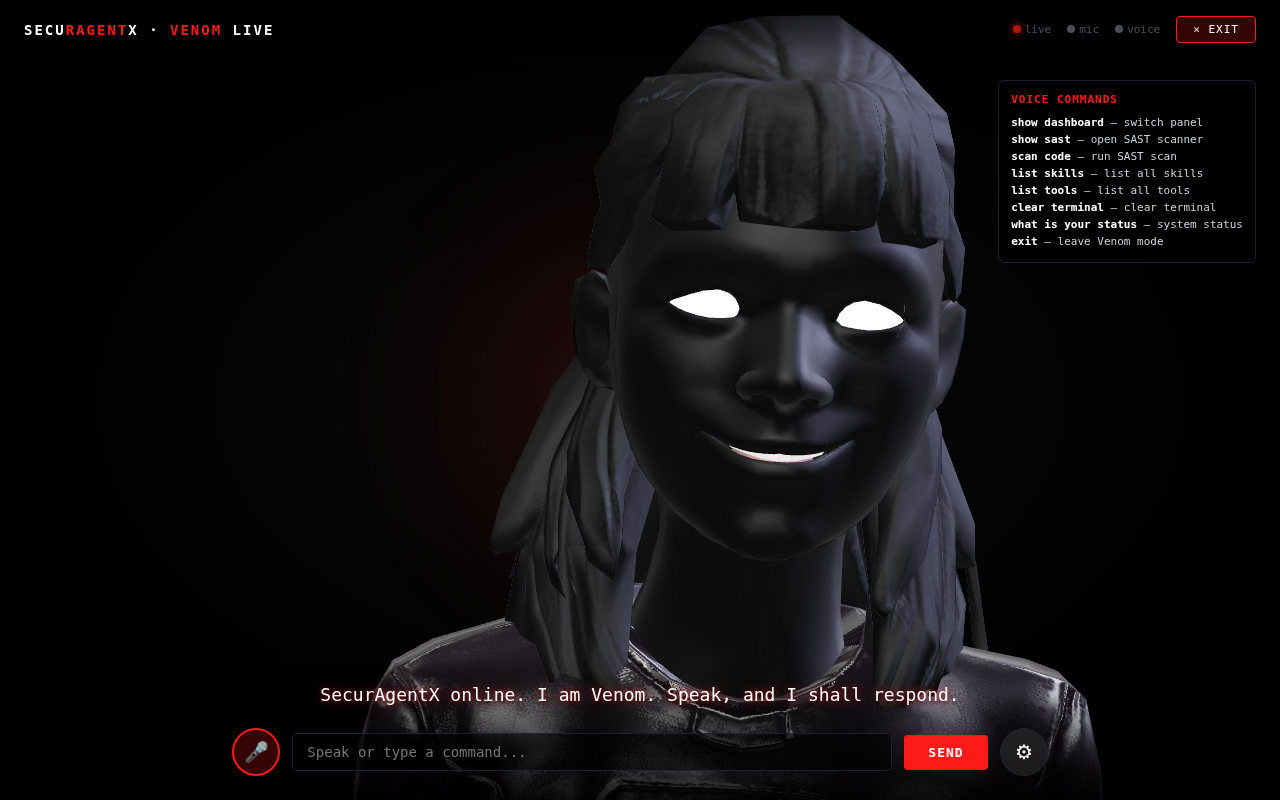 *毒液实时化身模式 — 真正的 3D、音频驱动的唇形同步、语音识别*
 ## 🐍 什么是 SecurAgentX?
SecurAgentX 是一个用于安全研究的**自主 AI agent**。它不遵循检查清单或脚本链 —— 它对目标进行**推理**,**选择**自己的工具,在受阻时进行**转换**,并在现有工具不足时**编写新工具**。
```
User: "Find vulnerabilities in example.com"
│
▼
┌──────────────────────────────────────────────────────────────┐
│ VulnAgent — Autonomous AI Agent (tool-selection autonomy, 27 tools) │
│ ├── Reasons about target and builds strategy │
│ ├── Selects tools from AVAILABLE_TOOLS (freedom to skip) │
│ ├── Creates new tools on the fly (edit_own_tool) │
│ ├── Learns from cross-session memory (ChromaDB + Skills) │
│ └── Pivots freely — no locked phases or forced ordering │
└──────────────────────────────────────────────────────────────┘
│
▼
┌──────────────────────────────────────────────────────────────┐
│ Governance Layer │
│ ├── SAFE → Execute immediately │
│ ├── PRIVILEGED → Ask user approval │
│ └── DESTRUCTIVE → Auto-deny (blocked by default) │
└──────────────────────────────────────────────────────────────┘
│
▼
Reports: findings, CVSS scores, AI analysis
```
与“在顶层叠加 AI 的脚本链”不同,SecurAgentX 赋予了 AI **真正的自主权** —— 它决定做什么、按什么顺序做,以及在路径失败时如何调整。
## 快速开始
### 前置条件
- **Python 3.10+**(已在 3.10、3.11、3.12、3.13、3.14 上测试)
- **Linux / macOS** (POSIX);Windows 用户应在 WSL2 内运行
- **可选**:Docker(用于沙盒化 shell 执行)、ChromaDB(用于向量记忆)
- AI 提供商 API key(推荐使用 Gemini;参见 `securagentx configure`)
### 安装说明
```
git clone https://github.com/moussa12345678/SecurAgentX.git
cd SecurAgentX && pip install -e .[dev]
```
### 首次运行
```
# 系统健康检查
securagentx doctor
# 配置 AI providers
securagentx configure
# 启动自主漏洞狩猎
securagentx hunt example.com
```
### 终端演示
```
┌─────────────────────────────────────────────────────────────┐
│ $ securagentx hunt example.com │
│ │
│ ╔═══════════════════════════════════════════════════════╗ │
│ ║ SECURAGENTX HUNT — Autonomous AI Vulnerability Hunter ║ │
│ ╚═══════════════════════════════════════════════════════╝ │
│ │
│ [INFO] Starting autonomous AI hunt... │
│ [INFO] Target: example.com │
│ [INFO] Cross-session memory: ACTIVE │
│ │
│ VulnAgent uses 27 available tools... │
│ ├── Reasoning: Reconnaissance needed first │
│ ├── Scanning subdomains... │
│ ├── Testing endpoints for common vulnerabilities... │
│ ├── [FOUND] SQL injection at /api/users?id= │
│ ├── Creating custom exploit script... │
│ └── Report generated with findings │
│ │
│ [OK] Hunt complete! │
│ [OK] Report: ~/.securagentx/reports/hunt_example_com.md │
└─────────────────────────────────────────────────────────────┘
```
## 功能
### 自主 AI agent 架构
原版使用 **VulnAgent** —— 这是一个在工具选择和执行流程上拥有**工具选择自主权**的自主 AI agent:
```
┌──────────────────────────────────────────────────────────────┐
│ AI REASONING CYCLE │
│ │
│ [REASON] ──► [TOOL SELECT] ──► [EXECUTE] ──► [ADAPT] │
│ │ │ │
│ └──────────────────────────────────────────┘ │
│ (continuous loop) │
└──────────────────────────────────────────────────────────────┘
```
- **无脚本链** —— AI 决定每一个步骤,没有锁定的阶段顺序
- **27 个内置工具** —— 从端口扫描到模糊测试、浏览器自动化、知识图谱、委派,外加用于运行时编写工具的 `create_tool` / `edit_own_tool`
- **`edit_own_tool`** —— AI 可以在运行时创建和修改自己的工具
- **`create_tool`** —— AI 可以动态编写任意的 Python 工具
- **`delegate`** —— AI 可以在 `--multi-agent` 模式下将子任务委派给专家 agent
- **`browser`** —— 使用 Playwright 无头 Chromium 处理 JS 渲染页面(导航、点击、输入、截图)
- **`knowledge_graph`** —— 跨会话构建和查询目标、资产、发现结果和 CVE 的图谱
- **跨会话记忆** —— 记住有效的方法(ChromaDB + Skills JSON 存储)
- **MCP 自动启动** —— MCP server 随每条命令在后台引导启动
### 记忆与技能
SecurAgentX 维护着两个持久化存储:
| 存储 | 格式 | 功能 |
|:-----:|:------:|--------------|
| **记忆** | `~/.securagentx/data/memory.json` | 跨会话保存发现、策略和目标模式 |
| **技能** | `~/.securagentx/data/skills.json` | 存储可复用的工具脚本、漏洞利用和技术 |
AI 可以执行 `memorize()`、`recall()`、`forget()`、`save_skill()`、`recall_skill()` 和 `list_skills()` —— 随着时间的推移建立起个人知识库。
### 设计上的安全性
每条命令在执行前都会经过**治理层**:
| 风险等级 | 操作 | 示例 |
|:----------:|--------|---------|
| **SAFE** | 立即执行 | `nmap`, `curl`, `python3` |
| **PRIVILEGED** | 请求用户批准 | `sudo apt install`, `pip install` |
| **DESTRUCTIVE** | 自动拒绝(默认阻止;参见治理) | `rm -rf /`, `dd`, `mkfs` |
### MCP 集成
全面支持 Model Context Protocol —— 随每条命令在后台自动启动:
```
securagentx scan example.com
│
▼
main() ──► show_banner() ──► start_mcp_if_enabled() ──► MCPServer (2 transports)
│
┌──────────┴──────────┐
▼ ▼
stdio (Claude Desktop) HTTP (port 8080)
27 dynamic tools REST API
```
通过以下方式配置 MCP server:
```
# 通过 TUI (Ctrl+, → MCP Servers)
# 或直接编辑 mcp.json
```
包含的默认 MCP server:
- `sequential-thinking` —— 结构化问题解决
- `chain-of-recursive-thoughts` —— 深度递归分析
- `mcp-structured-thinking` —— 逐步规划
- `memory` —— 跨会话记忆
## SecurAgentX 的新功能(对比上游 PentAGI/Elengenix)
SecurAgentX 构建在原始 Elengenix/PentAGI 基础之上,并进行了重大增强:
### 🆕 新功能
| 功能 | 描述 |
|---|---|
| **47 个安全工具** | 17 个原始工具 + 30 个新 CLI 工具(nmap, sqlmap, nikto, nuclei, ffuf, gobuster 等) |
| **多 Agent 模式** | `--multi-agent` 标志激活带有专家 agent(Generator, Refiner, Reporter, Coder, Pentester, Searcher, Installer)的 FlowManager + Docker 沙盒 |
| **YOLO 模式** | `--yolo` 标志禁用所有 AI 脚本安全扫描 —— AI 可以运行任何代码 |
| **狩猎规划** | 每次扫描前加载 5 项强制性预狩猎技能(红队、黑客工作流、漏洞赏金、OWASP Top 10、渗透测试检查清单) |
| **500+ 技能库** | 涵盖 10 个领域的 501 项 JSON 技能(recon、web、network、cloud、mobile、crypto、exploit、post-exploit、reporting、auth、API) |
| **LLM 适配器** | `UniversalAIClientAdapter` 将同步 `.chat()` 桥接到异步 `.call()` Protocol |
| **429 重试/退避** | 20 次尝试 × 60 秒等待 —— 在速率限制下耐心重试 |
| **范围咨询** | 非阻塞性范围检查(带警告继续,不阻止 IP) |
| **快速端口扫描** | 基于 Socket 的端口扫描(约 50 秒内扫描 25 个端口,使用 omni_scan 时曾需 5 分钟以上) |
| **REST API + GraphQL** | 带有速率限制的 FastAPI server(5次/分钟登录,10次/分钟 flows) |
| **可观测性** | OpenTelemetry + Langfuse 追踪自动设置 |
| **知识图谱** | 使用 NetworkX + SQLite 构建跨会话的目标/资产/CVE 图谱 |
| **浏览器自动化** | 使用 Playwright 无头 Chromium 处理 JS 渲染页面 |
| **Docker 沙盒** | 用于特权操作的隔离执行环境 |
| **max_steps=100** | 4 倍深度的扫描(上游版本中为 25) |
### 🔒 安全加固
| 修复 | 描述 |
|---|---|
| **路径遍历防护** | Docker 文件操作拒绝 `..` 路径 |
| **SSRF 防护** | Scheme 白名单 + IPv6 映射 IPv4 解包 |
| **包验证** | 包管理器名称的正则表达式白名单 |
| **速率限制** | API endpoint 上的内存令牌桶 |
| **Sudo 密码安全** | 密码通过子进程标准输入传递,绝不出现在命令字符串中 |
| **自动批准 TTL** | 治理自动批准的 5 分钟过期时间 |
### 📊 SAST 清洁
| 工具 | 结果 |
|---|---|
| ruff F-rules | ✅ 0 个错误 |
| bandit HIGH | ✅ 0 |
| pylint E-errors | ✅ 0 |
| vulture ≥80% | ✅ 0 |
| detect-secrets | ✅ 0 个真实机密 |
| CI | ✅ 4/4 绿灯(Python 3.11/3.12/3.13) |
## 仪表盘 TUI(Web 界面)
SecurAgentX 包含一个带有终端风格 UI 的完整单页 Web 仪表盘。在任何浏览器中打开 `dashboard/index.html` —— 无需服务器。
### 功能
| 面板 | 描述 |
|---|---|
| **📊 仪表盘** | 统计概览(27 个 AI 工具、47 个注册表工具、16 个可用、技能计数),带有模式/YOLO 切换的狩猎启动器,快捷操作按钮 |
| **🤖 AI 提供商** | 在 OpenRouter, OpenAI, Anthropic, Google Gemini, Groq, Ollama 之间切换 —— 带有模型选择和 API key 输入。更改将持久化到 localStorage。 |
| **⚡ 技能管理器** | 使用内置 JavaScript 代码编辑器添加/编辑/删除自定义技能。查看 5 项强制性预狩猎技能 + 所有自定义技能。 |
| **🔧 工具 (47)** | 浏览所有 27 个 AI 工具和 47 个注册表工具,带有可用性状态和缺失工具的 `apt install` 命令。 |
| **⚙️ 配置编辑器** | 用于完整配置文件的实时 JSON 编辑器 + 快速设置滑块(max_steps, timeout, max_output_chars)。 |
| **🎯 范围管理器** | 添加/移除范围域名。显示仅提供建议的警告(非阻塞性范围强制执行)。 |
| **💻 终端** | 带有 12 个命令的交互式终端提示符:`help`, `config show/set`, `provider set/list`, `skills list/add`, `scope add/list`, `tools list`, `hunt`, `mode`, `clear`。 |
| **💬 AI 聊天** | 高级聊天 UI,带有头像、时间戳、输入指示器、快速建议标签、智能响应(SQLi/OWASP/multi-agent/port_scan)以及聊天记录持久化。 |
| **🔍 狩猎控制** | 启动/停止狩猎,带有实时进度条、步骤日志、模式选择器(单/多)、YOLO 切换和 max_steps 控制。 |
| **🧠 记忆与知识图谱** | 保存/查看/删除跨会话记忆。添加/移除知识图谱节点。所有数据持久化到 localStorage。 |
### 设计
- 深色终端主题 (#0a0e14) 搭配等宽字体
- 绿/蓝/红/黄强调色
- 侧边栏导航 + 顶部状态栏
- 所有数据持久化到 localStorage(页面重新加载后依然存在)
- 零控制台错误(已通过 Playwright 测试)
- 100% 客户端 —— 无服务器,无依赖
### 毒液实时化身(全屏语音 + 面部)
| 功能 | 描述 |
|---|---|
| **毒液面部** | 完整的 SVG 毒液设计:黑色共生体头部、巨大波浪状白眼(McFarlane 风格)、22 颗锯齿状牙齿、长长的红舌头 |
| **全屏模式** | 激活时,仪表盘隐藏,全屏黑色覆盖层出现,毒液面部居中 |
| **语音识别** | 全双工 Web Speech API (`continuous: true, interimResults: true`) |
| **毒液语音** | SpeechSynthesis,pitch=0.1,rate=0.85,自动选择深沉的男性声音 |
| **唇形同步** | 通过 `onboundary` 事件交换嘴型 + 时的随机嘴型变形 |
| **空闲动画** | 呼吸(头部缩放)、舌头抽打(随机)、眨眼(3.5 秒间隔) |
| **语音指令** | “change provider to X”、“set multi-agent mode”、“toggle YOLO”、“hunt target.com”、“scan code”、“list skills”、“list tools”、“exit” |
| **智能响应** | 上下文相关的毒液风格响应(“We are Venom. We are SecurAgentX.”) |
| **文本输入** | 为没有麦克风支持的浏览器提供始终可见的文本输入 |
| **实时转录** | 临时结果(黄色)+ 最终结果(绿色) |
| **SAST 自动扫描** | 添加技能时,代码会被自动扫描,并通过 Toast 显示警告 |
### SAST 代码扫描器(基于浏览器)
| 工具 | 模拟规则 |
|---|---|
| **semgrep** | eval(), Function(), innerHTML, document.write 模式 |
| **bandit** | child_process 导入、命令注入模式 |
| **ruff** | 带有字符串的 setTimeout、console.log (T201) |
| **pylint** | 空的 catch 块 (W0702) |
| **mypy + pyright** | 缺少类型注解 |
| **vulture** | 未使用的变量检测 |
| **radon** | 圈复杂度分析 |
| **detect-secrets** | 硬编码的 API key、密码、token |
| **pip-audit** | 易受攻击的依赖模式 |
功能:
- 一次扫描所有技能或扫描单个代码片段
- 颜色编码的结果:红色(错误)、黄色(警告)、蓝色(信息)、绿色(清洁)
- 对技能代码进行自动扫描,带有详细的发现结果(工具名称、行号、消息)
- 汇总统计:错误/警告/信息计数
### 用法
```
# 在浏览器中打开
open dashboard/index.html # macOS
xdg-open dashboard/index.html # Linux
start dashboard/index.html # Windows
```
## CLI 命令
### 核心
```
securagentx hunt
## 🐍 什么是 SecurAgentX?
SecurAgentX 是一个用于安全研究的**自主 AI agent**。它不遵循检查清单或脚本链 —— 它对目标进行**推理**,**选择**自己的工具,在受阻时进行**转换**,并在现有工具不足时**编写新工具**。
```
User: "Find vulnerabilities in example.com"
│
▼
┌──────────────────────────────────────────────────────────────┐
│ VulnAgent — Autonomous AI Agent (tool-selection autonomy, 27 tools) │
│ ├── Reasons about target and builds strategy │
│ ├── Selects tools from AVAILABLE_TOOLS (freedom to skip) │
│ ├── Creates new tools on the fly (edit_own_tool) │
│ ├── Learns from cross-session memory (ChromaDB + Skills) │
│ └── Pivots freely — no locked phases or forced ordering │
└──────────────────────────────────────────────────────────────┘
│
▼
┌──────────────────────────────────────────────────────────────┐
│ Governance Layer │
│ ├── SAFE → Execute immediately │
│ ├── PRIVILEGED → Ask user approval │
│ └── DESTRUCTIVE → Auto-deny (blocked by default) │
└──────────────────────────────────────────────────────────────┘
│
▼
Reports: findings, CVSS scores, AI analysis
```
与“在顶层叠加 AI 的脚本链”不同,SecurAgentX 赋予了 AI **真正的自主权** —— 它决定做什么、按什么顺序做,以及在路径失败时如何调整。
## 快速开始
### 前置条件
- **Python 3.10+**(已在 3.10、3.11、3.12、3.13、3.14 上测试)
- **Linux / macOS** (POSIX);Windows 用户应在 WSL2 内运行
- **可选**:Docker(用于沙盒化 shell 执行)、ChromaDB(用于向量记忆)
- AI 提供商 API key(推荐使用 Gemini;参见 `securagentx configure`)
### 安装说明
```
git clone https://github.com/moussa12345678/SecurAgentX.git
cd SecurAgentX && pip install -e .[dev]
```
### 首次运行
```
# 系统健康检查
securagentx doctor
# 配置 AI providers
securagentx configure
# 启动自主漏洞狩猎
securagentx hunt example.com
```
### 终端演示
```
┌─────────────────────────────────────────────────────────────┐
│ $ securagentx hunt example.com │
│ │
│ ╔═══════════════════════════════════════════════════════╗ │
│ ║ SECURAGENTX HUNT — Autonomous AI Vulnerability Hunter ║ │
│ ╚═══════════════════════════════════════════════════════╝ │
│ │
│ [INFO] Starting autonomous AI hunt... │
│ [INFO] Target: example.com │
│ [INFO] Cross-session memory: ACTIVE │
│ │
│ VulnAgent uses 27 available tools... │
│ ├── Reasoning: Reconnaissance needed first │
│ ├── Scanning subdomains... │
│ ├── Testing endpoints for common vulnerabilities... │
│ ├── [FOUND] SQL injection at /api/users?id= │
│ ├── Creating custom exploit script... │
│ └── Report generated with findings │
│ │
│ [OK] Hunt complete! │
│ [OK] Report: ~/.securagentx/reports/hunt_example_com.md │
└─────────────────────────────────────────────────────────────┘
```
## 功能
### 自主 AI agent 架构
原版使用 **VulnAgent** —— 这是一个在工具选择和执行流程上拥有**工具选择自主权**的自主 AI agent:
```
┌──────────────────────────────────────────────────────────────┐
│ AI REASONING CYCLE │
│ │
│ [REASON] ──► [TOOL SELECT] ──► [EXECUTE] ──► [ADAPT] │
│ │ │ │
│ └──────────────────────────────────────────┘ │
│ (continuous loop) │
└──────────────────────────────────────────────────────────────┘
```
- **无脚本链** —— AI 决定每一个步骤,没有锁定的阶段顺序
- **27 个内置工具** —— 从端口扫描到模糊测试、浏览器自动化、知识图谱、委派,外加用于运行时编写工具的 `create_tool` / `edit_own_tool`
- **`edit_own_tool`** —— AI 可以在运行时创建和修改自己的工具
- **`create_tool`** —— AI 可以动态编写任意的 Python 工具
- **`delegate`** —— AI 可以在 `--multi-agent` 模式下将子任务委派给专家 agent
- **`browser`** —— 使用 Playwright 无头 Chromium 处理 JS 渲染页面(导航、点击、输入、截图)
- **`knowledge_graph`** —— 跨会话构建和查询目标、资产、发现结果和 CVE 的图谱
- **跨会话记忆** —— 记住有效的方法(ChromaDB + Skills JSON 存储)
- **MCP 自动启动** —— MCP server 随每条命令在后台引导启动
### 记忆与技能
SecurAgentX 维护着两个持久化存储:
| 存储 | 格式 | 功能 |
|:-----:|:------:|--------------|
| **记忆** | `~/.securagentx/data/memory.json` | 跨会话保存发现、策略和目标模式 |
| **技能** | `~/.securagentx/data/skills.json` | 存储可复用的工具脚本、漏洞利用和技术 |
AI 可以执行 `memorize()`、`recall()`、`forget()`、`save_skill()`、`recall_skill()` 和 `list_skills()` —— 随着时间的推移建立起个人知识库。
### 设计上的安全性
每条命令在执行前都会经过**治理层**:
| 风险等级 | 操作 | 示例 |
|:----------:|--------|---------|
| **SAFE** | 立即执行 | `nmap`, `curl`, `python3` |
| **PRIVILEGED** | 请求用户批准 | `sudo apt install`, `pip install` |
| **DESTRUCTIVE** | 自动拒绝(默认阻止;参见治理) | `rm -rf /`, `dd`, `mkfs` |
### MCP 集成
全面支持 Model Context Protocol —— 随每条命令在后台自动启动:
```
securagentx scan example.com
│
▼
main() ──► show_banner() ──► start_mcp_if_enabled() ──► MCPServer (2 transports)
│
┌──────────┴──────────┐
▼ ▼
stdio (Claude Desktop) HTTP (port 8080)
27 dynamic tools REST API
```
通过以下方式配置 MCP server:
```
# 通过 TUI (Ctrl+, → MCP Servers)
# 或直接编辑 mcp.json
```
包含的默认 MCP server:
- `sequential-thinking` —— 结构化问题解决
- `chain-of-recursive-thoughts` —— 深度递归分析
- `mcp-structured-thinking` —— 逐步规划
- `memory` —— 跨会话记忆
## SecurAgentX 的新功能(对比上游 PentAGI/Elengenix)
SecurAgentX 构建在原始 Elengenix/PentAGI 基础之上,并进行了重大增强:
### 🆕 新功能
| 功能 | 描述 |
|---|---|
| **47 个安全工具** | 17 个原始工具 + 30 个新 CLI 工具(nmap, sqlmap, nikto, nuclei, ffuf, gobuster 等) |
| **多 Agent 模式** | `--multi-agent` 标志激活带有专家 agent(Generator, Refiner, Reporter, Coder, Pentester, Searcher, Installer)的 FlowManager + Docker 沙盒 |
| **YOLO 模式** | `--yolo` 标志禁用所有 AI 脚本安全扫描 —— AI 可以运行任何代码 |
| **狩猎规划** | 每次扫描前加载 5 项强制性预狩猎技能(红队、黑客工作流、漏洞赏金、OWASP Top 10、渗透测试检查清单) |
| **500+ 技能库** | 涵盖 10 个领域的 501 项 JSON 技能(recon、web、network、cloud、mobile、crypto、exploit、post-exploit、reporting、auth、API) |
| **LLM 适配器** | `UniversalAIClientAdapter` 将同步 `.chat()` 桥接到异步 `.call()` Protocol |
| **429 重试/退避** | 20 次尝试 × 60 秒等待 —— 在速率限制下耐心重试 |
| **范围咨询** | 非阻塞性范围检查(带警告继续,不阻止 IP) |
| **快速端口扫描** | 基于 Socket 的端口扫描(约 50 秒内扫描 25 个端口,使用 omni_scan 时曾需 5 分钟以上) |
| **REST API + GraphQL** | 带有速率限制的 FastAPI server(5次/分钟登录,10次/分钟 flows) |
| **可观测性** | OpenTelemetry + Langfuse 追踪自动设置 |
| **知识图谱** | 使用 NetworkX + SQLite 构建跨会话的目标/资产/CVE 图谱 |
| **浏览器自动化** | 使用 Playwright 无头 Chromium 处理 JS 渲染页面 |
| **Docker 沙盒** | 用于特权操作的隔离执行环境 |
| **max_steps=100** | 4 倍深度的扫描(上游版本中为 25) |
### 🔒 安全加固
| 修复 | 描述 |
|---|---|
| **路径遍历防护** | Docker 文件操作拒绝 `..` 路径 |
| **SSRF 防护** | Scheme 白名单 + IPv6 映射 IPv4 解包 |
| **包验证** | 包管理器名称的正则表达式白名单 |
| **速率限制** | API endpoint 上的内存令牌桶 |
| **Sudo 密码安全** | 密码通过子进程标准输入传递,绝不出现在命令字符串中 |
| **自动批准 TTL** | 治理自动批准的 5 分钟过期时间 |
### 📊 SAST 清洁
| 工具 | 结果 |
|---|---|
| ruff F-rules | ✅ 0 个错误 |
| bandit HIGH | ✅ 0 |
| pylint E-errors | ✅ 0 |
| vulture ≥80% | ✅ 0 |
| detect-secrets | ✅ 0 个真实机密 |
| CI | ✅ 4/4 绿灯(Python 3.11/3.12/3.13) |
## 仪表盘 TUI(Web 界面)
SecurAgentX 包含一个带有终端风格 UI 的完整单页 Web 仪表盘。在任何浏览器中打开 `dashboard/index.html` —— 无需服务器。
### 功能
| 面板 | 描述 |
|---|---|
| **📊 仪表盘** | 统计概览(27 个 AI 工具、47 个注册表工具、16 个可用、技能计数),带有模式/YOLO 切换的狩猎启动器,快捷操作按钮 |
| **🤖 AI 提供商** | 在 OpenRouter, OpenAI, Anthropic, Google Gemini, Groq, Ollama 之间切换 —— 带有模型选择和 API key 输入。更改将持久化到 localStorage。 |
| **⚡ 技能管理器** | 使用内置 JavaScript 代码编辑器添加/编辑/删除自定义技能。查看 5 项强制性预狩猎技能 + 所有自定义技能。 |
| **🔧 工具 (47)** | 浏览所有 27 个 AI 工具和 47 个注册表工具,带有可用性状态和缺失工具的 `apt install` 命令。 |
| **⚙️ 配置编辑器** | 用于完整配置文件的实时 JSON 编辑器 + 快速设置滑块(max_steps, timeout, max_output_chars)。 |
| **🎯 范围管理器** | 添加/移除范围域名。显示仅提供建议的警告(非阻塞性范围强制执行)。 |
| **💻 终端** | 带有 12 个命令的交互式终端提示符:`help`, `config show/set`, `provider set/list`, `skills list/add`, `scope add/list`, `tools list`, `hunt`, `mode`, `clear`。 |
| **💬 AI 聊天** | 高级聊天 UI,带有头像、时间戳、输入指示器、快速建议标签、智能响应(SQLi/OWASP/multi-agent/port_scan)以及聊天记录持久化。 |
| **🔍 狩猎控制** | 启动/停止狩猎,带有实时进度条、步骤日志、模式选择器(单/多)、YOLO 切换和 max_steps 控制。 |
| **🧠 记忆与知识图谱** | 保存/查看/删除跨会话记忆。添加/移除知识图谱节点。所有数据持久化到 localStorage。 |
### 设计
- 深色终端主题 (#0a0e14) 搭配等宽字体
- 绿/蓝/红/黄强调色
- 侧边栏导航 + 顶部状态栏
- 所有数据持久化到 localStorage(页面重新加载后依然存在)
- 零控制台错误(已通过 Playwright 测试)
- 100% 客户端 —— 无服务器,无依赖
### 毒液实时化身(全屏语音 + 面部)
| 功能 | 描述 |
|---|---|
| **毒液面部** | 完整的 SVG 毒液设计:黑色共生体头部、巨大波浪状白眼(McFarlane 风格)、22 颗锯齿状牙齿、长长的红舌头 |
| **全屏模式** | 激活时,仪表盘隐藏,全屏黑色覆盖层出现,毒液面部居中 |
| **语音识别** | 全双工 Web Speech API (`continuous: true, interimResults: true`) |
| **毒液语音** | SpeechSynthesis,pitch=0.1,rate=0.85,自动选择深沉的男性声音 |
| **唇形同步** | 通过 `onboundary` 事件交换嘴型 + 时的随机嘴型变形 |
| **空闲动画** | 呼吸(头部缩放)、舌头抽打(随机)、眨眼(3.5 秒间隔) |
| **语音指令** | “change provider to X”、“set multi-agent mode”、“toggle YOLO”、“hunt target.com”、“scan code”、“list skills”、“list tools”、“exit” |
| **智能响应** | 上下文相关的毒液风格响应(“We are Venom. We are SecurAgentX.”) |
| **文本输入** | 为没有麦克风支持的浏览器提供始终可见的文本输入 |
| **实时转录** | 临时结果(黄色)+ 最终结果(绿色) |
| **SAST 自动扫描** | 添加技能时,代码会被自动扫描,并通过 Toast 显示警告 |
### SAST 代码扫描器(基于浏览器)
| 工具 | 模拟规则 |
|---|---|
| **semgrep** | eval(), Function(), innerHTML, document.write 模式 |
| **bandit** | child_process 导入、命令注入模式 |
| **ruff** | 带有字符串的 setTimeout、console.log (T201) |
| **pylint** | 空的 catch 块 (W0702) |
| **mypy + pyright** | 缺少类型注解 |
| **vulture** | 未使用的变量检测 |
| **radon** | 圈复杂度分析 |
| **detect-secrets** | 硬编码的 API key、密码、token |
| **pip-audit** | 易受攻击的依赖模式 |
功能:
- 一次扫描所有技能或扫描单个代码片段
- 颜色编码的结果:红色(错误)、黄色(警告)、蓝色(信息)、绿色(清洁)
- 对技能代码进行自动扫描,带有详细的发现结果(工具名称、行号、消息)
- 汇总统计:错误/警告/信息计数
### 用法
```
# 在浏览器中打开
open dashboard/index.html # macOS
xdg-open dashboard/index.html # Linux
start dashboard/index.html # Windows
```
## CLI 命令
### 核心
```
securagentx hunt # Autonomous AI vulnerability hunt (VulnAgent)
securagentx scan # AI-driven scan (equivalent to hunt)
securagentx vuln-hunt # Full autonomous vulnerability hunting
securagentx hunt --multi-agent # Multi-agent FlowManager mode (specialists + Docker sandbox)
securagentx hunt --yolo # YOLO mode: disable all safety scanning
securagentx tui # Textual TUI (chat interface)
securagentx configure # Setup wizard
securagentx doctor # System health check
securagentx api # Start REST API + GraphQL server (FastAPI)
```
**所有 scan/hunt 命令现在都使用 VulnAgent** —— 拥有 27 个工具、记忆和工具选择自主权的同一个 AI agent。没有脚本链,没有强制的阶段。
将 `--multi-agent` 传递给 `hunt` 或 `vuln-hunt`,以从单 agent 模式切换到多 agent `FlowManager`(使用 `securagentx/flows/` + `ConcreteFlowProvider` + 专家 agent + Docker 沙盒)。
传递 `--yolo` 以禁用所有 AI 脚本安全扫描。然后 AI 可以不受限制地运行任何 Python 代码。**仅在获得明确的书面授权时使用此功能!**
### 多目标
```
securagentx hunt "example.com, api.example.com"
```
### 快捷方式
| 快捷方式 | 展开为 | 描述 |
|:--------:|------------|-------------|
| `bb` | `scan --phase bola` | BOLA 测试 *(已弃用 —— 重定向至 VulnAgent)* |
| `check` | `scan --phase recon` | 快速侦察 *(已弃用 —— 重定向至 VulnAgent)* |
| `test` | `scan --phase waf` | WAF 检测 *(已弃用 —— 重定向至 VulnAgent)* |
## 架构
```
┌──────────────────────────────────────────────────────────────┐
│ main.py │
│ (CLI Entry Point) │
│ ┌─ MCP auto-start (every boot) │
└──────────────────────────┬───────────────────────────────────┘
│
┌────────────────┴────────────────┐
▼ ▼
┌─────────────────────┐ ┌─────────────────────────┐
│ VulnAgent │ │ MCP Server │
│ (Autonomous AI Agent) │ │ (Background daemon) │
│ │ │ │
│ AVAILABLE_TOOLS │ │ stdio transport │
│ ├─ 14 builtin │ │ HTTP transport │
│ ├─ browser │ │ 27 dynamic tools │
│ ├─ delegate │ │ REST API + GraphQL │
│ ├─ knowledge_graph│ └──────────────────────────┘
│ ├─ 4 memory │
│ ├─ 4 skill │
│ ├─ create_tool │
│ └─ edit_own_tool │
└──────────┬───────────┘
│
▼
┌─────────────────────┐
│ AgentMemory │
│ ├─ ChromaDB (FTS5) │
│ └─ JSON stores │
└─────────────────────┘
```
旧的脚本驱动 pipeline(`pipeline/phase_registry`, `pipeline/unified`)已被移除。为了向后兼容,保留了传统的 `core/brain.py` shim —— 新代码应改用 `securagentx/brain.py`。
## 配置
### MCP Server (mcp.json)
```
{
"mcpServers": {
"sequential-thinking": {
"type": "local",
"command": ["npx", "-y", "@modelcontextprotocol/server-sequential-thinking"]
},
"chain-of-recursive-thoughts": {
"type": "local",
"command": ["npx", "-y", "recursive-thinking-mcp"]
},
"mcp-structured-thinking": {
"type": "local",
"command": ["npx", "-y", "structured-thinking"]
},
"memory": {
"type": "local",
"command": ["npx", "-y", "@modelcontextprotocol/server-memory"]
}
}
}
```
首次运行时从 `mcp.json.example` 自动复制。用户配置覆盖项目配置。
### AI 提供商
支持:OpenAI、Anthropic、Google Gemini、Groq、DeepSeek、Ollama(本地)等。
```
securagentx configure # Interactive setup wizard
```
### 环境变量
SecurAgentX 从 `SECURAGENTX_*` 环境变量中读取运行时行为(在 `.env` 中设置它们):
| 变量 | 用途 | 默认值 |
|:---------|:--------|:--------|
| `SECURAGENTX_SCOPE` | 逗号分隔的允许目标域名 | (无 —— 改用 scope.txt) |
| `SECURAGENTX_PLUGIN_PATH` | 额外的插件发现路径 | (无) |
| `SECURAGENTX_DEFAULT_TARGET` | CLI 中未指定目标时使用的默认目标 | (无) |
| `SECURAGENTX_RATE_LIMIT` | 每分钟最大出站请求数 | `40` |
| `SECURAGENTX_SMART_SCAN` | 设置为 `1` 以在机器人集成中启用智能扫描优化 | `0` |
| `SECURAGENTX_DEMO` | 设置为任何非空值以启用 TUI 演示模式 | (未设置) |
加上各个提供商的 API key 变量:`GEMINI_API_KEY`、`OPENAI_API_KEY`、`ANTHROPIC_API_KEY`、`GROQ_API_KEY`、`TELEGRAM_BOT_TOKEN`、`TELEGRAM_CHAT_ID`。切勿提交 `.env` —— 它已被 gitignored。
### 配置文件 (config.yaml)
SecurAgentX 从 `~/.securagentx/config.yaml` 加载 YAML 配置(首次运行时从 `config.yaml.example` 自动创建)。它包含 agent 限制、AI 提供商选择、Telegram 桥接设置,以及可选的 TeamAegis 3-AI 协作块(strategist / specialist / critic)。
## 测试
```
# 完整测试套件 (2600+ 个测试)
python3 -m pytest tests/ -v
# 稳定套件 (无需网络)
python3 -m pytest tests/test_securagentx_paths.py tests/test_securagentx_scope.py tests/test_securagentx_governance.py -v
```
**2600+ 项测试** 涵盖:治理、shell 执行、目标验证、MCP 协议、VulnAgent 工具(包括 `browser`、`knowledge_graph`、`delegate`)、agent 记忆、agent 技能、SecurAgentX 路径/范围/治理层、REST API、GraphQL、flows、Docker 沙盒、可观测性等。
## 项目结构
```
SecurAgentX/
├── main.py # CLI entry point
├── commands/ # CLI command handlers
│ ├── scan.py # AI-driven scan (VulnAgent)
│ └── mcp_runner.py # MCP auto-start helper
├── securagentx/ # Canonical module location
│ ├── agent/ # Autonomous AI agent (VulnAgent)
│ │ ├── __init__.py # Exports VulnAgent
│ │ ├── vuln_agent.py # Main agent + 27 tools
│ │ ├── agent_memory.py # JSON-backed memory store
│ │ ├── agent_skills.py # JSON-backed skill store
│ │ └── memory.py # ChromaDB + FTS5 memory
│ ├── agents/ # Multi-agent specialists + PrimaryAgent (used with --multi-agent)
│ ├── flows/ # FlowManager + ConcreteFlowProvider (multi-agent orchestration)
│ ├── api/ # REST API (FastAPI) — `securagentx api`
│ ├── graphql/ # GraphQL schema (mounted at /graphql)
│ ├── observability/ # OpenTelemetry + Langfuse tracing (auto-setup in main.py)
│ ├── docker/ # Docker sandbox for privileged agent shell execution
│ ├── browser/ # Playwright headless Chromium tool
│ ├── knowledge_graph/ # Cross-session target/asset/CVE graph
│ ├── scope.py # Target validation & scope
│ ├── paths.py # Path resolution (SECURAGENTX_HOME / SECURAGENTX_DIRS)
│ ├── governance.py # Governance layer
│ ├── scanning/ # Scanning subsystems
│ ├── brain.py # Hybrid brain (deprecated)
│ └── loop.py # Main agent loop
├── mcp/ # MCP integration
│ ├── server.py # MCP server (27 dynamic tools)
│ ├── client.py # MCP client
│ ├── config.py # MCP configuration
│ └── manager.py # MCP lifecycle
├── tools/ # 100+ tool modules
├── cli/ # UI components + TUI (textual.py)
├── core/ # Legacy (deprecated stubs)
├── pipeline/ # LEGACY: only scope.py remains
├── tests/ # 2600+ tests (+ brutal/ integration suite)
```
## 贡献指南
请参阅 [CONTRIBUTING.md](CONTRIBUTING.md) 获取指南。
**核心规则:**
- 4 个空格缩进
- 处处使用类型提示
- shell 命令只能在治理层之后执行
- API key 只能放在 `.env` 中
- AI agent 获得真正的自主权 —— 没有强制的工具排序
**工作流:**
1. Fork `moussa12345678/SecurAgentX` 并创建一个功能分支。
2. 运行 `securagentx doctor` 以确认你的开发环境。
3. 在 `tests/` 下添加或更新测试 —— SecurAgentX 要求覆盖新的行为。
4. 推送前运行 `python3 -m pytest tests/ -v`;所有收集到的测试必须通过(2600+)。
5. 向 `main` 发起 Pull Request;CI 将运行完整的 SecurAgentX 测试矩阵。
有关负责任的披露,请参阅 [SECURITY.md](SECURITY.md);有关社区标准,请参阅 [CODE_OF_CONDUCT.md](CODE_OF_CONDUCT.md)。
## 致谢
SecurAgentX 是 **Elengenix** (https://github.com/Ashveil1/Elengenix) 的衍生作品,由 **Ashveil1** 原创开发,原许可证为 GPL-3.0。我们对原始工作表示衷心的感谢。
SecurAgentX 建立在更广泛的安全研究社区的理念和工具之上:
- **Model Context Protocol** 规范 —— `securagentx` 在每次运行时都会附带一个自动启动的 MCP server。
- **ChromaDB** 提供支持 `securagentx` 召回的跨会话向量记忆。
- **Textual** 提供 `securagentx tui` 聊天界面。
- 开源安全研究社区提供的灵感和工具
- 每一位针对 `moussa12345678/SecurAgentX` 提交 issue 或 PR 的贡献者。
想在这里看到你的名字?发送一个 PR —— 参见上面的[贡献指南](#contributing)。
## 许可证
GPL-3.0 —— 参见 [LICENSE](LICENSE)
### 🐍 毒液主题 AI 渗透测试框架
*一个拥有真实 **3D 毒液化身**的自主 AI agent,能说话、倾听和黑客攻击。47 个工具。501 项技能。SAST 扫描器。硬核测试。*
### 🌐 在线演示: **[moussa12345678.github.io/SecurAgentX](https://moussa12345678.github.io/SecurAgentX)**
[](https://moussa12345678.github.io/SecurAgentX)
[](https://python.org)
[](LICENSE)
[](https://github.com/moussa12345678/SecurAgentX/actions)
[](https://github.com/moussa12345678/SecurAgentX/stargazers)
[](https://github.com/moussa12345678/SecurAgentX/forks)
[](https://github.com/moussa12345678/SecurAgentX/issues)
[](CONTRIBUTING.md)
[](https://modelcontextprotocol.io)
[](https://github.com/met4citizen/TalkingHead)
[](https://github.com/Tonejs/Tone.js)
*毒液实时化身模式 — 真正的 3D、音频驱动的唇形同步、语音识别*
## 🐍 什么是 SecurAgentX?
SecurAgentX 是一个用于安全研究的**自主 AI agent**。它不遵循检查清单或脚本链 —— 它对目标进行**推理**,**选择**自己的工具,在受阻时进行**转换**,并在现有工具不足时**编写新工具**。
```
User: "Find vulnerabilities in example.com"
│
▼
┌──────────────────────────────────────────────────────────────┐
│ VulnAgent — Autonomous AI Agent (tool-selection autonomy, 27 tools) │
│ ├── Reasons about target and builds strategy │
│ ├── Selects tools from AVAILABLE_TOOLS (freedom to skip) │
│ ├── Creates new tools on the fly (edit_own_tool) │
│ ├── Learns from cross-session memory (ChromaDB + Skills) │
│ └── Pivots freely — no locked phases or forced ordering │
└──────────────────────────────────────────────────────────────┘
│
▼
┌──────────────────────────────────────────────────────────────┐
│ Governance Layer │
│ ├── SAFE → Execute immediately │
│ ├── PRIVILEGED → Ask user approval │
│ └── DESTRUCTIVE → Auto-deny (blocked by default) │
└──────────────────────────────────────────────────────────────┘
│
▼
Reports: findings, CVSS scores, AI analysis
```
与“在顶层叠加 AI 的脚本链”不同,SecurAgentX 赋予了 AI **真正的自主权** —— 它决定做什么、按什么顺序做,以及在路径失败时如何调整。
## 快速开始
### 前置条件
- **Python 3.10+**(已在 3.10、3.11、3.12、3.13、3.14 上测试)
- **Linux / macOS** (POSIX);Windows 用户应在 WSL2 内运行
- **可选**:Docker(用于沙盒化 shell 执行)、ChromaDB(用于向量记忆)
- AI 提供商 API key(推荐使用 Gemini;参见 `securagentx configure`)
### 安装说明
```
git clone https://github.com/moussa12345678/SecurAgentX.git
cd SecurAgentX && pip install -e .[dev]
```
### 首次运行
```
# 系统健康检查
securagentx doctor
# 配置 AI providers
securagentx configure
# 启动自主漏洞狩猎
securagentx hunt example.com
```
### 终端演示
```
┌─────────────────────────────────────────────────────────────┐
│ $ securagentx hunt example.com │
│ │
│ ╔═══════════════════════════════════════════════════════╗ │
│ ║ SECURAGENTX HUNT — Autonomous AI Vulnerability Hunter ║ │
│ ╚═══════════════════════════════════════════════════════╝ │
│ │
│ [INFO] Starting autonomous AI hunt... │
│ [INFO] Target: example.com │
│ [INFO] Cross-session memory: ACTIVE │
│ │
│ VulnAgent uses 27 available tools... │
│ ├── Reasoning: Reconnaissance needed first │
│ ├── Scanning subdomains... │
│ ├── Testing endpoints for common vulnerabilities... │
│ ├── [FOUND] SQL injection at /api/users?id= │
│ ├── Creating custom exploit script... │
│ └── Report generated with findings │
│ │
│ [OK] Hunt complete! │
│ [OK] Report: ~/.securagentx/reports/hunt_example_com.md │
└─────────────────────────────────────────────────────────────┘
```
## 功能
### 自主 AI agent 架构
原版使用 **VulnAgent** —— 这是一个在工具选择和执行流程上拥有**工具选择自主权**的自主 AI agent:
```
┌──────────────────────────────────────────────────────────────┐
│ AI REASONING CYCLE │
│ │
│ [REASON] ──► [TOOL SELECT] ──► [EXECUTE] ──► [ADAPT] │
│ │ │ │
│ └──────────────────────────────────────────┘ │
│ (continuous loop) │
└──────────────────────────────────────────────────────────────┘
```
- **无脚本链** —— AI 决定每一个步骤,没有锁定的阶段顺序
- **27 个内置工具** —— 从端口扫描到模糊测试、浏览器自动化、知识图谱、委派,外加用于运行时编写工具的 `create_tool` / `edit_own_tool`
- **`edit_own_tool`** —— AI 可以在运行时创建和修改自己的工具
- **`create_tool`** —— AI 可以动态编写任意的 Python 工具
- **`delegate`** —— AI 可以在 `--multi-agent` 模式下将子任务委派给专家 agent
- **`browser`** —— 使用 Playwright 无头 Chromium 处理 JS 渲染页面(导航、点击、输入、截图)
- **`knowledge_graph`** —— 跨会话构建和查询目标、资产、发现结果和 CVE 的图谱
- **跨会话记忆** —— 记住有效的方法(ChromaDB + Skills JSON 存储)
- **MCP 自动启动** —— MCP server 随每条命令在后台引导启动
### 记忆与技能
SecurAgentX 维护着两个持久化存储:
| 存储 | 格式 | 功能 |
|:-----:|:------:|--------------|
| **记忆** | `~/.securagentx/data/memory.json` | 跨会话保存发现、策略和目标模式 |
| **技能** | `~/.securagentx/data/skills.json` | 存储可复用的工具脚本、漏洞利用和技术 |
AI 可以执行 `memorize()`、`recall()`、`forget()`、`save_skill()`、`recall_skill()` 和 `list_skills()` —— 随着时间的推移建立起个人知识库。
### 设计上的安全性
每条命令在执行前都会经过**治理层**:
| 风险等级 | 操作 | 示例 |
|:----------:|--------|---------|
| **SAFE** | 立即执行 | `nmap`, `curl`, `python3` |
| **PRIVILEGED** | 请求用户批准 | `sudo apt install`, `pip install` |
| **DESTRUCTIVE** | 自动拒绝(默认阻止;参见治理) | `rm -rf /`, `dd`, `mkfs` |
### MCP 集成
全面支持 Model Context Protocol —— 随每条命令在后台自动启动:
```
securagentx scan example.com
│
▼
main() ──► show_banner() ──► start_mcp_if_enabled() ──► MCPServer (2 transports)
│
┌──────────┴──────────┐
▼ ▼
stdio (Claude Desktop) HTTP (port 8080)
27 dynamic tools REST API
```
通过以下方式配置 MCP server:
```
# 通过 TUI (Ctrl+, → MCP Servers)
# 或直接编辑 mcp.json
```
包含的默认 MCP server:
- `sequential-thinking` —— 结构化问题解决
- `chain-of-recursive-thoughts` —— 深度递归分析
- `mcp-structured-thinking` —— 逐步规划
- `memory` —— 跨会话记忆
## SecurAgentX 的新功能(对比上游 PentAGI/Elengenix)
SecurAgentX 构建在原始 Elengenix/PentAGI 基础之上,并进行了重大增强:
### 🆕 新功能
| 功能 | 描述 |
|---|---|
| **47 个安全工具** | 17 个原始工具 + 30 个新 CLI 工具(nmap, sqlmap, nikto, nuclei, ffuf, gobuster 等) |
| **多 Agent 模式** | `--multi-agent` 标志激活带有专家 agent(Generator, Refiner, Reporter, Coder, Pentester, Searcher, Installer)的 FlowManager + Docker 沙盒 |
| **YOLO 模式** | `--yolo` 标志禁用所有 AI 脚本安全扫描 —— AI 可以运行任何代码 |
| **狩猎规划** | 每次扫描前加载 5 项强制性预狩猎技能(红队、黑客工作流、漏洞赏金、OWASP Top 10、渗透测试检查清单) |
| **500+ 技能库** | 涵盖 10 个领域的 501 项 JSON 技能(recon、web、network、cloud、mobile、crypto、exploit、post-exploit、reporting、auth、API) |
| **LLM 适配器** | `UniversalAIClientAdapter` 将同步 `.chat()` 桥接到异步 `.call()` Protocol |
| **429 重试/退避** | 20 次尝试 × 60 秒等待 —— 在速率限制下耐心重试 |
| **范围咨询** | 非阻塞性范围检查(带警告继续,不阻止 IP) |
| **快速端口扫描** | 基于 Socket 的端口扫描(约 50 秒内扫描 25 个端口,使用 omni_scan 时曾需 5 分钟以上) |
| **REST API + GraphQL** | 带有速率限制的 FastAPI server(5次/分钟登录,10次/分钟 flows) |
| **可观测性** | OpenTelemetry + Langfuse 追踪自动设置 |
| **知识图谱** | 使用 NetworkX + SQLite 构建跨会话的目标/资产/CVE 图谱 |
| **浏览器自动化** | 使用 Playwright 无头 Chromium 处理 JS 渲染页面 |
| **Docker 沙盒** | 用于特权操作的隔离执行环境 |
| **max_steps=100** | 4 倍深度的扫描(上游版本中为 25) |
### 🔒 安全加固
| 修复 | 描述 |
|---|---|
| **路径遍历防护** | Docker 文件操作拒绝 `..` 路径 |
| **SSRF 防护** | Scheme 白名单 + IPv6 映射 IPv4 解包 |
| **包验证** | 包管理器名称的正则表达式白名单 |
| **速率限制** | API endpoint 上的内存令牌桶 |
| **Sudo 密码安全** | 密码通过子进程标准输入传递,绝不出现在命令字符串中 |
| **自动批准 TTL** | 治理自动批准的 5 分钟过期时间 |
### 📊 SAST 清洁
| 工具 | 结果 |
|---|---|
| ruff F-rules | ✅ 0 个错误 |
| bandit HIGH | ✅ 0 |
| pylint E-errors | ✅ 0 |
| vulture ≥80% | ✅ 0 |
| detect-secrets | ✅ 0 个真实机密 |
| CI | ✅ 4/4 绿灯(Python 3.11/3.12/3.13) |
## 仪表盘 TUI(Web 界面)
SecurAgentX 包含一个带有终端风格 UI 的完整单页 Web 仪表盘。在任何浏览器中打开 `dashboard/index.html` —— 无需服务器。
### 功能
| 面板 | 描述 |
|---|---|
| **📊 仪表盘** | 统计概览(27 个 AI 工具、47 个注册表工具、16 个可用、技能计数),带有模式/YOLO 切换的狩猎启动器,快捷操作按钮 |
| **🤖 AI 提供商** | 在 OpenRouter, OpenAI, Anthropic, Google Gemini, Groq, Ollama 之间切换 —— 带有模型选择和 API key 输入。更改将持久化到 localStorage。 |
| **⚡ 技能管理器** | 使用内置 JavaScript 代码编辑器添加/编辑/删除自定义技能。查看 5 项强制性预狩猎技能 + 所有自定义技能。 |
| **🔧 工具 (47)** | 浏览所有 27 个 AI 工具和 47 个注册表工具,带有可用性状态和缺失工具的 `apt install` 命令。 |
| **⚙️ 配置编辑器** | 用于完整配置文件的实时 JSON 编辑器 + 快速设置滑块(max_steps, timeout, max_output_chars)。 |
| **🎯 范围管理器** | 添加/移除范围域名。显示仅提供建议的警告(非阻塞性范围强制执行)。 |
| **💻 终端** | 带有 12 个命令的交互式终端提示符:`help`, `config show/set`, `provider set/list`, `skills list/add`, `scope add/list`, `tools list`, `hunt`, `mode`, `clear`。 |
| **💬 AI 聊天** | 高级聊天 UI,带有头像、时间戳、输入指示器、快速建议标签、智能响应(SQLi/OWASP/multi-agent/port_scan)以及聊天记录持久化。 |
| **🔍 狩猎控制** | 启动/停止狩猎,带有实时进度条、步骤日志、模式选择器(单/多)、YOLO 切换和 max_steps 控制。 |
| **🧠 记忆与知识图谱** | 保存/查看/删除跨会话记忆。添加/移除知识图谱节点。所有数据持久化到 localStorage。 |
### 设计
- 深色终端主题 (#0a0e14) 搭配等宽字体
- 绿/蓝/红/黄强调色
- 侧边栏导航 + 顶部状态栏
- 所有数据持久化到 localStorage(页面重新加载后依然存在)
- 零控制台错误(已通过 Playwright 测试)
- 100% 客户端 —— 无服务器,无依赖
### 毒液实时化身(全屏语音 + 面部)
| 功能 | 描述 |
|---|---|
| **毒液面部** | 完整的 SVG 毒液设计:黑色共生体头部、巨大波浪状白眼(McFarlane 风格)、22 颗锯齿状牙齿、长长的红舌头 |
| **全屏模式** | 激活时,仪表盘隐藏,全屏黑色覆盖层出现,毒液面部居中 |
| **语音识别** | 全双工 Web Speech API (`continuous: true, interimResults: true`) |
| **毒液语音** | SpeechSynthesis,pitch=0.1,rate=0.85,自动选择深沉的男性声音 |
| **唇形同步** | 通过 `onboundary` 事件交换嘴型 + 时的随机嘴型变形 |
| **空闲动画** | 呼吸(头部缩放)、舌头抽打(随机)、眨眼(3.5 秒间隔) |
| **语音指令** | “change provider to X”、“set multi-agent mode”、“toggle YOLO”、“hunt target.com”、“scan code”、“list skills”、“list tools”、“exit” |
| **智能响应** | 上下文相关的毒液风格响应(“We are Venom. We are SecurAgentX.”) |
| **文本输入** | 为没有麦克风支持的浏览器提供始终可见的文本输入 |
| **实时转录** | 临时结果(黄色)+ 最终结果(绿色) |
| **SAST 自动扫描** | 添加技能时,代码会被自动扫描,并通过 Toast 显示警告 |
### SAST 代码扫描器(基于浏览器)
| 工具 | 模拟规则 |
|---|---|
| **semgrep** | eval(), Function(), innerHTML, document.write 模式 |
| **bandit** | child_process 导入、命令注入模式 |
| **ruff** | 带有字符串的 setTimeout、console.log (T201) |
| **pylint** | 空的 catch 块 (W0702) |
| **mypy + pyright** | 缺少类型注解 |
| **vulture** | 未使用的变量检测 |
| **radon** | 圈复杂度分析 |
| **detect-secrets** | 硬编码的 API key、密码、token |
| **pip-audit** | 易受攻击的依赖模式 |
功能:
- 一次扫描所有技能或扫描单个代码片段
- 颜色编码的结果:红色(错误)、黄色(警告)、蓝色(信息)、绿色(清洁)
- 对技能代码进行自动扫描,带有详细的发现结果(工具名称、行号、消息)
- 汇总统计:错误/警告/信息计数
### 用法
```
# 在浏览器中打开
open dashboard/index.html # macOS
xdg-open dashboard/index.html # Linux
start dashboard/index.html # Windows
```
## CLI 命令
### 核心
```
securagentx hunt
## 架构
```
┌──────────────────────────────────────────────────────────────┐
│ main.py │
│ (CLI Entry Point) │
│ ┌─ MCP auto-start (every boot) │
└──────────────────────────┬───────────────────────────────────┘
│
┌────────────────┴────────────────┐
▼ ▼
┌─────────────────────┐ ┌─────────────────────────┐
│ VulnAgent │ │ MCP Server │
│ (Autonomous AI Agent) │ │ (Background daemon) │
│ │ │ │
│ AVAILABLE_TOOLS │ │ stdio transport │
│ ├─ 14 builtin │ │ HTTP transport │
│ ├─ browser │ │ 27 dynamic tools │
│ ├─ delegate │ │ REST API + GraphQL │
│ ├─ knowledge_graph│ └──────────────────────────┘
│ ├─ 4 memory │
│ ├─ 4 skill │
│ ├─ create_tool │
│ └─ edit_own_tool │
└──────────┬───────────┘
│
▼
┌─────────────────────┐
│ AgentMemory │
│ ├─ ChromaDB (FTS5) │
│ └─ JSON stores │
└─────────────────────┘
```
旧的脚本驱动 pipeline(`pipeline/phase_registry`, `pipeline/unified`)已被移除。为了向后兼容,保留了传统的 `core/brain.py` shim —— 新代码应改用 `securagentx/brain.py`。
## 配置
### MCP Server (mcp.json)
```
{
"mcpServers": {
"sequential-thinking": {
"type": "local",
"command": ["npx", "-y", "@modelcontextprotocol/server-sequential-thinking"]
},
"chain-of-recursive-thoughts": {
"type": "local",
"command": ["npx", "-y", "recursive-thinking-mcp"]
},
"mcp-structured-thinking": {
"type": "local",
"command": ["npx", "-y", "structured-thinking"]
},
"memory": {
"type": "local",
"command": ["npx", "-y", "@modelcontextprotocol/server-memory"]
}
}
}
```
首次运行时从 `mcp.json.example` 自动复制。用户配置覆盖项目配置。
### AI 提供商
支持:OpenAI、Anthropic、Google Gemini、Groq、DeepSeek、Ollama(本地)等。
```
securagentx configure # Interactive setup wizard
```
### 环境变量
SecurAgentX 从 `SECURAGENTX_*` 环境变量中读取运行时行为(在 `.env` 中设置它们):
| 变量 | 用途 | 默认值 |
|:---------|:--------|:--------|
| `SECURAGENTX_SCOPE` | 逗号分隔的允许目标域名 | (无 —— 改用 scope.txt) |
| `SECURAGENTX_PLUGIN_PATH` | 额外的插件发现路径 | (无) |
| `SECURAGENTX_DEFAULT_TARGET` | CLI 中未指定目标时使用的默认目标 | (无) |
| `SECURAGENTX_RATE_LIMIT` | 每分钟最大出站请求数 | `40` |
| `SECURAGENTX_SMART_SCAN` | 设置为 `1` 以在机器人集成中启用智能扫描优化 | `0` |
| `SECURAGENTX_DEMO` | 设置为任何非空值以启用 TUI 演示模式 | (未设置) |
加上各个提供商的 API key 变量:`GEMINI_API_KEY`、`OPENAI_API_KEY`、`ANTHROPIC_API_KEY`、`GROQ_API_KEY`、`TELEGRAM_BOT_TOKEN`、`TELEGRAM_CHAT_ID`。切勿提交 `.env` —— 它已被 gitignored。
### 配置文件 (config.yaml)
SecurAgentX 从 `~/.securagentx/config.yaml` 加载 YAML 配置(首次运行时从 `config.yaml.example` 自动创建)。它包含 agent 限制、AI 提供商选择、Telegram 桥接设置,以及可选的 TeamAegis 3-AI 协作块(strategist / specialist / critic)。
## 测试
```
# 完整测试套件 (2600+ 个测试)
python3 -m pytest tests/ -v
# 稳定套件 (无需网络)
python3 -m pytest tests/test_securagentx_paths.py tests/test_securagentx_scope.py tests/test_securagentx_governance.py -v
```
**2600+ 项测试** 涵盖:治理、shell 执行、目标验证、MCP 协议、VulnAgent 工具(包括 `browser`、`knowledge_graph`、`delegate`)、agent 记忆、agent 技能、SecurAgentX 路径/范围/治理层、REST API、GraphQL、flows、Docker 沙盒、可观测性等。
## 项目结构
```
SecurAgentX/
├── main.py # CLI entry point
├── commands/ # CLI command handlers
│ ├── scan.py # AI-driven scan (VulnAgent)
│ └── mcp_runner.py # MCP auto-start helper
├── securagentx/ # Canonical module location
│ ├── agent/ # Autonomous AI agent (VulnAgent)
│ │ ├── __init__.py # Exports VulnAgent
│ │ ├── vuln_agent.py # Main agent + 27 tools
│ │ ├── agent_memory.py # JSON-backed memory store
│ │ ├── agent_skills.py # JSON-backed skill store
│ │ └── memory.py # ChromaDB + FTS5 memory
│ ├── agents/ # Multi-agent specialists + PrimaryAgent (used with --multi-agent)
│ ├── flows/ # FlowManager + ConcreteFlowProvider (multi-agent orchestration)
│ ├── api/ # REST API (FastAPI) — `securagentx api`
│ ├── graphql/ # GraphQL schema (mounted at /graphql)
│ ├── observability/ # OpenTelemetry + Langfuse tracing (auto-setup in main.py)
│ ├── docker/ # Docker sandbox for privileged agent shell execution
│ ├── browser/ # Playwright headless Chromium tool
│ ├── knowledge_graph/ # Cross-session target/asset/CVE graph
│ ├── scope.py # Target validation & scope
│ ├── paths.py # Path resolution (SECURAGENTX_HOME / SECURAGENTX_DIRS)
│ ├── governance.py # Governance layer
│ ├── scanning/ # Scanning subsystems
│ ├── brain.py # Hybrid brain (deprecated)
│ └── loop.py # Main agent loop
├── mcp/ # MCP integration
│ ├── server.py # MCP server (27 dynamic tools)
│ ├── client.py # MCP client
│ ├── config.py # MCP configuration
│ └── manager.py # MCP lifecycle
├── tools/ # 100+ tool modules
├── cli/ # UI components + TUI (textual.py)
├── core/ # Legacy (deprecated stubs)
├── pipeline/ # LEGACY: only scope.py remains
├── tests/ # 2600+ tests (+ brutal/ integration suite)
```
## 贡献指南
请参阅 [CONTRIBUTING.md](CONTRIBUTING.md) 获取指南。
**核心规则:**
- 4 个空格缩进
- 处处使用类型提示
- shell 命令只能在治理层之后执行
- API key 只能放在 `.env` 中
- AI agent 获得真正的自主权 —— 没有强制的工具排序
**工作流:**
1. Fork `moussa12345678/SecurAgentX` 并创建一个功能分支。
2. 运行 `securagentx doctor` 以确认你的开发环境。
3. 在 `tests/` 下添加或更新测试 —— SecurAgentX 要求覆盖新的行为。
4. 推送前运行 `python3 -m pytest tests/ -v`;所有收集到的测试必须通过(2600+)。
5. 向 `main` 发起 Pull Request;CI 将运行完整的 SecurAgentX 测试矩阵。
有关负责任的披露,请参阅 [SECURITY.md](SECURITY.md);有关社区标准,请参阅 [CODE_OF_CONDUCT.md](CODE_OF_CONDUCT.md)。
## 致谢
SecurAgentX 是 **Elengenix** (https://github.com/Ashveil1/Elengenix) 的衍生作品,由 **Ashveil1** 原创开发,原许可证为 GPL-3.0。我们对原始工作表示衷心的感谢。
SecurAgentX 建立在更广泛的安全研究社区的理念和工具之上:
- **Model Context Protocol** 规范 —— `securagentx` 在每次运行时都会附带一个自动启动的 MCP server。
- **ChromaDB** 提供支持 `securagentx` 召回的跨会话向量记忆。
- **Textual** 提供 `securagentx tui` 聊天界面。
- 开源安全研究社区提供的灵感和工具
- 每一位针对 `moussa12345678/SecurAgentX` 提交 issue 或 PR 的贡献者。
想在这里看到你的名字?发送一个 PR —— 参见上面的[贡献指南](#contributing)。
## 许可证
GPL-3.0 —— 参见 [LICENSE](LICENSE)
**为开源安全社区而构建。**
[](https://github.com/moussa12345678/SecurAgentX)
[](https://github.com/moussa12345678/SecurAgentX/issues)
[](https://github.com/moussa12345678/SecurAgentX/pulls)
标签:3D虚拟人, CISA项目, Python, 密码管理, 无后门, 渗透测试框架, 特征检测, 请求拦截, 逆向工具, 防御, 静态代码扫描