kingsrule50/microsoft-sentinel-soc-lab

GitHub: kingsrule50/microsoft-sentinel-soc-lab

使用 Terraform 自动化部署支撑 Microsoft Sentinel 安全运营中心的 Azure 基础设施,包括 Windows Server 端点、日志分析和监控数据采集管道。

Stars: 0 | Forks: 0

# Microsoft Sentinel SOC 基础设施即代码 ![Terraform](https://img.shields.io/badge/Terraform-Infrastructure%20as%20Code-7B42BC?logo=terraform&logoColor=white) ![Microsoft Azure](https://img.shields.io/badge/Microsoft%20Azure-Cloud%20Infrastructure-0078D4?logo=microsoftazure&logoColor=white) ![Microsoft Sentinel](https://img.shields.io/badge/Microsoft%20Sentinel-SIEM-5C2D91?logo=microsoftazure&logoColor=white) ![Windows Server](https://img.shields.io/badge/Windows%20Server-2025-0078D4?logo=windows&logoColor=white) ![Status](https://img.shields.io/badge/Status-Completed-success) ## 执行摘要 本项目演示了我如何使用 **Terraform** 自动化部署支持 **Microsoft Sentinel 安全运营中心 (SOC)** 所需的 Azure 基础设施。 该部署预配了一台 Windows Server 2025 虚拟机、Azure 网络、Azure Monitor Agent、Log Analytics Workspace 和 Data Collection Rules,从而为 Microsoft Sentinel 实现集中化的 Windows 安全事件收集。 通过以代码方式管理整个部署,该环境可以实现一致性预配、自动化验证,并根据需要进行复现,这遵循了基础设施即代码 (IaC) 的最佳实践。 ## 概述 ### 问题背景 安全运营中心依赖于可靠的端点遥测数据来检测威胁、调查事件并响应安全事件。在 Microsoft Sentinel 能够收集、分析和关联安全数据之前,必须先部署并正确配置底层 Azure 基础设施。 ### 解决方案 我使用 Terraform 自动化了支持 Microsoft Sentinel 安全运营中心所需的 Azure 基础设施部署。该部署预配了核心 Azure 资源,配置了监控组件,并为接入 Microsoft Sentinel 准备好了环境。 ## 解决方案架构 下图展示了使用 Terraform 部署的 Azure 基础设施。

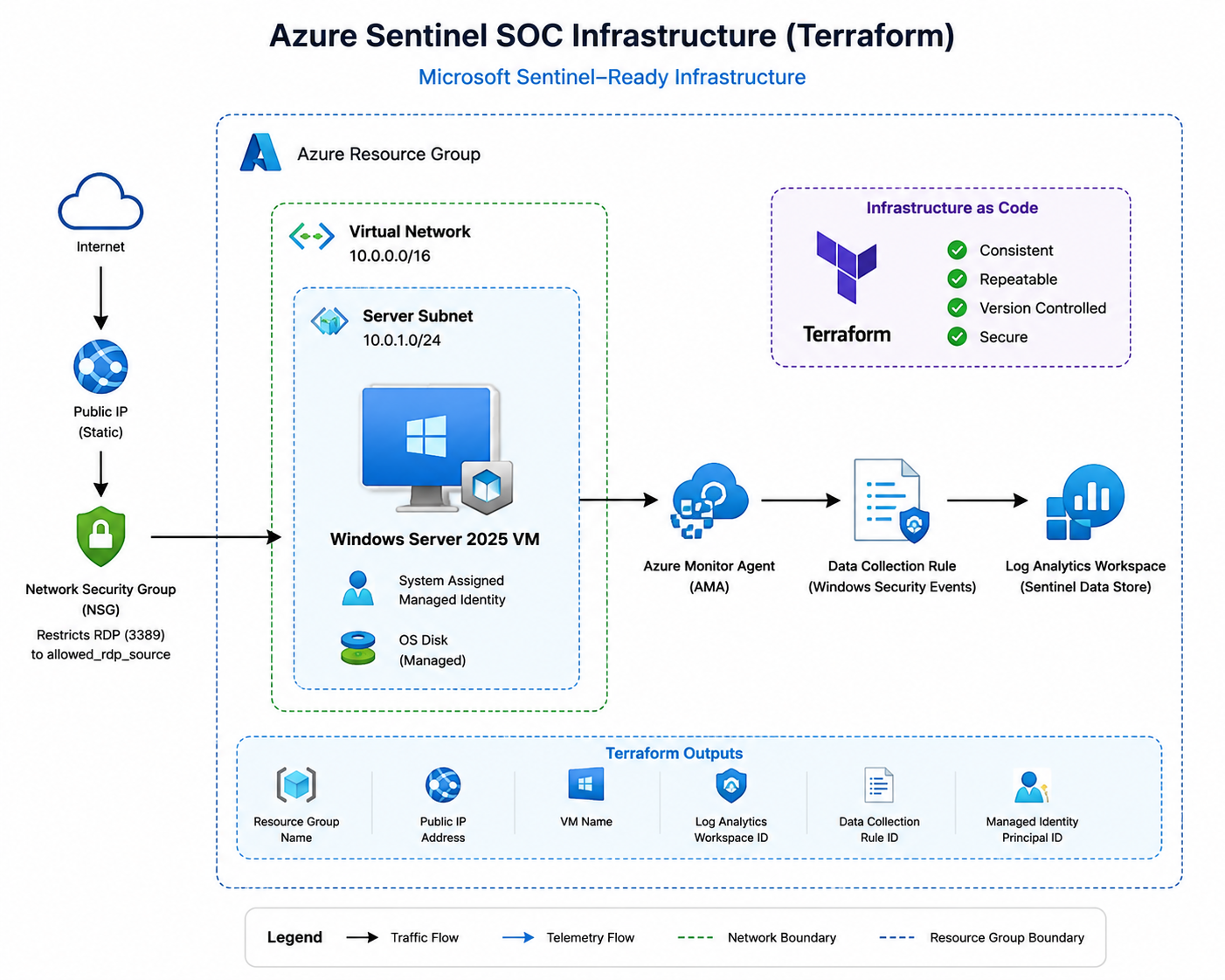
Azure architecture diagram showing Terraform-deployed Sentinel SOC infrastructure

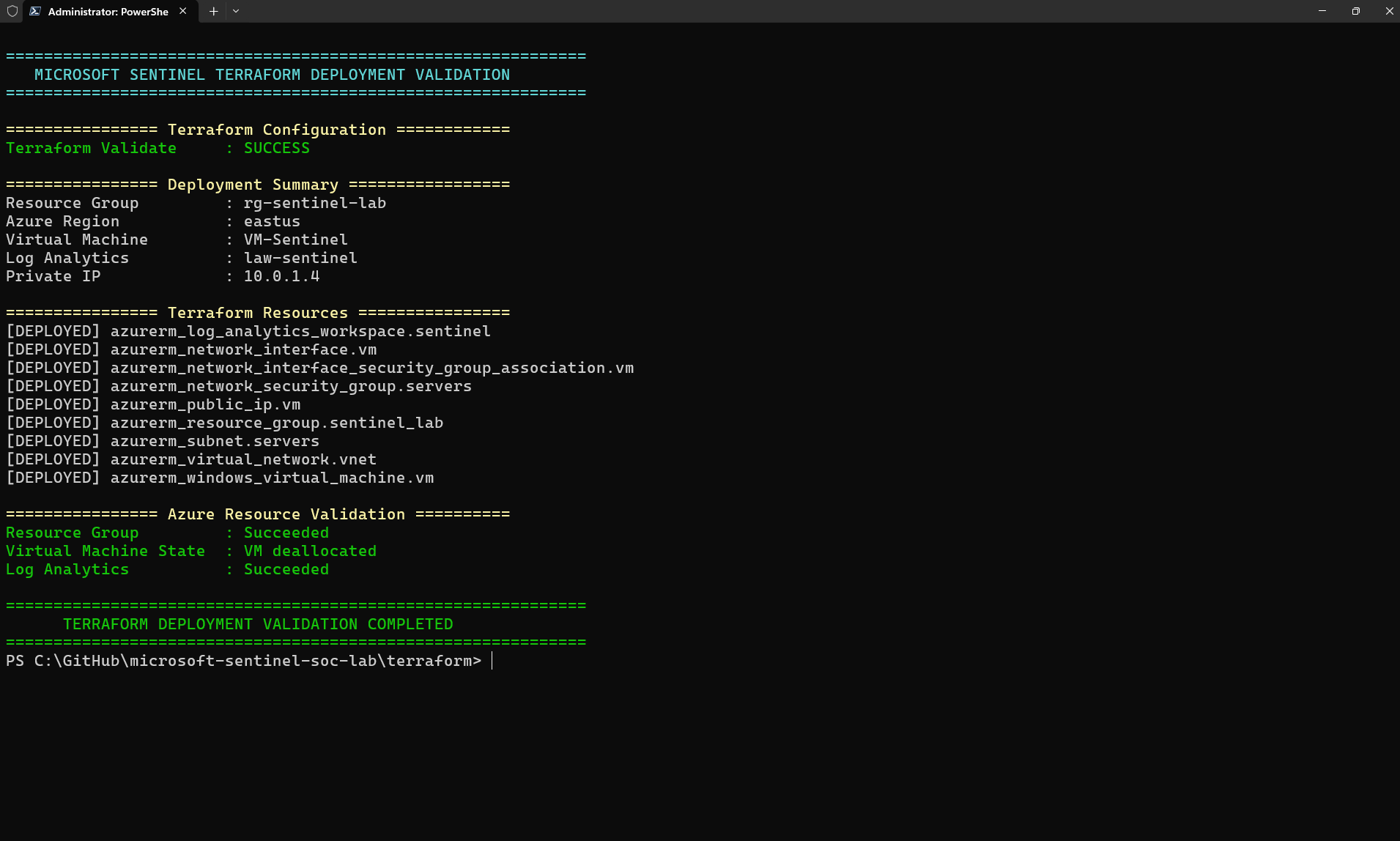
## 使用的技术 | 技术 | 用途 | |------------|---------| | Terraform | 基础设施即代码 | | Microsoft Azure | 云平台 | | Windows Server 2025 | 受监控端点 | | Azure Monitor Agent | Windows 遥测数据收集 | | Log Analytics Workspace | 集中式日志存储 | | Data Collection Rules | Windows 事件收集 | | Microsoft Sentinel | 云原生 SIEM | | Azure CLI | 部署验证 | | Git & GitHub | 版本控制与文档管理 | ## 项目目标 - 使用 Terraform 预配 Azure 基础设施。 - 部署 Windows Server 2025 虚拟机。 - 配置 Azure 网络和安全资源。 - 部署 Azure Monitor Agent。 - 配置 Log Analytics Workspace。 - 配置 Data Collection Rules。 - 为接入 Microsoft Sentinel 准备环境。 ## 仓库结构 ``` microsoft-sentinel-soc-lab/ ├── terraform/ │ ├── .terraform.lock.hcl │ ├── compute.tf │ ├── loganalytics.tf │ ├── main.tf │ ├── monitoring.tf │ ├── network.tf │ ├── outputs.tf │ ├── providers.tf │ ├── terraform.tfvars.example │ ├── variables.tf │ └── versions.tf ├── images/ │ ├── architecture.png │ ├── figure-1-terraform-deployment-validation.png │ ├── figure-2-azure-resource-group.png │ ├── figure-3-windows-server-vm.png │ ├── figure-4-log-analytics-workspace.png │ ├── figure-5-azure-monitor-agent.png │ └── figure-6-data-collection-rule.png ├── scripts/ │ └── portfolio-validation.ps1 ├── .gitignore └── README.md This lab currently uses local Terraform state. Terraform state files and environment-specific variable files are excluded from Git through `.gitignore`, and secured backups are maintained outside the repository. For shared or production deployments, the state can be migrated to an Azure Storage backend. --- ## 关键 Terraform 配置 The following Terraform configuration deploys the Azure Monitor Agent, defines the Windows Security Event Data Collection Rule (DCR), and associates the rule with the monitored Windows Server virtual machine. The DCR forwards Windows Security and AppLocker events to the Log Analytics Workspace. Managing these components through Terraform makes the monitoring pipeline version-controlled, repeatable, and easier to audit. ```hcl #---------------------------------------------------- # Azure Monitor Agent #---------------------------------------------------- resource "azurerm_virtual_machine_extension" "azure_monitor_agent" { name = "AzureMonitorWindowsAgent" virtual_machine_id = azurerm_windows_virtual_machine.vm.id publisher = "Microsoft.Azure.Monitor" type = "AzureMonitorWindowsAgent" type_handler_version = "1.0" automatic_upgrade_enabled = true auto_upgrade_minor_version = true } #---------------------------------------------------- # Windows 安全事件数据收集规则 #---------------------------------------------------- resource "azurerm_monitor_data_collection_rule" "windows_security_events" { name = "dcr-vm-sentinel-security" location = azurerm_resource_group.sentinel_lab.location resource_group_name = azurerm_resource_group.sentinel_lab.name kind = "Windows" destinations { log_analytics { workspace_resource_id = azurerm_log_analytics_workspace.sentinel.id name = "DataCollectionEvent" } } data_flow { streams = ["Microsoft-SecurityEvent"] destinations = ["DataCollectionEvent"] } data_sources { windows_event_log { name = "eventLogsDataSource" streams = ["Microsoft-SecurityEvent"] x_path_queries = [ "Security!*", "Microsoft-Windows-AppLocker/EXE and DLL!*", "Microsoft-Windows-AppLocker/MSI and Script!*" ] } } tags = { createdBy = "Sentinel" } } #---------------------------------------------------- # 将数据收集规则关联到 Windows VM #---------------------------------------------------- resource "azurerm_monitor_data_collection_rule_association" "windows_vm" { name = "dcr-vm-sentinel-security-association" # Matches the resource-ID capitalization returned by Azure # for the existing DCR association. target_resource_id = "${azurerm_resource_group.sentinel_lab.id}/providers/microsoft.compute/virtualmachines/${lower(azurerm_windows_virtual_machine.vm.name)}" data_collection_rule_id = azurerm_monitor_data_collection_rule.windows_security_events.id depends_on = [ azurerm_virtual_machine_extension.azure_monitor_agent ] } ``` ## Terraform 配置现已与部署的 Azure 环境相匹配。Terraform plan 确认无需进行任何基础设施更改。 ## 部署工作流 ### 前置条件 - Terraform >= 1.5 - Azure CLI 已通过目标订阅的身份验证 (`az login`) - 对目标订阅具有参与者访问权限 ### 部署步骤 ``` # 初始化 Terraform 并下载所需的 providers terraform init # 验证配置 terraform validate # 预览计划的基础设施变更 terraform plan -out=tfplan # 应用部署 terraform apply tfplan ``` ### 清理 为避免产生不必要的 Azure 费用,可以在不使用时通过单条命令销毁整个环境: ``` terraform destroy ``` ## 基础设施验证 ### 图 1 – Terraform 部署验证 Terraform 配置、state 资源、部署输出以及实际的 Azure 资源已通过一个整合的 PowerShell 会话进行了验证。

PowerShell terminal showing Terraform validation, deployed resources, outputs, and Azure resource validation

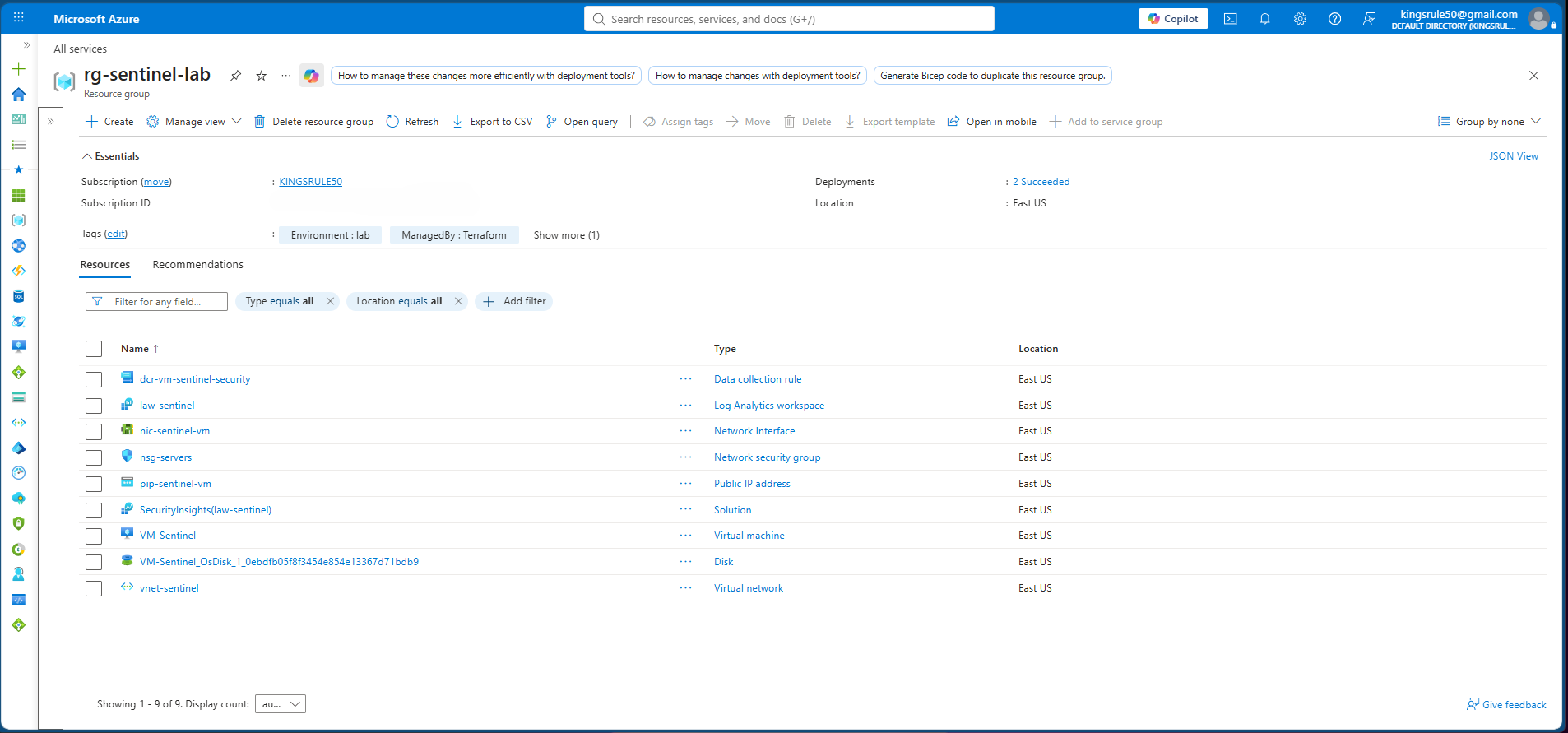
### 图 2 – Azure 资源组 Azure 资源组包含通过 Terraform 部署的所有基础设施资源,包括网络、监控组件、虚拟机资源以及相关的 Azure 服务。

Azure Portal view of the resource group containing all deployed resources

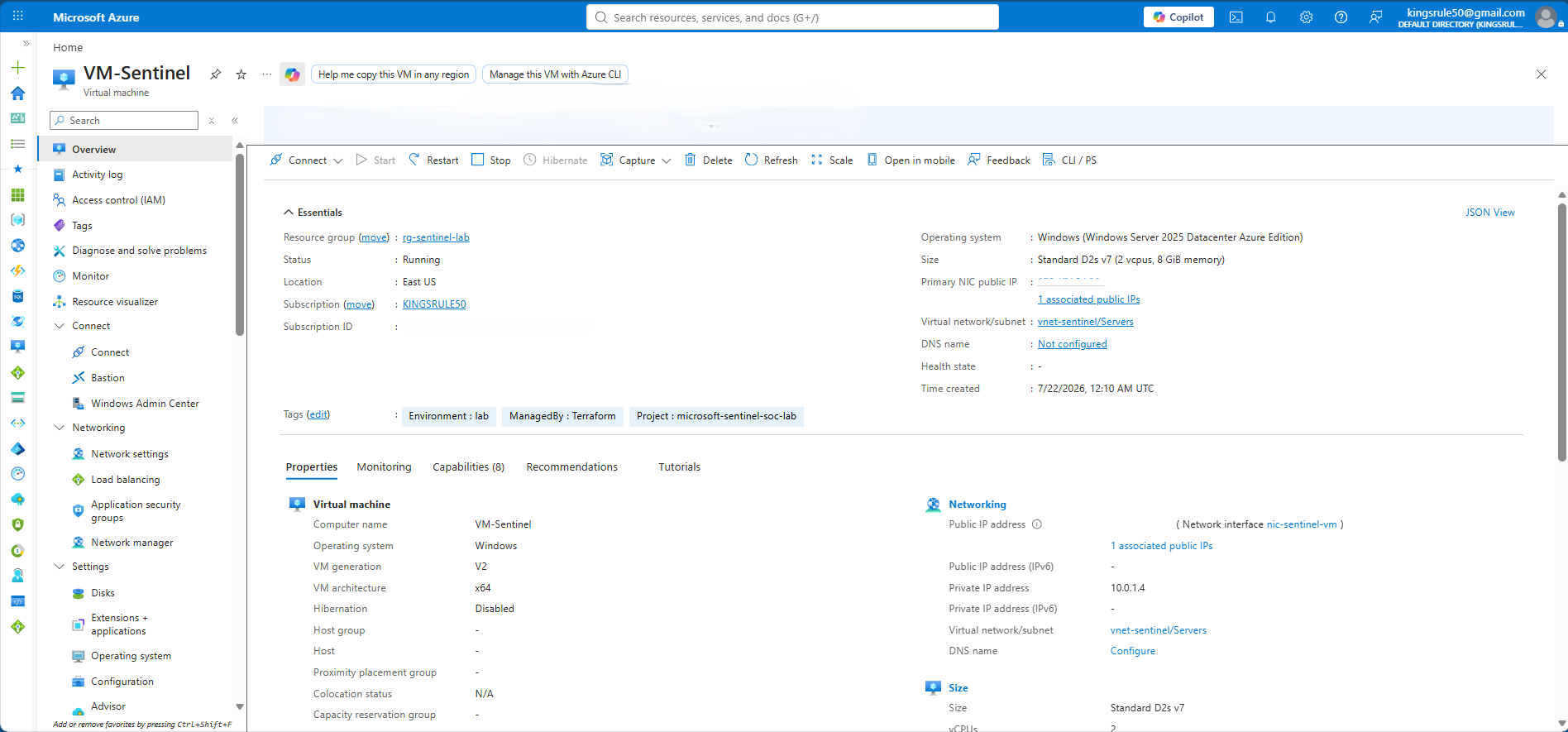
### 图 3 – Windows Server 虚拟机 Windows Server 2025 已成功部署并配置为 Microsoft Sentinel 的受监控端点。

Azure Portal view of the Windows Server 2025 virtual machine

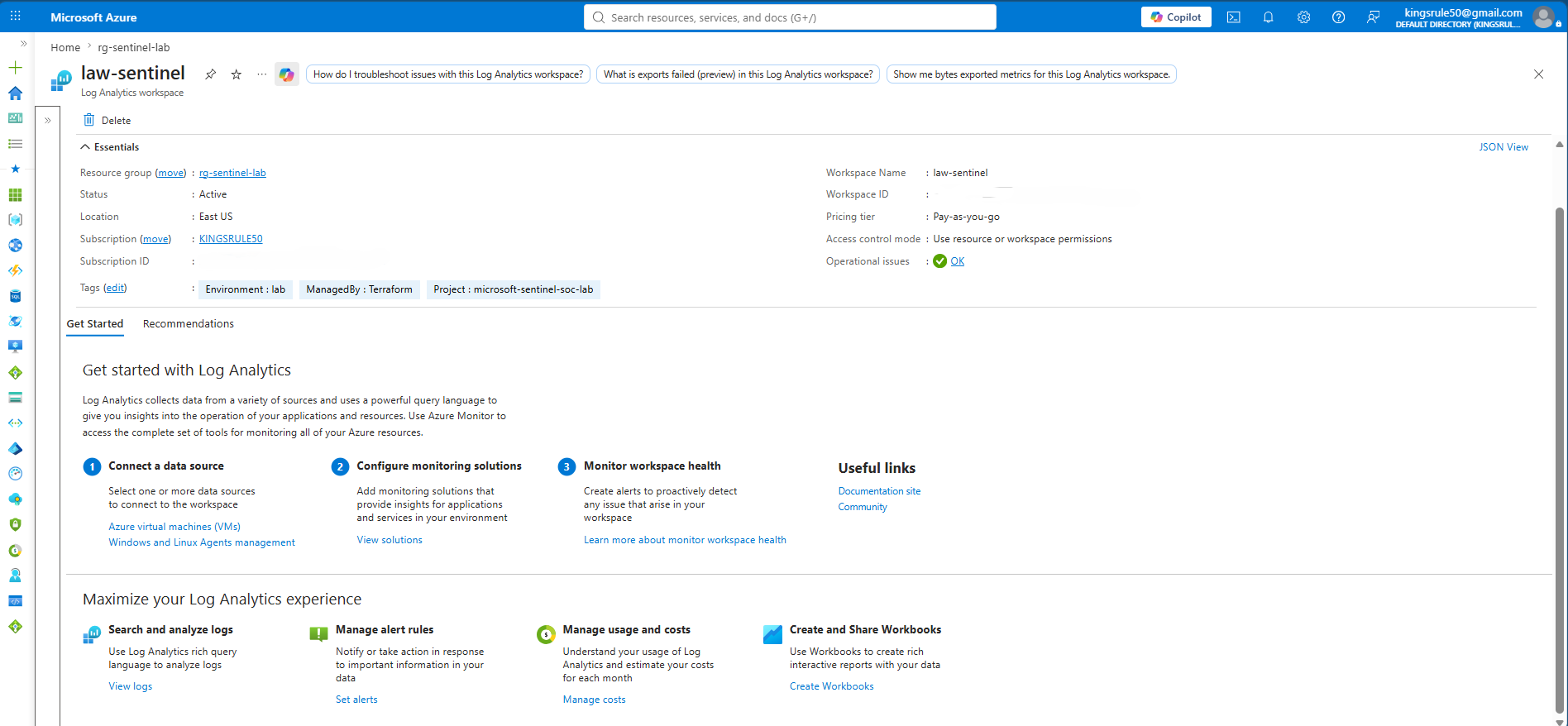
### 图 4 – Log Analytics Workspace Log Analytics Workspace 为从受监控资源收集的 Windows 安全事件提供了集中化存储。

Azure Portal view of the Log Analytics Workspace

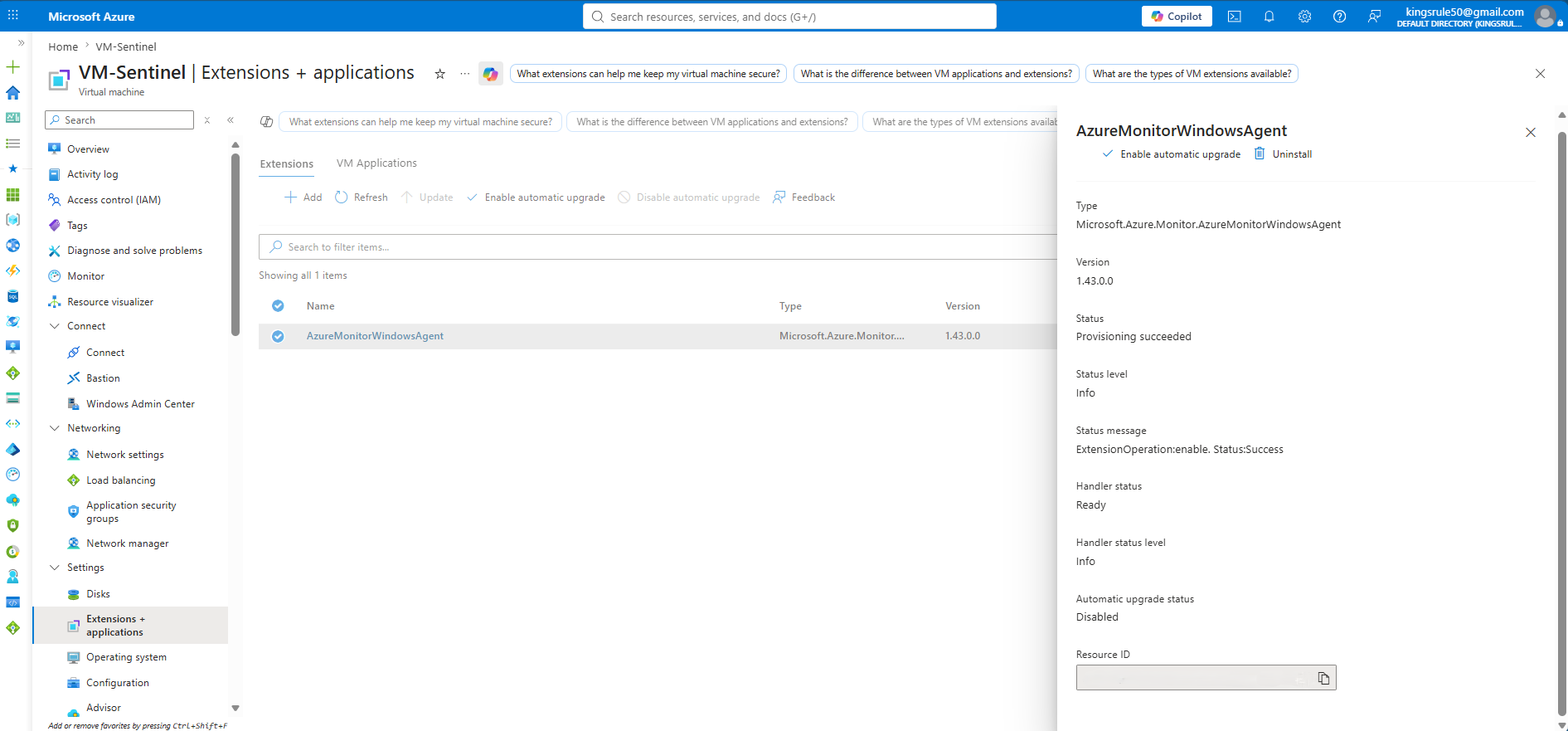
### 图 5 – Azure Monitor Agent Azure Monitor Agent 已成功安装在 Windows Server 虚拟机上,用于安全地收集遥测数据并将其转发到 Log Analytics Workspace。

Azure Monitor Agent extension installed on the virtual machine

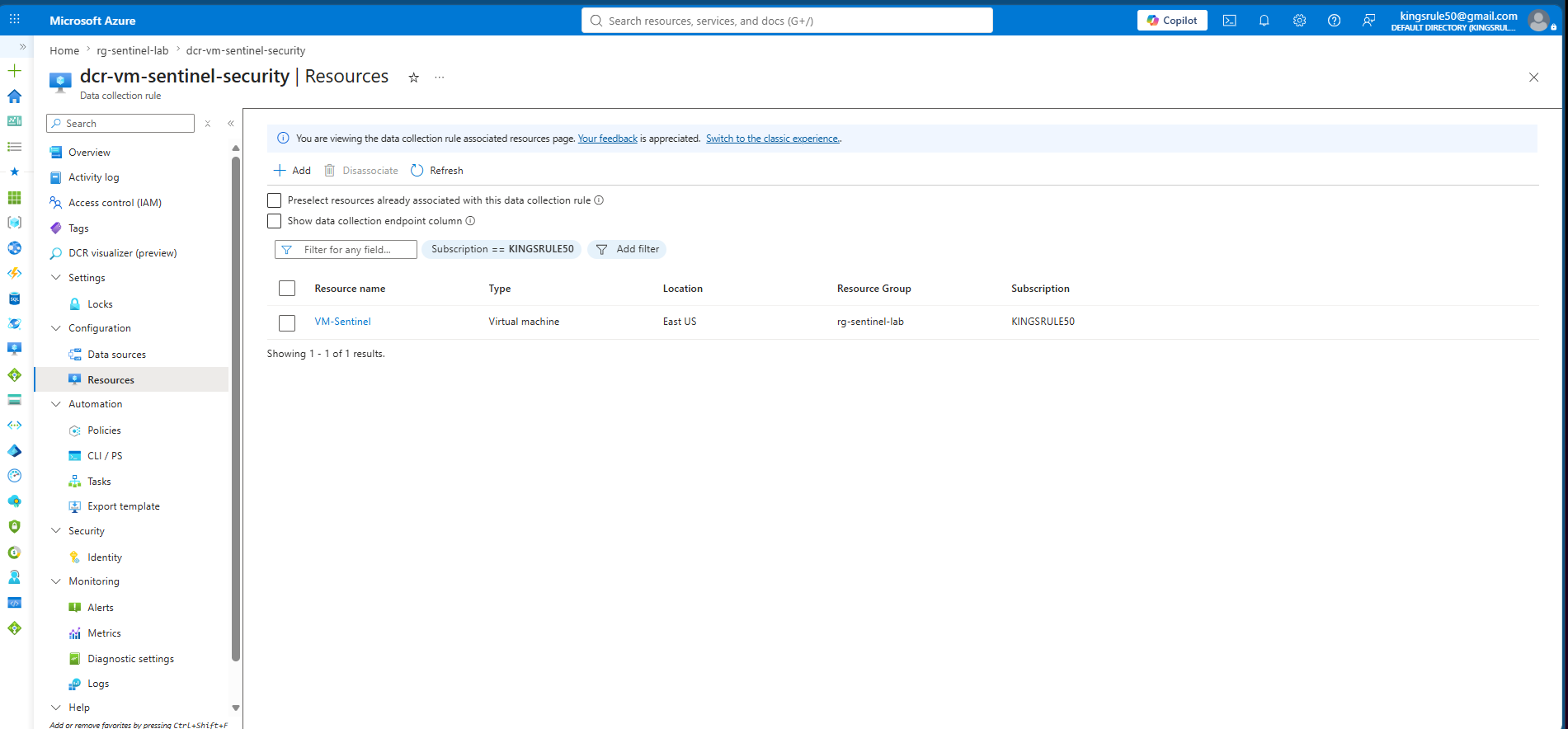
### 图 6 – Data Collection Rule Data Collection Rule 与受监控的 Windows Server 虚拟机关联,使 Azure Monitor Agent 的遥测数据能够被收集并转发到 Log Analytics Workspace。

Azure Portal view of the Data Collection Rule configuration

## 安全注意事项 在整个部署过程中应用了安全最佳实践: - **无硬编码凭证。** 敏感值永远不会被提交到仓库;特定环境的值通过 gitignored 变量文件提供。 - **网络安全控制。** Network Security Group 限制了对虚拟机的入站管理访问,将 RDP 暴露限制在授权的源 IP,而不是开放的互联网。 - **本地 state 保护。** Terraform state 和特定环境的变量文件被排除在 Git 之外,同时在仓库之外维护安全的备份。建议在共享或生产部署中使用 Azure Storage 后端。 - **托管的 agent 部署。** Azure Monitor Agent 作为托管扩展进行部署,避免了手动安装和配置漂移。 - **成本与攻击面管控。** 环境在不主动使用时会被销毁或释放。 ## 展示的技能 - 基础设施即代码 - Microsoft Azure 管理 - Azure Resource Manager (ARM) - Azure 虚拟网络 - Windows Server 部署 - Azure Monitor Agent 部署自动化 - Log Analytics Workspace 配置 - Data Collection Rules - Terraform state 管理 - Azure CLI - 基础设施验证 - Network Security Group 配置 ## 相关项目 ### Microsoft Sentinel 检测工程与安全运营 本项目是分为两部分的 Microsoft Sentinel 系列中的第一个项目。 配套项目在此基础设施的基础上,在 Log Analytics Workspace 上启用 Microsoft Sentinel,接入数据源,开发 Kusto Query Language (KQL) 检测,创建 Analytics Rules,调查事件,构建 Workbooks,并验证端到端的安全监控工作流。 **仓库:** [sentinel-detection-engineering](https://github.com/kingsrule50/sentinel-detection-engineering) *(即将推出)* ## 作者 ### Chinedu Asuzu **网络安全 | 云安全 | 安全运营 | 基础设施即代码** #### 认证 - CISA - CompTIA Security+ - Microsoft 认证:信息安全管理员 (SC-401)
标签:AI合规, ECS, Microsoft Sentinel, Terraform, 安全运营中心, 微软Azure, 网络安全研究, 网络映射