wassgha/rescript
GitHub: wassgha/rescript
开源的本地化基于文字稿的音视频编辑器,通过浏览器内 Whisper 转录实现逐词级别的音视频剪辑,全程离线运行、文件不离开设备。
Stars: 343 | Forks: 39

Edit video and audio like you edit text — fully offline, on your device.
# rescript.
[](https://github.com/wassgha/rescript)
[](https://discord.gg/qJAhYFydat)
[](https://x.com/wassgha)
**✨ 在浏览器中体验 [wassgha.github.io/rescript](https://wassgha.github.io/rescript/)** 或下载[桌面应用](#download)
[](https://wassgha.github.io/rescript/)
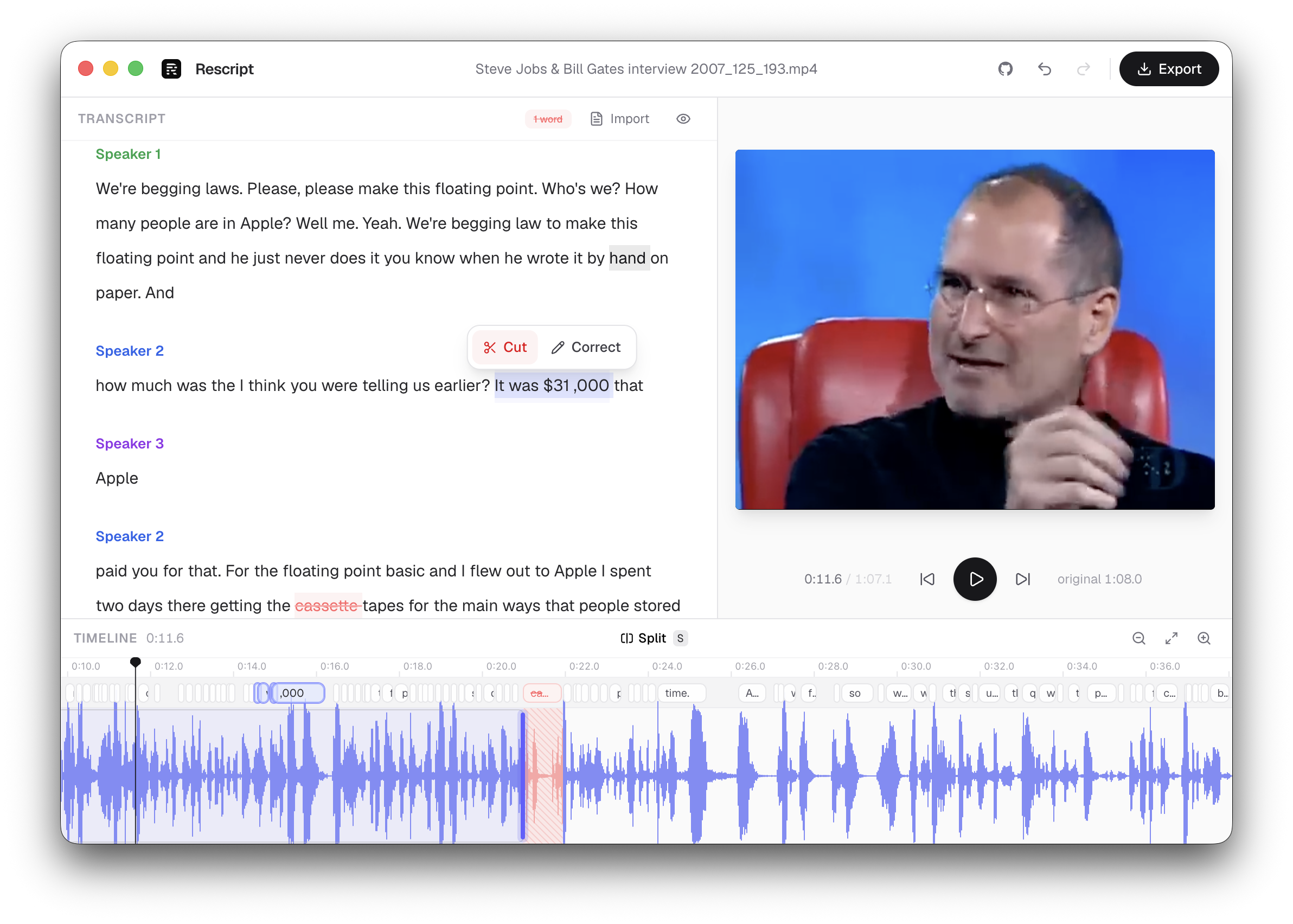
Rescript 是一款开源的、基于 transcript(文字稿)的媒体编辑器。导入视频或
音频文件,它会在本地进行转录,提供逐词时间戳和说话人
标签。在 transcript 中删除文字,媒体中相应的片段就会被
剪除。导出最终剪辑——而你的文件永远不会离开你的设备。
## 下载
请查看 [Releases](https://github.com/wassgha/rescript/releases) 页面。桌面
构建会从 GitHub Releases 自动更新。更喜欢使用浏览器?可以使用
[Web 应用](https://wassgha.github.io/rescript/)——同样的编辑器,无需安装。
- 🔒 **原生隐私设计** —— 无服务器,无身份验证,无文件上传;所有媒体处理均在本地设备上完成
- 📝 **词汇级编辑** —— 选中文字,按下 ⌫,剪辑即随文本同步剪除
- 📥 **导入自定义 transcript** —— 跳过 Whisper,使用 SRT、VTT 或 JSON 字幕文件进行编辑
- 🧹 **填充词移除** —— 一键剪除“um”、“uh”及类似的语气填充词
- 🗣️ **说话人分离** —— transcript 按说话人进行分组
- 🎬 **时间轴** —— 波形显示、带可拖拽时间手柄的词汇栏,Split(分割),
裁剪区域,播放头;滚动缩放,侧边拖拽平移
- ✂️ **分割与修剪** —— 在播放头处进行切片分割;拖拽片段边缘以
实现跨越词汇边界的精细化裁剪
- 🎯 **文字时间调整** —— 放大并拖拽词汇边缘,修正 ASR 对齐偏差
- 🔴 **切口边缘调整** —— 拖拽切口的任一边缘,独立于 Whisper
时间戳进行修剪;双击以重置
- ⚡ **实时预览** —— 播放时实时跳过你裁剪的部分
- 📦 **浏览器 / 桌面端导出** —— 借助 ffmpeg.wasm 导出帧精确的 MP4(视频)或 M4A(音频)
- 🎧 **音频文件** —— 以与视频相同的方式编辑播客、语音备忘录和采访
- 🖥️ **桌面应用** —— 通过 Electron 支持 macOS、Windows 和 Linux(在 Mac 上已签名并公证)
## 技术栈
| 组件 | 技术 |
| --- | --- |
| 应用程序 | [Next.js](https://nextjs.org) + React + TypeScript + Tailwind |
| 桌面端 | [Electron](https://www.electronjs.org/) + [electron-builder](https://www.electron.build/)(从 GitHub Releases 自动更新) |
| 转录 | [transformers.js](https://github.com/huggingface/transformers.js) 在 Web Worker 中运行 [`whisper-base_timestamped`](https://huggingface.co/onnx-community/whisper-base_timestamped) 或 [`whisper-small_timestamped`](https://huggingface.co/onnx-community/whisper-small_timestamped)(支持 WebGPU,并以 WASM 作为后备) |
| 说话人标签 | [`pyannote-segmentation-3.0`](https://huggingface.co/onnx-community/pyannote-segmentation-3.0) (ONNX) |
| 媒体处理 | [ffmpeg.wasm](https://ffmpegwasm.netlify.app/)(多线程)用于音频提取和导出 |
| 状态管理 | zustand |
## 开发说明
```
npm install # also copies ffmpeg/onnxruntime WASM into public/vendor
npm run dev # Next.js web app (http://localhost:3000)
npm run electron:dev # Electron shell + Next.js dev server
npm run build # production web build
npm run dist # unsigned desktop installers into dist/
npm run lint # eslint
```
打开 [http://localhost:3000](http://localhost:3000) 并导入一段带有
音轨的视频。有关桌面打包、签名和发布裁剪,请参阅
[RELEASING.md](./RELEASING.md)。
## 工作原理
1. **提取** —— ffmpeg.wasm 将音轨解码为单声道 16 kHz PCM 格式。
2. **转录** —— Whisper 在 Web Worker 中以 `return_timestamps: "word"` 参数运行,
边运行边流式输出文本;pyannote 为每个词分配说话人。
在主页选择 **Whisper Base**、**Whisper Small** 或 **导入 transcript**
(SRT / VTT / JSON)。
3. **编辑** —— 删除文字会生成原始媒体的“裁剪范围”。
预览播放器会实时跳过这些部分,时间轴上它们会以红色显示。
**移除填充词** 功能只需一键即可剪掉所有检测到的“um” / “uh” 等。
4. **导出** —— 保留的片段通过 ffmpeg 的 filter graph 进行修剪和拼接,
并重新编码(`libx264`/`aac`),从而实现逐词精确裁剪。
## 浏览器支持
对于 Web 应用,推荐使用基于 Chromium 的浏览器。它需要
`SharedArrayBuffer`(由 COOP/COEP 响应头提供支持),并
在可用时使用 WebGPU 进行推理,否则回退到 WASM。桌面应用
通过 Electron 内置了 Chromium,并在其
`app://` 协议上设置了相同的隔离响应头。
## 许可证
MIT
[](LICENSE)
[](#download)
[](https://www.electronjs.org/)
[](https://github.com/wassgha/rescript/stargazers)
[](https://github.com/wassgha/rescript/releases/latest)
由 [@wassgha](https://x.com/wassgha) 构建 —— 在 X 上关注以获取更新动态,或者
来 [Discord](https://discord.gg/RCv4gcwE4) 打个招呼。
标签:文本转录, 本地离线, 桌面应用, 浏览器应用, 自动化攻击, 音视频编辑