teocns/neocursor.nvim
GitHub: teocns/neocursor.nvim
该插件让 Neovim 复用 Cursor 的登录态和后端,实现与 Cursor 原生一致的下一处编辑预测和幽灵文本补全功能。
Stars: 43 | Forks: 1
# neocursor.nvim
**Cursor 的 Tab — 真正的下一处编辑模型 — 在 Neovim 中呈现。**
无需 API key。无需选择模型。无需创建账号。如果你已经登录了 Cursor,就无需再进行任何设置 — neocursor 会使用你现有的登录状态驱动 Cursor 自己的 `StreamCpp` 后端,因此你能获得与 Cursor 本身*相同*的预测,以及*相同*的延迟。
`。
**vim.pack**(内置于 Neovim ≥ 0.12) — 最简设置:
```
vim.pack.add { "https://github.com/teocns/neocursor.nvim" }
require("neocursor").setup {}
```
让 nvim-cmp / blink.cmp 接管
如果另一个插件已经映射了 ``,请设置 `map_tab = false` 并在你自己的处理程序中回退到 neocursor:
```
{ "teocns/neocursor.nvim", event = "InsertEnter", opts = { map_tab = false } }
-- in your mapping, try neocursor first:
if require("neocursor").accept() then return end
-- …otherwise let cmp/blink handle it
```
## Cursor Tab 对等性
目标是实现 **1:1 移植 Cursor 的 Tab**。目前仍是测试版,以下是真实的进度表 — 哪些功能真正实现了,哪些仍在开发中:
| Cursor Tab 功能 | neocursor |
|---|:---:|
| 内联多行补全(幽灵文本) | ✅ |
| 对现有行的 Diff 风格重写 | ✅ |
| **下一处编辑预测 + 光标跳转**(tab-tab-tab 流程) | ✅ |
| 多编辑链 — 每次编辑只需一次 ``,无需额外网络请求 | ✅ |
| 最近编辑 / diff 历史上下文 | ✅ |
| 相邻文件 + linter 错误上下文 | ✅ |
| 请求门控 — 在你阅读/导航时保持安静 | ✅ |
| 部分接受(逐词) | ✅ |
| 从 Cursor 实时拉取配置(`CppConfig`:debounce、启发式算法) | ✅ |
| 单字符编辑的字符级 diff | 🚧 |
| 跳转目标的跨文件 *应用* | 🚧 部分实现 — 可以跳转,但链路不完整 |
| macOS / Linux / Windows 认证路径 | ✅ |
✅ 已移植 · 🚧 开发中
核心循环 — 预测、幽灵文本、``、跳转、链式编辑 — 已经完成,并在 Cursor 实际的后端上运行。🚧 标记的行属于边缘情况,并非核心路径。
## 用法
输入、停顿,建议就会出现。然后:
| 按键 / 命令 | 作用 |
|---|---|
| `` | 接受 · 或 **跳转** 到预测的下一处编辑 · 或链接到下一个 |
| `` | 逐词接受建议 |
| `` | 关闭建议 |
| `:NeocursorSuggest` | 立即强制发起一次请求 |
| `:NeocursorLog` | 切换实时状态面板 |
| `:NeocursorDebug` | 打印诊断信息 |
**tab-tab-tab 流程:** 接受补全 → 如果 Cursor 预测到其他地方有编辑,幽灵文本会变成 `Tab →` 提示 → 下一次 `` 将你的光标 *跳转* 过去 → 再下一次 `` *接受*它。完全复刻 Cursor 的节奏。
map_partial = "", -- word-by-word accept
filetypes = nil, -- allow-list, e.g. { "python", "lua" }; nil = all
show_hints = true, -- false → no hint chrome (see below)
})
```
**`show_hints`** 控制着 neocursor 绘制的两个标签。建议本身永远不会受到影响 — 无论是幽灵文本、diff 还是每种 `` 的行为在任何情况下都完全一致。
| 界面 | 看起来像 | 标记的内容 |
|---|---|---|
| `edit` | `⟪neocursor · accept⟫` | 挂起的编辑;旁边的 diff 已经展示了具体改动 |
| `prediction` | `⟪ → L42⟫` | 跳转目标 — 这是排队等待中*唯一*可见的标志 |
```
show_hints = false -- hide both
show_hints = { edit = false } -- hide the label, keep the jump pill
show_hints = { prediction = false } -- hide the pill, keep the label
```
关闭预测胶囊会使挂起的跳转变得不可见:`` 依然会跳转,但在它发生之前你看不到目标位置。`:NeocursorDebug` 会打印已解析的设置。
## 工作原理
neocursor 没有重新实现或重新训练模型 — 它*就是* Cursor 的 Tab,通过一个微小的 stdio 桥接实现:
```
Neovim (Lua) ──JSON──▶ sidecar.py ──Connect/protobuf over h2──▶ Cursor StreamCpp
render + reads your Cursor token, (api2.cursor.sh)
accept + jump forges the checksum, streams edits
```
sidecar 会读取你本地的 Cursor session,发送 Cursor 自身客户端发出的精确 `StreamCpp` 调用,并流式传回编辑序列以及下一个光标跳转目标。有关渲染技术的归属,请参见 [`NOTICE`](./NOTICE)。
## 法律声明
这是一个独立的、**仅供个人使用的互操作性**项目 — 与 Anysphere / Cursor 没有任何隶属关系。它使用的是*你自己的*账号;token 绝不会离开你的机器。它会与 Cursor 私有的 API 通信,该 API 是未公开的并且可能会发生变化,使用它可能不符合 Cursor 的 ToS(服务条款)— 这完全是你与 Cursor 之间的事情。本项目没有重新分发任何 Cursor 源代码。使用风险自负。
## 许可证
[MIT](./LICENSE)。渲染技术归属信息详见 [`NOTICE`](./NOTICE)。
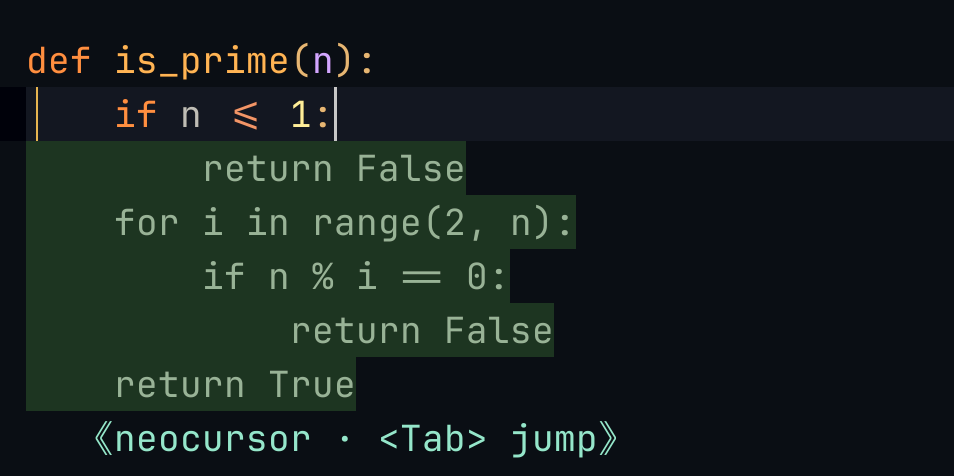
输入 def is_prime(n): — Cursor 预测了整个函数体。
<Tab> 接受 · 再次按 <Tab> 跳转到下一处编辑。
vim.pack:与 lazy.nvim spec 完全一致(预热 + 延迟启动)
上面的 lazy.nvim spec 会在安装时预热 sidecar 的 Python 依赖(`build`),并将启动延迟到插入模式(`event`)。vim.pack 的等价配置: ``` -- pre-warm the sidecar's deps on install/update (lazy.nvim's `build`). -- Register this BEFORE vim.pack.add so it sees the initial install. vim.api.nvim_create_autocmd("PackChanged", { callback = function(ev) if ev.data.spec.name ~= "neocursor.nvim" then return end if ev.data.kind == "install" or ev.data.kind == "update" then vim.system { "uv", "run", "--with", "httpx[http2]", "python", "-c", "import httpx" } end end, }) vim.pack.add { "https://github.com/teocns/neocursor.nvim" } -- start on first insert (lazy.nvim's `event = "InsertEnter"`) vim.api.nvim_create_autocmd("InsertEnter", { once = true, callback = function() require("neocursor").setup {} end, }) ``` 跳过预热也是可以的 — sidecar 会在首次启动时自行获取依赖;只是第一个建议会晚几秒钟到达。让 nvim-cmp / blink.cmp 接管 <Tab>
如果另一个插件已经映射了 `固定版本
``` { "teocns/neocursor.nvim", version = "*" } -- latest tagged release instead of main ``` 使用 vim.pack 时,`version` 接受标签、分支、commit hash 或 `vim.version.range()`: ``` vim.pack.add { { src = "https://github.com/teocns/neocursor.nvim", version = vim.version.range "*" } } ```配置(全为可选)
``` require("neocursor").setup({ debounce = 250, -- ms; overridden by Cursor's CppConfig at startup map_tab = true, -- false → another plugin owns标签:AI编程助手, Cursor, Neovim插件, rizin, SOC Prime, 代码补全, 开发工具, 开发者效率, 逆向工具