sebastianvasquezechavarria1234/automatizaciones
GitHub: sebastianvasquezechavarria1234/automatizaciones
该系统利用无头浏览器与AI模型自动完成哥伦比亚总检察院网站的纪律背景查询,解决了动态安全验证难题,实现高速且精准的自动化信息提取。
Stars: 2 | Forks: 0
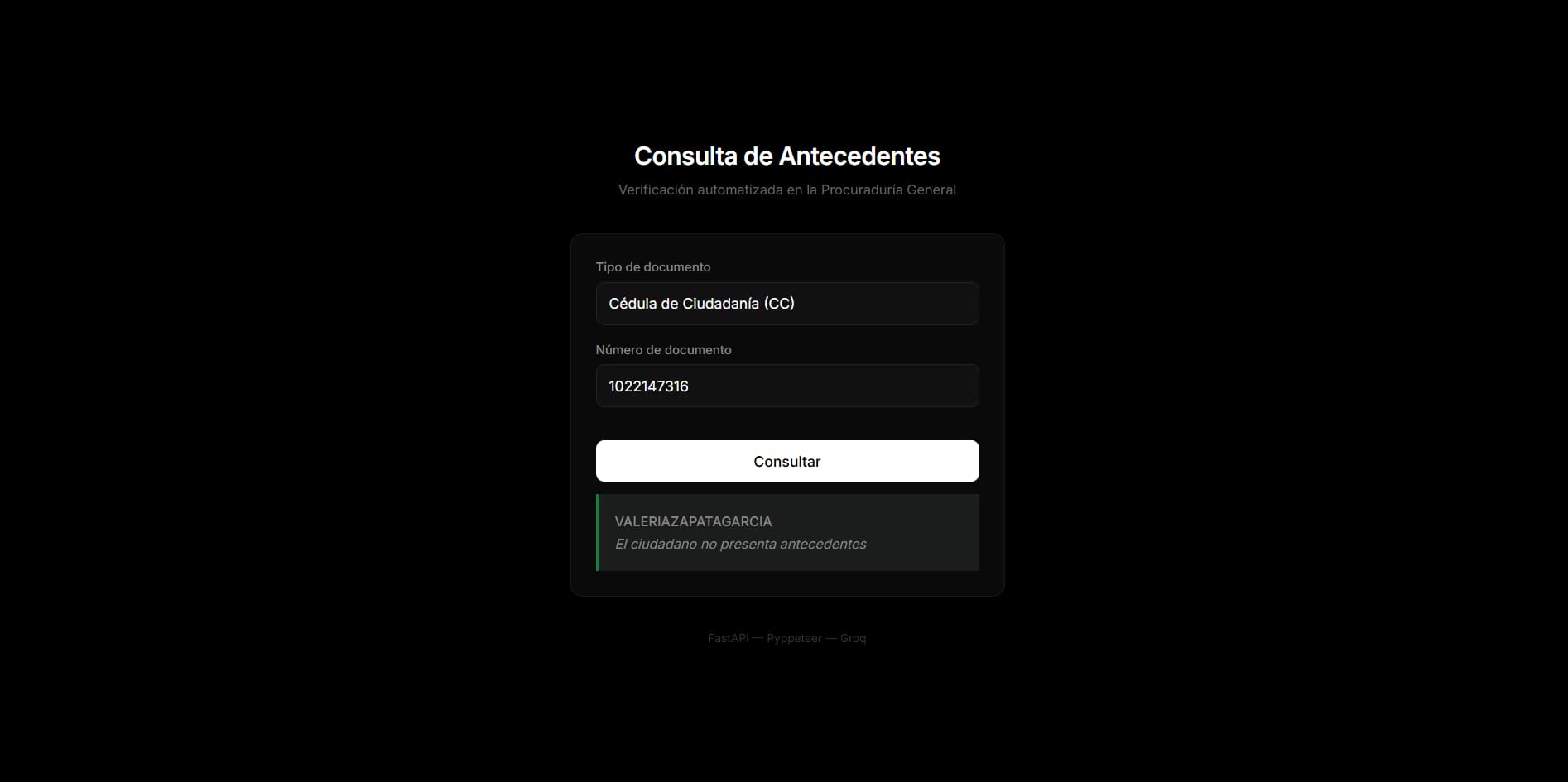
用于纪律背景检查的智能自动化
## 目录 - [概述](#overview) - [技术栈](#technologies) - [架构](#architecture) - [应用流程](#application-flow) - [安装说明](#installation) - [配置](#configuration) - [用法](#usage) - [API](#api) - [项目结构](#project-structure) - [技术决策](#technical-decisions) - [路线图](#roadmap) - [许可证](#license) ## 概述 本项目实现了对哥伦比亚 **Procuraduría General de la Nación** 网站纪律背景查询的自动化。它不是简单的抓取工具,而是一个能够自动导航、解析动态安全验证问题并提取结果的系统,具备人工操作般的精确度,且达到了机器般的速度。 该系统被构建为带有集成 Web 界面的 **REST API**。极简的前端允许您输入证件类型和号码,并在几秒钟内收到结果。每一步——启动浏览器、填写表单、解决安全挑战以及提取结果——都在后台自动完成。 ## 技术栈 | 层级 | 技术 | 用途 | |-----------------|-----------------------------|------------------------------------------------| | Backend | **FastAPI** (Python) | REST API、路由、业务逻辑 | | 自动化 | **Pyppeteer** | 无头浏览器控制 (Chrome/Edge) | | AI | **Groq** (LLaMA 3.3-70B) | 复杂验证问题解析 | | Frontend | **HTML + Tailwind CSS** | 简洁、响应式的用户界面 | | 服务器 | **Uvicorn** | FastAPI 的 ASGI 服务器 | ## 架构 系统作为一个按顺序工作的**三层调度器**运行: ``` ┌─────────────┐ ┌──────────────┐ ┌─────────────┐ │ Client │────▶│ FastAPI │────▶│ Pyppeteer │ │ (Browser) │ │ (Backend) │ │ (Scraper) │ └─────────────┘ └──────┬───────┘ └──────┬──────┘ │ │ │ ┌─────▼──────┐ │ │ Groq AI │ │ │(Verification) │ └────────────┘ │ ┌─────▼──────┐ │ Frontend │ │ (Response) │ └────────────┘ ``` 1. **客户端** 通过 HTTP POST 发送证件类型和号码。 2. **FastAPI** 接收请求并委派抓取过程。 3. **Pyppeteer** 打开无头浏览器,导航至 Procuraduría 门户网站,填写表单并解决安全挑战。 4. 当本地方法无法解决验证问题时,介入处理。 5. 结果返回至前端并显示给用户。 ## 应用流程 ``` ┌─────────────────────────┐ │ User enters data │ │ (doc type + number) │ └────────────┬────────────┘ │ ┌────────────▼────────────┐ │ FastAPI receives POST │ └────────────┬────────────┘ │ ┌────────────▼────────────┐ │ Pyppeteer launches │ │ Chrome (headless) │ └────────────┬────────────┘ │ ┌────────────▼────────────┐ │ Navigates to the │ │ Procuraduría portal │ └────────────┬────────────┘ │ ┌────────────▼────────────┐ │ Locates the form iframe │ └────────────┬────────────┘ │ ┌────────────▼────────────┐ │ Selects document type │ │ Enters document number │ └────────────┬────────────┘ │ ┌────────────▼────────────┐ │ Verification question │ │ present? │ └────────────┬────────────┘ ┌──────┴──────┐ ▼ ▼ ┌───────────┐ ┌───────────┐ │ Math │ │ Dictionary│ │ problem? │ │ lookup? │ └─────┬─────┘ └─────┬─────┘ Yes No Yes No ▼ ▼ ▼ ▼ ┌────────┐ ┌────────┐ ┌────────┐ ┌──────────┐ │Solve │ │ Groq │ │Known │ │ Groq │ │locally │ │ AI │ │capital │ │ (complex │ │ │ │ │ │ │ │ question)│ └───┬────┘ └───┬────┘ └───┬────┘ └────┬─────┘ ▼ ▼ ▼ ▼ ┌─────────────────────────────────────────┐ │ Answer entered into verification field │ └──────────────────┬──────────────────────┘ │ ┌─────────────▼──────────────────┐ │ "Consultar" button pressed │ │ Waiting for ASP.NET postback │ └─────────────┬──────────────────┘ │ ┌─────────────▼──────────────────┐ │ Result extracted: │ │ • Citizen name │ │ • Has background records? │ │ • Descriptive message │ └─────────────┬──────────────────┘ │ ┌─────────────▼──────────────────┐ │ FastAPI returns JSON │ │ Frontend displays result │ └─────────────────────────────────┘ ``` ## 安装说明 ### 前置条件 - **Python 3.10+** - 已安装 **Google Chrome** 或 **Microsoft Edge** - **Groq API key**(可选,用于复杂问题) ### 步骤 克隆仓库: ``` git clone https://github.com/sebastianvasquezechavarria1234/automatizaciones.git cd automatizaciones ``` 创建并激活虚拟环境: ``` python -m venv venv # Windows venv\Scripts\activate # macOS / Linux source venv/bin/activate ``` 安装依赖项: ``` pip install -r requirements.txt ``` ## 配置 ### 环境变量 Groq 仅用于无法在本地解决的验证问题。没有它系统也能运行,但某些安全挑战可能会失败。 ``` # 可选 — 仅在需要完整覆盖问题时需要 set GROQ_API_KEY=gsk_your_key_here ``` ## 用法 启动服务器: ``` python main.py ``` 服务器运行在 `http://localhost:8003`。 在浏览器中打开该 URL。您将看到一个简洁的界面,您可以在此: 1. 选择 **document type**(CC, CE, PAS, PEP, PPT, NIT)。 2. 输入 **document number**。 3. 点击 **Consultar**。 系统处理请求并在屏幕上显示结果。响应包含市民姓名、是否有记录以及来自门户网站的官方消息。 ### 示例响应 ``` { "tipo_documento": "CC", "numero_documento": "123456789", "nombre": "JUAN PEREZ", "tiene_antecedentes": false, "mensaje": "The citizen has no background records" } ``` ## API ### `POST /consultar-antecedents` 执行背景查询的主要 endpoint。 **请求:** ``` { "tipo_documento": "CC", "numero_documento": "123456789" } ``` | 字段 | 类型 | 描述 | |--------------------|--------|----------------------------------------------| | `tipo_documento` | string | 证件类型:CC, CE, PAS, PEP, PPT 或 NIT | | `numero_documento` | string | 身份证号码 | **响应(成功 — 无记录):** ``` { "tipo_documento": "CC", "numero_documento": "123456789", "nombre": "JUAN PEREZ", "tiene_antecedentes": false, "mensaje": "The citizen has no background records" } ``` **响应(成功 — 发现记录):** ``` { "tipo_documento": "CC", "numero_documento": "123456789", "nombre": "JUAN PEREZ", "tiene_antecedentes": true, "mensaje": "The citizen has registered background records." } ``` **响应(错误):** ``` { "error": true, "tipo_documento": "CC", "numero_documento": "123456789", "mensaje": "The query could not be completed. The security verification could not be resolved." } ``` | 字段 | 类型 | 描述 | |----------------------|---------|------------------------------------------------| | `tipo_documento` | string | 发送的证件类型 | | `numero_documento` | string | 发送的证件号码 | | `nombre` | string | 从门户网站提取的市民姓名 | | `tiene_antecedentes` | boolean | 如果发现记录则为 `true`,否则为 `false` | | `mensaje` | string | 描述性结果信息 | | `error` | boolean | 如果查询过程中发生错误则为 `true` | ### `GET /` 在根路径提供 Web 界面。 ## 项目结构 ``` automatizaciones/ ├── static/ # Frontend │ ├── index.html # User interface (Tailwind CSS) │ └── app.js # Frontend logic ├── main.py # FastAPI server (entry point) ├── scraper.py # Pyppeteer automation ├── groq_service.py # Groq AI integration ├── requirements.txt # Python dependencies ├── .gitignore ├── LICENSE # MIT License └── README.md # This file ``` ## 技术决策 ### 为什么选择 Pyppeteer 而不是 Selenium? Pyppeteer 是 Puppeteer 的 Python 异步版本。由于 FastAPI 本质上是异步的,Pyppeteer 可以无缝集成,而无需线程池或额外的事件循环。整个 pipeline 完全在纯粹的 `async/await` 上运行。 ### 智能验证解析 系统采用级联解析策略: 1. **本地数学运算** — 瞬间解决算术问题。 2. **基于证件的规则** — 关于证件号数字的问题使用提供的输入进行解答。 3. **省会城市词典** — 省会相关问题从预定义映射中解答。 4. **Groq AI** — 任何其他问题都会通过 Groq 发送给 LLaMA 3.3-70B,它会解析自然语言并返回答案。 这种设计通过在本地解决大多数情况,最大限度地减少了外部 API 的使用(及相关成本)。 ### ASP.NET iframe 处理 Procuraduría 门户网站使用嵌入在 iframe 中的表单并带有 ASP.NET 回发。系统定位正确的 iframe,在其中进行操作,并在每次交互后等待重新加载周期。等待时间经过校准,以确保在继续之前 DOM 已完成更新。 ## 路线图 - [x] 基础表单自动化 - [x] 验证问题解析(数学运算 + 词典 + Groq) - [x] 使用 Tailwind CSS 的 Web 界面 - [ ] 通过计算机视觉支持视觉验证码 - [ ] 频率限制和自动重试 - [ ] Docker 化 - [ ] 自动化测试(单元测试 + 集成测试) - [ ] 多语言前端支持 - [ ] 带有轻量级数据库的查询历史
由 Sebastián V 用 ❤️ 制作
标签:AV绕过, FastAPI, REST API, RPA流程自动化, 网络测绘, 背景调查, 逆向工具, 验证码识别