Gitlovess/wireshark-pcap-analysis
GitHub: Gitlovess/wireshark-pcap-analysis
基于 Wireshark 对 Lumma Stealer 恶意软件感染流量的完整 SOC 调查报告,演示了从原始 PCAP 中提取 IOC、追踪受感染主机与用户身份的全流程分析实践。
Stars: 0 | Forks: 0
# 🕵️ Wireshark — PCAP 流量分析与事件报告
这是一次针对 **Lumma Stealer** 感染的完整 SOC 调查,基于 malware-traffic-analysis.net 的真实流量捕获练习。本报告记录了完整的分析师工作流程——从 SIEM 告警到识别受感染的主机、用户以及恶意的 C2 基础设施。
## 🎯 这证明了什么
每位 SOC L1 分析师都必须能够提取 PCAP 文件并独立还原发生的事件——没有 SIEM 仪表盘可以依赖,只有原始数据包。此实验证明我能够:
- 深入调查 SIEM 告警,定位受感染的主机、用户和主机名
- 从 HTTP、DNS、Kerberos 和 SAMR 流量中提取 IOC
- 识别恶意软件家族行为(Lumma Stealer 指纹识别)
- 撰写可供事件响应团队使用的结构化事件报告
## 📋 事件摘要
| 字段 | 详情 |
|-------|---------|
| **告警** | ET MALWARE Lumma Stealer 受害者指纹识别活动 |
| **告警触发 IP** | 153.92.1.49 |
| **告警端口** | TCP 80 / 443 |
| **告警时间** | 2026-01-27 23:05 UTC |
| **环境域名** | win11office.com |
| **AD 环境名称** | WIN11OFFICE |
| **域控制器** | 10.1.21.2 (WIN-LU4L24X3UB7) |
| **局域网段** | 10.1.21.0/24 |
## 🔍 调查发现
### 1. PCAP 概述
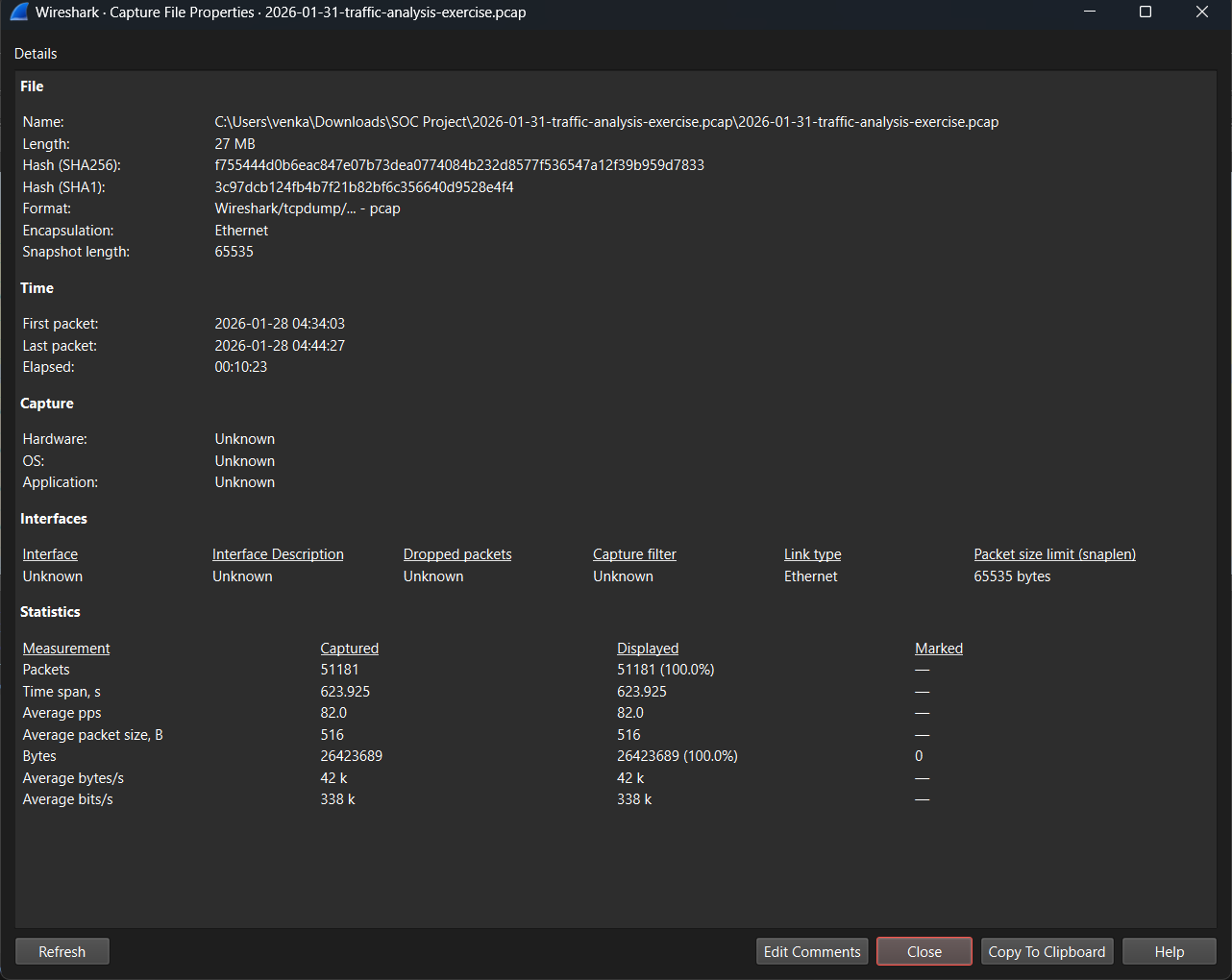
| 属性 | 值 |
|----------|-------|
| 总数据包数 | 51,181 |
| 时间跨度 | ~623 秒 (10分 23秒) |
| SHA256 哈希值 | f755444d0b6eac847e07b73dea0774084b232d8577f536547a12f39b959d7833 |
### 2. 受感染主机识别
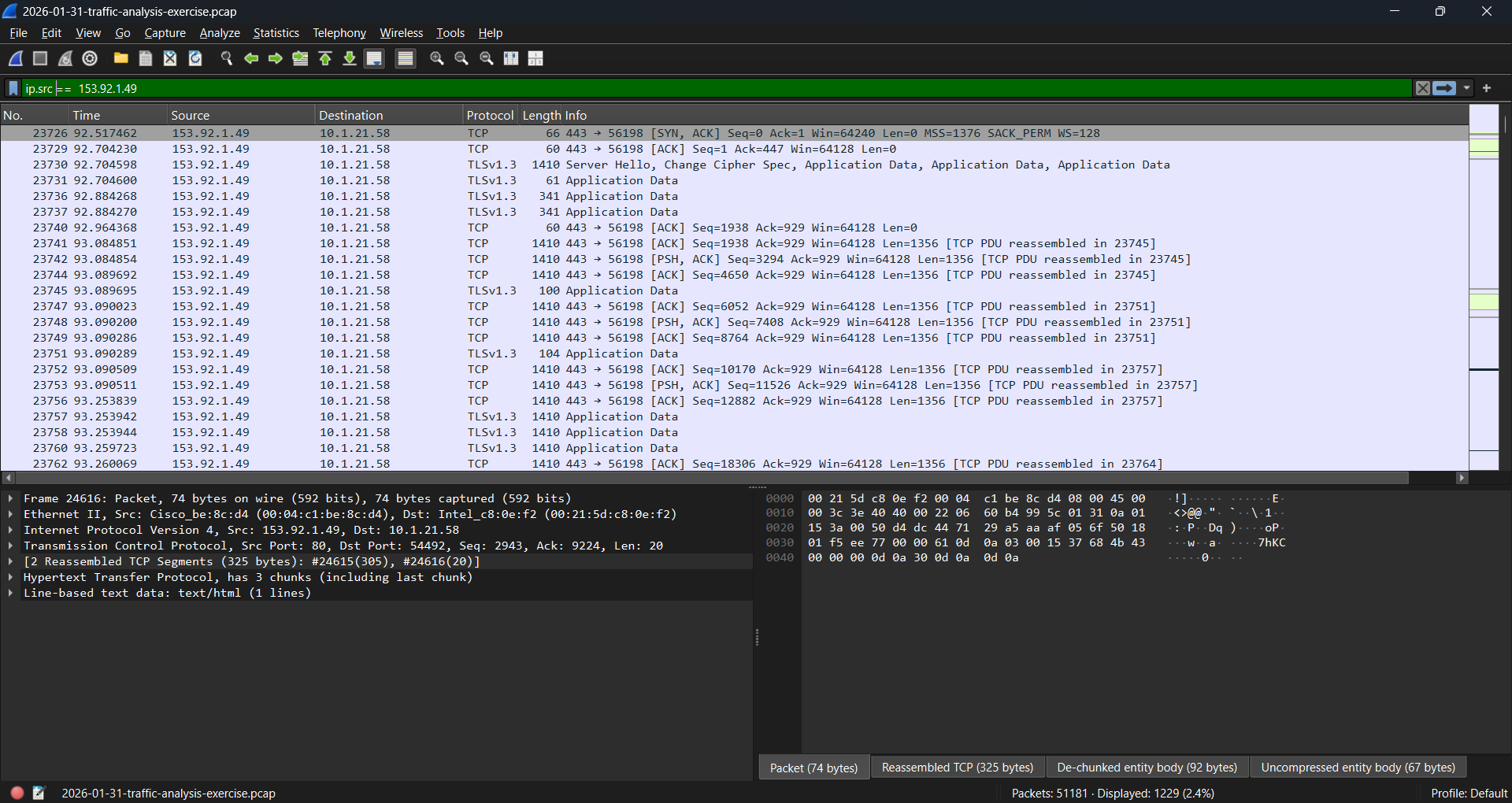
过滤进出已知 C2 IP `153.92.1.49` 的流量,直接揭示了与其联系的内部主机。
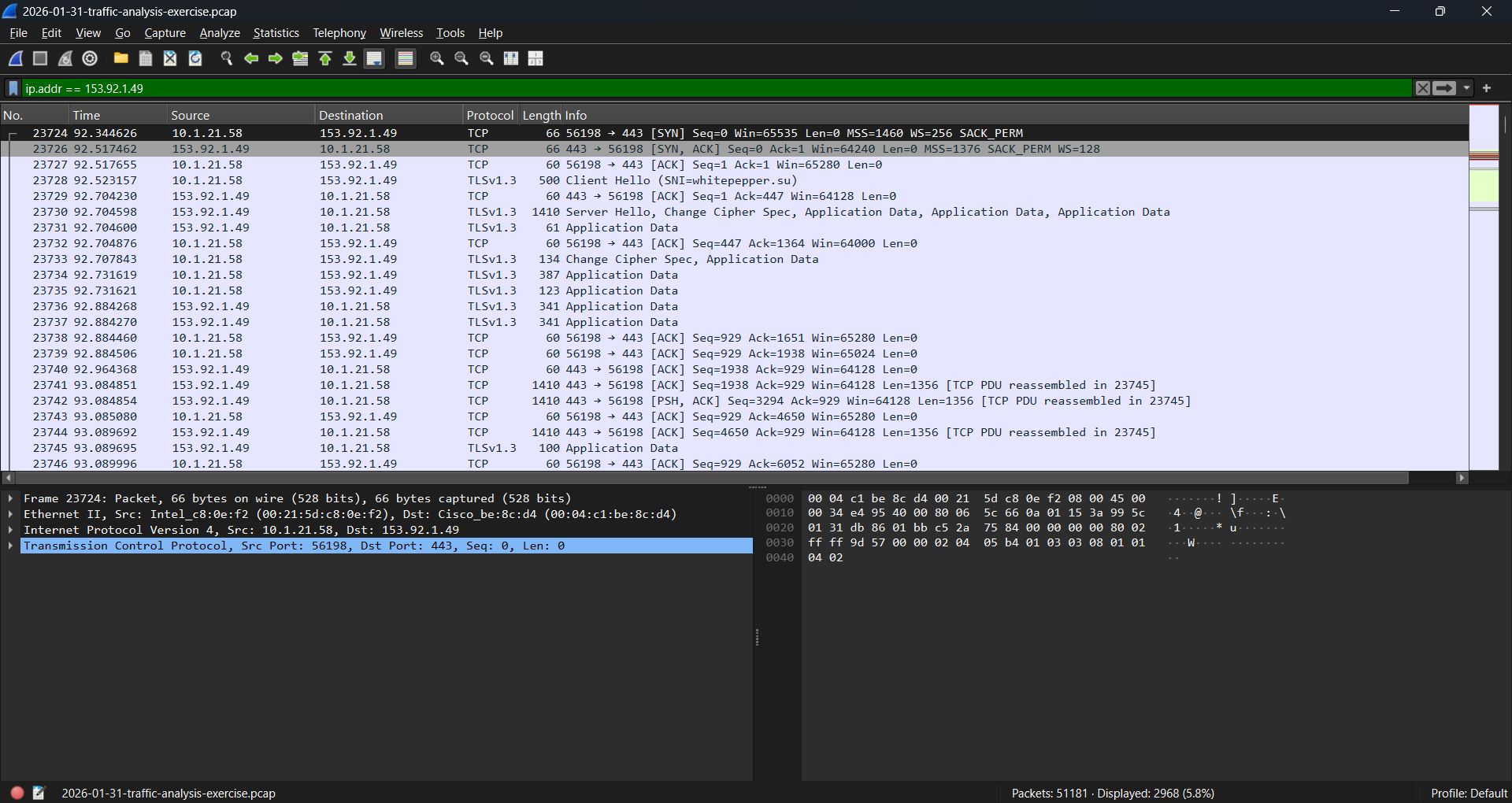
**使用的过滤器:**
```
ip.addr == 153.92.1.49
```
### 3. DHCP — 主机名与 MAC 地址
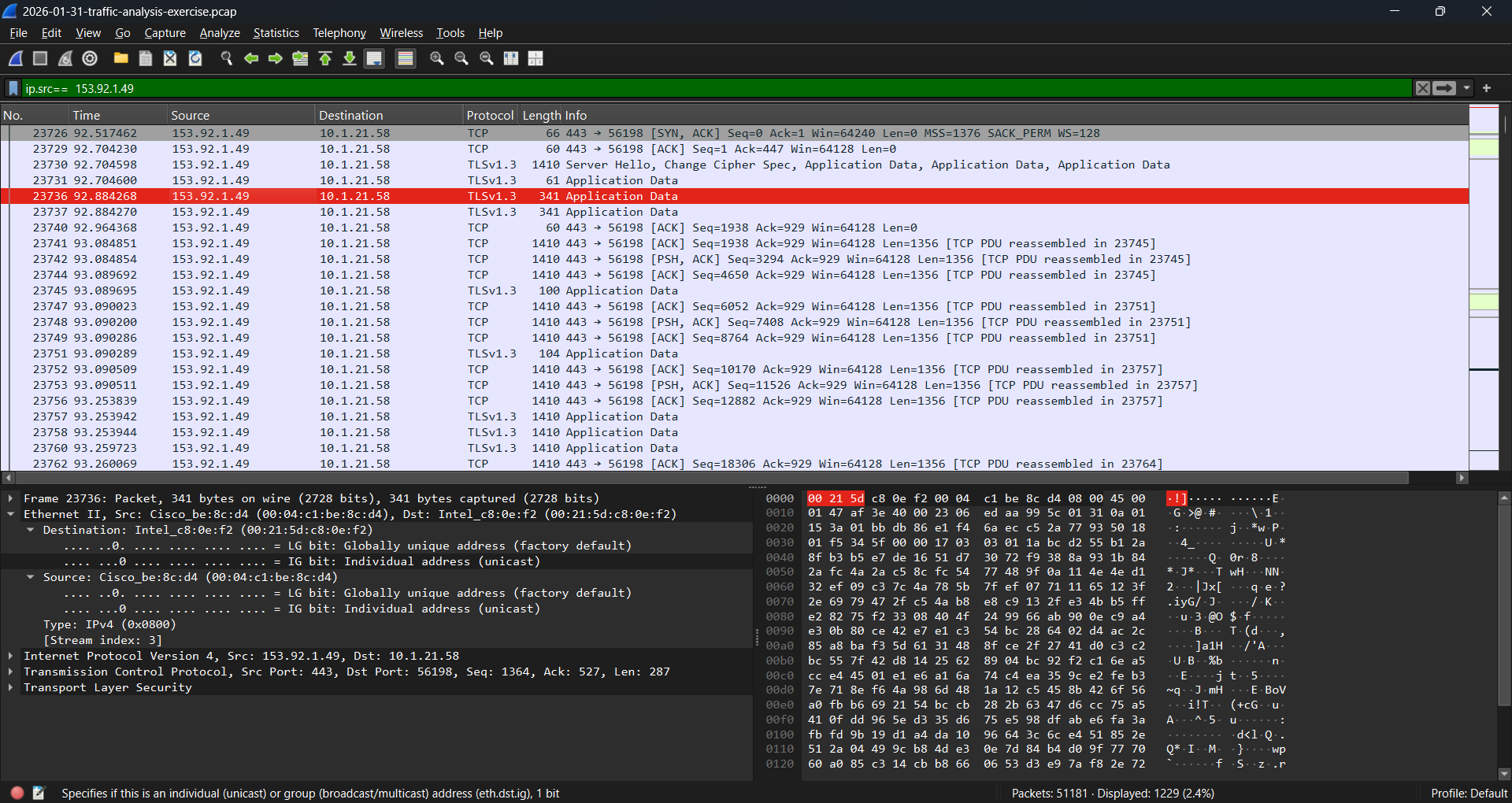
DHCP Request 数据包在单个数据包中同时揭示了受感染机器的主机名和 MAC 地址。
### 4. Kerberos — 用户名识别
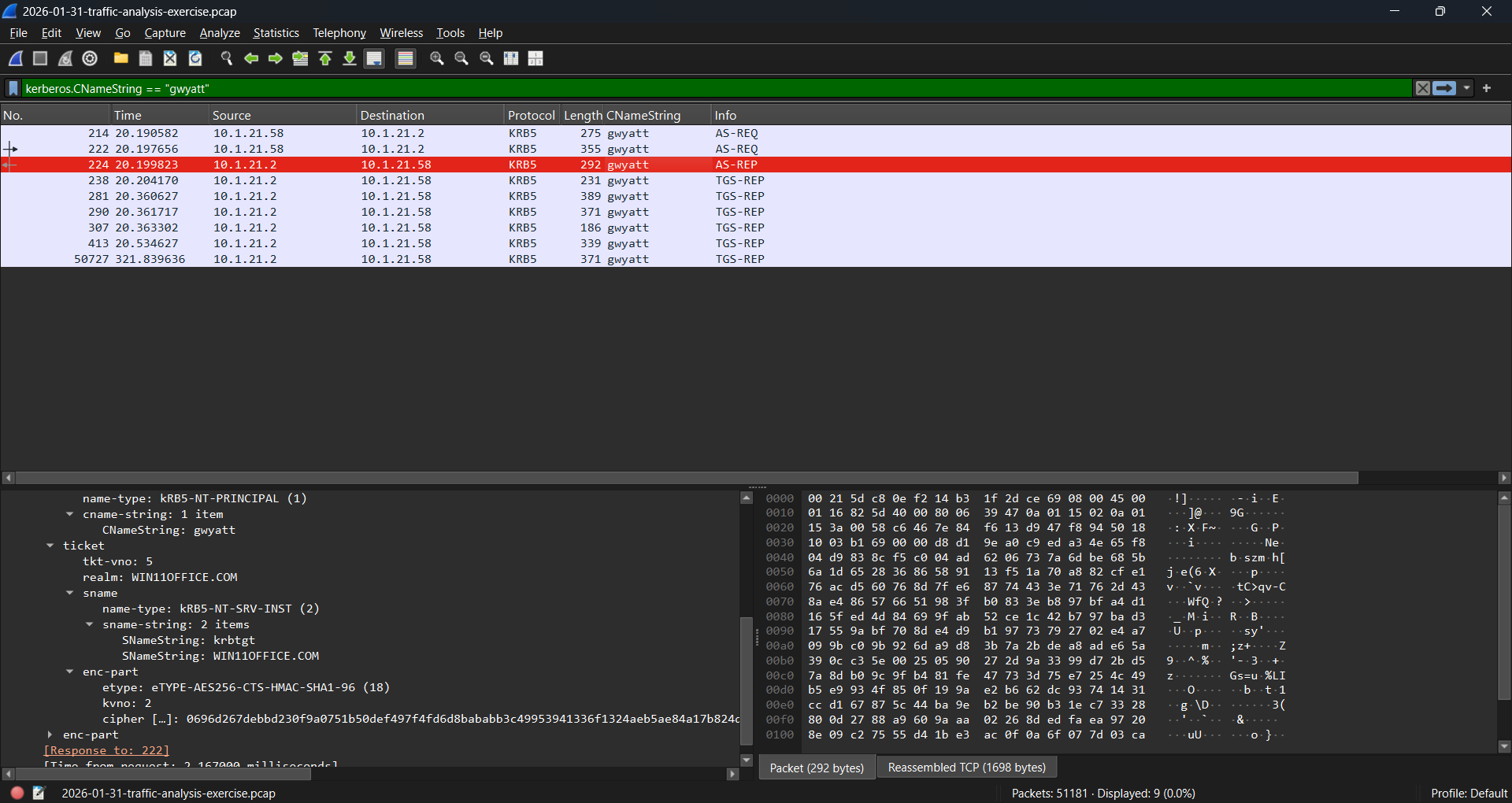
**使用的过滤器:**
```
kerberos.CNameString == "gwyatt"
```
Kerberos AS-REQ/AS-REP/TGS-REP 流量确认了与受感染主机关联的已验证域用户名。
### 5. SAMR 协议 — 全名查询
由于 Kerberos 流量中并不总是包含全名,我转向了主机与域控制器之间的 **SAMR (Security Account Manager Remote)** 协议流量——用于账户查询。
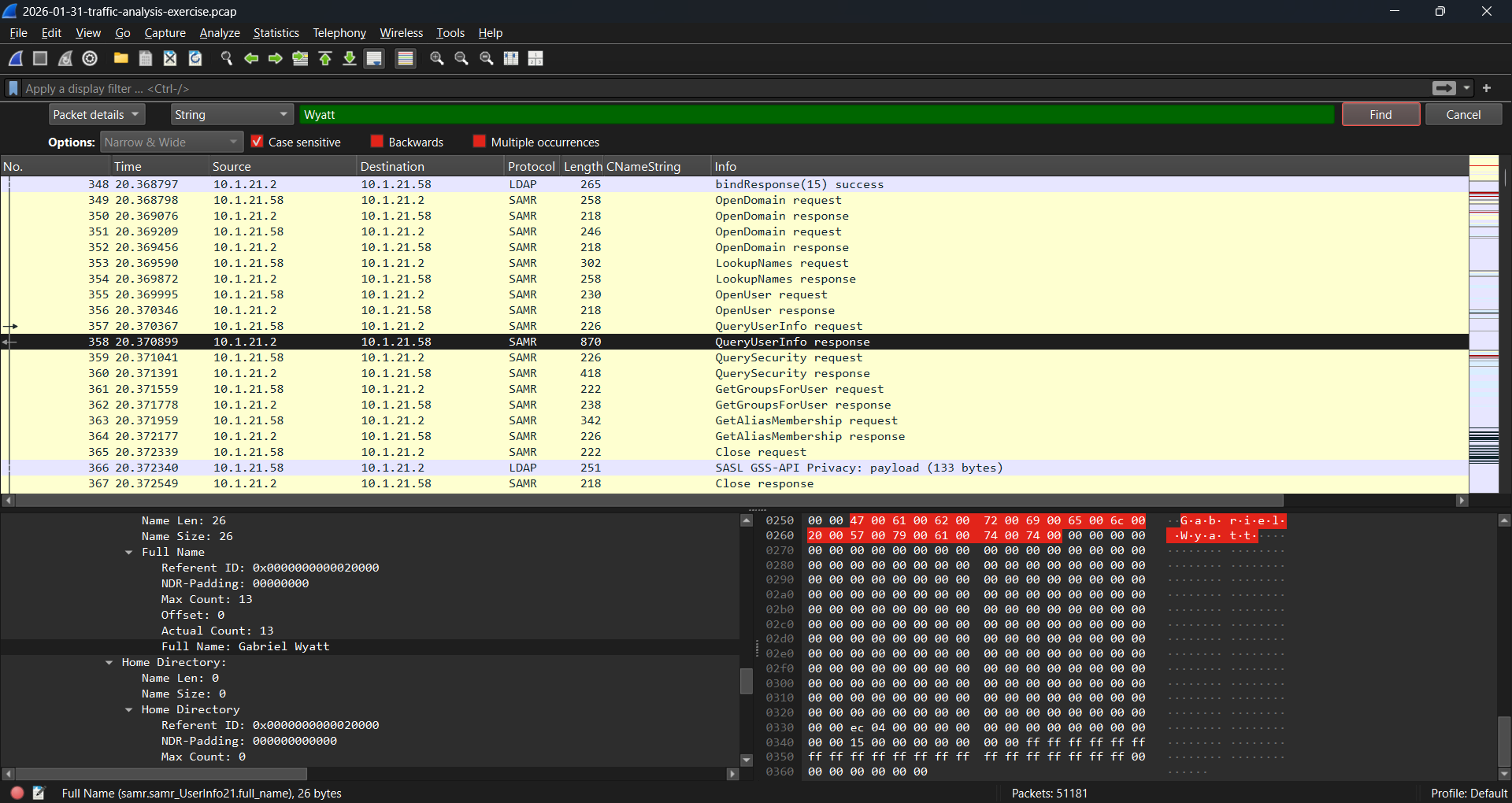
**使用的技术:** 在 `QueryUserInfo response` 数据包内部对姓氏 `Wyatt` 进行字符串搜索,从而揭示完整的域账户名。
```
Full Name: Gabriel Wyatt
```
### 6. HTTP 流量 — Lumma Stealer 指纹识别
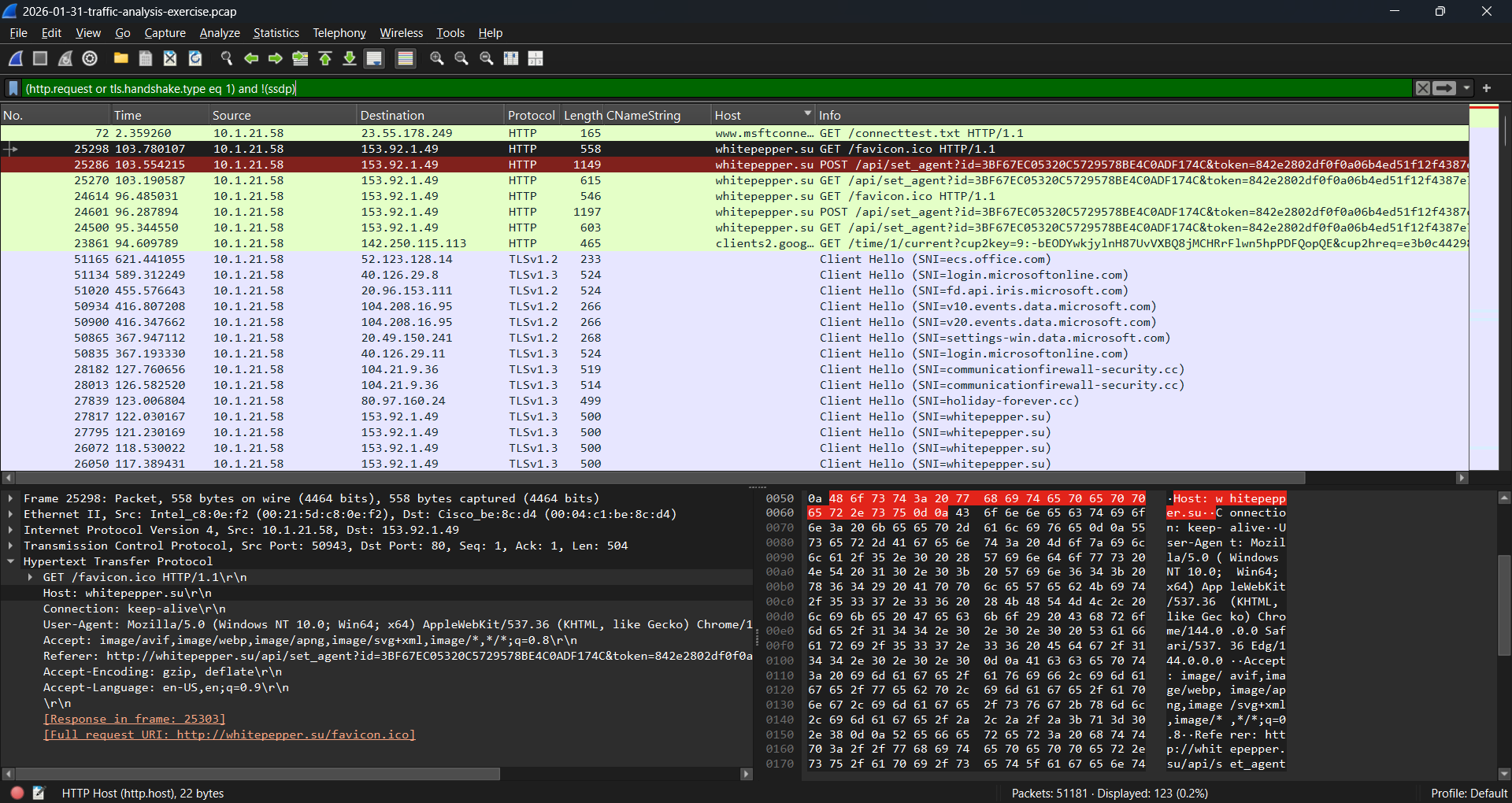
受感染的主机向 `whitepepper.su` 发出了重复的 HTTP GET/POST 请求,这与 Lumma Stealer 受害者指纹识别的模式相匹配:
```
POST /api/set_agent?id=3BF67EC05320C5729578BE4C0ADF174C&token=842e2802df0f0a06b4ed51f12f4387e...
GET /favicon.ico HTTP/1.1
```
### 7. TLS Client Hello — SNI 域名确认
多个 TLS Client Hello 数据包的 **SNI (Server Name Indication)** 字段确认了该恶意域名同时存在于 HTTP 和 HTTPS 连接中:
```
Client Hello (SNI=whitepepper.su)
```
### 8. TCP 流重组 — 完整请求
跟踪了 `set_agent` API 调用的完整 TCP 流,展示了完整的受害者指纹交互过程,包括 User-Agent 字符串和响应头 (`nginx/1.29.1`),从而确认了攻击者的 C2 服务器软件。
## ✅ 调查结果
| 问题 | 答案 |
|----------|--------|
| **受感染 IP** | `10.1.21.58` |
| **MAC 地址** | `00:21:5d:c8:0e:f2` |
| **主机名** | `DESKTOP-ES9F3ML` |
| **用户名** | `gwyatt` |
| **全名** | `Gabriel Wyatt` |
| **恶意域名** | `whitepepper.su` |
## 🦠 关于 Lumma Stealer
Lumma Stealer 是一种恶意软件即服务 的信息窃取程序,通常通过恶意广告、伪造的 CAPTCHA 页面和破解软件进行分发。一旦执行,它会进行**受害者指纹识别**——向其 C2 服务器发送唯一的代理 ID 和 token 以注册受感染的机器,然后再窃取浏览器凭据、加密钱包和会话 Cookie。
### 观察到的攻击链
```
Victim Machine (DESKTOP-ES9F3ML)
↓
Lumma Stealer executed
↓
HTTP POST /api/set_agent → whitepepper.su
(Victim fingerprinting — agent ID + token registration)
↓
Repeated GET /favicon.ico + POST /api/set_agent
(Beaconing / persistence check-in)
↓
TLS connections to whitepepper.su
(Encrypted C2 communication)
```
## 🚨 建议的遏制措施
- [ ] 立即将主机 `DESKTOP-ES9F3ML` (10.1.21.58) 从网络中隔离
- [ ] 重置用户 `gwyatt` (Gabriel Wyatt) 的凭据——假定凭据已完全泄露
- [ ] 在防火墙/代理层面封锁 `whitepepper.su`
- [ ] 在边界防火墙封锁 IP `153.92.1.49`
- [ ] 扫描主机以查找 Lumma Stealer 痕迹并移除持久化机制
- [ ] 检查浏览器保存的凭据,并强制重置在该主机上使用的所有账户的密码
- [ ] 审查 `10.1.21.0/24` 上的其他主机是否存在相同的 C2 指标
## 📁 仓库结构
```
lumma-stealer-pcap-analysis/
├── README.md # This file — full investigation report
├── iocs/
│ └── indicators.md # All extracted IOCs
└── screenshots/
├── 01-capture-properties.png
├── 02-c2-traffic-filter.png
├── 03-dhcp-request.png
├── 04-kerberos-username.png
├── 05-samr-fullname.png
├── 06-http-fingerprinting.png
├── 07-tls-client-hello.png
└── 08-tcp-stream-followed.png
```
## 🎯 展示的技能
- Wireshark 数据包分析与过滤
- 用于资产识别的 DHCP 流量分析
- 用于用户归属的 Kerberos 协议分析
- 用于全名解析的 SAMR 协议分析(高级技术)
- HTTP/TLS 流量分析与 SNI 提取
- TCP 流重组
- 恶意软件家族行为识别(Lumma Stealer)
- IOC 提取与记录
- 面向 IR 团队交接的事件报告撰写
## 📌 参考
- [恶意软件流量分析 — 培训练习](https://malware-traffic-analysis.net/training-exercises.html)
- [Lumma Stealer 概述 — Any.Run](https://any.run/malware-trends/lumma)
- [MITRE ATT&CK T1555 — 来自密码存储的凭据](https://attack.mitre.org/techniques/T1555/)
- [Wireshark 文档](https://www.wireshark.org/docs/)
## 🔗 SOC 家庭实验室系列
| 实验编号 | 项目 | 状态 |
|-----|---------|--------|
| 实验 1 | [NSM 技术栈 — TShark + Zeek + Suricata IDS](https://github.com/Gitlovess/nsm-lab) | ✅ 已完成 |
| 实验 2 | [pfSense 防火墙 + Suricata IPS](https://github.com/Gitlovess/pfSense-Suricata-IPS-lab) | ✅ 已完成 |
| 实验 3 | [Windows 10 终端加固](https://github.com/Gitlovess/Windows-10-Endpoint-Hardening) | ✅ 已完成 |
| 实验 4 | [Linux 服务器加固](https://github.com/Gitlovess/linux-hardening-lab) | ✅ 已完成 |
| 实验 5 | [SOC 自动化 — Wazuh + Shuffle + TheHive](https://github.com/Gitlovess/soc-automation-lab) | ✅ 已完成 |
| 实验 6 | [Active Directory + Splunk](https://github.com/Gitlovess/ad-splunk-lab) | ✅ 已完成 |
| 实验 7 | Wireshark PCAP 分析(本仓库) | ✅ 已完成 |
标签:HTTP, 底层编程